
ARCTIC Case Fan Hub
4.7Editor score
10 Port PWM Support
SATA Power Direct
Compact Black Design
Discover the top Fan Control Hub for PC options reviewed for performance and value. This guide compares features, ports, and compatibility for modern builds.
Modern PC builds often require more cooling than a motherboard can handle alone. A Fan Control Hub for PC solves this by centralizing power and signals for multiple fans.
We evaluated ten top models based on port count, power delivery, mounting options, and compatibility with PWM and ARGB standards. Each selection offers unique benefits for different system needs.
This list highlights key features and trade-offs to help you choose the right hub for your case. Remember that availability and specific configurations may vary over time.
4.7Editor score

4.7Editor score
4.6Editor score
The following table provides a side-by-side overview of the ten selected Fan Control Hub for PC models to help you quickly identify key specifications and capabilities.


The Thermalright ARGB Fan HUB serves as a practical solution for expanding fan capacity and lighting in a PC case. With a solid rating from users, it is known for reliable performance during continuous operation.
We may earn a commission when you buy through this link, at no additional cost to you.
This hub supports eight groups of fans and manages ARGB lighting efficiently using a 5V 3Pin interface. It includes strong double-sided tape and magnetic suction for flexible placement within the chassis.
While it does not control fan speed directly, it ensures synchronized lighting effects across connected devices. Users must be careful to avoid inserting 12V 4Pin RGB devices into the 5V slots.
It is best suited for builders needing to simplify cable management and expand fan ports without a premium price. Check current stock and specific port compatibility before purchasing.
Connecting multiple fans becomes easier with a central hub that reduces clutter inside your PC case.
Strong magnets and adhesive tape allow you to secure the hub securely to steel panels or flat surfaces.
We may earn a commission when you buy through this link, at no additional cost to you.
The ARCTIC Fan Controller is designed for enthusiasts who want individual control over every fan in their setup. It earns a high rating due to its robust performance and compatibility with both Windows and Linux.
We may earn a commission when you buy through this link, at no additional cost to you.
Each of its ten ports can supply up to 2 A, totaling 4.5 A across the hub. This allows you to drive multiple high-performance fans without overloading the motherboard headers.
The controller offers native driver support that enables compatibility with a wide range of fan control software. While it simplifies wiring, full potential is unlocked with compatible monitoring tools.
This unit is ideal for users prioritizing precise thermal management over basic fan grouping. Ensure your software stack supports its specific driver requirements for best results.
Individual PWM control allows you to adjust each fan speed based on specific zone temperatures.
Support for Windows and Linux ensures flexibility regardless of your primary operating system.
We may earn a commission when you buy through this link, at no additional cost to you.
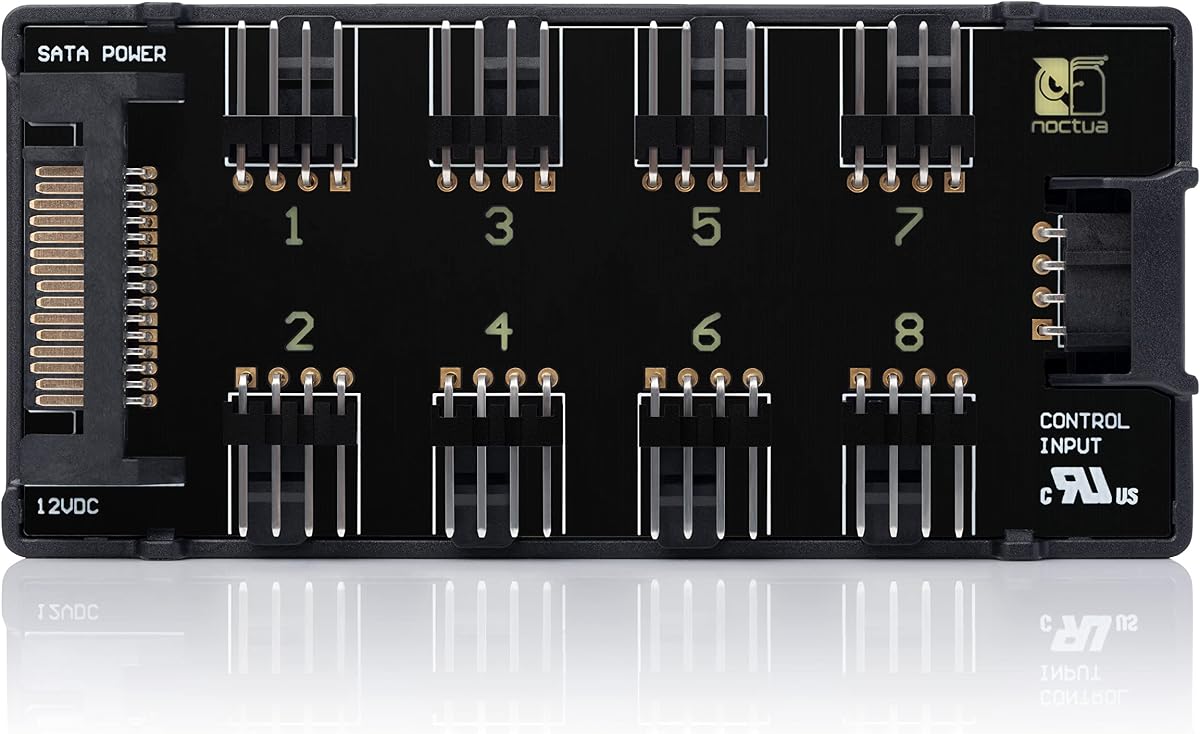
The Noctua NA-FH1 is a high-quality fan hub built with a focus on safety and reliability. It maintains a strong reputation for durability and offers a six year manufacturer warranty.
We may earn a commission when you buy through this link, at no additional cost to you.
It features eight-way fan splitting with inputs for both 4Pin fan headers and SATA power. Safety fuses protect against overcurrent and short circuits, providing peace of mind for sensitive components.
The unit includes strong magnets for easy attachment to steel case panels. It complies with multiple international safety standards including UL and CE certifications.
This hub is best for builders seeking top tier quality and safety features. It is ideal for premium systems where reliability outweighs the cost.
Safety fuses protect your hardware from electrical faults that could occur during operation.
Four strong magnets ensure the hub stays securely in place without needing extra screws.
We may earn a commission when you buy through this link, at no additional cost to you.
The ARCTIC Case Fan Hub provides an economical way to expand fan capabilities significantly. It holds a high rating among budget conscious users for its straightforward and effective design.
We may earn a commission when you buy through this link, at no additional cost to you.
This hub connects ten fans using synchronous PWM control based on the first fan slot reading. It draws power directly from the supply via SATA to ensure smooth and stable operation.
While it lacks lighting features, it excels at reducing cable clutter and improving airflow management. The black finish blends well into most case interiors.
Choose this hub if you need to add multiple case fans quickly without spending much. It is a practical choice for standard builds where RGB is not required.
With ten ports, you can fully ventilate your case regardless of motherboard header limits.
Direct SATA power prevents voltage loss and ensures fans run at their intended speeds.
We may earn a commission when you buy through this link, at no additional cost to you.
The Thermalright X12 IR White hub is designed to handle a large number of fans simultaneously. It offers a white finish that can suit light themed builds effectively.
We may earn a commission when you buy through this link, at no additional cost to you.
It supports both PWM fans and 5V ARGB lighting devices via direct SATA power input. This ensures stable output even when all ports are loaded with devices.
While the hub does not adjust speeds or colors on its own, it enables synchronized control through the motherboard headers. It is vital to match the correct pinouts during installation.
This hub is a strong choice for extensive builds needing extensive port expansion. It works best in white cases where matching the aesthetic is a priority.
The white casing allows it to blend seamlessly with light colored PC components and cases.
With twelve ports, it supports extensive cooling setups that exceed standard motherboard limits.
We may earn a commission when you buy through this link, at no additional cost to you.
The upHere P10PARGB BK hub is a versatile unit that supports both PWM fans and ARGB lighting with remote control. It achieves a solid rating for its functional feature set.
We may earn a commission when you buy through this link, at no additional cost to you.
It comes with an RF remote allowing you to customize colors and effects quickly. The front panel syncs with connected fans for a uniform lighting display.
Power is supplied directly through SATA to maintain reliability during high load usage. The magnetic mounting makes placement flexible within standard PC cases.
This hub is ideal for users who want hardware based lighting control without software dependencies. It is a great addition for custom RGB builds needing quick adjustments.
An included remote allows you to change lighting modes without opening your system or software.
Direct SATA connection ensures consistent power to fans and lights regardless of load.
We may earn a commission when you buy through this link, at no additional cost to you.
The Thermalright Integrated Fan Hub offers a straightforward way to manage up to ten fans in a system. It receives positive feedback for its simple and stable operation.
We may earn a commission when you buy through this link, at no additional cost to you.
It uses double-sided adhesive to secure itself to the chassis and relies on SATA for direct power transmission. This setup helps maintain stable output under high load conditions.
Speed reading is supported but typically limited to one fan port on the motherboard header. It is a practical tool for expanding headers without extra cost.
This hub is best for builders focused purely on cooling and cable management. It is a reliable option for cases needing more fan connections than available.
Managing multiple fans becomes easier with a central hub that organizes connections efficiently.
Strong adhesive strips allow you to place the hub securely where it fits best.
We may earn a commission when you buy through this link, at no additional cost to you.
The Thermalright X8 ARGB PWM hub allows you to manage lighting and fan speed connections simultaneously. It is designed to keep both cable types organized in one unit.
We may earn a commission when you buy through this link, at no additional cost to you.
It supports up to eight ARGB fans and eight PWM fans using direct SATA power inputs. This ensures stable performance under high load conditions for both types.
While it does not adjust colors or speeds, it provides necessary synchronization via the motherboard. The adhesive ensures a simple and safe installation process.
This hub is suitable for cases needing balanced lighting and cooling expansion. It is a practical solution for keeping cabling neat and efficient.
Separate connectors for lighting and fans help keep your build looking clean and organized.
Direct SATA power ensures both fans and lights receive consistent voltage under load.
We may earn a commission when you buy through this link, at no additional cost to you.
The upHere J-10 Pro offers a mix of convenience and functionality with RF remote and chassis key controls. It is rated well for its flexible control options.
We may earn a commission when you buy through this link, at no additional cost to you.
It supports ten sets of ARGB fans and manages lighting synchronization effectively. Magnetic mounting allows for easy placement inside the case without tools.
Power comes directly from the supply via SATA to ensure stable operation. The hub prevents stray currents and reduces voltage loss for efficient fan performance.
This hub is ideal for users wanting hardware control without complex software setups. It is a solid choice for cases needing extra lighting control points.
Access lighting control via a remote or key switch without entering system software.
A small footprint helps keep internal wiring tidy and accessible for future adjustments.
We may earn a commission when you buy through this link, at no additional cost to you.
The Thermalright X8 Hub provides a balanced approach to expanding fan and lighting ports. It maintains a solid rating for its stable output and reliable connections.
We may earn a commission when you buy through this link, at no additional cost to you.
It connects eight groups of fans and allows for synchronization via the motherboard. Direct SATA power ensures stability when multiple devices are active.
Installation is made simple with strong double-sided stickers for secure placement. It does not include a SATA cable so you must provide one separately.
This hub is recommended for builds needing moderate expansion without complex controls. It serves well for standard cooling and lighting needs.
Direct power from the supply prevents voltage drops even when multiple fans are running.
Strong stickers allow you to mount the hub securely without drilling or screws.
We may earn a commission when you buy through this link, at no additional cost to you.
Selecting the right hub depends on your specific needs for fan count, lighting, and control. This section breaks down key factors to consider before purchasing.
First determine how many fans you need to connect. Some hubs offer 8 ports while others support up to 10 or 12. Check if the hubs support both PWM fans and ARGB lighting as many only support one type.
Ensure the port count matches your case and cooling requirements to avoid future limitations.
Look for hubs that draw power via SATA connectors. This ensures stable voltage even when multiple fans run at full speed. Avoid models that rely solely on motherboard headers for power.
SATA power prevents voltage drops and keeps your fans running smoothly under load.
Consider how the hub will be placed inside your case. Magnetic mounts offer flexibility while adhesive strips provide stability. Some units come with both options for better placement control.
Secure mounting prevents the hub from shifting and damaging internal cables during operation.
Decide if you need speed control or just synchronization. Some hubs allow software control while others act as splitters only. Check if remote control is included for hardware based adjustments.
More control features add convenience but may require specific software support to function fully.
If you have RGB fans ensure the hub supports 5V 3Pin ARGB interfaces. Confirm it does not mix 12V RGB which can damage your devices. Look for synchronization capabilities to keep colors uniform.
Proper lighting support ensures your visual setup works without risking hardware damage.
Check the materials and safety certifications. Hubs with safety fuses protect against shorts and overcurrent. Reliable brands often offer better durability and longer warranties.
Investing in quality materials ensures long term reliability and safety for your system.
Verify that the hub works with your motherboard and software. Some hubs require specific drivers or interfaces to function correctly. Ensure compatibility with Windows or Linux systems if needed.
Compatibility checks prevent frustration and ensure all features work as advertised.
Balance the cost with the features you actually need. Basic models are cheaper but lack advanced controls. Premium hubs offer better safety and performance at a higher cost.
Choose a model that fits your budget while meeting all necessary technical requirements.
First install the hub using the provided adhesive or magnets to secure it to a flat surface inside the case. Avoid placing it near hot components to ensure it stays cool.
Next connect the SATA power cable directly from your power supply to the hub. This ensures stable power and prevents overloading your motherboard headers with heavy fan loads.
Finally connect each fan to its own port and ensure the ARGB cables are inserted in the correct direction. Check your manual for wiring diagrams to prevent damage to lights or fans.
Yes, by allowing centralized control of fan speeds through PWM signals, you can lower RPMs when cooling demands are low. This reduces noise without sacrificing performance when it is actually needed.
Not all hubs include a SATA cable in the box. Most require one for power delivery. Check the product details before buying to see if you need to purchase it separately.
Mixing voltages can damage your fans and lighting strips. Ensure all devices match the hub's supported voltage standards to prevent electrical issues.
Most hubs support between 8 to 12 fans depending on the model. Check the port count specifications to ensure it meets your cooling needs.
Many hubs are compatible with BIOS and OS control tools. Check the manufacturer list for supported software to ensure seamless integration with your system.
Yes, most hubs are designed for safe use in standard cases. Just ensure proper airflow around the hub to prevent heat buildup during high load operation.
Only hubs with specific lighting support can control colors. Some are designed purely for fan speed expansion so check lighting capabilities before purchase.
Warranty terms vary by brand but most offer at least one year of coverage. Premium brands may offer longer warranties for added peace of mind.
The top picks include the ARCTIC Fan Controller for advanced control and the Noctua NA-FH1 for reliability. These models offer excellent performance for most modern PC builds.
Prioritize features like SATA power support and magnetic mounting to ensure ease of use. Balance the need for lighting control with your cooling requirements to find the best fit.
Prices and availability change often so check current offers before finalizing your purchase. Select a hub that matches your case layout and budget for the best experience.