
Nektar 49-Key Midi Controller
4.5Editor score
Excellent value for money
DAW integration included
Comprehensive MIDI functionality
This expert guide compares the top 49 Key MIDI Keyboards for music production, performance, and learning. Find the right controller for your studio setup and
Choosing the right 49 Key MIDI Keyboard can transform your music production workflow. These controllers offer a balanced range of octaves perfect for both melody and chord playing. They provide essential controls like faders and knobs to manage your software instruments effectively.
We evaluated ten leading models based on key feel, software integration, and build quality. Our comparison covers options ranging from entry-level starters to advanced studio workhorses. Each product offers unique features tailored to different producer styles and budget constraints.
Each selection highlights specific strengths like DAW integration or premium keybeds. You will find detailed breakdowns of controls and included software bundles. Please note that availability and pricing can change frequently so check current listings before purchasing.
4.5Editor score

4.7Editor score

4.4Editor score
This side-by-side comparison highlights the key differences between the top ten models available today. We focus on physical controls and connectivity options to help you decide which hardware fits your needs.




The Novation Launchkey 49 MK4 stands out as a top-tier MIDI controller for modern producers. It holds a high rating among users who value deep integration with digital audio workstations. Its design focuses on keeping your hands on the hardware rather than the mouse.
We may earn a commission when you buy through this link, at no additional cost to you.
Key strengths include the seamless integration with major DAWs like Ableton and Logic. The 16 responsive FSR pads support polyphonic aftertouch which adds a layer of expressiveness to drumming and performance. Scale Mode and Chord modes make it easy to generate complex musical ideas quickly without music theory knowledge.
One trade-off is the higher price compared to entry-level models. This is acceptable given the advanced features like Native Kontrol Standard support and the included software bundle. It requires a computer connection which limits standalone use but enhances production capabilities.
This controller is ideal for producers who need a workflow-centric device for recording and mixing. If you want a controller that reduces friction between your ideas and your software this is the best choice available today.
Launchkey integrates automatically with your DAW of choice saving you time on mapping assignments and setup.
Scale and Chord modes allow you to play in key and trigger lush harmonies with single finger presses.
We may earn a commission when you buy through this link, at no additional cost to you.
The Nektar SE49 is an excellent entry point for anyone starting their music production journey. It offers all the features you need to make music with your computer at a very accessible price point. The DAW integration works well with most popular software options available.
We may earn a commission when you buy through this link, at no additional cost to you.
Its comprehensive MIDI functionality ensures compatibility with almost all music applications. The design includes essential controls like octave buttons and sustain input. It is also compatible with iOS devices which adds versatility for mobile creators.
While the build materials are basic they are functional and sturdy enough for regular use. The included software package is helpful but may require upgrades later as you advance. This is a common trade-off for budget-friendly controllers.
Students and hobbyists will find this model offers amazing value for money. If you need a reliable controller that does the job without breaking the bank this is a smart purchase.
The SE49 works seamlessly with Mac PC and iOS ensuring you can create music on your preferred platform.
Includes Bigwig Studio 8-track DAW plus sound content to get you started immediately.
We may earn a commission when you buy through this link, at no additional cost to you.
Arturia's KeyLab mk3 delivers a premium experience for professional producers who demand high fidelity and control. The 49 keys feature aftertouch adding expressiveness to your performances. It comes with a substantial software package including Analog Lab V which is highly regarded for sound quality.
We may earn a commission when you buy through this link, at no additional cost to you.
The hardware features 12 pressure-sensitive performance pads and 9 encoders for detailed parameter control. The bright LCD screen provides real-time feedback enhancing the user experience during live performance. USB-C power ensures modern connectivity and reliability.
The higher price reflects the superior materials and advanced features. While it requires a power source the build quality justifies the investment for studio environments. It is an investment in long-term usability and sound.
This controller is perfect for professionals who want a flagship device for their studio. If you appreciate tactile controls and high-quality sounds this model is the top-tier choice.
Includes Analog Lab V with thousands of presets spanning vintage and modern synthesis.
The LCD screen gives immediate visual feedback on parameters and settings.
We may earn a commission when you buy through this link, at no additional cost to you.
The M-AUDIO Oxygen 49 MKV is a strong contender for producers who use Native Instruments software. It brings NKS support directly to the keyboard allowing you to control presets without menus. The controller is designed to be a studio centrepiece with plenty of assignable controls.
We may earn a commission when you buy through this link, at no additional cost to you.
Key features include 16 velocity-sensitive pads and 8 assignable knobs for tactile control. The Smart Chord and Smart Scale modes help you stay in key while composing. Auto-mapping ensures that DAW controls are ready to use out of the box.
The key feel is functional but may not satisfy players seeking a weighted piano experience. This is acceptable for producers who prioritize workflow over pure playing feel. The software bundle is generous for this price range.
This model is ideal for beat makers and producers who rely on Native Instruments libraries. If you want easy access to presets and strong automation controls this is a solid choice.
Kontrol support lets you browse and control libraries directly from the keyboard interface.
Smart modes help you play harmonically correct notes and trigger arpeggios effortlessly.
We may earn a commission when you buy through this link, at no additional cost to you.
The M-AUDIO Oxygen Pro 49 focuses on performance with semi-weighted keys and aftertouch. This makes it more expressive than standard plastic keys and suitable for live settings. The assignable zones allow you to split the keyboard for different sounds.
We may earn a commission when you buy through this link, at no additional cost to you.
It includes 16 assignable pads and 9 faders for total command of your production. The 5-pin MIDI output adds connectivity for external hardware which is rare on modern USB controllers. Smart modes assist with creativity during live jams.
The design is somewhat bulky which may not fit small home studios easily. However, the extra controls justify the size for professionals. It requires a bit of setup time to fully utilize all features.
This is the best pick for performers who need expressive keys and hardware connectivity. If you play live or need MIDI out for synths this model delivers the necessary tools.
Semi-weighted keys with aftertouch provide dynamic control for emotional performances.
The 5-pin MIDI out allows connection to vintage gear and external modules easily.
We may earn a commission when you buy through this link, at no additional cost to you.
The KeyLab Essential mk3 brings a refined aesthetic and strong software bundle to the entry-level market. It includes Analog Lab V which offers thousands of presets for various genres. The RGB backlit pads add visual appeal and tactile feedback for triggering clips.
We may earn a commission when you buy through this link, at no additional cost to you.
Features like Scale and Chord modes make composition intuitive for producers of all levels. The LCD screen provides context-sensitive feedback which aids in parameter tweaking. DAW scripts ensure smooth integration with major software suites.
It lacks aftertouch which limits dynamic control compared to higher-end models. However, the included software value often outweighs this for producers looking for a complete package. It is a modern choice for contemporary music styles.
This model is perfect for producers who want a stylish controller with premium software. If you need a versatile tool for beats and synth melodies this is a strong contender.
The bright LCD and RGB pads offer visual feedback for better workflow and creativity.
Analog Lab V includes hybrid and modern synth sounds beyond just vintage tones.
We may earn a commission when you buy through this link, at no additional cost to you.
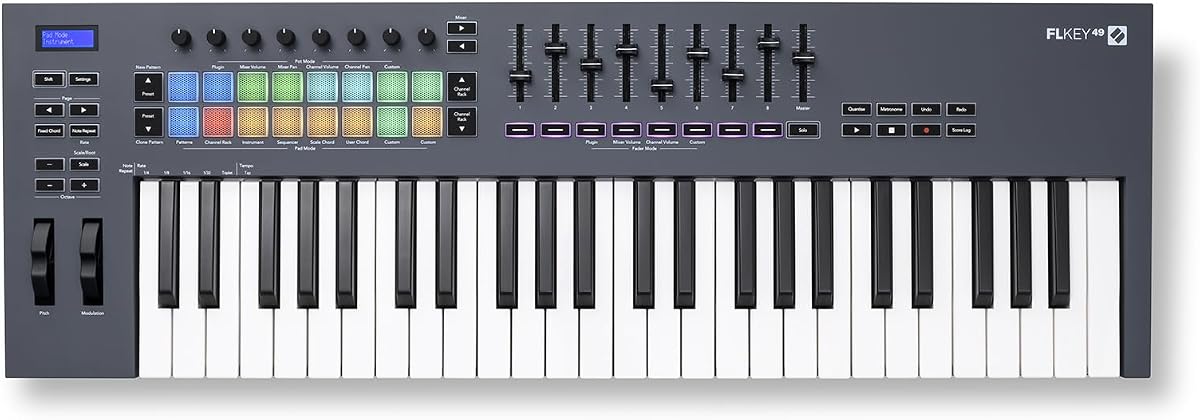
The Novation FLkey 49 is purpose-built for users of FL Studio. It eliminates manual mapping so controls for the mixer and channel rack are ready immediately. This focus allows you to stay in the flow without needing the mouse.
We may earn a commission when you buy through this link, at no additional cost to you.
Features like Sequencer Mode map pads to the step sequencer for fast beat programming. Scale modes help you stay in key while experimenting with new chords. The design prioritizes transport and score log access for quick workflow management.
While excellent for FL users it may offer less value for those using other DAWs. This specialization ensures deep integration within the FL ecosystem. It is a niche but highly effective tool for electronic music production.
If you produce primarily in FL Studio this controller is the ultimate companion. It streamlines your workflow and allows for rapid sound design and beat creation.
No manual assignment is needed for FL Studio controls which speeds up mixing and automation.
Sequencer Mode allows direct pattern editing from the pads for rapid idea capture.
We may earn a commission when you buy through this link, at no additional cost to you.
The M-AUDIO Keystation 49 MK3 strips away complexity to focus on the fundamentals of MIDI performance. It features full-size velocity-sensitive keys that provide a natural feel for playing melodies. The design is compact enough to fit any desk setup easily.
We may earn a commission when you buy through this link, at no additional cost to you.
It connects via USB without needing drivers making it ready to use instantly on any computer. The ergonomically-designed pitch and modulation wheels are easy to reach. It includes a software suite that is solid for getting started quickly.
Lack of faders and pads means it is less ideal for complex production tasks. However for playing MIDI instruments this simplicity is an advantage. It is a reliable tool for composers who focus on keys.
This model is best for pianists who want a straightforward MIDI interface. If you need to record piano parts without extra distraction this is an efficient choice.
Plug and play functionality ensures your computer recognizes the controller immediately without setup.
Velocity sensitive keys capture every subtle nuance of your performance accurately.
We may earn a commission when you buy through this link, at no additional cost to you.
This 49-Key MIDI Keyboard focuses on portability and basic functionality. The ABS construction ensures durability while keeping the unit lightweight. It is suitable for music practice and desktop usage without taking up much space.
We may earn a commission when you buy through this link, at no additional cost to you.
The compact profile allows for easy arrangement on a desktop. It is designed for everyday creative sessions rather than complex production. The simple black finish fits well in any home studio setup.
Because it lacks advanced features it is best used as a secondary controller. It does not offer the deep integration of branded controllers. This makes it a niche choice for casual users.
If you need a simple controller for learning or quick ideas this is a practical tool. It fits well in spaces where larger keyboards cannot be accommodated.
The compact dimensions make it easy to fit into small workspaces and desks.
ABS material ensures the unit is sturdy enough for regular handling and storage.
We may earn a commission when you buy through this link, at no additional cost to you.
The midiplus AK490 provides the essential controls needed for MIDI work. It features velocity-sensitive keys that respond well to touch. The inclusion of a MIDI out Din Jack allows connection to external hardware.
We may earn a commission when you buy through this link, at no additional cost to you.
The wheel controls and octave buttons give basic functionality for performance. It is a straightforward option for those who do not need complex software mapping. The package includes the necessary cable for quick setup.
It is an older design compared to modern USB-focused controllers. This limits its appeal for advanced DAW integration. However it is reliable for specific hardware setups.
This model suits hobbyists who need to connect to older MIDI gear. If you need a simple master keyboard with a physical output this is a solid choice.
The MIDI Din output lets you connect to synthesizers and drum machines directly.
Octave and wheel buttons offer the basics you need to control software instruments.
We may earn a commission when you buy through this link, at no additional cost to you.
Selecting the right controller involves considering how you play and what software you use. This guide outlines the essential factors to help you make an informed decision.
The keybed determines how your instrument feels during performance. Some models offer semi-weighted keys that mimic a piano while others use lighter plastic keys for portability. Velocity sensitivity is essential for dynamic expression so ensure your choice supports it.
Choose a keybed that matches your playing style whether you prefer pianistic touch or lightweight synth action.
Deep integration allows you to control transport and mixer functions without touching the mouse. Brands like Novation and Arturia offer custom scripts for major software suites. This feature significantly speeds up your workflow during recording sessions.
Prioritize a controller that maps to your specific digital audio workstation out of the box.
Having faders and knobs gives tactile control over volume and effects parameters. Look for a controller with at least eight knobs and one fader for mixing tasks. Assignable pads are also crucial for launching clips and programming beats.
Select a model with enough controls to manage your production needs without cluttering your desk.
Many controllers include software that adds value to your purchase. Look for bundles that include DAWs and virtual instruments like Analog Lab or MPC Beats. This can save you money when starting your production journey.
Evaluate the included software to ensure it meets your needs before buying hardware.
USB connectivity is standard but having additional MIDI out ports is beneficial for hardware synths. USB-C power support ensures modern compatibility and reliability. Consider if you need audio interfaces or standalone power for your setup.
Ensure your controller offers the connectivity options required for your existing gear.
Advanced features like Scale Mode and Chord Mode assist with music theory and composition. Arpeggiators can create complex rhythmic patterns with a single key press. These tools help beginners and pros alike generate ideas quickly.
Look for a controller that includes creative tools to expand your musical possibilities.
If you perform live or move setups often weight and durability are critical. Lightweight ABS or plastic designs are easier to carry but ensure they are sturdy enough for regular use. A compact profile saves desk space in home studios.
Choose a build quality that balances portability with durability for your usage environment.
Prices vary based on features and build quality. Entry-level models cost significantly less than premium units with aftertouch. Determine your budget and ensure you get the features you need most within that range.
Invest in the best value option that meets your core production requirements.
Connect your controller to your computer using a USB cable and install any required drivers. If your controller is plug-and-play it should be recognized immediately by your operating system. Ensure your DAW is set to recognize the device as an input source.
Keep your controller clean by wiping keys with a soft cloth after each session. Dust and debris can affect key response over time so use compressed air to clean between the keys. Store the controller in a dry place to prevent damage to electronic components.
Regularly update your firmware to ensure compatibility with new DAW versions. Check the manufacturer website for patches that improve performance or add features. This maintenance ensures your hardware remains reliable for years.
A MIDI keyboard sends note and control data to a computer or external device but does not produce sound on its own. A synthesizer generates sound internally and often includes keys built-in sound generation capabilities. MIDI controllers rely on software or hardware sound modules to create audio.
Most modern controllers are plug-and-play and work with standard USB protocols without drivers. However some brands recommend installing specific software or drivers for advanced features like custom DAW scripts. Check the product manual to confirm if drivers are required for your system.
Look for the jack labeled Sustain or Pedal on the back of the controller. Plug in a standard sustain pedal and configure it in your DAW settings. Ensure the pedal is set to the correct polarity for your specific controller model.
Yes 49 key MIDI keyboards offer a good balance between portability and range. They allow for playing chords and melodies without taking up too much stage space. Models with performance pads and knobs are particularly useful for triggering clips and effects live.
Many 49 key MIDI keyboards work with iPads when using a USB Camera Adapter. You need to ensure the controller is bus-powered or uses USB-C power that the iPad can supply. Check the controller manual for iOS compatibility details.
Most controllers include a package of virtual instruments DAW versions and sample libraries. Common inclusions are Ableton Live Lite MPC Beats and analog synthesis software. The exact software varies by manufacturer so review the bundle before purchasing.
We have explored ten top-rated models ranging from budget options to premium studio tools. The Novation Launchkey 49 MK4 offers the best all-around integration while the Nektar SE49 leads in value. For professionals the Arturia KeyLab mk3 provides a high-end experience.
When selecting a controller prioritize features that match your workflow such as faders for mixing or pads for beat making. Consider the software bundle included as it can save you significant money. Ensure the keybed feels comfortable for long recording sessions.
Always check the current availability and specifications on the product pages before buying. Prices and software bundles change frequently so staying informed ensures you get the best deal. We hope this guide helps you find the perfect controller for your music.