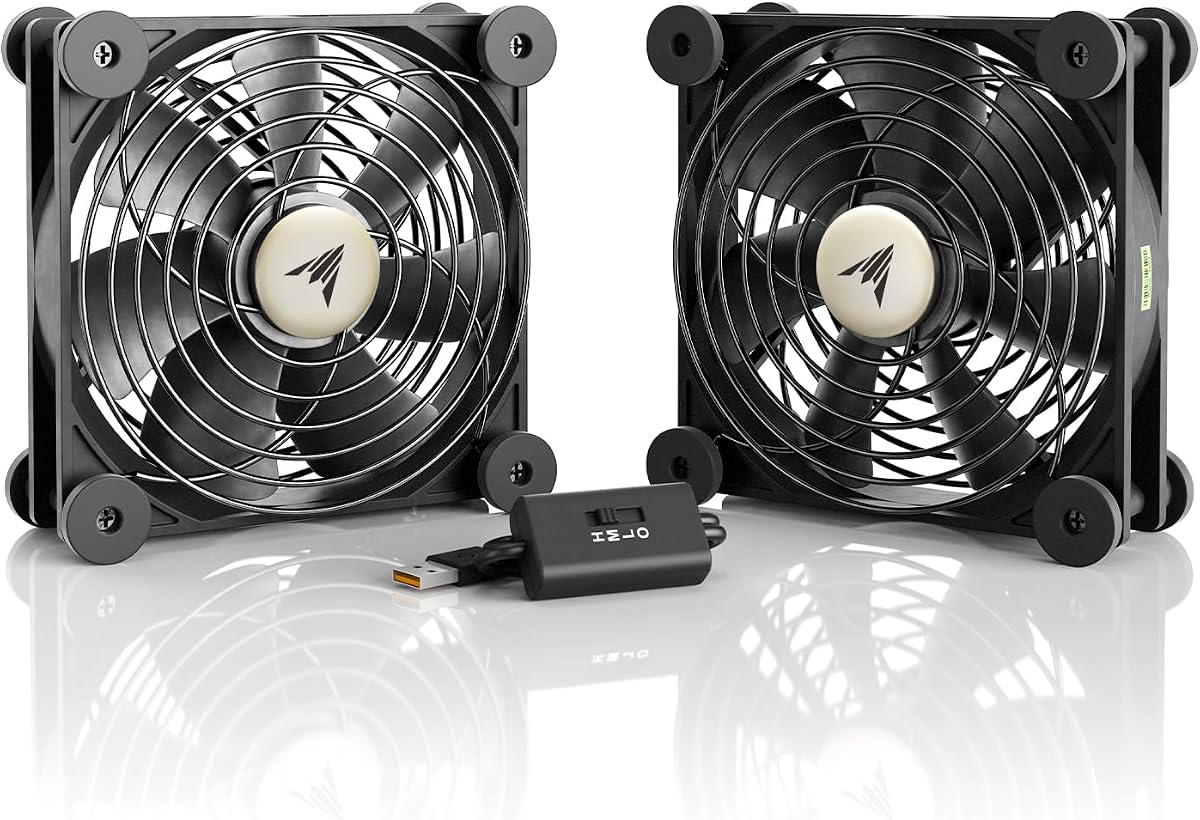
AC IN MULTIFAN S7
4.7Editor score
USB powered convenience
Multi-speed controller
Ultra-quiet operation
AV receivers generate significant heat during operation, which can lead to performance throttling or hardware failure over time. Proper ventilation is essential for maintaining longevity and ensuring consistent audio video quality in your home theater setup.
We evaluated ten leading cooling solutions based on airflow capacity, noise levels, ease of installation, and compatibility with various AV equipment. Each product was assessed for its ability to integrate seamlessly into existing media cabinets without requiring permanent modifications.
This guide highlights the strengths of each fan system, helping you choose the right model for your specific needs. Keep in mind that availability and pricing may fluctuate, so check the latest details before making your final purchase decision.
4.7Editor score

4.8Editor score

4.4Editor score
As an Amazon Associate we earn from qualifying purchases.
The following comparison table provides a side-by-side overview of the top cooling solutions evaluated in this guide. Each entry highlights key specifications to help you quickly identify the model that best fits your AV setup requirements.
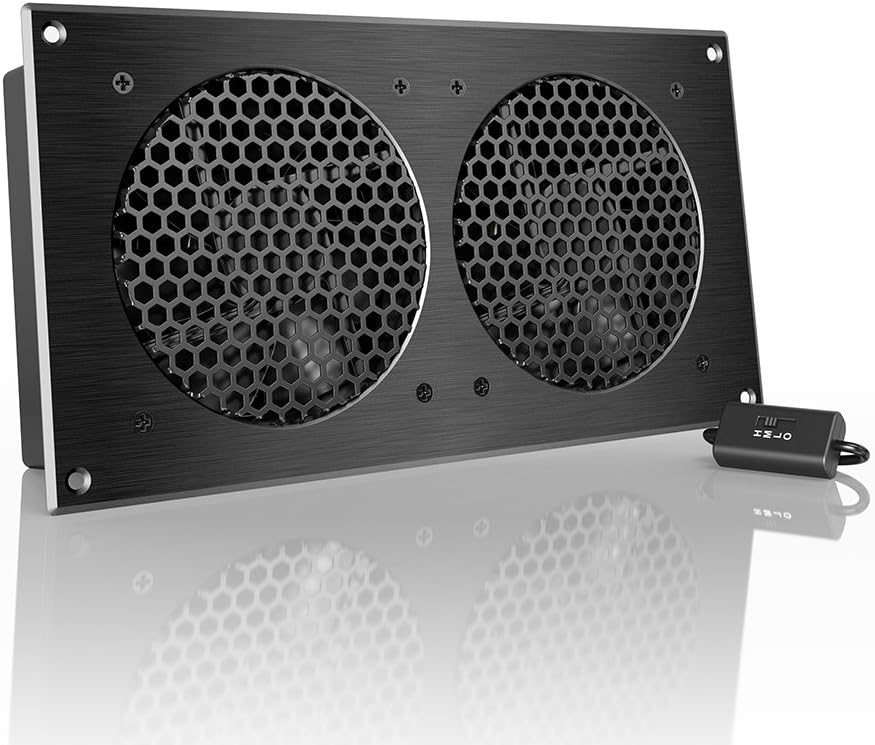


The AC Infinity AIRCOM S7 stands out as a top-tier solution for cooling AV receivers and other electronic components. With a 4.8 rating from users, it delivers powerful yet whisper-quiet performance thanks to its dual-ball bearing fans and PWM-controlled motors.
We may earn a commission when you buy through this link, at no additional cost to you.
This system features advanced programming capabilities, including two thermal trigger modes and four speed control options. The top-exhaust design efficiently vents hot air upward, protecting components from overheating while maintaining optimal performance and longevity.
While the price is higher than budget alternatives, the build quality and feature set justify the investment for serious home theater enthusiasts. The noise level remains impressively low at 19 dBA, ensuring it does not interfere with your audio experience.
Ideal for users seeking reliable, programmable cooling without sacrificing silence, the AIRCOM S7 is the best choice for those who prioritize performance and durability in their AV cabinet setup.
Customize fan speeds based on real-time temperature data to balance cooling needs with noise constraints.
Dual-ball bearings and PWM motors ensure long-term reliability and consistent operation without humming.
We may earn a commission when you buy through this link, at no additional cost to you.
The AC Infinity MULTIFAN S7 offers an excellent balance of performance and affordability for cooling AV receivers. Rated 4.7 by users, this dual-fan system provides adequate airflow while operating at a whisper-quiet 19 dBA noise level.
We may earn a commission when you buy through this link, at no additional cost to you.
Its USB power design makes it easy to plug into ports found behind AV electronics, game consoles, or routers. The included multi-speed controller allows you to adjust the fan speed to match your specific noise and airflow preferences.
While it does not offer the programmable thermal triggers of the S7, the S7 provides significant cooling power at a much lower cost. The dual-ball bearings ensure a lifespan of 67,000 hours, making it a durable choice for everyday use.
Perfect for budget-conscious buyers or those with limited power outlets, this fan delivers reliable, quiet cooling without requiring complex wiring or additional adapters.
Draw power directly from connected devices, eliminating the need for extra wall outlets.
Use the speed controller to optimize performance for different seasons or usage levels.
We may earn a commission when you buy through this link, at no additional cost to you.
The Noctua NV-FS2 is a premium multi-purpose fan set designed for users who demand the highest performance and acoustics. With a 4.4 rating, it combines the award-winning NF-A12x25 PWM fan with soft silicone gaskets to minimize vibrations.
We may earn a commission when you buy through this link, at no additional cost to you.
This set includes a compact NA-FC1 fan controller for precise speed adjustment and a universal power supply supporting 230/115V inputs. The offset fan design optimizes airflow for both intake and exhaust applications in tight spaces.
While significantly more expensive than standard options, the NV-FS2 offers unmatched quietness and durability. It is ideal for high-end home theater setups where noise reduction is critical and equipment placement flexibility is required.
For audiophiles and professionals seeking top-tier cooling without compromise, this premium set delivers exceptional results despite its higher price and more involved installation process.
Soft silicone pads and offset design prevent noise transfer to sensitive audio equipment.
Universal power adapter with multiple plug types ensures use in any region without extra hardware.
We may earn a commission when you buy through this link, at no additional cost to you.
This 120mm AC computer cooling fan provides a straightforward, plug-and-play solution for cooling AV receivers. Rated 4.7 by users, it connects directly to standard wall outlets without requiring any additional adapters or complex wiring.
We may earn a commission when you buy through this link, at no additional cost to you.
A built-in speed controller allows you to adjust airflow from a gentle breeze to maximum cooling power. The premium brushless motor ensures quiet operation, making it suitable for living rooms where noise sensitivity is a concern.
While it lacks advanced programming features, its simplicity and low cost make it an attractive option for basic ventilation needs. The protective metal finger guard and flexible mounting options add to its practicality.
Ideal for users seeking immediate cooling without technical setup, this fan offers reliable performance for AV components, routers, and small enclosures at an accessible price point.
Plug directly into any outlet to start cooling immediately without extra cables or adapters.
Fine-tune RPM with the included dial to match ambient temperature and noise requirements.
We may earn a commission when you buy through this link, at no additional cost to you.
This cabinet cooling fan allows for no-drill installation, making it perfect for protecting furniture while improving airflow. With a 4.0 rating, it fits existing cabinet gaps and vents hot air from enclosed spaces without permanent damage.
We may earn a commission when you buy through this link, at no additional cost to you.
Powered by USB 5V, it connects easily to power banks, chargers, or AV receivers for plug-and-play convenience. The built-in speed controller lets you adjust airflow based on your specific cooling needs and noise tolerance.
Though the rating is lower than some competitors, the installation simplicity and low cost appeal to renters and DIY enthusiasts. It delivers up to 77.12 CFM, which is sufficient for small to medium-sized cabinets.
Best for users who cannot modify cabinets and want a simple, USB-powered cooling solution that requires no tools or professional help.
Secure without drilling holes or cutting, keeping your furniture intact and warranty safe.
Connect to existing USB ports in your cabinet for power without extra outlets.
We may earn a commission when you buy through this link, at no additional cost to you.
This slim cabinet cooling fan is designed for tight spaces where traditional fans cannot fit. With a 4.4 rating, it uses existing cabinet gaps or vents for secure mounting without any drilling required.
We may earn a commission when you buy through this link, at no additional cost to you.
It operates quietly to reduce heat around AV receivers and game consoles without creating distraction. The USB 5V connection ensures simple plug-and-play operation with compatible electronic devices or adapters.
The ultra-slim profile makes it an excellent choice for media consoles and equipment enclosures with limited clearance. While it does not offer speed control, its efficiency and quietness make it a reliable daily performer.
Ideal for users with narrow cabinets seeking a no-fuss, quiet cooling solution that installs quickly and operates silently.
Slim design fits narrow cabinets that other bulky fans cannot accommodate.
Uses existing gaps to stay in place without screws or damage to furniture.
We may earn a commission when you buy through this link, at no additional cost to you.
This cabinet cooling fan utilizes a specialized Gap-Flow design to exhaust hot air through existing door gaps. With a 4.2 rating, it fits snugly against cabinet doors without requiring a single drill bit.
We may earn a commission when you buy through this link, at no additional cost to you.
Installation takes under 60 seconds using non-destructive mounting brackets, making it suitable for renters and DIY enthusiasts. The slim profile excels in tight spaces, pulling heat away from AV receivers and game consoles quietly.
USB power allows it to be plugged directly into an AV receiver or wall adapter for convenience. While it offers basic cooling, its focus on preserving furniture integrity and quiet operation sets it apart.
Best for users wanting quick, non-invasive cooling that protects expensive furniture while keeping equipment safe from overheating.
Attach using included brackets in under a minute without tools or professional help.
Optimized airflow path extracts heat efficiently through door slits without extra vents.
We may earn a commission when you buy through this link, at no additional cost to you.
The Wathai 140mm USB fan provides a dual-fan solution for cooling electronics efficiently. With a 4.3 rating, it offers 57 CFM airflow and operates at a low 18 dBA noise level for quiet performance.
We may earn a commission when you buy through this link, at no additional cost to you.
It features a 3-speed controller to customize airflow based on cooling needs. USB compatibility allows it to work with PC ports, AV receivers, and routers, and multiple units can be daisy-chained for expanded cooling.
Although it uses sleeve bearings which may have a shorter lifespan than ball bearings, the compact design fits well in AV cabinets and game console enclosures. The flat fan design is optimized for electronics in tight spaces.
Great for users needing multiple cooling points with simple USB power and adjustable speed control at an affordable price.
Daisy-chain multiple fans to cover larger cabinets or multiple devices simultaneously.
Choose from three settings to balance airflow and noise for your environment.
We may earn a commission when you buy through this link, at no additional cost to you.
The GDSTIME 240mm USB fan delivers high airflow for cooling routers, modems, and AV receivers. With a 4.3 rating, its dual hydraulic bearing motor ensures long-lasting quiet cooling suitable for 24/7 operation.
We may earn a commission when you buy through this link, at no additional cost to you.
It includes a multi-speed controller to adjust settings from near-silent low to maximum high airflow. The USB 5V power source eliminates the need for extra adapters, and an extension cable simplifies speed control placement.
While larger than 120mm models, it is effective for crowded shelves and network racks. The compact, slim design still fits well in most AV cabinets and provides ample air for heat-generating gear.
Best for users needing stronger airflow from a USB-powered fan without compromising on quiet operation on lower settings.
Hydraulic bearing motor supports continuous daily use without premature wear or noise.
Included extension cable allows flexible fan placement for better airflow paths.
We may earn a commission when you buy through this link, at no additional cost to you.
This cabinet cooling fan provides an affordable way to improve airflow without drilling holes. With a 4.4 rating, it uses existing cabinet gaps to mount securely and vent hot air efficiently.
We may earn a commission when you buy through this link, at no additional cost to you.
Powered by USB, it offers plug-and-play convenience with minimal setup time. The slim design allows it to fit in tight spaces where standard fans cannot, ensuring effective ventilation for enclosed electronics.
While it lacks speed controls, its quiet performance and ease of installation make it a practical choice for basic cooling needs. It protects furniture integrity while preventing overheating in AV cabinets.
Perfect for budget-conscious users seeking a simple, non-invasive cooling solution for home theater equipment and routers.
Mount instantly without tools or drilling for a hassle-free installation experience.
Runs quietly to avoid distraction during movies or gaming sessions.
We may earn a commission when you buy through this link, at no additional cost to you.
Selecting the right cooling fan involves understanding your cabinet space, power options, and noise tolerance. This guide covers key factors to ensure optimal performance for your AV setup.
Airflow measured in CFM determines how effectively a fan can move hot air out of your cabinet. Look for models that provide sufficient volume to handle your receiver's heat output without straining the motor.
Prioritize fans with higher CFM ratings for enclosed or poorly ventilated spaces.
Noise levels measured in dBA are critical for AV systems where silence is paramount. Fans below 20 dBA are ideal for home theater setups to avoid disrupting audio experiences.
Check dB ratings carefully to ensure the fan remains inaudible during normal operation.
Fans may use USB, AC outlets, or internal power supplies. USB models offer convenience but depend on available ports, while AC models provide independent operation.
Choose a power option that fits your existing cabling and outlet availability.
Installation can range from no-drill mounting to permanent screw fixes. Renter-friendly options protect furniture integrity while allowing effective cooling solutions.
Opt for non-destructive mounting if you cannot drill holes in your cabinet.
Some fans feature speed controllers or thermal triggers for dynamic cooling. Advanced controls help balance performance with noise levels throughout the day.
Look for adjustable settings if your AV usage varies significantly.
Measure your cabinet space to ensure the fan fits without obstruction. Slim profiles are essential for tight enclosures and modern media consoles.
Verify height and width specifications before purchasing to avoid fit issues.
Bearing types affect fan lifespan and noise over time. Dual-ball bearings generally offer longer life and quieter operation compared to sleeve bearings.
Invest in fans with quality bearings for reliable long-term cooling.
Higher prices often reflect better build quality and features. Balance your budget with the features you actually need to avoid overspending.
Select a model that offers the best value based on your specific requirements.
Position the fan where it can exhaust hot air out of the cabinet efficiently. Place it near the top rear vent of the receiver to pull heat upward and away from sensitive components.
Regularly clean dust from the fan blades and surrounding vents to maintain optimal performance. Accumulated debris can restrict airflow and cause the motor to work harder over time.
Monitor your receiver's operating temperature to ensure the fan is effective. Adjust speed settings if you notice excessive heat or noise during prolonged usage.
Yes, especially if your receiver is enclosed in a cabinet without sufficient ventilation. Cooling fans prevent overheating, which can cause performance throttling and hardware damage over time. They help maintain stable operation during long listening sessions.
It should operate below 20 dBA to remain inaudible during movies or music playback. Most top-rated models operate around 18 to 19 dBA, which is quiet enough not to interfere with your audio experience.
Yes, USB-powered fans are convenient if your receiver or nearby devices have available USB ports. They provide a simple plug-and-play solution without requiring additional wall outlets or adapters.
Many modern fans offer no-drill installation using existing door gaps or vent slots. These models protect your furniture while still providing effective cooling for enclosed electronics.
Ball bearings typically last longer and operate more quietly than sleeve bearings. They are better suited for continuous 24/7 operation in AV cabinets where reliability is important.
Unplug the fan and use a soft brush or compressed air to remove dust from the blades and grille. Clean at least once every few months to maintain airflow and prevent motor strain.
Our top picks highlight the AC Infinity AIRCOM S7 for its overall performance, the MULTIFAN S7 for budget shoppers, and the Noctua NV-FS2 for premium needs. Each offers unique advantages depending on your specific setup requirements.
Prioritize noise level and installation method when making your decision. A quiet, easy-to-install fan will provide better long-term satisfaction than one that disrupts your viewing experience.
Always check current availability and details before purchasing to ensure the model still meets your needs. Prices and stock levels may change over time.