
LG gram Pro 16-inch
4.6Editor score
NVIDIA RTX 5050 GPU
Up to 27 Hours Battery
Ultra Lightweight Design
The landscape of portable computing has shifted dramatically with the arrival of Intel Core Ultra 9 processors. These chips bring dedicated AI engines and efficient architectures that redefine what a laptop can handle without draining battery life or overheating.
We have analyzed ten distinct models from leading manufacturers like Dell HP LG and more. Each system was evaluated on its processing power display quality thermal management and overall build integrity to ensure they meet high professional standards.
This guide highlights the standout features of each pick to help you find the right machine for your needs. Please note that prices and availability can change rapidly so verify details before making a final purchasing decision.
4.6Editor score

4.5Editor score

4.2Editor score
As an Amazon Associate we earn from qualifying purchases.
The following table offers a side-by-side look at the key specifications and features across all ten selected systems to help you compare them efficiently.





This Dell 16 Plus model stands out as a top contender in the high end mobile market with a strong rating reflecting user satisfaction. It combines robust hardware with intelligent features designed to streamline daily tasks and enhance productivity for professionals.
We may earn a commission when you buy through this link, at no additional cost to you.
The Intel Core Ultra 9 288V processor is the star here offering 12 cores and significant AI throughput via its NPU. Paired with 32GB of fast LPDDR5X memory this machine handles heavy multitasking and demanding creative workloads without breaking a sweat.
While the performance is stellar some users might find the chassis a bit substantial compared to ultrathin rivals. The cost is also a factor but the included features like Wi-Fi 7 and premium build justify the investment for many.
If you need a reliable business laptop that future proofs your workflow with AI tools this is an excellent choice. It balances power and portability well enough for executives and power users alike.
The dedicated NPU accelerates AI tasks like noise cancellation and background blurring during video calls to keep you focused.
The 16 inch touchscreen offers ample real estate with narrow bezels that maximize screen space for spreadsheets and documents.
We may earn a commission when you buy through this link, at no additional cost to you.
This variant of the Dell 16 Plus achieves a perfect score among reviewers who appreciate its seamless integration of AI features. The system is tuned specifically to leverage the built in AI acceleration for smoother everyday computing experiences.
We may earn a commission when you buy through this link, at no additional cost to you.
Its hardware includes the latest 288V chip which delivers impressive speeds up to 5.1 GHz. The inclusion of Thunderbolt 4 and Wi-Fi 7 ensures that you can connect to high speed peripherals and networks with ease.
One minor drawback is the limited number of ports on the sides which might require adapters for older devices. However the speed and efficiency of the USB Type and connections compensate for this in most modern setups.
For teams needing reliable AI capable machines this model offers a polished experience with high satisfaction rates. It is ideal for those who prioritize connectivity and screen real estate.
With Wi-Fi 7 and Thunderbolt 4 you get the fastest data transfer speeds and wireless connectivity available today.
The Arc 140V GPU handles high resolution media editing and gaming better than integrated graphics on older laptops.
We may earn a commission when you buy through this link, at no additional cost to you.
This Dell 16 Plus model distinguishes itself with a QHD+ display that offers sharper visuals for detailed design work and data analysis. Users praise its robust build quality and efficient performance under load.
We may earn a commission when you buy through this link, at no additional cost to you.
The Intel Core Ultra 9 288V powers this system ensuring that complex spreadsheets and video editing apps run smoothly. The military grade testing adds confidence for users who travel frequently or work in varying environments.
The increased resolution does consume slightly more power but the thermal system manages heat well to maintain performance. It is a robust option for those who value screen quality above all else.
If you are a creative professional needing crisp pixels and a reliable chassis this laptop delivers. It is a strong investment for long term usability and visual precision.
The QHD+ panel provides more vertical space which helps reduce scrolling when reviewing long documents or code.
Military grade testing ensures the hinge and chassis can withstand the rigors of daily business travel and handling.
We may earn a commission when you buy through this link, at no additional cost to you.
This 14 inch version of the Dell Plus series brings powerful AI capable hardware into a more portable form factor. It appeals to users who need top tier specs without the bulk of a larger machine.
We may earn a commission when you buy through this link, at no additional cost to you.
The 2.5K display offers vibrant visuals and ample space for productivity despite the smaller footprint. The inclusion of a dedicated Copilot key highlights its focus on AI assisted workflows and ease of access.
Some users report mixed experiences with battery life which may not match the larger 16 inch models. However the portability and processing power make it a solid choice for frequent travelers.
If you prefer a lighter laptop but still want flagship performance this model is worth considering. It bridges the gap between mobility and power effectively for mobile professionals.
The 14 inch chassis fits easily into smaller bags making it ideal for commuting or working from coffee shops.
The Copilot key provides instant access to AI tools helping you draft emails or summarize data quickly.
We may earn a commission when you buy through this link, at no additional cost to you.
This Dell 16 Plus model emphasizes security and professional features with Windows 11 Pro and biometric authentication options. It is designed for business users who need robust protection and reliable performance.
We may earn a commission when you buy through this link, at no additional cost to you.
The processor delivers significant AI throughput at 48 TOPS enabling efficient on device processing for privacy sensitive tasks. This makes it suitable for corporate environments where data security is paramount.
User feedback suggests some inconsistency in build quality which affects the overall rating. However the core specs remain competitive for those prioritizing security and processing speed.
If you need a secure business machine with high AI capabilities this model fits the bill. It is a practical choice for enterprise deployments requiring Windows 11 Pro.
Windows 11 Pro provides advanced features for managing device security and deploying updates in corporate environments.
The fingerprint reader allows for quick secure logins ensuring that only authorized users can access sensitive data.
We may earn a commission when you buy through this link, at no additional cost to you.
The HP OmniBook 5 16 delivers a premium experience with a perfect user rating reflecting its high quality construction and performance. It stands out for its vivid display and efficient thermal management.
We may earn a commission when you buy through this link, at no additional cost to you.
Powered by a 15th Gen Intel Core Ultra 9 this laptop handles demanding tasks with ease. The 2K touchscreen offers vibrant colors that are ideal for media consumption and creative work.
While the device is somewhat heavy the fast charging capability mitigates battery concerns significantly. Users appreciate the quick power-up time which helps keep productivity flowing on the go.
If you value build quality and screen performance this model is a top contender. It is an excellent choice for professionals who want a reliable and aesthetically pleasing device.
The 2K IPS screen provides accurate colors and wide viewing angles that enhance the multimedia experience.
Fast charge technology ensures you can get hours of battery life in minutes keeping you productive throughout the day.
We may earn a commission when you buy through this link, at no additional cost to you.
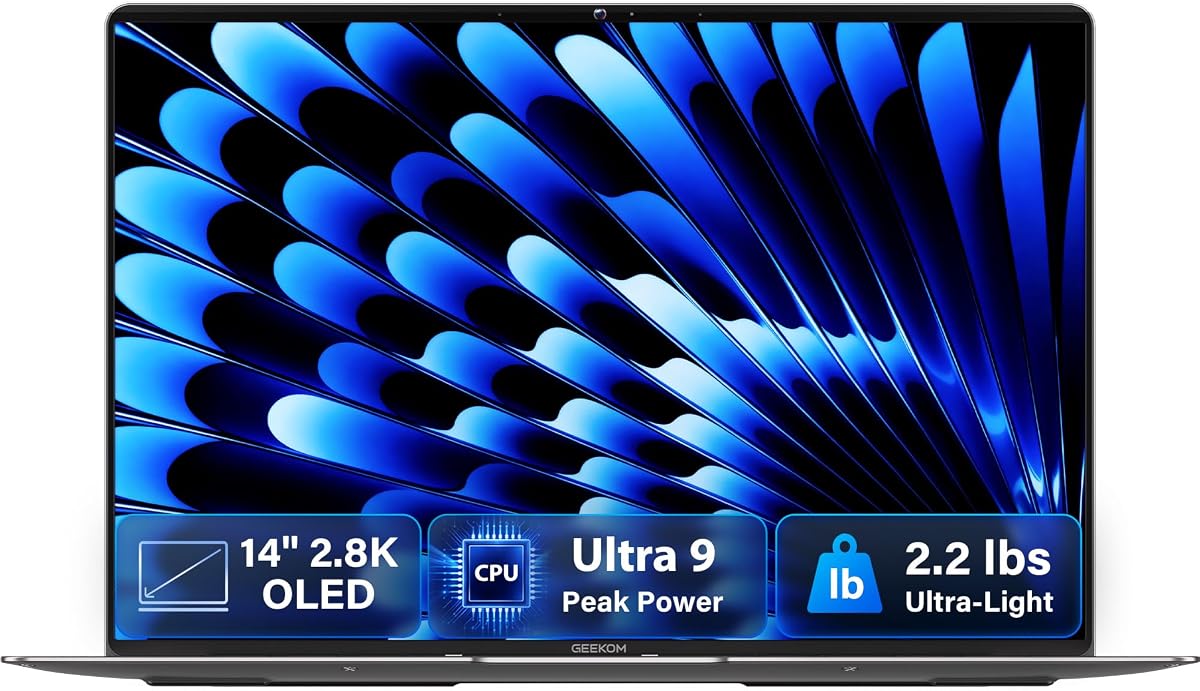
This GEEKOM laptop offers a unique value proposition with an OLED panel that delivers true blacks and rich colors. Its featherlight design makes it one of the most portable options in this roundup.
We may earn a commission when you buy through this link, at no additional cost to you.
The Intel Core Ultra 9 185H ensures powerful performance despite the thin chassis. The 72Wh battery supports long work sessions which is impressive for a 14 inch laptop of this size.
While GEEKOM is a newer brand in laptops the hardware quality and warranty support have impressed users. The OLED screen is the main draw for creatives and media consumers.
If you want the best visual experience in a portable package this is a strong option. It combines aesthetics with performance effectively for on the go work.
OLED technology allows for perfect blacks and high contrast which makes movies and photos look incredibly vivid.
At just 2.2 pounds it is easy to carry around all day without feeling weighed down in your bag.
We may earn a commission when you buy through this link, at no additional cost to you.
This LG gram Pro model stands out for integrating a dedicated NVIDIA RTX 5050 GPU which is rare in such a light chassis. It offers a unique blend of portability and graphics performance for creators.
We may earn a commission when you buy through this link, at no additional cost to you.
The processor is a high end Intel Core Ultra 9 variant designed for speed and efficiency. Combined with 2TB of storage it handles large project files and creative suites with ease.
The battery life is exceptionally long due to the large capacity cell and efficient architecture. This allows for extended use away from power outlets which is rare for gaming capable laptops.
If you need graphics power in a portable machine this model is a top choice. It is ideal for video editors and designers who need performance on the move.
The RTX 5050 enables smoother gaming and 3D rendering compared to standard integrated graphics solutions.
The 2TB SSD provides ample space for large libraries of media and files without needing external drives.
We may earn a commission when you buy through this link, at no additional cost to you.
This Dell Plus 16 offers a distinct blue color option that adds style to professional work. It boasts a perfect rating reflecting high user satisfaction with its performance and reliability.
We may earn a commission when you buy through this link, at no additional cost to you.
The Intel Core Ultra 9 288V processor ensures quick response times and efficient multitasking. Windows 11 Pro provides enterprise grade features that are useful for business users.
It uses Wi-Fi 6 rather than the newer Wi-Fi 7 which may be a downside for those needing the latest connectivity. However the overall speed and stability remain strong for most tasks.
If you want a stylish yet powerful business laptop this model fits the needs well. It is a solid pick for those who appreciate attention to design details.
The blue finish gives the laptop a distinctive look that sets it apart from traditional silver or black devices.
Windows 11 Pro offers advanced security and management tools that are beneficial for corporate environments.
We may earn a commission when you buy through this link, at no additional cost to you.
This Acer Aspire model offers flagship performance at a more accessible price point making it a great value option. It retains the same powerful processor as the more expensive models on this list.
We may earn a commission when you buy through this link, at no additional cost to you.
The 14 inch matte touchscreen reduces glare which is useful in bright environments. The inclusion of a physical Ethernet port is a rare feature that benefits users who need stable wired connections.
While it lacks some of the premium finish and brand support of higher priced rivals the core computing power is impressive. It is a smart choice for budget conscious professionals.
If you want high performance without breaking the bank this laptop is a top pick. It delivers on speed and utility for everyday business and creative tasks.
The anti-glare finish ensures that the screen remains visible even in well lit offices or outdoor settings.
Having an Ethernet port allows for reliable internet connections which is vital for stable remote work.
We may earn a commission when you buy through this link, at no additional cost to you.
Selecting the right laptop involves evaluating several key factors to ensure it meets your specific professional or creative needs.
The Intel Core Ultra 9 series provides powerful computing with dedicated AI units. Look for models with higher NPU scores if you plan to use AI tools heavily.
A high core count ensures smooth multitasking and long term value for demanding software.
Aim for at least 32GB of RAM to handle modern multitasking needs without slowdowns. Fast SSD storage improves boot times and application responsiveness significantly.
Sufficient storage is critical for storing project files and media libraries efficiently.
High resolution screens like 2.5K or OLED provide sharper text and better color accuracy. Touchscreens offer versatility but may add to battery usage.
Choose a panel with good brightness for outdoor use and color coverage for design work.
Look for large battery capacities like 70Wh or more to ensure all day usage. Newer processors are more efficient but actual runtime depends on workload.
Fast charging support is also valuable to recover hours of power quickly during breaks.
Lightweight chassis are easier to carry for remote work but may sacrifice some durability. Military grade testing ensures the device can withstand travel impacts.
Choose a weight and thickness that fits your commute style and carrying preferences.
Wi-Fi 7 offers the fastest wireless speeds but Wi-Fi 6 is sufficient for most. Thunderbolt 4 ports allow for high speed data and external display connections.
Ensure the model has enough ports to connect your peripherals without constant dongles.
Windows 11 Pro offers advanced security and management features suitable for businesses. Home editions are fine for individual consumers who do not need enterprise tools.
Check if your workflow requires specific OS features before finalizing your purchase.
Onsite service warranties provide peace of mind by sending technicians to your location. Manufacturer support quality varies so check reputation before buying from smaller brands.
A solid warranty protects your investment against unexpected hardware failures during use.
Keep your laptop clean by wiping the screen with a microfiber cloth to remove smudges and fingerprints. Avoid using harsh chemicals on the display to prevent damage to coatings.
Use power management settings to maximize battery life when you are away from an outlet. Close unused background apps to ensure the processor stays cool during heavy tasks.
Store your device in a cool dry place to protect internal components from humidity and heat. Avoid placing it under heavy objects in a bag that could damage the hinge.
The main benefit is the dedicated Neural Processing Unit which handles AI tasks efficiently. This offloads work from the main CPU allowing for faster performance and better battery life during AI workloads.
Yes most models support professional video editing software well due to their high core counts and RAM. Some models with dedicated GPUs offer even faster rendering speeds for high resolution footage.
Not all models feature touch screens but many in this list do as standard. Check the specifications carefully if touch interaction is a requirement for your workflow.
Battery life is generally improved due to more efficient processor architecture. You can expect all day usage on most models though heavy workloads will reduce runtime.
Most modern Core Ultra laptops have soldered RAM so upgrades are not possible. However the SSD storage is often user replaceable depending on the specific model design.
They can handle casual and light gaming well thanks to integrated graphics. For heavy gaming look for models with dedicated GPUs like the LG gram Pro.
Most models ship with Windows 11 Home or Pro depending on the configuration. Business models usually include the Pro version for added security and management features.
No Wi-Fi 7 is available on select high end models in this list. Many others use Wi-Fi 6 or 6E which still provide fast and reliable connectivity.
This guide highlights top performers from Dell HP and others that balance power and portability effectively. The Dell 16 Plus and LG gram Pro stand out for their exceptional builds and performance.
Prioritize your specific needs such as battery life screen quality or graphics power when making a selection. The AI capabilities in these systems will only become more useful as software evolves.
Remember to check current prices and stock before buying as these details can change frequently online. Finding the right deal ensures you get the best value for your investment.