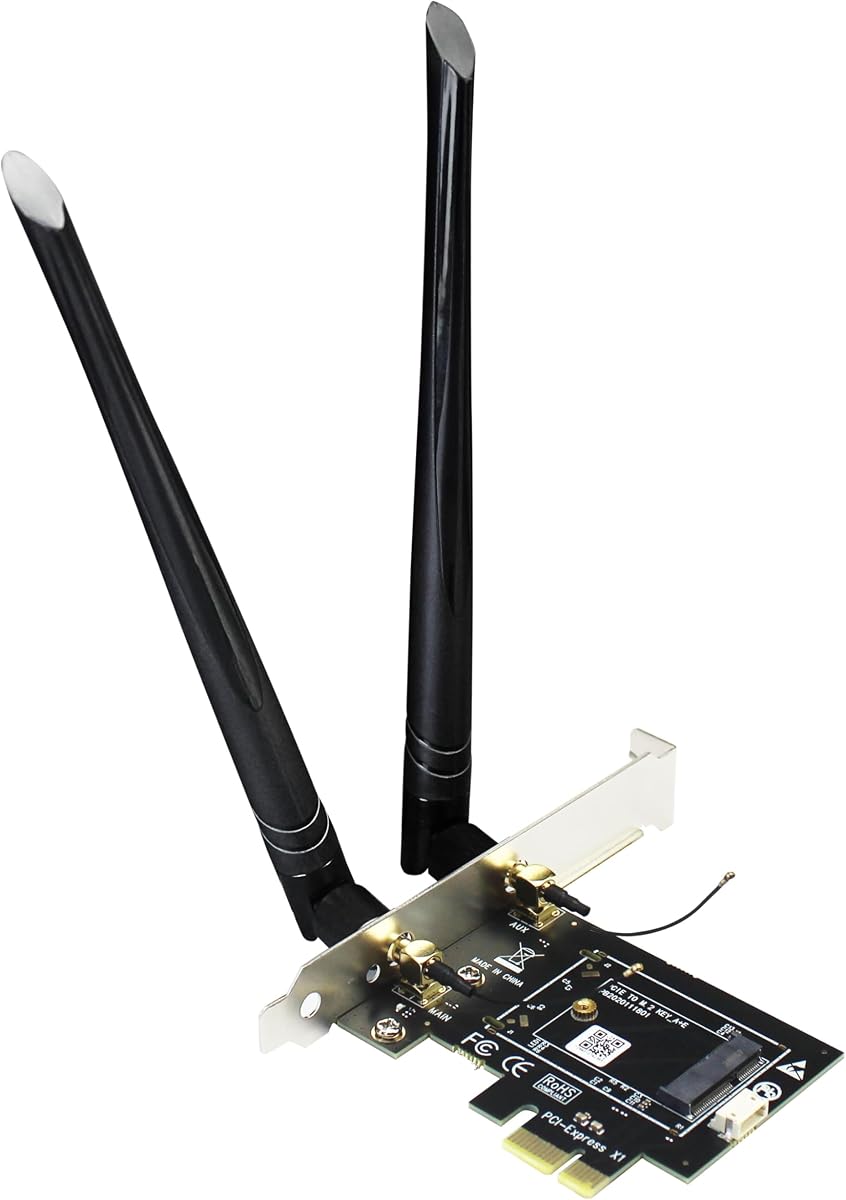
GLOTRENDS WA01 Adapter
4.1Editor score
PCIe X1 to M.2 Key E
Supports WiFi 7 Modules
Includes Antenna Kits
This guide compares the top M2 Key E WiFi cards for laptops and desktops, evaluating speed, compatibility, and features to help you choose the right wireless
Finding the right wireless network adapter can transform your computing experience significantly. Modern M2 Key E WiFi cards offer incredible speeds and reliability for gaming and streaming. Choosing the correct model ensures your hardware supports the latest protocols without compatibility issues.
We analyzed ten top-rated cards based on chipset performance, band support, and user feedback. Our comparison covers WiFi 6E and the newest WiFi 7 options available today. Each entry highlights specific strengths to help you match the card to your system needs.
Every pick below details real-world performance metrics and installation requirements clearly. We focus on adapters that support tri-band connectivity and Bluetooth integration seamlessly. Please note that availability and pricing may vary by region and retailer over time.
4.1Editor score

4.5Editor score

4.6Editor score
The following table provides a side-by-side technical comparison of all ten selected M2 Key E WiFi cards. It highlights key specifications like maximum speed, supported bands, and Bluetooth versions to help you quickly identify the best fit for your upgrade.


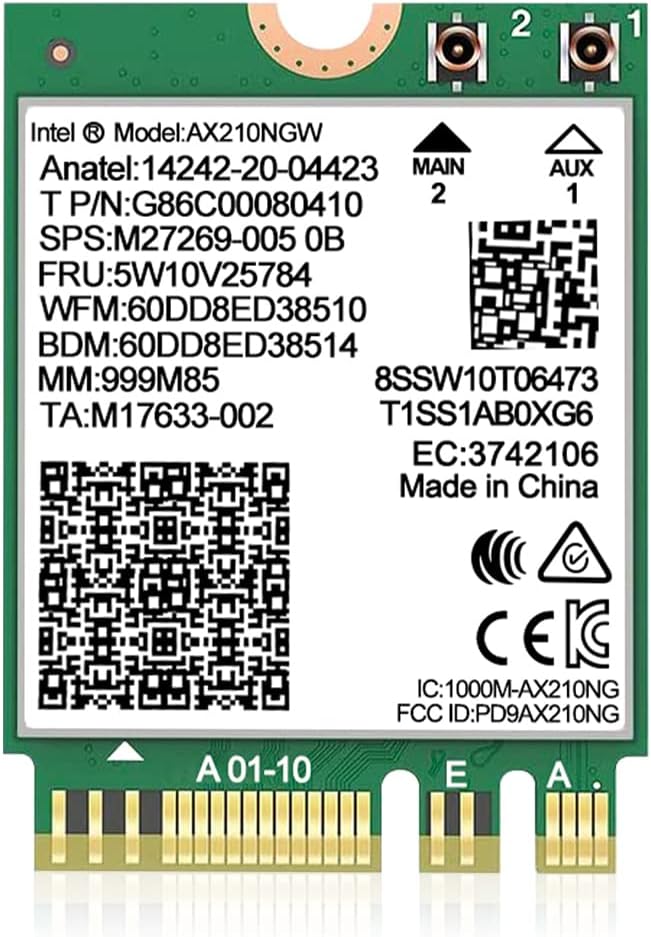




This AX210NGW DTK module stands out as a top-tier choice for upgrading wireless connectivity. It delivers robust tri-band performance with dedicated 6GHz support. Users report stable connections and high throughput for streaming.
We may earn a commission when you buy through this link, at no additional cost to you.
The inclusion of high-gain antennas ensures signal reaches further than standard cards. Bluetooth 5.3 improves peripheral connectivity significantly. Installation is straightforward with the provided low-profile brackets.
Drivers must be downloaded from Intel rather than using built-in Windows drivers initially. The RF cables are long enough for most desktop cases but may need routing adjustments.
Buy this if you want reliable Wi-Fi 6E performance without breaking the bank. It balances speed and features better than most alternatives in this price range.
The 5dBi high gain antennas help maintain strong connections even in larger homes or offices.
It works with Intel and AMD boards, making it a flexible upgrade for many systems.
We may earn a commission when you buy through this link, at no additional cost to you.
This adapter is the best budget option for those who already own a module or plan to upgrade later. It bridges the gap between M.2 Key E slots and standard PCIe slots on desktops. It is simple and effective for basic wireless needs.
We may earn a commission when you buy through this link, at no additional cost to you.
It supports upcoming WiFi 7 modules which makes it a forward-looking investment. The SMA antennas are robust and easy to swap if needed. However, you must connect a USB cable for Bluetooth functionality.
The adapter adds a layer of complexity compared to direct install cards. You need to ensure the M.2 module you choose is CNVio free for it to work properly.
Choose this if you need to fit a laptop card into a desktop motherboard cheaply. It is perfect for enthusiasts who want to swap modules later without buying a new adapter.
Support for WiFi 7 modules means your adapter won't become obsolete quickly.
Using standard PCIe X1 makes installation easy on almost any desktop board.
We may earn a commission when you buy through this link, at no additional cost to you.
The 10Gtek adapter offers a straightforward way to add modern wireless to older desktops. It takes standard laptop modules and fits them into full height slots. This is great for building a PC without relying on integrated WiFi.
We may earn a commission when you buy through this link, at no additional cost to you.
It supports both PCIe WiFi and USB Bluetooth simultaneously with the included cable. The high baffle ensures the antennas are positioned well for signal. It is a practical bridge between old and new standards.
You must buy a separate module to get wireless working here. The USB connection for Bluetooth requires a specific header on your motherboard which might not be available.
This is ideal for DIY builders who want to reuse parts from old laptops. It keeps costs down while providing flexible upgrade paths for various system configurations.
The full height bracket ensures it fits standard case back panels perfectly.
Handles both network and Bluetooth signals through one adapter card.
We may earn a commission when you buy through this link, at no additional cost to you.
This card pushes the boundaries of current wireless tech with WiFi 7 support. It achieves speeds that were previously impossible on consumer hardware. For heavy data users, this is a significant upgrade from WiFi 6E.
We may earn a commission when you buy through this link, at no additional cost to you.
Multi-link operation allows it to use multiple bands at once for stability. The 4K QAM modulation increases data density for higher throughput. However, you must have a compatible WiFi 7 router to see these gains.
Setup requires careful driver management on Windows 11. Older routers will work but you lose the advanced features. It is also exclusive to specific newer motherboard chipsets.
Buy this if you want to future-proof your system for next-gen routers. It is a strong choice for streamers and gamers who demand the absolute lowest latency possible.
MLO lets the card use two bands at once for better reliability.
Speeds up to 5.8Gbps are possible with the right .
We may earn a commission when you buy through this link, at no additional cost to you.
This AX210 variant is a standard reliable card for many users. It uses the trusted Intel chipset which ensures driver compatibility is high. Users appreciate the tri-band performance without complex setup requirements.
We may earn a commission when you buy through this link, at no additional cost to you.
The Bluetooth integration works well with modern peripherals like headphones. It supports WPA3 which adds a layer of security. Performance is consistent even when the network is crowded with devices.
It does not support CNVio protocols so check your laptop manual before buying. The included antennas are adequate but not high gain like other kits. It is a solid mid-range option.
This card is perfect for general users who want a safe upgrade. It provides all necessary features without unnecessary complexity or risk of incompatibility.
Intel drivers are well maintained and rarely cause connection issues.
WPA3 support ensures your connection is secure from modern threats.
We may earn a commission when you buy through this link, at no additional cost to you.
The OKN AX210 focuses on delivering consistent performance under load. MU-MIMO technology helps manage multiple data streams efficiently. This makes it ideal for households with many connected devices.
We may earn a commission when you buy through this link, at no additional cost to you.
It supports the latest operating systems like Windows 11 without issues. Power efficiency is a key feature which helps laptops run cooler. The card is reliable even during long downloads.
Users must supply their own antennas which adds to the total cost. It does not work on older motherboard generations without specific slots. Ensure you have the correct Key E slot before purchasing.
This is the right pick for power users who need consistent throughput. It balances efficiency and speed to deliver a smooth daily computing experience.
Optimized power use means less drain on your laptop battery.
MU-MIMO helps maintain speeds even when the network is busy.
We may earn a commission when you buy through this link, at no additional cost to you.
This version stands out due to the powerful 8dBi antennas included. It is designed for situations where range is critical. Users report better signal strength even through thicker walls.
We may earn a commission when you buy through this link, at no additional cost to you.
The kit comes with brackets and cables to simplify installation. It supports the standard AX210 features but focuses on connectivity quality. This is great for large homes or offices.
The antennas are physically larger so placement requires some planning. You need enough space to mount them effectively for optimal results. It is slightly more involved to set up.
Choose this if you struggle with weak signals in your current setup. It solves coverage issues better than standard adapters without needing external repeaters.
8dBi antennas reach further distances than standard 5dBi ones.
Includes brackets and cables to make installation easier.
We may earn a commission when you buy through this link, at no additional cost to you.
This card delivers raw speed suitable for high-end gaming. The 5800Mbps theoretical speed is a major draw for enthusiasts. It performs exceptionally well when paired with newer routers.
We may earn a commission when you buy through this link, at no additional cost to you.
Bluetooth integration is smooth and supports latest peripherals. The card is highly integrated which helps with thermal performance. It is designed for users who want top-tier connectivity.
You cannot use this on Windows 10 or older systems. Drivers need to be downloaded manually to ensure full functionality. It is best for newer systems that can handle it.
Buy this if you prioritize speed above all else. It is a powerful option for streaming and gaming in demanding environments.
Low latency ensures your gaming inputs are fast and responsive.
Works best with Windows 11 for full feature support.
We may earn a commission when you buy through this link, at no additional cost to you.
This card is a solid dual band choice for basic laptops. It provides reliable speeds for daily tasks like browsing and streaming. It is often cheaper than tri-band alternatives.
We may earn a commission when you buy through this link, at no additional cost to you.
Linux compatibility is a rare feature here which is helpful for developers. Bluetooth 5.2 ensures good peripheral support. It is a safe pick for general office use.
It lacks the 6GHz band found in newer models so speeds are capped. You will not get the latest range improvements of WiFi 6E. It is older tech but still effective.
This is the right pick for budget laptops that do not need 6GHz. It offers good value without the complexity of newer protocols.
One of the more affordable cards available on the market.
Works with Linux systems where other cards might not.
We may earn a commission when you buy through this link, at no additional cost to you.
This is the premier option for Intel users wanting the fastest wireless. It uses the latest BE200 chipset for top performance. Gamers and pros appreciate the ultra-low latency features.
We may earn a commission when you buy through this link, at no additional cost to you.
Bluetooth 5.4 provides better range and stability than previous versions. The Killer software allows precise traffic prioritization for gaming. It is a powerful component for high-end builds.
It is strictly limited to Intel processors and Windows 11. This reduces its versatility for general upgrades. The price is higher due to the premium features it offers.
This card is best for enthusiasts with compatible Intel machines. It delivers the ultimate performance you can get from a wireless card today.
Killer features help manage network traffic for better performance.
Designed specifically to work best with Intel systems.
We may earn a commission when you buy through this link, at no additional cost to you.
Selecting the right M2 Key E WiFi card involves understanding your system's limits and your connectivity needs. This guide explains the essential factors to consider before purchasing.
Modern cards support Wi-Fi 6 or Wi-Fi 7 which use 2.4GHz, 5GHz and often 6GHz bands. Tri-band support ensures better speeds and less interference. Always check if you have a router that matches the card's standards.
Choose a card that supports at least Wi-Fi 6 for future readiness.
Some cards like the Intel BE200 work only with Intel CPUs while others support both Intel and AMD. Verify your motherboard supports CNVio protocols or standard PCIe interfaces. A mismatch means the card will not work.
Always check your motherboard manual for supported wireless modules.
Bluetooth is integrated into most wireless cards. Newer versions like 5.3 or 5.4 offer better range and lower latency. If you use wireless headphones or mice check the version included.
Ensure the Bluetooth version supports your peripherals for best results.
Newer cards often require Windows 11 to unlock features like MLO. Some older systems might struggle with the drivers. Check the supported list on the product page.
Make sure your OS version matches the card's requirements.
Standard antennas are fine for most users but high gain options help in large spaces. Look for kits that include cables and brackets. Better antennas improve signal stability significantly.
Consider high gain antennas if you have weak signal issues.
Full height brackets are needed for desktops while low profile ones fit smaller cases. Laptops usually require no brackets but ensure your slot is the right size. Verify if cables are included.
Check the physical dimensions against your system case.
Most cards need drivers from the manufacturer or Intel website. Some cards support plug and play which simplifies setup. Research driver support before buying.
Choose cards with stable driver support for hassle free use.
Investing in Wi-Fi 7 or tri-band cards ensures longevity. These options are ready for new routers and networks. It is often worth paying a bit more for future features.
Prioritize cards with the latest standards for long term use.
First ensure your system is powered off and static free before opening the case. Remove the old card if replacing it and insert the new one into the M.2 slot firmly. Secure it with the screw or bracket.
Next connect the antenna cables to the small connectors on the card. Make sure they are seated correctly to avoid weak signals. Close the case and power on the system.
Install the latest drivers from the manufacturer website or Intel site. Restart your computer after installation and check the network settings. Adjust antenna positions for better signal.
Not all laptops use the same interface. Some use CNVio or Mini PCIe instead of M.2 Key E. Check your manual to ensure compatibility before purchasing.
Yes if you use a PCIe to M.2 adapter card. Desktops usually have PCIe slots and these adapters bridge the gap for laptop style modules.
Many kits include antennas and cables but some do not. Always check the product description to see what is included before buying.
WiFi 6E adds the 6GHz band which offers faster speeds and less interference. It works with newer routers and cards that support the extra frequency.
Many Intel cards support Linux but others might need extra drivers. BrosTrend is known for good open source compatibility on some models.
Newer models like the QCNCM865 and BE200 support WiFi 7. You will need a compatible router to utilize the full speed.
We have reviewed ten cards offering speed and stability for various systems. Top choices include the AX210NGW for overall value and the BE200 for premium gaming performance.
Prioritize compatibility and features like Bluetooth versions when selecting a card. Ensure your system supports the standards you plan to use for best results.
Prices and availability change regularly so check current listings before buying. This guide helps you find the right fit for your wireless upgrade today.