
RGB Monitor Light Bar
4.1Editor score
Dual mode lighting
RGB backlight effects
USB-C power
Modern screens cause significant eye strain during long work sessions. Proper lighting behind your monitor helps reduce contrast and fatigue effectively. Choosing the right bar protects vision while enhancing productivity and comfort.
We evaluated ten leading models based on glare reduction and color accuracy. Our analysis covers features like auto-dimming and wireless controls. Each option addresses specific needs for gamers and professionals equally.
Every pick highlights key strengths and potential trade-offs for clarity. Prices fluctuate often so verify current deals before purchasing. Read on to find the ideal lighting solution for your specific setup.
4.1Editor score

4.6Editor score

4.7Editor score
As an Amazon Associate we earn from qualifying purchases.
This side-by-side comparison highlights key specifications for all ten selected monitor light bars to help you decide quickly.


This SAMPHON light bar offers dual lighting modes for focus and atmosphere. With a 4.1 rating it balances affordability and eye care features effectively.
We may earn a commission when you buy through this link, at no additional cost to you.
It combines a glare-free front light with vibrant RGB backlighting for gaming ambiance. Users appreciate the independent control buttons for brightness and color temperature settings.
The main trade-off is the lack of advanced sensors compared to premium models. However the basic memory function and USB-C power keep operation simple.
Ideal for budget-conscious gamers needing versatile mood lighting without cluttering desks. It provides essential eye protection at an entry-level price point.
The nine RGB backlight modes allow you to set dynamic colors behind your screen for an immersive gaming atmosphere.
Separate buttons for front and back lights let you adjust task lighting and ambiance without affecting each other.
We may earn a commission when you buy through this link, at no additional cost to you.
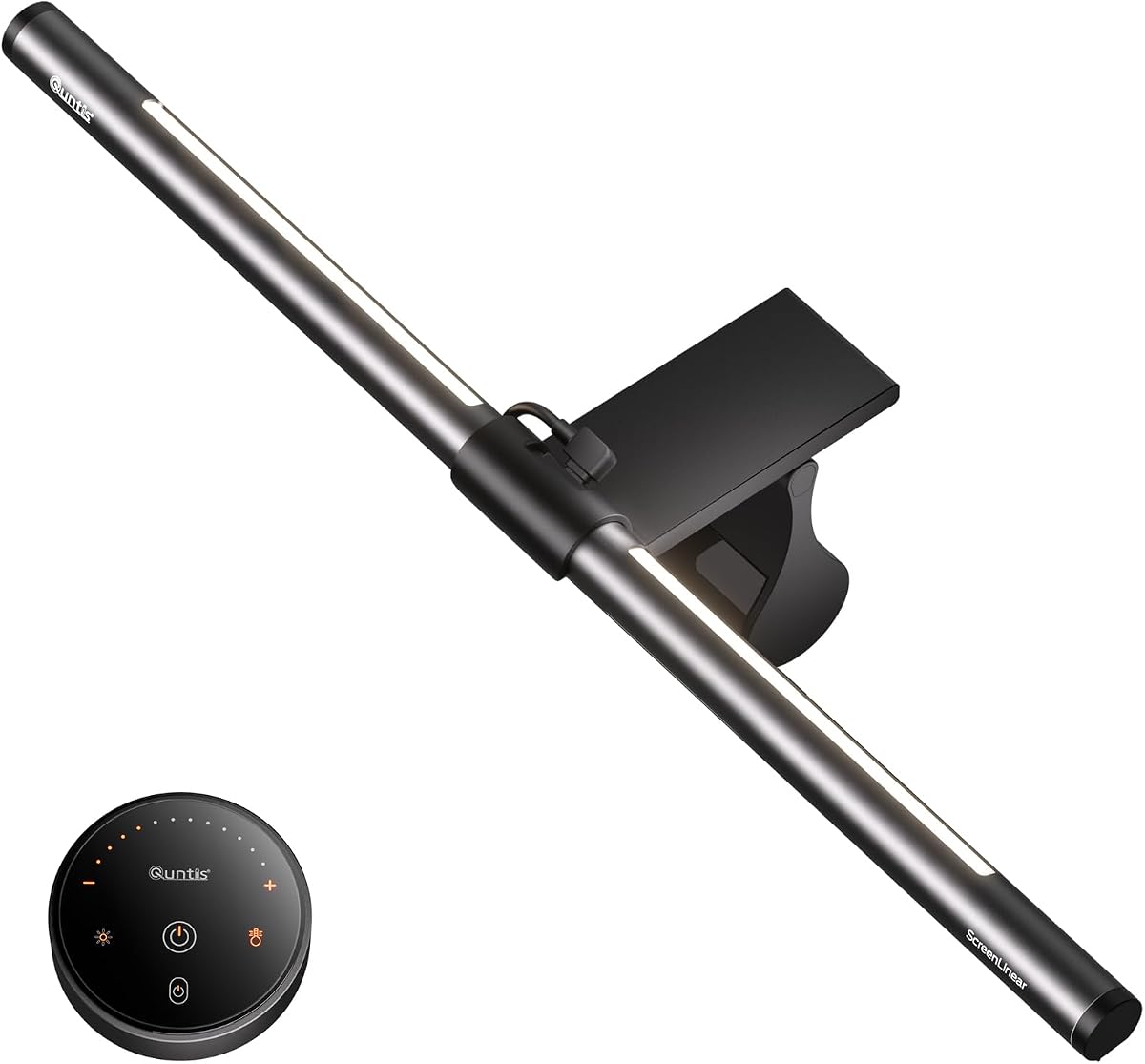
The Quntis ScreenLinear stands out with auto-dimming technology that adjusts to ambient light. It holds a strong 4.6 rating for eye comfort and precision.
We may earn a commission when you buy through this link, at no additional cost to you.
Certified for no blue light hazard and flicker-free illumination it protects vision during long tasks. The Ra98 CRI ensures accurate color rendering for designers.
While it lacks RGB mood lighting the focus on task illumination is superior. The asymmetrical design prevents screen glare effectively without wasting energy.
Recommended for professionals and students prioritizing eye health and color accuracy. Its smart sensor reduces manual adjustments significantly throughout the day.
A built-in sensor monitors room brightness and adjusts the light output to prevent visual fatigue automatically.
With Ra98 CRI and 78 LEDs this bar provides true-to-life colors essential for design and photo editing tasks.
We may earn a commission when you buy through this link, at no additional cost to you.
YEELIGHT delivers premium build quality with a full-metal body and RG0 safety rating. This ensures durability and the highest blue light protection available.
We may earn a commission when you buy through this link, at no additional cost to you.
Its stepless dimming and high Ra95 CRI offer precise control and color fidelity. The design avoids webcam obstruction which is vital for remote workers.
Touch controls are intuitive though lack a remote for convenience. The metal body aids heat dissipation ensuring consistent performance over long hours.
Best suited for users seeking a durable and safe lighting solution. It combines professional-grade features with a modern aesthetic for any desk.
The highest safety standard prevents potential damage to retinas ensuring safe extended use without harmful exposure.
Low-profile construction ensures your webcam remains unobstructed during video calls and streaming sessions.
We may earn a commission when you buy through this link, at no additional cost to you.
The BenQ ScreenBar Halo 2 represents the pinnacle of monitor lighting technology with a wireless controller. It holds a 4.7 rating for exceptional build and eye care.
We may earn a commission when you buy through this link, at no additional cost to you.
Its Asym-Light tech eliminates glare completely while the motion sensor adjusts lighting automatically. The ambient backlight reduces screen contrast for better focus.
While expensive it offers unmatched convenience and performance. The wide compatibility with curved monitors makes it versatile for modern setups.
Ideal for professionals and enthusiasts who want the best lighting experience. It justifies the cost through superior ergonomics and eye comfort.
A dedicated dial on the desk allows precise adjustments without touching the screen or using complex software.
The bar detects movement and adjusts lighting automatically to suit your current activity or rest state.
We may earn a commission when you buy through this link, at no additional cost to you.
This ultrawide bar provides broad coverage for large monitors. With a 4.2 rating it balances performance and ease of use effectively.
We may earn a commission when you buy through this link, at no additional cost to you.
The asymmetric design eliminates shadows on wide screens ensuring consistent illumination. The mechanical switch offers reliable control without complex menus.
It lacks the smart sensors of premium models but focuses on core lighting needs. The memory function saves settings for convenience.
Best for users with large screens needing simple and effective lighting. It delivers solid performance at a competitive price.
The extended width ensures even light distribution across larger desks and ultrawide monitors.
A dedicated button allows instant control of brightness and temperature without digital interfaces.
We may earn a commission when you buy through this link, at no additional cost to you.
LYMAX offers a wireless remote for easy control. Its 4.5 rating reflects a solid balance of features and affordability.
We may earn a commission when you buy through this link, at no additional cost to you.
The gravity damper base ensures stability without damaging the monitor. The Type-C port supports modern charging needs easily.
While the remote requires battery changes it offers excellent convenience. The four color modes cover most common use cases.
Great for users who prefer tactile control over touch buttons. It provides reliable performance for daily tasks.
A small remote lets you adjust settings from anywhere at your desk without reaching up.
A stable bracket design secures the light bar firmly without needing clamps or screws.
We may earn a commission when you buy through this link, at no additional cost to you.
This Colorpanda bar offers strong brightness with a metallic finish. It holds a 4.5 rating for its durability and performance.
We may earn a commission when you buy through this link, at no additional cost to you.
The asymmetric design reduces glare and headache risks. The memory function remembers your preferred settings automatically for ease.
Lack of advanced sensors limits automation but the core lighting is effective. It is sturdy enough for daily use.
Suitable for budget-conscious users needing high-quality light. It provides essential features without unnecessary complexity.
250 lumens provide ample illumination for detailed tasks and reading on your desk.
A metallic casing gives a sleek look and protects internal components from wear.
We may earn a commission when you buy through this link, at no additional cost to you.
The Pzloz lamp offers flexible arms for custom angles. It lacks a specific eye-care rating but provides versatile lighting options.
We may earn a commission when you buy through this link, at no additional cost to you.
The 24W output supports multiple modes for drafting and reading. The clamp base secures it firmly without taking desk space.
Its design is more traditional than a bar but suits unique needs. The remote adds convenience for adjustments.
Best for users needing adjustable angles beyond a fixed bar. It is a versatile alternative for general desk tasks.
Multiple joints allow the head to be positioned anywhere for targeted lighting.
A secure clamp frees up desk space for other tools and equipment.
We may earn a commission when you buy through this link, at no additional cost to you.
This Quntis bar features dual lighting for task and ambiance. With a 4.5 rating it combines eye care with immersive RGB modes.
We may earn a commission when you buy through this link, at no additional cost to you.
The asymmetric design ensures glare-free task lighting while RGB modes enhance gaming. Memory function saves preferences for quick access.
Controls may be complex for some users but offer deep customization. It is well-built and secure.
Ideal for gamers who want both focus and atmosphere. It provides balanced lighting for work and play.
Separate RGB and task lights allow independent control for different activities.
A specialized clamp secures firmly to various thicknesses and curved screens.
We may earn a commission when you buy through this link, at no additional cost to you.
The Quntis Glow model features a smart remote for easy control. It holds a 4.6 rating for eye comfort and precision.
We may earn a commission when you buy through this link, at no additional cost to you.
Dual protection design shields eyes and prevents screen glare. The high Ra95 CRI ensures accurate colors for designers.
The sliding clip fits unique monitor shapes securely. However the remote requires batteries for full functionality.
Best for users needing high accuracy and remote convenience. It offers a comprehensive solution for eye care.
An intuitive touch remote allows precise control from your desk without reaching up.
An innovative sliding mechanism ensures a stable fit on various monitor types.
We may earn a commission when you buy through this link, at no additional cost to you.
Selecting the right monitor light bar requires understanding key factors that impact eye comfort and usability.
Look for certifications like flicker-free and blue light hazard-free to ensure safe use. RG0 ratings indicate the highest level of safety for retinas.
Prioritize models with these features to reduce strain during long sessions.
A high CRI (Ra95+) ensures colors on your screen appear true to life. This is crucial for designers and color-sensitive tasks.
Choose high CRI bars for professional accuracy.
The light should direct downwards to the desk without hitting the screen. This prevents glare and reflections that cause headaches.
Confirm the design is asymmetrical for maximum comfort.
Ensure the clip fits your monitor thickness and curvature. A secure mount prevents wobbling or damage to the screen.
Check specs for curved monitor compatibility.
Touch buttons, remotes, or wireless dials offer different convenience levels. Choose based on your preference for accessibility.
Wireless controllers add flexibility.
USB or USB-C power eliminates bulky adapters. Ensure your setup has an available port for convenient usage.
USB-C offers future-proof power.
This feature restores your last settings automatically. It saves time adjusting brightness and color every day.
Always opt for a bar with memory.
RGB or ambient backlighting reduces contrast between screen and surroundings. This helps reduce eye fatigue at night.
Select if you want immersive lighting.
Mount the bar securely on the center of your monitor using the provided clip. Ensure it is level to avoid uneven lighting.
Adjust the angle slightly downwards to illuminate the desk without shining into your eyes. Avoid pointing it directly at the screen.
Clean the lens regularly with a soft cloth to maintain brightness. Check cables periodically for any wear or damage.
Yes, they reduce the contrast between a bright screen and dark room. Proper lighting helps eyes adjust better and reduces fatigue.
They take up less desk space and direct light specifically to your work area. Desk lamps often cause more glare on the screen.
Lower temperatures around 3000K are warmer and better for evening use. Higher temperatures like 6500K are cooler and better for daytime focus.
Not strictly, but it adds convenience if your monitor is hard to reach. Touch buttons are usually sufficient for daily adjustments.
Many modern bars come with specialized clips that fit curved screens. Always check the mounting specs before buying.
Using cool light late at night can disrupt sleep cycles. Choose models with warm modes and avoid using them right before bed.
We explored ten top options ranging from budget-friendly bars to premium models like BenQ. Each offers unique features tailored to different user needs.
Prioritize eye care certifications and mounting compatibility to ensure safety. For gaming, RGB options add value; for work, high CRI is key.
Prices fluctuate regularly so check the latest deals before purchasing. Your eyes deserve the best protection for daily comfort.