
RedThunder One Handed Gaming Keyboard RGB Backlit 35 Keys Portable Mini Gaming Keypad Ergonomic Game Controller for PC Gamer
4.4Editor score
Anti ghosting keys
Macro recording support
RGB lighting modes
This guide compares the top left handed gaming keyboards for ergonomic comfort and performance, helping you find the perfect layout for your setup.
Finding the right input device can transform your gaming experience. For left handed gamers, standard keyboards often feel cramped or inefficient. A dedicated left handed gaming keyboard offers ergonomic relief and better access to essential keys during intense sessions.
We evaluated ten top rated options based on build quality, switching technology, and ergonomic design. Our analysis covers mechanical keypads, wireless full layouts, and specialized controllers. Each product was reviewed for comfort, customization, and real world gaming performance.
Each pick highlights unique strengths tailored to different play styles and budgets. You will see detailed pros and cons to help you decide. Keep in mind that pricing and availability fluctuate frequently, so verify current details before purchasing your next setup.
4.4Editor score

4.6Editor score

4.6Editor score
This side by side comparison outlines the key features and specs of every model on our list. Use this table to quickly identify which device matches your specific gaming needs and ergonomic requirements.



The RK ROYAL KLUDGE L98 stands out as a top tier option for left handed gamers seeking a full keyboard experience. With a rating of 4.6 stars, it delivers exceptional value through its unique Southpaw layout and premium build quality.
We may earn a commission when you buy through this link, at no additional cost to you.
Its gasket mounted structure combined with five sound dampening layers ensures a soft and satisfying typing feel. The massive 8000 mAh battery provides weeks of usage, while the tri mode connectivity allows seamless switching between devices.
While the price point is higher than standard keypads, the versatility and comfort justify the investment. The layout requires some adjustment if you are used to traditional right side numpads, but the ergonomic benefits are significant.
This keyboard is perfect for users who want a complete solution without sacrificing wireless freedom. We recommend it for anyone looking to upgrade their gaming and productivity setup with a reliable high performance device.
With up to 310 hours of use without RGB, this device lasts longer than most competitors. The ability to switch via Bluetooth or 2.4GHz ensures you stay connected without lag.
Hot swappable switches allow you to tailor the feel to your preference. Whether you prefer linear or tactile feedback, you can swap components without soldering tools.
We may earn a commission when you buy through this link, at no additional cost to you.
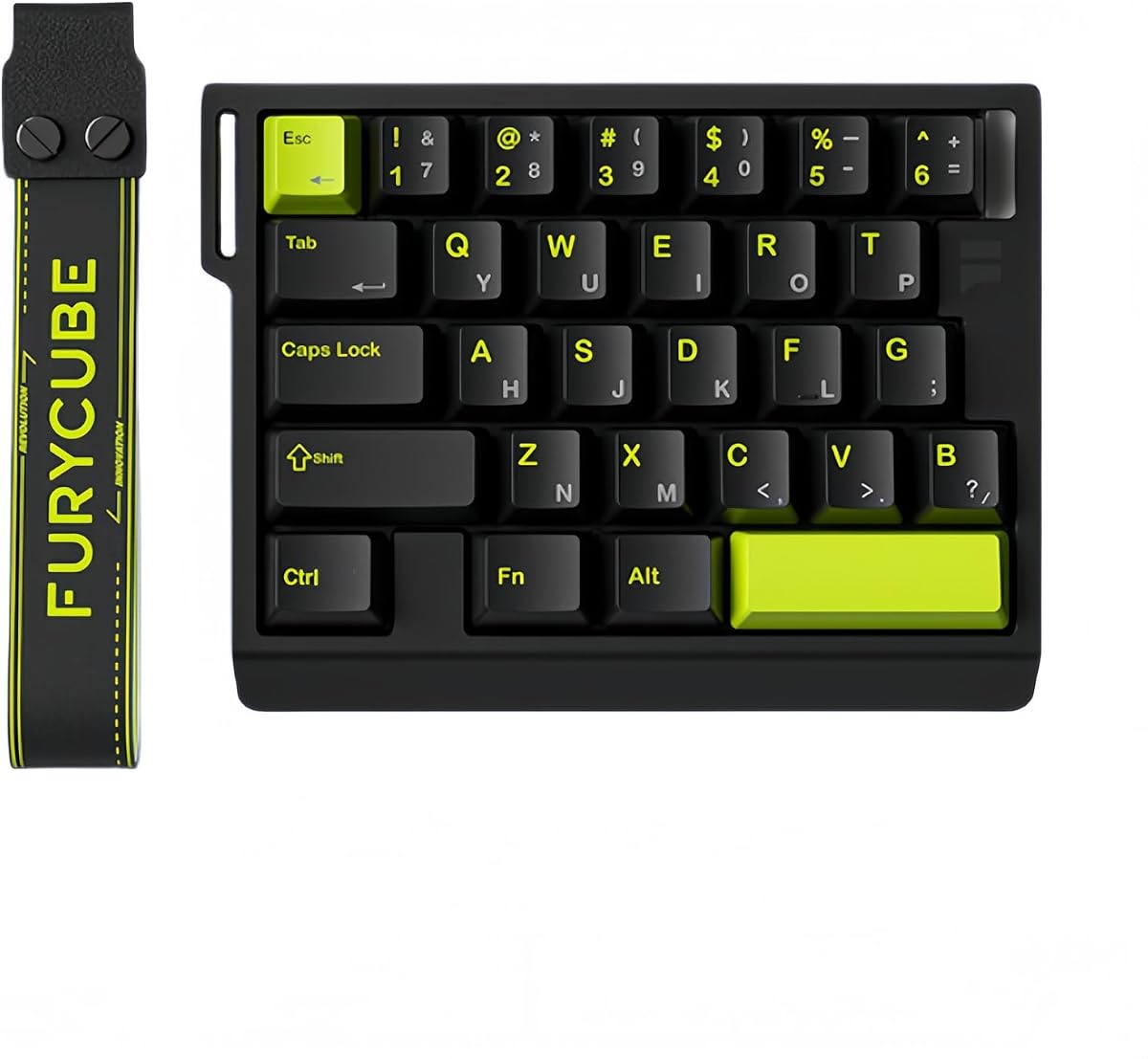
The RedThunder One Handed Gaming Keyboard offers an accessible entry point for left handed gamers on a tight budget. Rated 4.4 stars, it covers essential gaming needs with a focus on simplicity and portability.
We may earn a commission when you buy through this link, at no additional cost to you.
Its 35 key layout supports anti ghosting for accurate inputs during fast gameplay. The macro recording feature allows users to automate complex commands, adding value beyond standard key presses.
Build quality is functional but not premium, reflecting the budget price. Users might find the keycaps less durable over time compared to higher end models, but for casual play it performs well.
This is an ideal choice for students or casual gamers who need a quick upgrade without spending much. We suggest it for those testing the waters of one handed layouts before committing to expensive gear.
Built in macros can be recorded using specific function combinations. This makes it easy to execute complex moves without needing external software drivers.
The small size makes it easy to carry to LAN parties or move around your desk. Wrist rests provide basic support during extended usage sessions.
We may earn a commission when you buy through this link, at no additional cost to you.
The AZERON Keyzen represents the pinnacle of precision and customization for serious competitive gamers. With a 4.6 star rating, it offers advanced features like magnetic joysticks and premium mechanical switches.
We may earn a commission when you buy through this link, at no additional cost to you.
Its Hall Effect joystick provides drift free analog control that rivals traditional gamepad sticks. The Cherry MX switches ensure consistent feedback for every keypress, crucial for high speed competitive matches.
Adjustment is required to master the ergonomic design which fits specific hand sizes. The software is powerful but might overwhelm new users who prefer simple plug and play experiences.
We recommend this keypad for pros who need every advantage in their setup. The investment pays off in performance and comfort over long periods of intense gaming activity.
The joystick enables nuanced movements like 360 degree aiming and sensitivity adjustments. This level of control is unmatched by standard digital keypads.
Constructed with 3D printed parts, it allows for future upgrades and repairs. The design focuses on long term durability rather than disposable components.
We may earn a commission when you buy through this link, at no additional cost to you.
The AZERON Cyborg II is designed to replace keyboards entirely with an ergonomic keypad that fits the hand. Rated 4.3 stars, it offers unique analog controls that appeal to specific gaming genres.
We may earn a commission when you buy through this link, at no additional cost to you.
Its Hall Effect thumbstick allows for smooth analog inputs in compatible titles. The software is deep, offering fine tuned settings for sensitivity and dead zones that improve performance.
The design is specific to certain hand sizes which might limit comfort for everyone. The software is powerful but requires time to set up perfectly for different game types.
We suggest this for users who want a dedicated controller that feels like a keyboard. It is a niche product for those seeking unique ergonomic solutions in competitive environments.
Software allows mapping multiple zones on the stick for distinct actions. This flexibility makes it adaptable to various play styles and game requirements.
The adjustable parts ensure a snug fit for different hand sizes. Medium sizing works well for average hands, though smaller users might find it large.
We may earn a commission when you buy through this link, at no additional cost to you.
The AJAZZ AK029 focuses on competitive performance with rapid trigger technology. Rated 4.5 stars, it delivers fast response times essential for high level FPS games.
We may earn a commission when you buy through this link, at no additional cost to you.
Magnetic switches allow for adjustable actuation points and instant resets. This feature lets players customize sensitivity and reduce travel time for quicker reactions.
The aluminum build and acoustic dampening provide a premium feel and sound. However the small 29 key layout requires you to use a separate mouse pad for full control.
We recommend this for esports enthusiasts who prioritize speed and precision over extra keys. It is an excellent tool for competitive shooters where every millisecond counts.
Key resets happen immediately upon release without fixed thresholds. This allows for fast double taps and smooth movement without delay.
Five layers of internal padding ensure a quiet and solid typing experience. The aluminum plate adds rigidity and reduces unwanted vibrations.
We may earn a commission when you buy through this link, at no additional cost to you.
This ergonomic keyboard prioritizes health and comfort for office workers and accountants. Rated 4.4 stars, it aims to reduce strain through unique keycap shapes and layout.
We may earn a commission when you buy through this link, at no additional cost to you.
The patented natural_A shape helps keep wrists and shoulders in a neutral position. Multimedia hotkeys offer quick access to common controls without reaching for other devices.
Build quality is functional but dated compared to modern gaming keyboards. The design targets long term usage comfort rather than high speed gaming performance.
We suggest this for professionals who spend all day typing. It is a practical choice for those seeking ergonomic relief in a business environment.
The layout reduces the need to twist hands repeatedly. Natural key positioning helps prevent carpal tunnel and shoulder strain.
It supports Windows and Mac systems with standard connections. Drivers may be needed for specific OS optimization but it works broadly.
We may earn a commission when you buy through this link, at no additional cost to you.
The Keychron C0 HE blends modern magnetic tech with easy web based configuration. Rated 4.2 stars, it appeals to users who want speed without installing heavy software.
We may earn a commission when you buy through this link, at no additional cost to you.
Rapid trigger and Hall Effect switches offer precise control for FPS titles. The web configurator allows changes directly in the browser making setup quick and intuitive.
It is optimized for both Windows and Mac which is a plus for mixed environments. The lack of physical software installation keeps the system clean but relies on internet access.
We recommend this for creators and gamers who prefer simple setup workflows. It is a great choice for teams needing consistent settings across different systems.
Customize keys and RGB without downloading extra programs. This simplifies sharing configurations across multiple devices easily.
An 8K polling rate ensures minimal latency during rapid inputs. The magnetic technology supports adjustable actuation points for better accuracy.
We may earn a commission when you buy through this link, at no additional cost to you.
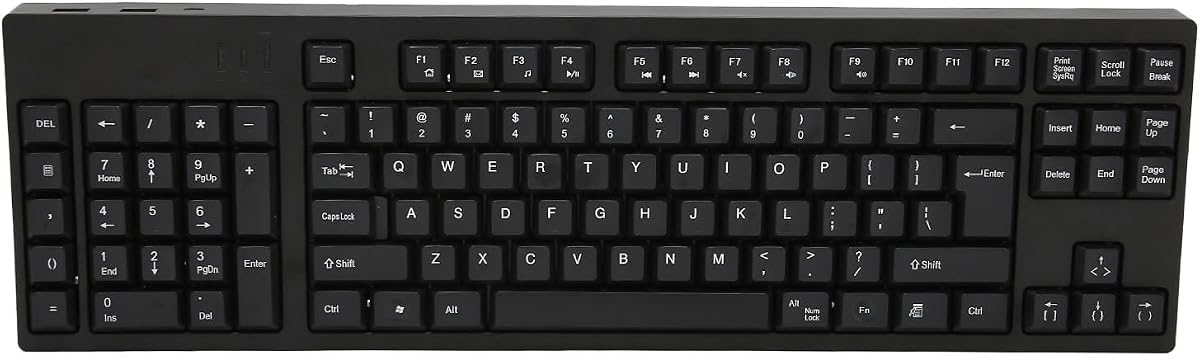
This full size left handed keyboard provides a complete alternative to standard layouts. Rated 5.0 stars, it offers every key you might need for work and play.
We may earn a commission when you buy through this link, at no additional cost to you.
The 109 key layout includes a dedicated numpad and function row for full productivity. It is designed to relieve right hand fatigue by moving controls to the left.
While the design is basic, it works well for general use without drivers. The micro USB connection is standard but slightly older than USB-C alternatives.
We suggest this for users needing a full keyboard feel without switching hands. It is a practical solution for accounting or design tasks requiring many keys.
Keep all standard keys in a reversed order for better access. The numpad is accessible without needing to switch mouse hands.
Simply plug in and start typing immediately. The design focuses on function over form and delivers reliable performance.
We may earn a commission when you buy through this link, at no additional cost to you.
The FKZ M30HE offers high customization for users who want to tweak every setting. Rated 4.0 stars, it provides advanced features like hot swapping and web drivers.
We may earn a commission when you buy through this link, at no additional cost to you.
Magnetic switches allow precise adjustment of actuation points. This lets you tune the keyboard to match your specific typing style and game needs.
The web driver simplifies setup but can still be overwhelming for casual users. RGB lighting adds visual flair but does not impact performance directly.
We recommend this for tinkerers who enjoy configuring their gear. It is a strong option for those who want flexibility in their input device.
Change switches without soldering for instant customization. This allows you to experiment with different feels easily.
Set how deep a key needs to press to trigger an input. This helps reduce fatigue and improve speed in games.
We may earn a commission when you buy through this link, at no additional cost to you.
The A4tech Ergonomic Left Handed Keyboard focuses on reducing physical strain. Rated 4.3 stars, it is built for users concerned about posture and hand health.
We may earn a commission when you buy through this link, at no additional cost to you.
Its layout encourages better hand positioning while typing. Multimedia keys add convenience for daily tasks without requiring extra mouse clicks.
The design is functional and straightforward without flashy gaming elements. It serves well for long office sessions where comfort is a priority.
We suggest this for professionals seeking ergonomic improvements. It is a practical tool for maintaining health during heavy computer usage.
The layout helps reduce shoulder strain during long work hours. Proper key placement keeps wrists in a neutral position naturally.
Uses a standard USB connection for broad compatibility. No special drivers are needed to start using it.
We may earn a commission when you buy through this link, at no additional cost to you.
Selecting the right left handed keyboard involves weighing layout, build quality, and specific features like magnetic switches or ergonomic rests.
Decide between full layouts with numpads or compact keypads for more mouse space. Compact options like 29 or 35 keys save room but limit extra macros.
Check if the numpad is on the left side to match your dominant hand for data entry.
Mechanical switches offer tactile feedback while magnetic switches allow adjustable actuation points. Magnetic tech is best for competitive gaming due to rapid trigger capabilities.
Consider your preference for clicky, tactile, or linear keys based on typing feel and noise tolerance.
Look for designs that support wrist resting and natural hand angles. Brands like AZERON offer adjustable parts to fit specific hand sizes.
Proper ergonomics reduce fatigue during long gaming sessions and protect long term hand health.
Choose between wired, wireless, or tri mode systems. Wired ensures lowest latency while wireless offers flexibility.
Ensure compatibility with your device whether PC, Mac, or console.
Higher polling rates like 8KHz reduce input lag for faster reactions. This is crucial for competitive shooters and fast paced games.
Verify that the device supports rapid trigger if you need instant key resets.
Web based configurators simplify setup while deep software offers advanced macros. Ensure the tools match your technical comfort level.
Check if profiles can be stored on device for easy swapping between setups.
Aluminum builds last longer and reduce vibration compared to plastic. PBT keycaps resist wear and shine better than ABS.
Look for hot swappable PCBs if you plan to change switches later.
Entry level keypads start under $30 while premium models exceed $200. Determine how much you value advanced tech versus basic functionality.
Invest in higher quality if you use the keyboard daily for many hours.
Begin by plugging the keyboard into a USB port and installing any required drivers. For web configurators simply open the browser link to map your keys.
Clean regularly using compressed air and a microfiber cloth to maintain key smoothness. Avoid harsh chemicals on plastic or printed surfaces.
Store your device in a dry place when not in use to protect internal electronics from humidity and dust buildup.
Left handed keyboards move the numpad and navigation keys to the left side allowing your dominant hand to handle both typing and data entry. This reduces reaching and improves comfort.
Yes but they may feel awkward if your hand dominance is reversed. Some models allow software swaps to fit either preference.
They offer adjustable actuation and rapid triggers which are ideal for competitive gaming. The precision can improve performance in fast paced titles.
Many options support macOS with specific drivers or web tools. Always check compatibility before purchasing to ensure full functionality.
Most software lets you record sequences or assign multiple actions to single keys. Follow the provided guide for your device to save profiles.
Basic plug and play models work without software but advanced features require drivers. Web based tools remove the need for local installation.
Mechanical switches with tactile feedback help prevent errors during fast typing. The AZERON Keyzen and RK ROYAL KLUDGE L98 are top choices for this.
We explored ten excellent options ranging from budget friendly keypads to premium ergonomic pads. Each model offers unique strengths tailored to specific gaming and work needs.
Prioritize magnetic switches for speed or ergonomic rests for long sessions based on your primary activity. The right choice depends on your hand size and layout preference.
Prices vary and models update often so check current listings before purchasing. Verify compatibility and warranty details to ensure a smooth experience.