10 Best LCD Controller Board for Laptop Screen (November 2026) Expert Guide
Written by Jamie · Updated November 2026
Finding the right LCD controller board for laptop screen repairs or DIY monitor projects can be challenging. You need a board that matches your panel's interface and resolution to ensure stable performance and clear visuals.
We have evaluated ten popular controller boards based on compatibility, interface types, and user feedback. This list covers various sizes and resolutions to help you find the exact match for your specific display panel.
Each pick shows key features and compatibility details to simplify your decision. Keep in mind that product availability and pricing may fluctuate over time, so always verify specifications before purchasing online.
Top 3 Picks for Best LCD Controller Board for Laptop Screen
Best Budget
VSDISPLAY H/D VGA DVI LVDs Controller Board 40Pin for 15.6" 1366×768 LP156WH2 LP156WH3 LP156WH4 TL B156XW02 N156B6-L0b LCD Screen
As an Amazon Associate we earn from qualifying purchases.
Top 10 Best LCD Controller Board for Laptop Screen in 2026 Compared
This table provides a side-by-side comparison of the top ten LCD controller boards available for laptop screen integration. Review the specs to find the model that matches your display requirements.
This H/D VGA DVI Audio LVDs Controller Board stands out as a top choice for users needing to repair or repurpose 17 to 19 inch LCD screens. With a 4.6 rating, it offers reliable performance for DIY monitor projects involving 1280×1024 resolution panels.
Pros
High compatibility with 17 and 19 inch panels
Supports both VGA and DVI inputs
Includes audio speaker connector
Self-check LED indicators for troubleshooting
Cons
Requires separate power adapter
Only supports 1280×1024 resolution
We may earn a commission when you buy through this link, at no additional cost to you.
The board supports both VGA and DVI video inputs, making it versatile for connecting to older desktops or laptops. It includes a speaker connector for audio output and features clear LED indicators to help users diagnose connection or signal issues during setup.
One trade-off is that it requires a separate 12V 3A power adapter which is not included in the package. Additionally, it is limited to 1280×1024 resolution so users with higher resolution displays will need a different model.
It is ideal for hobbyists or technicians restoring larger laptop screens or building custom monitors. If your panel matches the listed models like M170EG01 or M190EN01 this board provides a solid plug-and-play solution with excellent signal stability.
Wide Input Compatibility
Supporting both VGA and DVI inputs ensures this board works with a wide range of older video cards and devices.
Built-in Troubleshooting
LED indicators allow users to quickly verify power and signal status before connecting the screen.
VSDISPLAY H/D VGA DVI LVDs Controller Board 40Pin for 15.6" 1366×768 LP156WH2 LP156WH3 LP156WH4 TL B156XW02 N156B6-L0b LCD Screen
1366×768 Resolution
40 Pin LVDS Interface
VGA and DVI Inputs
12V 2A Power
The VSDISPLAY H/D VGA DVI LVDs Controller Board is an excellent budget option for users with 15.6 inch laptops screens in 1366×768 resolution. It holds a 4.4 rating and supports a wide variety of common panel models used in many older laptops.
Pros
Affordable price point
Compatible with popular LP156WH series panels
Includes audio speaker output
Plug and play setup
Cons
Only supports 1366×768 resolution
Requires external power supply
We may earn a commission when you buy through this link, at no additional cost to you.
This board features VGA and DVI inputs which make it easy to connect to various desktop PCs. It also includes a speaker connector for audio support and offers a plug-and-play experience for users familiar with basic cable connections.
The main limitation is that it does not support higher resolutions like 1080p so it is not suitable for FHD panels. Additionally you will need to source a separate 12V 2A power adapter to run the board effectively.
If you are looking for a cost-effective solution to revive a 15.6 inch laptop screen this board delivers strong value. Its compatibility with LP156WH2 and similar models makes it a reliable choice for standard HD laptop repairs.
Common Panel Support
Designed specifically to work with popular 15.6 inch HD laptop panels like the LP156WH series.
Simple Interface Options
VGA and DVI inputs ensure compatibility with older monitors and desktop graphics cards.
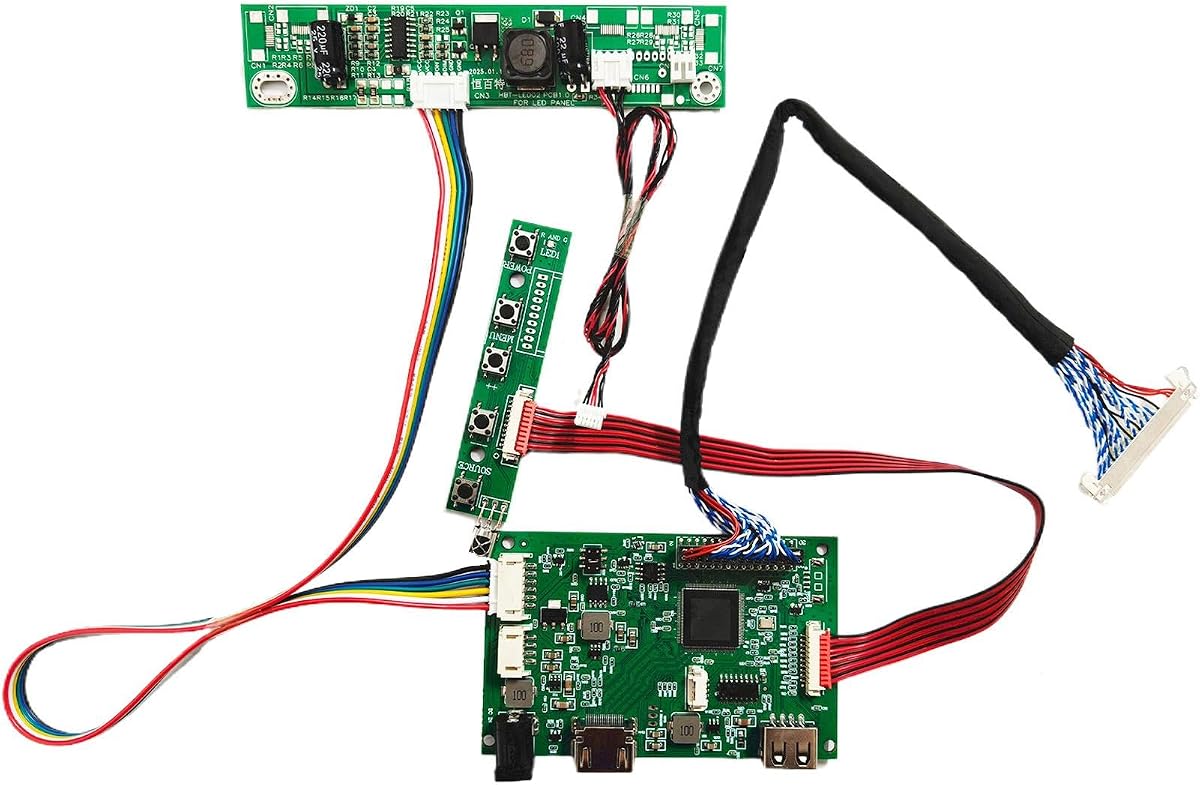
This VGA Controller Board is designed for users working with Full HD 1920×1080 laptop panels using a 30 Pin eDP interface. It received a 4.0 rating and supports a wide range of screen sizes from 11.6 to 17.3 inches.
Pros
Supports 1080p FHD resolution
Compatible with many modern laptop panels
No driver installation needed
Supports 11.6 to 17.3 inch screens
Cons
Limited to VGA input
Requires precise cable alignment
We may earn a commission when you buy through this link, at no additional cost to you.
The board does not require any driver installation and works directly once connected to the proper signal source. It is a solid choice for turning old FHD laptop screens into standalone monitors using a basic VGA connection from your PC.
The limitation is that it only accepts VGA input which means you will need an adapter if your computer only has HDMI or DisplayPort. You must also ensure cable alignment is correct to avoid issues like white screens or signal loss.
If you need to utilize a 1080p screen panel this board provides a straightforward solution. It is particularly useful for users who already have VGA-enabled systems or can easily adapt their video output.
Direct Plug and Play
No drivers are required for operation making setup faster and easier for most users.
Wide Size Compatibility
Supports screens ranging from 11.6 inches up to 17.3 inches in various laptop form factors.
H/D LCD Controller Board for 11.6" 13.3" 14" 15.6" 1366×768 30 Pin eDP (not for 1920×1080) Screen Panel
1366×768 Resolution
30 Pin eDP Interface
VGA Input Only
12V 2A Power
This H/D LCD Controller Board is specifically optimized for 1366×768 HD panels using a 30 Pin eDP interface. It has a 4.4 rating and is suitable for laptop screens ranging from 11.6 to 15.6 inches in size.
Pros
Precision compatibility for HD panels
Pre-connected signal cable included
Low standby power consumption
LED indicators for status check
Cons
Does not support FHD resolutions
Requires separate power adapter
We may earn a commission when you buy through this link, at no additional cost to you.
The package includes a pre-connected signal cable to simplify installation and reduce the risk of connection errors. It features energy-saving design with low standby consumption and uses LED indicators to confirm signal status quickly.
A critical note is that it will not work with 1920×1080 panels so buyers must verify their screen resolution before purchase. Additionally a separate 12V 2A power adapter is required for stable operation during use.
Ideal for users repairing standard HD laptop screens this board offers reliable performance and clear setup instructions. It ensures stable image quality and is a safe choice for compatible eDP interface panels.
Simplified Setup
Pre-connected signal cables reduce installation time and minimize connection errors for users.
Energy Efficient Design
Low standby power consumption helps save energy when the monitor is not in active use.
VSDISPLAY VGA DVI Controller Board for 21.5" 23.8" 1920×1080 30Pin Screen
1920×1080 Resolution
30 Pin Interface
VGA and DVI Inputs
12V 3A Power
The VSDISPLAY VGA DVI Controller Board is designed for larger laptop screens between 21.5 and 23.8 inches with 1920×1080 resolution. It has a 4.2 rating and offers a solid bridge between older desktops and large LCD panels.
Pros
Supports 21.5 to 23.8 inch panels
Compatible with FHD resolutions
VGA and DVI input support
Includes inverter board
Cons
Requires separate power adapter
No HDMI input option
We may earn a commission when you buy through this link, at no additional cost to you.
It accepts both VGA and DVI video inputs and comes with an inverter board for added functionality. This makes it a versatile choice for DIY monitor enthusiasts who want to repurpose larger laptop displays.
One downside is the absence of HDMI input which may require adapters for modern computers. Users also need to source a 12V 3A power adapter separately since it is not included with the board.
If you need a controller for a large FHD panel this board provides good compatibility and performance. It is well suited for users who prioritize size and resolution over having the latest video input types.
Large Panel Support
Specifically designed to handle larger 21.5 to 23.8 inch laptop screens with FHD resolution.
Dual Input Flexibility
Both VGA and DVI inputs allow connections to a variety of legacy and modern PCs.
H/D Controller Driver Board for 11.6'' 13.3'' 14'' 15.6'' 1920×1080 30 Pin eDP (not for 1366×768) LCD Screen
1920×1080 Resolution
30 Pin eDP Interface
VGA Input Only
12V 2A Power
This H/D Controller Driver Board is built for 1920×1080 panels using a 30 Pin eDP interface. It holds a 4.1 rating and is compatible with many modern laptop screens from 11.6 to 15.6 inches.
Pros
Optimized for 1080p panels
Compatible with popular eDP models
Includes pre-connected cable
Clear troubleshooting tips
Cons
Does not support HD resolution
Requires external power supply
We may earn a commission when you buy through this link, at no additional cost to you.
The board comes with a pre-connected signal cable to ease installation and ensure optimal data transmission. It includes clear troubleshooting tips for common issues like black screens or signal errors during setup.
It is not compatible with 1366×768 panels so users must verify their screen resolution before purchasing. Additionally a separate 12V 2A power adapter is needed to run the board properly.
This board is ideal for users who need a reliable FHD solution for their laptop screen projects. It balances compatibility and ease of use making it a strong option for standard 1080p eDP panels.
Pre-connected Cable
A pre-connected signal cable simplifies setup and helps ensure correct connection to the board.
Troubleshooting Guide
Detailed troubleshooting tips help users resolve common connection and display issues quickly.
Taidacent Universal LVDS Controller Board 10-65 Inch LCD Screen HDMI DVI VGA to LVDS Driver Board DIY Notebook Display Kit (Single Drive Board)
Universal 10 to 65 Inch
HDMI DVI and VGA Inputs
LVDS Interface Support
NT68676 Chipset
The Taidacent Universal LVDS Controller Board offers support for screens ranging from 10 to 65 inches with HDMI DVI and VGA inputs. It has a 4.0 rating and uses the NT68676 chipset for robust signal processing.
Pros
Universal size compatibility
Supports HDMI DVI and VGA
Multiple OSD languages available
Suitable for large DIY kits
Cons
Complex setup for new users
May require additional configuration
We may earn a commission when you buy through this link, at no additional cost to you.
This board supports multiple OSD languages including English and French which makes it accessible for global users. It is designed for DIY notebook display kits and allows flexible customization for various LVDS panels.
The universal compatibility can lead to a more complex setup process for users unfamiliar with LVDS configurations. It may require additional configuration to ensure the correct resolution and pin alignment for your panel.
If you are working on a large or unique display project this board provides the flexibility you need. It is an excellent choice for advanced users who want to maximize screen size options.
Extensive Size Support
Compatible with screens from 10 to 65 inches offering unmatched flexibility for DIY projects.
Language Options
Multiple OSD languages ensure the menu settings are accessible for users worldwide.
VSDISPLAY H/D USB LCD Controller Board for 21.5'' 23.8''1920×1080 Screen
1920×1080 Resolution
30 Pin Interface
HDMI and USB Inputs
12V 2A Power
The VSDISPLAY H/D USB LCD Controller Board is a top rated choice for 21.5 to 23.8 inch FHD panels. It has a 5.0 rating and supports both HDMI and USB inputs for versatile media playback.
Pros
Supports USB video playback
Compatible with large FHD panels
Includes image rotation support
Includes inverter board
Cons
Limited to specific panel models
Requires external power supply
We may earn a commission when you buy through this link, at no additional cost to you.
This board allows direct video playback via USB and includes image rotation support for flexible display orientations. It also comes with an inverter board which simplifies the setup process for users.
Compatibility is limited to specific panel models so users must verify their screen type before purchase. Additionally a separate 12V 2A power adapter is required for operation since it is not included.
Ideal for digital signage or media players this board offers strong multimedia capabilities. It is a great option for users who want to integrate USB media playback into their monitor setup.
USB Video Support
Direct USB video playback allows for easy media display without connecting to a PC.
Image Rotation Feature
Support for 180 degree image rotation provides flexibility for portrait or landscape setups.
15.6"Compatible For LP156WH4 LTN156AT17 B156XW02 LP156WH2 1366X768 LCD LED Screen Controller Board Driver HDMI+VGA Monitor LVDS 40Pins
1366×768 Resolution
40 Pin LVDS Interface
HDMI and VGA Inputs
Compatible with LP156WH4
This 15.6 inch compatible controller board supports 1366×768 resolution using a 40 Pin LVDS interface. It offers HDMI and VGA inputs and is compatible with popular panels like LP156WH4 and B156XW02.
Pros
Supports HDMI input
Adjustable image parameters
Stable operation features
Compatible with popular 15.6 inch panels
Cons
Limited to 15.6 inch screens
Requires external power adapter
We may earn a commission when you buy through this link, at no additional cost to you.
The board features adjustable image parameters for brightness and contrast which helps optimize visual quality. It also monitors working status to ensure stable operation and prevent hardware overload during extended use.
Its design is optimized for 15.6 inch panels so users with different sizes will need a different model. Additionally it requires a separate power adapter for operation which may add to the setup process.
If you need to repair a 15.6 inch HD laptop screen this board offers reliable signal processing. It is suitable for users looking for basic HDMI support and stable performance in standard laptop panels.
Adjustable Image Quality
Parameters for brightness and contrast are adjustable to enhance the viewing experience.
Stable Operation Monitoring
Continuous monitoring helps prevent hardware overload and extends the lifespan of the screen.
This controller board is a premium option specifically matched for B173HW01 and B173HW02 17.3 inch laptop panels. It has a 5.0 rating and supports 1920×1080 resolution with HDMI and VGA input compatibility.
Pros
Premium build quality and integration
High power efficiency management
HDMI and VGA input support
Specific to B173HW01 panels
Cons
Very specific panel compatibility
Requires separate power adapter
We may earn a commission when you buy through this link, at no additional cost to you.
The board features high power efficiency management which helps maintain performance while reducing consumption. It ensures stable screen voltage and supports low-power modes to extend battery life during operation.
Its compatibility is highly specific which means users must confirm their panel model before purchase. Also it requires a separate power adapter which adds to the setup complexity but ensures reliable operation.
If you have a B173HW01 or B173HW02 panel this board is the most reliable choice available. It provides premium integration and stability ideal for users who want top-tier repair solutions.
Power Efficiency
Optimized power management ensures stable voltage and extended battery life for integrated systems.
Precise Panel Matching
Designed specifically for B173HW01 panels to guarantee perfect compatibility and performance.
We may earn a commission when you buy through this link, at no additional cost to you.
Buying Guide – How to Choose the Best LCD Controller Board for Laptop Screen
Choosing the right controller board requires matching your screen's specifications precisely. This guide outlines the critical factors to consider for a successful repair or project.
Resolution Compatibility
The controller board must match your panel's resolution to display images correctly. Boards labeled for 1366×768 will not work with 1920×1080 panels and vice versa. Always check your screen's model number to confirm resolution before purchasing.
Verify the resolution listed in the product title to ensure it aligns with your display requirements.
Interface Type
Interfaces like 30 Pin eDP and 40 Pin LVDS are not interchangeable. Your controller board must have the exact connector type your screen uses to function properly. Mismatched interfaces will prevent any signal transmission.
Check the physical connector on your screen and compare it to the board's input specification.
Screen Size
Controller boards are often designed for specific screen sizes such as 15.6 inches or 17.3 inches. Using a board meant for a different size may cause display scaling issues or no signal. Ensure the size range listed includes your panel size.
Match the screen size range provided in the product details to your exact panel dimensions.
Video Inputs
Consider what video inputs your setup needs whether VGA DVI or HDMI. Some boards support multiple inputs while others only have VGA. Ensure the board supports the ports available on your computer or device.
Choose a board with input types that match your computer's available video output ports.
Power Requirements
Most boards require a 12V DC adapter but the amperage may vary between 2A and 3A. Using an adapter with insufficient current can cause flickering or constant restarts. Always check the power specifications on the product page.
Verify that your power adapter meets the voltage and amperage requirements for stable operation.
Cable Configuration
Some boards come with pre-connected signal cables while others require you to buy them separately. Pre-connected cables simplify installation and reduce connection risks. Check the packing list to see what is included before you order.
Confirm whether signal cables are included or if you need to purchase them separately.
Panel Model Match
Manufacturers often list specific panel models that are guaranteed to work with the board. If your exact model is listed you can expect a smooth plug and play experience. If not listed check the resolution and interface match carefully.
Refer to the supported model list in the product description for confirmation of compatibility.
Troubleshooting Features
Boards with LED indicators or self-check features make diagnosing connection issues easier. These tools help you identify power or signal errors without needing extra equipment. Look for boards that include diagnostic features for smoother setup.
Select a board that offers clear status indicators to help with troubleshooting if issues arise.
How to Use and Care for Your LCD Controller Board for Laptop Screen
Begin by disconnecting your laptop from any power source to avoid electrical shorts. Open the laptop or screen casing and locate the screen connector on the panel.
Connect the signal cable from the controller board to the screen ensuring Pin 1 is aligned. Connect the power adapter to the board and plug it into a wall outlet before turning it on.
Test the display by connecting your video source and turning on the board. If the screen flickers or shows no signal check the power supply and cable connections before restarting.
Frequently Asked Questions
Do I need to install drivers for these controller boards?
Most controller boards for laptop screens are plug and play devices that do not require driver installation. They handle the signal processing internally so you just need to connect the cables properly.
Can I use any 12V power adapter with these boards?
No you must use a power adapter that matches the specific voltage and amperage requirements listed for the board. Using an adapter with insufficient current can cause display flickering or system instability.
What happens if the screen shows a black screen after setup?
A black screen often indicates a power issue or incorrect cable connection. Check the power adapter amperage and ensure the signal cable is aligned with Pin 1 on the board.
Are these boards compatible with all laptop screen models?
No these boards are designed for specific resolutions and interfaces. You must match the board to your screen model resolution and connector type to ensure compatibility.
Why does my screen show white or colored bands?
White or colored bands usually mean the signal cable is not connected correctly or the resolution settings are wrong. Recheck the cable alignment and your display settings on the connected computer.
Can I use these boards with 4K resolution screens?
Most of these boards are designed for HD or Full HD resolutions up to 1920×1080. For 4K screens you will need specialized controllers that support higher resolution standards.
Do these controller boards include audio support?
Some boards include a speaker connector for audio output but others may require separate audio wiring. Check the product description to confirm if audio support is included.
How do I know if the board is receiving power?
Many boards feature LED indicators that light up when power is supplied. If the LED does not light up check your power adapter and cable connections before troubleshooting the display.
Final Thoughts on Choosing the Best LCD Controller Board for Laptop Screen
Choosing the right controller board depends on matching your screen resolution interface and size. The boards in this guide cover a range of needs from budget HD panels to FHD large screens.
Prioritize compatibility over other features to avoid display issues. Verify your panel model and connector type before purchasing to ensure a smooth installation process.
Prices and availability can change so always double check the current product details on Amazon before you order. With the right board you can easily repair or repurpose your old laptop screens.