
Lenovo Smartcard Wired Keyboard II
4.4Editor score
Affordable security solution
Standard USB connectivity
Compact footprint design
Explore our expert guide comparing the top 10 keyboards with smart card readers for secure authentication across government healthcare and enterprise environmen
Securing digital identities requires robust hardware solutions that blend typing comfort with advanced authentication features. A keyboard with smart card reader integrates secure access directly into your daily workflow ensuring seamless login experiences without extra dongles or complex setups.
We analyzed ten top-rated models focusing on security certifications ergonomic design and build quality to help you find the perfect match. Our comparison covers essential standards like FIPS 201 and CCID compatibility ensuring these devices meet strict enterprise and government compliance requirements.
Each product entry highlights unique strengths trade-offs and ideal use cases so you can make an informed decision for your workspace. Keep in mind that pricing and availability fluctuate regularly so verify current details before finalizing your purchase decision today.
4.4Editor score
4.6Editor score

4.2Editor score
The following table provides a side-by-side comparison of all ten selected models highlighting key specifications and design features to help you quickly identify the best fit for your specific security needs and workspace requirements.


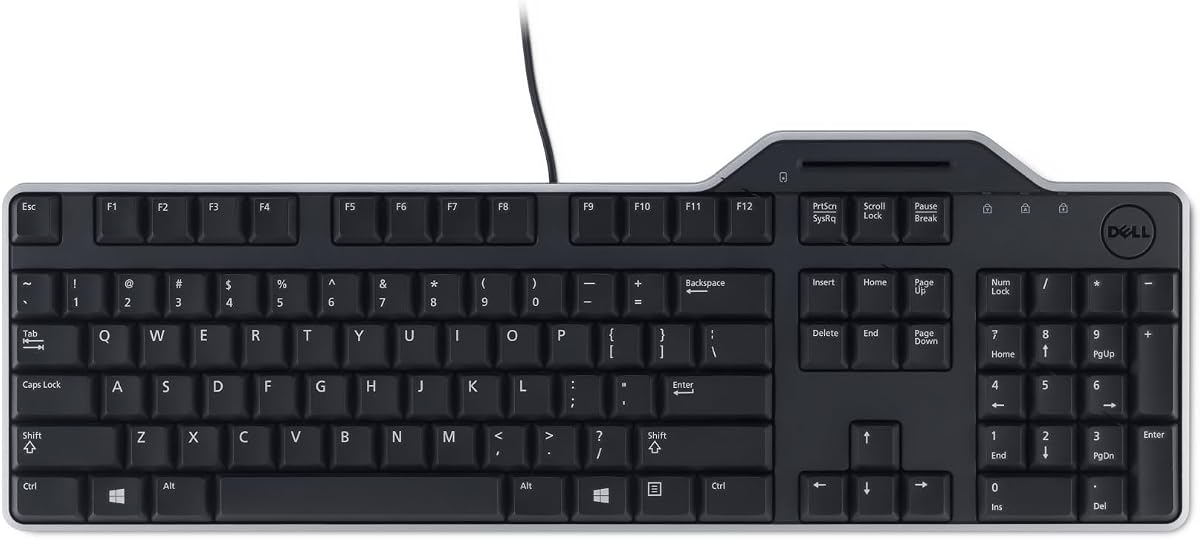
The Dell KB813 stands out as a reliable choice for securing access with its integrated smart card reader. Rated highly by users it delivers a secure authentication experience without adding bulk to your desk setup.
We may earn a commission when you buy through this link, at no additional cost to you.
Its spill-resistant design protects against accidental liquid damage while the low-profile keys offer a quiet typing environment ideal for open office settings. The detachable palm rest enhances comfort during long work sessions reducing wrist strain effectively.
While it lacks extensive customization options the straightforward design ensures plug-and-play functionality that saves time. This balance of security and practicality makes it a solid investment for enterprise environments requiring consistent performance.
Users needing a dependable keyboard with built-in security features will find this model meets daily demands efficiently. We recommend it for teams prioritizing secure login processes alongside comfortable typing experiences.
Built-in smartcard reader simplifies authentication workflows eliminating the need for external devices and streamlining secure logon processes.
Detachable palm rest and low-profile keys promote natural hand positioning reducing fatigue during extended daily use.
We may earn a commission when you buy through this link, at no additional cost to you.
The Adesso TruForm AKB-150SB-TAA is designed specifically for organizations requiring TAA compliance alongside robust security features. Its built-in smart card reader supports multiple international standards making it versatile for diverse enterprise security protocols.
We may earn a commission when you buy through this link, at no additional cost to you.
The split ergonomic design encourages natural hand positioning which helps reduce joint pain and improve posture over long periods. Integrated multimedia hotkeys provide quick access to common tools while the quiet membrane switches maintain a peaceful workspace.
Though the price reflects its specialized compliance features the durability and ergonomic benefits justify the investment for government and regulated sectors. The learning curve for the split layout is minimal and most users adapt quickly to the improved positioning.
This keyboard is ideal for federal agencies or vendors needing certified hardware with secure identification capabilities. We recommend it for professionals who prioritize compliance and long-term comfort in their daily workflow.
Designed to meet U.S. Trade Agreement Act Specifications ensuring suitability for government procurement and secure agency requirements.
Split key zones and gently sloped shape reduce spinal discomfort and promote natural wrist alignment for healthier typing.
We may earn a commission when you buy through this link, at no additional cost to you.
The Cherry KC 1000 delivers certified security with FIPS 201 and EMV 2000 approvals ensuring it meets stringent government and financial standards. Its integrated chip card terminal allows secure PIN entry making it a reliable tool for authorized access.
We may earn a commission when you buy through this link, at no additional cost to you.
The thin design features a low smart card contacting unit that keeps the profile minimal while maintaining durability. Driver support for Windows Mac and Linux ensures broad compatibility across diverse IT environments without complex configurations.
While it lacks extra multimedia features the focus remains on secure and efficient authentication. The one-handed operation of the smart card module adds convenience for users who need quick access without interrupting their workflow.
This model suits IT departments requiring verified compliance standards for secure logon systems. We recommend it for organizations prioritizing security certifications and cross-platform compatibility in their hardware choices.
Approved by FIPS 201 and EMV 2000 Level 1 ensuring compliance with high security industry standards for identity verification.
Official drivers available for Windows macOS and Linux enabling seamless integration across various operating system environments.
We may earn a commission when you buy through this link, at no additional cost to you.
The Adesso EasyTouch 130SB brings mechanical switch durability to secure workstations with red switches rated for 50 million keystrokes. The built-in smart card reader supports EMV 4.0 and other standards ensuring safe transactions and secure web logons.
We may earn a commission when you buy through this link, at no additional cost to you.
A dedicated Copilot AI hotkey allows instant access to Microsoft Copilot helping users generate code or get creative suggestions without navigating menus. Large print keycaps enhance visibility which is helpful for low-light conditions or users needing better character legibility.
Mechanical switches provide clear tactile feedback but may produce more sound than membrane options. The 104-key full-size layout includes standard internet and multimedia hotkeys offering a comprehensive set of controls for daily tasks.
Ideal for power users who prefer mechanical feedback alongside security and AI features. We recommend it for developers or professionals needing durable input devices with modern productivity enhancements.
Copilot hotkey provides direct access to AI assistance streamlining tasks like code generation and creative writing efficiently.
Large print keycaps offer improved contrast making symbols and letters easier to read during extended typing sessions.
We may earn a commission when you buy through this link, at no additional cost to you.
This Dell model offers a straightforward and reliable solution for secure authentication at an affordable price point. The wired USB connection ensures fast data transfers without the need for batteries keeping your setup simple and consistent.
We may earn a commission when you buy through this link, at no additional cost to you.
A spill-resistant keyboard safeguards against beverage mishaps which is essential for shared office spaces. The full-size layout includes a detachable palm rest providing ergonomic support during long work sessions while maintaining a quiet typing experience.
While it lacks advanced features the focus on essential security and comfort makes it a practical choice for basic enterprise needs. The quiet profile helps reduce distractions allowing users to focus on tasks without keyboard noise.
Teams looking for a dependable and cost-effective secure keyboard will find this model meets daily requirements well. We recommend it for budget-conscious organizations needing reliable smart card integration.
Wired USB connectivity provides secure fast data transfers without battery dependency ensuring consistent performance.
Spill-resistant design safeguards against accidental liquid spills extending the lifespan of the device in active offices.
We may earn a commission when you buy through this link, at no additional cost to you.
The Kensington KB201C is designed for government and enterprise environments requiring CAC and FIPS-201 compliance. It provides reliable authentication and data protection making it an essential tool for organizations with strict security requirements.
We may earn a commission when you buy through this link, at no additional cost to you.
Its quiet-click keyboard enhances the workspace by allowing focused productivity without disturbing colleagues nearby. The full-size layout includes a numeric keypad facilitating faster data entry for professionals working extensively with numbers.
While the rating is slightly lower the TAA compliance and 3-year limited warranty offer peace of mind for long-term deployment. Compatibility with Windows macOS and ChromeOS ensures it fits into various IT ecosystems seamlessly.
This keyboard is ideal for federal agencies needing compliant hardware with standard typing features. We recommend it for procurement officers prioritizing regulatory standards and warranty coverage.
CAC certified and TAA compliant ensuring suitability for U.S. Federal Government institutions and strict security measures.
Full-size layout with numeric keypad enhances productivity facilitating faster data entry for number intensive tasks.
We may earn a commission when you buy through this link, at no additional cost to you.
Lenovo offers a simple yet effective solution for secure access with this wired smart card keyboard. Its compact footprint saves desk space while the US English layout ensures compatibility with standard enterprise environments.
We may earn a commission when you buy through this link, at no additional cost to you.
The lightweight design reduces bulk making it easier to transport or reposition as needed. Users benefit from secure authentication without complex setup processes ensuring it integrates quickly into existing systems.
While specific technical details are limited the product maintains Lenovo's reputation for reliability and straightforward functionality. It provides a basic but effective method for adding smart card security to standard workstations.
Teams needing a minimal and affordable secure keyboard option will find this model practical. We recommend it for basic deployments where space and budget are primary constraints.
Compact footprint allows for efficient desk utilization ideal for smaller workspaces or shared office areas.
Plug-and-play wired connectivity ensures quick integration into systems without software installation requirements.
We may earn a commission when you buy through this link, at no additional cost to you.
The HP USB Business Slim Smartcard Keyboard features a sleek profile that saves space while integrating secure card access. Built-in spill drain technology helps manage accidental liquids protecting the internal components effectively.
We may earn a commission when you buy through this link, at no additional cost to you.
LED key light indicators provide visual feedback for important keys ensuring clarity in low-light conditions. The membrane keyswitch offers a quiet typing experience suitable for collaborative office environments where noise reduction is valued.
While it focuses on essentials rather than multimedia features the reliability of HP business hardware shines through. The six-foot cable length provides flexibility for desktop arrangement without needing extra extensions.
This model is ideal for users preferring a slim and quiet keyboard with essential security features. We recommend it for professional settings valuing clean aesthetics and spill protection.
Slim keyboard profile reduces desk footprint allowing for a cleaner workspace layout with reduced visual clutter.
Built-in spill drain system helps protect internal electronics from liquid damage extending device lifespan significantly.
We may earn a commission when you buy through this link, at no additional cost to you.
The Cherry Secure Board 1.0 supports both traditional smart cards and RF/NFC tags for versatile authentication options. Intelligent security features include authentication and encryption making it ideal for thin client environments requiring secure data transfer.
We may earn a commission when you buy through this link, at no additional cost to you.
Read/write compatibility with ISO 7816 and ISO 14443 A/B compliant cards ensures broad device support. The CCID compatible design simplifies installation reducing software complexity for IT administrators managing multiple endpoints.
While focused on specific security protocols the GS Approval adds a layer of trust regarding quality and compliance. This model excels in scenarios where contactless card options are required alongside traditional smart card access.
Organizations implementing secure virtual desktops will find this keyboard a strong match. We recommend it for advanced security setups needing both contact and contactless authentication support.
Intelligent reader supports both smart cards and RF/NFC tags providing flexible authentication options for varied needs.
Secure mode with encryption especially benefits thin clients by streamlining authentication within virtualized environments.
We may earn a commission when you buy through this link, at no additional cost to you.
This new OEM unit offers the same core functionality as the standard Dell KB813 model. It arrives unopened ensuring a clean condition for immediate deployment in secure enterprise environments.
We may earn a commission when you buy through this link, at no additional cost to you.
The English keyboard layout supports standard typing while the integrated smart card reader enables secure authentication processes. As an OEM product it provides a direct replacement or upgrade option for existing Dell workstations.
While specifications are basic the reliability of Dell hardware remains consistent across these models. It is a practical choice for bulk deployments where identical units are needed for standardized IT support.
Users seeking a fresh unit with proven features will find this option valuable. We recommend it for IT procurement needing reliable and certified replacement keyboards.
Unopened new unit ensures clean condition ready for immediate deployment in standardized enterprise environments.
English layout and smart card integration ensure seamless compatibility with existing Dell workstation setups.
We may earn a commission when you buy through this link, at no additional cost to you.
Selecting the right secure keyboard requires balancing certification needs ergonomics and budget. This guide outlines key factors to evaluate before purchasing to ensure compatibility and comfort.
Look for standards like FIPS 201 CCID or CAC compliance to ensure the keyboard meets your organization regulatory requirements. These certifications confirm the device can handle secure authentication processes legally and safely.
Verify that the keyboard supports the specific protocols your IT department mandates for secure login access.
Consider keyboards with split layouts or built-in palm rests to reduce wrist strain during long work sessions. Ergonomic features are vital for maintaining productivity and comfort over time in busy offices.
Choose a layout that supports natural hand positioning to prevent repetitive strain injuries.
Wired USB models generally offer more reliable security connections compared to wireless options. Ensure the cable length suits your desk setup to avoid clutter or connectivity issues during daily use.
Opt for wired USB connectivity to guarantee stable and secure data transfer for authentication.
Decide between membrane or mechanical switches based on noise tolerance and tactile preference. Membrane keys are quieter while mechanical options provide longer lifespans and clearer feedback.
Select switch types that match your office environment noise requirements and typing habits.
Confirm driver availability for your operating system whether Windows macOS or Linux. Cross-platform support ensures the keyboard works seamlessly across different devices without software conflicts.
Check system compatibility before purchase to avoid driver installation headaches later.
Prioritize spill-resistant features and durable materials to protect against daily office accidents. High-quality construction extends the lifespan of your keyboard reducing replacement costs over time.
Look for durable features like spill resistance to protect your investment from common accidents.
Read customer reviews to gauge real-world performance and durability issues specific to the model. Feedback often highlights practical pros and cons not mentioned in official product descriptions.
Use user reviews to validate claims and identify potential long-term reliability issues.
Check the warranty period and support terms provided by the manufacturer. A longer warranty indicates confidence in product quality and offers protection against defects.
Ensure the warranty covers potential issues to safeguard your purchase investment.
Connect the keyboard to your computer via USB and install any necessary drivers before inserting a smart card. Ensure the device is recognized by your operating system to facilitate smooth authentication.
Clean the keys and smart card slot regularly with compressed air to prevent dust buildup. Avoid exposing the keyboard to direct sunlight or moisture to maintain its functionality over time.
Store the keyboard in a cool dry place when not in use to protect its internal components. If the unit has a detachable palm rest remove it before transport to avoid stress on the hinges.
A keyboard with a smart card reader is primarily used for secure authentication in government healthcare and enterprise environments. It allows users to insert a smart card for identity verification enabling secure logon without external dongles.
Many models include drivers for macOS but compatibility varies by manufacturer. Check product specifications to confirm system support before purchasing if you use Apple computers.
Most modern models offer plug-and-play functionality without extra software. However complex authentication may require driver installation for specific protocols like CAC or FIPS.
Use a can of compressed air to gently blow out dust from the slot. Avoid using liquids or sharp objects to prevent damage to the internal contacts.
FIPS 201 compliance ensures the device meets U.S. government standards for identity verification. It is required for many federal agencies to ensure secure access control systems.
Wired keyboards offer more reliable connections and eliminate battery dependency which is crucial for secure environments. They also reduce latency and potential signal interference compared to wireless models.
This guide has highlighted top models like the Dell KB813 for overall value and the Cherry Secure Board 1.0 for advanced RF/NFC needs. Selecting the right option depends on your specific security protocols and ergonomic requirements.
Prioritize certifications that match your industry standards while considering comfort features for daily use. A well-chosen keyboard ensures both secure access and comfortable typing for your team.
Remember to verify current availability and details as product specifications may change. Regularly checking for updates ensures you get the most suitable model for your secure workspace needs.