
AULA WIN68 HE
4.5Editor score
Adjustable Actuation
Web-Based Driver
Compact 60% Layout
Discover the top keyboards for Valorant ranked by speed and precision. We compare Hall Effect, magnetic, and optical switches to help you win every duel.
Finding the right keyboard for Valorant means prioritizing speed and precision. Players need switches that register inputs instantly without delay. This guide highlights models designed for competitive FPS play.
We evaluated each product based on polling rates, switch technology, and build quality. Our analysis focuses on features like Rapid Trigger and adjustable actuation. These traits determine performance in high-stakes matches.
Each pick includes detailed specs and real-world performance notes. Prices and availability change frequently so verify details before buying. We aim to help you choose the best tool for your setup.
4.5Editor score

4.1Editor score

4.6Editor score
This table compares all ten models side by side. Look for polling rates, switch types, and layout sizes to find the right fit for your gaming style and desk space.

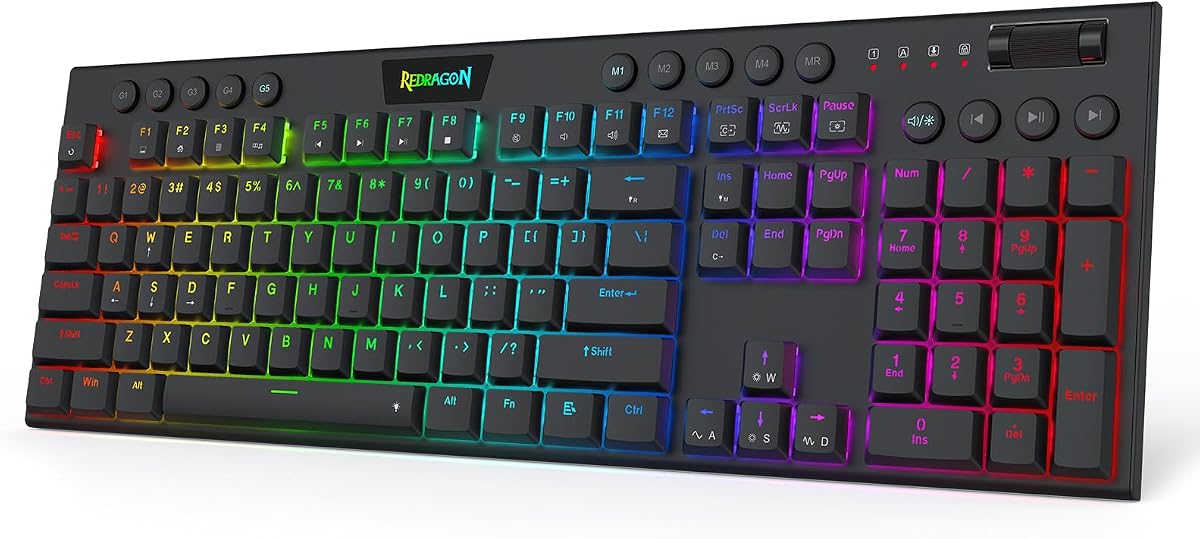





The Redragon K673 HE stands out for its speed and precision. Rated 4.1 stars it brings advanced magnetic technology to budget-conscious gamers. The Hall-Effect switches eliminate physical contact for smoother keystrokes.
We may earn a commission when you buy through this link, at no additional cost to you.
Its 8000Hz polling rate ensures inputs register instantly. Rapid Trigger mode helps with quick counter-strafing. You can calibrate actuation points between 0.1mm and 3.4mm for tailored sensitivity.
While it requires driver installation for full features the performance is worth it. The lack of wireless might bother some users but wired connections offer reliability during intense matches.
This keyboard is ideal for FPS players needing split-second reactions. The build quality and sound dampening make it a strong daily driver for competitive Valorant sessions.
The 8000Hz polling rate ensures inputs register instantly reducing delay.
Adjust actuation points between 0.1mm and 3.4mm to suit your playstyle.
We may earn a commission when you buy through this link, at no additional cost to you.
The Redragon K686 HE improves on the K673 with a higher user rating. It features similar magnetic switches and Rapid Trigger for FPS gaming. The TKL layout saves desk space for mouse movement.
We may earn a commission when you buy through this link, at no additional cost to you.
Its polling rate reaches 8000Hz for near-instant registration. Magnetic switches allow precise actuation adjustment. The anti-wobble structure keeps keys stable during rapid keypresses.
Some users find the software necessary for tuning features. The absence of a numpad limits utility for productivity tasks outside of gaming sessions.
This model suits gamers wanting a balance of performance and size. Its reliability and speed make it a top contender for competitive Valorant setups.
The TKL layout saves desk space improving mouse movement room.
Users report higher satisfaction due to better stability and sound.
We may earn a commission when you buy through this link, at no additional cost to you.
The Redragon K618 HE holds a perfect rating for its low-profile design. Magnetic switches sense keypresses without contact ensuring fast triggers. A dedicated macro zone adds utility without software.
We may earn a commission when you buy through this link, at no additional cost to you.
Low-profile switches shorten travel distance for quicker actuation. The 30% slimmer frame reduces wrist strain. You can tune actuation profiles to match your specific play style needs.
Its unique layout may require adjustment for some users. Limited customization compared to full mechanical keyboards restricts advanced setup options significantly.
Ideal for players seeking comfort alongside competitive speed. The combination of low-profile design and magnetic tech offers a distinct advantage in fast-paced FPS games.
Shorter travel distance leads to quicker keystrokes and less fatigue.
Dedicated keys allow macro recording without extra software installation.
We may earn a commission when you buy through this link, at no additional cost to you.
Corsair brings durability to the 60% form with this PRO MINI model. MGX switches allow rapid resets for faster reactions. The IP57 rating ensures protection against spills and dust.
We may earn a commission when you buy through this link, at no additional cost to you.
FlashTap SOCD logic delivers cleaner directional inputs. Adjustable actuation ranges from 0.2mm to 3.8mm for fine-tuning. PBT keycaps resist wear over time effectively.
The 60% layout removes dedicated arrow keys which some users dislike. Premium pricing reflects brand reputation and specific protective features included in the design.
Best for gamers needing robust equipment in tight spaces. Its reliability and speed make it a strong choice for competitive Valorant environments.
Water and dust resistance ensures longevity in intense gaming sessions.
FlashTap SOCD enables cleaner directional inputs for sharper movements.
We may earn a commission when you buy through this link, at no additional cost to you.
The Razer Huntsman Mini uses optical technology for light-speed response. Linear optical switches offer smooth and consistent actuation. PBT keycaps provide a textured finish that resists grime buildup.
We may earn a commission when you buy through this link, at no additional cost to you.
Snap Tap allows prioritizing inputs for easier movement. RGB lighting syncs with other hardware for immersion. Aluminum construction adds structural integrity to the compact chassis.
High cost is a barrier for budget shoppers. Proprietary software is needed for advanced settings like macro mapping and customization preferences.
This keyboard suits gamers valuing speed and brand ecosystem integration. Its optical switches deliver a distinct performance edge for competitive play.
Optical beams register keypresses faster than traditional mechanical switches.
Razer Synapse prioritizes inputs for smoother in-game movement.
We may earn a commission when you buy through this link, at no additional cost to you.
Aula offers strong value with this WIN60 HE model. Magnetic switches provide precise actuation without physical contact. Web-based drivers simplify customization without heavy software downloads.
We may earn a commission when you buy through this link, at no additional cost to you.
Hot-swappable switches let you change switches easily. 8000Hz polling ensures fast response times. RGB lighting adds visual flair to the compact build.
Drivers rely on internet access for full features. Some users find the interface simpler than desktop applications.
Ideal for beginners entering magnetic switch tech. Its balance of price and performance makes it a top choice for budget gamers.
Hot-swappable switches let you easily change switches without soldering.
Web-based drivers simplify customization without heavy software downloads.
We may earn a commission when you buy through this link, at no additional cost to you.
The AULA WIN68 HE fits between compact and full-size layouts. Its 68-key design saves space while retaining essential keys. Magnetic switches enable rapid trigger for fast reactions.
We may earn a commission when you buy through this link, at no additional cost to you.
Web drivers allow extensive customization without downloads. 8000Hz polling keeps latency low. RGB lighting enhances visual immersion during gameplay.
Mac users are limited as drivers support Windows only. Wired connectivity offers stability but reduces flexibility for mobile setups.
Great for gamers needing extra arrow keys without full size. It provides a robust balance of features for competitive play.
The 68-key design saves space while retaining essential keys.
Web drivers allow extensive customization without heavy downloads.
We may earn a commission when you buy through this link, at no additional cost to you.
The AULA F75 Pro offers tri-mode connectivity for flexibility. Hot-swappable switches support 3-pin and 5-pin options. A control knob manages media and lighting functions efficiently.
We may earn a commission when you buy through this link, at no additional cost to you.
Side-printed PBT keycaps provide a modern look. Wireless modes connect up to five devices simultaneously. Pre-lubed switches deliver a smooth typing experience.
Wireless connectivity may introduce slight latency for competitive play. Higher cost reflects the added wireless and customization features.
Best for users needing multi-device support. Its versatility and build quality make it a premium option for hybrid gaming and work setups.
Connect up to five devices simultaneously for versatile setup.
Hot-swappable switches support 3-pin and 5-pin options for easy customization.
We may earn a commission when you buy through this link, at no additional cost to you.
The ATTACK SHARK X68 HE brings magnetic switches to a 68-key layout. Adjustable actuation and Rapid Trigger help precision aiming. PBT keycaps ensure durable clear legends.
We may earn a commission when you buy through this link, at no additional cost to you.
Top mount structure adds stability. Web-based tools allow key remapping. RGB effects offer customization to match gaming setups.
Less brand recognition may raise concerns for some buyers. Heavy reliance on web tools can complicate offline usage.
Great for gamers needing reliable magnetic tech at an entry price. It supports diverse needs from FPS to rhythm gaming effectively.
Adjust actuation points to suit your specific aiming style.
Top mount design enhances stability during intense gameplay.
We may earn a commission when you buy through this link, at no additional cost to you.
The ASUS ROG Strix Scope II 96 combines full-size utility with wireless freedom. Pre-lubed linear switches deliver smooth keystrokes. 2.4GHz wireless provides low latency for gaming.
We may earn a commission when you buy through this link, at no additional cost to you.
A multi-function wheel handles media and lighting adjustments. PBT keycaps add texture and durability. The 96% layout keeps numpad functionality in a smaller frame.
Premium pricing limits accessibility. The footprint is larger than compact options which might challenge small desks.
Best for users wanting premium features and wireless freedom. Its build and feature set justify the investment for dedicated gamers.
Low latency 2.4GHz wireless allows flexible setup options.
Hot swappable switches allow easy customization of your typing experience.
We may earn a commission when you buy through this link, at no additional cost to you.
Choosing the right keyboard requires understanding technical features that impact performance. This guide breaks down the key factors to consider before buying.
Hall Effect and optical switches provide faster actuation than traditional mechanical ones. They allow for Rapid Trigger which resets keys immediately upon release.
Prioritize Hall Effect or optical switches for competitive play.
Polling rate measures how often the keyboard reports inputs to the computer. Higher rates like 8000Hz reduce latency significantly.
Look for models with 4000Hz or 8000Hz polling for faster response.
Adjustable actuation lets you set how far a key must press to register. Lower settings speed up reactions but risk accidental presses.
Choose keyboards offering adjustable actuation ranges for customization.
Compact layouts like 60% or TKL save desk space for mouse movement. Larger layouts retain dedicated arrow keys and numpad.
Select a layout that matches your desk space and key needs.
Wired connections offer the lowest latency while wireless provides flexibility. Ensure wireless models use low-latency technology like 2.4GHz.
Opt for wired for pure speed or wireless for flexibility.
Durable materials like aluminum and PBT keycaps extend lifespan. Look for features like IP ratings for water resistance.
Prioritize sturdy construction to ensure long-term durability.
Advanced software allows mapping and macro creation. Web-based drivers offer accessibility without heavy downloads.
Check if the software supports your needs before buying.
Internal layers reduce noise during typing. Quiet switches help focus during competitive matches.
Look for keyboards with sound dampening for a quieter setup.
Calibrate your actuation points using the software to match your preferred sensitivity. Regular calibration ensures consistent performance over time.
Keep the keyboard clean by using compressed air to remove dust from switches. Wipe keycaps gently to avoid residue buildup that can affect feel.
Store cables properly to prevent wear. Use a desk mat to protect the keyboard surface and reduce noise during typing.
Rapid Trigger resets a key immediately upon release allowing faster counter-strafing. This reduces input delay and improves accuracy in tight situations. It helps players stop moving and shoot more quickly.
Magnetic switches eliminate physical contact reducing wear and enabling faster actuation. They support features like adjustable actuation and Rapid Trigger which mechanical switches lack. This provides a competitive edge in FPS games.
A polling rate of 8000Hz or at least 4000Hz is ideal for reducing latency. Higher rates ensure inputs register instantly which is crucial for precise aiming. Standard 1000Hz keyboards may feel sluggish in fast-paced matches.
Most Hall Effect keyboards require software to enable Rapid Trigger or adjust actuation. Some models offer web-based drivers for easier access. Basic typing works without software but advanced features need configuration.
TKL or 60% layouts save desk space allowing better mouse movement. However some players prefer having dedicated arrow keys. Choose a size that fits your workspace without hindering your reach.
PBT keycaps are more durable and resistant to shine than ABS plastics. They provide a textured surface that improves grip and feel during intense sessions. This material ensures longevity even with heavy usage.
The Redragon K673 HE and AULA WIN68 HE offer excellent performance for most players. These models deliver the speed required for high-level gameplay at reasonable prices.
Prioritize features like Rapid Trigger and high polling rates over aesthetic appeal. Your choice should focus on reducing latency and improving precision in every match.
Prices and availability change frequently so verify the current details before purchasing. Checking user reviews also helps ensure the model fits your specific setup needs.
