
Redragon K617 HE
4.3Editor score
Hall Effect Rapid Trigger
Adjustable Actuation Point
Compact 60 Percent Layout
Discover the top keyboards for CS2 including Hall effect, optical, and mechanical options designed to enhance your gameplay with rapid trigger and precise
Finding the right keyboard for CS2 is crucial for competitive success. The best models offer rapid trigger technology and adjustable actuation to help you move and shoot faster than ever before.
We compared ten top-rated gaming keyboards focusing on speed, durability, and features that matter in Counter-Strike. Each pick was evaluated based on switch technology and polling rates.
Every review below details specific strengths and potential trade-offs to help you choose wisely. Prices and availability can change quickly so verify details before purchasing your new setup.
4.3Editor score
4.4Editor score
4.5Editor score
The following table compares key specifications across all ten selected keyboards to help you identify which model best suits your specific playstyle and budget requirements.



The Redragon K617 HE stands out as an exceptional entry-level option for CS2 players seeking rapid trigger capabilities. With a solid 4.3 rating from users, it offers hall effect switches that eliminate physical contact for faster responses.
We may earn a commission when you buy through this link, at no additional cost to you.
Its standout feature is the ability to fine-tune actuation points via software, allowing you to set lighter triggers for movement keys and heavier ones for aiming. The 8000Hz polling ensures inputs are registered instantly during fast-paced rounds.
While the software is functional, it lacks the polish of premium brands. The compact 60 percent layout is perfect for mouse movement but may take adjustment if you rely on numpad functions daily.
This keyboard is ideal for budget-conscious gamers who want competitive features without breaking the bank. If you need speed and customization at a low cost, this model delivers significant value.
Rapid trigger resets keys immediately upon lift, giving you faster strafing and counter-strafing in CS2.
Removing the numpad gives you more room to swipe your mouse for low-sensitivity aiming.
We may earn a commission when you buy through this link, at no additional cost to you.
The Redragon K686 HE improves on the budget formula with better sound dampening and a convenient media knob. Users praise its 4.4 rating for combining performance with everyday usability.
We may earn a commission when you buy through this link, at no additional cost to you.
Its UltraMag POM switches provide a soft bounce that feels premium compared to standard mechanical options. The dual-module floating structure reduces wobble and creates a quieter typing experience during long sessions.
The media knob is a practical addition for controlling volume without alt-tabbing. However, it lacks the advanced onboard adjustments found in more expensive models.
For those who want slightly better build quality than the K617 without spending much, this is a strong contender. It balances competitive features with daily driver comfort.
The floating structure and dampening layers reduce harsh clicks for a softer feel.
Adjust brightness and volume with a single knob to avoid complex key combos.
We may earn a commission when you buy through this link, at no additional cost to you.
The Redragon K673 HE shares core features with its sibling but sits in a slightly higher price bracket. It maintains the hall effect technology that makes these keyboards suitable for CS2.
We may earn a commission when you buy through this link, at no additional cost to you.
Its design focuses on user comfort with noise dampening layers and a floating structure. The software allows you to save multiple actuation profiles for different games or tasks.
While solid, the lower rating suggests some users may find the driver less intuitive or the build less robust than competitors. The media knob is a nice touch for general use.
If you prefer having software profiles ready for different games, this model is worth considering. Just weigh the extra cost against the actual performance gains.
Save multiple profiles to switch between games without reconfiguring settings manually.
Layers inside the case dampen sound for a quieter experience during streams.
We may earn a commission when you buy through this link, at no additional cost to you.
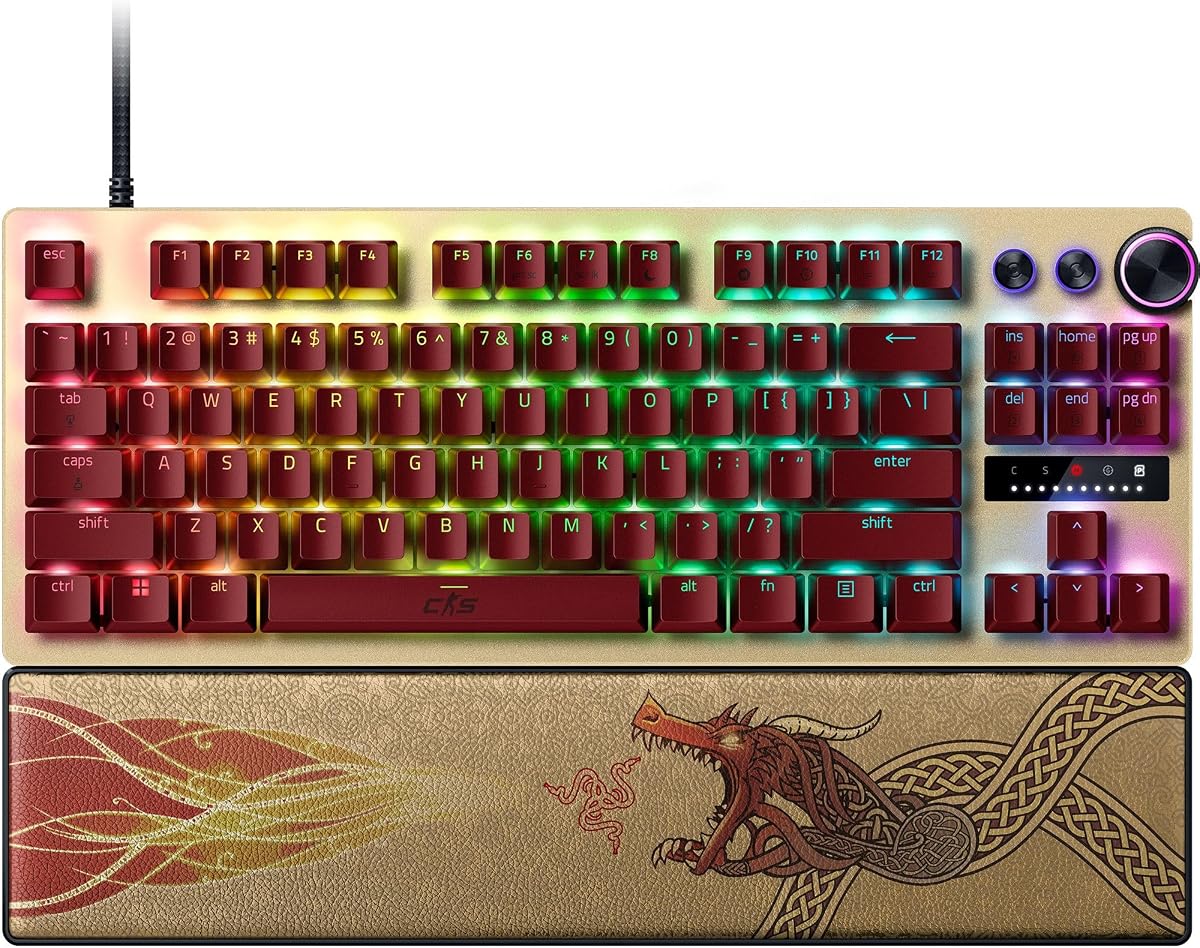
The Razer Huntsman V3 Pro TKL CS2 Edition is engineered specifically for competitive FPS play. It features optical switches with rapid trigger and snap tap mode for near-instant directional changes.
We may earn a commission when you buy through this link, at no additional cost to you.
Its standout snap tap feature lets you prioritize inputs between two keys without releasing the previous one. This is a massive advantage for movement tech in CS2.
The onboard dial and LED array allow quick tweaks without software. Textured PBT keycaps ensure durability. However, the high cost might be prohibitive for casual players.
If you want the best possible edge and have the budget, this keyboard is unmatched. It offers features you won't find in cheaper models.
Snap tap allows instant direction changes by prioritizing the latest input between two keys.
Adjust actuation height and sensitivity using the onboard dial without opening software.
We may earn a commission when you buy through this link, at no additional cost to you.
The Corsair Clipper PRO MINI is a durable option for CS2 players who want a compact layout and robust build. Its IP57 rating protects against dust and spills.
We may earn a commission when you buy through this link, at no additional cost to you.
It uses MGX Hyperdrive switches for ultra-fast actuation and supports FlashTap SOCD for cleaner directional inputs. The 8000Hz polling rate ensures near-instant registration.
The 60 percent layout frees up desk space but removes function keys that some may need. The sound dampening keeps keystrokes quiet during intense matches.
Choose this if you need durability and a small footprint. The water resistance makes it reliable for long gaming sessions.
IP57 rating guards against spills and dust so you can play without worry.
FlashTap SOCD ensures sharp counter-strafing by cleaning directional inputs.
We may earn a commission when you buy through this link, at no additional cost to you.
The Redragon K745 HE offers a five-layer noise dampening structure for a quiet feel. It retains the hall effect switches and rapid trigger tech found in other Redragon models.
We may earn a commission when you buy through this link, at no additional cost to you.
With an 8000Hz polling rate, it provides fast input registration suitable for competitive play. The software allows saving actuation profiles for different playstyles.
The lower rating indicates some inconsistencies in quality control or software experience. Still, it remains a good option for those prioritizing sound dampening.
If a quiet keyboard is important for your setup, this model delivers on that front. Just be aware of potential software limitations.
Multiple layers reduce noise and vibration for a softer and quieter typing feel.
8000Hz polling minimizes input latency so your moves are registered instantly.
We may earn a commission when you buy through this link, at no additional cost to you.
The Keychron C0 HE is a one-handed keypad that complements a main keyboard. It features 35 programmable keys and hall effect switches for rapid trigger.
We may earn a commission when you buy through this link, at no additional cost to you.
Its web-based configurator makes setup easy without installing software. Cross platform support ensures it works well with both Windows and macOS systems.
While great for macros or secondary control, it cannot replace your main keyboard for full gameplay. It is best for specific use cases.
Consider this if you want dedicated macro access or streaming controls on a separate device. It excels in niche scenarios.
Configure keys and RGB in a browser without installing software on your PC.
Fully compatible with both Windows and macOS for versatile multi system use.
We may earn a commission when you buy through this link, at no additional cost to you.
This renewed version of the Huntsman V3 Pro offers premium features at a reduced price. It includes snap tap and analog optical switches for rapid inputs.
We may earn a commission when you buy through this link, at no additional cost to you.
The aluminum top plate provides a sturdy chassis. However, as a renewed item, condition and longevity can vary. Check warranty terms carefully.
Snap tap remains a key advantage for CS2 movement. It gives you access to high-end tech without the full retail cost.
This is a good option if you are comfortable with renewed products. Ensure you verify the condition before finalizing your purchase.
Get high-end features like snap tap at a lower price through renewed units.
Verify warranty terms and return policies when purchasing renewed products.
We may earn a commission when you buy through this link, at no additional cost to you.
The Corsair K55 RGB PRO is a budget-friendly membrane option for those who do not need rapid trigger. It features six dedicated macro keys and spill resistance.
We may earn a commission when you buy through this link, at no additional cost to you.
Its IP42 rating provides basic protection against spills. The detachable palm rest offers comfort during long sessions.
While it lacks the speed of hall effect switches, it remains a solid choice for casual play. RGB lighting zones add customization.
Choose this if you are on a tight budget or prefer membrane feel. It offers good features for the price.
Six dedicated macro keys let you execute commands in one stroke easily.
IP42 rated protection guards against accidental spills so you can keep playing.
We may earn a commission when you buy through this link, at no additional cost to you.
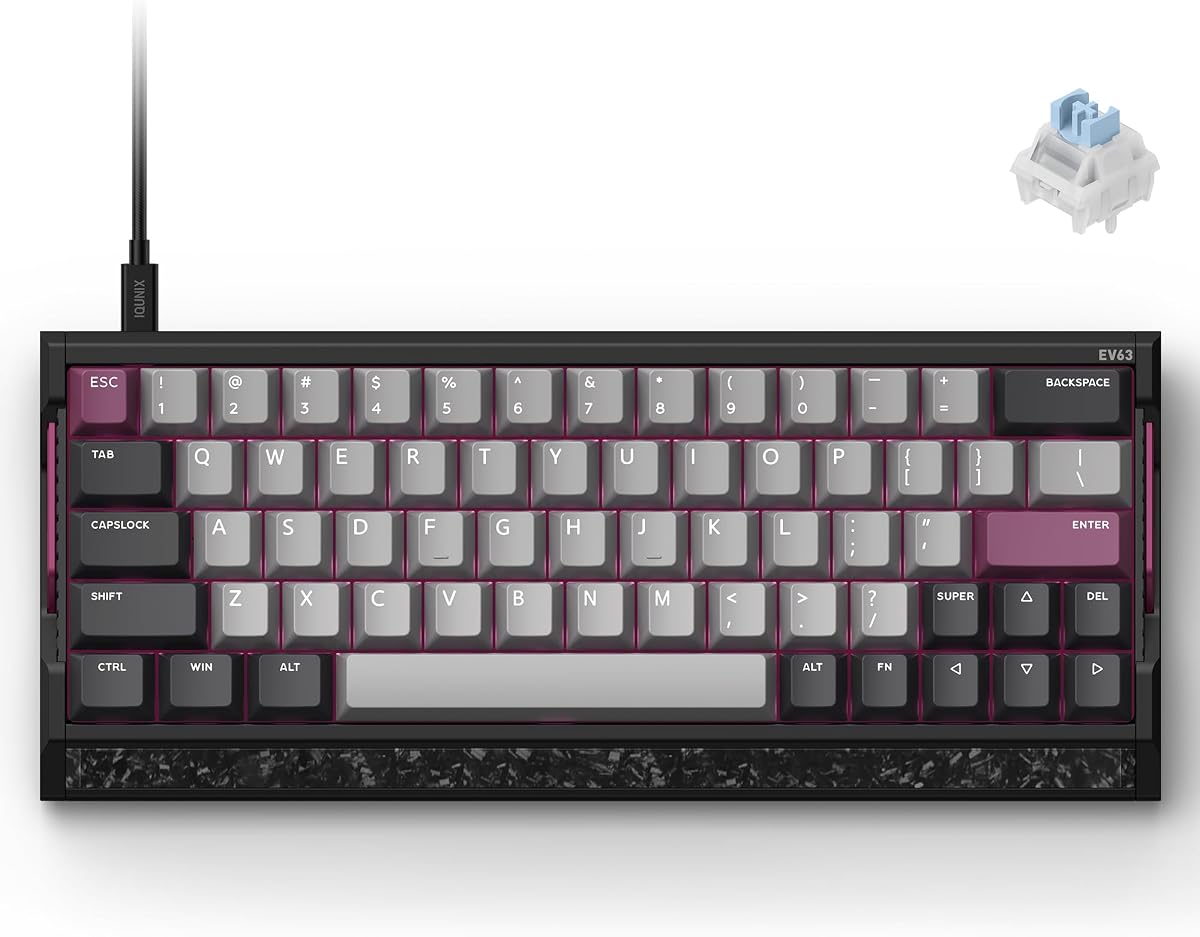
The IQUNIX EV63 is a top-tier pick with a 4.5 rating for its premium build and precise performance. It features a real forged carbon front plate and CNC aluminum case.
We may earn a commission when you buy through this link, at no additional cost to you.
Its M.A.T algorithm checks each key in real time to ensure consistent magnetic sensing and reduce missed inputs. This delivers clean stops and movements.
The 8kHz polling and 0.01mm rapid trigger ensure maximum responsiveness. While expensive, the build quality justifies the cost.
If you want a custom-like feel and reliable performance, this is the best choice. It stands out for its construction and precision.
A real forged carbon front plate provides a solid custom-like feel for gaming.
M.A.T checks each key in real time to reduce missed inputs and vibrations.
We may earn a commission when you buy through this link, at no additional cost to you.
Choosing the right keyboard involves evaluating several technical factors. This section breaks down what to prioritize for CS2 performance.
Hall effect or optical switches are ideal for CS2 because they use magnetic or light sensors instead of physical contacts. This reduces wear and allows for rapid trigger capabilities.
Prioritize hall effect switches if you want adjustable actuation and faster reset times.
Rapid trigger resets a key immediately when you lift your finger. This is essential for fast counter-strafing and movement in CS2.
Ensure your keyboard explicitly supports rapid trigger or snap tap for this advantage.
Polling rate is how often your keyboard reports to your PC. A rate of 8000Hz reduces latency compared to standard 1000Hz models.
Look for keyboards offering 4000Hz or 8000Hz polling for competitive play.
Compact layouts like 60 percent or TKL free up desk space for mouse movement. This is critical for low-sensitivity players.
Choose a compact size if you prioritize aiming room over full keypad functionality.
Adjustable actuation lets you set how far a key must press to register. You can set light triggers for movement and heavier ones for shooting.
Check if the keyboard allows per-key actuation adjustment via software or onboard controls.
Materials like aluminum and carbon fiber add stability and reduce vibration. These features improve typing feel and durability over time.
Opt for metal cases if you want a solid feel and long-term durability.
Good software enables saving profiles, remapping keys, and customizing RGB. Some keyboards offer web-based config tools for easier setup.
Ensure the companion software is user-friendly and supports multiple profiles for different games.
IP ratings indicate protection against dust and water. Spills and accidents happen often during intense gaming sessions.
Select a keyboard with at least IP42 or IP57 protection for peace of mind.
Start by downloading the official driver or software for your specific model. Calibrate the hall effect switches using the provided instructions to ensure accurate sensing.
Set your actuation points based on your playstyle. Lighter points for movement keys help with faster counter-strafing while heavier points prevent accidental presses.
Keep your keyboard clean by using compressed air regularly. Wipe keycaps with a soft cloth to remove oils and dust that can interfere with switches.
Yes, hall effect keyboards generally work better for CS2 because they support rapid trigger technology. This allows keys to reset instantly without a fixed bottom-out point. Faster reset times lead to quicker counter-strafing and movement.
The ideal point depends on your preference but many players prefer lighter actuation for movement keys around 0.2mm to 0.4mm. This ensures quick resets and precise control. You can adjust each key individually for best results.
While not strictly necessary it is highly beneficial for competitive play. Higher polling reduces input latency allowing faster response times. Standard 1000Hz works but 8000Hz gives you a faster connection to your PC.
Yes 60 percent keyboards are great for CS2 as they free up mouse space. You may miss function keys for some in-game menus but most essential controls remain accessible. You can remap keys if needed.
Most rapid trigger keyboards require their software for calibration and profile management. Some models allow onboard storage so you can save settings directly to the keyboard. Check each model requirements carefully before buying.
Hall effect switches are very durable as they have no physical contact points to wear out. They typically offer millions of keystrokes. This makes them ideal for heavy gaming sessions and daily use.
Snap Tap mode prioritizes the latest input between two selected keys without releasing the previous one. This gives near-instant directional changes. It helps with movement in FPS games like CS2.
It is recommended to clean your keyboard at least once a month using compressed air. This removes dust that can affect performance. Wipe keycaps weekly to remove oils and dirt buildup.
The Redragon K617 HE offers the best budget value while the Razer Huntsman V3 Pro TKL provides elite features for pros. For a premium build the IQUNIX EV63 stands out with its carbon plate and high rating.
Prioritize hall effect switches and rapid trigger support if you want to improve movement speed and accuracy. Ensure the polling rate matches your setup needs for minimal latency.
Remember that prices change frequently so check current listings before buying. Select the model that fits your budget and layout preferences for the best CS2 experience.