
Lamicall Adjustable iPad Stand for Desk
4.6Editor score
Ultra-slim foldable design
360 degree rotation base
Adjustable hinge tightness
Finding the right iPad stand for desk can transform your productivity and comfort during long work sessions. A quality holder keeps your screen at eye level reducing strain and offering versatile angles for any task.
We evaluated ten leading models based on stability adjustability material quality and compatibility. Our analysis covers portable folding options alongside robust desktop bases designed for daily professional use and heavy multitasking demands.
Each pick highlights specific strengths from budget friendly simplicity to premium engineering. Keep in mind that product availability and pricing fluctuate frequently so always verify current details before making your final purchase decision online.
4.6Editor score

4.8Editor score

4.5Editor score
As an Amazon Associate we earn from qualifying purchases.
The following table provides a quick side-by-side comparison of key specifications for all ten selected models to help you identify the best fit for your specific desk setup requirements.




This stand earns the top spot for its perfect balance of price performance and build quality. Users consistently rate it highly for the solid aluminum construction that prevents any wobbling during active use on desk surfaces.
We may earn a commission when you buy through this link, at no additional cost to you.
The multi-angle adjustment allows you to find the perfect viewing position whether you are watching videos or typing extensively. Rubber pads on the hook and base ensure your device stays secure without scratching the surface.
While the height is fixed and the tilt is somewhat limited compared to premium models the stability is unmatched in this price category. You may need to position your desk carefully to get the best eye level angle.
Ideal for home office workers and students who need a reliable everyday stand that looks professional and lasts for years without issues or degradation over time.
The spaceflight aluminum alloy provides superior strength while remaining lightweight enough for easy relocation.
Supports devices from 4 to 13 inches and cases up to 0.71 inches thick for broad usability.
We may earn a commission when you buy through this link, at no additional cost to you.
This model is engineered to eliminate neck pain by bringing screens to comfortable eye level. The telescoping design and heavy metal base make it ideal for long sessions on larger tablets or portable monitors.
We may earn a commission when you buy through this link, at no additional cost to you.
It features a unique triple stability design with a wide holding plate and non-slip EVA padding to prevent any movement. Users praise its ability to hold devices securely even when typing or tapping vigorously.
The main tradeoff is its weight which makes it less convenient for travel but perfect for a fixed desk setup. It also comes at a higher price point but offers features rarely found in standard holders.
Best for professionals or anyone working long hours who needs a reliable ergonomic solution to maintain a healthy posture throughout the workday.
The 7-10 inch telescoping range elevates screens effectively to reduce strain on your neck and shoulders.
Compatible with tablets and small portable monitors making it a versatile choice for various devices.
We may earn a commission when you buy through this link, at no additional cost to you.
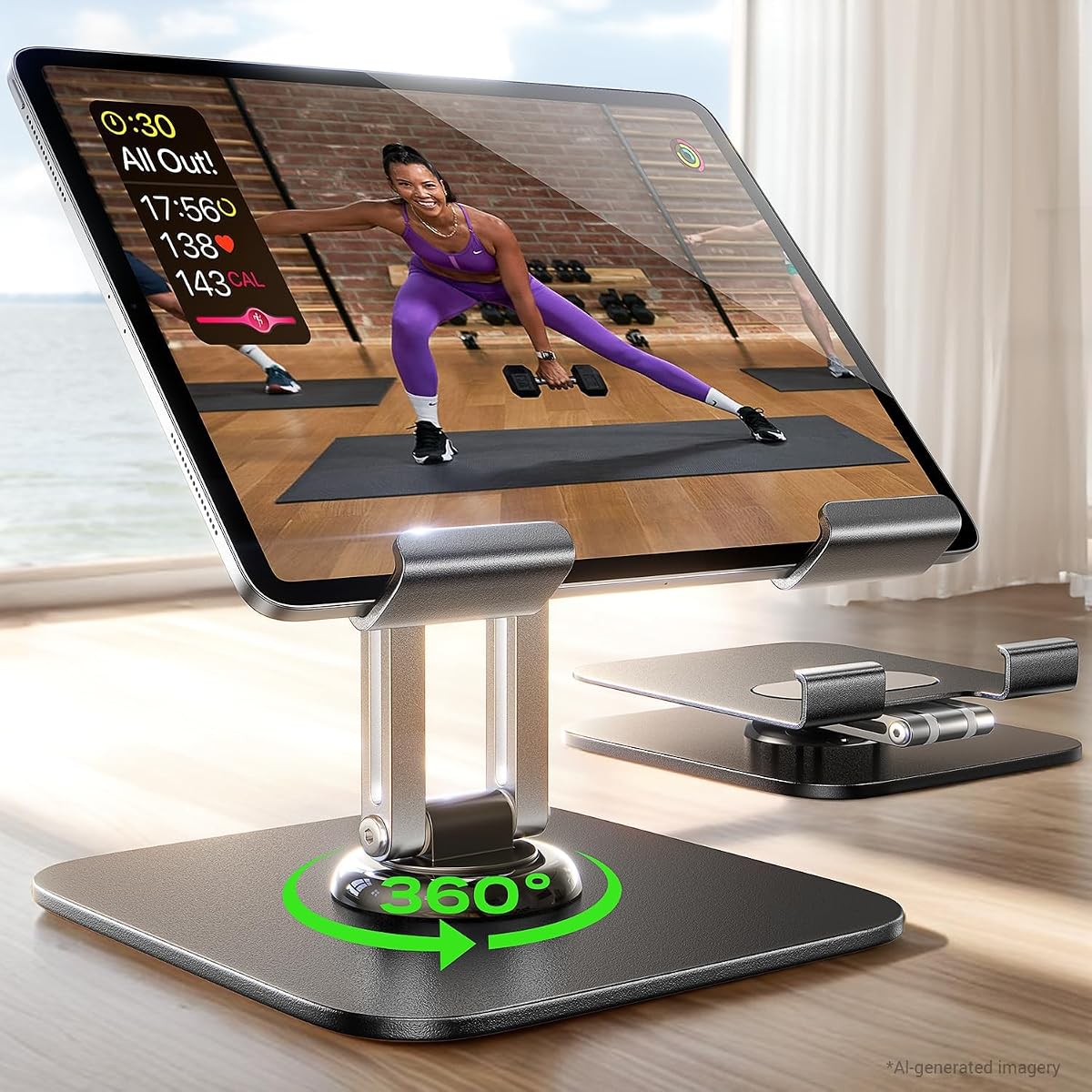
This is an incredibly portable stand that folds down to less than half an inch thick for easy transport. Despite its slim profile it uses high strength alloys to provide solid support for devices up to 13 inches.
We may earn a commission when you buy through this link, at no additional cost to you.
The standout feature is the full 360 degree base rotation which makes sharing content with others seamless without moving the device. Users can also adjust hinge tightness with a included wrench for custom stability.
It requires a bit of initial effort to unfold due to the tight hinge mechanism but this ensures it stays securely in place during use. The design is practical for travelers who still demand office quality stability.
Perfect for students and remote workers who frequently move between locations and need a compact yet durable stand for their devices.
Folds flat to 0.59 inches making it easy to slip into a laptop bag or backpack.
Features adjustable hinges and a rotating base for versatile viewing angles in any setting.
We may earn a commission when you buy through this link, at no additional cost to you.
This stand is designed for users with larger devices up to 16.9 inches that often lack compatible accessories. Its dual rod system and all-metal base provide exceptional stability for heavier tablets and portable monitors.
We may earn a commission when you buy through this link, at no additional cost to you.
Users appreciate the robust locking mechanism that lets you adjust the height and angle precisely without it slipping. The non-slip silicone pads protect both the device and the desk surface from scratches.
While it folds flat for storage it is slightly bulkier than minimalist options and lacks variable height on some models. The price reflects the larger scale and engineering required to support bigger screens securely.
An excellent choice for those needing a reliable solution for large tablets or portable monitors in a home or office environment.
Accommodates devices from 4.7 to 16.9 inches including portable monitors and large tablets.
Weighted base and strong support structure prevent tipping even during vigorous use.
We may earn a commission when you buy through this link, at no additional cost to you.
This model uses a clever gravity-based system that secures your device with a back tilt instead of clips or magnets. It folds into a pocket size making it one of the most portable options on the market.
We may earn a commission when you buy through this link, at no additional cost to you.
It includes a unique bridge screw adjustment truss rod to keep the joints tight and stable over time. Users find it effective for casual viewing and quick access during travel or commutes.
The stand only supports phones and small tablets in landscape mode and relies on a light aluminum plastic build. It is not designed for heavy daily typing or large devices that require rigid support.
Best for users who prioritize extreme portability and simple setup over heavy-duty desk stability or ergonomic height adjustments.
Relies on tilt to hold devices securely without clips or magnets for easy access.
Folds completely flat for pocket storage ideal for travelers and commuters.
We may earn a commission when you buy through this link, at no additional cost to you.
This stand is built for commercial environments where durability and quick access are critical. It features a folding arm and a rotatable base that allows seamless switching between portrait and landscape modes.
We may earn a commission when you buy through this link, at no additional cost to you.
Users highlight its quick detach mechanism which makes sharing the device with customers or colleagues effortless. The weighted base provides sturdy structure to withstand heavy operations without any tipping risks.
It comes at a higher price than consumer models and is designed specifically for business settings or reception desks. The cable management design helps keep the setup organized in public or shared spaces.
Ideal for retail stores offices or public displays where a device needs to be securely mounted yet easily accessible for multiple users.
Weighted base and folding arm offer sturdy structure to withstand weights of large tablets.
Quick attach detaches with a simple push of the button for easy storage and carrying.
We may earn a commission when you buy through this link, at no additional cost to you.
This stand offers flexible height and angle adjustments to match your posture for a comfortable viewing experience. It uses aircraft grade aluminum to ensure stability even with heavier devices up to 2.42 pounds.
We may earn a commission when you buy through this link, at no additional cost to you.
Integrated cable clips help keep your workspace organized by managing charging cords efficiently. Users appreciate the included wrench that allows them to tighten joints for extra stability if needed.
It is designed for flat stable surfaces and explicitly avoids headboards to prevent wobbling. While robust it requires some assembly steps with tools to ensure optimal performance.
Great for home users or bedrooms where a sturdy flexible mount is needed for comfortable media consumption without strain.
Height and angle are fully adjustable to match your height and posture.
Scientific base design ensures stability even with heavy devices.
We may earn a commission when you buy through this link, at no additional cost to you.
This model addresses the instability of earlier stands with a heavier wider base and military grade aluminum alloy. It offers a smooth 360 degree rotation for versatile viewing without moving the device on the desk.
We may earn a commission when you buy through this link, at no additional cost to you.
It includes a bridge screw adjustment truss rod to prevent joints from loosening over time. Users value the durable construction that remains stable even during vigorous shaking or tapping on the screen.
It folds into a pocket size but the metal construction makes it heavier than plastic alternatives. Phone support is limited to landscape mode but it fits a wide range of tablets perfectly.
Best for home office users seeking a premium looking and highly durable stand that can handle daily heavy usage.
All metal extremely sturdy base with soft silicone non-slip protects your desktop.
Adjust your view to perfection with a 360 degree rotatable tablet holder stand.
We may earn a commission when you buy through this link, at no additional cost to you.
This stand is designed for maximum portability with a compact size that slips easily into a pocket. It features premium ABS material that provides a balance of durability and light weight for travelers.
We may earn a commission when you buy through this link, at no additional cost to you.
Users can choose from multiple viewing angles ranging from 15 to 100 degrees to suit different tasks. The silicone pads on the bottom protect your device from sliding and prevent desk scratches.
It is not as heavy-duty as metal models and is limited to tablets up to 11 inches. However its simplicity and small footprint make it a convenient choice for on the go use.
Perfect for travelers or students who need a basic reliable holder that takes up minimal space in their bag.
Foldable and easy to slip into your pocket for travel.
Multiple viewing angles to choose from 15 to 100 degrees.
We may earn a commission when you buy through this link, at no additional cost to you.
This stand reaches 20 inches in height making it ideal for dual monitor setups or video calls where eye level is crucial. It supports devices from mini tablets to 17 inch portable monitors securely.
We may earn a commission when you buy through this link, at no additional cost to you.
Trusted by professionals like traders and healthcare workers it offers a robust design with a weighted anti-slip base. Users note its effectiveness in eliminating neck pain by raising screens to a comfortable position.
The stand is not designed for easy port due to its height and weight but excels as a fixed workstation accessory. It assembles quickly and comes in eco-friendly packaging which many appreciate.
Best for power users or professionals who need a tall sturdy stand to integrate a tablet into a multi-screen workflow.
Reaches perfect eye level for dual monitors video calls to eliminate neck pain.
Supports everything from iPad mini to 17 inch portable monitors up to 4.4 lbs.
We may earn a commission when you buy through this link, at no additional cost to you.
Selecting the right iPad stand involves considering several key factors to ensure it meets your specific desk and workflow needs effectively.
Materials like aluminum alloy and aircraft grade steel offer the best durability and resistance to bending. Plastic options are lighter and cheaper but may wear out faster under heavy daily use.
Prioritize metal construction if you want a stand that will last for years without loosening or cracking.
Ensure the stand supports your tablet model size and any case you might use. Some models cap at 11 inches while others accommodate larger monitors or devices with thick protective covers.
Check the maximum width and thickness specifications before buying to avoid fit issues.
Look for stands with multiple tilt angles and rotation options to suit different tasks like reading or typing. Some models offer height adjustment which is critical for ergonomic comfort.
More adjustment points generally mean better usability for varied activities throughout your workday.
A weighted base and non-slip pads are essential to prevent tipping or sliding during use. Lighter stands may be portable but often sacrifice stability especially for heavier devices.
Choose a stable base if you plan to type or tap on the screen frequently.
If you move often between home and office a foldable slim design will fit easily in your bag. However portable stands may not offer the same stability as desk specific models.
Consider how often you need to carry the stand to decide between travel friendly and stationary options.
Simple stands require no tools while others might include wrenches or screws for adjusting tightness. User friendly designs save time and frustration when switching between devices or angles.
Opt for straightforward setups if you value convenience over fine-tuned customization.
Basic plastic stands are affordable but lack robust features while metal models cost more but last longer. Balance your budget with the level of durability and functionality you need.
Invest slightly more for metal models to ensure long-term satisfaction and reliability.
Some stands include cable management clips or cooling vents to protect your device. Business models might offer quick detach mechanisms or locking systems for security.
Identify specific features that match your workflow to enhance overall productivity and safety.
Always place the stand on a flat stable surface to ensure maximum stability and prevent tipping. Check that non-slip pads are clean and free of debris to maintain grip on the desk.
Adjust the angle and height before placing your device to find the most comfortable viewing position. Tighten any hinges or screws with the provided tools to ensure the stand holds its position securely.
Clean the stand regularly with a soft dry cloth to remove dust and dirt. Avoid harsh chemicals that may damage metal or plastic surfaces and prolong the life of the device.
Most stands listed support devices with cases up to a certain thickness usually around 0.7 to 0.75 inches. Always check the specific compatibility details for your case thickness before purchasing to ensure a secure fit.
Yes many models are designed to hold the device steady enough for typing. However stability may vary by model so look for options with heavy bases or locking mechanisms for the best typing experience.
Yes most options feature multiple adjustable angles or full rotation capabilities. This allows you to customize the view for activities like video calls reading or watching content as needed.
Foldable models like the UGREEN or Lamicall Foldable are best for travel. They collapse to a very small size and are lightweight enough to fit easily in a bag or pocket.
Most stands require no assembly and are ready to use right out of the box. Some models include a wrench for adjusting hinge tightness but no additional tools are needed for basic setup.
Yes several options like the tounee or COOPER TabStand are designed for larger devices up to 17 inches. They feature reinforced bases and strong materials to prevent tipping during use.
We highlighted ten top stands ranging from budget options to premium ergonomic solutions. The Lamicall models offer exceptional value while the COOPER stands provide superior height and stability for larger devices.
Prioritize your needs such as portability adjustability or material durability when making your choice. A good stand protects your neck strain and enhances your overall productivity with your iPad.
Remember to verify current availability and pricing since these details can change often. Checking reviews and specifications ensures you get the best fit for your workspace setup.