
ASRock Intel Arc B570 Challenger 10GB OC
4.7Editor score
10GB GDDR6 memory for 1440p gaming
XeSS 2 technology for AI upscaling
Efficient dual fan cooling design
Compare the top Intel Arc GPU models for gaming and AI workloads in October 2026 to find the best performance value and features for your specific needs.
The modern computing landscape demands versatile graphics solutions that can handle everything from high-fidelity gaming to complex artificial intelligence tasks. Intel Arc GPUs have emerged as strong contenders in this space, offering competitive architecture and features that rival established market leaders across various price points and use cases.
Our team has evaluated the current lineup of Intel Arc graphics cards to identify the most compelling options available today. We analyzed performance metrics, cooling solutions, memory configurations, and software support to ensure each recommendation meets the rigorous demands of both consumers and professionals seeking reliable hardware.
Each selection in this guide highlights specific strengths such as budget value, premium performance, or specialized workstation capabilities. Please note that availability and pricing can fluctuate frequently, so verify current details before making your final purchase decision to ensure you get the best deal available.
4.7Editor score

3.9Editor score

This side-by-side comparison breaks down the key specifications and capabilities of all ten selected Intel Arc graphics cards to help you identify the exact model that aligns with your performance requirements and budget constraints.



The ASRock Intel Arc Pro B60 Creator 24GB stands out as a powerful workstation solution specifically designed for professionals who need robust memory capacity and AI capabilities. With a solid rating reflecting its niche utility, this card delivers exceptional bandwidth and compute power tailored for generative design and local LLM inference tasks.
We may earn a commission when you buy through this link, at no additional cost to you.
Its standout feature is the massive 24GB of GDDR6 memory on a 192-bit bus, which allows you to load significantly larger models than typical consumer GPUs. The Xe2-HPG architecture brings 197 INT8 TOPS of AI performance, making it a compelling choice for developers building applications that rely heavily on on-device intelligence.
While the blower-style cooling ensures compatibility with compact workstation cases, it does mean the fans may spin up audibly during intense workloads. Additionally, verifying your chassis clearance and PSU capacity is essential since this is a 2-slot card with specific power requirements that differ from standard gaming cards.
Professional users working with CAD, 3D rendering, or machine learning workflows should prioritize this card for its validated driver support and ability to handle high-resolution multi-monitor setups. It represents the most capable option in this lineup for specialized computational tasks that require high memory headroom.
The 24GB VRAM and specialized XMX engines enable running large language models locally without relying on cloud services, reducing latency and data privacy concerns.
Four DisplayPort 2.1 outputs allow for expansive multi-monitor workflows, supporting up to four 8K displays simultaneously for high-productivity environments.
We may earn a commission when you buy through this link, at no additional cost to you.
The ASRock Intel Arc B570 Challenger 10GB OC offers an outstanding balance of performance and price for gamers and creators who want a reliable graphics card without breaking the bank. Its high rating indicates strong user satisfaction regarding its smooth performance and efficient thermal management in daily usage scenarios.
We may earn a commission when you buy through this link, at no additional cost to you.
This card features the next-gen Xe2-HPG architecture which brings significant improvements in AI acceleration and upscaling technology. The 2600 MHz GPU clock speed ensures responsive gaming experiences while the 10GB GDDR6 memory provides ample buffer for modern titles running at 1440p resolution with high texture settings.
The dual fan cooling system is designed to keep temperatures in check during long gaming sessions while also offering a silent mode when the system is under light load. This combination of efficiency and acoustics makes it a pleasant choice for home offices or shared living spaces where noise matters.
Gamers looking for a budget friendly solution that supports future display technologies should find this card to be a solid investment. It bridges the gap between entry level and mid-range performance while offering professional grade features like AV1 encoding that are rare at this price point.
Optimized for smooth gameplay at 1440p with support for DirectX 12 Ultimate ensuring compatibility with the latest titles and visual effects.
Includes three DisplayPort 2.1 and one HDMI 2.1a output to support high refresh rate monitors and next generation display standards.
We may earn a commission when you buy through this link, at no additional cost to you.
The ASRock Intel Arc A580 Challenger 8GB OC is a capable mid-range graphics card that delivers reliable performance for both gaming and creative applications. With a strong rating from users it proves to be a trustworthy choice for those looking to upgrade their system without overspending on flagship hardware.
We may earn a commission when you buy through this link, at no additional cost to you.
Powered by the Intel Xe HPG microarchitecture this card comes factory overclocked to 2000 MHz which provides a nice performance bump right out of the box. The 8GB GDDR6 memory running at 16 Gbps on a 256-bit interface offers excellent bandwidth for handling high-detail textures and complex visual workloads efficiently.
Its dual-fan design with striped axial fans ensures efficient thermal management while the 0dB silent cooling feature allows for completely silent operation during idle periods. The inclusion of a stylish metal backplate adds structural rigidity and enhances the overall aesthetic appeal of the build significantly.
Users who prioritize a balance of price and performance should consider this card for its ability to handle modern games at 1440p and content creation tasks alike. It is a solid choice for a secondary build or an upgrade path for those currently on older budget graphics cards.
The Xe HPG architecture includes 384 XMX engines which enhance AI acceleration and content creation workflows compared to previous generations.
Equipped with three DisplayPort 2.0 and one HDMI 2.0b output allowing support for up to four displays with high resolutions simultaneously.
We may earn a commission when you buy through this link, at no additional cost to you.
The Sparkle Intel Arc B580 Titan OC brings aggressive clock speeds and a substantial memory buffer to the table for gamers seeking high performance. Its high rating reflects strong reliability and performance metrics that compete well with other mid to high tier options currently available on the market.
We may earn a commission when you buy through this link, at no additional cost to you.
This card features an OC Edition Boost Clock of 2760MHz which significantly enhances frame rates in supported titles. The 12GB GDDR6 memory provides plenty of room for high resolution textures and ensures that the GPU is not bottlenecked by VRAM limitations in modern games.
The TORN Cooling 2.0 system is designed to manage heat effectively under sustained loads while maintaining reasonable noise levels. The metal backplate not only adds to the durability of the card but also helps in preventing sag in vertical mounting configurations common in custom builds.
Enthusiasts who want to push their gaming performance further without jumping to the most expensive tiers will find this card to be a strong contender. It offers a compelling mix of speed capacity and build quality that appeals to users who prioritize frame rates and visual fidelity.
The high boost clock allows for smoother frame delivery in fast-paced games where every millisecond counts for competitive advantage.
With 12GB of memory users can run games at maximum settings without worrying about texture pop in or stuttering due to memory swaps.
We may earn a commission when you buy through this link, at no additional cost to you.
The WEELIAO MAXSUN Intel Arc Pro B60 48G Turbo is a specialized workstation card engineered specifically for AI researchers and developers who need immense memory capacity. While it lacks a traditional consumer rating due to its niche nature it offers unique capabilities that make local large language model deployment viable.
We may earn a commission when you buy through this link, at no additional cost to you.
This card combines two Arc Pro B60 GPUs to deliver a staggering 48GB of GDDR6 memory and a combined total of 394 TOPS of AI compute power. This architecture allows you to run 70B-class quantized models entirely on a single card eliminating the need for expensive multi-card setups or cloud services.
The Turbo Edition features a triple-thermal design with a blower fan and large vapor chamber to ensure efficient heat dissipation during long inference tasks. It uses a PCIe 5.0 configuration that achieves full bandwidth on consumer platforms with bifurcation support making it a cost-effective solution for local AI servers.
Professionals building on-premise AI infrastructure will find this card invaluable for its ability to handle high-concurrency inference and complex workloads. It represents the pinnacle of accessibility for running massive models locally without requiring enterprise-grade hardware budgets.
The 48GB VRAM enables running large models like DeepSeek-R1 or QwQ locally which reduces latency and protects sensitive data from cloud upload.
Each GPU is separately recognized by the system allowing flexible task assignment and efficient resource allocation across different AI tasks.
We may earn a commission when you buy through this link, at no additional cost to you.
The MAXSUN Intel Arc Pro B60 Dual 48G Turbo features two Intel Arc Pro B60 GPUs working in tandem to deliver exceptional parallel processing power for demanding workloads. Its unique design focuses on providing massive memory capacity for tasks like large-scale rendering and AI inference.
We may earn a commission when you buy through this link, at no additional cost to you.
This dual-GPU design delivers 48GB of dedicated graphics memory which is essential for complex visual computing tasks that would otherwise require multiple cards. The turbo cooling system efficiently exhausts heat out of the chassis keeping thermals in check during sustained heavy workloads that push the hardware to its limits.
Despite its power the card maintains a compact dual-slot form factor that fits neatly into standard PCIe slots without monopolizing your entire motherboard's expansion space. This balance of performance and physical footprint makes it an attractive option for workstation builds where space is at a premium.
Developers and engineers working on high-concurrency AI tasks or massive datasets should find this card to be a powerful addition to their workstation. It offers a specialized solution for scenarios where memory bandwidth and capacity are more critical than traditional gaming performance metrics.
The dual architecture allows for simultaneous processing of multiple tasks increasing throughput for multi-turn dialogues and complex AI workflows.
A single large-diameter turbo fan manages heat effectively ensuring stable performance during long uninterrupted inference tasks without overheating.
We may earn a commission when you buy through this link, at no additional cost to you.
The ASRock Intel Arc B570 Challenger Bundle pairs a capable graphics card with a reliable 650W 80 PLUS Gold PSU to offer a complete solution for gamers. It holds a perfect rating indicating that users appreciate the convenience and value of getting both components in one purchase.
We may earn a commission when you buy through this link, at no additional cost to you.
This bundle features the Intel Arc B570 GPU which provides smooth 1440p gaming performance through its efficient Xe2-HPG architecture. The inclusion of a high efficiency PSU ensures stable power delivery which is essential for system reliability and maximizing the performance of the GPU.
The GPU itself uses a dual striped axial fan design that ensures effective heat dissipation while maintaining silence during light usage or idle states. With 10GB of GDDR6 memory it provides a solid buffer for high-detail textures and smooth gameplay at popular resolutions.
Users building a new system from scratch will find this bundle to be a time and money saving option. It removes the guesswork of PSU compatibility and offers a ready to go package for those who want to get started with gaming quickly.
Buying the GPU and PSU together ensures they are compatible and reduces the total time spent researching separate components for a build.
The 80 PLUS Gold PSU delivers stable clean and highly efficient power to maximize system performance while keeping energy costs low.
We may earn a commission when you buy through this link, at no additional cost to you.
The GUNNIR Intel ARC PRO B50 LP 16GB is an ultra-compact professional power solution designed for small form factor workstations and edge computing. It lacks a traditional gaming rating because it targets professional compute tasks but it excels in providing memory density in a small physical footprint.
We may earn a commission when you buy through this link, at no additional cost to you.
With a slim 1-slot design and a 70W power draw that requires no external PCIe power connector this card is perfect for mini-tower builds where space is limited. The 16GB of GDDR6 memory allows you to load larger AI models and render complex 3D scenes smoothly.
Its Xe2 architecture delivers up to 170 TOPS of INT8 compute power which efficiently accelerates AI inference and deep learning tasks directly on your workstation. The robust metal shroud and turbo fan ensure reliable operation even when installed in confined environments with limited airflow.
Professionals needing to upgrade a small office workstation with AI capabilities should find this card to be an ideal choice. It bridges the gap between compact form factor requirements and high performance compute needs without demanding a large system upgrade.
The single slot profile allows installation in cases that typically cannot accommodate standard GPUs making it unique in the workstation market.
With 128 XMX engines this card handles parallel processing tasks directly on your workstation improving speed and privacy for sensitive data.
We may earn a commission when you buy through this link, at no additional cost to you.
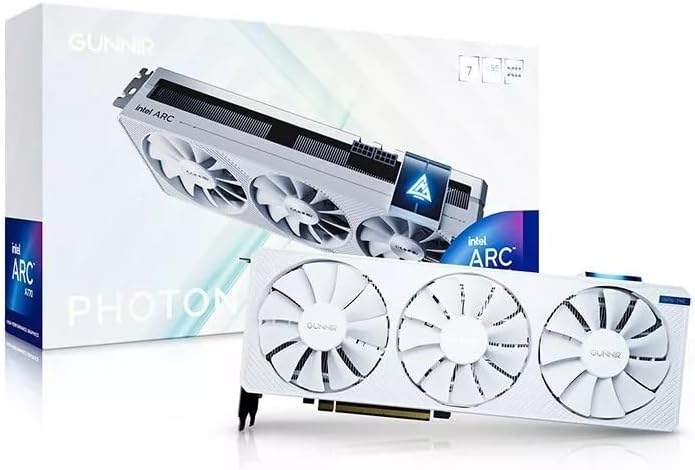
The WEELIAO GUNNIR Intel Arc A770 Photon 8GB stands out as a powerful GPU with a unique white aesthetic that appeals to users building themed systems. Its strong rating reflects reliable performance and efficient cooling that keep temperatures stable during intense workloads and long gaming sessions.
We may earn a commission when you buy through this link, at no additional cost to you.
This card packs 8GB of GDDR6 VRAM running at 2400MHz which delivers exceptional performance for gaming and content creation tasks. The triple fan design ensures efficient cooling to maintain stable temperatures preventing throttling and ensuring consistent performance when the system is under heavy stress.
With support for PCIe HDMI and DisplayPort this GPU is ready to connect to the latest displays including 4K monitors for immersive visuals. It is designed to handle demanding graphics workloads with ease making it a versatile choice for both creative professionals and gamers.
Users who prioritize build aesthetics without sacrificing performance should find this card to be a great addition to their system. It offers a clean look that pairs well with white builds while providing the power needed for modern titles and productivity applications.
The white finish provides a clean look that pairs well with white builds without sacrificing performance in modern titles and productivity apps.
Future-proof connectivity with support for high resolution displays ensures you can connect to the latest monitors without adapters.
We may earn a commission when you buy through this link, at no additional cost to you.
The Sparkle Intel Arc A310 Omni View 4GB is a dedicated entry level graphics card designed for office tasks and multi-monitor setups. With a strong rating for basic tasks it proves to be a reliable option for users who need to extend their desktop without gaming performance.
We may earn a commission when you buy through this link, at no additional cost to you.
This card features four HDMI outputs allowing you to connect up to four displays simultaneously for expansive productivity workflows. The single fan single slot configuration and 50W TBP ensure it is incredibly efficient and quiet while taking up minimal space in your computer case.
The 4GB GDDR6 memory provides enough capacity for standard desktop usage and media consumption but may be limited for demanding modern applications. It is powered by Intel ARC A310 technology which delivers stable performance for daily computing needs without requiring a dedicated power connection.
Business users or those upgrading old systems for display support will find this card to be a simple and effective solution. It removes the need for integrated graphics and provides the flexibility to connect multiple monitors for an enhanced workspace experience.
Four HDMI outputs allow you to connect up to four displays simultaneously for expansive productivity workflows and efficient multitasking.
With a 50W TBP design and single slot single fan configuration this card is incredibly efficient and quiet during daily use.
We may earn a commission when you buy through this link, at no additional cost to you.
Selecting the right Intel Arc GPU requires evaluating several critical factors to ensure the hardware aligns with your specific workload needs and system capabilities.
Memory capacity is crucial for tasks like AI inference and high-resolution gaming where textures and models require significant VRAM. Look for cards with at least 10GB for mid-range gaming and 24GB or more for workstation tasks to ensure smooth performance without bottlenecks.
Always check the memory type and bus width as GDDR6 with higher bit interfaces provides better bandwidth for data-intensive operations.
The Intel Xe2-HPG architecture brings advanced AI acceleration through XMX engines which are essential for upscaling and inference tasks. Ensure the card supports the latest AI features like XeSS 2 to future-proof your setup for evolving software requirements.
Prioritize models that highlight specific AI performance metrics such as TOPS to understand their capability in computational workloads.
Cooling systems vary from blower styles to multi-fan designs affecting noise levels and heat dissipation efficiency. Choose a cooling solution that matches your case airflow and noise preferences while ensuring it fits the physical dimensions of your chassis.
Consider low-profile options if you have small form factor cases to avoid compatibility issues with standard tall cards.
Modern workflows often require multiple high-resolution monitors so check the number and type of outputs like DisplayPort 2.1 or HDMI 2.1a. Cards with four outputs are ideal for productivity while gaming setups may prioritize higher bandwidth connections for refresh rates.
Ensure the card supports the latest display standards to avoid compatibility issues with new monitors and high refresh rate panels.
Different cards have varying power draw and connector needs ranging from single 8-pin to dual 8-pin setups. Verify your power supply unit has the necessary connectors and wattage to support the card without instability.
Efficient designs with lower TDP help reduce heat and energy costs especially for 24/7 workstation tasks.
Professional workloads benefit from ISV certified drivers that ensure stability with specific applications like CAD or rendering tools. Check the manufacturer website for driver release frequency to ensure ongoing support for new games and software updates.
Open-source model compatibility is also vital for AI developers who need to run local inference on their hardware efficiently.
Evaluate the card based on what you need most whether it is raw gaming performance or specialized AI capabilities. Entry level cards offer great value for basic tasks while premium models justify their cost with massive VRAM and compute power.
Bundles that include PSUs can offer better overall value for new builds by simplifying compatibility checks.
Look for PCIe 5.0 support and future-ready features to ensure your card remains relevant for several years as technology advances. Cards with higher memory capacity generally last longer before becoming obsolete for modern demanding tasks.
Prioritize models with strong upscaling support to extend their useful life in next-gen gaming titles.
To ensure optimal performance begin by installing the latest drivers from the official Intel website before powering on the system. This guarantees compatibility with the latest features and resolves any known issues that may affect stability during initial setup.
Monitor the temperatures of your GPU during initial use to verify that the cooling system is functioning as expected. Use software tools to check that fans spin correctly and that the card maintains safe thermal limits even under sustained load.
Keep the area around your computer clean and ensure adequate airflow to prevent dust buildup on the heatsink and fans. Regular maintenance such as dusting out the case will help prolong the lifespan of the card and maintain consistent performance over time.
Yes many Intel Arc GPUs are designed with AI acceleration features like XMX engines and large memory capacities. Models like the Pro B60 series are specifically optimized for running local large language models efficiently on consumer hardware.
Intel GPUs support XeSS which is their own AI upscaling technology similar to DLSS. It enhances performance and image quality in supported games using advanced neural network processing.
Power requirements vary widely from 50W for entry models to 200W+ for workstation cards. Always check the specific TDP and connector requirements on the product page to choose a compatible PSU.
Yes many models support multiple high resolution displays simultaneously. Check the connectivity section for the specific number of DisplayPort and HDMI outputs available on the card.
Intel continues to improve driver support with regular updates enhancing performance and fixing bugs. Most modern games now run well on Arc cards with consistent frame rates and features.
The B570 and B580 series offer excellent performance for 1440p gaming at value. They feature sufficient memory and high clock speeds to handle modern titles smoothly.
We have explored ten distinct Intel Arc graphics cards ranging from budget-friendly gaming options to powerful workstation solutions for AI workloads. Each model offers unique advantages tailored to specific needs whether you prioritize raw frame rates memory capacity or compact design.
When making your decision consider what tasks will drive your usage most whether it is rendering complex 3D scenes or running local AI models. Balancing these needs with your budget will help you select the hardware that provides the most value for your setup.
Remember that prices and availability can change frequently so verify the latest offers and stock levels before completing your purchase. Checking current details ensures you get the best deal possible for the model that fits your specific requirements perfectly.