Treedix Cable Tester Board
4.6Editor score
Detects short and open circuits
Supports HDMI 1.0 to 2.1
Compact portable acrylic housing design
This guide compares the top HDMI Signal Tester models for professionals and home users, evaluating features, compatibility, and reliability to help you choose
Finding the right HDMI Signal Tester is crucial for ensuring your video setup works flawlessly. Whether you are installing a home theater or debugging professional equipment, a reliable tester saves time and prevents costly mistakes during installation.
We compared ten top-rated models based on their testing capabilities, build quality, and ease of use. Each product offers unique features ranging from basic continuity checks to advanced 4K and 8K signal analysis for modern displays.
Each pick highlights specific strengths to help you match a device to your needs. Keep in mind that prices and availability change frequently, so always check the latest details before making your final purchasing decision today.
4.6Editor score

4.5Editor score

4.8Editor score
The following table provides a side-by-side comparison of all ten selected HDMI Signal Tester models to help you quickly identify the specifications that matter most for your specific installation needs.


The STEREN Handheld Portable HDMI Tester stands out as the top choice for technicians who need a self-contained solution. With a rating of 4.5 stars, it offers an HD LCD screen that allows you to verify audio and video signals without needing a separate display device.
We may earn a commission when you buy through this link, at no additional cost to you.
Its key strengths lie in its durability and versatility. The device features a tempered glass display that is resistant to dust, water, and scratches. It includes two HDMI input output ports for continuity tests and an additional port to connect directly to a set-top box.
While the price is higher than basic cable testers, the trade-off is justified by the built-in screen and battery life. You get about three to four hours of use time from the 2300mAh battery, which is essential for long installation jobs.
This device is ideal for professional installers and AV enthusiasts who often work in locations without a television. It ensures that set-top boxes are installed correctly and allows for quick troubleshooting on the go.
You can verify audio and video output directly on the device screen without needing a separate monitor or TV.
The hybrid dual layer of silicone rubber and plastic ensures the device can withstand drops and rough handling on site.
We may earn a commission when you buy through this link, at no additional cost to you.
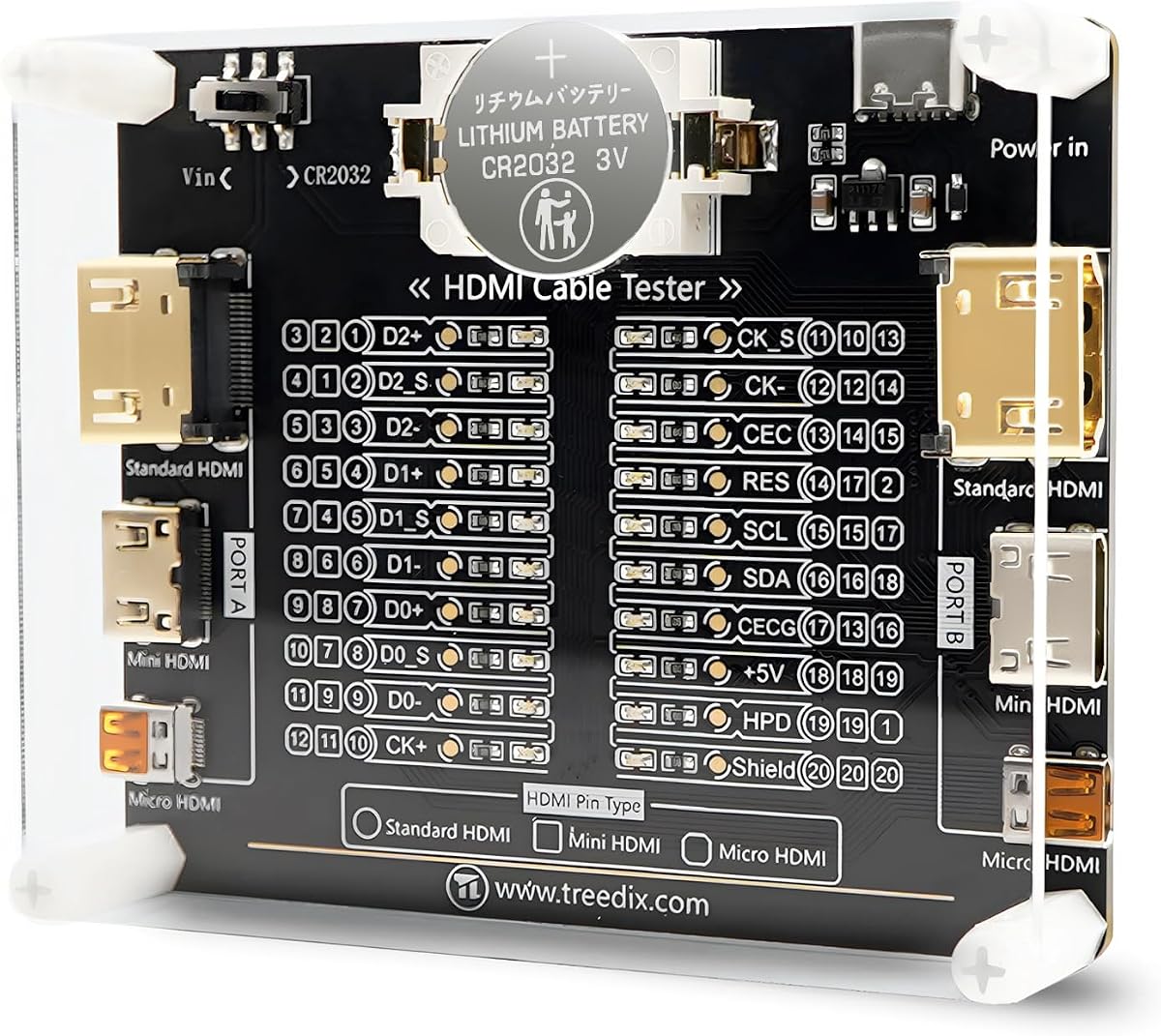
The Treedix Cable Tester Board is an excellent budget-friendly option for those who need basic continuity checks. With a high rating of 4.6 stars, it offers a simple and effective way to detect short circuits or open circuits within HDMI cables.
We may earn a commission when you buy through this link, at no additional cost to you.
Its main advantage is affordability and simplicity. The board uses 20 LED indicators to show the status of each pin, making it easy to identify which wires are working. It supports a wide range of HDMI versions from 1.0 to 2.1.
Trade-offs include a lack of advanced signal analysis like resolution testing or HDCP verification. However, for verifying cable integrity before installation, this tool is perfectly adequate and saves significant money compared to more complex devices.
This board is best suited for DIYers or small business owners who need to verify cable health before connecting expensive equipment. It is lightweight and easy to carry in a toolkit for quick on-site checks.
Each LED corresponds to a specific pin, giving you instant visual feedback on which connections are active or faulty.
You can power the unit using batteries or an external 3 to 12V supply, offering flexibility in remote locations.
We may earn a commission when you buy through this link, at no additional cost to you.
The JTECH Digital Signal Generator represents the pinnacle of HDMI testing technology available today. It receives a top rating of 4.8 stars for its ability to handle 8K signals at 60Hz, making it essential for high-end AV professionals.
We may earn a commission when you buy through this link, at no additional cost to you.
Key strengths include comprehensive testing features like HDCP 2.3 verification and CEC control. It provides 64 resolutions and 33 built-in patterns to stress-test displays and ensure compatibility with modern standards like HDR and 40Gbps bandwidth.
While the price is high, it is an investment for professional shops that deal with flagship TVs and projectors. The portable design with a rechargeable battery ensures you can take it anywhere, and free lifetime technical support adds significant value.
This device is strictly for professionals who need to validate high-bandwidth signals. If you are testing standard 1080p home theater setups, this may be overkill, but for cutting-edge installations, it is unmatched.
Supporting 8K at 60Hz ensures your tool will remain relevant as displays advance beyond current 4K standards.
Testing HDCP 2.3 guarantees that protected content will play correctly on premium displays without handshake errors.
We may earn a commission when you buy through this link, at no additional cost to you.
The Monoprice HDMI Signal Generator offers a practical solution for professionals who need 4K testing without the cost of a premium analyzer. With a 4.0 rating, it is a solid choice for verifying high-resolution outputs and HDCP compatibility.
We may earn a commission when you buy through this link, at no additional cost to you.
Its standout feature is the 4-pin DIP switch that allows you to easily set video resolution and HDCP content types. It supports various formats including 4K at 60Hz with different color sampling options like 4:4:4 and 4:2:0.
Trade-offs include a lack of complex on-screen menus or automated tests. You need to manually configure the switches for each change, which can be slower than devices with digital interfaces but ensures reliability.
This generator is best for technicians who need to verify specific signal outputs. It is a cost-effective way to ensure your displays are receiving the correct resolution and protection protocols without a massive budget.
The DIP switches provide a straightforward way to toggle settings without navigating through complex digital menus.
Supporting 4:4:4 and 4:2:0 ensures you can test specific color formats required for professional workflows.
We may earn a commission when you buy through this link, at no additional cost to you.
The Parts Express HDMI Cable Signal Tester is designed for simplicity and portability. With a 4.3 rating, it is an ideal tool for quick diagnostics where you need to determine if a cable is causing video issues.
We may earn a commission when you buy through this link, at no additional cost to you.
Its primary benefit is the ability to diagnose color shifts, sparkles, or missing pictures directly. The tester displays the status of each HDMI signal component, helping you pinpoint which part of the signal chain is failing.
The trade-off is that it does not include a screen to show video. It is purely a diagnostic tool for cables, so you will still need a display to see the actual image output during installation.
This tool is perfect for home theater installers who want to check cables before connecting them to expensive receivers. It saves time by confirming cable integrity before you spend hours troubleshooting a complex setup.
Viewing the status of each component helps you identify which specific wire within the HDMI connector is failing.
The compact size means it fits easily in your pocket, allowing you to test cables in tight spaces.
We may earn a commission when you buy through this link, at no additional cost to you.
The Portable HD Network Tester offers a convenient all-in-one solution for checking both HDMI and network cables. It holds a 4.4 rating and is designed to quickly scan up to 19 wires for short circuits or open circuits.
We may earn a commission when you buy through this link, at no additional cost to you.
Its main feature is the inclusion of a main unit and a remote unit, which stores on the side of the main unit. This allows you to test cables at both ends without needing to rewire them manually.
The trade-off is that it focuses on continuity rather than signal quality. It will not tell you if the signal degrades over distance, only if the wires are connected properly. This makes it less useful for very long cable runs.
This tester is best for IT and AV technicians who deal with both Ethernet and HDMI cabling. It is a practical tool for basic connectivity checks that keeps your toolkit versatile without adding bulk.
Using a single device for both HDMI and RJ45 reduces the need to carry multiple testers to the job site.
The remote unit allows you to test cables that are already installed in walls or tight spaces easily.
We may earn a commission when you buy through this link, at no additional cost to you.
The JTECH Digital Generator is a robust tool designed for testing compliance and bandwidth. With a 4.2 rating, it is suitable for professionals who need to ensure their systems meet specific HDMI standards like 18Gbps.
We may earn a commission when you buy through this link, at no additional cost to you.
It offers 4K to 1080p scaling to support a range of displays, making it versatile for mixed setups. The device also includes EDID management and tests cables for bandwidth compliance to prevent signal loss issues.
The trade-off is that it is more expensive than basic testers and focuses heavily on signal parameters rather than visual verification. You may need a separate display to see the output if the unit does not have a built-in screen.
This unit is best for AV integrators who need to certify installations. It ensures that your high-speed cables are capable of carrying the data rate required for 4K content without errors.
Controlling EDID data helps resolve issues where displays do not recognize the correct input capabilities.
Testing bandwidth compliance ensures your cables are up to speed for modern high-resolution content delivery.
We may earn a commission when you buy through this link, at no additional cost to you.
The Portable High Def Tester is an efficient tool designed for quick and accurate testing of HDMI cables. It holds a 3.9 rating but provides solid features like auto shut-down to save battery life during storage.
We may earn a commission when you buy through this link, at no additional cost to you.
It includes two test modes: a fast scan mode and a full display mode for more comprehensive checking. This flexibility allows you to choose between speed and detail depending on the urgency of the task.
The trade-off is a slightly lower rating compared to others, which might indicate inconsistencies in build quality. However, for basic checks, it remains a convenient option that supports various connector types without issue.
This tester is best for casual users or technicians who need a quick way to verify cable functionality. The auto shut-down feature adds value by ensuring the device does not drain batteries if left in a bag.
Choosing between fast scan and full display lets you prioritize speed or accuracy based on the situation.
Auto shut-down after ten minutes of inactivity ensures you do not return to a dead device.
We may earn a commission when you buy through this link, at no additional cost to you.
The Jonard Tools HDMI-100 is a compact tool that excels in remote testing scenarios. With a 4.4 rating, it is particularly useful for checking long cables where the ends are far apart.
We may earn a commission when you buy through this link, at no additional cost to you.
Its main feature is the detachable remote unit, allowing you to test installed cables without needing to reach both ends. You can see each individual connection in scan mode or all connections at once in full display mode.
The trade-off is the reliance on a 9V battery, which is less common than AAA or rechargeable options. However, the versatility of testing Mini HDMI cables adds value for modern compact devices.
This tester is ideal for professionals working in commercial settings with long cable runs. The ability to separate the units makes troubleshooting in ceilings or conduits much easier.
Detaching the remote allows for easy testing of cables in difficult-to-reach locations without extra help.
Switching between scan and full display gives you control over how much information you view at a time.
We may earn a commission when you buy through this link, at no additional cost to you.
The UT681 HDMI Tester is a practical tool designed for modern HDMI cables including micro and mini types. It holds a high 4.8 rating and focuses on rapid analysis to detect short or open circuits efficiently.
We may earn a commission when you buy through this link, at no additional cost to you.
Its standout features include intelligent power consumption that warns you when the battery is low via a blue light flash. The lightweight design makes it easy to carry, and the LED zones clearly show which connections are faulty.
The trade-off is that it lacks advanced signal verification. It is strictly for checking the physical integrity of the cable, not for testing high-speed data transfer or HDCP handshake issues.
This tester is best for technicians working with portable devices like cameras or game consoles. Its small size and micro support make it a valuable addition to any toolkit that deals with compact electronics.
Supporting micro and mini HDMI ensures you can test cables for smaller modern devices without extra adapters.
The visual warning prevents surprise power-offs during testing, ensuring you are always ready to work.
We may earn a commission when you buy through this link, at no additional cost to you.
Choosing the right HDMI Signal Tester depends on your specific needs and the complexity of your installations.
Ensure the tester supports the maximum resolution you need, such as 4K or 8K. Basic testers may only work with 1080p signals.
Always match the tester specs to your display capabilities to avoid compatibility issues during installation.
HDCP support is critical for streaming devices and premium content. Check if the tester verifies HDCP 2.3 or 2.2 standards.
Without HDCP testing, you may face playback issues that are difficult to diagnose without the right tools.
Basic continuity checks help identify short or open circuits in your cables. LED indicators are common for this purpose.
This feature is essential for ensuring the physical integrity of the cable before investing in high-end signal analysis.
Some testers include built-in screens to show audio and video without needing a separate TV. This adds convenience to your workflow.
Decide if you need a visual output on the device or if you have access to a display at the job site.
Portable testers rely on batteries. Look for rechargeable options or models that use common batteries like AAA or 9V.
Long battery life ensures you can work all day without frequent interruptions to replace or recharge power sources.
Professional environments require rugged devices. Look for shockproof and water-resistant designs to withstand daily use.
A durable casing protects your investment and ensures the tool remains reliable in tough conditions.
Modern devices often use Mini or Micro HDMI. Verify the tester supports these specific connectors in addition to standard Type A.
Versatility in connector types means you can carry one tool for multiple devices and cable configurations.
If you travel to job sites, a compact and lightweight design is essential. Consider the size and weight before purchasing.
A portable device saves space in your bag and makes it easier to carry multiple testing tools at once.
Start by powering on the device and selecting the appropriate test mode based on your needs. Connect the HDMI cable to the input port and ensure the output is connected to a display or another tester.
For continuity checks, look at the LED indicators to see which wires are connected. If a light does not flash, inspect the connector for damage or dirt that might be blocking the signal.
To maintain your tester, store it in a dry place and avoid dropping it from heights. Clean the ports regularly with compressed air to prevent dust from interfering with connections.
An HDMI Signal Tester helps diagnose cable faults and verify signal compatibility between devices. It ensures that audio and video signals are transmitted correctly without interruptions or quality loss during setup.
Basic testers often do not verify high-bandwidth 4K signals. For 4K content, you need a tester that specifically supports 18Gbps or higher bandwidth to ensure accurate testing and reliability.
It depends on your workflow. If you have access to a display at the site, a simple continuity tester works fine. If not, a built-in screen allows you to verify output without extra equipment.
HDCP testing checks if the cable can support high-bandwidth content protection. This matters because incompatible cables can block premium content playback on modern devices and streaming boxes.
There is no fixed timeline. Replace your tester if LEDs stop working or the device becomes unreliable. Proper care and storage can extend its lifespan significantly beyond typical usage periods.
Most testers are backward compatible with older HDMI versions. However, always check the specs to ensure it supports the latest standards like HDMI 2.1 if you are working with newer equipment.
Some models include RJ45 connectors for network cable testing. However, standard HDMI testers are strictly for video cables. Check the product details if you need dual functionality.
Most portable testers use batteries like AAA or rechargeable internal packs. Some advanced units may require an external power supply for full functionality, so check the requirements before purchase.
The STEREN Handheld Portable HDMI Tester and JTECH Digital Signal Generator are top choices for professionals seeking advanced features. For budget-conscious buyers, the Treedix Cable Tester Board offers reliable performance.
Prioritize the resolution and HDCP support that match your current and future needs. A tester that grows with your technology stack will provide better long-term value.
Prices and availability can change, so review the current listings before making a purchase. Finding the right tool ensures your installations are successful and your clients are satisfied.