
Netgate 1100 pfSense+ Security Gateway
4.1Editor score
Pre-loaded with pfSense+ software
Compact silent desktop form factor
Includes lifetime software updates
Discover the top hardware firewalls for 2026. Our expert guide compares performance, features, and security to help you secure your network infrastructure
Protecting your network requires robust hardware firewalls that offer deep packet inspection and advanced threat defense. These appliances secure critical data from external intrusions while maintaining high throughput for smooth operations.
We evaluated ten leading models based on throughput, port flexibility, management ease, and security suite integration. Each product was chosen for its reliability and ability to scale with growing business needs.
Every pick includes key specs, pros, cons, and detailed usage notes to guide your decision. Prices fluctuate regularly so verify current listings before purchasing to ensure you get the best deal.
4.1Editor score
4.2Editor score

5.0Editor score
This side-by-side comparison highlights the core specifications and capabilities of each model to help you match the right hardware to your specific network size and security requirements.


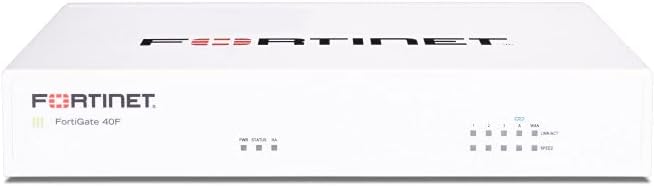
The FortiGate-40F is a compact firewall appliance designed for small businesses. It holds a 4.2 rating and delivers robust protection with AI-driven threat detection.
We may earn a commission when you buy through this link, at no additional cost to you.
It features a purpose-built security processor for high IPS throughput. The management console is user-friendly with Zero Touch Integration for easy deployment.
While it does not include a subscription out of the box, it supports extensive Fortinet services. This allows you to add advanced services as your security needs grow.
Ideal for small offices needing reliable security, it balances performance and cost well. Its silent fanless design makes it suitable for office environments.
The device uses a desktop form factor that minimizes space and operates quietly for office use.
It integrates FortiGuard Labs to identify and mitigate known and unknown threats effectively.
We may earn a commission when you buy through this link, at no additional cost to you.
Netgate 1100 pfSense+ comes pre-loaded with pfSense+ software for quick setup. It carries a 4.1 rating and is perfect for secure edge networking on a budget.
We may earn a commission when you buy through this link, at no additional cost to you.
With a dual core ARM processor it delivers near gigabit routing performance. The unit includes technical assistance and a one year hardware warranty.
Its silent and compact design allows deployment on desktops or walls. You can configure separate WAN LAN and OPT ports for flexibility.
This appliance is ideal for businesses wanting open source software support. It offers strong protection without high licensing costs.
Pre-loaded pfSense+ software gets you running fast with free help from TAC.
Three 1GbE switched ports allow you to configure WAN LAN and OPT separately.
We may earn a commission when you buy through this link, at no additional cost to you.
Zyxel USGFLEX700 is a business class firewall with a 1-Year UTM Security Pack. It has a perfect 5.0 rating and supports up to 500 users.
We may earn a commission when you buy through this link, at no additional cost to you.
It delivers 5400 Mbps SPI firewall throughput with flexible Gigabit ports. The complete security bundle includes anti-malware and application control.
Nebula Cloud Management lets you manage the network easily from anywhere. This centralized approach simplifies monitoring and configuration tasks.
Best for mid to large offices needing top-tier protection. The included UTM saves on initial software licensing costs.
The firewall includes 1-Year UTM services for complete protection and performance.
Nebula Cloud Management makes it easy to manage monitor and configure security.
We may earn a commission when you buy through this link, at no additional cost to you.
SonicWall TZ280 offers 2.5 Gbps firewall inspection with a desktop form factor. It has a 4.7 rating and is built for small business branch needs.
We may earn a commission when you buy through this link, at no additional cost to you.
The patented Reassembly-Free Deep Packet Inspection engine ensures fast security. It supports Secure SD-WAN and Zero-Trust Network Access features.
Note that security services must be purchased separately to activate protection. This keeps upfront costs lower but requires future investment.
Great for small distributed sites needing reliable security. It integrates well with cloud security managers for visibility.
It drives up to 2.5 Gbps firewall inspection using RFDPI engine.
Connectivity includes 8x1GbE and 2x1G SFP for flexible deployment.
We may earn a commission when you buy through this link, at no additional cost to you.
Fortinet FortiGate-70G is designed for branch and small office security. It has a perfect 5.0 rating and comes with 10 Gigabit Ethernet ports.
We may earn a commission when you buy through this link, at no additional cost to you.
It includes NGFW IPS and web filtering with Secure SD-WAN. Deep visibility allows you to govern encrypted traffic effectively.
Centralized management via FortiGate Cloud simplifies deployment. The seamless integration with FortiSwitch and FortiAP is a big plus.
Best for offices needing high-speed connections and unified security. It helps maintain consistent security policies across cloud apps.
It features NGFW IPS and web filtering built in for robust security.
Improves cloud performance while maintaining consistent security policies.
We may earn a commission when you buy through this link, at no additional cost to you.
Sophos XGS 128 is a next-generation firewall appliance for enterprise networks. It offers 19.1 Gbps firewall throughput with 9×2.5 GE copper ports.
We may earn a commission when you buy through this link, at no additional cost to you.
It is purpose built for high performance and reliable operation. SD-WAN optimization provides resilient connectivity for multiple WAN links.
Note that you need a subscription to enable IPS web security. This is standard for most next-gen firewalls.
Best for larger offices needing high-speed enterprise-grade protection. Its architecture supports secure site-to-site networking.
It provides up to 19.1 Gbps firewall throughput for larger offices.
Provides resilient connectivity and intelligent traffic routing.
We may earn a commission when you buy through this link, at no additional cost to you.
Zyxel USGFLEX100H supports up to 50 users with SPI firewall throughput. It includes a 1 Year Entry Defense Pack and has a 4.0 rating.
We may earn a commission when you buy through this link, at no additional cost to you.
You can configure it via Nebula portal wizard or offline via FTP. Flexible ports allow you to set LAN WAN and load balancing.
The Entry Defense Pack includes reputation filtering and visibility. Full UTM like anti-malware requires optional license upgrade.
Best for small teams needing centralized management. Its offline updates ensure you stay secure even without internet.
Reputation filtering and visibility included in Entry Defense Pack.
Centralized configuration policy sync and SD-VPN orchestration.
We may earn a commission when you buy through this link, at no additional cost to you.
SonicWall TZ680 is built for high-end SMB with 5 Gbps inspection. It has a 4.6 rating and includes 8x1GbE and 2x5G SFP+ ports.
We may earn a commission when you buy through this link, at no additional cost to you.
Its RFDPI engine drives fast threat prevention and IPSec VPN. It supports Secure SD-WAN and Zero-Trust Network Access.
As hardware only it requires a subscription for full protection. Zero-touch deploy makes management on-box or via cloud simple.
Best for distributed sites needing robust connectivity. It keeps remote workers protected with advanced access.
Up to 5 Gbps firewall inspection with threat prevention engine.
Desktop form factor with 2x10G SFP and 2x5G SFP+.
We may earn a commission when you buy through this link, at no additional cost to you.
Fortinet FortiGate 60F is bundled with 36 Month Unified Threat Protection. It holds a 4.4 rating and is optimized for medium-sized businesses.
We may earn a commission when you buy through this link, at no additional cost to you.
It secures against threats with web filtering and anti-botnet. FortiCare Premium ensures reliable customer support continuity.
You get hardware plus security services to simplify management. It employs advanced filtering to safeguard against sophisticated threats.
Best for businesses needing robust security without enterprise complexity. The bundle reduces the need for separate service purchases.
Secures against online threats with web filtering and anti-botnet.
FortiCare Premium ensures high-quality support and service continuity.
We may earn a commission when you buy through this link, at no additional cost to you.
Cisco ASA5525-X offers a classic enterprise security appliance at a lower price. It has a 4.3 rating and comes as a renewed unit.
We may earn a commission when you buy through this link, at no additional cost to you.
It features 8 port gigabit Ethernet for standard connections. The ASA series is well known for proven reliability.
This is an older model so features may be limited. Renewed status means it is refurbished but functional.
Best for budget buyers needing enterprise brand security. It serves well for basic firewall needs without high cost.
Cisco ASA 5525-x firewall edition with 8 port gigabit Ethernet.
We may earn a commission when you buy through this link, at no additional cost to you.
Choosing a hardware firewall involves evaluating performance, security features, and scalability. Here are the critical factors to consider.
Throughput determines how much data the firewall can process per second. Look for models that support your network speed to avoid bottlenecks.
Prioritize devices with throughput higher than your internet speed.
Advanced features like IPS and anti-malware are essential for modern threats. Ensure the hardware supports these suites or offers upgradeable licenses.
Look for unified threat management capabilities.
Port flexibility allows you to connect multiple networks or segments. Choose models with enough Ethernet or SFP ports for your devices.
Ensure you have enough ports for WAN and LAN needs.
Ease of management affects how quickly you can configure policies. Cloud or unified consoles simplify operations for small teams.
Choose intuitive interfaces that support cloud management.
Many appliances sell hardware only requiring paid subscriptions for features. Calculate total cost of ownership over the hardware lifespan.
Factor in long-term license costs before buying.
Your firewall should grow with your business. Select models that support adding more users or features as needed.
Choose appliances with upgrade paths for future needs.
Reliable support ensures you get help when issues arise. Check warranty terms and available technical assistance channels.
Prioritize providers with strong support reputations.
Connect the device between your modem and router. Ensure firmware is updated immediately after setup.
Configure WAN and LAN interfaces and set security policies based on user needs.
Monitor traffic logs regularly. Keep the device in a cool dry place to ensure longevity.
A hardware firewall is a dedicated physical device that filters traffic between networks. It protects internal systems from external threats more effectively than software alone.
Many appliances sell hardware only but require a subscription for advanced security features. Check the product details to confirm what is included out of the box.
Install it by connecting the WAN port to your modem and LAN ports to your switch. Access the management console to configure settings.
Some appliances integrate routing functions but dedicated routers are often preferred for performance. Check if the firewall supports your specific routing needs.
Throughput is the amount of data the firewall can process per second. Higher throughput ensures your network runs smoothly under heavy loads.
Cloud management simplifies configuration and updates. It allows remote access which is useful for distributed offices.
Update firmware regularly to patch security vulnerabilities. Many devices support auto-updates but check your settings to ensure it is enabled.
IPS stands for Intrusion Prevention System. It detects and blocks malicious traffic in real time to protect your network.
We reviewed ten models from Fortinet Zyxel and SonicWall. Top picks include FortiGate-40F for small businesses and Zyxel USGFLEX700 for larger offices.
Prioritize throughput and security features that match your network size. Subscriptions and support costs should also factor into your final decision.
Prices vary across retailers so check current listings before buying. Ensure the appliance meets all your security and scalability needs.