
SABRENT USB 3.0 to SATA Hard Drive Docking Station
4.4Editor score
Supports 2.5 and 3.5 SATA drives
Includes 12V power adapter
Tool-free hot-swap design
Finding a reliable hard drive docking station simplifies data access and backup tasks significantly. A good unit supports multiple drive sizes and offers fast transfer speeds without requiring internal installation.
We evaluated ten top-rated models based on compatibility, cloning features, and build quality. Our selection includes options for beginners and professionals needing versatile connectivity solutions.
Each pick highlights specific strengths like USB-C support or offline cloning capabilities. Please note that product availability and pricing may change over time.
4.4Editor score

4.5Editor score

4.5Editor score
As an Amazon Associate we earn from qualifying purchases.
This table provides a side-by-side look at the specifications and key capabilities of each selected docking station to help you compare features quickly.



The SABRENT Dual Bay Cloner is a top choice for users needing reliable access to SATA hard drives. It features USB 3.0 connectivity for fast file transfers and includes a dedicated cloning button for easy backups.
We may earn a commission when you buy through this link, at no additional cost to you.
This model supports both 2.5 and 3.5 inch drives up to 10TB. The offline cloning capability allows you to copy data directly between drives without using a computer. It is designed for simplicity with plug and play functionality.
While cloning speeds are moderate compared to USB transfer rates, the convenience of a standalone backup tool is valuable. The unit requires a power source for 3.5 drives which ensures stable operation during long sessions.
Anyone looking for a balance of performance and utility will appreciate this docking station. It is ideal for home users managing multiple drives or tech enthusiasts needing quick data access.
You can duplicate a drive by pressing a button without installing software. This feature is perfect for migrating data to new SSDs quickly.
It accepts standard 2.5 and 3.5 inch SATA hard drives and SSDs. This flexibility means you can use existing drives from desktops or laptops.
We may earn a commission when you buy through this link, at no additional cost to you.
The SABRENT USB 3.0 Docking Station offers excellent value for those needing basic drive access. It supports both 2.5 and 3.5 inch SATA drives and includes a power adapter for stable performance.
We may earn a commission when you buy through this link, at no additional cost to you.
This model features a trayless design allowing you to insert drives directly without tools. The USB 3.0 interface with UASP support provides faster data transfer speeds compared to older USB 2.0 standards.
It lacks advanced features like offline cloning which keeps the cost down. You will need to format new drives in your operating system before they are recognized but this is standard for most docks.
This is an ideal entry-level option for students or home users. It provides reliable connectivity for occasional backup or data recovery tasks without a high price tag.
Inserting a drive is as easy as sliding it into the bay. The design ensures good contact without requiring screwdrivers or extra hardware.
The included 12V adapter ensures 3.5 drives spin up correctly. 2.5 drives often work via bus power but the adapter adds stability.
We may earn a commission when you buy through this link, at no additional cost to you.
The ICY BOX TripleBay Docking Station is designed for power users who need to manage multiple drive types. It supports M.2 NVMe SSDs and standard SATA drives offering unprecedented versatility.
We may earn a commission when you buy through this link, at no additional cost to you.
Equipped with USB-C 10Gbps technology this dock provides blazing fast data speeds. The three independent slots allow you to connect multiple drives simultaneously for easy file comparisons.
Offline cloning works between different drive types like NVMe to SATA which is rare. The price is higher but the ability to read modern internal SSDs justifies the cost.
This unit is perfect for professionals upgrading storage or managing diverse hardware. It bridges the gap between legacy SATA drives and modern high-speed NVMe SSDs.
Unlike many docks this model reads modern M.2 NVMe SSDs directly. You can access high-speed storage without needing to buy an adapter case.
USB-C 10Gbps ensures files move as fast as the drive allows. This reduces wait times when copying large media libraries or databases.
We may earn a commission when you buy through this link, at no additional cost to you.
The SABRENT 4-Bay Docking Station is a robust solution for managing multiple hard drives. It allows you to access up to four SATA drives at once making it ideal for RAID-like management.
We may earn a commission when you buy through this link, at no additional cost to you.
With a powerful external power adapter it ensures all drives spin up reliably. The offline clone feature lets you duplicate one drive to another without using computer resources.
Its size is significant and requires dedicated desk space. You cannot use it with USB-C without an adapter which might be a limitation for newer laptops.
This dock is best for users with large existing drive libraries needing access. It simplifies the process of moving data between multiple large capacity hard drives.
You can connect and manage up to four drives simultaneously. This is useful for comparing files across multiple backup sets or archives.
The included adapter provides stable power for all four bays. This prevents drive dropouts that can occur with underpowered USB ports.
We may earn a commission when you buy through this link, at no additional cost to you.
The SABRENT Single Bay Docking Station is a straightforward tool for accessing external SATA drives. It supports large capacity drives up to 20TB making it future proof for expanding storage needs.
We may earn a commission when you buy through this link, at no additional cost to you.
It includes an AC adapter which is essential for stable performance with 3.5 inch drives. The auto sleep feature helps save energy when the dock is idle for long periods.
Lacking a cloning button means you must use software for backups on a computer. This simplifies the hardware but reduces standalone functionality compared to dual bay models.
This unit suits users who need basic connectivity without extra features. It is a dependable choice for occasional file access or drive initialization.
The dock automatically enters sleep mode after thirty minutes of inactivity. This reduces power consumption and heat generation when not in use.
It accommodates drives up to 20TB which covers most modern hard drives. You do not need to worry about compatibility limits with large disks.
We may earn a commission when you buy through this link, at no additional cost to you.
The UGREEN Dual-Bay Docking Station focuses on hardware protection and safety. Its 360 degree cooling design helps manage heat during extended data transfer sessions.
We may earn a commission when you buy through this link, at no additional cost to you.
It supports offline cloning to allow quick duplication without a PC. The included one-meter USB-C to USB-B cable is longer than average reducing clutter on your desk.
The product includes a dust cover to protect connectors when not in use. While cloning is supported users should test speeds as they can vary based on drive health.
This dock is great for users concerned about device longevity and safety. It offers a balanced set of features for standard home or office use.
The surround cooling design helps keep drives cool during use. This can prolong the lifespan of hard drives sensitive to heat exposure.
Anti-slip pads and a dust cover are included for safety. These small details show attention to protecting your drives and the dock itself.
We may earn a commission when you buy through this link, at no additional cost to you.
The RSHTECH Dual Bay Docking Station features a premium aluminum housing. This ensures better heat dissipation and durability compared to plastic alternatives.
We may earn a commission when you buy through this link, at no additional cost to you.
It comes with both USB-A and USB-C cables ensuring compatibility with various computers. The 36W power adapter provides ample power for stable operation.
It supports offline cloning for basic backup tasks without software. Users should note that sleep mode activates after ten minutes which saves energy efficiently.
This model is suitable for professionals valuing build quality and versatility. The aluminum body feels sturdy and fits well in modern office setups.
The aluminum case helps dissipate heat effectively during use. It also gives the dock a premium look and feel on your desk.
Both USB-A and USB-C cables are provided in the box. This ensures you can connect to older and newer computers easily.
We may earn a commission when you buy through this link, at no additional cost to you.
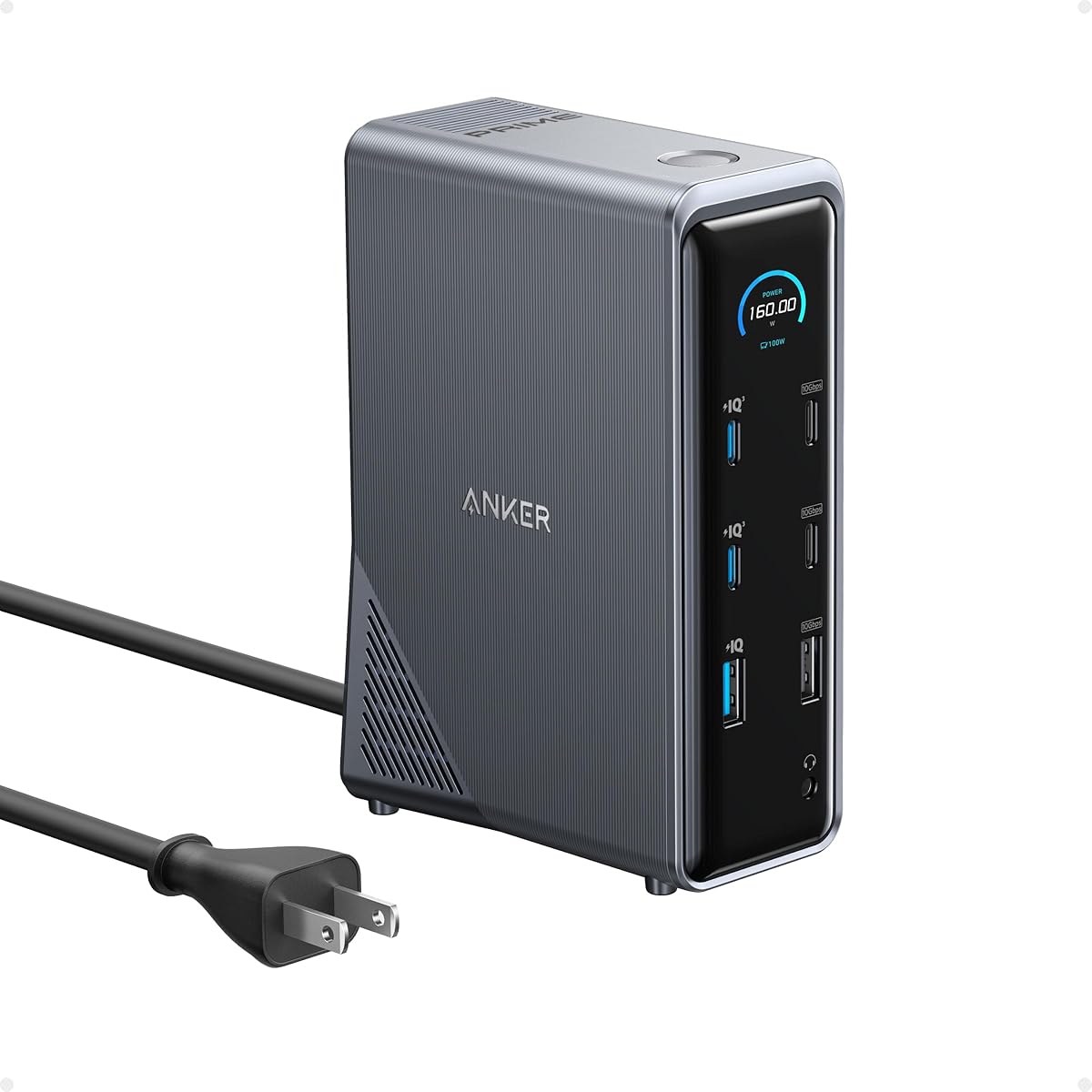
The Anker Prime Docking Station is a versatile hub offering extensive connectivity. While not a dedicated drive dock it includes USB ports that support drive access alongside other peripherals.
We may earn a commission when you buy through this link, at no additional cost to you.
It delivers up to 160W total output which can charge multiple devices simultaneously. The dual HDMI ports allow you to connect two external displays easily.
Using it for drives is possible but less specialized than dedicated docks. It is ideal for users wanting a single station for monitors and storage devices.
This solution is best for professionals seeking minimal desk clutter. It simplifies connections for laptops needing multiple video and data interfaces.
This unit combines video data and power ports in one device. It reduces the need for multiple adapters on your workspace.
The 160W output ensures laptops charge while in use. You can connect accessories without worrying about power draining your device.
We may earn a commission when you buy through this link, at no additional cost to you.
The FIDECO Dual Bay Docking Station provides affordable cloning capabilities. It supports both 2.5 and 3.5 inch drives making it flexible for various hardware.
We may earn a commission when you buy through this link, at no additional cost to you.
It features a dedicated clone button for easy data duplication. USB 3.0 speeds ensure quick transfers for daily backup needs.
The build is mostly plastic which feels less premium than metal docks. However the performance is reliable for the price point.
This is an excellent choice for budget-conscious users needing specific cloning features. It offers strong functionality without a high investment.
You get offline cloning at a lower price than competitors. This makes advanced features accessible to more users.
No drivers are required to use this dock on Windows or Mac. Just plug it in and the drives appear in your file system immediately.
We may earn a commission when you buy through this link, at no additional cost to you.
The SABRENT Dual-Bay USB-C Docking Station is built for modern laptops. It features a native USB-C port which eliminates the need for adapters on newer devices.
We may earn a commission when you buy through this link, at no additional cost to you.
It supports offline cloning for quick backups directly between drives. The USB-C connection ensures high-speed data transfer up to 5Gbps.
If your computer only has USB-A ports you will need a separate adapter. This is a small trade-off for the benefits of a reversible USB-C cable.
This model is ideal for users with ultrabooks or modern workstations. It bridges the gap between older hard drives and new hardware interfaces.
USB-C is reversible and supports faster data rates. This aligns with current trends in laptop and computer design.
The compact design saves space while offering two drive bays. It keeps your workspace organized without sacrificing functionality.
We may earn a commission when you buy through this link, at no additional cost to you.
Selecting the right docking station involves understanding your specific drive types and workflow needs. This guide breaks down key factors to help you choose.
Ensure the dock supports your specific drive interface. Most docks support SATA but modern ones may also include M.2 NVMe slots for SSDs.
Check your drive's connector type before purchasing to avoid incompatibility issues.
Look for USB 3.0 or newer standards like USB-C for better speeds. USB-C offers reversible connections and is standard on new laptops.
Choose a dock that matches the ports available on your computer.
If you need frequent backups without a computer look for a cloning button. This allows direct drive-to-drive copying without PC software.
Cloning is a vital feature for quick data migration tasks.
3.5 inch drives usually require an external power adapter for stable operation. Ensure the dock includes this adapter to prevent drive dropouts.
A robust power supply is essential for long-term reliability.
Decide how many drives you need to access simultaneously. Single bay is cost-effective but multi-bay options offer better management.
More bays allow for easier file transfers between multiple drives.
Metal housings dissipate heat better than plastic. Good heat management extends the lifespan of your hard drives.
A solid build also protects the drives during transport.
Hot-swapping lets you insert or remove drives without restarting your computer. This is essential for users who swap drives frequently.
Ensure your operating system supports hot-swapping for this feature to work.
Look for support for UASP to boost transfer speeds. Standard USB protocols may throttle SSD performance.
Faster speeds save time when dealing with large files.
Begin by connecting the power adapter if required and then plug the USB cable into your computer. Allow the system to recognize the drives before inserting any disks.
Insert your drives gently into the bays ensuring the connectors align correctly. Wait for the LED indicators to show that the drives are active.
Regularly check the connectors for dust and use a soft cloth to clean them. Store the dock in a dry place when not in use to protect the electronics.
Most modern docking stations are plug and play and do not require driver installation. They are recognized by Windows macOS and Linux automatically upon connection.
Standard docking stations support SATA drives only. You need a specific dock with M.2 slots to use NVMe SSDs directly.
Offline cloning is convenient but often slower than using high-speed software on a computer. It is best for quick backups without needing a PC setup.
3.5 inch drives require more power than a USB port can provide. You must use the included external power adapter for stable operation.
Connect both drives to the dock and open File Manager. You can drag and drop files from one drive to another as with any external storage.
Most docking stations work with Macs via USB. However you may need to initialize and format drives for Mac file systems to recognize them.
Our top picks offer a range of options from basic SATA access to advanced NVMe support. The SABRENT Dual Bay Cloner remains a strong choice for general use.
Prioritize features like USB-C connection and offline cloning based on your workflow. A solid power supply is critical for handling larger 3.5 inch drives reliably.
Always check current availability before making your purchase to ensure you get the model you need. Proper use and care will extend the life of your docking station.