
msi Gaming RTX 3050 LP 6G OC
4.5Editor score
Low Profile design saves space
6GB GDDR6 memory capacity
HDMI 2.1 and DP support
Discover the top GPUs for Small Form Factor Sff PC builds in October 2026. We compare performance, size, and features to help you choose the right graphics
Building a compact gaming or workstation PC requires careful hardware selection. A GPU for Small Form Factor Sff PC must deliver strong performance without exceeding strict size and power limits. Choosing the right card ensures your system runs cool and quiet while fitting perfectly into miniature cases.
We evaluated ten top-rated graphics cards based on architecture, cooling design, and compatibility. Each product was analyzed for its physical dimensions, power draw, and output options. This list covers budget-friendly low profile models and high-end enthusiast cards tailored for mini ITX enclosures.
Every pick highlights key strengths like memory size, clock speeds, and interface support. Real-world usage scenarios help you match a card to your specific needs. Note that product availability and pricing fluctuate frequently, so verify current details before finalizing your purchase decision today.
4.5Editor score

4.7Editor score

4.8Editor score
This side-by-side comparison details the specifications and unique features of every selected graphics card. Use this table to quickly identify which model fits your chassis clearance, power supply, and performance requirements for your Small Form Factor build.


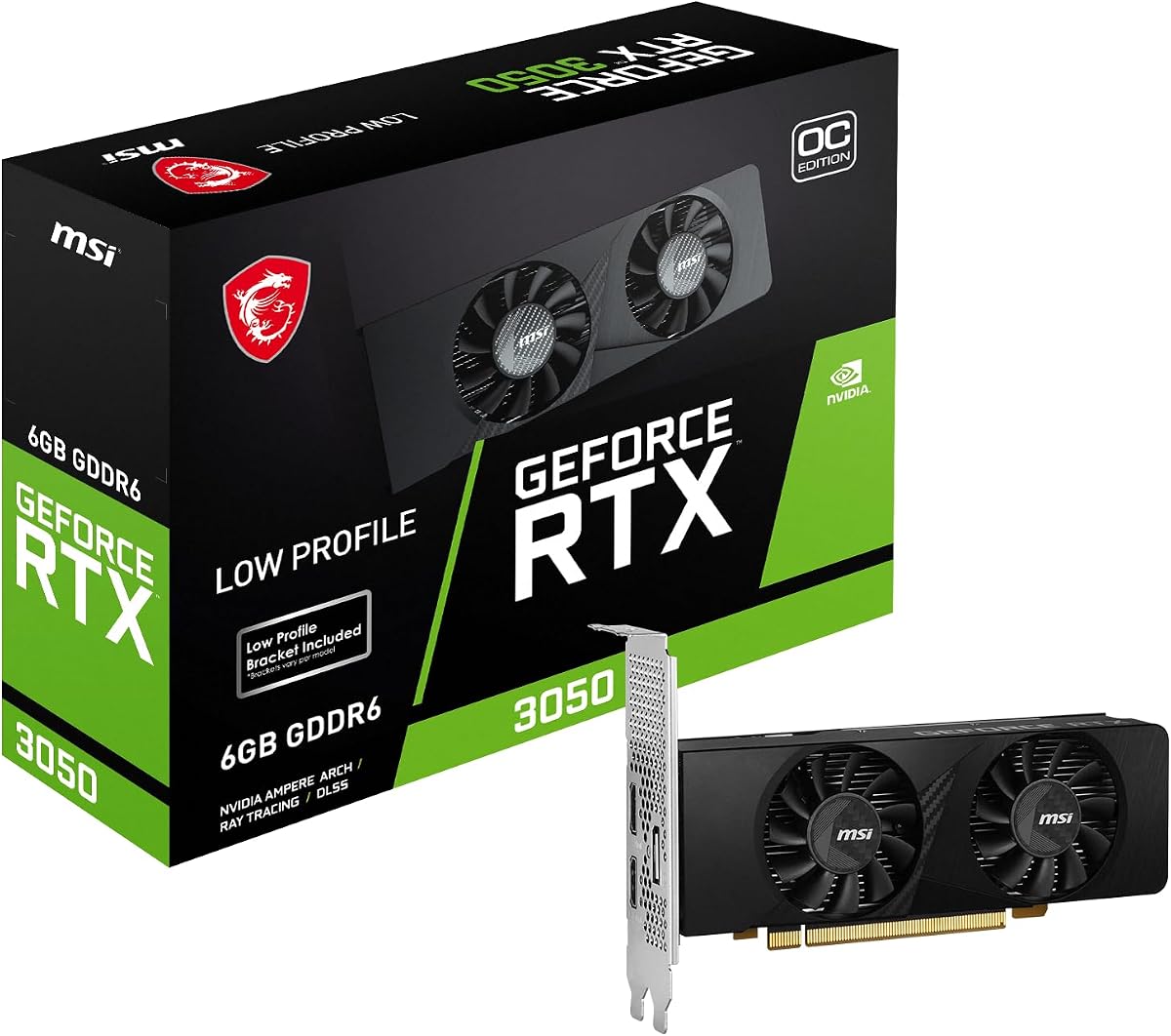


This card stands out as a top contender for small builds thanks to its slim dimensions and strong architecture. It receives a solid 4.3 rating from users who value its balance of size and performance in tight spaces.
We may earn a commission when you buy through this link, at no additional cost to you.
The NV Ampere architecture provides significant gains over older generations with AI specialized Tensor Cores. Users report smooth gameplay in demanding titles thanks to the boost clock speeds reaching 1470MHz.
While the 96-bit memory interface is a limitation for high-resolution textures, the 6GB capacity remains sufficient for most 1080p gaming needs. The low profile design ensures it fits into cases with very limited vertical clearance.
Buyers seeking a reliable card for mini ITX systems should consider this model for its broad compatibility. It offers excellent value for those needing modern connectivity like HDMI 2.1 without sacrificing chassis space.
The slim design measures only 6.65 inches by 2.71 inches ensuring it fits most compact cases.
Includes HDMI 2.1 and DisplayPort 1.4a for support up to 8K resolution displays.
We may earn a commission when you buy through this link, at no additional cost to you.
This MSI card delivers excellent value for budget builders wanting entry level ray tracing and modern features. It earns a strong 4.5 rating due to its reliable performance in small cases without breaking the bank.
We may earn a commission when you buy through this link, at no additional cost to you.
The factory overclock provides a boost clock of 1492 MHz which helps maintain frame rates in competitive games. Users appreciate the dual HDMI ports that allow easy connection of multiple displays for work or media setups.
While not a powerhouse for 4K gaming it handles 1080p titles efficiently. The low profile design is strictly fixed meaning it cannot be converted to a full height bracket for larger cases.
This choice is ideal for office upgrades or entry gaming rigs where cost matters most. It provides a solid foundation for small form factor builds needing basic graphics acceleration.
The OC version ships with a higher boost clock for better out of box gaming performance.
Features two HDMI 2.1a outputs alongside a DisplayPort for flexible monitor connections.
We may earn a commission when you buy through this link, at no additional cost to you.
This card represents the cutting edge of SFF performance with next-gen architecture and massive memory. It scores a 4.7 rating for its ability to handle modern AAA titles in compact enclosures effectively.
We may earn a commission when you buy through this link, at no additional cost to you.
Powered by the Blackwell architecture it supports DLSS 4 which uses AI to upscale images for better performance. The 12GB GDDR7 memory ensures future proofing for high resolution textures and demanding workloads.
The 2.5-slot design balances cooling performance with size constraints allowing better airflow than single slot options. However its physical size may still restrict compatibility in the most miniature cases available.
Enthusiasts willing to invest in top tier performance should choose this for its reliability. The 3 year warranty adds peace of mind for long term usage in professional or gaming setups.
The 12GB GDDR7 memory delivers bandwidth necessary for 4K gaming and creative workloads.
Phase-change thermal pads help lower temperatures for sustained performance under heavy loads.
We may earn a commission when you buy through this link, at no additional cost to you.
This card is optimized for business systems and professional environments requiring stability over gaming performance. It holds a 4.7 rating from users deploying it in compact workstations and design centers.
We may earn a commission when you buy through this link, at no additional cost to you.
The single slot low profile design minimizes physical footprint allowing for dense server racks or office PCs. Its 50W power draw ensures it runs silently without needing active cooling fans in many cases.
Four Mini DisplayPort outputs enable multi-monitor setups ideal for financial trading or creative work. While not intended for games it supports professional features like ray tracing for CAD modeling efficiently.
Business buyers should choose this for its reliability and low heat output. It is an excellent solution for small form factor systems where silence and display density are priorities.
Supports up to four displays with resolutions up to 5120 x 2880 at 60 Hz.
Consumes only 50W which reduces overall system power costs and heat generation.
We may earn a commission when you buy through this link, at no additional cost to you.
This Intel Arc card is a strong candidate for media centers and light gaming due to its AV1 encode support. It achieves a 4.3 rating for its ability to handle 8K video playback efficiently in small cases.
We may earn a commission when you buy through this link, at no additional cost to you.
The 0dB silent fan stops spinning at low temperatures ensuring total silence during movie watching. Its single fan cooling system is optimized for airflow without generating excessive noise in living room setups.
Intel XeSS upscaling boosts gaming performance in supported titles making it viable for esports. However compatibility with older DirectX 11 titles may require driver updates compared to NVIDIA options.
Streamers and home theater enthusiasts should consider this for its encode features. It offers excellent value for those needing a compact card to drive modern displays with minimal power.
Hardware support for AV1 video encoding accelerates workflow creation and streaming setups.
The fan stops completely at low temps to deliver 0dB silence during idle usage.
We may earn a commission when you buy through this link, at no additional cost to you.
This MSI card combines a low profile form factor with dual fan cooling for improved thermal performance. It holds a 4.6 rating from users who prioritize silent operation in their small gaming builds.
We may earn a commission when you buy through this link, at no additional cost to you.
The dual fan heatsink design allows the card to run cooler than single fan alternatives. Users appreciate the MSI Center software which lets them monitor temperatures and optimize performance in real time.
While the 96-bit interface is a bottleneck for high resolutions the 6GB buffer is sufficient for 1080p gaming. The custom PCB engineering ensures reliability during extended gaming sessions under load.
Gamers wanting silent performance without sacrificing space should choose this model. It provides a reliable balance of cooling efficiency and compact design for mini ITX cases.
Dual fans and a large heatsink ensure cool and quiet experience for gaming.
Engineered with hardened circuits for optimized trace routing and long term reliability.
We may earn a commission when you buy through this link, at no additional cost to you.
This GIGABYTE card delivers exceptional performance for small builds using the latest Blackwell architecture. It earns a 4.8 rating for its ability to handle high-end gaming in a compact chassis reliably.
We may earn a commission when you buy through this link, at no additional cost to you.
The 12GB GDDR7 memory with a 192-bit interface provides ample bandwidth for detailed textures. NVIDIA SFF ready certification ensures it fits specific SFF cases designed for high-end graphics cards.
The WINDFORCE cooling system maintains stable temperatures even under heavy load. Its physical dimensions may still require checking case clearance before purchasing for very tight enclosures.
Power users seeking maximum performance in a small box should choose this card. It represents the pinnacle of SFF technology for those who refuse to compromise on graphics quality.
The cooling system uses optimized fan designs to maintain low temperatures under load.
The 192-bit interface paired with GDDR7 ensures rapid data transfer for rendering.
We may earn a commission when you buy through this link, at no additional cost to you.
This card offers strong mid-range performance with the latest NVIDIA Blackwell architecture and advanced cooling. It holds a 4.5 rating for its balanced approach to heat management and gaming capability in small cases.
We may earn a commission when you buy through this link, at no additional cost to you.
The TORX Fan 5.0 stabilizes airflow to keep temperatures down during intense sessions. The nickel-plated copper baseplate captures heat quickly from the GPU and memory for efficient dissipation.
Users will appreciate the 8GB GDDR7 memory which is sufficient for modern gaming needs. While SFF-Ready it may still require a case with specific clearance due to its dual slot design.
Gamers looking for a balance of price and performance should consider this model. It brings next-gen features to a smaller footprint without the premium cost of higher-end cards.
Nickel-plated copper baseplate captures heat swiftly for better thermal management.
Designed as an SFF-Ready enthusiast card to fit compact gaming builds effectively.
We may earn a commission when you buy through this link, at no additional cost to you.
This AMD card provides reliable performance for office and media tasks in a tiny package. It receives a 4.4 rating for its ability to run multiple displays on minimal power in small systems.
We may earn a commission when you buy through this link, at no additional cost to you.
The 4 GB GDDR5 memory offers decent speed for rendering and video editing tasks. It can drive a single 5K display or up to four 4K displays making it great for multi-monitor setups.
With AMD ZeroCore Power technology the card optimizes power usage to reduce electricity bills. However it is not recommended for heavy gaming due to its older memory architecture.
Business users needing display density in a small case should choose this card. It delivers professional features like hardware video processing in a low profile design.
AMD PowerTune technology dynamically optimizes power usage for maximum energy savings.
Can drive one 5K display or four 4K displays simultaneously for productivity.
We may earn a commission when you buy through this link, at no additional cost to you.
This ASUS card stands out for its massive 16GB memory buffer which is rare in compact designs. It earns a 4.7 rating from users needing high memory capacity for creative workloads in small cases.
We may earn a commission when you buy through this link, at no additional cost to you.
The Axial-tech fans feature a smaller hub for longer blades to increase downward air pressure. This design maintains effective cooling while keeping noise levels manageable during gaming or rendering.
The Dual BIOS switch allows users to toggle between Quiet and Performance profiles easily. Users appreciate the 0dB technology that stops fans when temperatures are low for silent operation.
Creative professionals needing memory capacity should consider this card despite its size. It offers a great balance of cooling and memory for workstation tasks in small form factor builds.
The 16GB GDDR6 memory handles large textures and complex 3D scenes effortlessly.
0dB technology stops fans at low temps for silence during idle or light loads.
We may earn a commission when you buy through this link, at no additional cost to you.
Choosing the right GPU for a Small Form Factor PC involves balancing performance, physical dimensions, and power requirements. This guide details key factors to consider before purchasing a graphics card.
The most critical factor is ensuring the card fits your case. Measure the internal width and height of your SFF enclosure to verify compatibility. Low Profile cards are often required for ultra compact builds.
Always check the maximum length allowed by your chassis before buying. Cards that exceed this limit will not fit and may require return or exchange.
Small cases usually have lower wattage power supplies than tower PCs. Ensure your PSU can handle the GPU's TDP and any external power connectors required. Overloading a PSU can cause instability.
Look for cards with lower wattage consumption for better efficiency in SFF builds. Many modern cards are optimized to run on lower wattage units without sacrificing performance.
VRAM size impacts how well a card handles high-resolution textures and creative apps. For 1080p gaming 6GB is often sufficient but 8GB or more offers better longevity. Professional tasks benefit from higher memory pools.
Select a card with memory capacity that matches your workload. Streaming and editing require more buffers than standard gaming or office work.
Compact cases have limited airflow so cooling design is essential. Cards with large heatsinks or high quality fans prevent throttling. Axial-tech or WINDFORCE designs help direct air effectively.
Check the thermal design power (TDP) to ensure the cooling matches the heat output. A quiet card helps keep your SFF system pleasant to use.
Ensure the card has the ports you need for your monitors. Look for HDMI 2.1 or DisplayPort 1.4a for support up to 4K and high refresh rates. Multi-monitor setups require multiple outputs.
Verify that the connectors are accessible on low profile brackets. Some cards have ports that align with the bracket which prevents blocking.
Newer architectures like Blackwell or Ampere offer better efficiency and features like DLSS. This tech uses AI to boost frame rates without increasing power draw. It is vital for smooth gaming.
Choose a card with an architecture that matches your software needs. Ray tracing and AI features rely heavily on the latest hardware generations.
A robust PCB and high quality capacitors ensure longevity. Look for warranties of at least 3 years to protect your investment. Professional cards often have longer support options.
Read user reviews regarding long-term stability. Cards from reputable brands often have better quality control and customer support services.
SFF cards can sometimes cost more per frame due to smaller heatsinks. Balance your budget with the performance you need for your specific use case. Premium features may not always be necessary.
Compare total cost of ownership including PSU upgrades if needed. Investing in efficiency saves money in the long run through lower electricity bills.
Before installation ensure your power supply is turned off and unplugged from the outlet. Insert the card firmly into the PCIe slot and secure it with the bracket screws. Verify the card does not block airflow paths.
Install the latest drivers from the manufacturer's website to ensure compatibility. Use tuning software like MSI Center to monitor temperatures and adjust fan speeds. Keep your system clean of dust using compressed air.
Regularly check for BIOS updates and driver patches to maintain performance. Avoid placing your PC in enclosed spaces to prevent overheating. Ensure the case fans are functioning correctly to support the GPU.
Most SFF cases support cards up to 200mm in length. Low Profile cards are the best option for ultra compact builds as they fit within 70mm height limits. Always check your specific case manual for maximum dimensions.
Only if the case is large enough and supports dual slot heights. Many SFF cases require Low Profile brackets or Single Slot designs. Verify the internal clearance before attempting to install larger cards.
Many entry level SFF GPUs do not need external power connectors and run directly from the motherboard. However high end cards may need 6-pin or 8-pin power. Check the specific card specifications for power requirements.
Ensure your case has adequate intake and exhaust fans. Choose a GPU with a heatsink designed for compact airflow. Avoid stacking heat sources together to prevent thermal throttling in tight spaces.
Yes if your current card lacks support for modern features like DLSS. Newer models often consume less power and offer better performance. This upgrade path extends the life of your SFF system.
Entry level cards struggle with 4K gaming but mid range options can handle it. Look for cards with at least 8GB memory to manage high resolution textures. Performance will vary based on game optimization.
We reviewed ten top choices ranging from budget low profile cards to high-end enthusiast options. The ASUS RTX 5070 and GIGABYTE RTX 5070 offer premium performance for those willing to invest. The MSI RTX 3050 provides reliable value for general users.
When selecting a card prioritize dimensions and power efficiency over raw power. A card that fits well and runs cool will serve you better than one that exceeds your case limits. Match the memory size to your actual usage needs.
Prices for GPUs fluctuate frequently so check current listings before buying. Verify that your PSU and case are compatible with the final choice. These cards represent the best solutions for Small Form Factor builds available today.