
Hohem iSteady Pro 4
4.2Editor score
Bluetooth shutter control
IPX4 splash proof
14 hour runtime
Finding the perfect gimbal for your action camera can transform shaky footage into smooth cinematic shots. Whether you are vlogging, filming sports, or exploring outdoors, stabilization is key to professional results. This guide explores the leading options designed specifically for action cams and versatile setups.
We evaluated each product based on stabilization performance, battery life, compatibility, and ease of use. Our analysis covers everything from budget-friendly options to premium models with advanced AI tracking. Each entry reflects real-world usability and technical specifications relevant to content creators today.
Every pick highlights unique strengths and potential trade-offs to help you decide quickly. Prices and availability can change so always verify details before purchasing. Use this resource to find a stabilizer that matches your gear and creative goals without overspending or compromising quality.
4.2Editor score
4.5Editor score

4.5Editor score
As an Amazon Associate we earn from qualifying purchases.
The following table provides a side-by-side overview of every model reviewed in this guide. Compare key specifications and features at a glance to identify which gimbal fits your specific action camera and workflow requirements best.


The Hohem iSteady Pro 4 stands out as an excellent entry-level gimbal for action cameras. With a solid 4.2 rating, it delivers reliable 3-axis stabilization for GoPro HERO 5 through 13 models and other similarly sized cams. Users appreciate its straightforward design and robust build quality at a competitive cost.
We may earn a commission when you buy through this link, at no additional cost to you.
Its standout features include native wireless shutter control via Bluetooth which saves battery compared to WiFi connections. The IPX4 splash-proof rating means you can film in light rain or snow without worry. Additionally, the 14-hour runtime ensures you can shoot all day without recharging the gimbal itself.
While it lacks some advanced AI tracking found in premium models, the iSteady 5.0 anti-shaking algorithm handles dynamic motion well. The 600° Inception mode allows for creative transitions without needing complex editing. Some users note the interface is simpler than more expensive options which limits customization.
This gimbal is ideal for budget-conscious creators who prioritize stability and durability over smart features. If you need a dependable tool for hiking or travel videos, the Pro 4 offers great value. It balances performance and affordability better than most competitors in this price range today.
Wireless control reduces power draw significantly compared to older WiFi methods ensuring longer shooting sessions.
IPX4 rating protects internal components from water splashes making it suitable for outdoor adventures.
We may earn a commission when you buy through this link, at no additional cost to you.
This variant of the iSteady Pro 4 emphasizes ease of use and quick setup for action camera users. It maintains the same core performance as the previous model but highlights the quick mounting system. Creators can detach and attach their camera in seconds which is crucial for capturing spontaneous moments.
We may earn a commission when you buy through this link, at no additional cost to you.
The Bluetooth connection remains a key advantage allowing shutter control while conserving power. This efficiency extends the runtime significantly compared to older WiFi-dependent systems. The gimbal also supports charging your camera while shooting turning it into a portable power bank for extended trips.
Despite its simplicity, the stabilization performance handles running and intense motion effectively thanks to the 5.0 algorithm. Users can switch working modes with a simple tap and clear indicators show the current state. However, advanced tracking features are absent which may limit solo shooters.
For those seeking a no-frills tool that delivers smooth footage without complexity, this model works well. It is particularly useful for vloggers who need reliability over smart automation. The splash-proof design adds peace of mind for outdoor filming in unpredictable weather conditions.
The spring-loaded clip enables fast mounting and dismounting saving valuable time during shoots.
Can charge action cameras directly via USB extending total shooting time in remote locations.
We may earn a commission when you buy through this link, at no additional cost to you.
The GoPro Fluid Pro AI represents an official stabilization solution designed specifically for GoPro cameras and smartphones. With a strong 4.2 rating, it offers features like AI subject tracking and integrated fill lighting that enhance production quality directly in the field. It is built for creators who want seamless compatibility with GoPro gear.
We may earn a commission when you buy through this link, at no additional cost to you.
Its forward or rear-facing AI tracker locks onto faces or bodies allowing for precise framing without manual adjustment. The fill light helps balance exposure in darker scenes reducing the need for external accessories. The gimbal supports 360° rotation for dynamic transitions and smooth movement during active shoots.
While the price is higher than third-party options, the integration offers unique benefits for GoPro users. It works best with HERO 9 through 13 models ensuring optimized performance and control. Some users note that phone compatibility is somewhat limited compared to other universal gimbals on the market.
This device is perfect for vloggers and content creators who already use GoPro cameras and want an all-in-one solution. The ability to track subjects autonomously makes solo filming much easier. If you prioritize native features over raw price savings, this gimbal provides a premium experience.
Locks onto subjects automatically ensuring they stay centered in the frame during complex movements.
Fill light module improves shot quality in low light conditions without extra equipment.
We may earn a commission when you buy through this link, at no additional cost to you.
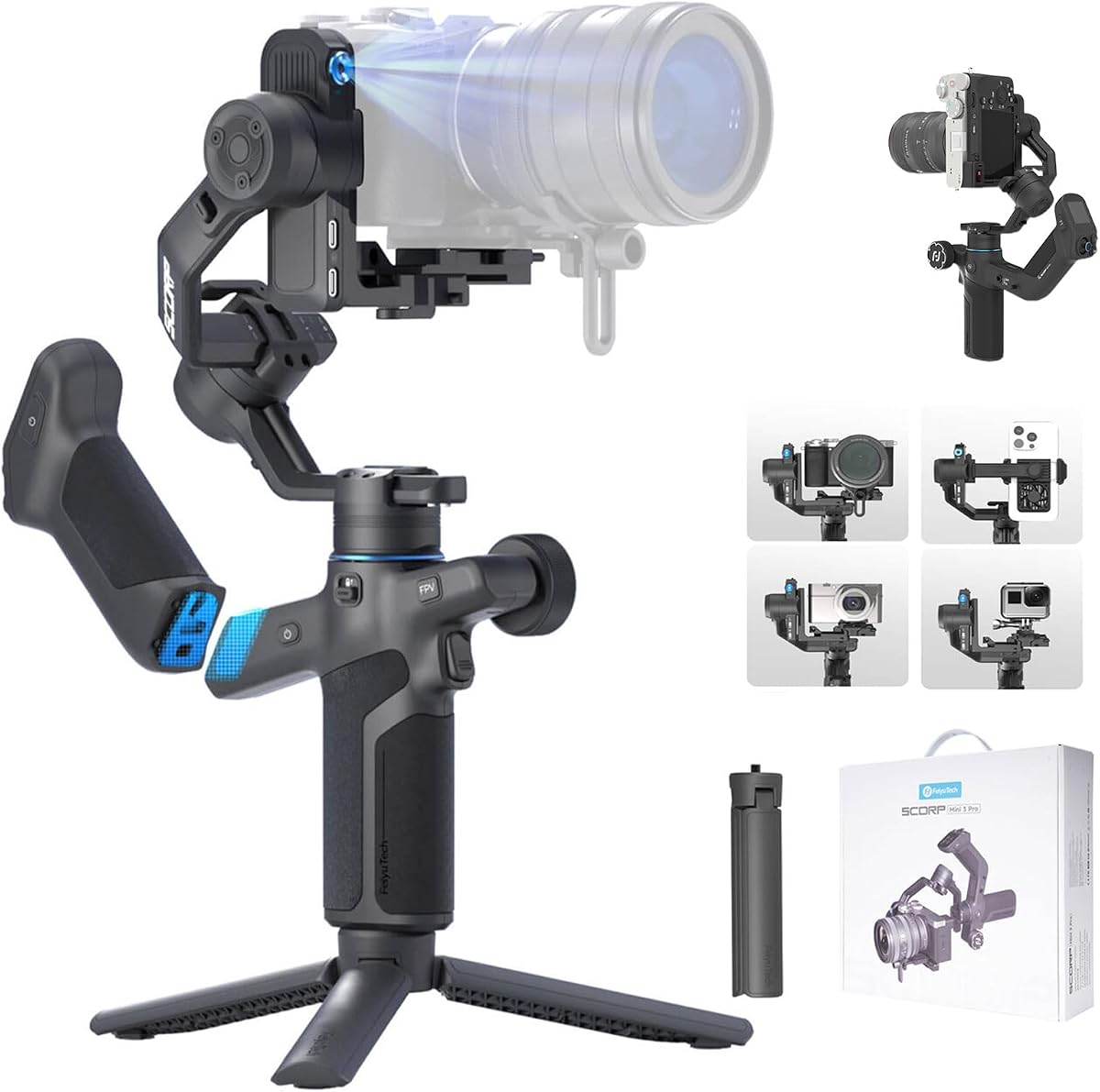
The FeiyuTech SCORP Mini 3 Pro earns its place as a top-rated option due to its versatile performance and smart features. Boasting a 4.5 rating, it handles mirrorless cameras, smartphones, and action cams with equal ease. The advanced AI tracking system responds in milliseconds making it ideal for dynamic environments.
We may earn a commission when you buy through this link, at no additional cost to you.
Its detachable remote handle opens up creative possibilities for solo creators who need to frame shots from a distance. The 4.4 lbs payload supports heavier setups while maintaining stability thanks to the quaternion algorithm. This flexibility allows users to switch between camera types without needing multiple gimbals.
Users praise the ergonomic grip and modular design which supports efficient workflow changes. The quick release plate enables horizontal and vertical transitions smoothly. However, the initial setup and balancing may take some practice compared to simpler action camera-specific models.
For creators who need a professional tool that grows with their gear, this gimbal is an excellent choice. The combination of high payload and lightweight build makes it stand out in its category. It balances advanced features with usability better than most competitors available today.
Detachable remote allows solo shooting and complex movements without a second person nearby.
Handles up to 2kg enabling use with heavier cameras and lens combinations.
We may earn a commission when you buy through this link, at no additional cost to you.
The DJI RS 3 Mini is designed for portability without sacrificing stabilization quality for lighter camera setups. With a 4.3 rating, it is ideal for travel filmmakers who need a gimbal that fits easily in a backpack. The 3rd-gen algorithm delivers smooth footage even in low-angle shots or flashlight mode.
We may earn a commission when you buy through this link, at no additional cost to you.
Its lightweight build of just 795 grams allows for extended use without hand fatigue. The 2 kg payload capacity supports a wide range of lens combinations making it versatile for small to medium rigs. Native vertical shooting support is a key feature for social media content creators.
Bluetooth shutter control reconnects automatically after initial pairing which simplifies operation. A 1.4-inch full-color touchscreen provides an intuitive interface for accessing frequently used settings quickly. However, the reliance on the DJI Ronin app for activation can be tricky depending on device compatibility.
This model is best suited for creators who prioritize mobility and lightweight gear. The stabilization performance is impressive given the size and weight of the unit. If you need a reliable tool for on-the-go shooting that supports vertical formats, the RS 3 Mini is a strong contender.
Quick release plate allows seamless switching to vertical for social media platforms.
Maintains stability despite small size by delivering strong holding force.
We may earn a commission when you buy through this link, at no additional cost to you.
The DJI Osmo Mobile 7 offers lossless stability for smartphone users looking to upgrade their video quality. With a 4.4 rating, it stands out for its ActiveTrack 7.0 technology which keeps subjects sharp even during fast motion. The foldable design makes it easy to carry and store when not in use.
We may earn a commission when you buy through this link, at no additional cost to you.
Features like ShotGuides and One-Tap Edit help creators film and edit like professionals directly from their device. The ergonomic anti-slip handle ensures comfort during long sessions. It weighs just 300 grams and provides up to 10 hours of runtime to support outdoor filming or live streaming.
Dual-lens enhanced tracking allows subjects to move freely while maintaining focus. The built-in tripod adds convenience for solo creation without needing extra accessories. While it is limited to phones, the performance and features it offers are unmatched in this specific category.
This gimbal is perfect for mobile creators who want cinema-quality results without complex setups. The seamless integration with DJI Mimo app enhances the overall workflow significantly. If you shoot primarily with a phone and value portability with smart tracking, the Osmo Mobile 7 is the ideal choice.
Dual-lens tracking ensures subjects stay in focus during dynamic and fast-paced movements.
Compact foldable body allows for easy storage and transport in small bags.
We may earn a commission when you buy through this link, at no additional cost to you.
The FeiyuTech SCORP Mini 2 Kit provides a complete solution with essential accessories included right out of the box. With a 4.2 rating, it supports mirrorless cameras, smartphones, and action cams while remaining lightweight. The built-in AI tracker allows for smooth tracking without needing an app connection.
We may earn a commission when you buy through this link, at no additional cost to you.
A 1.3-inch touch screen simplifies operation and low angle shots. The five-way joysticks offer intuitive control over gimbal movements. The kit includes an extension rod and carrying case which adds value for those starting their journey into stabilized video shooting.
Bluetooth and cable control options make adjusting focus easy without touching the camera. The payload capacity of 1.2 kg handles smaller setups effectively. However, heavier rigs may exceed this limit which restricts compatibility with larger mirrorless bodies.
This option is suitable for entry-level creators who want a complete kit without extra purchases. The inclusion of a case and rod makes it ready to use immediately. If you need a lightweight gimbal with tracking and a touchscreen for everyday use, the Mini 2 Kit delivers good value.
Comes with a carrying case and extension rod which enhances readiness for shoots.
1.3 inch screen offers easy navigation for settings and low angle filming.
We may earn a commission when you buy through this link, at no additional cost to you.
The hohem iSteady MT3 delivers robust stabilization with features designed for versatile content creation. Rated 4.4, it supports mirrorless, pocket, and action cameras with a powerful 10.0 stabilization algorithm. The built-in AI tracker focuses on subjects without requiring Bluetooth or app restrictions for seamless operation.
We may earn a commission when you buy through this link, at no additional cost to you.
Its OLED display and adjustable CCT/RGB fill light provide excellent control for lighting and settings. The 2nd-Gen Fast Vertical Switch allows quick transitions between horizontal and vertical formats without rebalancing. A 17-hour runtime ensures durability throughout extended filming sessions or travel adventures.
Bluetooth control supports adjusting zoom and shutter directly from the gimbal buttons. The 4-in-1 compatibility means you can switch devices easily if needed. However, the unit is heavier than dedicated action cam stabilizers which might limit its use for lightweight setups.
For creators who need a multi-purpose tool with advanced features like lighting and tracking, this gimbal excels. The ability to switch vertical modes quickly supports social media workflows efficiently. If you shoot with multiple camera types and value battery life, the MT3 is a compelling option.
Second-gen switch allows quick orientation changes without needing to rebalance the rig.
Built-in screen lets you adjust settings directly without needing a phone app.
We may earn a commission when you buy through this link, at no additional cost to you.
The hohem iSteady MT3 Pro leads the list with a premium feature set designed for demanding creators. With a 4.5 rating, it supports up to 2.5 kg payload and includes a detachable touchscreen remote for live feeds. This model is ideal for professional workflows requiring robust stabilization and flexibility.
We may earn a commission when you buy through this link, at no additional cost to you.
Its built-in 2MP AI camera tracks subjects in just one second using touch or gesture control. The detachable remote allows framing selfies or group shots from a distance with a wireless range of 10 meters. This feature adds significant value for solo shooters or interview setups.
Battery life reaches up to 20 hours and fast charging adds 5 hours in 30 minutes. The vertical switch and infinite pan follow support dynamic movements effortlessly. While the price is higher than other options the professional tools it offers justify the investment.
This gimbal is best for those who need maximum payload and advanced remote control features. The ability to detach the screen and use it as a remote expands creative possibilities significantly. If you require top-tier reliability and remote monitoring, the MT3 Pro is the ultimate choice.
1.4-inch touchscreen remote allows framing and monitoring from up to 10 meters away.
Built-in camera supports gesture tracking for hands-free operation in complex scenes.
We may earn a commission when you buy through this link, at no additional cost to you.
The FeiyuTech SCORP Mini 3 Pro emphasizes gesture control and wireless flexibility for creators on the move. With a 4.0 rating, it supports lenses up to 50mm and offers app-free gesture control for recording and tracking. The OLED screen allows direct adjustment of settings without needing a phone.
We may earn a commission when you buy through this link, at no additional cost to you.
Its detachable handle serves as a remote control and includes a display for key settings. Wireless Bluetooth control keeps the setup clean and flexible. The Heat-Dissipating phone clamp and Quick Release System 3.0 ensure seamless transitions between devices and orientations.
Users appreciate the ability to start recording or track movement via gestures without touching buttons. This hands-free operation is useful for static shots or solo content creation. However, the optimized lens range limits compatibility with longer focal length setups.
This gimbal suits creators who prefer gesture interactions and wireless convenience over heavy payload support. The OLED interface adds a layer of control not found in many competitors at this price. If you need smooth tracking and flexible mounting options, this model offers strong performance.
Recognizes five gestures for full hands-free control without requiring an app connection.
Integrated screen allows direct adjustments on the device for efficient workflow management.
We may earn a commission when you buy through this link, at no additional cost to you.
Choosing the right gimbal involves balancing your camera type, budget, and intended shooting scenarios.
Ensure the gimbal supports your specific action camera model and size. Most units list compatible models like GoPro HERO or DJI Osmo. If you switch cameras often choose a model with broad compatibility and adjustable mounting points to accommodate different brands or shapes without needing extra adapters for every shoot.
Always check the manufacturer's compatibility chart before buying to avoid mismatches that could limit your camera use or require additional hardware.
Payload capacity determines the weight of gear your gimbal can stabilize effectively. Action cameras are usually light but adding lights or microphones increases total weight. Select a gimbal with a payload slightly above your total gear weight to ensure motors operate efficiently and provide smooth stabilization.
Overloading a gimbal can lead to jitter and reduced battery life so always account for accessories in your calculations.
Long battery life is crucial for all-day shoots without interruptions. Look for units offering at least 10 to 14 hours of runtime. Some models also allow you to charge your camera while shooting which extends your total production time significantly during outdoor adventures or remote filming.
Prioritize models with USB-C charging and fast charge support to minimize downtime between sessions.
Modern gimbals use advanced algorithms like AI tracking or quaternion math to smooth footage. These systems react quickly to movements and can track subjects automatically. Choose a gimbal with a high update rate to ensure your video remains steady even during fast action or sudden changes in direction.
Test stabilization performance in real-world scenarios if possible to confirm it handles your typical motion style effectively.
Interface design impacts how quickly you can start shooting. Touchscreens and clear button layouts reduce learning time. Some models offer one-touch vertical switching or intuitive joystick controls that help beginners adapt faster. Simplicity is key if you need to capture fleeting moments without fiddling with settings.
Look for features like auto-tuning or quick release plates that simplify setup and balancing steps significantly.
Since action cameras are used outdoors the gimbal should be built to withstand environmental conditions. Look for splash-proof ratings like IPX4 or robust materials that resist impact. A sturdy build ensures longevity and reliability when filming in harsh weather or rugged terrain conditions.
Check for weather sealing and protective cases included in the package to safeguard your investment during travel.
Smart features like subject tracking or gesture control add convenience for solo creators. These tools automate framing and reduce the need for a cameraman. However, be aware that smart features often require specific app connections which may add complexity to your workflow or reduce battery life.
Evaluate if you need automation features or if manual control is sufficient based on your typical shooting style needs.
Budget ranges vary widely so determine what features are essential for your work. Higher price points often bring better build quality or smarter tracking. Compare specs against your actual needs to ensure you are paying for utility rather than just brand name or extra functions.
Focus on core performance metrics first before considering premium add-ons to get the best value for your money.
Start by balancing your camera on the gimbal before turning it on. Adjust the mounting arms until the camera floats evenly without drifting. Proper balancing reduces motor strain and ensures the best stabilization performance across all axes. Always lock the axes before shipping to protect internal components from damage.
Use Bluetooth or cable connections to control camera settings directly from the gimbal. Learn the button shortcuts for modes like lock, pan, or follow to streamline your workflow. Practice tracking movements with the joystick before filming live content to build muscle memory and confidence in your setup.
Store the gimbal in a dry and dust-free environment when not in use. Regularly check and wipe the motors and mounting plates to prevent dirt buildup. If you film in wet or dusty conditions rinse the unit with clean water and dry it thoroughly before storage to extend its lifespan.
Not every action camera fits every gimbal. You must check the payload capacity and mounting dimensions listed by the manufacturer. Most gimbals support popular models like GoPro HERO or DJI Osmo but older or custom cameras may need adapters. Always verify compatibility before purchasing to avoid mounting issues or unstable footage.
To balance, place the camera on the mount and adjust the three axes until the camera stays level without motor force. Unlock the lock buttons and gently push the camera to ensure it does not drift. Once balanced, relock the axes to preserve the setup. Proper balancing is critical for smooth and stable results.
Gimbals are designed for video stabilization not audio reduction. They do not cancel motor noise or wind noise directly. To reduce noise use a windscreen or external microphone that isolates audio from vibration. Some gimbals offer silent motors which may help slightly but they are not audio solutions.
AI tracking allows the gimbal to automatically follow a person or object during a shot. This is useful for solo creators who want to frame themselves without a second operator. It saves time on editing and ensures subjects stay centered even when moving dynamically across the scene.
Some gimbals feature power bank functions that allow charging your camera during shooting. Check the model specs for USB output ports or dedicated charging lines. This feature extends recording time significantly but may consume extra battery from the gimbal. Ensure your camera supports pass-through charging to use this function.
If you film in rain or near water, a waterproof or splash-proof gimbal is worth the investment. It protects internal components from damage and allows filming in harsh conditions. Standard models can fail quickly in wet environments so prioritize units with IPX ratings for outdoor reliability.
Choosing the right gimbal involves balancing your needs with the available technology. Our top picks offer a range of options from budget-friendly to premium models. Whether you need simple stabilization or smart tracking, there is a solution for every creator.
Prioritize compatibility and battery life to ensure smooth workflows in the field. Avoid overpaying for features you will not use regularly. Investing in a reliable unit now saves time and frustration during actual production.
Always verify current prices and availability since product listings can change. Use this guide to compare specs side by side and make an informed decision. With the right tool, your action footage will look smoother and more professional than ever.