
Noctua NA-FC1
4.8Editor score
Compact PWM 4-Pin
3-Way Splitter Included
6-Year Warranty
This guide compares the top 10 Front Panel Fan Controller options based on channel count, display quality, and thermal management features for PC builds.
Finding the right Front Panel Fan Controller helps you manage airflow and noise effectively. A good unit offers precise speed control and temperature monitoring for safer system operation.
We compared ten models based on channel count, display type, and build quality. Each product was evaluated for compatibility with standard fans and ease of installation in PC cases.
Each pick shows key features and performance ratings to help you decide. Prices change frequently, so verify current details before purchasing to ensure you get the best value today.
4.8Editor score

5.0Editor score

4.2Editor score
The following table compares the key specifications and features of all ten models to help you choose the right fit for your PC cooling needs.
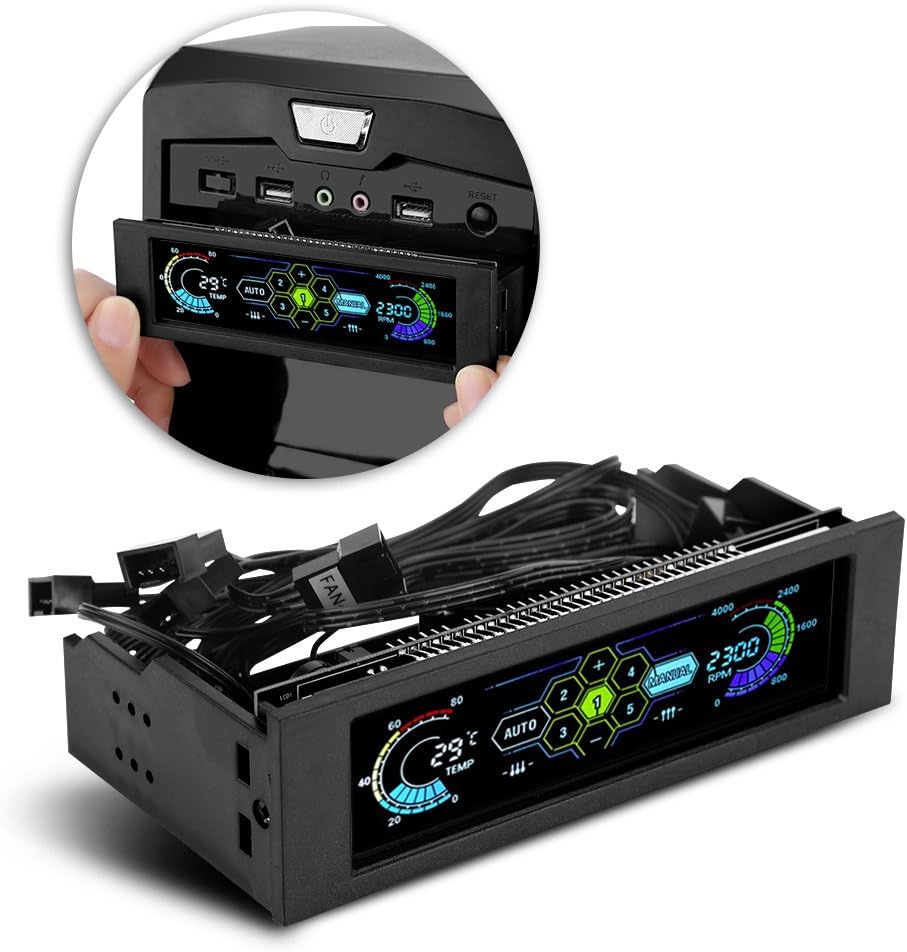


The STW‑6041 Multi Fan Speed Controller is a top-rated Front Panel Fan Controller designed for precise thermal management. It offers a perfect balance of features and performance for standard PC builds.
We may earn a commission when you buy through this link, at no additional cost to you.
Its LCD display shows four fan speeds and temperatures simultaneously. The over temperature warning system flashes when heat exceeds safe limits ensuring hardware protection.
The PWM circuit reduces noise by adjusting speed efficiently. While it uses capacitors that resist high temperatures the unit is best suited for systems with available optical drive bays.
This model is ideal for users seeking reliable control without complex software. Its robust construction makes it a strong choice for long-term PC cooling.
The wide LCD screen lets you track multiple temperatures and fan speeds at a glance for better system visibility.
High temperature alarms and fan anti-seize functions protect your hardware from overheating or mechanical failure.
We may earn a commission when you buy through this link, at no additional cost to you.
The V BESTLIFE Fan Speed Controller offers flexible control options for PC cooling. It stands out for its ability to switch between auto and manual modes easily.
We may earn a commission when you buy through this link, at no additional cost to you.
A large LCD screen displays temperature and hard disk states clearly. You can set alarm temperatures from 40 to 90 degrees to prevent overheating damage.
While it controls five fans the setup requires careful cable management. Users appreciate the immediate alert when a fan breaks down though.
This unit suits enthusiasts who want detailed monitoring without software. It provides solid protection against thermal issues in demanding setups.
The AUTO/MANUAL switch allows you to choose between automatic thermal regulation and manual fan speed adjustments.
Track fan speed temperature and hard disk state on one big screen for complete system awareness.
We may earn a commission when you buy through this link, at no additional cost to you.
The SaiDian Fan Speed Controller provides essential thermal control at an accessible price point. It includes date time display which adds a unique touch to PC builds.
We may earn a commission when you buy through this link, at no additional cost to you.
You can set alarm temperatures to protect hardware from overheating. The large screen shows fan speed and hard disk status clearly for monitoring.
While it manages three groups of fans it lacks advanced customization. This makes it a practical choice for basic systems needing simple oversight.
Ideal for users on a budget who want basic monitoring. It delivers reliable safety features without unnecessary complexity or cost.
Fan jam alarms trigger immediately when fans fail to dissipate heat keeping your system safe.
Manual and automatic modes are easy to configure for quick thermal regulation adjustments.
We may earn a commission when you buy through this link, at no additional cost to you.
The Thermaltake Commander F6 RGB LCD delivers high-end aesthetics and control for PC enthusiasts. It combines visual appeal with robust cooling management features.
We may earn a commission when you buy through this link, at no additional cost to you.
Six voltage control knobs allow precise manual fan adjustments. The RGB LCD screen adds customization to your build while monitoring temperatures.
Although pricey it includes protections like short circuit alarms. The ability to control LED strips enhances the visual theme of your PC case.
Best for users prioritizing style alongside function. This controller is perfect for builds needing premium lighting and thermal oversight.
The RGB LCD screen and compatibility with LED strips let you match the controller to your system lighting.
Warning alarms and short circuit protection keep your components safe from electrical or thermal faults.
We may earn a commission when you buy through this link, at no additional cost to you.
The Ejoyous Computer Fan Controller focuses on quiet and efficient thermal management. Its PWM circuitry ensures precise fan control without annoying high-frequency noise.
We may earn a commission when you buy through this link, at no additional cost to you.
Four separate controllers allow quick manual adjustments on the wide LCD. Acoustic alarms alert you if temperatures exceed sixty degrees or fans stall.
The aluminum alloy panel with matte finish looks durable. While setup takes effort the robust execution supports a long lifespan in your case.
This model suits users prioritizing silent operation. It delivers reliable performance for those wanting manual control without electronic noise.
PWM circuitry adjusts fan speed to reduce high-frequency noise improving your overall acoustic experience.
High-temperature capacitors and aluminum panels support long-term function even under demanding thermal loads.
We may earn a commission when you buy through this link, at no additional cost to you.
The ARCTIC Fan Controller offers modern flexibility for extensive fan setups. It supports ten ports with individual PWM control and driver compatibility with Windows and Linux.
We may earn a commission when you buy through this link, at no additional cost to you.
Unlike traditional panels this unit uses adhesive or magnetic mounting. It centralizes cable management to reduce clutter inside the PC case effectively.
While lacking a display it enables detailed control via software. This design suits users who prefer digital management over physical knobs.
Ideal for complex builds needing many fans. It provides clean installation and powerful control without visual overhead.
Native driver support for Windows and Linux ensures compatibility with a wide range of monitoring software.
Centralized cable management eliminates the need for extension cables reducing build clutter and improving airflow.
We may earn a commission when you buy through this link, at no additional cost to you.
The Noctua NA-FC1 is a compact manual controller for PWM fans. It allows quiet operation even with high-speed industrial fans through manual speed reduction.
We may earn a commission when you buy through this link, at no additional cost to you.
Its 'No stop' mode prevents fans from dropping below three hundred RPM to avoid BIOS errors. A 3-way splitter lets you control up to three fans easily.
This controller is best for users needing simple control without software. It offers excellent reliability with a long warranty period.
Perfect for quiet builds requiring manual tuning. It delivers dependable performance for users prioritizing simplicity and low noise.
The No stop mode prevents fan errors by maintaining a minimum speed of 300 RPM.
A six-year manufacturer warranty ensures long-term reliability and peace of mind for your investment.
We may earn a commission when you buy through this link, at no additional cost to you.
The Delinx 12V PWM controller provides versatile dual-mode operation. It features a digital display showing real-time temperature and fan speed data.
We may earn a commission when you buy through this link, at no additional cost to you.
Its auto/manual mode ensures precise thermal management across various scenarios. Settings are saved even when power is off for convenient reuse.
This model supports five channels and includes a USB-C adapter. It is ideal for DIY projects needing compact thermal regulation features.
Great for custom builds or servers. It offers reliable safety features and flexible control options.
Works with PD USB-C chargers and supports 5V to 30V voltage ranges for broad compatibility.
Power-off memory retains all temperature and speed settings ensuring quick restoration of preferences.
We may earn a commission when you buy through this link, at no additional cost to you.
The 4 Fans Computer Fan Controller provides basic thermal oversight for standard PCs. It displays four temperature sets and speeds on an LCD screen.
We may earn a commission when you buy through this link, at no additional cost to you.
A safety system triggers alarms when temperatures exceed sixty degrees. The PWM circuit helps reduce noise by adjusting fan power.
Despite its basic features it offers reliable protection against overheating. The alloy panel supports a long service life.
Ideal for users needing simple thermal monitoring. It delivers essential functions without extra complexity.
The LCD screen displays four sets of fan speeds and temperatures for quick monitoring.
High temperature alarms ensure immediate alerts when heat levels threaten system safety.
We may earn a commission when you buy through this link, at no additional cost to you.
The 5-Fans Speed Controller manages multiple cooling groups from one panel. It supports manual and automatic modes to regulate temperatures effectively.
We may earn a commission when you buy through this link, at no additional cost to you.
Users can set alarm ranges from forty to ninety degrees. The system alerts immediately if a fan breaks down and stops cooling.
While setup requires effort it handles up to five fan groups. This makes it useful for larger PC builds.
Best for users needing multi-zone cooling. It provides reliable safety alerts and flexible manual control.
Controls five groups of fans to ensure balanced airflow across large or complex PC cases.
Immediate alerts for fan breakdowns help prevent overheating before damage occurs.
We may earn a commission when you buy through this link, at no additional cost to you.
Selecting the right Front Panel Fan Controller depends on your cooling needs and PC case layout. Consider these key factors to ensure compatibility and performance.
The number of channels determines how many fans you can control independently. Standard units offer three to six channels for typical PC builds.
Choose a model with enough channels for all your fans to ensure balanced cooling control.
LCD screens provide real-time data on temperatures and fan speeds. Some units include additional details like date time and hard disk states.
Prioritize clear displays if you want visual monitoring without software interfaces.
Controllers offer manual knobs or automatic temperature-based adjustments. Manual modes allow fine tuning while auto modes simplify operations.
Select automatic mode for set-and-forget cooling or manual for precise control.
Aluminum alloy panels and high-spec capacitors extend lifespan. Matte finishes resist scratches and fit various chassis styles.
Look for robust materials to ensure durability inside the PC case.
Over-temperature warnings and fan anti-seize alerts protect hardware. These systems trigger alarms when limits are exceeded.
Ensure the unit includes safety alerts to prevent damage from overheating.
Most controllers fit into standard 5.25-inch optical drive bays. Verify your case has the correct slot before purchasing.
Check your chassis specifications to confirm compatibility with front panel mounting.
PWM controllers offer precise speed adjustments via pulse width modulation. Voltage controls reduce power to slow fans down.
Choose PWM for modern fans needing accurate speed tuning.
Ensure the controller supports your fan voltages such as 5V 12V or 24V. Mismatched voltages can damage components.
Verify input voltage ranges match your system power supply requirements.
Connect the power supply cables from your PSU to the controller unit securely. Ensure all fan plugs are inserted into the correct channel ports.
Access the control panel via the front of your PC case. Adjust the knobs or switches to set desired speeds or auto modes.
Regularly dust the display screen and casing to maintain visibility. Avoid excessive force when adjusting knobs to prevent internal damage.
A Front Panel Fan Controller is a device installed in your PC case to manage fan speeds. It lets you adjust cooling manually or automatically using temperature sensors.
Most controllers fit into a standard 5.25-inch optical drive bay. Check your case dimensions to ensure compatibility before buying.
Some units support RGB lighting or LED strips. Check product specs to confirm if the controller manages lighting alongside speed.
PWM control uses pulse width modulation for precise fan speed adjustments. Voltage control reduces power to slow fans but offers less accuracy.
Installation requires connecting power and fan cables into the case. While slightly complex most users can do it with basic tools.
Most physical controllers work without software using front-panel knobs. Modern hub versions may need driver support for full functionality.
Warranties vary from one year to six years depending on the brand. Higher-end models often provide longer coverage periods.
The STW‑6041 and Noctua NA-FC1 stand out for overall performance and budget value respectively. Both offer reliable control for different user needs.
Prioritize features like channel count and alarm systems based on your build complexity. Visual displays help if you want real-time monitoring.
Always verify current prices and model compatibility before purchasing. Cooling needs change so choose a controller that fits your current and future goals.