
iKKEGOL Upgraded USB Triple Foot Pedal
4.4Editor score
Programmable HID device
Durable optical switches
Wide pedal surface
Find the best foot pedals for transcriptionists with this expert guide comparing top models for comfort, durability, and software compatibility to boost your
Transcriptionists rely heavily on efficient tools to manage audio files. A quality foot pedal allows hands-free control, letting you focus entirely on typing. It reduces strain and speeds up the process significantly for professionals.
We compared ten top-rated USB foot pedals based on ergonomics, durability, and software support. Our analysis covers models from leading brands like Philips and Infinity to ensure you find a reliable tool for your setup.
Each pick highlights key features and potential trade-offs to help you decide. Prices and availability change frequently, so verify current listings before purchasing. Choose the model that fits your specific transcription software needs best.
4.4Editor score

4.5Editor score

4.1Editor score
This table provides a side-by-side overview of all ten top-rated models. Compare specifications, switch types, and key design features to find the right match for your transcription workstation.


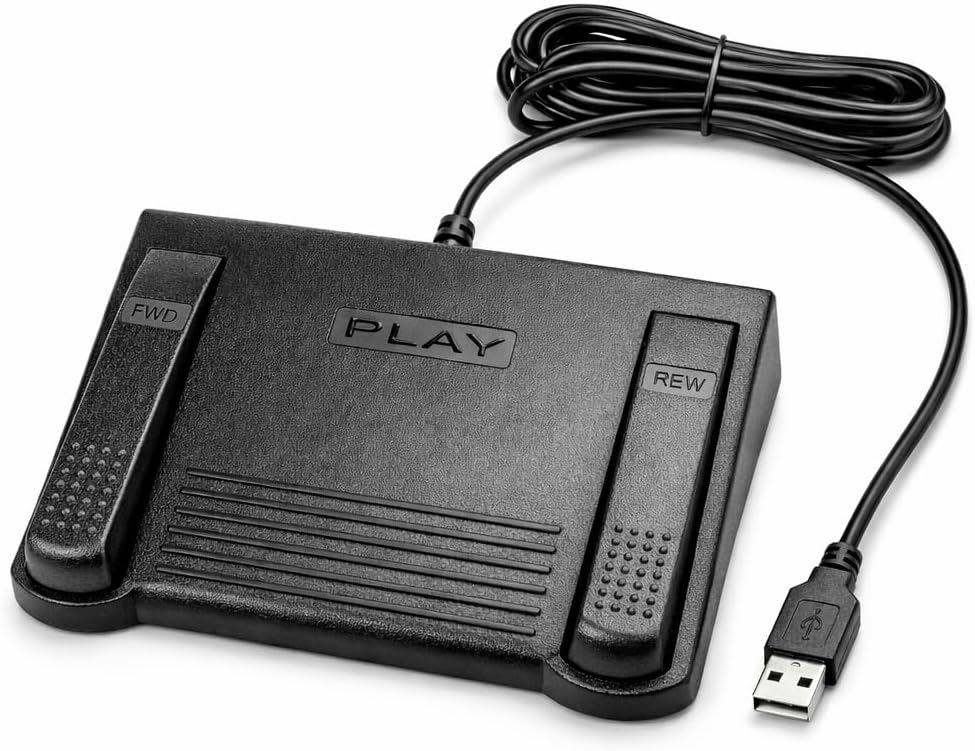


The Infinity 3 USB Foot Pedal Control stands out as a reliable tool for transcriptionists seeking durability. It holds a strong rating of 4.5 stars and features ultra-heavy-duty micro switches that ensure countless hours of trouble-free performance.
We may earn a commission when you buy through this link, at no additional cost to you.
Its ergonomic design includes a wide, central, sloping Play pedal that makes it easy to move your foot between functions. The large size enables you to easily navigate from Play to Fast Forward or Rewind keys without losing control during long sessions.
While it offers standard functions without custom software, this simplicity ensures compatibility across various systems. The sturdy build means it withstands heavy use, making it a solid choice for daily professional workloads.
If you need a dependable pedal that prioritizes physical comfort and longevity over complex programming, this model is highly recommended. It simplifies your workflow by keeping your hands free for typing while ensuring consistent playback control.
The sloping play pedal reduces strain by allowing natural foot positioning during extended transcription work.
Heavy-duty micro switches are built to withstand millions of presses without failing over time.
We may earn a commission when you buy through this link, at no additional cost to you.
The VEC in-USB-2 Infinity Digital Foot Control offers advanced features at a competitive price point. With a rating of 4.4 stars, it provides a rechargeable battery that powers up to 1000 hours of digital recording time for extended use.
We may earn a commission when you buy through this link, at no additional cost to you.
Its ergonomic design includes a sloping Play pedal and a mechanical stop that prevents accidental triggering of the center pedal while stepping on side pedals. This ensures control during use and maintains accuracy when managing audio files.
While the rechargeable battery adds convenience, it requires occasional charging which might interrupt workflow if not managed well. However, its wide compatibility with most leading brands of dictation/transcription products makes it a versatile choice for diverse setups.
For transcriptionists looking for a balance between cost and advanced features like battery power, this model is an excellent budget-friendly pick. It supports seamless operation across most PCs and laptops with a USB port.
The rechargeable battery supports up to 1000 hours of usage, reducing the need for constant power sources.
A mechanical stop ensures precise pedal activation by preventing unintended presses on side keys.
We may earn a commission when you buy through this link, at no additional cost to you.
The Philips ACC2330 4-Pedal Foot Control is designed for professional dictation environments requiring precise digital system integration. It offers a 4.1 star rating and features a toe touch control system that allows you to feel the control area change easily.
We may earn a commission when you buy through this link, at no additional cost to you.
Its design includes an increased width of the center pedal to avoid unintended presses of other pedals, which is critical for accuracy in high-stakes transcription work. You can swing your foot using the heel, enabling easy foot relax during pause times.
Although it comes with a higher price point than entry-level options, its specialized features justify the cost for professionals who need granular control. It is particularly suited for those using digital systems that require multi-pedal configuration.
If you need a premium pedal for professional medical or legal dictation, this model delivers the necessary reliability. Its ergonomic structure minimizes fatigue during long sessions while ensuring accurate pedal response.
Toe touch controls allow for sensitive adjustments without lifting the foot off the pedal surface.
The design allows you to swing your foot with the heel, reducing strain during pauses.
We may earn a commission when you buy through this link, at no additional cost to you.
The DAC 3 Function Foot Pedal holds a perfect 5.0 user rating, reflecting exceptional satisfaction among users. It is a robust option that features three distinct functions including a Next Job button, which streamlines workflow efficiency.
We may earn a commission when you buy through this link, at no additional cost to you.
Its buttons are clearly labeled as Next Job, Rew/Play, and Record, making it intuitive to use without constant reference to manuals. The large buttons ensure easy pressing, reducing the chance of missteps during busy transcription tasks.
While it commands a higher price, the dedicated Next Job functionality sets it apart for users who process large batches of files. However, compatibility is limited to certain computer software designed for foot control, which may require verification.
If you need a pedal specifically optimized for job switching and file management, this model is a strong contender. Its high rating suggests reliability and user-friendly design for focused transcription environments.
The dedicated Next Job button speeds up workflow by reducing keyboard shortcuts for file navigation.
Large, labeled buttons minimize errors by clearly indicating each function for instant recognition.
We may earn a commission when you buy through this link, at no additional cost to you.
The Infinity USB Digital IN-USB3 is a versatile option that combines digital control with a low profile design. With a 4.5 star rating, it offers a non-slip surface area that ensures stability during use without sliding around on your desk.
We may earn a commission when you buy through this link, at no additional cost to you.
This model fits seamlessly into tight workspace configurations where larger pedals might obstruct movement. Its digital footprint allows for precise control, making it suitable for various professional transcription setups requiring reliable hardware.
While specific detailed specs are limited online, its reputation as an Infinity product suggests consistent quality and durability. The focus on ergonomics and stability makes it a practical choice for those prioritizing desk organization.
If you need a compact pedal that doesn't compromise on digital functionality, this is a solid investment. It supports efficient typing workflows by providing stable and responsive control underfoot.
The low profile design reduces physical clutter while maintaining full functionality for transcription tasks.
A larger non-slip surface area keeps the pedal firmly in place during heavy foot use.
We may earn a commission when you buy through this link, at no additional cost to you.
The Express Scribe ECS-FPAE is designed specifically for users of Express Scribe transcription software. It holds a 3.8 star rating and comes pre-programmed to work seamlessly with both free and paid versions of the software on Windows and Mac.
We may earn a commission when you buy through this link, at no additional cost to you.
Its custom hardware includes an exclusive modified internal control board engineered for precise playback control. This ensures that the foot pedal commands match the software requirements exactly without needing additional configuration steps.
While it lacks versatility for other software like Case Catalyst, its specialized nature makes it a top choice for dedicated Scribe users. The large ergonomic layout allows easy movement between functions, supporting comfortable operation.
If you are committed to Express Scribe, this pedal offers a reliable plug-and-play solution that minimizes setup time. Its 1 year warranty adds confidence to its professional-grade reliability in daily use.
The custom board ensures perfect compatibility with Express Scribe without requiring manual setup or drivers.
Plug-and-play functionality means you can start transcribing immediately after connecting the USB cable.
We may earn a commission when you buy through this link, at no additional cost to you.
The ECS-IN-USB-1 Infinity foot pedal focuses on providing reliable hands-free audio playback control. While it has a 3.5 star rating, it is engineered for comfort during extended use with a thoughtfully contoured layout that supports natural foot positioning.
We may earn a commission when you buy through this link, at no additional cost to you.
Its broad software compatibility makes it a dependable choice for professional transcription environments that use various major dictation platforms. It helps minimize strain and fatigue during long transcription sessions in fields like medical and legal.
Though the user rating is moderate, its design prioritizes ergonomics which is crucial for professionals working daily. The warranty coverage provides added peace of mind regarding long-term reliability and customer support.
If your priority is comfort and wide compatibility over advanced custom features, this model serves well. It keeps your workflow smooth by allowing uninterrupted typing while controlling audio playback efficiently.
Contoured design supports natural foot angles to reduce strain during prolonged typing sessions.
Designed to work with most major dictation software ensuring flexibility for different work environments.
We may earn a commission when you buy through this link, at no additional cost to you.
The iKKEGOL Upgraded USB Triple Foot Pedal offers a unique solution with its optical switch system that is quiet and durable. With a 4.4 star rating, it functions as a standard HID device that can be programmed for custom keyboard actions.
We may earn a commission when you buy through this link, at no additional cost to you.
Its wide pedal surface and large size enable long-lasting comfort for your feet during extended work. The build quality supports a weight of more than 100kg, ensuring robustness in demanding professional environments like hospitals or studios.
While it is marketed for broader applications like gaming, its programmable nature allows transcriptionists to map specific macros easily. The four TPU rubber feet ensure it stays right where you want it on hard floors.
If you want a versatile pedal that can adapt to specific key mapping needs beyond standard playback, this is a strong choice. Its quiet switches prevent audio disruption during recording sessions.
Optical switches operate silently to avoid noise interference during audio recording or dictation.
Built to support over 100kg of weight ensuring stability and longevity under heavy daily use.
We may earn a commission when you buy through this link, at no additional cost to you.
The Philips LFH-2330 Configurable USB Foot Control offers advanced customization for professionals needing tailored setups. It holds a 4.2 star rating and features a 4 pedal design that can be completely configured using a user-friendly wizard.
We may earn a commission when you buy through this link, at no additional cost to you.
Its ergonomic slim design minimizes foot movement during transcription to reduce physical strain. This layout helps lessen movement of the foot due to its slim profile making it comfortable for extended work periods.
While setup might require more effort than plug-and-play models, the flexibility it provides is invaluable for complex workflows. The anti-slip bottom surface keeps it firmly in place on your desk or floor.
If you need a system that adapts to your specific key needs and workflows, this model is highly recommended. It combines brand reliability with functional flexibility for high-level transcription tasks.
A user-friendly wizard lets you map each pedal to functions that fit your personal workflow.
The slim ergonomic design minimizes unnecessary foot movement reducing physical strain over time.
We may earn a commission when you buy through this link, at no additional cost to you.
The iKKEGOL Upgraded Mechanical Triple Foot Pedal provides a robust mechanical solution for complex workflows. With a 4.3 star rating, it uses a spring-loaded lever that physically closes an electrical circuit to send the signal reliably.
We may earn a commission when you buy through this link, at no additional cost to you.
It is compatible with Windows, macOS, and Linux systems via software configuration using ElfKey software for command setup. Once configured, it works as a plug-and-play device ensuring versatility across different operating environments.
While it requires initial software configuration to realize its full potential, the ability to execute complex macros makes it a powerful tool for professionals. The sensitive switches ensure a fast response with minimal resistance during typing.
If you need a pedal that can handle custom key combinations and macros, this model is an excellent choice. Its mechanical design ensures durability and consistent performance for daily transcription needs.
Triple pedal system allows execution of complex macros speeding up workflows significantly for professionals.
ElfKey configuration software supports Windows and macOS for Linux setup before plug and play use.
We may earn a commission when you buy through this link, at no additional cost to you.
Selecting the right foot pedal involves understanding your software needs, comfort requirements, and budget. This guide outlines the critical factors to consider before making a purchase.
The most critical factor is whether the pedal works with your specific transcription software. Some pedals are designed exclusively for apps like Express Scribe while others are universal and work with most major brands.
Ensure you check the product description to confirm it supports your current setup to avoid connectivity or functional issues.
Since you will be using this device for hours, ergonomic design is essential to prevent foot strain. Look for sloped pedals and wide surfaces that allow natural foot positioning without forcing awkward movements.
A comfortable pedal reduces fatigue and helps maintain productivity during long transcription sessions.
Transcription involves repeated foot presses so durability is non-negotiable. Heavy-duty micro switches or mechanical switches generally offer longer lifespans compared to basic rubber domes.
Opt for models with high durability ratings to ensure the pedal withstands millions of presses over time.
Some pedals allow you to program custom functions such as Next Job or Record while others are fixed to standard playback. Advanced workflows benefit from customizable pedals that let you map macros to keys.
Decide if you need basic playback controls or advanced macro capabilities based on your task complexity.
Most transcription pedals use USB connections for universal compatibility with desktops and laptops. Ensure the connection type matches your available ports to avoid needing extra hubs or adapters.
USB connectivity is standard and provides reliable performance without the need for additional hardware.
A pedal that slides around on your desk disrupts workflow significantly. Look for models with rubber feet or anti-slip bottoms to keep the unit stable during use.
Stability ensures precise control and prevents the need to constantly reposition the pedal while working.
Prices vary widely from basic models to high-end professional units. Determine your budget early but remember that a higher price often correlates with better durability and features.
Balance cost with necessary features to find a model that offers the best value for your specific needs.
A solid warranty indicates manufacturer confidence in the product. Look for models backed by at least a one-year warranty to protect against potential defects or failures.
Reliable customer support can save time and money if you encounter technical issues with the hardware.
Start by connecting the pedal to an available USB port on your computer. Allow your system to recognize the device as a standard HID input if automatic setup is required.
If your software offers configuration settings ensure the pedal functions match your desired actions. Test the Play, Rewind, and Fast Forward buttons to verify responsiveness before starting work.
Clean the pedal regularly with a soft cloth to prevent dust buildup which can affect switch performance. Avoid placing it on uneven surfaces and ensure it remains dry for safe long-term operation.
Not all foot pedals work with every transcription software out of the box. Some are universal while others like Express Scribe models are designed for specific apps. Check compatibility lists before purchasing.
Most USB foot pedals are plug-and-play meaning they work immediately after connecting to a computer. However some advanced models may require driver installation or software configuration for custom functions.
Yes many foot pedals are compatible with both Windows and Mac systems. Always verify system requirements in the product details to ensure it supports macOS before buying for your setup.
Choose a pedal with an ergonomic design that supports natural foot positioning. Take regular breaks during transcription sessions and ensure your pedal is placed on a comfortable surface to reduce strain.
Optical switches use light beams to trigger actions making them quieter and durable while mechanical switches use physical contact. Both offer reliability but optical switches are preferred for noise-sensitive environments.
Advanced foot pedals often come with configuration software allowing you to map buttons to specific keyboard macros. Basic models may have fixed functions so check product specifications for customization options.
Most wired USB foot pedals do not need batteries as they are powered directly by the USB connection. However some advanced wireless models may require rechargeable batteries for power.
First check your USB connection and restart your computer to reset the device. If that fails verify software settings or try reinstalling drivers if specific configuration software is required for operation.
Finding the right foot pedal can transform your workflow and make transcription more efficient. Our top picks like the Infinity 3 USB Pedal and Philips ACC2330 offer proven reliability for professional needs.
Prioritize ergonomics and software compatibility when selecting a model to ensure it fits your specific workflow. A comfortable pedal reduces fatigue while correct integration ensures seamless operation with your transcription apps.
Prices and availability change frequently so always check current listings before purchasing. Investing in a quality pedal will pay off in improved speed and comfort for your transcription tasks.