
UGREEN Ethernet Coupler 10Gbps
4.7Editor score
Supports up to 10Gbps speeds
Extends up to 328 feet
Compatible with Cat5 through Cat8
This guide compares the top Ethernet Line Extender models for 2026, analyzing speed, range, and compatibility to help you choose the right networking solution.
Finding reliable network connectivity in large homes or commercial spaces often requires extending your Ethernet signal beyond standard limits. An Ethernet Line Extender solves this by pushing data further over existing wires or electrical circuits without costly rewiring.
We evaluated ten top-rated extenders based on range capabilities, data throughput, ease of setup, and overall reliability. Our analysis focuses on real-world performance metrics to ensure you select a device that meets your specific networking demands effectively.
Each selection below highlights key features, pros, and cons to guide your decision. Prices and availability fluctuate frequently, so please verify current details on the product pages before making your final purchase decision today.
4.7Editor score

4.8Editor score
4.4Editor score
The following table offers a side-by-side comparison of all ten selected extenders, detailing their maximum range, supported speeds, and key connectivity features to help you quickly identify the best fit for your infrastructure.


The StarTech Ethernet Extender stands out as a robust solution for extending network reach significantly beyond typical Ethernet limits. With a rating of 4.8 stars, it is highly regarded by professionals needing reliable connectivity over long distances without fiber optics.
We may earn a commission when you buy through this link, at no additional cost to you.
Its primary strength lies in its ability to reach up to 0.5 miles using existing copper cabling, making it perfect for remote equipment monitoring or large facility setups. The transparent network design ensures seamless VLAN tag pass-through and supports protocols like Wake-on-LAN and PXE boot.
While the speed is limited to 100Mbps, this is often acceptable for control systems or surveillance where bandwidth demand is lower than latency and stability. The inclusion of DIP switches and clear LED indicators simplifies deployment and troubleshooting for IT administrators.
This extender is best suited for businesses or industrial environments where distance is the main constraint and gigabit speeds are not critical. If you need to bridge a gap of several hundred meters using standard cabling, this is a top-tier professional choice.
Designed for deployment in demanding environments, this unit ensures consistent performance even with variable cabling quality.
It passes all standard Ethernet protocols unaltered, allowing it to fit into existing complex network topologies effortlessly.
We may earn a commission when you buy through this link, at no additional cost to you.
The TP-Link AV1000 Powerline Adapter Kit offers a straightforward way to extend Ethernet through your home's electrical wiring. Rated at 4.2 stars, it provides a balanced mix of speed and convenience for users struggling with thick walls or long distances.
We may earn a commission when you buy through this link, at no additional cost to you.
Powered by HomePlug AV2 technology, it delivers up to AV1000 speeds across distances of roughly 750 feet. The Gigabit port ensures that wired devices like consoles and smart TVs get the bandwidth they need for high-performance activities without lag.
However, performance can be inconsistent if your home's electrical circuit is old or shared with noisy appliances. The device must be plugged directly into the wall rather than a power strip, which can be a limitation in some setups.
This kit is an excellent choice for homeowners looking to avoid drilling holes for cables while maintaining a wired connection. It works best when both adapters are on the same electrical circuit and away from large appliances.
TP-Link adheres to strict cybersecurity standards ensuring your data transmission remains private and secure across the network.
The built-in power saving mode automatically reduces consumption by up to 85% when data activity is low.
We may earn a commission when you buy through this link, at no additional cost to you.
The NETGEAR PLP2000 is designed for users who need maximum speed from a powerline solution. With a 4.2-star rating, it claims to support Gigabit speeds over electrical outlets using advanced HomePlug AV2 technology.
We may earn a commission when you buy through this link, at no additional cost to you.
Its standout feature is the support for 2000 Mbps theoretical speeds, which translates to real-world performance capable of handling 4K streaming and gaming. The MIMO with beamforming technology helps direct signals where they are needed most, improving stability.
The extra filtered outlet on the adapter allows you to plug in other devices without losing power, adding convenience. However, like other powerline adapters, it requires a direct wall outlet and can struggle if the wiring is poor.
This kit is ideal for high-bandwidth users who want to extend a wired connection without running cables. If you have modern wiring and need fast speeds across multiple rooms, this adapter offers strong performance potential.
Beamforming focuses the network signal directly at connected devices to reduce interference and boost speed.
The integrated filtered power socket ensures you can plug in a lamp or router without an extension cord.
We may earn a commission when you buy through this link, at no additional cost to you.
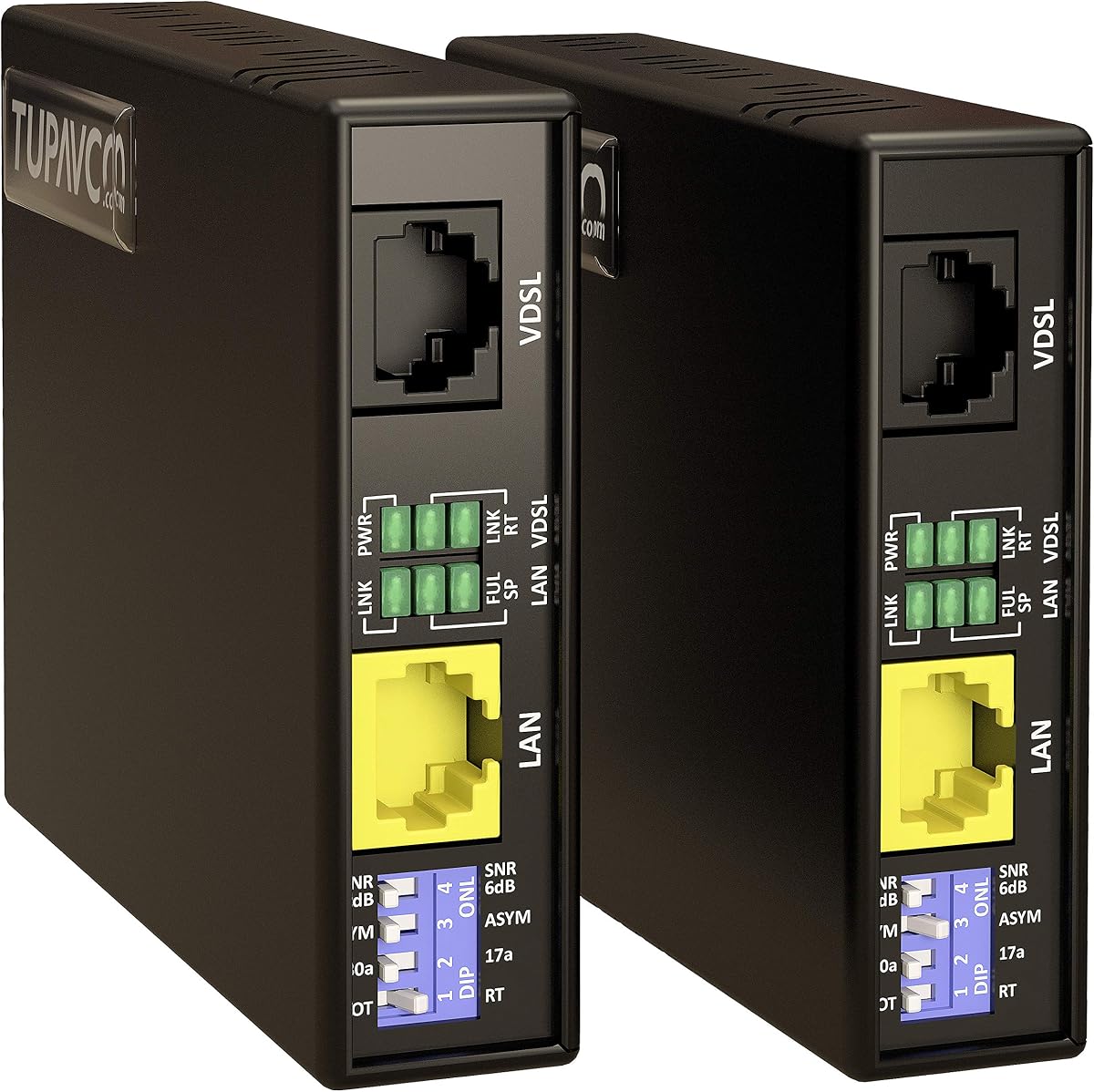
This VDSL Ethernet Extender Kit is built for scenarios where distance is the primary challenge. Rated 4.4 stars, it extends the typical Ethernet limit of 328 feet to an impressive 7000 feet using twisted copper or phone cables.
We may earn a commission when you buy through this link, at no additional cost to you.
The kit comes pre-paired for central and remote locations, ensuring easy out-of-the-box use. It supports standard CAT5 through CAT8 cables as well as phone lines, making it versatile for various building infrastructures.
The connection remains stable for remote devices like cameras or VoIP phones, which is critical for security systems. There is no software installation required, as the device handles the signal extension transparently.
For users needing to connect remote buildings or large properties without expensive fiber, this kit provides a cost-effective solution. It is particularly useful for installing cameras at remote ends of large farms or campuses.
It works with twisted pair, phone lines, and standard network cables to fit existing cabling infrastructure.
The preset pairing ensures that you do not need to manually configure settings before the first use.
We may earn a commission when you buy through this link, at no additional cost to you.
The TP-Link AV600 offers a budget-friendly option for extending network access to remote rooms. It holds a 4.2-star rating and uses AV600 technology to transmit data over existing electrical wiring efficiently.
We may earn a commission when you buy through this link, at no additional cost to you.
With speeds up to 600 Mbps theoretically but capped at 100 Mbps by the port, it is suitable for general web browsing and standard streaming. The compact size ensures it does not block adjacent outlets in crowded power strips.
It includes a power saving mode that reduces consumption when idle, which helps lower energy bills over time. However, because it is limited to 100 Mbps, it may not be ideal for gigabit internet plans.
This adapter is perfect for users who need basic connectivity in a garage or attic where Wi-Fi is weak. It provides a reliable wired alternative without the hassle of running cables through walls.
The small nano design ensures it fits snugly into outlets without blocking additional sockets.
Automatic power saving reduces energy use by up to 85% during periods of low network activity.
We may earn a commission when you buy through this link, at no additional cost to you.
This hybrid kit from TP-Link combines powerline networking with a Wi-Fi 6 extender for comprehensive coverage. With a 4.1-star rating, it targets users who need both wired and wireless extensions in difficult areas of their home.
We may earn a commission when you buy through this link, at no additional cost to you.
The powerline part handles the data transfer through the walls using AV1000 speeds, while the Wi-Fi 6 unit provides fast wireless access at the remote end. This ensures stable high-speed connections for devices in the same room.
Features like EasyMesh compatibility allow you to integrate this kit into a larger mesh system easily. The WiFi Clone button simplifies configuration by copying your main router's credentials instantly.
It is a great solution for large homes where a single router cannot cover the entire area. By extending the network through walls and boosting Wi-Fi at the target spot, it eliminates dead zones effectively.
Supports AX1500 speeds to ensure wireless devices benefit from the latest connectivity standards.
Connects with EasyMesh routers to create a single network name for whole-home coverage without drops.
We may earn a commission when you buy through this link, at no additional cost to you.
This extender kit combines powerline stability with a built-in Wi-Fi extender to boost wireless coverage. Rated at 4.0 stars, it is designed to eliminate dead zones by leveraging electrical wiring for the signal backbone.
We may earn a commission when you buy through this link, at no additional cost to you.
The AC1200 dual-band speeds provide reliable streaming and gaming performance for connected wireless devices. The Gigabit Ethernet port allows you to connect devices like game consoles directly for a wired advantage.
One key benefit is the integrated power passthrough, which lets you plug other devices into the adapter without needing a separate outlet. The one-click sync feature helps maintain consistent network settings across the system.
It is suitable for users looking to expand their Wi-Fi reach without running long cables. The combination of powerline and Wi-Fi makes it a versatile choice for multi-story homes.
The built-in power socket ensures you do not lose access to your electrical outlet while extending the network.
Easily copy your main network credentials to extend the signal without complex manual setup.
We may earn a commission when you buy through this link, at no additional cost to you.
The UGREEN Ethernet Coupler is a straightforward tool designed to join two Ethernet cables together. With a 4.7-star rating, it is a popular choice for extending the length of a network run quickly and simply.
We may earn a commission when you buy through this link, at no additional cost to you.
It supports speeds up to 10Gbps and is compatible with Cat5 through Cat8 cables, ensuring it handles high-bandwidth traffic. The built-in PoE support means it does not disrupt power delivery for devices like security cameras.
Unlike active extenders, this is a passive connector, meaning it does not regenerate signals but simply links wires. This limitation means it works best for joining existing cables rather than extending over very long distances.
This coupler is perfect for temporary setups or when you simply need a few more feet of length. Its affordability and ease of use make it a practical add-on for any home or office network.
Fully compatible with 10Gbps networks to ensure future-proofing for your internet and file transfers.
Designed to safely pass Power over Ethernet signals through to connected devices without interruption.
We may earn a commission when you buy through this link, at no additional cost to you.
This kit is designed to bridge network gaps over existing copper wires, supporting up to 600 meters of distance. It holds a 4.6-star rating and is a robust choice for industrial applications where standard Ethernet fails.
We may earn a commission when you buy through this link, at no additional cost to you.
The device works by actively regenerating the signal at both ends, ensuring a stable link even over long distances. It can use spare pairs in existing Cat5 runs or even alarm wires, offering significant installation flexibility.
As a Layer 1 device, it passes all data and VLAN tags without altering them, which is critical for security cameras and specialized industrial systems. The setup is purely hardware-based with no software or configuration needed.
It is ideal for connecting remote sensors or equipment where running new cables is impossible. The requirement for power at both ends is a minor trade-off for the reliability and distance it provides.
Supports any two copper conductors, making it usable with various existing wires in older buildings.
Unlike passive extenders, these units regenerate the signal to maintain stability over long runs.
We may earn a commission when you buy through this link, at no additional cost to you.
This VDSL kit offers a strong balance of speed and distance, reaching up to 5000 feet with speeds up to 300Mbps. It has a 4.6-star rating and is designed for environments requiring reliable long-distance Ethernet.
We may earn a commission when you buy through this link, at no additional cost to you.
The G.INP technology helps reduce noise sensitivity, which is crucial for maintaining speed over long cable runs. The DIP switches allow you to adjust profiles based on the specific distance and cable type you are using.
Plug-and-play design means no software is required, though you must set the switches correctly for optimal performance. It uses existing phone or network cabling, avoiding the need for expensive fiber upgrades.
It is a solid choice for large properties or remote sites needing higher speeds than traditional DSL extenders. If you need fast connectivity over thousands of feet without new infrastructure, this is a capable solution.
G.INP support ensures that broadband signals remain stable even in noisy environments.
The 8-position DIP switch allows you to fine-tune settings for specific distances and cable types.
We may earn a commission when you buy through this link, at no additional cost to you.
Selecting the right extender depends on your specific distance requirements, existing infrastructure, and speed needs. We detail the key factors below to help you make an informed decision.
The most critical factor is how far you need to extend your connection. Standard Ethernet cables cap out at 328 feet (100 meters). If your target location is beyond this, you need an active extender or a powerline solution capable of handling 500 to 7000 feet or more depending on the model.
Always check the manufacturer's maximum distance rating and ensure it covers your specific layout with some buffer for installation realities.
Not all extenders handle data at the same speed. While some extend to 10Gbps, others are capped at 100Mbps. For high-bandwidth tasks like 4K streaming or large file transfers, ensure the device supports at least Gigabit speeds or your specific requirement.
Higher speeds often require better cabling quality and direct wall connections to maintain performance.
Determine what cables you already have in place. Some extenders work over existing Cat5/Cat6 runs, while others utilize telephone lines or electrical wiring. Matching the extender to your existing wiring saves you from the cost of new cabling.
Ensure the device supports the specific cable type and gauge to avoid signal degradation over long distances.
Active extenders typically require power adapters at both ends, whereas passive couplers do not. Consider whether you have easy access to power outlets at the remote location. Additionally, check if the unit requires configuration software or if it is plug-and-play.
Simple plug-and-play setups save time and technical effort during deployment.
If you are extending a network to an outdoor or industrial area, look for units with appropriate temperature ratings and protection. Some models are better suited for harsh environments with extreme heat or humidity compared to standard home models.
Verify if the device meets industry standards like TAA for government or enterprise compliance if required.
For home or small office use, a simple setup with clear status lights is valuable. Advanced units might offer web interfaces or mobile apps for monitoring. Choose a level of complexity that matches your technical comfort level.
Features like LED indicators for power and connection status make troubleshooting much easier.
Start by verifying that the extender supports your required distance and speed. Connect the local unit to your router or switch via an Ethernet cable and plug it into a direct wall outlet to ensure power stability.
At the remote end, connect the extender to your device such as a camera or computer. If using active units, ensure both ends are receiving power simultaneously to establish the link.
Check the status LEDs to confirm a stable connection. Avoid placing adapters near sources of electrical interference like large appliances to maintain optimal performance and speed.
Yes, powerline adapters act as Ethernet extenders by using your home's electrical wiring to transmit data. These require two units, one at each end, and work best on the same electrical circuit.
A standard Cat5e or Cat6 cable is limited to approximately 328 feet or 100 meters. Extenders are necessary for distances beyond this limit to maintain signal integrity.
Most modern extenders are plug-and-play and do not require software installation. Some advanced models offer optional desktop apps for monitoring but are fully functional without them.
Yes, many VDSL extenders are designed to use existing telephone wires or spare pairs in existing network cables to extend the signal to remote locations effectively.
Yes, if the extender supports lower speeds than your internet plan, your connection will be capped at the extender's maximum speed. Always choose a device that matches or exceeds your internet speed.
Passive extenders or couplers simply join cables without boosting signals, while active extenders regenerate the signal allowing for longer distances and better stability over long runs.
Choosing the best Ethernet Line Extender depends on balancing distance, speed, and your existing infrastructure. The StarTech extender offers professional-grade range, while TP-Link options provide versatile home solutions.
Prioritize models that support your required speed and wiring type to avoid bottlenecks. Active extenders are superior for long-distance needs, while powerline adapters suit indoor home setups.
Always verify the latest pricing and availability on the product pages before purchasing to ensure you get the best deal for your specific networking needs today.