
MEGATEK Region-Free DVD Player for TV with HDMI & 1080P Upscaling
4.4Editor score
1080p HDMI Upscaling
Multi-Region DVD Playback
USB Port Media Support
This guide compares the top DVD players for projectors, evaluating HDMI output, upscaling quality, and region support for home theater enthusiasts.
Finding the right DVD player for projectors ensures your home theater setup delivers crisp visuals and immersive sound. Modern projectors often lack built-in disc drives, so an external player is essential for enjoying physical media collections.
We evaluated ten highly rated DVD players based on their HDMI compatibility, upscaling capabilities, and region-free functionality. Our analysis focuses on devices that pair seamlessly with modern projection systems for optimal performance.
Each selection highlights specific strengths like compact design, audio options, and media format support. Prices and availability change frequently, so verify current details before purchasing to ensure the best fit for your setup.
4.4Editor score

4.2Editor score

4.3Editor score
The following table provides a side-by-side comparison of all ten selected DVD players, highlighting key specifications and compatibility features relevant to projector setups.

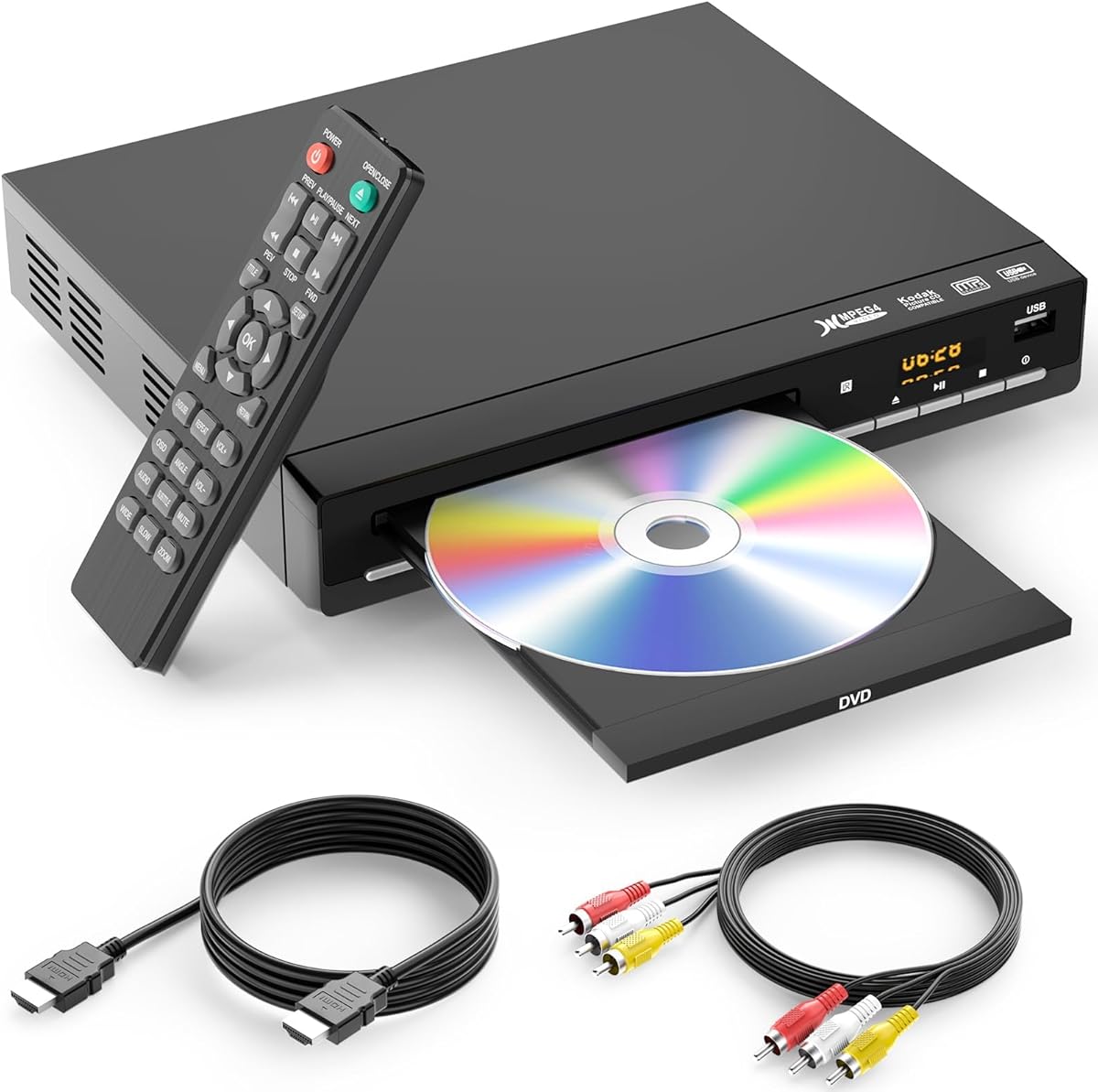


The MEGATEK Region-Free DVD Player stands out for its reliable performance and versatile media support. With a solid rating, it delivers clear visuals through advanced upscaling, making it ideal for projector setups that demand quality output.
We may earn a commission when you buy through this link, at no additional cost to you.
Its 1080p HDMI upscaling ensures standard-definition discs look crisp on large screens. The multi-region playback feature allows you to enjoy imported discs, while the USB port enables direct playback of MP3 and JPEG files.
While it does not support Blu-ray discs, the error correction and anti-shock technology ensure smooth playback even with scratched media. The compact design fits well into small home theater racks without taking up much space.
This player is a top recommendation for users seeking a straightforward, high-performance solution for DVD playback. It balances features and reliability effectively, ensuring your projector gets the best possible signal from your disc collection.
Advanced enhancement technology turns standard DVDs into near-HD visuals, perfect for modern projectors.
Play DVDs from any region around the world, expanding your media library without restrictions.
We may earn a commission when you buy through this link, at no additional cost to you.
The DESOBRY Mini DVD Player offers exceptional value with its compact design and robust feature set. It is tailored for users who want a small device that still delivers full HD upscaling for projector connections.
We may earn a commission when you buy through this link, at no additional cost to you.
Its upgraded drive core ensures fast loading and quiet operation, minimizing disruptions during movie nights. The breakpoint memory function allows you to resume playback exactly where you left off, enhancing convenience.
While it lacks support for MP4 files and cannot function as an external drive, it handles standard DVDs and CDs perfectly. The included cables make setup immediate, requiring minimal effort to connect to your display.
This model is perfect for dorm rooms or small apartments where space is premium. It proves that affordable options can still provide the necessary connectivity and performance for a satisfying home theater experience.
Its tiny footprint fits easily into tight entertainment centers or travel kits without clutter.
Error correction and noise cancellation work together to provide smooth, uninterrupted viewing sessions.
We may earn a commission when you buy through this link, at no additional cost to you.
The Sony BDP-S1700U brings premium performance with its ability to play Blu-ray Discs in Full HD. For projector users who want the highest possible video quality from physical media, this player delivers exceptional results.
We may earn a commission when you buy through this link, at no additional cost to you.
Its super quick start mode allows boot up in less than a second, ensuring you are ready to watch immediately. The new user-friendly interface simplifies navigation, making it easy to find your favorite movies quickly.
While it carries a higher price tag than standard DVD players, the inclusion of Blu-ray capabilities justifies the cost for cinephiles. Note that region codes apply to Blu-ray Discs, so check compatibility for international films.
This device is a smart investment for those building a serious home theater system. It ensures your projector receives a high-quality signal, maximizing the screen's capabilities for an immersive cinematic experience.
Enjoy movies in Full HD directly from Blu-ray discs, taking full advantage of projector resolution.
Super quick start technology ensures you spend less time waiting and more time watching movies.
We may earn a commission when you buy through this link, at no additional cost to you.
The MAJORITY DVD player is designed with a focus on comprehensive media support and easy integration. It offers full HD visuals through HDMI, ensuring your projector receives a clean signal without degradation.
We may earn a commission when you buy through this link, at no additional cost to you.
Its LCD display provides clear feedback on playback status, and the low-noise design ensures the device itself does not distract from the movie. The full format remote allows control over zoom, slow motion, and other playback functions.
While the build is standard for this price range, the inclusion of HDMI and RCA cables makes it ready to use right out of the box. It handles a wide array of disc formats without issues.
This player is a solid choice for users who want flexibility without complexity. It supports various disc types and USB media, making it a versatile addition to any home entertainment setup.
Includes all necessary cables for HDMI and RCA connections, saving you a trip to the store.
The full-featured remote gives you precise control over playback settings and visual adjustments.
We may earn a commission when you buy through this link, at no additional cost to you.
This unbranded DVD player delivers high definition picture quality that suits modern projectors well. Its support for all regions and formats makes it a universal choice for diverse media collections.
We may earn a commission when you buy through this link, at no additional cost to you.
The imported movement ensures fast disc reading and reliable error correction, minimizing interruptions during playback. It can read discs in advance to enhance the movie watching experience significantly.
While it does not play Blu-ray discs, it supports a wide range of audio and video files from USB drives. The stylish appearance complements modern living room decor without looking out of place.
It is an excellent option for users who want reliable performance without breaking the budget. The 12-month warranty and friendly customer support add peace of mind to your purchase.
Handles DVDs, CDs, and VCDs from any country, ensuring your global collection plays easily.
Connect USB drives to play MP3s and JPEGs, turning your player into a multimedia hub.
We may earn a commission when you buy through this link, at no additional cost to you.
The Sony DVPSR510H is known for its reliable performance and energy efficiency. It upscales DVDs to 1080p, providing a sharp image on projector screens that enhances the viewing experience.
We may earn a commission when you buy through this link, at no additional cost to you.
Its slim design allows it to fit into tight spaces, while the multi-disc resume feature helps you track multiple titles without losing your place. The remote control is easy to use for everyday tasks.
While it lacks some of the advanced streaming features found in newer players, it focuses on core functionality effectively. The Energy Star rating ensures it consumes minimal power even in standby mode.
This player is a steady choice for traditional DVD libraries. It delivers consistent quality and is backed by Sony's reputation for durability and long-term support.
Energy Star certification means lower electricity bills and less heat output in your media center.
The new mid-size design keeps your entertainment shelf looking clean and organized.
We may earn a commission when you buy through this link, at no additional cost to you.
This Mini DVD Player redefines portability, weighing just 0.62 lbs and measuring inches thin. It is perfect for users who want to take their movies on the go or use a projector in multiple rooms.
We may earn a commission when you buy through this link, at no additional cost to you.
The headphone jack output lets you listen to music privately or use the device as a portable CD player. The anti-shock mechanism ensures smooth playback even if the unit is moved slightly during operation.
While it does not support H.264 video files, it handles MP4 and other common formats well. The remote control is effective up to 10 feet, giving you flexibility when sitting back on the couch.
This is an ideal choice for dorms or travelers who still want quality DVD playback. It turns any room into a personal theater without requiring heavy equipment or complicated setups.
The dedicated headphone jack allows for silent music enjoyment without disturbing others around you.
Its lightweight build makes it easy to pack and transport for movie nights anywhere.
We may earn a commission when you buy through this link, at no additional cost to you.
The Sony UBP-X700U is a high-end solution that offers 4K Ultra HD Blu-ray playback and powerful upscaling. It is designed for enthusiasts who want the absolute best image quality from their physical media collection.
We may earn a commission when you buy through this link, at no additional cost to you.
Its stunning picture clarity and ability to upscale up to 60p ensure fluid motion and sharp details on compatible projectors. The dual HDMI outputs allow for better audio and video separation in advanced systems.
While it is a premium option, the support for multiple file formats means it can handle almost any disc you throw at it. The setup is straightforward with the included HDMI cable and user-friendly interface.
This device is a top choice for home theater purists who want future-proof technology. It ensures your setup is ready for high-resolution content while still playing standard DVDs and Blu-rays effortlessly.
Experience unrivalled detail with 4K upscaling that brings out every pixel on large screens.
Dual HDMI outputs provide cleaner sound routing, optimizing your home theater audio system.
We may earn a commission when you buy through this link, at no additional cost to you.
The Sony DVP-NS90V features the Precision Drive 3 System, which simplifies error correction for warped discs. This technology ensures faster and more accurate playback, reducing skips and errors during viewing.
We may earn a commission when you buy through this link, at no additional cost to you.
Precision Cinema Progressive Technology optimizes the picture at the pixel level, resulting in sharp backgrounds and motion-free objects. The 1080i upscaling delivers high-quality video through HDMI connections to your projector.
While it is an older model, its focus on high-resolution audio and video makes it a favorite among audiophiles. It supports SACD playback, adding a layer of audio quality that few other players offer.
This player is suitable for users who prioritize technical performance and audio fidelity. It provides a stable and high-quality signal, ensuring your projector displays movies with excellent clarity.
Precision Drive 3 handles warped discs gracefully by moving the lens independently for stable reading.
Pixel-level optimization reduces motion artifacts, keeping moving objects sharp and natural.
We may earn a commission when you buy through this link, at no additional cost to you.
The Toshiba HD-A35 was built for HD DVD playback, offering 1080p resolution and Deep Color support. For collectors of this specific format, it remains a vital device for accessing high-definition content.
We may earn a commission when you buy through this link, at no additional cost to you.
It includes HDMI CEC support, allowing for easy control through your TV remote, and delivers high-quality visuals via HDMI. The player also handles standard DVDs and CDs for a versatile viewing experience.
While HD DVDs are largely legacy media, this player still provides excellent output for those who own the discs. Its resolution and color support ensure that old titles still look vibrant on modern projectors.
This device is a niche choice for specific collectors but remains a powerful option for HD playback. It delivers sharp images and reliable performance, ensuring your collection continues to be enjoyed.
Richer color depth ensures your movies look vibrant and true to life on large screens.
HDMI CEC support simplifies control, allowing your projector remote to manage the player easily.
We may earn a commission when you buy through this link, at no additional cost to you.
Selecting the right DVD player for your projector requires considering several key factors to ensure optimal performance and compatibility.
Ensure the player has an HDMI output that supports at least 1080p resolution to match your projector's capabilities. HDMI provides a high-quality digital signal that avoids the degradation seen in older analog connections.
Look for devices with 1080p upscaling to enhance standard DVDs on modern high-resolution projectors.
If you have imported DVDs, check for region-free capabilities to ensure universal playback. Many standard players are locked to specific regions, which can limit your access to foreign media collections.
Region-free models allow you to play discs from anywhere in the world without restrictions.
Verify that the player supports the disc formats you use, such as DVD+R, DVD-RW, and CD-R. Some units also support USB playback for MP3 and JPEG files, expanding your entertainment options significantly.
Choose a model with broad format support to accommodate your entire physical and digital media library.
Measure your entertainment space to ensure the player fits comfortably without taking up too much room. Compact designs are ideal for smaller setups or travel, while larger units might offer better cooling.
Opt for a sleek profile that complements your home theater aesthetic while ensuring proper ventilation.
Check for audio outputs like coaxial or HDMI to connect with external sound systems. Quality audio is as important as video, so ensure the player can handle surround sound if needed.
Select a player with diverse audio options to match your specific home theater sound system requirements.
Look for features like quick start, memory playback, and user-friendly interfaces to simplify daily use. Remote range and button layout also affect how convenient it is to operate the device.
Prioritize models with intuitive controls and helpful features to enhance your overall viewing experience.
Reputable brands often offer better build quality and longer warranties. A solid warranty period gives you peace of mind and protects your investment against defects.
Choose a manufacturer with a track record of reliability to ensure long-term satisfaction with your purchase.
Connect your DVD player to the projector using a high-quality HDMI cable for the best digital signal. Ensure both devices are turned off before connecting to avoid any electrical issues during setup.
Keep discs clean and handle them by the edges to prevent scratches and smudges. Use a soft, lint-free cloth to wipe them if necessary for optimal playback quality.
Place the player in a well-ventilated area to prevent overheating. Avoid direct sunlight or heat sources that could affect the internal components or cause errors.
Most modern DVD players with HDMI output will work with any projector that has an HDMI input. Just ensure both devices support compatible resolutions like 1080p for a seamless connection.
A standard high-speed HDMI cable is usually sufficient. For 4K projectors, ensure the cable supports high bandwidth to transmit clear video signals without issues.
Check that the projector is set to the correct HDMI input source. Also verify that the HDMI cable is securely connected and functioning properly on both ends.
Standard DVDs will be upscaled by the player or projector to fit the screen. While not native 4K, upscaling helps improve the image to look acceptable on high-resolution displays.
Some players come with region-free capabilities by default. Others may require specific codes or hardware modifications, so check the product details before purchasing if this is a priority.
Yes, most players listed support MP3 playback from USB drives. Ensure the drive is formatted correctly and the files are in supported formats like MP3 or WMA.
Our top picks for DVD players for projectors balance performance, compatibility, and value effectively. Whether you need a budget option or a premium 4K solution, there is a choice that fits your needs.
Prioritize HDMI upscaling and region support to ensure your device works well with your specific projector and media collection. These features make a significant difference in your overall viewing experience.
Always check current availability and pricing before making a purchase to ensure you are getting the best deal available today. Technology and market conditions change, so verifying details is always recommended.