
CENMATE Aluminum 4 Bay
4.3Editor score
Aluminum alloy construction
USB A and C 3.0
Active cooling fan included
Direct Attached Storage offers a powerful way to expand your digital library without network complexity. These enclosures connect directly to your computer via USB, delivering rapid speeds for media creation and backup tasks.
We evaluated ten leading DAS models based on build quality, interface speed, drive capacity, and user features. Our analysis covers 4-bay units, hybrid NVMe options, and hardware RAID solutions to help you find the right fit.
Each selection highlights specific strengths like hot-swapping, cooling efficiency, and operating system support. Please note that model availability and specifications may change over time, so verify details before purchasing.
4.3Editor score

4.2Editor score

5.0Editor score
As an Amazon Associate we earn from qualifying purchases.
The following table provides a side-by-side view of all ten products covered in this guide. Each entry lists key specifications to help you quickly compare capacities, interfaces, and unique features across the lineup.




The TERRAMASTER D4-320 stands out as a top choice for users needing high-speed direct storage without network overhead. Its USB 3.2 Gen2 interface delivers impressive throughput that supports large file workflows effectively.
We may earn a commission when you buy through this link, at no additional cost to you.
Key strengths include its intelligent cooling system and the unique push-lock mechanism that prevents accidental drive disconnection. The enclosure supports hot swapping, making it easy to replace drives without shutting down the host system.
While the fan is designed to be quiet, some users sensitive to noise might find it noticeable under load. This trade-off is acceptable given the thermal benefits for maintaining drive health during extended use.
This unit is ideal for photographers and editors who need reliable storage with minimal setup hassle. Its robust construction and compatibility with major operating systems make it a versatile addition to any desk setup.
The USB 3.2 Gen2 protocol ensures you can move large video files or photo libraries in seconds rather than minutes.
An intelligent temperature-controlled fan adjusts speed based on drive heat, keeping operations cool and efficient without constant loud spinning.
We may earn a commission when you buy through this link, at no additional cost to you.
The QNAP TR-004 offers a unique blend of direct storage and expansion capabilities tailored for QNAP ecosystem users. It provides hardware RAID support which adds a layer of data redundancy not found in many standalone DAS units.
We may earn a commission when you buy through this link, at no additional cost to you.
Its ability to function as an external storage pool or volume for a QNAP NAS makes it highly valuable for those looking to extend their server capacity seamlessly. The lockable bays add physical security for drive protection.
However, compatibility is restricted to specific QNAP models running updated firmware, limiting its universal appeal. Users must ensure their NAS supports this expansion before purchase to avoid connectivity issues.
If you are invested in the QNAP ecosystem, this unit offers excellent value and performance. It bridges the gap between simple external drives and full network storage solutions effectively.
Built-in RAID allows for redundant configurations like RAID 5 or 1 without needing software configuration, enhancing data safety automatically.
Can be used to expand the storage pool of compatible QNAP devices, offering more space without complex networking setups.
We may earn a commission when you buy through this link, at no additional cost to you.
This hybrid enclosure allows users to mix large capacity HDDs with high-speed NVMe SSDs for optimized storage tiers. It caters to those who need both archival space and fast access speeds in one physical unit.
We may earn a commission when you buy through this link, at no additional cost to you.
The tool-free tray design makes it easy to swap drives between HDD and M.2 slots as needed. The included backup software helps manage data retention and security across the different drive types.
The lower user rating suggests some complexity or reliability concerns compared to simpler 4-bay units. Users should be prepared for potentially higher power consumption and heat management needs with this many drives.
For advanced users managing complex media libraries, this unit offers a versatile solution. It effectively combines speed and capacity for demanding editing workflows without requiring network infrastructure.
Combining HDDs and SSDs allows you to store cold data cheaply while keeping active project files on high-speed storage.
Automatic reboot after power loss ensures your workflow isn't interrupted unexpectedly, adding a layer of operational continuity.
We may earn a commission when you buy through this link, at no additional cost to you.
For those seeking an entry-level DAS solution without breaking the bank, this aluminum enclosure delivers solid performance and durability. Its 4-bay design provides ample room for standard 3.5-inch drives and 2.5-inch SSDs.
We may earn a commission when you buy through this link, at no additional cost to you.
The inclusion of both USB A and C cables ensures broad compatibility with older and newer computers alike. The aluminum shell helps dissipate heat passively while the active fan keeps temperatures manageable during heavy transfers.
While the fan runs quietly for most, sensitive users might notice the operational noise under load. This is a minor drawback considering the thermal protection it offers for valuable data drives.
This is an excellent choice for home offices or small businesses needing reliable local storage. Its build quality and compatibility make it a dependable workhorse for everyday file transfers.
Having both Type-A and Type-C ports means you can plug this into almost any computer without needing extra adapters.
Active cooling prevents overheating even when all four bays are filled with drives, ensuring long-term drive health.
We may earn a commission when you buy through this link, at no additional cost to you.
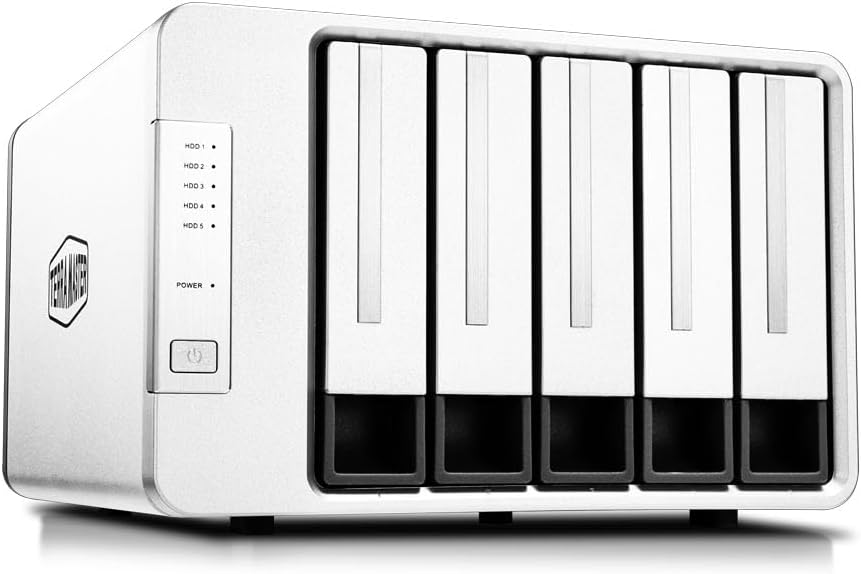
This unit expands beyond the standard four-bay format, offering five slots for those who need extra local storage density. Each drive connects independently via a dedicated controller, ensuring stable performance across all connected volumes.
We may earn a commission when you buy through this link, at no additional cost to you.
Features like individual power switches and LED indicators allow for precise management of each drive. This flexibility is useful for rotating backup drives or keeping specific drives in standby mode to save power.
The absence of hardware RAID means users rely on OS-level software for data redundancy. This simplifies the device but requires some technical knowledge to configure properly for data safety.
Ideal for power users needing substantial local storage without network complexity. The robust build and thoughtful feature set justify the cost for professional workflows requiring reliability.
Switching drives on and off individually helps save energy and allows for selective mounting without shutting down the dock.
Additional ports on the rear allow for connecting peripherals or other docks, reducing cable clutter on your desk.
We may earn a commission when you buy through this link, at no additional cost to you.
The D8 Hybrid 2 refines the hybrid concept with improved power management and Thunderbolt 5 compatibility. Its flawless user rating reflects exceptional performance and reliability among early adopters.
We may earn a commission when you buy through this link, at no additional cost to you.
TPM technology optimizes power usage and wake times, which is critical for hybrid storage setups involving both fast SSDs and high-capacity HDDs. This ensures the system wakes up quickly for active tasks.
Users managing complex storage tiers might find the initial setup intricate compared to single-drive types. However, the flexibility of handling different drive formats in one box is a major advantage.
This is a top-tier choice for professionals needing the ultimate in local storage flexibility. The combination of speed, capacity, and power efficiency makes it a standout premium option.
Proprietary power management balances energy efficiency with fast response times, keeping your system always ready for work.
Support for Thunderbolt 5 future-proofs the device for even faster data transmission speeds as standards evolve.
We may earn a commission when you buy through this link, at no additional cost to you.
This unit stands out for its dedicated hardware RAID knob, making configuration accessible without navigating menus. It supports standard RAID levels like 5 and 10, providing robust data protection for critical files.
We may earn a commission when you buy through this link, at no additional cost to you.
The hot spare feature automatically replaces a failed drive, minimizing downtime. This is a premium feature often reserved for more expensive enterprise storage solutions but found here at a mid-range price.
User reviews indicate some variability in performance consistency, which is acceptable for the feature set offered. The lower USB 3.1 speeds are a trade-off for the added RAID management hardware.
If you need reliable data redundancy on a desktop without a full NAS, this is a strong contender. The compatibility with multiple OSes ensures it fits into mixed workstation environments.
A physical knob on the back lets you switch RAID modes instantly without software intervention or complex setups.
Included software allows for automated backups, ensuring your valuable data is regularly secured against accidental loss.
We may earn a commission when you buy through this link, at no additional cost to you.
This docking station doubles as a hub for connectivity, featuring an HDMI output alongside storage ports. It is designed for users who want to connect displays and drives to a single USB-C port on their laptop.
We may earn a commission when you buy through this link, at no additional cost to you.
The aluminum shell provides excellent heat dissipation for the four internal drives, with dual fans ensuring optimal operating temperatures during heavy use. Fast data transfer speeds support demanding media editing tasks.
The HDMI output depends on host capability, so not all computers will utilize this feature effectively. Additionally, the cooling fans can be noticeable if placed on a quiet desk surface.
For multimedia professionals or those needing to minimize cable clutter, this dock offers a comprehensive solution. The combination of video and storage makes it versatile for modern workstations.
The HDMI port allows you to connect a monitor directly to the dock, simplifying your desk layout significantly.
Dual temperature-controlled fans activate only when necessary, balancing silent operation with effective heat management.
We may earn a commission when you buy through this link, at no additional cost to you.
This unit simplifies drive installation with a magnetic cover design that eliminates the need for screws entirely. It provides five bays for expansion, making it a solid option for large local storage needs.
We may earn a commission when you buy through this link, at no additional cost to you.
Cooling is handled via dual-ball bearing fans and a honeycomb rear panel, ensuring adequate airflow. The USB-C connection ensures modern compatibility, and the drive recognition is notably fast.
Users on Linux may find limitations where only one drive mounts at a time, which affects utility for multi-drive setups. For Windows or Mac users, this is generally not an issue.
The magnetic design adds a touch of premium feel to a standard enclosure. It is best suited for users prioritizing quick access to internal drives without tools.
A magnetic latch holds the cover in place securely while allowing quick removal whenever you need to access internal components.
Rear honeycomb holes improve air circulation to keep drive temperatures stable during heavy data transfers.
We may earn a commission when you buy through this link, at no additional cost to you.
For users with limited space, this 2-bay unit offers a compact solution without sacrificing essential features. It supports hardware RAID for redundancy and integrates seamlessly with QNAP systems.
We may earn a commission when you buy through this link, at no additional cost to you.
The lockable bays provide physical security, which is valuable in shared office environments. USB Type-C ensures fast connectivity and future compatibility with modern laptops and desktops.
With only two bays, storage capacity is capped compared to 4 or 5-bay units. This makes it ideal for small backups or specific project storage rather than massive archives.
This unit is perfect for those needing a portable yet robust storage device. Its simplicity and reliability make it a strong choice for small business users.
The small footprint saves valuable desk space while still delivering professional-grade performance and security features.
Lockable drive bays prevent unauthorized removal of hard drives, adding a layer of security for sensitive data.
We may earn a commission when you buy through this link, at no additional cost to you.
Selecting the right DAS depends on your capacity needs, speed requirements, and how you plan to use the device.
Determine how many drives you need to connect simultaneously. Units range from 2-bay to 5-bay or more, accommodating different storage volumes.
Choose a model with enough bays to hold your current drives plus future expansion.
Look for USB 3.2 Gen2 or higher for speeds up to 10Gbps. This ensures fast file transfers for media editing and backups.
Avoid older USB 2.0 interfaces if you plan to move large files regularly.
Active fans keep drives cool but can add noise. Ensure the unit has sound dampening if you work in a quiet space.
Check if the fan is temperature-controlled to minimize noise during idle periods.
If you need data redundancy, choose a unit with hardware RAID capabilities. This protects against drive failure without needing software setup.
Standard DAS units without RAID offer simpler connectivity but less data safety.
Verify the enclosure works with your specific OS like macOS, Windows, or Linux. Some models require specific drivers for full functionality.
Plug-and-play support is preferable to avoid installation issues.
Hot swapping allows you to remove drives while the system is on. This is convenient for rotating backup drives.
Ensure the tray design supports tool-free removal for ease of use.
Aluminum shells offer better heat dissipation and durability compared to plastic. Invest in sturdy materials for long-term reliability.
Look for reinforced corners and secure drive locks to prevent damage.
Most units require external power adapters. Ensure the included power supply meets the drive requirements.
Check if the unit supports internal power distribution for added convenience.
Connect the enclosure to a powered USB port on your computer. If the drives spin up properly, they should appear as separate volumes in your file explorer.
Organize your files across drives based on usage patterns. Keep active projects on faster drives and archive old files on lower-speed drives to save resources.
Regularly check the temperature of the enclosure. If it feels excessively hot, ensure there is enough airflow and clean dust from the fan vents periodically.
Direct Attached Storage connects directly to a single computer via USB, while Network Attached Storage connects to your network for shared access by multiple devices.
Most units support standard 3.5-inch or 2.5-inch SATA drives. Check the specific model compatibility list for supported drive types and sizes.
Yes, newly installed drives usually need to be formatted for your operating system. Most enclosures are diskless when shipped.
RAID is recommended if you cannot afford data loss. For general storage, simple drives are sufficient if you have separate backups.
Most USB-C DAS units support backward compatibility with USB-A via adapters. Always verify the cable type and port speed supported by your computer.
Place the unit on a hard surface with airflow space around it. Avoid stacking heavy items on top of the enclosure during operation.
Sudden power loss can damage data on active drives. Use an uninterruptible power supply for critical setups to prevent corruption.
Yes, but you may need mounting adapters to secure 2.5-inch SSDs in larger bays. Check if the tray supports both sizes securely.
The TERRAMASTER D4-320 offers the best overall balance of speed and reliability for most users. Its plug-and-play design simplifies setup for daily storage needs.
If you prioritize budget, the CENMATE Aluminum provides solid performance at a lower price point. For premium needs, the D8 Hybrid 2 offers unmatched flexibility.
Remember to verify current specifications before purchase to ensure compatibility with your specific workflow and operating system.