
Cooling Station and Stand for PS5/Slim/Pro
4.5Editor score
Automatic fan speed adjustment
Nine RGB lighting modes
Two point five hour charge
Discover the top cooling stands for PS5 console in October 2026. This guide compares ten best-selling models with fans, chargers, and storage for optimal
Keeping your console cool is essential for long gaming sessions. A quality cooling stand prevents overheating and extends the life of your hardware while adding useful charging features for your controllers.
We compared ten top-rated stands based on cooling power, design compatibility, and added accessories. Each model offers unique benefits like auto fans, RGB lighting, and dual charging docks for different user needs.
Each pick highlights key strengths and potential trade-offs to help you choose wisely. Prices and availability may change over time, so verify details before purchasing to ensure you get the right fit for your setup.
4.5Editor score
4.4Editor score

4.5Editor score
This side-by-side comparison highlights the key differences between the ten leading cooling stands for PS5 consoles. Review specifications like fan types, charging speeds, and storage options to find the perfect match for your gaming environment.


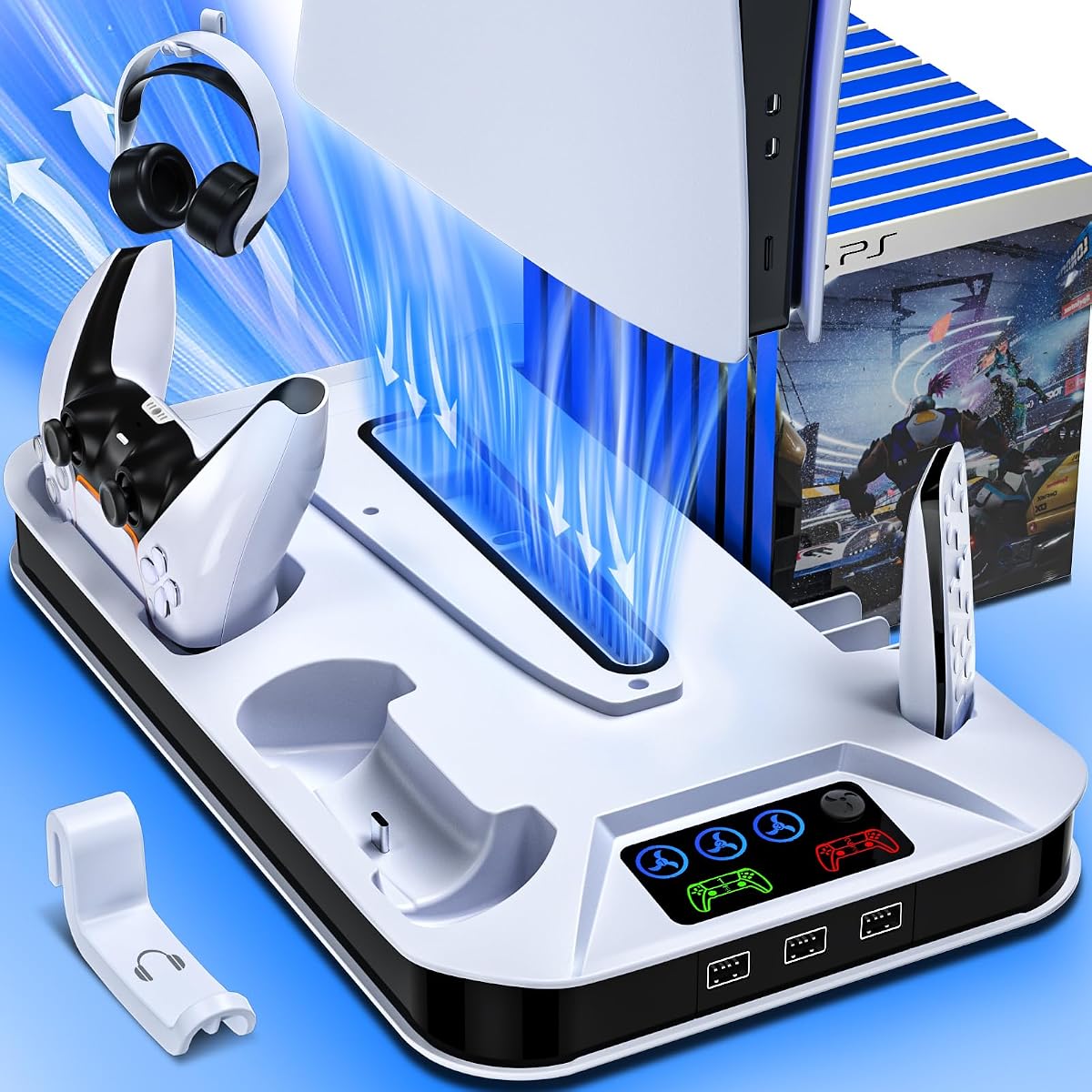
This PS5 cooling station stands out as a top contender for users seeking both cooling and charging capabilities. With a rating of 4.4 stars it delivers reliable performance across all PS5 console versions. The integrated turbo fan and dual controller dock make it a versatile choice for any gamer.
We may earn a commission when you buy through this link, at no additional cost to you.
The standout feature is the high-efficiency turbo fan that offers three adjustable speeds to manage console heat effectively. The charging station handles two controllers simultaneously in just three hours with clear LED indicators for status. The three additional USB hubs provide extra flexibility for headsets or cameras.
Users should note the unit does not support PS5 edge controllers which limits some users. Panel removal is needed for slim versions though the design remains secure. These minor adjustments ensure a stable fit without compromising the cooling efficiency.
This station is ideal for gamers who need a complete setup solution to keep their console and accessories organized. It balances performance and convenience making it a strong recommendation for most PS5 owners looking for reliable cooling and charging.
The turbo fan provides efficient airflow to prevent overheating during long gaming sessions.
Dual charging docks and USB hubs keep controllers and accessories powered up and ready.
We may earn a commission when you buy through this link, at no additional cost to you.
This cooling station offers impressive features at a budget-friendly price point making it a great value. It supports auto fan control and fast charging for two controllers with a clear LED display. The RGB lighting adds a vibrant touch to any gaming setup.
We may earn a commission when you buy through this link, at no additional cost to you.
The automatic fan control adjusts speed based on temperature which keeps the console cool without manual input. Charging completes in two point five hours with clear status indicators. The memory function remembers settings to make use easier every time.
Some users may find the RGB lights too bright for quiet sessions though they can be turned off easily. The auto mode is efficient but reduces fine manual control for specific cooling needs. These trade-offs keep the cost low.
This unit is perfect for gamers who want reliable cooling and charging without spending too much. The auto cooling and RGB lights make it a standout budget option for those valuing automation and aesthetics.
Built-in sensors adjust fan speed automatically to match console temperature needs efficiently.
Nine RGB modes allow customization of the gaming environment with vibrant colors and effects.
We may earn a commission when you buy through this link, at no additional cost to you.
This premium cooling stand combines advanced cooling with comprehensive accessory organization for top-tier performance. Its auto adjustable fan and fast dual charging make it ideal for demanding gaming sessions. The build quality and safety features are designed for long-term reliability.
We may earn a commission when you buy through this link, at no additional cost to you.
The fan adjusts automatically to temperature changes ensuring efficient cooling without user intervention. Charging two controllers in two hours is exceptionally fast and supported by smart chip protection for battery health. The multiple slots for games and headsets keep everything within easy reach.
The higher price may not suit budget shoppers though the features justify the cost for serious gamers. The fan is efficient but may produce sound during high-speed operation. These are minor compromises for such high functionality.
This stand is the best choice for users who prioritize performance and organization. It delivers professional-grade cooling and charging with ample storage making it a premium investment for any PS5 setup.
Temperature sensors drive automatic fan adjustments to maintain optimal console temperature.
Dedicated slots for games and headsets ensure your desk stays tidy and efficient.
We may earn a commission when you buy through this link, at no additional cost to you.
This horizontal stand offers a scalable design for all PS5 models with easy installation. The dual controller charging and three-speed fans provide solid cooling and convenience. It is a great fit for those preferring a sideways setup.
We may earn a commission when you buy through this link, at no additional cost to you.
The scalable design fits all PS5 versions seamlessly with simple assembly steps for quick setup. Dual controllers charge in three to three point five hours with clear LED indicators. The three-speed fans adapt cooling needs from light to intense gaming.
Horizontal placement requires more surface space which might be an issue for smaller desks. The digital version needs EVA foam which adds a small step to setup. These are minor trade-offs for horizontal preference.
Ideal for gamers who prefer horizontal console orientation this stand delivers reliable cooling and charging. Its scalable design ensures compatibility while keeping your setup tidy and organized.
Scalable structure adapts to different console models for a secure horizontal fit.
Simple steps and included foam allow for quick installation without tools.
We may earn a commission when you buy through this link, at no additional cost to you.
This station blends auto turbo fans with RGB lighting to create a dynamic cooling setup. It supports both manual and auto fan modes while charging two controllers quickly. The RGB lights enhance your gaming atmosphere significantly.
We may earn a commission when you buy through this link, at no additional cost to you.
The auto fan uses temperature probes to adjust speed while manual modes offer full control. Controllers charge in two point five hours with clear status indicators. The memory function retains settings for seamless use after restarts.
RGB lights may not appeal to those seeking minimal setup though they can be adjusted. Panel removal is sometimes needed for slim versions adding a small setup step. These are minor considerations for the features.
Best for gamers wanting a vibrant and functional setup this station combines cooling with visual flair. It offers flexibility with manual and auto modes to suit different needs.
Nine RGB effects add color and style to your gaming desk environment.
Choose between auto and manual modes to tailor cooling to your preference.
We may earn a commission when you buy through this link, at no additional cost to you.
This cooling station stands out for its organized layout and safety features. It includes a headset holder and multiple USB hubs with fast charging for controllers. The three-speed fan keeps the console cool efficiently.
We may earn a commission when you buy through this link, at no additional cost to you.
The turbo fan offers three speeds with low-noise operation for effective cooling. Dual controllers charge in two point five hours with LED status. The overcharge protection chip ensures safe long-term battery health.
Edge controllers are not supported limiting compatibility for some. Panel removal is required for digital versions but the fit remains secure. These minor steps ensure a stable and safe setup.
Perfect for gamers needing an organized and safe setup this station combines cooling with accessory management. Its protective features and efficient cooling make it a reliable choice.
Smart chips prevent overcharging to extend controller battery lifespan.
Built-in headset holder and USB ports keep all devices organized and accessible.
We may earn a commission when you buy through this link, at no additional cost to you.
This stand is designed to fit all PS5 models securely with a built-in fan. It supports edge controllers and offers USB ports for accessories making it versatile. The safety screw ensures the console remains stable during use.
We may earn a commission when you buy through this link, at no additional cost to you.
The fan offers three speeds with touch switching for easy adjustment. Charging is fast and LEDs indicate status clearly. The memory function helps retain settings for consistent use.
Third-party controllers are not supported limiting accessory options. Fan memory may not persist across power cycles which requires re-setting. These are minor issues for the core features.
Ideal for users with edge controllers or needing USB access this stand delivers compact efficiency. It balances cooling and connectivity for a functional gaming setup.
Safety screw and design keep your console stable during intense gaming.
Multiple USB ports allow charging headsets and other devices without extra cables.
We may earn a commission when you buy through this link, at no additional cost to you.
This horizontal stand provides scalable fit for all PS5 models with easy setup. Dual controllers charge and three-speed fans cool effectively. It consolidates the gaming setup into one neat unit.
We may earn a commission when you buy through this link, at no additional cost to you.
The scalable design ensures compatibility with all versions while requiring no tools for assembly. Charging takes three to three point five hours with LED status. Three-speed fans adapt to gaming intensity.
Rest mode must be configured for charging which adds a small setup step. Fan noise may increase during high speeds though it remains reasonable. These steps ensure optimal performance and convenience.
Best for gamers wanting a streamlined horizontal setup this stand delivers versatility and cooling. Its scalability and ease of use make it a strong contender.
No tools needed for installation allowing quick setup in minutes.
All-in-one design reduces clutter by combining charging and cooling.
We may earn a commission when you buy through this link, at no additional cost to you.
This stand features silent fans and vibrant RGB lighting for a polished setup. Dual controllers charge in three hours with clear status indicators. USB hubs and storage keep accessories organized.
We may earn a commission when you buy through this link, at no additional cost to you.
Three silent fan speeds offer quiet cooling with color LED indicators. The RGB ring provides eight color modes with long press off options. USB hubs allow charging additional devices easily.
Fan hum may be noticeable in very quiet rooms though it is generally quiet. RGB controls require clicks which may be less intuitive for some. These are small trade-offs for the lighting.
Perfect for those valuing aesthetics and quiet cooling this stand delivers both. The storage and charging features add practical value to the design.
Silent fan speeds ensure cooling without distracting noise.
Eight RGB color modes create an immersive gaming atmosphere.
We may earn a commission when you buy through this link, at no additional cost to you.
This cooling station features multiple USB ports for wide accessory compatibility. Dual controllers charge in three hours with clear LED status. The stable design and headset holder provide reliable organization.
We may earn a commission when you buy through this link, at no additional cost to you.
The three-level fan adjusts to cooling needs with secure screws. The USB and Type-C ports support charging multiple devices simultaneously. The headset holder adds convenience for audio devices.
Panel removal may be required for certain versions which adds a setup step. Charging is solid but not the fastest on the list. These are minor points for the connectivity.
Ideal for users needing multiple charging options this stand delivers versatile connectivity and cooling. Its stable design and hub features make it a practical choice.
Multiple USB and Type-C ports allow charging various devices at once.
Security screws keep the console steady and prevent accidental knocks.
We may earn a commission when you buy through this link, at no additional cost to you.
Choosing the right cooling stand involves evaluating compatibility cooling power and additional features. This guide explains the key factors to consider for a perfect match.
Ensure the stand supports your specific PS5 model whether standard slim or pro. Some units require panel removal or adapters for slim versions. Universal designs offer the most flexibility and long-term value.
Check product listings for explicit support of your console version before buying.
Look for stands with adjustable fan speeds to balance cooling and noise. Turbo fans offer higher airflow for intense gaming sessions. Auto modes can adjust speed based on temperature to save energy.
Prioritize units with high-efficiency fans if overheating is a concern.
Dual charging docks are standard but check for fast charging support. Compatibility with edge controllers is a differentiator for some models. LED indicators help track charging status easily.
Select a unit with charging speeds that match your play patterns.
Extra USB ports allow charging headsets or cameras without extra cables. Three or more hubs add versatility to your gaming desk. Type-C support expands connectivity options.
Count your accessories to ensure enough ports are available.
Sturdy materials and safety screws prevent console slipping during play. Non-slip pads protect your desk surface. Weight and base design contribute to overall balance.
Choose stands with robust construction for long-term reliability.
Dedicated slots for headsets remotes or game discs keep areas tidy. A good stand should hold multiple accessories securely. Look for designs that save desk space.
Assess your accessory count to find the right storage layout.
Some stands offer RGB lighting for visual flair while others stay minimal. Color and shape should match your existing setup. Noise levels also impact the user experience.
Balance style with performance to suit your preferences.
Smart chips protect against overcharging and overheating for batteries. Overcurrent and short circuit protection extend accessory life. Quality units include thermal management features.
Verify safety tech to protect your investments.
Connect the stand to your console using the included cable. Place your console on the base and secure it with safety screws to prevent slips.
Adjust the fan speed based on gaming intensity. Use auto modes if available for temperature-responsive cooling. Charge controllers in the dock with LED indicators showing status.
Clean the fan and vents regularly to maintain airflow. Dust accumulation can reduce efficiency over time. Ensure cables are properly managed to avoid tripping.
No a cooling stand does not void the warranty as long as it does not modify the console. Ensure you use a product that is compatible and does not interfere with hardware components.
Many stands support edge controllers but not all. Check product descriptions to confirm compatibility before purchasing. Universal chargers usually work with both standard and edge controllers.
The stand adds minimal height but may increase width or depth. Measure your desk space before buying to ensure it fits comfortably. Horizontal versions require more surface area.
Yes most stands offer multiple fan settings including off mode. You can adjust speeds based on need to reduce noise. Auto modes may still activate depending on temperature.
Many models include USB hubs but not all. Check the product features list to confirm the number of ports. Additional hubs are often available if more are needed.
Charging in rest mode depends on your PS5 settings. Enable power supply to USB ports in system settings. Most stands are designed to work with this configuration.
Most stands power via the PS5 USB port eliminating the need for an adapter. Some models may include an adapter for wall power. Verify the power source in the product details.
Use compressed air or a soft brush to remove dust from fan vents. Avoid direct contact with internal components. Regular cleaning maintains airflow efficiency and longevity.
The ten models compared offer a wide range of features to suit any gaming setup. Each stand provides effective cooling and convenient charging options. Consider your specific needs for storage and USB connectivity.
Prioritize compatibility and cooling performance when making your choice. Auto fans and safety features are valuable for long-term reliability. Look for designs that keep your area organized.
Prices and availability may change so verify current details before purchasing. The best stand will enhance your console experience and keep it running cool. Take time to select the right fit for your space.