
Learning Resources Code & Go Robot Mouse
4.5Editor score
Screen-free coding basics
Ideal for young coders
Includes maze grids and walls
This expert guide compares the top 10 best coding toys for kids in October 2026, highlighting screen-free options, robotics kits, and educational robots.
Coding toys are essential tools that introduce children to programming logic through hands-on play. They transform abstract concepts into tangible activities that build critical thinking and problem-solving skills from an early age.
We evaluated ten leading products based on educational value, ease of use, and engagement levels. Our analysis focuses on screen-free options, app-based learners, and robotics kits suitable for various developmental stages.
Each selection demonstrates unique approaches to teaching coding fundamentals like sequencing and loops. Please note that product availability and pricing may change frequently, so verify current details before purchasing your child's next learning adventure.
4.5Editor score

4.1Editor score

4.6Editor score
The following table offers a quick side-by-side overview of all ten top-rated coding toys available this month. Compare key specifications to find the perfect match for your child's age and learning goals.





The Thames & Kosmos My Robotic Pet stands out as a unique entry in the coding toy market. With a rating of 4.1 stars, it combines physical building with logical programming in a fun reptile format.
We may earn a commission when you buy through this link, at no additional cost to you.
This kit allows children to construct a robotic chameleon that responds to gestures and color inputs. The color sensor and infrared capabilities enable screen-free coding using physical action cards, making abstract logic concrete for young minds.
While the build process is detailed, the reward is a highly interactive robot with three distinct modes. Some users find the assembly challenging for younger children, but the educational payoff justifies the effort for independent learners.
This product is ideal for kids aged eight and up who enjoy mechanical projects. It bridges the gap between traditional construction toys and modern programming concepts effectively.
Using physical colored cards removes the need for tablets, fostering tactile engagement with coding logic.
The guide teaches how nature inspires engineering solutions through the analysis of reptile anatomy.
We may earn a commission when you buy through this link, at no additional cost to you.
Makeblock mBot is highly rated at 4.6 stars for its versatility in teaching robotics and electronics. Designed for ages eight to twelve, it serves as an excellent bridge between beginner toys and advanced programming.
We may earn a commission when you buy through this link, at no additional cost to you.
Children can build this robot in about fifteen minutes and immediately start using it for line-following or obstacle avoidance. The inclusion of coding cards and apps like mBlock helps kids progress from visual blocks to text-based coding.
One drawback is the need for specific batteries that are not included in the box. However, the open-source nature allows for endless creativity and expansion with hundreds of compatible modules from the Makeblock platform.
This kit is perfect for families seeking a STEM gift that grows with the child. It supports both casual play and serious educational exploration through its modular design.
The mBlock software provides a seamless transition from graphical coding to more complex text languages.
Compatibility with LEGO parts and electronic modules ensures the robot can be modified over years.
We may earn a commission when you buy through this link, at no additional cost to you.
Sphero Mini is a tiny robot ball packed with sensors and features, earning a 4.6 rating. It fits easily into small spaces and offers a unique mix of driving and coding education for kids and teens.
We may earn a commission when you buy through this link, at no additional cost to you.
The free app allows users to draw paths or write JavaScript to control the robot. Drive modes like tilt and slingshot make it fun to use as a game controller for arcade-style challenges right out of the box.
Battery life is a limitation, offering about one hour of play time per charge. Despite this, the ability to learn coding logic through game mechanics makes it a compelling choice for tech-savvy households.
Ideal for children who enjoy gaming and want to understand the code behind the movement, this robot encourages creativity through sports and competitive play scenarios.
Programming the ball to navigate obstacle courses or hit targets turns abstract logic into fun rewards.
Its ping pong size makes it easy to transport and play with anywhere without needing a large table.
We may earn a commission when you buy through this link, at no additional cost to you.
The Code & Go Robot Mouse is a fantastic entry point for young children with a strong 4.5 rating. It focuses on sequencing and problem-solving without requiring any screens or complex digital interfaces.
We may earn a commission when you buy through this link, at no additional cost to you.
Children can program the mouse using buttons to navigate a grid-based maze. The set includes numerous walls and tunnels, allowing for repetitive play that reinforces logical thinking skills in a safe environment.
While it lacks advanced programming features, this simplicity is its greatest strength for early learners. It builds confidence through trial and error, ensuring that even very young kids can succeed.
Parents looking for an affordable and educational gift will find this mouse is an excellent choice. It is widely used in classrooms and homes alike for introducing basic coding concepts.
This toy supports critical thinking and spatial awareness for children as young as four years old.
Teachers love the durable design and repeatable activities that fit well into rotation schedules.
We may earn a commission when you buy through this link, at no additional cost to you.
Mech-5 is a specialized robot that emphasizes mechanical engineering principles with a 4.5 rating. It is designed for older kids who want to understand how machines move and perform specific tasks.
We may earn a commission when you buy through this link, at no additional cost to you.
The robot features a coding wheel where buttons snap on to command actions like kicking or drawing. This tactile method of coding allows children to visualize cause and effect in a physical way.
Assembly is a significant commitment requiring multiple hours of work. This might be daunting for some, but it results in a durable and functional robot that feels like a real engineering project.
This product is best suited for future engineers aged ten and up. It provides a deep dive into STEM that goes beyond simple electronic toys.
The kit focuses on completing specific tasks which helps kids understand practical applications of coding.
Using physical buttons on a wheel reinforces the concept of input and output clearly and effectively.
We may earn a commission when you buy through this link, at no additional cost to you.
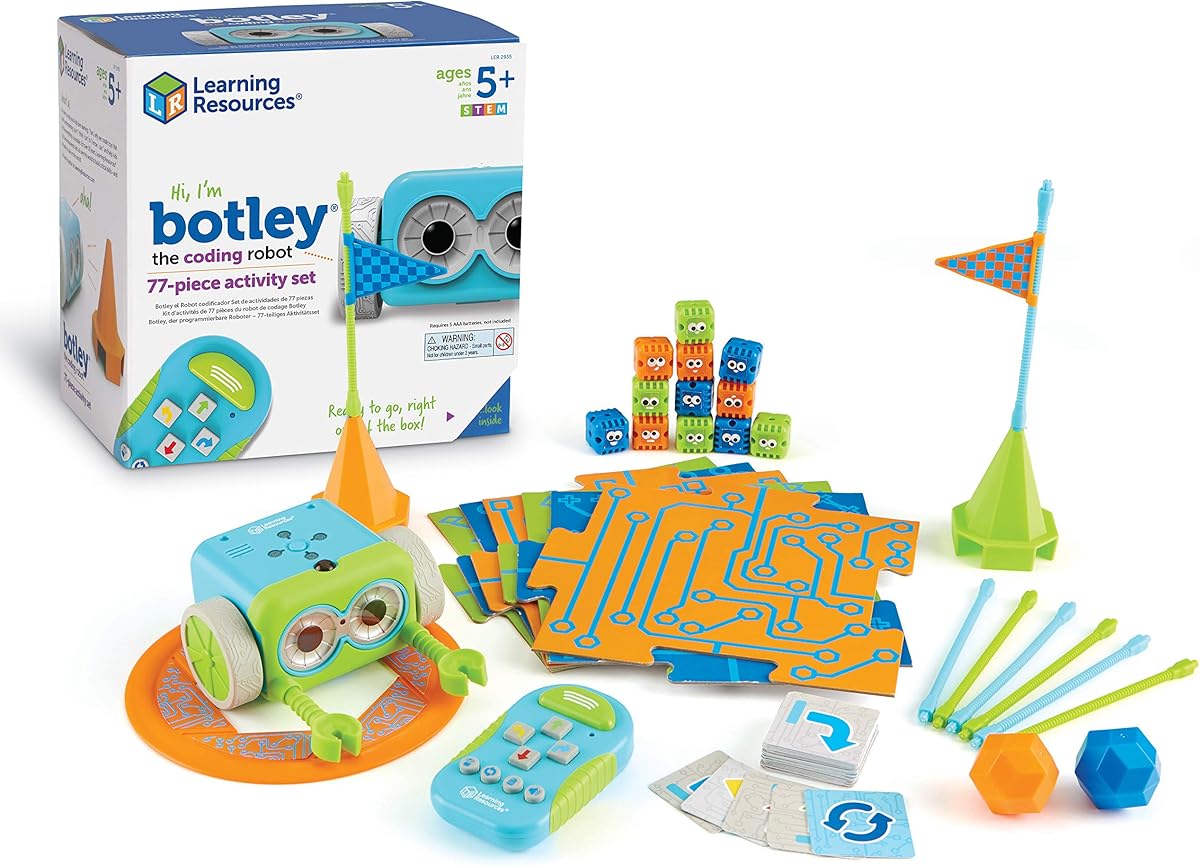
Botley is a highly popular choice with a 4.6 rating for its comprehensive set of accessories. It is designed to teach early STEM skills without the distraction of a screen or tablet.
We may earn a commission when you buy through this link, at no additional cost to you.
The robot can detect objects and avoid them, adding a layer of realism to the coding tasks. With 77 pieces including tiles and obstacles, it offers hours of creative play and structured learning for young children.
Setup requires a screwdriver and batteries, which might be a minor hurdle for quick play. However, once ready, it supports looping commands and black-line paths that challenge kids to think strategically.
This kit is ideal for both home and classroom environments. It encourages collaboration and problem-solving among peers, making it a versatile tool for educational settings.
The built-in sensors allow the robot to react to its environment, simulating real-world navigation.
With detachable arms and many pieces, the robot can be customized for different scenarios and games.
We may earn a commission when you buy through this link, at no additional cost to you.
Ozobot Evo stands out for its use of color codes to program the robot, earning a 4.6 rating. It introduces coding in a fun way using markers that the robot reads from physical surfaces.
We may earn a commission when you buy through this link, at no additional cost to you.
The kit includes over 700 free lessons covering various subjects. This makes it an excellent long-term investment for families or schools that want structured curriculum support alongside play.
While the price is higher than some basic options, the durability and educational resources justify the cost. The zip case keeps markers organized, making it practical for daily use in busy environments.
This kit is perfect for children who enjoy art and science. It merges creativity with logic, allowing kids to draw their own coding paths and watch the robot follow them.
Drawing color patterns teaches sequence and logic without needing a digital interface or screen.
Access to hundreds of free lessons ensures there is always something new to learn and explore.
We may earn a commission when you buy through this link, at no additional cost to you.
The Botley 2.0 builds on its predecessor with improved features and a 4.5 rating. It adds complexity with 45-degree turns and object-sensing reactions that challenge older children.
We may earn a commission when you buy through this link, at no additional cost to you.
Kids can design command sequences to navigate longer and more complex routes. The lights and music add a sensory layer that keeps engagement high during coding sessions.
The 78-piece kit allows for building custom mazes and imaginative stories. This openness encourages kids to invent their own challenges and solutions repeatedly.
This version is recommended for children ready to tackle more advanced programming tasks. It offers a significant step up from basic linear coding models.
The ability to turn at angles adds realism to navigation tasks and increases the difficulty.
Hidden features unlock open-ended play that rewards curiosity and experimentation with inputs.
We may earn a commission when you buy through this link, at no additional cost to you.
Dash is one of the most widely used robots in schools globally with a 4.6 rating. It is ready to learn immediately out of the box without any assembly required for the user.
We may earn a commission when you buy through this link, at no additional cost to you.
The robot sings and dances, and responds to voice commands, making it very engaging. Its five compatible apps provide a rich environment for learning concepts like loops and variables through games.
It does not have a camera, which limits some advanced features, but the battery life allows for long sessions of active play. This reliability makes it a favorite for classrooms and serious learners.
This robot is an excellent choice for children who want a fully featured friend. It balances fun and education perfectly to keep kids motivated for hours.
The range of supported apps ensures the robot remains useful as coding skills advance over time.
Used by tens of thousands of schools, it aligns with standard educational goals for STEM.
We may earn a commission when you buy through this link, at no additional cost to you.
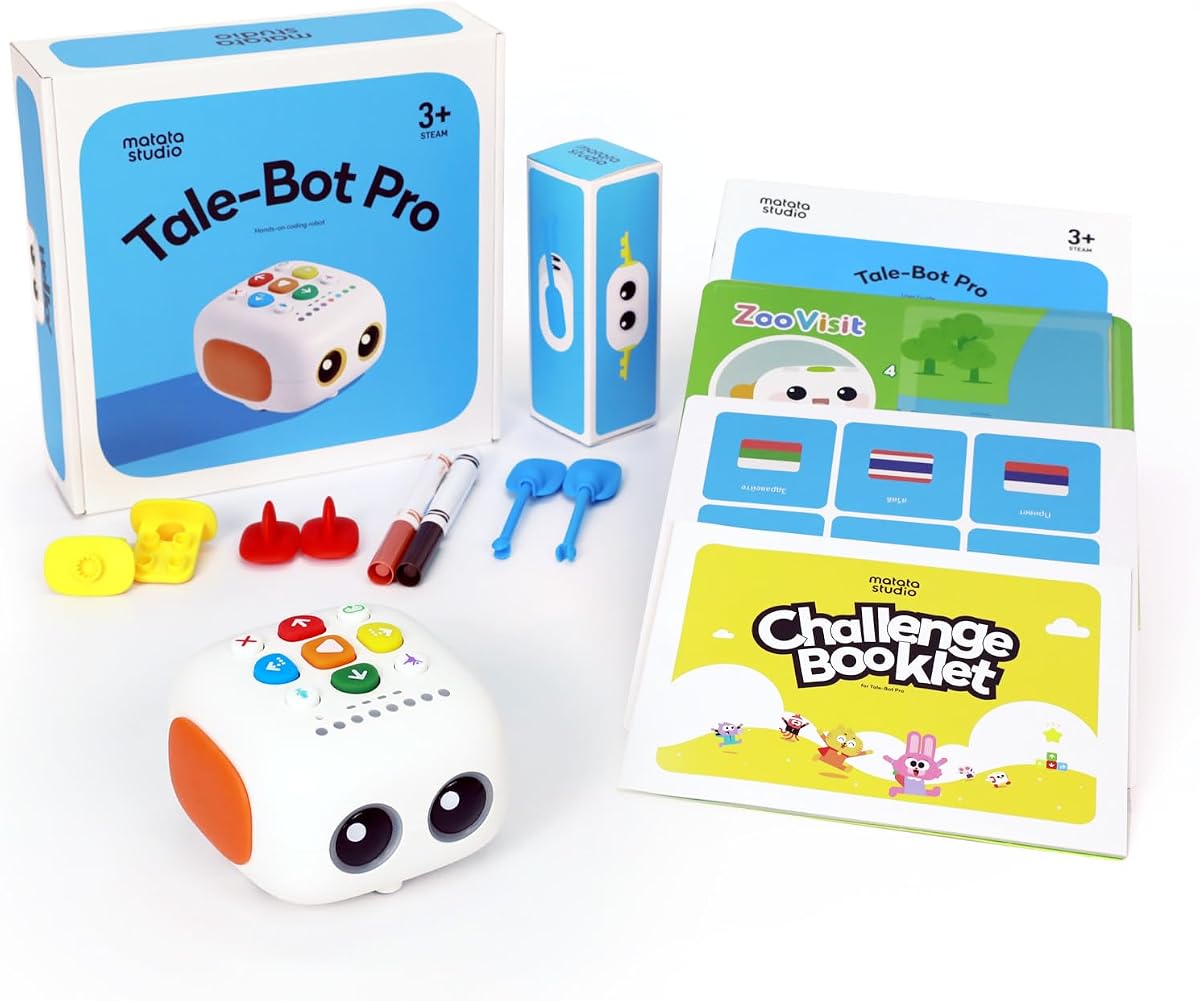
TaleBot Pro is designed specifically for toddlers aged three to five with a high 4.7 rating. It combines coding concepts with interactive storytelling to engage young children early.
We may earn a commission when you buy through this link, at no additional cost to you.
Children can record their voices and tell stories that the robot acts out on the map. This unique feature helps develop language skills and creativity alongside basic sequencing and loops.
The robot is compatible with Lego blocks, allowing for physical creativity. It supports multiple languages, making it a versatile option for diverse learning environments and families.
This toy is perfect for preschoolers who need a gentle introduction to technology. It prioritizes engagement and language development without overwhelming technical details.
Recording voice commands adds a creative element that makes learning feel like play time.
Focuses on basic commands that young minds can grasp through visual and tactile interaction.
We may earn a commission when you buy through this link, at no additional cost to you.
Choosing the right coding toy depends on your child's age, interests, and the level of support available at home. This guide covers the key factors to consider before making a purchase.
Ensure the toy matches your child's developmental stage. Products designed for preschoolers focus on simple sequencing, while those for teens introduce text-based languages like JavaScript. Always check the minimum age recommendation to avoid frustration.
Look for age ranges that align with your child's attention span and motor skills for successful learning.
Screen-free toys are great for minimizing digital distractions and focusing on physical logic. App-based robots offer more advanced features and visual feedback through tablets or phones. Decide which environment fits your family better.
Screen-free options are ideal for younger children or those needing a digital detox.
Some kits require assembly which teaches engineering but takes time. Others come pre-built for immediate play. Consider if you want a project for an afternoon or a toy to use right away.
Assembly kits provide added value for kids who enjoy building and mechanics.
Many robots come with free online lessons or physical guides. Look for toys that offer structured activities to ensure continuous learning. A good curriculum grows with your child's abilities over years.
Comprehensive guides help parents understand the learning goals of each activity.
Check if the robot supports add-ons or compatibility with other blocks. Open systems allow you to grow the toy as skills improve. This makes the initial investment last longer.
Compatibility with standard bricks like LEGO ensures long-term engagement.
Verify the type of batteries required and if they are included. Rechargeable units can save money over time but need charging access. Standard batteries are easier to replace on the go.
Long battery life is crucial for uninterrupted play and learning sessions.
Coding toys should withstand frequent handling and assembly. Metal or hard plastic parts often last longer than soft plastic. A durable toy is safer for classrooms and homes alike.
Sturdy construction ensures the product remains functional for years of use.
Look for brands with active user communities and forums. This support helps when you get stuck or want project ideas. A strong community means more resources for creativity.
Online communities provide inspiration and troubleshooting advice for parents.
Always start with the basic exercises provided in the manual. This helps children grasp the core logic before moving to complex projects. Patience is key during the initial setup and assembly phases.
Keep small parts like sensors and screws organized in a container. Losing pieces can make the toy unusable, so a clean workspace is essential. Regularly check batteries to prevent leakage damage.
Encourage your child to invent their own challenges and stories. This creativity reinforces the logic concepts learned in guided activities. Sharing their creations with family members builds confidence and pride.
It depends on the specific model. Some robots like the Sphero Mini and Dash require a tablet for advanced features, while others like Botley and the Robot Mouse are completely screen-free. Always check the product description to confirm connectivity needs.
Yes, most of these products are designed specifically for beginners. They start with simple drag-and-drop interfaces or physical buttons that teach basic logic. As skills improve, the complexity of challenges increases naturally.
The majority of these toys are suitable for children aged four to twelve years. However, some advanced kits cater to older teens and beginners interested in professional engineering. Always refer to the age rating on the box.
Learning is a continuous process. A child can learn basic concepts in a few hours but may spend months mastering advanced programming. The toys are designed to grow with the child to provide long-term value.
In most cases, batteries are not included. You will need to purchase AA or AAA batteries separately. Some models use rechargeable packs, which can save money in the long run.
Yes, many of these toys are specifically designed for educational use in schools. They come with lesson plans and durable materials suitable for group work and rotation. Teachers often find them useful for STEM programs.
We have highlighted ten top choices ranging from budget-friendly mice to advanced programmable robots. The Thames & Kosmos My Robotic Pet and Learning Resources Code & Go Robot Mouse offer great entry points for different age groups.
When selecting a toy, prioritize features that align with your child's interests and the available support at home. A toy that matches their current skill level ensures they stay engaged and motivated to learn.
Please remember that pricing and availability may change frequently. Always verify the current details before purchasing to ensure you get the best product for your needs at this time.