
Gwolves Skoll Mini SK-S Black
4.4Editor score
Ultralight 50g weight
3389 high precision sensor
Detachable cable included
This guide compares the top ten claw grip gaming mice for small hands to help you find the best lightweight and precise option for your gaming style and needs.
Finding the right claw grip gaming mouse for small hands can significantly enhance your precision and comfort during intense gaming sessions. Many gamers struggle with standard-sized mice that feel bulky or unwieldy, leading to fatigue and reduced performance over time.
We have carefully evaluated ten top-rated models based on their weight, sensor accuracy, ergonomics, and overall build quality. Each product was selected to ensure it fits smaller palms while delivering the responsive control needed for competitive play and everyday tasks.
Our detailed reviews highlight the strengths and weaknesses of each mouse so you can make an informed decision. Keep in mind that prices and availability may change frequently, so checking the latest listings is always recommended before purchasing.
4.4Editor score

4.6Editor score

4.3Editor score
This side-by-side comparison highlights the key specifications and features of each mouse to help you quickly identify the model that best suits your specific gaming requirements and hand size.


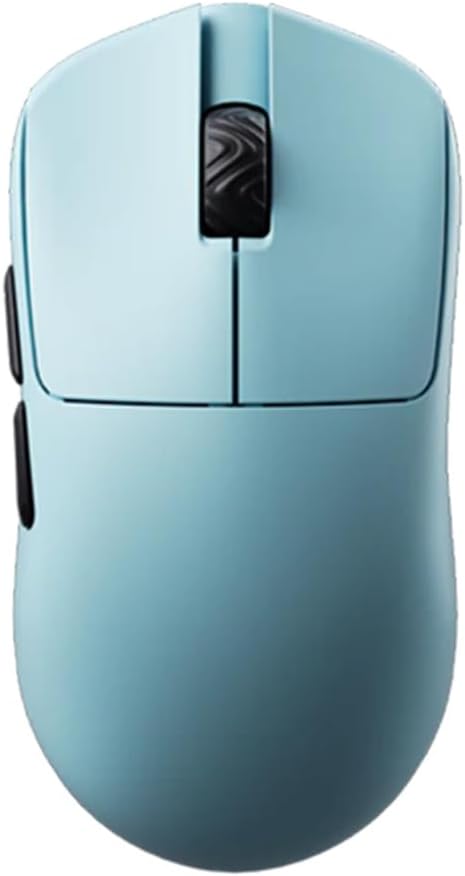

The Gwolves Skoll Mini SK-S stands out as a top contender for budget-conscious gamers seeking a claw grip mouse tailored for small hands. With a rating of 4.4, it offers a solid combination of performance and affordability that is hard to beat in this category.
We may earn a commission when you buy through this link, at no additional cost to you.
Weighing just 50 grams, this mouse is designed to minimize fatigue during extended play sessions. The honeycomb design not only reduces weight but also adds a unique aesthetic appeal. The included 3389 sensor ensures accurate tracking, while the PTFE skates provide a smooth glide across various surfaces.
While the honeycomb shell is effective for weight reduction, it can accumulate dust and debris over time, requiring occasional cleaning. Additionally, as a wired model, it lacks the convenience of wireless connectivity, which might be a drawback for users who prefer a clutter-free desk setup.
This mouse is ideal for gamers who prioritize lightweight performance and cost-efficiency. It delivers reliable precision without breaking the bank, making it an excellent starting point for those new to competitive gaming or looking to upgrade their current setup.
The Skoll Mini delivers high-end sensor performance at a fraction of the cost, ensuring competitive accuracy without the premium price tag.
Its compact dimensions and ergonomic shape are specifically tuned to fit smaller palms comfortably, reducing strain during claw grip usage.
We may earn a commission when you buy through this link, at no additional cost to you.
The Lamzu Atlantis Mini Champion Edition earns our Editor's Choice award for its exceptional balance of wireless freedom and ergonomic design. Boasting a 4.6 rating, it is widely regarded as one of the best options for claw grip users with smaller hands.
We may earn a commission when you buy through this link, at no additional cost to you.
Its symmetrical hourglass design features a broad back and curved top that naturally prevents finger cramps. The mouse weighs only 51 grams, reducing wrist strain significantly. The PAW3950 sensor supports up to 30,000 DPI and ensures seamless performance with no delays, while the optical switches offer a lifespan three times that of mechanical ones.
The main trade-off is the higher price compared to wired alternatives, which may not fit every budget. Additionally, like most wireless mice, it requires battery management over time. However, the performance benefits and build quality often justify the investment for serious gamers.
This mouse is perfect for competitive players who demand top-tier specs and wireless convenience. Its design specifically caters to claw grip styles, ensuring comfort and control during intense gaming sessions without compromising on speed or accuracy.
With 8K compatibility and the Nordic 52840 MCU, this mouse delivers latency-free tracking that rivals wired models while maintaining a clean setup.
The hourglass symmetry helps maintain a natural hand position, minimizing fatigue and cramping during marathon gaming sessions.
We may earn a commission when you buy through this link, at no additional cost to you.
The Pulsar X3 LHD represents the pinnacle of lightweight design, earning its spot as the Best Premium option. With a rating of 4.3, it is engineered for gamers who need maximum speed and minimal weight without sacrificing durability or control.
We may earn a commission when you buy through this link, at no additional cost to you.
Tipping the scales at an unreal 43 grams, this mouse is lighter than an egg yet remains incredibly durable. The hybrid ergonomic design blends palm and claw grip features, offering a unique balance of comfort and control. The XS-1 sensor provides 32,000 DPI resolution and 750 IPS tracking speed for unparalleled precision.
The primary downside is the steep price, which may be prohibitive for many users. Additionally, its left-handed designation limits accessibility for right-handed gamers. However, for those who fit its profile, the performance gains are substantial and unmatched by most competitors.
This mouse is tailored for elite gamers seeking the absolute lightest possible device. Its build quality and sensor technology ensure that even with reduced weight, you maintain heavy performance and precision during critical gameplay moments.
At 43 grams, this mouse sets a new standard for speed, allowing for rapid movements with virtually no resistance or inertia.
The relaxed claw shape supports both palm and claw grip styles, ensuring comfort across different hand sizes and preferences.
We may earn a commission when you buy through this link, at no additional cost to you.
The Bloody V7 Ergonomic is a solid choice for gamers who need extra functionality alongside gaming performance. With a 4.4 rating, it offers versatile programmability that suits users who rely on macros and scripting for their gameplay or workflow.
We may earn a commission when you buy through this link, at no additional cost to you.
This mouse features eight programmable buttons, allowing for extensive customization of commands and macros. The optical sensor tracks up to 3200 DPI, which is sufficient for most general gaming needs. The adjustable report rate lets you fine-tune responsiveness based on your preferences and surface conditions.
However, the maximum DPI is lower compared to modern high-end sensors, which might limit its utility for competitive FPS players. The software is functional but lacks the polish of more expensive brands. Despite this, it remains a practical tool for those needing specific automation features.
Ideal for users who prioritize functionality over raw sensor speed, this mouse delivers reliable performance for everyday tasks and gaming. Its ergonomic shape supports claw grip users well, ensuring comfort during extended usage periods.
With eight programmable buttons and macro support, you can automate complex sequences and improve your efficiency in games and applications.
The rubberized coating provides a secure grip that prevents slipping, enhancing control during fast-paced movements.
We may earn a commission when you buy through this link, at no additional cost to you.
The Pulsar X2H Mini Wireless offers a compelling mix of performance and wireless freedom. With a 4.1 rating, this renewed model provides access to high-end features at a potentially lower price point than brand-new units.
We may earn a commission when you buy through this link, at no additional cost to you.
Featuring the PixArt PAW3395 sensor, it supports programmable DPI up to 26,000 and includes Motion-Sync Technology for accurate tracking. The elevated rear hump and narrower waist make it more stable for aggressive claw grips. The Nordic MCU ensures efficient power use, offering up to 100 hours of usage on a single charge.
Since this is a renewed product, condition and wear may vary between units. Battery performance can also differ depending on prior usage. However, the core specifications remain top-tier, making it a viable option for those willing to accept minor risks.
This mouse is suited for gamers who want wireless reliability without the highest premium cost. The narrow waist and optical switches ensure consistent clicks and comfort, supporting a variety of grip styles effectively.
The Nordic MCU and 2.4GHz connection provide stable, low-latency performance that matches wired mice in responsiveness.
The raised rear hump supports aggressive claw grip users, offering stability without compromising on maneuverability.
We may earn a commission when you buy through this link, at no additional cost to you.
The Corsair IRONCLAW Wireless SE is packed with features designed for productivity and gaming alike. With a 3.9 rating, it appeals to users who prioritize battery life and customization over pure lightweight performance.
We may earn a commission when you buy through this link, at no additional cost to you.
This mouse offers ten programmable buttons and a powerful CORSAIR MARKSMAN sensor that tracks up to 26K DPI. The battery life is massive, lasting up to 285 hours on 2.4GHz or 532 hours via Bluetooth. Customizable RGB lighting allows for extensive personalization of logos and scroll wheels.
However, the mouse is designed for larger hands and palm grip users, which may make it unsuitable for claw grip users with small hands. Its weight is also higher than many specialized gaming mice, which could cause fatigue during long sessions.
Ideal for power users who need a versatile tool for both work and play, this mouse delivers robust features and lasting battery life. While not optimized for small hands, its functionality makes it a strong contender for general use.
With over 285 hours of battery life, you can game for days without needing to recharge, minimizing interruptions.
Ten programmable buttons and RGB zones allow for deep customization to match your specific workflow and style.
We may earn a commission when you buy through this link, at no additional cost to you.
The V8 Gaming Mouse by Scyrox delivers impressive performance for its minimal weight. Rated 4.5, it is designed specifically for claw and fingertip gamers who value speed and responsiveness above all else.
We may earn a commission when you buy through this link, at no additional cost to you.
Weighing approximately 36 grams, this mouse reduces hand fatigue significantly. It features the PAW3950 sensor for low latency tracking and Kailh optical switches for instant actuation. The web-based driver allows for easy settings adjustments without installing bulky software, and an 8K dongle is included for enhanced polling rates.
One consideration is the weight variance of ±3g, which might affect consistency between units. Additionally, the web-based driver requires an internet connection for configuration, which may not be ideal for all setups. However, the performance benefits remain substantial.
This mouse is perfect for competitive gamers who need rapid cursor movements with minimal effort. Its symmetrical shape and high-end components ensure it is suitable for a wide range of hand sizes and grip styles.
The web-based driver simplifies configuration, allowing you to adjust settings directly in your browser without downloads.
With the included 8K dongle and Nordic MCU, you get incredibly fast response times for competitive play.
We may earn a commission when you buy through this link, at no additional cost to you.
The Pulsar X2H Wireless Mini in white offers a sleek look combined with high performance. With a 4.2 rating, it caters to users who want a clean desk setup without sacrificing gaming capabilities.
We may earn a commission when you buy through this link, at no additional cost to you.
Its slim waist design provides enhanced stability for aggressive claw grips. The PAW3395 sensor ensures precise tracking with up to 26,000 DPI programmable settings. The Nordic MCU powers the device efficiently, delivering up to 100 hours of usage on a single charge at a hyper-responsive 1000Hz polling rate.
While the white finish looks great, it may show dirt more easily than darker colors. The price is also on the higher end compared to basic models. Still, the combination of aesthetics and technology makes it a strong choice for many gamers.
This mouse is recommended for those seeking a balance between style and substance. Its internal structure ensures consistent clicks and smooth wheel rotations, enhancing the overall user experience.
The sturdier shell rigidity and indirect wheel clicks provide reliable tactile feedback with no rattling during use.
The Nordic MCU extends battery life and provides accurate status readings, so you always know when to recharge.
We may earn a commission when you buy through this link, at no additional cost to you.
The V6 Gaming Mouse by Scyrox stands out for its solid, no-hole construction while remaining ultra-lightweight. With a 4.6 rating, it appeals to users who prefer a clean look without the dust risks of honeycomb designs.
We may earn a commission when you buy through this link, at no additional cost to you.
Weighing only 40 grams, it reduces fatigue significantly during long sessions. The PAW3950 chip delivers accurate tracking with no noticeable acceleration or spin-outs. The concave main buttons are ergonomically designed to fit fingers naturally, improving consistency during rapid clicks.
Since it lacks holes, dust and debris are less likely to get inside, which is a plus for longevity. However, battery life may vary slightly between units. Overall, the build quality and wireless performance make it a robust option for various gaming needs.
This mouse is ideal for gamers who want a lightweight device without compromising durability. Its symmetrical shape supports both claw and palm grips, making it a versatile choice for different hand sizes.
The concave buttons naturally align with your fingers, providing clear click positioning and reducing accidental inputs.
The no-hole design keeps dirt out, ensuring your internal components stay clean and functional for longer.
We may earn a commission when you buy through this link, at no additional cost to you.
The BenQ Zowie S2-C is designed for pure esports performance without the need for software. With a 4.3 rating, it is trusted by professionals who value simplicity and reliability above complex features.
We may earn a commission when you buy through this link, at no additional cost to you.
This symmetrical mouse comes in a small size tailored for smaller hands. It features a 3360 optical sensor with four adjustable DPI levels for straightforward operation. The paracord cable minimizes drag, and the 24-step scroll wheel offers precise adjustments. It includes additional mouse feet for customization.
Because it is driverless, you cannot adjust DPI easily without cycling through preset levels. It is also wired, which may not suit everyone. However, its robust build and focus on competition make it a favorite among serious gamers.
This mouse is best for competitive players who want a straightforward tool without distractions. Its ergonomic design ensures comfort for both palm and claw grip users, providing consistent performance across various titles.
Designed by Zowie, this mouse meets strict professional standards for esports, ensuring it can handle intense competitive demands.
With no software required, the mouse works out of the box, reducing potential system conflicts and saving space.
We may earn a commission when you buy through this link, at no additional cost to you.
Selecting the right gaming mouse involves considering several critical factors that affect comfort, performance, and durability for your specific hand size.
For claw grip users, a lighter mouse allows for faster movements and reduces fatigue. Look for models under 60 grams that have a balanced center of gravity to ensure stability during rapid swipes.
Aim for lightweight options that feel neutral in your hand rather than top-heavy, which can strain your wrist over long sessions.
Claw grip requires a mouse with a hump that supports your palm without forcing your fingers to stretch too far. Symmetrical or slightly curved shapes often work best for this grip style to maintain control and comfort.
Choose a shape that fits your hand dimensions naturally to prevent cramping and allow for precise aiming adjustments.
A high-quality sensor ensures your movements translate accurately to the screen without jitter or acceleration. Modern optical sensors often exceed 10,000 DPI, providing ample range for various play styles and screen resolutions.
Prioritize sensors with consistent tracking on different surfaces to maintain reliable performance during gameplay.
Wireless mice offer freedom of movement but may have slightly higher latency or battery concerns. Wired mice eliminate battery worries but can have cable drag if the cord is heavy or stiff.
Decide based on whether you prioritize a clean desk setup or consistent connection reliability for your specific setup.
Optical switches generally last longer than mechanical ones and avoid issues like double-clicking over time. This is crucial for gaming where frequent clicking occurs throughout a session.
Look for mice that mention switch lifespan or warranty coverage to ensure long-term reliability.
Some mice offer more programmable buttons for macros or shortcuts, while others keep it minimal for simplicity. Ensure extra buttons are easily reachable without shifting your grip position unintentionally.
Select a layout that supports your workflow without adding unnecessary complexity that could lead to accidental clicks.
For wireless models, battery life can vary from 50 hours to over 100 hours. Long-lasting batteries mean less frequent recharging and fewer interruptions during play.
Check for features like fast charging or indicators that let you monitor battery status effectively.
Reputable brands often provide better quality control and warranty support. Research customer service reviews and return policies before making a purchase to avoid potential issues.
A strong warranty can provide peace of mind and protect your investment against defects.
Start by adjusting the DPI settings to find a sensitivity level that feels comfortable for your hand size and play style. Many modern mice allow you to cycle through DPI levels using a button on top.
Keep your mouse feet clean and free of debris to ensure smooth movement across your mousepad. Periodically wipe the surface with a microfiber cloth to prevent dust buildup.
For wireless models, charge the battery regularly and store the unit in a cool, dry place when not in use to maintain battery health and performance.
A suitable mouse for claw grip users typically features a smaller footprint, a distinct hump to support the palm, and a lightweight design. These elements prevent finger strain and allow for quick, accurate movements without needing to stretch your hand excessively.
Optical switches are generally more durable and provide faster response times due to their lack of physical contact parts. This reduces the risk of double-click issues over time, making them ideal for high-intensity gaming where clicks happen frequently.
A lighter mouse can improve speed and reduce fatigue, but balance is key. If a mouse is too light without stability, it might feel hard to control. Look for a balance that suits your specific grip and movement style.
Begin with a moderate DPI setting like 800 or 1600 and adjust based on your comfort. Higher DPI allows for faster cursor movement, but lower DPI provides more precision. Experiment to find what works best for your specific game.
Yes, claw grip mice can be used for general tasks, but ensure the ergonomic shape fits your hand well to avoid discomfort. Many users find them comfortable for both gaming and browsing if the weight is manageable.
Honeycomb designs reduce the overall weight of the mouse by removing excess material, which helps minimize wrist strain. However, they can collect dust, so regular cleaning may be necessary to maintain performance.
Modern wireless technology has largely closed the gap with wired mice, with latency often imperceptible to most users. High-end models with 1ms response times deliver performance that rivals wired alternatives effectively.
Depending on usage intensity, a gaming mouse may last several years before switches or sensors degrade. If you notice inconsistent clicks or tracking issues, it might be time to consider an upgrade for consistent performance.
We reviewed ten excellent options ranging from budget-friendly wired models to premium wireless choices. Each was selected for its ability to support claw grip styles comfortably while delivering reliable performance for competitive play.
When making your choice, prioritize weight, sensor quality, and ergonomic shape to ensure the mouse aligns with your personal gaming preferences. Finding the right balance will enhance both comfort and precision significantly.
Prices and availability can change quickly, so always verify current listings and details before purchasing. Taking the time to choose the right tool now will pay off in your overall gaming experience and satisfaction.