
MELOGAGA RGB
4.2Editor score
7 color RGB lighting
Inline volume control
Compact space saving design
This guide compares the top ten affordable desktop audio options for 2026, evaluating sound quality, connectivity, and build to help you find the best cheap PC
Finding the right audio setup does not require breaking the bank. Cheap PC speakers can deliver impressive sound for work, gaming, or media without sacrificing too much quality. We evaluate key features to ensure value.
We analyzed ten top-rated models based on user feedback, technical specifications, and real-world performance. Our comparison covers connectivity options, power sources, and design factors that matter for desktop setups today.
Each pick highlights specific strengths and ideal use cases to match your needs. Note that availability and pricing fluctuate frequently, so verify current details before purchasing to ensure you get the best deal possible.
4.2Editor score

4.6Editor score
4.2Editor score
The following table provides a side-by-side comparison of all ten selected models. It highlights core specifications and connectivity options to help you quickly identify which option aligns best with your specific desktop audio requirements.



The Creative Pebble 2.0 stands out as a top choice for budget audio. With a high user rating, it offers a hassle-free setup using just a single USB cable for power and audio. Its distinctive design ensures sound reaches your ears clearly.
We may earn a commission when you buy through this link, at no additional cost to you.
Its standout feature is the custom-tuned far-field driver paired with rear-facing passive radiators. This configuration enhances bass reproduction and audio projection significantly compared to standard flat speakers. The 45-degree elevation directs sound optimally for listening comfort.
While it lacks an auxiliary input, the USB audio solution simplifies desk clutter effectively. The volume control is conveniently placed on the front face for quick adjustments. Build quality feels solid despite the affordable price point.
This speaker is ideal for users prioritizing clean aesthetics and straightforward connectivity. It works well for office work, casual gaming, and media consumption. If you value design and simplicity, this model delivers consistent performance without extra hassle.
Using a single USB cable eliminates the need for separate power adapters, reducing cable clutter on your desk.
The angled driver design ensures audio is directed towards you, improving clarity and reducing ear strain during long sessions.
We may earn a commission when you buy through this link, at no additional cost to you.
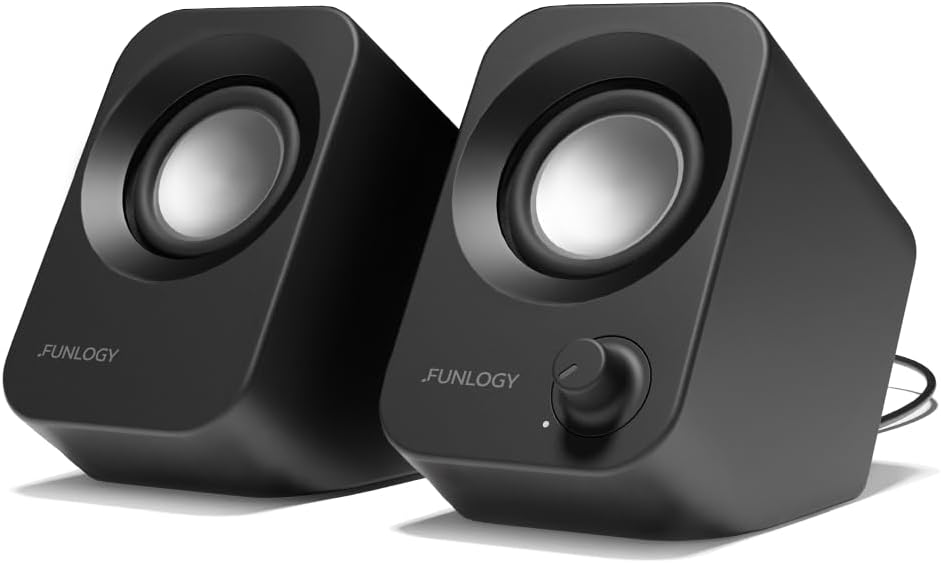
The FUNLOGY Speaker offers premium features at a competitive price. Recognized with a VGP award, it delivers powerful 14W output with clear mids and crisp highs. Its compact size makes it suitable for various desktop environments.
We may earn a commission when you buy through this link, at no additional cost to you.
The 30-degree tilt design optimizes sound delivery directly to your ears for an immersive experience. It uses dual 48mm full-range drivers and passive radiators for punchy bass. Noise-reducing audio components ensure clear sound without static interference.
Setup is straightforward with included USB and 3.5mm cables, requiring no drivers. The matte finish and build quality reflect its Japanese design heritage. While it costs slightly more, the audio performance justifies the investment.
Choose this model if you seek high fidelity and reliable build quality. It fits well in offices or gaming setups needing strong audio presence. The broad compatibility ensures it works across PCs, laptops, and consoles effortlessly.
With 14W output and full-range drivers, this speaker provides rich, distortion-free sound that rivals larger setups.
The upward-facing tilt ensures optimal sound projection at ear level, enhancing clarity without needing ear-level placement.
We may earn a commission when you buy through this link, at no additional cost to you.
The MELOGAGA RGB speakers combine affordability with aesthetic appeal. They feature dual 3W drivers delivering balanced sound with deep bass. The vibrant LED lighting adds a stylish touch to any gaming or workspace setup.
We may earn a commission when you buy through this link, at no additional cost to you.
Designed to be ultra-compact, these speakers fit seamlessly on small desks without clutter. The inline rotary knob allows for quick and precise volume adjustments without reaching for system settings. USB power and aux input ensure universal compatibility.
While the sound profile is basic, it performs well for general use. The lighting cycles through seven colors for visual interest. For the price, it offers a complete package for budget-conscious users seeking style and function.
This is a great entry-level choice for students or casual users. If you want colorful lighting and decent audio without spending much, this model delivers. It works perfectly for watching videos or listening to music casually.
The 7-color RGB backlighting enhances your desk vibe, cycling through mesmerizing colors to match your mood.
The slim design ensures these speakers fit anywhere, making them ideal for cramped workstations.
We may earn a commission when you buy through this link, at no additional cost to you.
Amazon Basics delivers reliable audio with its Stereo 2.0 set. This pair offers USB power and a 3.5mm aux input for flexible connectivity. The in-line volume control provides easy access without digging into settings.
We may earn a commission when you buy through this link, at no additional cost to you.
A bottom radiator enhances bass response, providing a springy sound for music and movies. The metal finish and scratch-free padded base ensure durability on desktop surfaces. Blue LED lights indicate power status clearly.
While the design is utilitarian, it focuses on performance. The volume control is conveniently placed on the cable. It offers clear sound without distortion at moderate levels. This makes it a practical choice for daily use.
Select this if you prioritize reliability and straightforward features. It is perfect for office environments where function matters most. The build quality supports long-term use, making it a dependable option for many users.
Supports both USB power and 3.5mm audio, allowing easy connection to various devices without extra adapters.
A dedicated bottom radiator adds depth to low frequencies, enriching the overall listening experience significantly.
We may earn a commission when you buy through this link, at no additional cost to you.
This soundbar offers a unique approach with a clip-on monitor mount. It saves valuable desk space by attaching directly to your display. The adaptive channel switching ensures correct left-right positioning regardless of clamp placement.
We may earn a commission when you buy through this link, at no additional cost to you.
Touch buttons on the front allow intuitive muting and volume adjustment. It includes a USB-C adapter for modern devices like Macs and tablets. The dual ultra-magnetic drivers provide deep bass and loud sound for movies.
Setup is simple via USB plug-in. Ensure your monitor thickness allows proper clamping. The sound quality is strong for its size, providing rich audio without cluttering your workspace. It is ideal for tight desks.
Choose this if you need to maximize desk real estate. It transforms monitor space into audio potential. The touch controls add a modern feel. It works well for media consumption and gaming where space is limited.
The patented clamp allows smooth placement on your monitor, freeing up desk space for keyboards and accessories.
A built-in G-sensor ensures audio channels remain correctly positioned whether mounted on top or bottom of monitor.
We may earn a commission when you buy through this link, at no additional cost to you.
This compact model prioritizes portability and ease of use. Powered via USB 5V, it plugs directly into computers for instant audio. A front-facing volume control allows quick adjustments without reaching for software.
We may earn a commission when you buy through this link, at no additional cost to you.
It features a headphone jack, enabling direct connection for private listening. The frequency range covers 103 Hz to 20 KHz for clear mids and highs. It measures just 2.76 by 5.3 inches, fitting almost anywhere.
Ideal for travelers or small workstations, it weighs about 1.4 pounds. Setup is driver-free. The simple design ensures reliable performance without unnecessary features. It meets basic audio needs effectively for many users.
Pick this if portability is your main concern. It is great for laptops on the go or small dorm rooms. The headphone jack adds versatility. Expect straightforward performance that just works without fuss.
Its compact size and lightweight design make it easy to pack, perfect for moving between home and office.
A built-in headphone jack lets you connect headphones directly to the speakers for private audio.
We may earn a commission when you buy through this link, at no additional cost to you.
This soundbar delivers enhanced bass through passive radiators and 3W drivers. It works seamlessly with Windows, macOS, Linux, and ChromeOS for broad compatibility. The single USB cable handles both power and audio, reducing clutter.
We may earn a commission when you buy through this link, at no additional cost to you.
Plug-n-play setup means no driver installation is needed. Click the speaker icon in your taskbar to select the USB device. It offers greater dynamic range and lower distortion than basic models. The compact sound bar design fits under monitors.
Ideal for users needing rich audio without complex wiring. The build quality is sufficient for daily use. It ensures clean sound for movies and gaming. The enhanced bass makes a difference in music playback significantly.
Choose this if you want better low-end performance on a budget. It suits desktop PCs and laptops equally well. The wide OS support is a major plus for mixed environments. Expect reliable stereo sound.
No need for separate aux cables; one USB line feeds both audio and electrical power for a clean setup.
Compatible with Windows, macOS, ChromeOS, and Linux, ensuring it works across nearly all modern computers.
We may earn a commission when you buy through this link, at no additional cost to you.
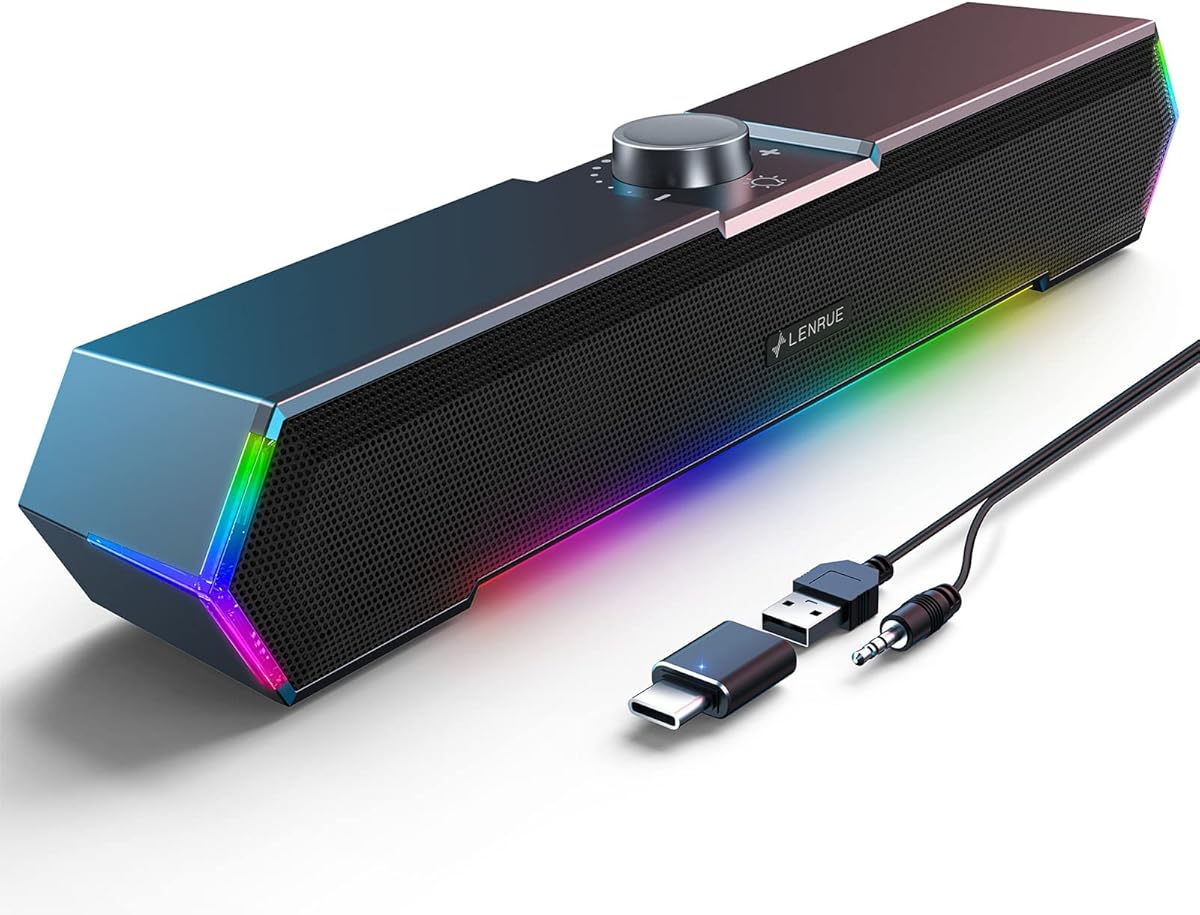
The LENRUE G11 features unique touch angular lights for atmosphere. It offers surge stereo sound via large amplifier IC horns for distortion-free audio. The USB-C adapter ensures compatibility with modern laptops.
We may earn a commission when you buy through this link, at no additional cost to you.
A top volume knob provides easy adjustment. The speakers fit under monitors without extra space. Cables are glued together to reduce clutter. It works with Windows, Mac, and ChromeOS systems easily.
While it lacks a headphone port, the focus remains on desktop audio. The dynamic light design adds visual appeal for gaming. The sound is clear and immersive for movies and videos. It is a fun addition to setups.
Pick this for its lighting and stereo effect. It is great for gaming desks needing ambiance. The build quality supports consistent sound. Ensure your desk space accommodates the design for optimal viewing.
One-touch angular lights create a dynamic game atmosphere, avoiding traditional button designs for convenience.
Large amplifier IC horns deliver distortion-free sound, enhancing movies and music with a cinematic feel.
We may earn a commission when you buy through this link, at no additional cost to you.
Uakinat offers clear and loud sound with 2x3W technology. It delivers Hi-Fi quality suitable for movies and games. The in-line volume control makes adjustments easy without software changes.
We may earn a commission when you buy through this link, at no additional cost to you.
Anti-slip foot pads keep speakers secure on desks. Cables are glued together to avoid clutter. It fits under monitors to save space. The design ensures stability during use without sliding around.
Setup requires no drivers for quick connection. It meets audio needs for indoor media consumption. The sound is crisp without distortion. It is a solid choice for general desktop environments needing reliable audio.
Choose this for dependable sound and neat cables. It works well for office or home setups. The volume control is convenient. Expect consistent performance for daily listening tasks without technical fuss.
Cables are glued together to prevent tangles, keeping your desktop clean and organized.
Anti-slip foot pads ensure speakers stay in place on any desk surface during use.
We may earn a commission when you buy through this link, at no additional cost to you.
This compact USB set provides loud and distortion-free Hi-Fi sound. It is ideal for movies, music, and gaming on a budget. The column-shaped design saves space while offering a modern look for any office.
We may earn a commission when you buy through this link, at no additional cost to you.
It comes with USB and 3.5mm cables for plug-and-play. No drivers are needed. In-line volume control allows easy adjustments. The cable length between speakers reaches 31.5 inches for flexible positioning.
Anti-slip foot pads ensure stability on desks. The matte metal panel adds a touch of quality to the build. It meets basic audio needs effectively without complex controls. A straightforward choice for many users.
Pick this for cost-effective audio performance. It fits well in modern homes and workspaces. The simple controls make it user-friendly. Expect clear sound for general use without extra bells and whistles.
With 31.5 inches of cable between speakers, you can place them comfortably next to your PC.
Unique column shape and matte metal panels complement modern homes and offices perfectly.
We may earn a commission when you buy through this link, at no additional cost to you.
Selecting the right cheap PC speakers involves weighing sound quality against budget constraints. Here are key factors to consider before purchasing.
Most budget models use USB power for simplicity. This eliminates the need for wall outlets. However, ensure your USB ports provide enough current for the speakers to perform well.
USB power is generally reliable for small desktops.
Check for 3.5mm aux inputs and USB-C adapters. Some models combine audio and power in one cable. Having multiple options increases device compatibility.
Dual connectivity ensures future-proofing for various devices.
Look for specifications like driver size and wattage. Passive radiators enhance bass response significantly. Higher wattage usually means louder sound without distortion.
Prioritize specs like 48mm drivers for clearer sound.
Compact or clip-on designs save valuable desk real estate. Monitor-mounted speakers are excellent for tight setups. Standard pairs require more table space.
Measure your desk to choose the right form factor.
Metal finishes and scratch-free bases indicate durability. Plastic models may be cheaper but feel less sturdy. Anti-slip pads prevent sliding on smooth surfaces.
Check product descriptions for material quality details.
In-line volume controls offer quick adjustments without software. Touch buttons add modern convenience but may require specific setup. Front-facing dials are easiest to reach.
Physical controls save time during daily use.
LED lighting and color finishes impact setup style. RGB lights suit gaming setups better. Neutral colors work well in offices.
Select a look that matches your environment.
Verify support for your OS like Windows or macOS. USB-C adapters are necessary for newer Macs. Some models exclude headphone jacks.
Confirm compatibility to avoid connection issues.
Connect the USB cable to a free port on your computer. For audio, plug the 3.5mm jack into your headphone or audio output port. If using a USB-only model, ensure your OS recognizes the device immediately.
Use the in-line control or touch buttons to adjust volume. Avoid turning volume to maximum immediately to prevent speaker damage. Let audio levels increase gradually as you find comfortable settings.
Keep speakers on flat, stable surfaces to prevent falls. Avoid placing heavy items on top of the speakers. Periodically dust the grilles with a soft cloth to maintain sound quality and appearance.
Most of the models reviewed use USB power which comes directly from your computer. This removes the need for external power adapters. However, check individual product pages for any specific requirements.
Many models now include USB-C adapters or work with standard USB ports. Ensure you have the correct connector for your specific MacBook model. Some older models may require an extra adapter.
Yes, if your phone has a USB or 3.5mm audio jack. You can also use USB-C adapters if the phone supports audio output. This works for Android and iOS devices.
Yes, they provide clear sound for gaming. Models with higher wattage or bass radiators enhance effects. While not professional grade, they work well for casual gaming sessions.
Most models focus on output only without microphone input. You may need a separate headset for voice chat. Always check product specs to confirm available ports.
Ensure system volume and media player volume are set to maximum. Adjust the inline volume knob on the speaker. If issues persist, check audio driver updates.
Many sellers offer warranties ranging from six months to one year. Check the product details page for specific terms. Contact customer support if you encounter defects.
These models are designed for desktop or monitor placement. Wall mounting requires specific brackets not provided. Stick to desk or monitor mounting for best safety.
The Creative Pebble 2.0 leads as the top choice for overall balance. For lighting and style, MELOGAGA RGB stands out. FUNLOGY offers premium sound for those wanting extra power.
Prioritize connectivity and build quality when deciding. Ensure your desk has enough space. Think about how you use audio most, whether gaming or work.
Always verify current prices and availability before buying. Deals change often, so checking multiple sources can help. Choose the model that best fits your specific needs today.