
CyberPower CP1000PFCLCD
4.2Editor score
PFC Sinewave Output
Ten Outlet Protection
LCD Status Display
This guide compares the top 10 Battery Backup for Workstation PC models for October 2026, evaluating performance, features, and reliability for professionals.
When your workstation powers down unexpectedly, critical work disappears. A quality Battery Backup for Workstation PC keeps your systems running during outages, ensuring data safety and continuous productivity without interruption or loss of progress.
We evaluated ten leading UPS models based on runtime, outlet capacity, waveform quality, and software support. Our analysis focuses on units that protect active PFC supplies and offer reliable surge protection for demanding workstation environments.
Each pick highlights key specs and real-world benefits to help you choose wisely. Prices and availability change frequently, so verify current details before purchasing. This guide ensures you find the right power protection for your specific workstation needs today.
4.2Editor score

4.5Editor score

4.4Editor score
The following comparison table provides a side-by-side view of all ten selected units. Review each specification carefully to determine which model aligns best with your workstation power requirements and operational constraints.




The CyberPower CP1500PFCLCD is a standout choice for workstation owners who need reliable power protection. Rated at 4.5 stars by users, this unit delivers pure sine wave output ensuring compatibility with active PFC power supplies often found in modern workstations.
We may earn a commission when you buy through this link, at no additional cost to you.
Its 1500VA capacity provides ample headroom for high-performance systems, while the 12 outlets offer flexibility for monitors and peripherals. The color LCD panel gives real-time insights into load and battery status, helping you manage power consumption effectively.
While it is heavier and pricier than entry-level options, the investment pays off in safety and longevity. The AVR system handles voltage fluctuations without draining the battery, extending its lifespan during frequent brownouts.
This model is ideal for professionals who cannot afford downtime. Whether you are editing video or managing servers, the CP1500PFCLCD provides the stable power foundation your workstation requires to operate smoothly during grid instability.
Unlike simulated wave units, this model ensures sensitive electronics receive clean power, preventing overheating or premature failure in modern power supplies.
The tilting color screen allows you to monitor battery life and load capacity instantly, ensuring you know exactly how much runtime remains during an outage.
We may earn a commission when you buy through this link, at no additional cost to you.
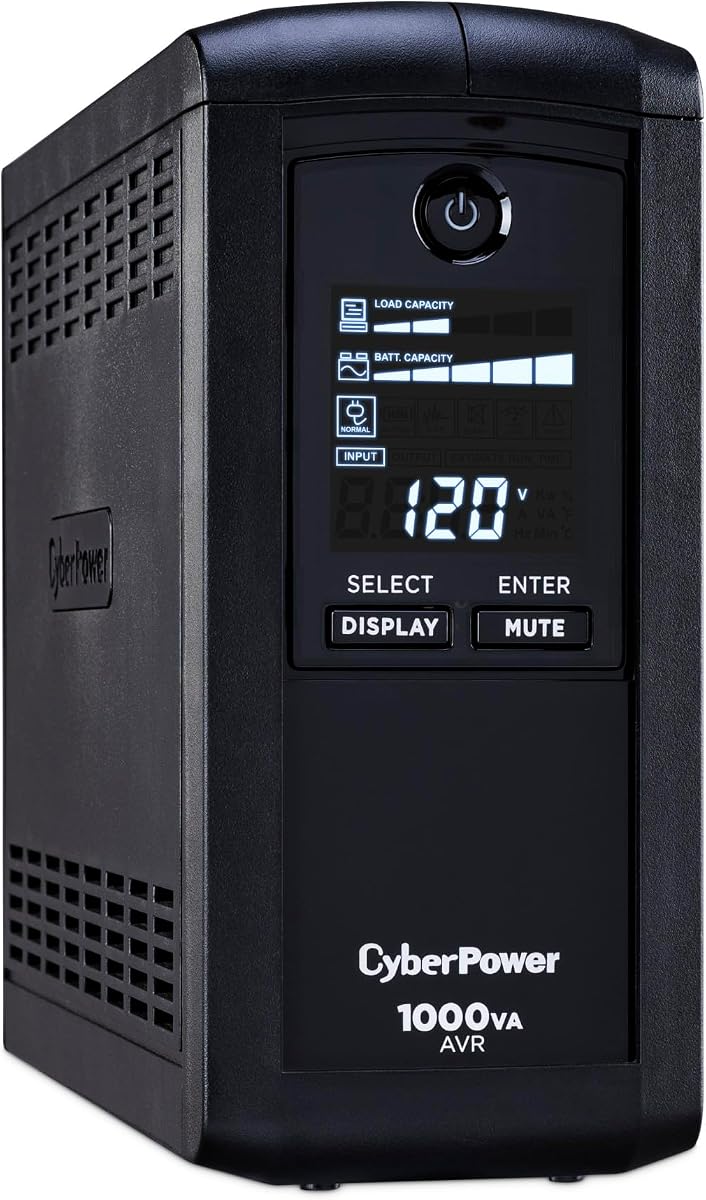
For those seeking pure sine wave protection without the premium price tag, the CP1000PFCLCD is an excellent entry point. With a 4.2 star rating, it offers robust safety for workstations using active PFC power supplies at a competitive cost.
We may earn a commission when you buy through this link, at no additional cost to you.
This unit provides 1000VA capacity, which is sufficient for most single-monitor setups and standard office workloads. The 10 outlets ensure you can connect your main PC plus essential peripherals without needing extra power strips.
The trade-off is slightly less runtime compared to higher VA models. However, for quick shutdowns or bridging short outages, it performs reliably. The AVR technology helps conserve battery by stabilizing voltage fluctuations automatically.
Ideal for students or small offices on a tight budget, this UPS strikes a balance between performance and cost. It ensures your data remains safe during power dips without breaking the bank, making it a practical choice for basic workstation protection.
You get critical sine wave protection at a lower price point than larger units, making advanced safety accessible for budget-conscious buyers.
The compact footprint fits easily under desks or on shelves, saving valuable workspace while still delivering essential power backup capabilities.
We may earn a commission when you buy through this link, at no additional cost to you.
The GOLDENMATE 2000VA Lithium UPS represents a significant upgrade in battery technology. Rated at 4.4 stars, it uses LiFePO4 cells that last over ten years, eliminating the need for costly replacements common with traditional lead-acid units.
We may earn a commission when you buy through this link, at no additional cost to you.
Its massive 1600W output handles high-performance workstation components including powerful GPUs and multiple monitors. The pure sine wave output ensures all connected equipment runs smoothly without risk of electrical noise interference or damage.
While the upfront cost is higher, the total cost of ownership drops significantly over time. The unit is heavier due to the robust internal transformer required for the lithium system, but this ensures stability and reliability during heavy loads.
This is the best choice for professionals who want a set-and-forget solution. If you plan to keep your workstation for many years, the durability and high capacity of this lithium model make it a superior long-term investment.
LiFePO4 batteries offer far more charge cycles and a longer life than lead-acid, reducing waste and maintenance costs over the device lifetime.
With 1600W output, this unit can power demanding workstation rigs that standard UPS models might struggle to support during an outage.
We may earn a commission when you buy through this link, at no additional cost to you.
The CP1500AVRLCD3 offers a massive 1500VA capacity for those needing extensive backup time. With a 4.5 star rating, it is a popular choice for home offices that use standard power supplies rather than active PFC systems.
We may earn a commission when you buy through this link, at no additional cost to you.
The color LCD panel provides clear visual feedback on battery life and power status. This makes it easy to see exactly when the battery is low or when the unit is charging, giving you peace of mind during operation.
However, the simulated sine wave output means it should not be used with sensitive active PFC equipment. For standard workstations and general electronics, it works perfectly well and provides reliable protection against surges and outages.
Choose this model if you need maximum outlet count and capacity on a mid-range budget. It handles multiple peripherals easily and offers solid protection for typical office equipment where pure sine wave is not strictly required.
With twelve outlets, you can connect every peripheral your workstation needs without cluttering your desk with extra power strips or extension cords.
The color screen makes it simple to check your battery health at a glance, ensuring you are never caught off guard by a sudden power loss.
We may earn a commission when you buy through this link, at no additional cost to you.
The EC850LCD stands out for its energy-saving features. With a 4.4 star rating, it is designed to reduce power consumption when your computer is in sleep mode by cutting power to connected peripherals automatically.
We may earn a commission when you buy through this link, at no additional cost to you.
This model is best suited for light workstation usage where energy efficiency is a priority. It provides enough power for a single monitor and system tower during short outages, ensuring you can save your work safely.
While the capacity is lower than the 1500VA models, the ECO mode helps lower electricity bills over time. It is an excellent choice for users who want to minimize their environmental impact without sacrificing basic protection.
Select this unit if you have a modest setup and want to save on energy costs. It delivers reliable surge protection and backup for essential devices while helping you reduce your overall power footprint.
When your PC sleeps, the ECO outlets cut power to monitors and speakers, saving energy without manual intervention or extra cables.
Even without long backup time, it still protects your valuable hardware from voltage spikes and surges that could damage sensitive electronic components.
We may earn a commission when you buy through this link, at no additional cost to you.
The AVRG900LCD earns a high 4.6 star rating for its inclusion of data line protection. This feature safeguards your workstation against surges traveling through telephone or DSL lines, which standard UPS units often miss.
We may earn a commission when you buy through this link, at no additional cost to you.
It is an excellent choice for workstations that rely on older network connections or need extra security for communication lines. The 900VA capacity is adequate for standard office PCs, ensuring safe shutdowns during power failures.
While it lacks USB charging ports found on newer models, the focus on data security makes it unique. The AVR system helps maintain stable voltage without draining the battery unnecessarily, prolonging the unit life.
Choose this unit if your setup includes modems or older network hardware. It adds a layer of protection that keeps your communication lines safe while providing essential backup power for your computer and monitor.
Protecting data lines prevents costly damage to network cards and modems from surges that enter through phone or cable connections.
The AVR feature ensures your devices receive consistent voltage, reducing the risk of data corruption caused by power fluctuations.
We may earn a commission when you buy through this link, at no additional cost to you.
The CP1000AVRLCD offers a balanced mix of capacity and features for general workstation use. With a 4.5 star rating, it delivers reliable power protection for standard office setups without requiring complex installation or management.
We may earn a commission when you buy through this link, at no additional cost to you.
The intelligent LCD display keeps you informed about battery status and estimated runtime. This transparency helps you plan your power usage effectively and avoid unexpected shutdowns during critical tasks or long work sessions.
While the simulated sine wave output limits compatibility with high-end active PFC supplies, it works well for most conventional systems. The 600W output is sufficient for a computer and one or two monitors.
This model is a practical choice for users who need straightforward protection without advanced features. It provides the core safety your workstation needs to survive brief outages and voltage fluctuations reliably and efficiently.
The LCD shows estimated runtime, helping you gauge how long you can continue working or safely shut down during a power failure.
The strong connected equipment guarantee gives you confidence that your hardware is covered against potential damage from power anomalies.
We may earn a commission when you buy through this link, at no additional cost to you.
The ST900U is designed for spaces where desk real estate is limited. With a 4.5 star rating, this slim profile unit fits easily under desks or in tight corners while still offering essential backup power for your workstation.
We may earn a commission when you buy through this link, at no additional cost to you.
It provides 900VA capacity and twelve outlets, ensuring you have enough ports for all your devices. The GreenPower design focuses on energy efficiency, reducing standby power consumption when the UPS is not actively discharging.
While it lacks an LCD screen to display detailed status, its simplicity is a benefit for users who want plug-and-play protection. It handles basic surges and short outages effectively for standard home office setups.
Choose this model if you have limited space and want a straightforward solution. It delivers the core protection your workstation needs without the extra bulk or complexity of more advanced models.
The slim design allows placement in tight spots, making it ideal for smaller desks or workstations where floor space is at a premium.
Energy efficient design means less power wasted during normal operation, helping you reduce your electricity bill while protecting your equipment.
We may earn a commission when you buy through this link, at no additional cost to you.
The CP850AVRLCD is one of the most compact options available. With a 4.5 star rating, it is perfect for workstations with minimal power requirements, such as thin clients or all-in-one PCs.
We may earn a commission when you buy through this link, at no additional cost to you.
The intelligent LCD panel provides clear visibility into battery status, which is helpful for maintaining awareness of your power reserve. It handles small power fluctuations well thanks to its automatic voltage regulation feature.
While the 510W output limits it to light loads, it remains a dependable choice for essential protection. It ensures your system stays online long enough to save your work during brief power interruptions without fail.
Select this unit for small setups or secondary workstations. It offers a balanced mix of features and size, delivering reliable protection in a package that fits easily into tight workspace environments.
Its compact design fits anywhere, ensuring you can add power backup even to workstations with very limited available space.
The LCD keeps you updated on battery health, allowing you to take action before the battery fails to provide expected runtime.
We may earn a commission when you buy through this link, at no additional cost to you.
The BRG1500AVRLCD2 leads the pack with a 4.7 star rating. It combines high capacity with a robust five-year warranty, offering peace of mind for workstation owners who want reliable long-term protection against power issues.
We may earn a commission when you buy through this link, at no additional cost to you.
With 1500VA capacity and twelve outlets, it supports extensive setups including multiple monitors and peripherals. The USB charging ports add convenience, allowing you to charge phones or tablets directly from the UPS.
While it uses simulated sine wave which limits compatibility with active PFC supplies, it is excellent for standard systems. The extended warranty signals confidence in its durability and performance over time.
Choose this unit for heavy workstation setups needing maximum runtime and protection. It balances power output with essential features, making it a top choice for professionals who value reliability and long-term warranty support.
The five-year warranty is rare in this category, ensuring you are covered against defects for much longer than the standard three years.
With 1500VA capacity, this unit supports heavy workloads, providing ample time to complete tasks or shut down safely during an outage.
We may earn a commission when you buy through this link, at no additional cost to you.
Selecting the right UPS involves balancing capacity, waveform, and features. This guide walks you through the key factors to consider ensuring you choose a model that fits your specific workstation needs.
VA (Volt-Ampere) and wattage ratings determine how much load a UPS can support. Calculate the total wattage of your PC, monitor, and peripherals to ensure the UPS can handle the load without overloading. For workstation PCs, aim for at least 1000VA to allow room for expansion and safe shutdowns.
Always choose a unit with a wattage rating higher than your system's total consumption to ensure reliability.
Pure sine wave output is essential for modern workstations using active Power Factor Correction (PFC) power supplies. Simulated sine wave is cheaper but can cause overheating or failure in these units. If your PC has a high-end PSU, prioritize pure sine wave models.
Pure sine wave ensures compatibility with sensitive electronics and prevents potential hardware damage.
Consider how many outlets you need for your setup. Look for a mix of battery-backed and surge-only outlets. Battery-backed outlets protect critical equipment like the PC and main monitor, while surge-only outlets can protect peripherals like printers that do not need backup.
Choose a model with enough outlets to cover all your critical devices without needing extra power strips.
AVR technology stabilizes minor voltage fluctuations without switching to battery power. This extends battery life during brownouts where voltage drops slightly. Look for units with clear AVR specifications to ensure efficient battery usage and prolonged lifespan.
AVR helps preserve battery health by preventing unnecessary discharge during minor power dips.
Software that allows automatic shutdown protects your data during long outages. USB and Ethernet ports enable remote monitoring and management. Ensure the UPS includes compatible software for your operating system to utilize these features effectively.
Proper software integration ensures your files are safe even if you are away from the workstation.
Most UPS units use lead-acid batteries that need replacement every three to five years. Lithium options offer longer life but cost more initially. Check the warranty terms and battery replacement costs to estimate long-term ownership expenses accurately.
Consider total cost of ownership when comparing lead-acid and lithium battery technologies.
Physical footprint matters for under-desk installation. Measure your available space and check unit dimensions. Some models are vertical while others are horizontal. Ensure the design fits your office layout without obstructing airflow or cables.
Choose a physical design that fits your workspace and allows for proper ventilation.
A longer warranty often indicates higher build quality. Look for guarantees that cover both the unit and the battery. Connected equipment guarantees also protect your hardware against surge damage. Verify the support process for claims and battery replacement.
Prioritize models with comprehensive warranties to protect your investment against defects and surge damage.
After connecting your workstation to the UPS, perform a brief test to ensure power transfer works. Unplug the UPS from the wall to verify your system switches to battery power without interruption. This simple test confirms readiness before any real power failure occurs.
Regularly update the battery monitoring software to track health and runtime estimates. Most units alert you when replacement is needed, typically every three to five years for lead-acid models. Replacing the battery promptly maintains peak performance.
Avoid overloading the outlets by calculating total connected wattage. Keep the unit in a cool, dry place to extend battery life. Dust and extreme heat can degrade internal components over time. Ensure ventilation slots remain unblocked for optimal heat dissipation.
Runtime depends on load capacity and battery health. Most units provide 10 to 30 minutes for standard office setups at 50 percent load. This duration is typically enough to save work and shut down safely. Heavier loads reduce runtime significantly.
Yes if your PC has an active PFC power supply. Modern gaming and workstation PCs often use PFC PSUs that require pure sine wave. Simulated sine wave can cause overheating or damage to these supplies. Check your PSU manual to confirm requirements.
It is better to connect printers to surge-only outlets if available. Printers rarely need backup power. Using battery outlets for peripherals reduces runtime for critical devices like your PC. Reserve battery outlets for equipment that needs to stay on during outages.
Lead-acid batteries typically last three to five years. Lithium options can last up to ten years. Replace the battery when runtime drops significantly or the unit shows replacement warnings. Regular testing helps identify when a swap is necessary.
Standby UPS switches to battery only during major outages. Line-interactive models use AVR to handle voltage fluctuations without using the battery. Line-interactive units are generally better for areas with frequent power instability or brownouts.
Most UPS models allow user replacement of the battery cartridge. Check the manual for instructions. It is safer to use original manufacturer batteries. Always disconnect power before opening the unit to avoid electrical hazards during the swap.
A UPS provides surge protection but may not handle massive lightning strikes directly. Use additional point-of-entry surge protectors for best defense. Ensure your connected equipment guarantee covers surge damage. Proper grounding is also essential for safety.
Yes, all UPS units draw some power in standby mode. Look for energy efficient models with eco features to minimize this. The cost is generally low but adds up over time. Some models include smart power management to reduce consumption.
We reviewed ten top models ranging from budget-friendly units to high-capacity lithium systems. The CyberPower CP1500PFCLCD leads as our Editor's Choice for its pure sine wave protection and robust features. The GOLDENMATE 2000VA Lithium offers premium long-term value for heavy users.
Prioritize pure sine wave if you have active PFC power supplies to avoid hardware issues. Ensure the wattage capacity exceeds your system total to maintain safe operation during outages. Look for automatic voltage regulation to extend battery life in unstable power environments.
Prices and availability change frequently so verify details before purchasing. Your workstation is your most valuable asset, invest in power protection that matches your workload. By choosing the right model from this list, you ensure your data and productivity remain safe regardless of power conditions.