
TECKNET Wired Keyboard
4.5Editor score
7-Color RGB backlight
Silent membrane keys
Lifetime warranty included
Explore our expert guide comparing the top ten backlit illuminated keyboard options for productivity, visibility, and comfort across home and office environment
A backlit illuminated keyboard transforms your typing experience by providing clear visibility in any lighting condition. Whether you work late at night or have difficulty seeing standard keys, these devices offer adjustable brightness and color options to suit your needs effectively.
We analyzed ten top-rated models focusing on layout design, backlight quality, and ergonomic features. Each product was evaluated based on user feedback, build quality, and specific use cases like accessibility or multimedia control to ensure comprehensive coverage for all potential buyers.
Every pick includes detailed specifications and real-world performance notes to help you make an informed decision. Remember that availability and pricing can fluctuate frequently so always check the latest details before finalizing your purchase online for the best value possible today.
4.5Editor score

4.9Editor score

4.1Editor score
This side-by-side comparison highlights key differences across layout, lighting, and durability features for each model to help you identify the perfect match for your specific workflow and environment requirements.



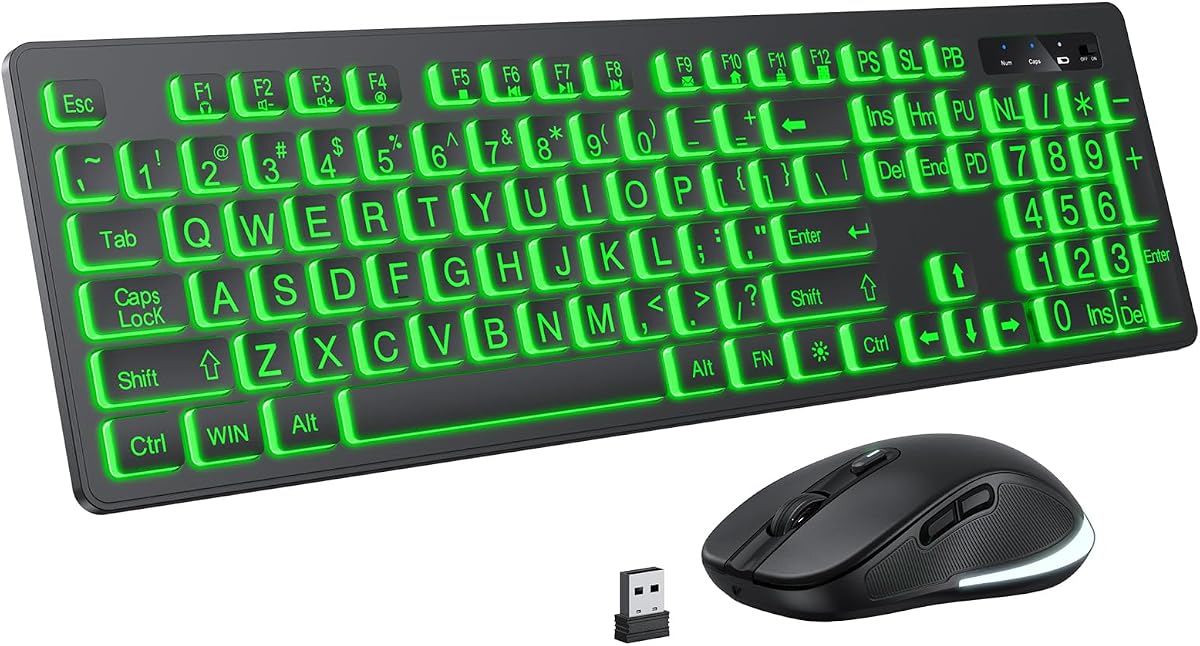


The TECURS Large Print Backlit Keyboard stands out as the top choice for users seeking high visibility and comfort. With a rating near perfect scores from verified buyers, it excels in readability with oversized fonts that are four times larger than standard options.
We may earn a commission when you buy through this link, at no additional cost to you.
Its backlit system offers seven brightness levels ensuring keys remain visible in dark rooms without glare. The silent membrane structure makes it ideal for shared workspaces where noise is a concern, while the dedicated multimedia keys enhance workflow efficiency.
While the USB and Type C combo ensures modern compatibility, multimedia keys may have limited functionality on Mac systems. This trade-off is minor given the price point and focus on Windows environments where it performs reliably.
For seniors, low vision users, or anyone needing clear typing feedback this keyboard delivers unmatched value. It combines durability with ergonomic comfort making it a standout recommendation for home or office use.
The oversized printed letters ensure you never miss a keystroke even in low light conditions reducing typing errors significantly.
Soft membrane keystrokes provide a silent experience ideal for libraries or open offices where sound disturbance must be minimized.
We may earn a commission when you buy through this link, at no additional cost to you.
TECKNET delivers exceptional value with this wired RGB backlit keyboard offering versatile customization at a budget friendly price. Users appreciate the silent typing capability combined with vibrant lighting modes that enhance desk aesthetics without compromising functionality.
We may earn a commission when you buy through this link, at no additional cost to you.
The seven color options and two lighting modes allow personalization for any environment. Built with durability in mind the spill resistant design and high keystroke rating ensure longevity even in demanding daily use scenarios.
Limitations include standard font sizes which might not suit users requiring large print options. Additionally, the wired connection means less flexibility compared to wireless models but ensures stable performance without charging concerns.
Ideal for gamers or students seeking style and affordability this keyboard balances cost and features effectively. The lifetime warranty adds significant peace of mind for long term usage in home or office setups.
Choose from seven colors and multiple modes to match your mood or decor creating a personalized typing environment.
Backed by a lifetime warranty this keyboard offers reliable support ensuring you get maximum value from your investment.
We may earn a commission when you buy through this link, at no additional cost to you.
The HP 400 Backlit Wired Keyboard brings a premium feel to your setup with its slim profile and warm white LED illumination. Designed for professionals it combines portability with full size functionality including a number pad for essential data entry tasks.
We may earn a commission when you buy through this link, at no additional cost to you.
Programmable shortcuts allow customized workflows boosting productivity without requiring complex software. The sanitizable surface adds hygiene benefits suitable for shared spaces or medical environments where cleanliness is prioritized for health safety.
While it offers fewer brightness levels than some alternatives the warm LED reduces eye strain during long sessions. The higher price reflects build quality and features that may appeal more to corporate users than casual home typists.
Best suited for hybrid workers needing a reliable and clean looking device this keyboard delivers on ergonomics and practicality. Its USB-C connection ensures future proofing while maintaining compatibility with older systems through included adapters.
A slim space saving design fits easily into bags for travel while maintaining a full key layout for efficient typing.
Twelve programmable keys let you create custom shortcuts for frequent tasks enhancing speed and reducing repetitive strain.
We may earn a commission when you buy through this link, at no additional cost to you.
The X9 Large Print Backlit Keyboard provides a practical solution for users needing high visibility through oversized letters and bright LED backlighting. Its design caters to seniors or visually impaired users ensuring characters are clear and easy to read in any lighting condition.
We may earn a commission when you buy through this link, at no additional cost to you.
With seven color options and a full size layout it supports both accessibility and productivity needs. The simple plug and play setup requires no drivers making it straightforward for any user to start typing immediately after connection.
Build quality is basic but functional for typical home or office use. The lack of wireless options limits mobility but ensures stable performance without battery changes which is beneficial for users who prefer simplicity.
This keyboard is a reliable choice for shared workspaces or libraries where clear typing is essential. Its affordability and focus on visibility make it a strong option for those prioritizing ease of use over advanced features.
The oversized font ensures you can see every key clearly reducing eye strain and improving typing accuracy significantly.
Seven lighting colors allow you to choose a tone that suits your environment or personal preference easily.
We may earn a commission when you buy through this link, at no additional cost to you.
Perixx PERIBOARD-317 combines large print accessibility with reliable build quality for everyday typing tasks. The white LED backlight ensures visibility in dark settings while low profile keys offer a comfortable and quiet typing experience.
We may earn a commission when you buy through this link, at no additional cost to you.
Its four times larger font size helps reduce errors for users with vision challenges or those simply wanting clearer feedback. The extended cable length provides flexibility in desk setups allowing placement further from the computer without extra adapters.
A limitation is that the Scroll Lock function is disabled when the backlight is active which may inconvenience some users. However for general typing and data entry this is a minor trade-off given the overall performance and value.
Best for those needing a simple functional keyboard without unnecessary features this model delivers consistent performance. Its durability and clear layout make it a solid choice for office or home use requiring steady reliability.
A long five foot cable gives you plenty of freedom to position the keyboard comfortably on larger desks.
Low profile keys provide quick tactile feedback ensuring accurate typing without the noise of traditional switches.
We may earn a commission when you buy through this link, at no additional cost to you.
KOPJIPPOM offers a robust typing experience with large print keys and a reliable white LED backlight for visibility. The design includes ergonomic tiltable feet and a full size layout to accommodate diverse typing needs efficiently.
We may earn a commission when you buy through this link, at no additional cost to you.
With four times larger fonts and a spill-proof cover it suits environments where accidents might occur. The simple plug and play functionality makes setup effortless for Windows users without requiring additional drivers or software installation.
Mac compatibility is limited for multimedia keys which may restrict some advanced functions on Apple systems. For Windows users though this keyboard provides a stable and affordable option for general productivity.
Ideal for gaming or office work requiring a standard layout this model ensures comfort and accessibility. Its straightforward design and focus on visibility make it a practical choice for users needing consistent daily performance.
A protective design shields internal components from liquid spills reducing the risk of damage during use.
Adjustable feet allow you to set a comfortable typing angle reducing wrist strain during extended sessions.
We may earn a commission when you buy through this link, at no additional cost to you.
This wireless combo simplifies your setup with large print keys and colorful backlighting in a convenient rechargeable package. Users enjoy the freedom of a clutter-free desk while maintaining high visibility for typing in any environment.
We may earn a commission when you buy through this link, at no additional cost to you.
The seven color backlight and auto-save features extend battery life ensuring long usage between charges. Its compatibility with Windows and Mac makes it versatile for various devices though some users report initial pairing challenges.
The automatic sleep mode can sometimes interrupt workflow requiring a key press to wake the device. For many this small inconvenience is outweighed by the flexibility and portability provided by the wireless connection.
Best for home office use or media centers this set offers comfort and style. The included mouse and clear keys make it a complete solution for users who prioritize ease of use and modern design.
A wireless receiver stored in the keyboard provides a stable connection eliminating cable clutter on your desk.
Rechargeable batteries with smart power saving ensure you can work for extended periods without frequent charging.
We may earn a commission when you buy through this link, at no additional cost to you.
Designed for seniors and low vision users this wired keyboard features oversized fonts and a practical cover for protection. The included wrist rest and foldable feet enhance comfort making long typing sessions less taxing on hands.
We may earn a commission when you buy through this link, at no additional cost to you.
A white LED backlight ensures visibility without excessive glare while the full size layout supports all standard tasks. The protective cover helps prevent dust and spills extending the lifespan of the device in busy environments.
While the cover is useful for storage it can add minor bulk during active use. For those seeking a no fuss accessible solution this keyboard balances comfort protection and visibility effectively.
Ideal for home use or shared computers this model prioritizes simplicity and user safety. The thoughtful inclusion of protective accessories makes it a considerate choice for families or care facilities.
An included cover shields keys from dust and spills ensuring longevity in high traffic or shared spaces.
Foldable feet and wrist support reduce fatigue allowing comfortable typing for extended periods without strain.
We may earn a commission when you buy through this link, at no additional cost to you.
Arteck offers a sleek ultra thin keyboard with vibrant backlight and quiet scissor keys for a refined typing experience. Its slim form factor saves desk space while maintaining full size functionality for comfortable daily use.
We may earn a commission when you buy through this link, at no additional cost to you.
With seven color options and media hotkeys it balances aesthetics and convenience well. The lightweight design makes it easy to move between locations while the ergonomic structure reduces hand fatigue during extended sessions.
Some users might prefer a full number pad for extensive data entry tasks as this model omits it. For general typing and media consumption however the compact layout enhances usability and portability significantly.
Best for modern minimalist setups this keyboard delivers reliable performance and style. Its quiet operation and vibrant lighting make it a popular choice for creative professionals or casual users seeking a clean desk.
An ultra thin profile saves valuable desk space while still providing full key functionality for everyday tasks.
Dedicated hotkeys allow quick access to music or media apps enhancing productivity during work breaks.
We may earn a commission when you buy through this link, at no additional cost to you.
This keyboard combines large print visibility with an integrated wrist rest to enhance comfort and accessibility simultaneously. Users appreciate the soft touch keys and colorful backlight options that suit various preferences and settings.
We may earn a commission when you buy through this link, at no additional cost to you.
The ergonomic seven degree angle reduces wrist strain making it suitable for long typing sessions. Seven color options add visual appeal while plug and play functionality ensures easy setup across multiple Windows platforms.
The wrist rest is fixed rather than adjustable which may not fit all hand positions perfectly. Nevertheless for most users the comfort and visibility benefits outweigh this minor ergonomic limitation effectively.
Ideal for home office or gaming this model prioritizes comfort and ease of use. Its thoughtful design and clear keys make it a recommended choice for anyone needing extra support and visibility while typing.
A built-in wrist rest provides consistent support reducing strain during extended typing or gaming sessions.
Multiple backlight colors let you match your keyboard to your setup or mood for a personalized look.
We may earn a commission when you buy through this link, at no additional cost to you.
Selecting the right backlit illuminated keyboard involves evaluating several key factors to ensure it meets your specific needs and preferences effectively.
Consider the number of colors and brightness levels available as adjustable lighting helps reduce eye strain in different environments. Some models offer single color lighting while others provide multi RGB options for personalization.
Look for models with multiple brightness settings to accommodate both dark rooms and bright offices comfortably.
Decide between full size keyboards with number pads and compact layouts based on your workflow needs. Full size models are better for data entry while compact ones save desk space for limited setups.
Choose a layout that supports your primary tasks and fits comfortably on your desk for long sessions.
If you have vision challenges prioritize keyboards with large print letters and high contrast keycaps for easier reading. Many models offer four times larger fonts designed specifically for seniors or low vision users.
Opt for oversized fonts and clear backlighting to enhance visibility and reduce typing errors effectively.
Choose between wired USB and wireless options based on your preference for stability versus cable-free flexibility. Wired keyboards provide consistent performance without batteries while wireless offers portability.
Select the connection type that aligns with your workspace setup and usage habits for best results.
Evaluate whether you prefer silent membrane keys for quiet environments or tactile switches for feedback during typing. Different switch types impact comfort and noise levels especially in shared spaces.
Pick a key mechanism that matches your noise tolerance and desired typing feedback for comfort.
Look for spill-resistant designs and durable keycaps to extend the keyboard life in busy environments. Protective features help safeguard against accidents and dust buildup over time.
Prioritize models with reinforced construction and liquid resistance for long term reliability.
Check for adjustable feet or built-in wrist rests to maintain proper hand positioning and reduce strain. Ergonomic designs contribute significantly to comfort during extended typing sessions.
Ensure the keyboard supports natural wrist angles to prevent fatigue and discomfort during work.
Verify the keyboard works with your operating system especially if using Mac which may have limited key functions. Most keyboards support Windows but multimedia features may vary across platforms.
Confirm OS compatibility to avoid functionality issues with shortcut keys or media controls.
Begin by connecting the keyboard to your computer via USB or pairing the wireless receiver. Ensure it is seated securely and the driver installation completes if required by your system.
Adjust brightness and color settings using the provided function keys to suit your environment. This helps maintain visibility without causing eye strain during extended use.
Clean regularly with a soft dry cloth to remove dust and use compressed air to clear debris from key gaps. Avoid liquids or harsh chemicals to prevent damage to electronic components and lighting.
Yes, backlit keyboards enhance visibility in low light which reduces errors and helps users find keys quickly. This is especially helpful for those with vision challenges or working in dim environments.
Most models work with Mac but some multimedia keys may not function fully. Check product details for specific compatibility notes before purchasing for Apple devices.
Use the function keys combined with arrow keys or dedicated buttons to cycle through colors. Instructions vary by model so refer to the user manual for exact controls.
Wired offers stable performance without charging needs while wireless provides flexibility and less clutter. Choose based on your priority for mobility versus consistent connectivity.
Large print and ergonomic designs reduce the effort needed to see and press keys which can ease strain. Combined with wrist support they help accommodate users with hand limitations.
Most LED backlights last tens of thousands of hours making them durable for daily use. Lifespan depends on usage patterns and power settings configured on the device.
No, they resist minor spills but should not be fully submerged or washed. Clean keys gently with a damp cloth only to avoid damaging internal electronics.
Many support basic gaming though dedicated gaming models offer advanced features. For casual use these keyboards perform well but serious gamers may prefer specialized hardware.
The top picks highlight exceptional options ranging from the visibility-focused TECURS to the budget-friendly TECKNET and premium HP 400 models tailored for diverse user needs.
Prioritize features like print size, lighting flexibility, and ergonomic design based on your primary workflow and environment requirements for best results.
Remember that product availability and pricing fluctuate so verify current stock and specifications before making your final purchase decision.