
TONGVEO 3-in-1 4K Webcam
4.0Editor score
3-in-1 all-in-one design
5X digital zoom capability
Built-in microphone and speaker
This guide compares the top ten auto tracking conference camera models featuring AI video, zoom lenses, and connectivity options for professional and educationa
Modern video conferencing demands high quality visual clarity and intelligent framing to keep remote participants engaged. An auto tracking conference camera uses advanced artificial intelligence to follow speakers automatically ensuring the best view is always captured without manual adjustment during critical business meetings.
We analyzed ten leading models focusing on resolution quality optical zoom capabilities and the accuracy of their AI tracking algorithms. Each product was evaluated on connectivity options build quality and overall performance to help you find the perfect system for your specific meeting room size and usage needs.
Every pick in this list highlights unique strengths ranging from budget friendly kits to professional broadcast ready systems. While we strive for accuracy in our reviews please note that product availability and pricing can change frequently so verify details before making your final purchasing decision.
4.0Editor score

4.8Editor score

4.6Editor score
The following table provides a detailed side-by-side comparison of all ten selected models highlighting their key specifications video output capabilities and unique features to help you make an informed choice.




This TONGVEO system stands out as our top choice for its exceptional balance of high resolution video and intelligent tracking capabilities. It received a strong rating from users who appreciate the seamless integration of the PTZ camera with the wireless speakerphone for full room coverage.
We may earn a commission when you buy through this link, at no additional cost to you.
The standout feature is the advanced AI algorithm that tracks speakers with impressive precision ensuring they remain centered even when moving around the room. Combined with a 3x optical zoom and 93 degree wide angle view this camera captures details that other models might miss during active discussions.
While the system offers professional grade performance it does require a bit of setup to optimize the tracking and audio settings which may be a minor hurdle for non technical users. Additionally the need for separate power adapters adds a small amount of cable management to your desk setup.
This camera is ideal for small to medium conference rooms where professional quality is a priority without needing expensive broadcast equipment. If you need a reliable all-in-one solution that works well with major platforms like Zoom and Teams this is the top recommendation.
The system uses improved algorithms to track both faces and human bodies ensuring consistent framing during dynamic meetings.
The included Bluetooth speakerphone features four omnidirectional mics and supports hands-free communication for up to 12 people.
We may earn a commission when you buy through this link, at no additional cost to you.
This webcam offers an accessible entry point into the world of auto tracking cameras without sacrificing essential features like AI framing and 4K resolution. Users rate it as a solid choice for small meeting spaces where cost effectiveness and ease of use are the top priorities.
We may earn a commission when you buy through this link, at no additional cost to you.
The AI auto framing is effective at detecting groups and keeping everyone in the frame making it perfect for team standups or small board meetings. Its physical lens cover adds a layer of privacy that is often missing in budget webcams which is a valuable security feature.
However the optical zoom capabilities are limited compared to PTZ models meaning you cannot get close-ups of speakers without losing image quality. The overall rating is slightly lower due to occasional software compatibility issues that require a reboot to resolve.
If you are outfitting a small office or home workspace with a tight budget this webcam delivers impressive value for money. It is best suited for teams who prioritize simplicity and basic auto framing over advanced remote control features.
The AI automatically detects attendees and frames all participants ensuring no one is cut off in smaller meeting rooms.
A built-in physical lens cover provides peace of mind when the camera is not in use in shared environments.
We may earn a commission when you buy through this link, at no additional cost to you.
This model represents the pinnacle of consumer grade video conferencing technology offering broadcast level features that are rare in standard office equipment. It is highly rated by production teams and churches who need robust connectivity options like NDI and SDI for professional streaming workflows.
We may earn a commission when you buy through this link, at no additional cost to you.
The 20X optical zoom allows you to capture detailed shots of presenters from the back of a large hall without any loss in quality. Its AI tracking is refined to resume focus even after brief obstructions ensuring a smooth viewing experience for remote attendees during complex presentations.
The complexity of setting up NDI streams and the high price point make this less suitable for casual users who just want plug and play simplicity. Without a dedicated IT or AV team the advanced features might remain underutilized in a standard corporate meeting room.
For organizations that run high quality live streams or require long distance video transmission this camera is unbeatable. It is the ultimate choice for churches and production studios that need to switch between multiple camera sources seamlessly.
Official NDI license included simplifies professional live stream setups with software like OBS and vMix.
The SDI output supports locking connectors for reliable signal transmission over long distances up to 300 feet.
We may earn a commission when you buy through this link, at no additional cost to you.
This system trades raw resolution for motion smoothness with its 1080P 60fps output which reduces blur during fast movements in the meeting room. Users appreciate the integrated audio solution which simplifies the cabling for hybrid meetings in medium sized spaces.
We may earn a commission when you buy through this link, at no additional cost to you.
The tracking algorithm is tuned to maintain focus on speakers smoothly without the jitter that can occur in lower quality models. With a 114 degree wide angle and 3x zoom it covers most standard meeting tables effectively making it a strong contender for general office use.
The main trade-off is the lack of 4K resolution which might be noticeable on very large displays or when detailed visual clarity is required for design reviews. The speakerphone battery life is decent but requires regular charging which can be an extra maintenance task.
Teams that prioritize fluid video motion over static image sharpness will find this model appealing. It is a great middle ground for offices that need a simple plug and play solution without managing multiple separate audio and video devices.
The 60fps frame rate ensures that fast gestures and movements are captured smoothly during dynamic meetings.
Combines a PTZ camera and a Bluetooth speakerphone into one complete solution for streamlined setup.
We may earn a commission when you buy through this link, at no additional cost to you.
This system adds a unique interactive layer through gesture control allowing you to start tracking or zoom in with a simple hand signal. It is highly rated for its ease of use in presentations where hands are occupied or when a quick visual command is more intuitive.
We may earn a commission when you buy through this link, at no additional cost to you.
The 4K resolution ensures crisp video quality and the 120 degree wide angle captures the entire room comfortably. The digital zoom is useful for isolating details on a whiteboard though it does not match the optical clarity of higher end PTZ models.
The sensitivity of the gesture recognition can sometimes lead to accidental commands if you are not careful with your movements. Additionally the digital zoom reduces image quality slightly at higher magnifications which might be a drawback for detailed presentations.
For training sessions or interactive workshops where presenter movement is frequent this camera offers a novel and convenient way to manage framing. It is an excellent choice for environments that value user interaction and visual control.
Six specific hand gestures allow you to control tracking zoom and other functions without touching a remote.
The 120 degree wide angle lens ensures that all participants are captured comfortably without needing to reposition.
We may earn a commission when you buy through this link, at no additional cost to you.
This camera is designed for large spaces where capturing detail from a distance is essential thanks to its powerful 20X optical zoom lens. It is well rated for its professional connectivity options including PoE which allows for cleaner installations in commercial or church environments.
We may earn a commission when you buy through this link, at no additional cost to you.
The AI tracking is precise enough to follow a speaker across a large room ensuring they remain in frame throughout their presentation. The inclusion of a Bluetooth speakerphone ensures that audio quality matches the high video standards of the system.
The size and complexity of the setup might be overkill for small offices and the PoE switch requirement adds cost if you do not have one already. The mounting process is straightforward but requires careful alignment to ensure the tracking covers the desired area.
For houses of worship large lecture halls or executive boardrooms this system provides the reach and clarity needed for professional broadcasts. It is a strong investment for spaces where camera placement is fixed far from the active area.
The 20X optical zoom allows you to get close-up shots of presenters from the back of large conference rooms.
LAN PoE support simplifies cabling by delivering power and data through a single network cable.
We may earn a commission when you buy through this link, at no additional cost to you.
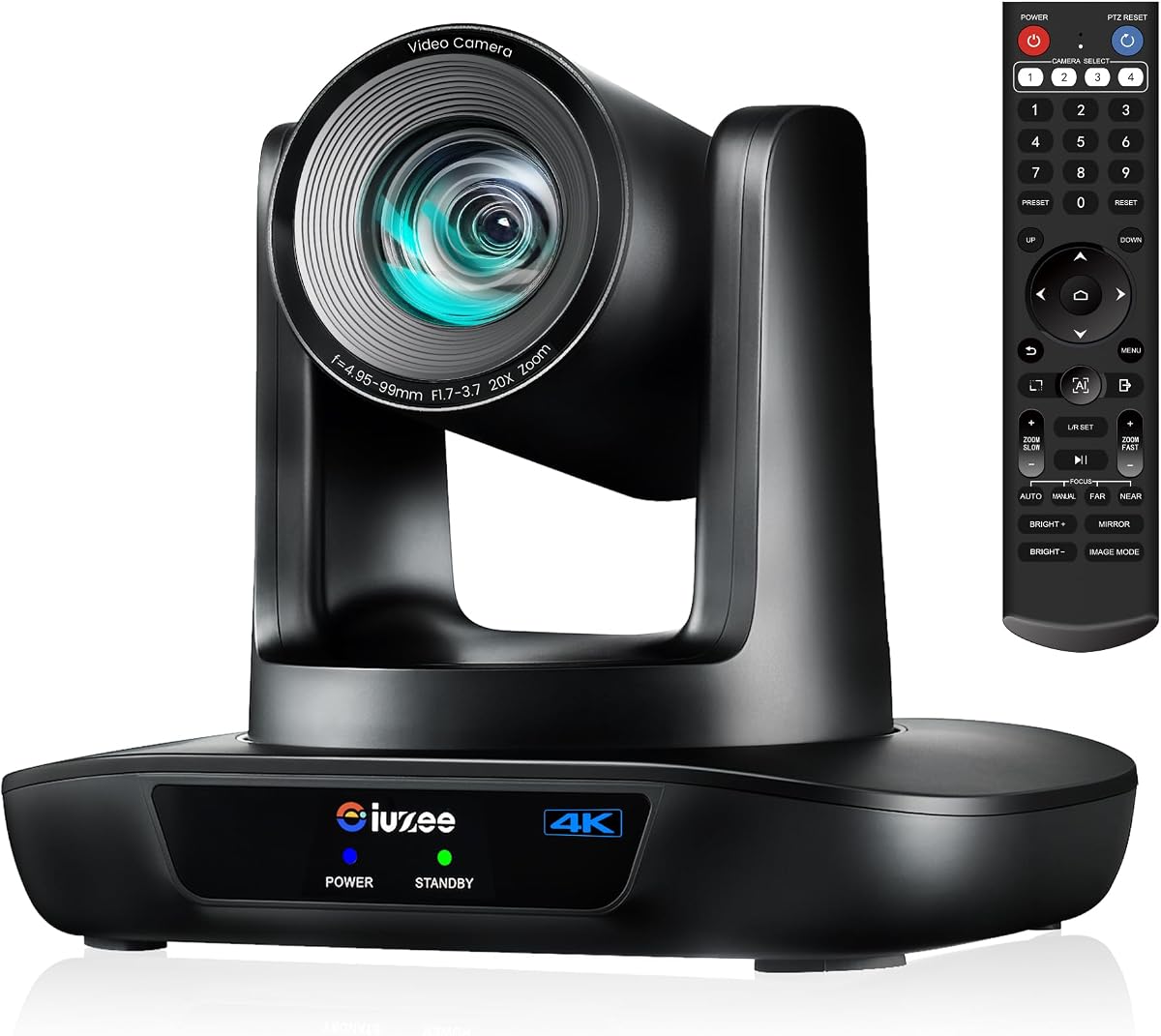
This camera is engineered for streaming environments where multiple outputs are needed for live production workflows. It has a high rating for its reliable 20X zoom and support for RTMP and RTSP protocols which are essential for broadcasting to platforms like YouTube.
We may earn a commission when you buy through this link, at no additional cost to you.
The AI tracking features are robust allowing for presenter mode or auto framing modes depending on the needs of the event. The ability to output via USB HDMI and LAN simultaneously makes it incredibly versatile for complex production setups.
Because it lacks a built-in microphone you must supply your own audio system which adds a layer of complexity to the installation. The narrow 63 degree lens means you must position the camera carefully to cover wide angles without relying heavily on digital zoom.
This model is the top choice for education institutions and churches that run their own live streams. If you already have an audio setup and need a camera that integrates well with streaming software this is an excellent pick.
Supports RTMP and RTSP protocols allowing direct streaming to platforms like Facebook and YouTube.
Simultaneous USB HDMI and LAN outputs ensure flexibility for different connection types.
We may earn a commission when you buy through this link, at no additional cost to you.
This camera offers a reliable balance of professional features and ease of use making it suitable for a wide range of environments from classrooms to boardrooms. Users rate it as a stable option that performs consistently for meetings and streaming events.
We may earn a commission when you buy through this link, at no additional cost to you.
The 20X optical zoom provides the flexibility to frame subjects tightly from a distance and the PoE support allows for clean installation in modern offices. The tracking algorithm is responsive and keeps the speaker centered effectively during presentations.
You may need to adjust output resolution settings manually if your display supports 4K at 30Hz but this is a minor setup step. Since it does not include audio you will need to pair it with a separate microphone or speaker system for full meetings.
For organizations that need a durable camera with professional connectivity options this model is a safe and effective choice. It is best for users who prioritize long-term reliability and flexible mounting over all-in-one audio solutions.
Pan tilt and zoom can be controlled via remote software or optional joystick for precise positioning.
Designed for professional use with durable construction that ensures smooth performance over years of operation.
We may earn a commission when you buy through this link, at no additional cost to you.
This system is built for medium to large conference rooms and combines a high resolution camera with a robust microphone array and integrated speakers. It is highly rated for its ability to manage audio and video in a single unit simplifying the conference room setup.
We may earn a commission when you buy through this link, at no additional cost to you.
The auto framing feature detects participants and adjusts the view in real time keeping everyone centered during group discussions. The 5X zoom and 120 degree wide angle ensure that whether the room is full or empty the camera captures the right view.
The integrated speakers are convenient but may not provide sufficient volume for very large halls without additional amplification. The bulky design takes up significant desk or shelf space which could be a consideration for smaller offices.
This is a top choice for corporate offices that want to simplify their hardware footprint without sacrificing audio quality. It is ideal for teams that host regular group meetings and need a reliable all-in-one solution.
The 120 degree wide angle and auto framing keep everyone visible without manual adjustments.
A 4-mic array with noise reduction ensures clear voice pickup across the entire room.
We may earn a commission when you buy through this link, at no additional cost to you.
This webcam is perfect for individual professionals who want a simple all-in-one solution for their home office. It has a good rating for its ease of use and privacy features making it a practical choice for remote workers and freelancers.
We may earn a commission when you buy through this link, at no additional cost to you.
The adjustable field of view allows you to switch between wide shots for group calls and narrow views for solo presentations. The 5x digital zoom is sufficient for getting a closer look at speakers without needing complex mechanical adjustments.
The sound quality is decent for small rooms but lacks the range of professional conference phones. You may notice some grain in low light conditions compared to more expensive dedicated PTZ cameras.
If you need a reliable webcam that handles both audio and video without cluttering your desk this is a great option. It is best for individual users who prioritize convenience and privacy over advanced tracking capabilities.
The included privacy cover protects the lens from dust and ensures your privacy when not in use.
Three field of view modes let you tailor the framing for different meeting types and participant sizes.
We may earn a commission when you buy through this link, at no additional cost to you.
Choosing the right auto tracking camera involves evaluating resolution zoom and tracking accuracy to ensure seamless video meetings.
High resolution video is essential for professional meetings. Look for 4K resolution for the sharpest image quality especially when using large displays. 1080P is acceptable for smaller rooms but may lack detail in large environments.
Prioritize 4K for clarity and future-proofing your conference room setup.
Optical zoom maintains image quality while zooming in on speakers. Digital zoom crops the image and reduces clarity at higher magnifications. For large rooms a camera with optical zoom is superior for capturing distant details.
Always choose optical zoom for professional environments requiring detailed views.
The core of an auto tracking camera is its AI algorithm. Look for models that support face and body recognition to ensure smooth tracking even when movement is brisk. Advanced models resume tracking after temporary obstructions.
Check reviews for tracking reliability in dynamic meeting scenarios.
Standard USB is easy but professional setups may require HDMI LAN or PoE. PoE simplifies cabling by providing power and data through one cable. Ensure your computer has the necessary ports to support your chosen connectivity.
Match the camera ports with your existing infrastructure to avoid extra adapters.
Many systems include a built-in speakerphone or mic array. If your room is large ensure the microphone pickup range covers the entire table. Separate audio units may be needed for very large conference spaces.
Verify that the audio range matches your meeting room size.
A wide field of view like 120 degrees is ideal for group meetings. Narrower angles are better for focused one-on-one calls. Adjustable FOV options give you flexibility to frame the room correctly for different meeting types.
Select a wide FOV for group collaboration and narrow for individual focus.
Ensure the camera supports your preferred mounting method such as desk wall or ceiling. Some models require specific brackets or ceiling mounts. Proper installation is key to ensuring the AI tracking works effectively across the room.
Check the mounting requirements before purchase to ensure compatibility with your room layout.
Most cameras work with Zoom Teams and Google Meet. However some models offer specific certifications that enhance performance. Ensure the camera is tested with your primary conferencing software to avoid connection issues.
Verify certification for your preferred video conferencing platform.
Start by installing the camera securely on a flat surface or mount so the AI has a clear view of the room. Connect the USB or HDMI cable and ensure power is stable before launching your meeting software.
Run through the setup menu to calibrate tracking and audio settings. Adjust the field of view so all participants are included without excessive empty space. Test the AI tracking by moving around the room to ensure it follows you smoothly.
Keep the lens clean with a microfiber cloth and avoid touching it with fingers to prevent smudges. Regularly update the camera firmware to access new features and performance improvements that keep the system running smoothly.
An auto tracking camera uses AI to follow speakers automatically so you do not need to manually adjust the view during a meeting. This keeps the focus on the presenter and ensures remote participants can see who is speaking clearly.
Many models come with built-in microphones or include a wireless speakerphone. If you have a large room you may need additional audio equipment to ensure everyone is heard clearly.
The camera software uses facial recognition to detect people and automatically adjusts the pan tilt and zoom to keep them in the frame. Advanced models can track movement smoothly even if the person walks around the room.
Yes most of these cameras are compatible with major conferencing platforms like Zoom Teams Google Meet and WebEx. Some models offer specific certification to optimize performance on these platforms.
Optical zoom uses the lens to magnify the image without losing quality while digital zoom crops the image which reduces resolution. Optical zoom is better for professional settings where detail matters.
Absolutely many models support HDMI or IP streaming protocols for broadcasting to platforms like YouTube. Look for cameras with NDI or RTSP support if you need professional streaming features.
Most cameras plug and play via USB requiring no drivers. Mount the camera securely at eye level and connect it to your computer or TV. Configure the tracking settings in the software before your first meeting.
Our top picks highlight the best balance of resolution tracking and audio features available in the market. The TONGVEO 4K System leads for overall performance while the NDI model offers unmatched professional connectivity options.
When choosing prioritize the resolution and zoom capabilities that match your room size to ensure remote attendees can see every detail. Also consider the ease of setup and whether the audio system is integrated or requires extra hardware.
Please check current pricing and availability before making a purchase as these factors can change quickly. With the right auto tracking camera your meetings will be more engaging efficient and professional.