
ASUS ROG Tessen Mobile Gaming Controller
4.1Editor score
Ultra-portable foldable design
Console-grade control for mobile
Zero-latency wired USB-C connection
This guide compares the top ten ASUS ROG Ally controller options including wireless and wired models with customizable features for PC and Xbox gaming
Finding the right controller for your ASUS ROG Ally or PC setup can transform your gaming experience entirely. We examine connectivity options, ergonomics, and customization to help you choose the best fit for your play style and budget constraints today.
Our team analyzed ten top-rated controllers from ASUS and compatible brands. We evaluated polling rates, battery life, build quality, and feature sets like OLED displays and Hall Effect sticks to ensure you get reliable performance for competitive or casual sessions.
Each pick highlights specific strengths such as budget value, premium features, or mobile compatibility. Note that prices and availability change frequently on Amazon so check the current links before making your final purchase decision for your gaming setup needs.
4.1Editor score

4.0Editor score

3.9Editor score
This side-by-side comparison highlights the key specifications and features of each controller to help you make an informed decision based on your specific gaming needs and device compatibility requirements.


The ASUS ROG Raikiri II Pro PC Controller stands out as the top pick for serious gamers seeking precision and reliability. With a competition-level 8K sampling rate and hot-swappable joysticks, it delivers exceptional responsiveness that rivals wired setups. Its full color display allows for quick profile changes and calibration adjustments without leaving the game.
We may earn a commission when you buy through this link, at no additional cost to you.
Key strengths include the anti-drift TMR joysticks which ensure consistent accuracy over time. The additional customizable buttons provide faster access to in-game commands, enhancing your competitive edge. Extended battery life up to 79 hours means you can game for days on a single charge without interruption.
Trade-offs include a higher price tag compared to standard controllers and limited compatibility outside PC and Xbox ecosystems. However, the advanced features and build quality justify the investment for users who demand top-tier performance and customization options for their gaming sessions.
This controller is ideal for enthusiasts who want professional-grade tools. If you value low latency and extensive personalization, this model is the clear recommendation for your ASUS ROG Ally or PC setup needs today.
The 8K sampling rate ensures every input is registered instantly, giving you a competitive edge in fast-paced games.
Hot-swappable joysticks and rear buttons let you tailor the controller to your exact preferences for maximum comfort.
We may earn a commission when you buy through this link, at no additional cost to you.
The ASUS ROG Tessen Mobile Gaming Controller offers incredible value for Android mobile gamers. Its foldable design makes it easy to carry in a pocket, while console-grade controls provide a familiar and comfortable feel. The 500Hz polling rate ensures responsive gameplay even over a wired connection.
We may earn a commission when you buy through this link, at no additional cost to you.
Standout features include programmable aluminum rear paddles that let you execute complex commands quickly. The RGB lighting adds a personalized touch, and the ergonomic handles reduce fatigue during long sessions. Pass-through charging means you never have to stop playing to keep your phone powered up.
Limitations involve its restriction to Android devices and reliance on a wired USB-C link. While this limits wireless freedom, the zero-latency performance and secure phone grip make it a strong choice for competitive mobile titles that benefit from physical controls.
This controller is perfect for Android users on a budget who want console-quality gaming on the go. If you prioritize portability and performance over wireless convenience, the Tessen is an excellent addition to your mobile gaming arsenal.
Folds down to pocket size making it ideal for travel and commuting without sacrificing control quality.
Wired USB-C eliminates battery anxiety and ensures consistent low-latency input for competitive matches.
We may earn a commission when you buy through this link, at no additional cost to you.
The ASUS ROG Raikiri Pro OLED display controller brings a unique visual element to gaming with its built-in OLED screen. This feature allows you to view status indicators and customize animations directly on the controller. Tri-mode connectivity gives you the flexibility to choose between wired, Bluetooth, or RF connections based on your needs.
We may earn a commission when you buy through this link, at no additional cost to you.
Key strengths include the premium ESS DAC that enhances audio immersion through the 3.5mm jack. Remappable rear buttons and step triggers let you tailor input sensitivity for different games. Extensive customization through Armoury Crate ensures the controller adapts to your specific play style over time.
Trade-offs involve a shorter battery life compared to some rivals and the added expense of the OLED component. Despite this, the visual feedback and audio quality make it a standout choice for gamers who value multimedia integration and deep control customization.
This controller is recommended for players who want an immersive multimedia gaming experience. If an OLED display and premium audio are priorities for your setup, this model offers a compelling blend of style and function.
The OLED screen adds a personal touch with customizable animations and real-time status indicators during gameplay.
Built-in ESS DAC delivers high-fidelity sound through headphones for a more engaging audio experience.
We may earn a commission when you buy through this link, at no additional cost to you.
The ASUS ROG Raikiri II Xbox Wireless Gaming Controller is a versatile option designed for both PC and Xbox systems. Its TMR joysticks offer anti-drift performance that ensures long-term accuracy. The inclusion of a portable protective case adds value by protecting the controller and enabling charging on the go.
We may earn a commission when you buy through this link, at no additional cost to you.
Key strengths include certified compatibility via USB-C and 2.4GHz RF for reliable connections. Dual-mode triggers let you switch between short and full travel modes depending on game genre. Enhanced grip and ergonomic design provide comfort during extended gaming sessions without slipping.
Trade-offs involve a lower polling rate compared to premium variants and fewer software customization options. However, for users focused on Xbox compatibility and reliability, the robust build quality and included accessories make it a practical choice for everyday gaming.
This controller is ideal for Xbox owners and PC gamers seeking a reliable wireless option. If you value comfort and a included protective case, this model balances performance and convenience well.
TMR joysticks consume less power and prevent drift better than Hall Effect sensors for longer lifespan.
Protective case ensures your controller stays safe while charging during travel or storage periods.
We may earn a commission when you buy through this link, at no additional cost to you.
The ASUS ROG Raikiri Pro Gaming Controller features a built-in OLED display for profile management and status viewing. With up to 48 hours of battery life, it is designed to support nonstop gaming sessions. Versatile tri-mode connectivity ensures you can connect to PC or Xbox seamlessly without hassle.
We may earn a commission when you buy through this link, at no additional cost to you.
Key strengths include four intuitive rear buttons that can be programmed for in-game commands or sensitivity shifts. Selectable step triggers allow customization of input depth for different game genres. Premium sound via ESS DAC enhances the overall audio experience during gameplay.
Trade-offs include a lower user rating compared to similar models and potential need for software updates. Despite this, the battery endurance and OLED features remain strong selling points for those who prioritize longevity and visual customization in their controller choice.
This controller is recommended for gamers who need extended battery life. If you often play for hours without charging access, this model offers the endurance and features to keep you in the game longer.
Up to 48 hours of use allows multiple days of gaming on a single charge.
Programmable rear buttons enhance accessibility for complex commands without taking fingers off sticks.
We may earn a commission when you buy through this link, at no additional cost to you.
The ASUS ROG Raikiri Pro Gaming Controller Renewed offers access to premium features at a lower cost. It includes the same OLED display and tri-mode connectivity as the new version with limited to no signs of wear. A 90-day warranty provides peace of mind for your purchase.
We may earn a commission when you buy through this link, at no additional cost to you.
Key strengths include full functionality testing during refurbishing to ensure performance matches original standards. The OLED display lets you customize animations and view status. Extensive battery life supports long gaming sessions without frequent charging needs.
Trade-offs involve potential minor cosmetic wear and reliance on a certified refurbishment process. However, the significant cost savings make it an attractive option for budget-conscious buyers who still want high-end features and reliability.
This option is recommended for value seekers who want OLED capabilities. If you prioritize cost over perfect condition, this renewed unit delivers strong performance and features for less.
Refurbishing includes inspection and testing to guarantee functional reliability.
Lower price point allows access to premium OLED technology at a more affordable budget level.
We may earn a commission when you buy through this link, at no additional cost to you.
The ASUS ROG Xbox Ally Handheld is a complete gaming system that includes high-quality integrated controllers. With a 7-inch 120Hz display and Windows 11, it offers console-level performance in a portable form factor. Built-in Game Pass provides access to hundreds of titles instantly.
We may earn a commission when you buy through this link, at no additional cost to you.
Key strengths include AMD Ryzen Z2 A processor for efficient performance and long battery life. The 512GB SSD and 16GB RAM handle multitasking smoothly. Contoured grips ensure comfort during long sessions while dual USB-C ports allow for connectivity and charging.
Trade-offs involve it being a full handheld rather than an external controller. Despite this, the all-in-one convenience makes it a great choice for those wanting a dedicated device that replaces a PC and console setup seamlessly.
This device is ideal for gamers wanting a portable all-in-one solution. If you prioritize convenience and full game library access without external peripherals, this handheld delivers exceptional value.
AMD Ryzen Z2 A and 120Hz screen deliver smooth gaming comparable to home consoles.
Xbox Game Pass integration lets you start playing instantly without external purchases.
We may earn a commission when you buy through this link, at no additional cost to you.
The ASUS ROG Raikiri II Renewed offers reliable wireless performance at a lower price point. It maintains TMR joysticks and 50 hours of battery life similar to new units. Web-based configuration allows easy customization without installing additional software on your PC.
We may earn a commission when you buy through this link, at no additional cost to you.
Key strengths include anti-slip grip for stability and a travel case for protection. The 2.4GHz RF and Bluetooth options ensure versatile connectivity. Certification guarantees functionality and minimal wear upon arrival.
Trade-offs involve limited availability and minor cosmetic imperfections that may appear. However, the extended battery life and included case make it a practical choice for travelers needing consistent wireless performance without the premium price.
This option is recommended for budget-conscious wireless gamers. If you need reliability and long battery life for travel, this renewed unit provides excellent value.
Up to 50 hours of battery life allows for days of uninterrupted gaming sessions.
Web-based setup makes customizing controls simple and quick.
We may earn a commission when you buy through this link, at no additional cost to you.
The CRKD NEO S Wireless Collectible Controller offers a unique look with Hall Effect thumbsticks that prevent drift. It supports Bluetooth pairing across Nintendo Switch, PC, and mobile devices seamlessly. Adjustable trigger sensitivity allows you to fine-tune inputs for precise control.
We may earn a commission when you buy through this link, at no additional cost to you.
Key strengths include its retro design which doubles as a collectible item. Remappable back buttons add versatility to gameplay. Swappable stick tops allow customization without needing to replace the whole controller. The companion app adds interactive features for rarity checking.
Trade-offs involve needing a mobile app for full collectible features and not being an official ASUS product. However, for gamers seeking style and compatibility across multiple platforms, this controller delivers excellent performance and uniqueness.
This controller is ideal for collectors and multi-platform gamers. If you value distinct design and Hall Effect reliability, this model stands out as a great alternative choice.
Magnetic sensors prevent drift for consistent performance over long gaming periods.
Seamless switching between devices ensures flexibility without reconfiguring every time.
We may earn a commission when you buy through this link, at no additional cost to you.
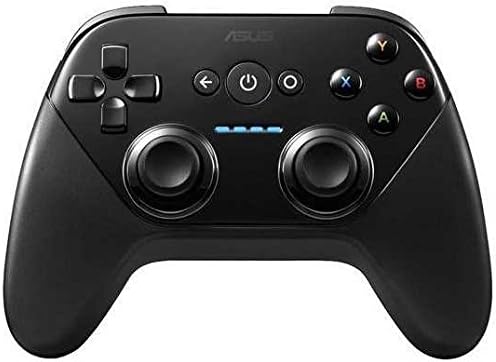
The ASUS TV500BG Gamepad is a simple wireless controller designed for Android TV and PC gaming. It provides accurate control for 3D visuals on HDTVs and allows tracking progress across Android devices. The design focuses on basic functionality without advanced customization.
We may earn a commission when you buy through this link, at no additional cost to you.
Key strengths include ease of setup and broad compatibility with Android TV apps. It supports Google Play Games for progress tracking. The wireless connection offers freedom without cables for living room gaming.
Trade-offs involve a basic feature set lacking remappable buttons or advanced software. However, for users needing a straightforward wireless controller for casual TV gaming, this model is reliable and cost-effective.
This controller is recommended for casual Android TV gamers. If you want simple wireless controls for streaming and basic games, this model delivers essential functionality well.
Designed specifically for Android TV to enhance your couch gaming experience easily.
Tracks achievements across phone and tablet for a seamless gaming journey.
We may earn a commission when you buy through this link, at no additional cost to you.
Choosing the right controller involves assessing connectivity, build quality, and features tailored to your gaming needs. Below are key factors to consider before making your purchase.
Modern controllers offer wired USB-C, Bluetooth, or 2.4GHz RF connections. Wired offers zero latency but limits movement. Bluetooth provides convenience but may have slight lag. 2.4GHz RF balances low latency and wireless freedom making it ideal for competitive play.
Hall Effect and TMR joysticks are superior to traditional potentiometers as they prevent drift over time. TMR sticks use magnetic resistance to ensure consistent accuracy. Check for anti-drift claims in product specs to guarantee long-term reliability for precision aiming.
Battery life varies significantly between models ranging from 30 to 79 hours. Longer battery life reduces interruptions during extended sessions. Consider whether rechargeable or replaceable batteries suit your routine better for continuous gameplay.
Comfort is essential for long gaming sessions. Look for ergonomic handles and anti-slip grips. Adjustable components or modular designs allow you to customize the fit for your hand size reducing fatigue and strain.
Rear paddles and programmable buttons enable quick access to commands. Ensure the controller supports software customization for mapping complex actions. This feature is critical for competitive shooters where speed matters.
Step or linear triggers allow switching between short and full travel. This affects how quickly inputs register. Adjustable trigger sensitivity lets you tailor feedback to different game genres enhancing control.
Features like OLED displays or audio DACs add multimedia value. These are beneficial if you want status visibility or high-fidelity sound. Ensure these features align with your usage priorities before investing.
A warranty protects your investment against defects. Certified renewed products offer similar benefits. Check for customer support accessibility and warranty duration to ensure peace of mind for your purchase.
Regularly update firmware through the official app to fix bugs and improve compatibility. Clean buttons and joysticks with a dry cloth to remove dust. If drift occurs, recalibrate sticks through software settings or replace modules if hot-swappable.
The ASUS ROG Raikiri II Pro PC Controller offers the highest performance with 8K sampling and hot-swappable sticks. For budget users the ASUS ROG Raikiri II Xbox Wireless model provides reliable connectivity and anti-drift features that integrate well with the Ally ecosystem.
Yes many ASUS ROG controllers including the Raikiri series are certified for Xbox via USB-C and 2.4GHz RF connections. Always verify compatibility on the product page before purchase to ensure full access to Xbox-specific features.
Both use magnetic sensors to prevent drift but TMR (Tunneling Magnetoresistance) is more efficient and responsive than traditional Hall Effect sensors. TMR technology consumes less power and offers faster response times ideal for competitive gaming scenarios.
Yes but specific models like the ROG Tessen are designed exclusively for Android. Most other controllers connect via Bluetooth but may have limited game support. Check app compatibility and mapping features before using for mobile titles.
Battery life varies by model and usage ranging from 30 to 79 hours. Features like RGB lighting and vibration reduce battery life. For maximum endurance turn off non-essential features during long sessions.
Yes certified renewed controllers are available on Amazon with warranties and testing. These provide the same features as new units at a lower cost. Inspect product condition notes carefully before purchasing.
Armoury Crate allows button remapping trigger sensitivity adjustment and profile management. Web-based config tools are also available for some models. Ensure your device is supported before relying on advanced customization features.
The OLED display shows status animations and lets you switch profiles quickly. It adds visual flair and convenience but requires extra battery. Consider if this feature adds value to your specific gaming setup.
Always check current prices and availability before purchasing. Prices change frequently so verify the latest offers on Amazon. Use the detailed comparisons above to select the right controller for your setup today.