
Bambu Lab A1
4.7Editor score
High-speed precision printing
Multi-color with AMS lite
Full-auto calibration system
Discover the top 3D printers for cosplay. This guide compares speed, build volume, and material support to help you create detailed costumes and props
Creating stunning cosplay costumes requires precision and creativity. A reliable 3D printer allows you to craft intricate armor pieces, props, and accessories tailored to your character. Choosing the right model ensures your designs come to life with sharp details and durability.
This guide evaluates leading 3D printers based on speed, build volume, and material compatibility. We analyze features like multi-color printing and auto-leveling to help you find a machine that suits your skill level and project needs without unnecessary complexity.
Each pick highlights specific strengths for cosplay creators, from large build areas to fast printing speeds. Prices and availability change frequently, so check current listings before purchasing. Focus on models that balance performance with ease of use for consistent results.
4.7Editor score

4.5Editor score

4.0Editor score
This side-by-side comparison highlights key specifications across all ten models. Use it to quickly identify differences in speed, build size, and advanced features to narrow down your options before reading detailed reviews.




The Bambu Lab P1S stands out as a top choice for cosplayers needing speed and versatility. It supports vibrant multi-color prints when paired with the AMS system, reducing post-processing time. Its enclosed design ensures stability for engineering materials like ABS.
We may earn a commission when you buy through this link, at no additional cost to you.
With speeds reaching 500mm/s, you can print large armor pieces in hours rather than days. Automatic bed leveling eliminates manual calibration, saving time on setup. The high acceleration maintains precision even at top speeds, ensuring clean edges on intricate details.
While the AMS unit is sold separately for full multi-color capability, the base printer excels at single-material reliability. The enclosed chamber is crucial for warp-prone filaments but may require ventilation in small rooms. Noise levels remain manageable during operation.
This printer is ideal for intermediate to advanced users seeking production-quality results. It balances speed with accuracy, making it perfect for deadline-driven convention projects. Consider the Combo version if multi-color printing is a priority for your designs.
Connecting the AMS allows up to 16 colors, enabling detailed patterns without painting. This saves hours of manual work on helmet decals or armor highlights.
The fully enclosed body maintains consistent temperatures for materials like ASA and ABS. This reduces warping on large flat surfaces common in chest pieces.
We may earn a commission when you buy through this link, at no additional cost to you.
The P2S Combo represents the pinnacle of consumer 3D printing technology. It combines high-speed capabilities with the AMS 2 Pro for reliable multi-color results. Every layer stays sharp due to active flow rate compensation and servo extruder precision.
We may earn a commission when you buy through this link, at no additional cost to you.
Filament drying is built into the AMS, ensuring consistent quality for hygroscopic materials like Nylon. The adaptive airflow system balances cooling and heat retention, optimizing prints for both PLA and engineering filaments without manual adjustments.
Smart features like AI failure detection and quick-swap nozzles minimize downtime. However, the investment is significant compared to entry-level options. This machine is best for professionals who need consistent output for custom props.
If you prioritize quality and time savings, the P2S Combo delivers. It handles complex geometries with ease, making it suitable for intricate masks and articulated joints. The ecosystem ensures a smooth experience from design to finished part.
The AMS 2 Pro includes drying at up to 65 degrees C. This prevents moisture issues that cause stringing in sensitive materials.
Balances cooling and heat retention automatically. This ensures crisp overhangs while maintaining chamber temps for tougher plastics.
We may earn a commission when you buy through this link, at no additional cost to you.
The Bambu Lab A1 brings high-end features to a budget-friendly price. It offers impressive acceleration and precision, making it suitable for detailed cosplay accessories. With the AMS lite, you can achieve multi-color effects without breaking the bank.
We may earn a commission when you buy through this link, at no additional cost to you.
Full-auto calibration handles Z-offset and bed leveling, ensuring a perfect first layer every time. Active flow rate compensation maintains smooth extrusion even during complex movements. This reduces failed prints caused by calibration errors.
While it lacks an enclosure, it handles standard PLA and PETG well. For high-temp materials, you may need third-party solutions. The quiet operation is a plus for home studios where noise can be disruptive during long prints.
This is the ideal choice for beginners starting their cosplay journey. It provides reliability and speed without overwhelming complexity. If you need larger builds, consider pairing it with modular extensions later.
Automatic processes remove manual leveling hassles. This lets you focus on designing props rather than tuning the printer.
Active motor noise canceling keeps the workspace peaceful. This allows you to work in shared spaces without disturbance.
We may earn a commission when you buy through this link, at no additional cost to you.
The Creality K2 Combo offers a robust platform for multi-color printing with its CFS system. You can hook up to four units for up to 16 colors, reducing the need for painting. Its silent mode makes it suitable for home use.
We may earn a commission when you buy through this link, at no additional cost to you.
Step-servo motors adjust torque dynamically, enhancing print accuracy and reducing noise. The leveling sensor probes only the target area, speeding up setup. This is efficient for quick turnaround on props for upcoming conventions.
The AI camera monitors prints in real-time, detecting failures like spaghetti. While pre-assembled, some users report calibration tweaks may be needed. It is a versatile machine that balances features and cost effectively.
Consider this if you want to explore multi-color printing without premium prices. It handles standard materials well and has a sturdy frame for stability. Ensure you have adequate space for the CFS units when printing.
The CFS system enables detailed color separation without painting. This allows for realistic textures on helmets and shoulder armor.
Real-time camera watch prevents wasted time. It alerts you to failures early so you can restart quickly.
We may earn a commission when you buy through this link, at no additional cost to you.
The SV08 MAX redefines large-format printing with a massive 500mm cube build volume. This allows you to print full-scale props like shields or weapons in one piece. CoreXY kinematics ensure smooth motion even at 700mm/s speeds.
We may earn a commission when you buy through this link, at no additional cost to you.
Advanced eddy current scanning provides precise, contactless bed leveling. The built-in HD camera enables remote monitoring via Obico integration. This is vital for long prints that run overnight while you sleep.
High-temperature support handles engineering filaments, but the chamber heating is an optional upgrade. Without it, ABS may warp in smaller models. The reserved interface makes it easy to upgrade later for better consistency.
If you need to print oversized parts without seams, this is the tool. It reduces assembly time significantly. Ensure your workspace has room for the frame and that you can manage the power requirements.
Print 500mm cubes without splitting parts. This is essential for seamless armor sections and large decorative items.
Minimal moving mass reduces vibration. This leads to better surface quality on long, flat edges.
We may earn a commission when you buy through this link, at no additional cost to you.
The Adventurer 5M Pro focuses on safety and ease of use. Its dual filtration system keeps the workspace clean, which is great for shared environments. The CoreXY structure allows speeds up to 600mm/s with vibration compensation.
We may earn a commission when you buy through this link, at no additional cost to you.
Nozzles can be swapped in just three seconds, enabling quick adjustments for different details. High-temperature capabilities support ABS and ASA, though the build volume is smaller than industrial options. It is designed for convenience.
Mobile control and camera integration let you manage prints from anywhere. This flexibility is valuable for hobbyists who cannot monitor machines constantly. However, ensure your projects fit within the standard dimensions before purchasing.
This machine is perfect for small props, helmets, or jewelry. It balances speed with safety features that protect your health during long sessions. Consider it if you prioritize air quality in your workspace.
Integrated filters reduce fumes from engineering materials. This makes it safer for indoor use without extra ventilation.
Replace nozzles without tools in seconds. This allows switching between detail and bulk printing easily.
We may earn a commission when you buy through this link, at no additional cost to you.
The Snapmaker U1 stands out with its four independent toolheads and five-second tool changer. This allows true multi-material printing without purging or manual swaps. It minimizes waste and speeds up complex workflows for functional parts.
We may earn a commission when you buy through this link, at no additional cost to you.
You can combine rigid and flexible materials in a single print. This is perfect for cosplay props that need soft grips on hard structures. The CoreXY motion system maintains accuracy even at 500mm/s speeds.
Calibration is automatic, reducing manual intervention for quality control. While the build volume is not massive, the precision is high. It is a specialized tool for those needing specific material combinations.
If you want to create articulated joints or soft touch features, this is the best option. It offers great freedom in design that standard printers cannot match. The open-source software ensures you are not locked into a closed ecosystem.
Changes toolheads in five seconds. This saves time compared to traditional filament swapping systems.
Print rigid and flexible parts together. This enables functional props with integrated soft components.
We may earn a commission when you buy through this link, at no additional cost to you.
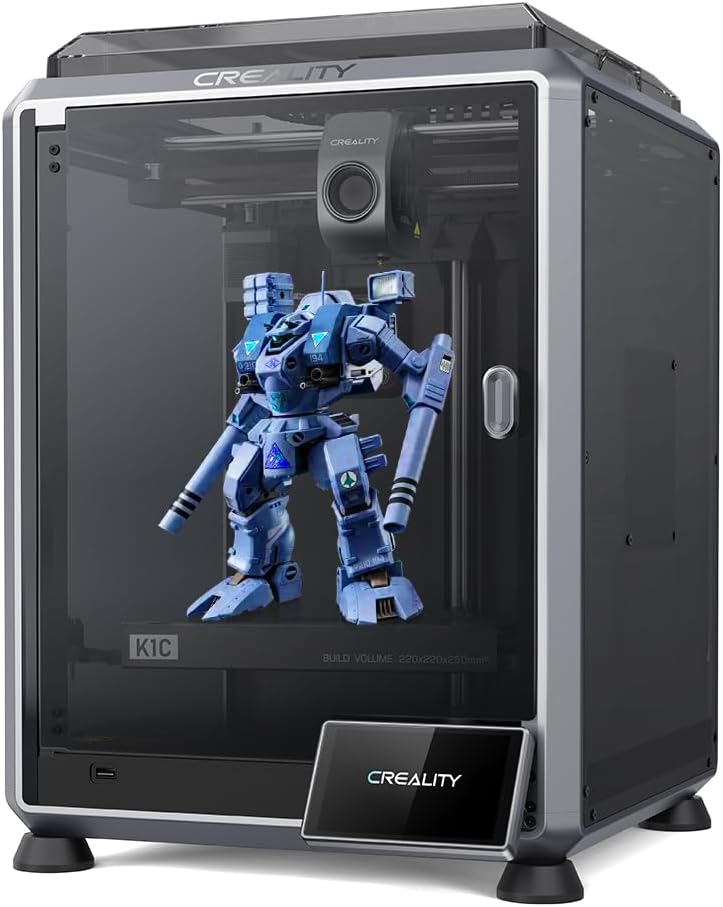
The Creality K1C is designed to handle abrasive materials like carbon fiber filaments. Its hardened steel tip and direct extruder prevent clogs and wear. This makes it a reliable choice for strong, durable props needed for active cosplay.
We may earn a commission when you buy through this link, at no additional cost to you.
With speeds up to 600mm/s, it reduces production time for heavy-duty items. The AI camera detects issues like debris, ensuring consistent quality. Setup is straightforward with auto calibration features ready to go out of the box.
The cooling structure is upgraded to handle heat creep and fine-tune texture. While not as large as industrial models, it excels in material compatibility. It is a niche machine for those needing strength over size.
Choose this if you plan to print functional gear that needs to withstand impact. The specialized nozzle ensures longevity when using reinforced filaments. It is a solid investment for technical cosplay applications.
Hardened nozzles handle abrasive filaments. This extends the life of the printer for tough jobs.
Direct drive ensures precise feed of stiff fibers. This prevents jamming and improves surface finish.
We may earn a commission when you buy through this link, at no additional cost to you.
The K2 Plus Combo offers a large build volume of 350mm combined with multi-color capabilities. This allows for printing full costumes without seams. The step-servo motors deliver high acceleration for fast printing of large objects.
We may earn a commission when you buy through this link, at no additional cost to you.
Intelligent CFS units read RFID filaments and relay them when running out. This automation reduces manual intervention during long print jobs. Dual AI cameras monitor both the toolhead and chamber for comprehensive oversight.
The Matrix frame structure ensures rigidity to prevent resonance. While the learning curve is steeper, the results are professional. It is a flagship machine for those requiring large-scale production.
Use this for full suits or large props that need detailed coloring. It handles high-temp materials like PPA well. Ensure you have space for the printer and the additional CFS units.
CFS units relay automatically when running out. This ensures continuous printing without interruption for long projects.
350mm volume handles big props without assembly. This is ideal for seamless armor and oversized shields.
We may earn a commission when you buy through this link, at no additional cost to you.
The Anycubic Kobra X offers extensive color flexibility, expanding up to 19 colors with extra units. Adaptive extrusion handles transitions from hard to soft materials seamlessly. This enables diverse multi-material projects for detailed costumes.
We may earn a commission when you buy through this link, at no additional cost to you.
LeviQ 3.0 ensures perfect first layers with full auto leveling. It reduces guesswork and failed prints for beginners. The quiet operation and AI monitoring make it a reliable partner for long creative sessions.
While it supports up to 19 colors, the base model starts at 4. The cost of extra units adds up but provides great variety. It is designed for easy plug and play out of the box.
Choose this for artistic models requiring intricate color patterns. It balances ease of use with professional-grade output. Ensure your budget accommodates extra modules for full color capabilities.
Expand to 19 colors with extra units. This allows for detailed multi-color designs without painting.
Noise levels stay under 48 dB. This ensures your workspace remains peaceful during use.
We may earn a commission when you buy through this link, at no additional cost to you.
Choosing the right printer involves balancing speed, size, and features. This section breaks down critical factors to help you decide based on your specific cosplay needs.
The build volume determines the maximum size of parts you can print. For full armor or large props, a minimum of 350mm per side is ideal. Smaller volumes work for helmets and accessories but may require assembly.
Prioritize models with large beds if you plan to print seamless pieces.
Fast speeds reduce wait times significantly. Models offering 600mm/s or more help meet tight deadlines. Speed alone does not guarantee quality, so look for acceleration control to maintain detail.
Higher speeds are beneficial for large props where finish time matters most.
Different materials offer different strengths. PLA is easy but weak; ABS and ASA are durable and weather-resistant. Ensure your printer supports engineering materials if you need strong, long-lasting props.
Check nozzle temperature limits for high-temp filaments like PC or Nylon.
Multi-color systems simplify detailed designs. Look for support for 16 colors to reduce painting needs. Some systems like AMS or CFS provide reliable color changes without manual swaps.
Select systems that are robust and easy to maintain.
Auto-leveling and auto-calibration save setup time. Beginners benefit from plug-and-play designs. Features like camera monitoring help prevent failures during long runs.
Look for intuitive interfaces and mobile app support.
Closed chambers and filtration are vital for indoor safety. Printing with ABS or ASA releases fumes that require proper airflow. Models with built-in filters improve workspace health.
Ensure your room has ventilation for open-frame machines.
Reliable performance prevents wasted filament and time. Features like AI failure detection help manage risks. Check community feedback for consistent print success.
Reliable machines save hours of troubleshooting over time.
Set a clear budget for the printer and accessories. Some models require extra purchases for full functionality. Consider long-term costs like filament and maintenance.
Balance initial cost with the features you need most.
Always level the bed before starting a new print. Modern printers offer auto-leveling, but manual checks ensure adhesion. Use a calibration sheet if recommended by the manufacturer.
Clean the nozzle regularly to prevent clogs. Heat the extruder and gently clean with a soft brush. High-temperature nozzles may need occasional replacement after heavy use.
Store filaments in dry boxes to prevent moisture. Humidity causes bubbles in prints and weakens materials. Use desiccants in storage containers for optimal results.
Many standard printers have limited build volumes. You may need to split large parts into sections for assembly. Alternatively, use large-format printers that support single-piece printing for seamless armor.
Engineering materials like ABS or ASA provide high durability. They are more weather-resistant than standard PLA. Ensure your printer can handle high temperatures for these materials.
An enclosure is not strictly necessary for PLA. However, it helps maintain temperature stability for better quality. If printing other materials like ABS, an enclosure is highly recommended.
Use faster printers that support high acceleration. Increasing infill density and shell thickness also helps maintain speed. Multi-part printing can also reduce overall print duration.
Modern systems like AMS are designed for simplicity. They often include automatic filament changes and calibration. Setup is generally straightforward with guided tutorials.
It depends on the material and ventilation. ABS and ASA emit fumes, so proper airflow is essential. Use printers with built-in filtration or place them in ventilated areas.
The top picks highlight options for every skill level. The Bambu Lab P1S offers a great balance of speed and reliability for most cosplayers.
Consider your specific needs when selecting a machine. Large builds require different features than small, detailed props. Prioritize speed and material support for professional results.
Prices change frequently so check current listings for the best deals. Ensure you have the right setup for your chosen model before purchasing. Happy printing!