
Ethernet Adapter for Fire TV Stick
4.7Editor score
Affordable price point
Sturdy aluminum design
Universal stick compatibility
This guide compares the top Fire TV Stick Ethernet Adapter models for reliable wired internet, covering compatibility, speed, and design to help you choose
Streamlining your home entertainment setup often requires a stable internet connection. A Fire TV Stick Ethernet Adapter bridges the gap between wireless limitations and wired reliability. This accessory ensures your streaming device receives consistent bandwidth for smooth playback.
We evaluated ten top-rated adapters based on compatibility, build quality, and user feedback. Our analysis focuses on devices supporting Fire TV Stick models and other popular streaming sticks. We prioritized products offering easy setup and durable construction for long-term use.
Each selection highlights specific strengths like gigabit speeds or USB-C support. Prices and availability may change frequently so verify details before purchasing. Use this guide to find the perfect adapter for your specific streaming hardware needs today.
4.7Editor score

4.5Editor score

4.3Editor score
The following table provides a side-by-side comparison of the leading Fire TV Stick Ethernet Adapter options available. We highlight key specifications to help you quickly identify the right model for your specific streaming setup needs.


This Micro-USB Ethernet Adapter stands out as a reliable solution for Fire TV devices needing wired internet. With a 4.5 star rating it promises stable connection speeds for streaming. Its design allows direct connection to routers without complex configuration steps.
We may earn a commission when you buy through this link, at no additional cost to you.
The adapter frees up WiFi bandwidth by connecting your Fire TV Stick directly to a wired network. It supports various models including Lite 4K and Cube making it versatile. Setup involves simply connecting the micro-USB port on the Fire TV and plugging in an Ethernet cable.
One limitation is its incompatibility with newer Fire TV Stick HD models using USB-C. It also maxes out at 10/100 Ethernet speeds which may not suit gigabit plans. However for most streaming needs these trade-offs are acceptable given the price.
If you own a compatible Fire TV Stick and want reliable streaming this adapter is a solid choice. It ensures consistent internet speeds and prevents buffering during movie nights. We recommend checking your device port type before purchase.
This adapter works with multiple Fire TV models including Lite 4K and Cube ensuring wide usability across generations.
You can connect your Fire TV directly to a wired network effortlessly allowing seamless streaming without WiFi interruptions.
We may earn a commission when you buy through this link, at no additional cost to you.
The Right Angle USB-C Ethernet Adapter is designed for the newest Fire TV Stick HD models with USB-C connectivity. It supports speeds up to 480mbps which is beneficial for faster data transfer. Its right angle design helps manage cables neatly behind your TV.
We may earn a commission when you buy through this link, at no additional cost to you.
Compatibility is strictly limited to Fire TV Stick HD (2nd Gen) with USB-C. It will not work with older micro-USB models. This specificity ensures a perfect fit for the targeted device but limits broader use across other streaming sticks.
While 480mbps is less than gigabit speeds it suits most home internet plans well. The right angle connector reduces bulk making it ideal for tight spaces behind entertainment centers. Users appreciate the streamlined look compared to straight adapters.
Buyers with the 2nd Gen Fire TV Stick HD will find this adapter essential for wired stability. It avoids the clutter of USB cables and provides a direct link to your router. Ensure your device model matches before ordering to avoid returns.
Designed specifically for the latest Fire TV Stick HD models this adapter matches the USB-C port perfectly for seamless integration.
The right angle shape minimizes protrusion behind your TV saving space and reducing cable tangling in tight setups.
We may earn a commission when you buy through this link, at no additional cost to you.
ELECTOP offers a high-speed Ethernet adapter delivering 1000Mbps speeds for smooth video playback and gaming. The aluminum alloy casing provides excellent heat dissipation and durability. An LED indicator shows network status instantly helping you troubleshoot connection issues easily.
We may earn a commission when you buy through this link, at no additional cost to you.
Compatibility extends to many sticks including Chromecast Ultra Raspberry Pi Zero and Fire TV 4K models. It supports Micro-USB ports but excludes older Fire Stick 1st Gen devices. Users should verify port types as it is not compatible with USB-C devices like Chromecast with Google TV.
The high-speed capability ensures future proofing for faster broadband plans. Aluminum construction keeps the device cool during long streaming sessions. However some users might need an additional power cable for stable operation on certain ports.
If you need gigabit speeds and a rugged build this adapter is worth considering. It stabilizes networks and reduces latency significantly. Check your device port requirements and power needs before purchasing to ensure full functionality.
With 1000Mbps capacity you get unprecedented smooth streaming and gaming without lag caused by weak wireless signals.
High-quality aluminum alloy construction and built-in protection features make this adapter safe and reliable for long term use.
We may earn a commission when you buy through this link, at no additional cost to you.
This budget-friendly Ethernet Adapter provides reliable 10/100 Mbps speeds for Fire TV Sticks and other devices. It features a built-in LED indicator for real-time connection status. The aluminum alloy build ensures durability and efficient heat dissipation during use.
We may earn a commission when you buy through this link, at no additional cost to you.
It supports universal TV sticks with Micro-USB ports including Chromecast and Fire TV 4K. Setup is plug-and-play requiring no drivers. Included self-adhesive tapes help secure the adapter preventing loose connections from hanging cables behind the TV.
While speeds are capped at 10/100 Mbps it is sufficient for most streaming needs. The focus on affordability and essential features makes it popular. Some users may find it lacks additional power options compared to premium models.
For those seeking a cost-effective solution this adapter delivers essential wired connectivity. It is easy to install and keeps your streaming stable. Ensure your device uses Micro-USB before buying to avoid compatibility issues.
Combining a low price with a sturdy aluminum alloy body this adapter offers great value for everyday streaming reliability.
Included adhesive tapes allow you to mount the adapter firmly avoiding poor contact from loose cables during viewing.
We may earn a commission when you buy through this link, at no additional cost to you.
The ZEXMTE Ethernet Adapter is designed for rapid setup taking about one minute to connect. It supports seamless integration with Fire TV Sticks 2/3/4K and 4K Max. The premium aluminum casing helps keep the device cool during binge-watching sessions.
We may earn a commission when you buy through this link, at no additional cost to you.
Smart status lights provide instant visual confirmation that your wired connection is active. This feature helps users quickly verify network status without diving into settings. It supports 10/100 Mbps speeds which are reliable for smooth 4K streaming and gaming.
The compact design fits well with streaming sticks without adding much bulk. While it does not offer gigabit speeds it delivers consistent performance. Users report improved stability compared to relying on WiFi dropouts in busy households.
This adapter is ideal for anyone wanting simple reliable internet for their Fire TV. It requires no technical knowledge to install. Check your device compatibility and ensure your port is Micro-USB for the best experience.
You can switch from wireless to wired internet in under a minute ensuring seamless streaming without complex configurations.
Smart status lights give you instant visual confirmation of your connection status making troubleshooting and setup easier for everyone.
We may earn a commission when you buy through this link, at no additional cost to you.
UGREEN provides an Ethernet Adapter that includes a 3.3 ft power cable for flexible positioning. It supports 10/100 Mbps speeds for stable video streaming. The USB-A power cord allows powering both adapter and TV Stick together reducing cable clutter.
We may earn a commission when you buy through this link, at no additional cost to you.
Compatibility is specific to Fire TV Basic and 2nd gen models Chromecast and Fire TV 3. It excludes Roku devices and newer Fire Stick 1st gen 4K Max. Users must ensure their port is Micro-USB and not USB-C to avoid incompatibility.
The length of the power cable is helpful for setups with limited wiggle room behind the TV. It requires a USB wall charger over 5W for normal operation. This extra step might be slightly inconvenient but ensures reliable performance.
Ideal for users needing extra cable length and unified power supply this adapter delivers steady performance. It simplifies setup by including necessary cables. Verify your device model and power requirements before purchasing to match your needs.
The 3.3 ft power cable design is handy for tight setups where you need extra room to connect behind your TV.
An included USB-A power cord powers both the adapter and your TV Stick at the same time reducing the need for extra cables.
We may earn a commission when you buy through this link, at no additional cost to you.
This ZEXMTE adapter promises faster speeds up to 1000Mbps to eliminate buffering and Wi-Fi drops. It features green and yellow LED lights to monitor operation status clearly. The durable reinforced aluminum alloy shell ensures fast heat dissipation for safety.
We may earn a commission when you buy through this link, at no additional cost to you.
It fits TV sticks with Micro-USB ports like Fire TV Stick 2/3/4K Max but excludes Cube and Roku devices. Users should be aware that actual speeds depend on their broadband plan and network conditions. Visual indicators help troubleshoot issues quickly.
While rated lower than some competitors it offers advanced features like over-current protection. The premium shell helps prevent overheating during long streaming sessions. Some users report connectivity issues if power is not sufficient.
Consider this adapter if you seek gigabit potential for high bandwidth activities. It provides visual feedback for connection health. Ensure your device is compatible and power needs are met for optimal performance results.
With green and yellow LED lights you can easily monitor the adapter status at a glance to verify connection status instantly.
Durable aluminum shell construction ensures fast heat dissipation and includes safety protections making it reliable for daily use.
We may earn a commission when you buy through this link, at no additional cost to you.
Cable Matters offers a Micro USB to Ethernet Adapter ensuring reliable wired connection for Fire Stick and Chromecast devices. It supports up to 300+Mbps transmission speeds which is faster than traditional Fast Ethernet. The included 3-foot USB power cable simplifies power management.
We may earn a commission when you buy through this link, at no additional cost to you.
This adapter connects various streaming devices to your router eliminating buffering caused by unreliable Wi-Fi. It is easy to install requiring no additional software. Versatile compatibility includes smart speakers like Google Home Mini for broader utility in your home.
While 300+Mbps is not gigabit it delivers almost five times the speed of older standards. The convenient power cable helps maintain stable connections during heavy streaming. Some users may find it slightly more expensive than basic alternatives.
Choose this adapter if you need a reliable solution with included power management. It supports various devices and speeds well. Verify your power needs and device compatibility before purchase to ensure seamless integration with your setup.
This Chromecast Ethernet Adapter supports up to 300+Mbps Ethernet speed offering a faster more reliable connection than typical wireless networks.
This Fire TV Stick Ethernet Adapter works with many streaming sticks and smart speakers allowing power and Ethernet simultaneously without clutter.
We may earn a commission when you buy through this link, at no additional cost to you.
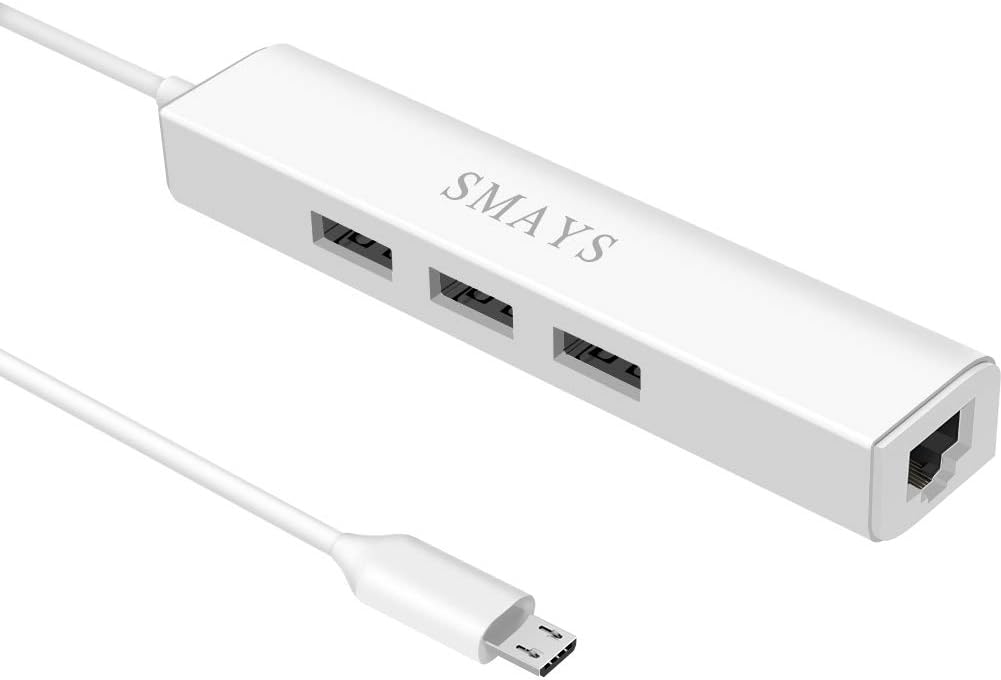
This Micro USB Hub adds Ethernet and extra USB ports for Fire TV devices needing both internet and storage. It supports 10/100M Internet speeds for stable wired connectivity without buffering. Compatible with Fire Stick Lite Cube and Roku TV models.
We may earn a commission when you buy through this link, at no additional cost to you.
The 3-port OTG USB Hub allows access to external USB flash drives SSDs and memory card readers. You can transfer data and run apps from external storage easily. It also supports mice and keyboards for enhanced input options on your TV.
Power is required via 5V DC-in which needs a separate wall adapter or charger. This adds a step to setup but enables full functionality. The design prevents poor contact between TV stick and LAN wires during use.
Ideal for users needing storage expansion alongside wired internet this hub is functional. It streamlines connectivity for multiple peripherals on a single stick. Ensure you have sufficient power and check compatibility with your specific Fire TV model.
A 3-port OTG USB Hub allows your streaming stick to access external storage drives mice and keyboards for greater flexibility.
This adapter supports 10/100M Internet speed providing stable wired internet without buffering or lag during heavy usage sessions.
We may earn a commission when you buy through this link, at no additional cost to you.
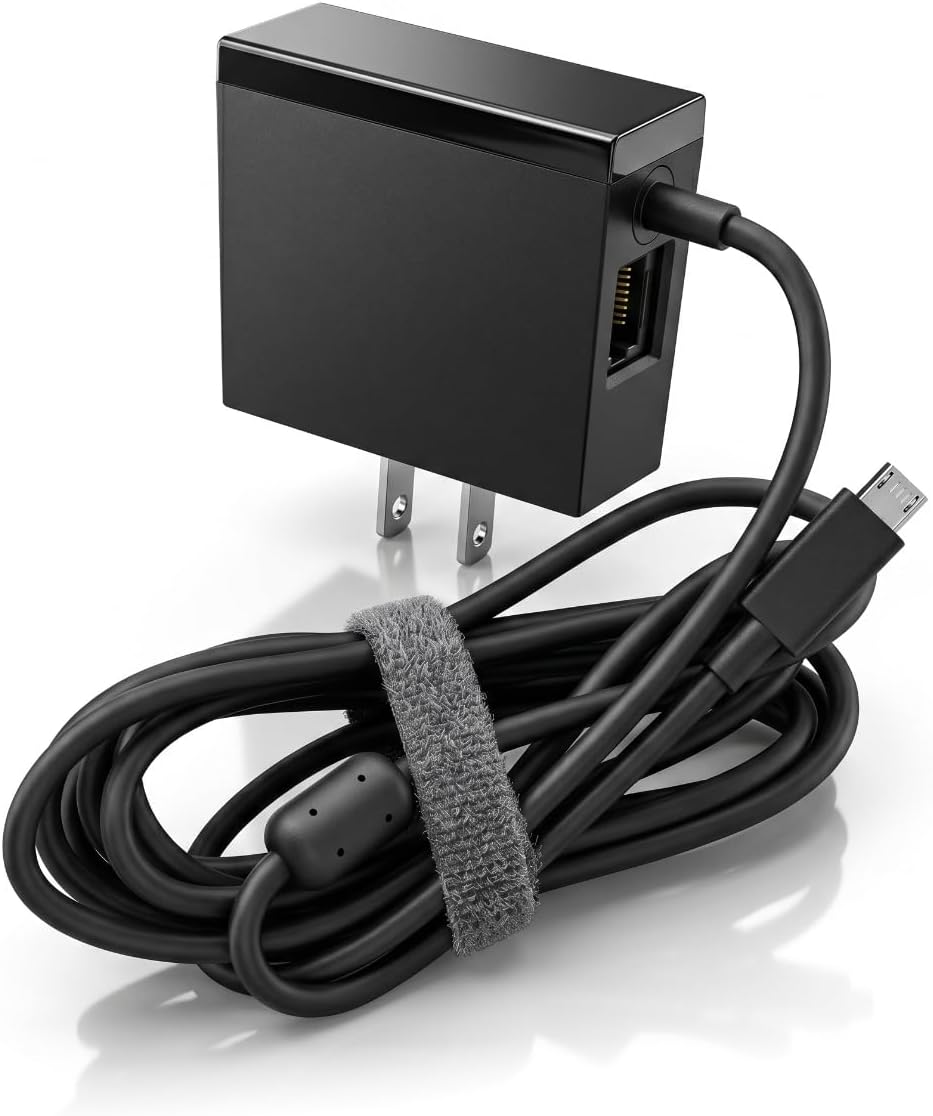
This Micro USB Port adapter combines power supply with an Ethernet port for Fire TV Stick and Chromecast Ultra devices. It delivers 100Mbps RJ45 port speeds enabling stable 4K signal transmission without delay. The design ensures your device receives both internet and power from one source.
We may earn a commission when you buy through this link, at no additional cost to you.
It is designed for Fire TV Stick 2nd/3rd gen and Fire TV Cube. The output is 5V 1A which suits standard power requirements. Input supports 100-240V making it versatile for different regions. Ensure your device uses Micro-USB not USB-C for compatibility.
The all-in-one solution reduces clutter from separate cables and adapters. It prevents signal loss and ensures reliable connections for high quality streaming. Users appreciate the simplicity of having power and network combined in one compact unit.
If you need a clean setup with integrated power and Ethernet this adapter is ideal. It supports various Fire TV models and ensures stable signals. Check your device power port type and ensure compatibility before purchasing for best results.
This standard power adapter with 100Mbps RJ45 ethernet port enables stable 4k signal transmission without worrying about signal delay.
With input of 100-240V this adapter works globally and delivers 5V 1A output to power your device reliably during use.
We may earn a commission when you buy through this link, at no additional cost to you.
Selecting the right Fire TV Stick Ethernet Adapter requires understanding your device compatibility and internet needs. This section outlines critical factors to ensure you pick a model that delivers reliable performance.
Always verify whether your Fire TV Stick uses a Micro-USB or USB-C port before purchasing an adapter. Older models like Fire TV Stick 4K use Micro-USB while newer HD models use USB-C. Using the wrong connector will not work.
Check your device's physical port type to confirm compatibility. Manufacturers usually specify supported models in the product description.
Most adapters offer 10/100 Mbps speeds which are sufficient for 4K streaming. Some premium models support Gigabit speeds up to 1000Mbps which is better for high bandwidth activities or large households.
Choose speeds matching your broadband plan to avoid bottlenecks. Ensure your adapter supports the desired data rate for optimal performance.
Look for adapters with aluminum alloy casings to dissipate heat effectively during extended use. Heat buildup can lead to performance issues so durable materials are beneficial for long term reliability.
Check user feedback on build quality to ensure the device stays cool. A sturdy design helps prevent physical damage over time.
The best adapters feature plug-and-play functionality without requiring drivers or complex configurations. You should be able to connect the Ethernet cable and micro-USB port quickly to start streaming.
Avoid models that need additional software installations. Simplicity saves time and ensures hassle-free setup for your streaming needs.
Some adapters draw power directly from the Fire TV port while others need a separate power cable. Ensure your TV adapter can support the power needs of the Ethernet accessory without issues.
Verify if an additional wall charger is necessary for stability. Check power output specs to avoid interruptions during streaming sessions.
Consider the length of included cables to ensure they reach your router comfortably. Some adapters include USB power cords which help with reach and reduce clutter behind the TV.
Select models with appropriate cable lengths to avoid tension on connectors. This prevents accidental disconnections and maintains a tidy entertainment center.
Adapters with LED indicators provide visual feedback on network status. Lights can show active connections or errors helping you troubleshoot issues quickly without technical tools.
Look for clear and intuitive status lights. These small features make a difference in monitoring connection health easily.
Check the warranty period and customer support options offered by the manufacturer. Reliable support ensures you can get help if the device fails or has compatibility issues after purchase.
Research manufacturer reputation for responsive service. A good warranty adds peace of mind for your electronics investment.
To start using your Ethernet adapter, power off your Fire TV Stick and connect the micro-USB end of the adapter to the stick's USB port. Ensure the connection is secure before proceeding to the next step.
Plug one end of an Ethernet cable into the adapter's RJ45 port and the other end into an available port on your router. If your adapter requires external power, connect the USB power cord to a wall adapter and plug it in.
Power on your Fire TV Stick and navigate to Network settings. Select Wired Network or Ethernet to establish a connection. Verify status LEDs show a successful connection and enjoy stable streaming without buffering issues.
No, you must match the adapter to your Fire TV Stick's port type. Older models require Micro-USB adapters while newer HD models use USB-C. Always check compatibility details before buying to ensure proper fit and function.
Yes, wired connections provide consistent bandwidth reducing buffering caused by weak WiFi signals. It stabilizes your network especially during peak usage times or when multiple devices share the connection.
You need a standard Ethernet cable (Cat5e or higher) to connect the adapter to your router. Most adapters do not include this cable so ensure you have one available for setup.
Some Ethernet adapters draw more power than the TV stick port can supply. An extra power cord ensures stable operation preventing intermittent disconnections during heavy usage.
Most work with Fire TV sticks and Chromecast models but Roku devices often have different port requirements. Verify the product's supported devices list to confirm compatibility with your streaming hardware.
Many adapters include LED indicator lights that show connection status. Check the adapter settings on your Fire TV to confirm it recognizes a wired connection and displays active network activity.
Check cable connections and ensure the power supply is sufficient. Try resetting your router or adapter by unplugging for a few seconds. Verify your internet plan supports the desired speeds without throttling.
They can improve stability but speeds depend on your adapter's rating and your broadband plan. Most 10/100 Mbps adapters handle 4K streaming well but Gigabit adapters are needed for faster connections.
We explored ten top-rated Fire TV Stick Ethernet Adapters ranging from budget options to premium models. Each adapter offers unique strengths suited for different device types and internet needs to ensure stable streaming performance.
Prioritize compatibility and speed when selecting an adapter to match your specific hardware requirements. A reliable wired connection eliminates buffering and ensures your entertainment setup runs smoothly without interruptions during viewing.
Remember to check current prices and availability before making your final purchase decision. Regular updates to product specs and models can affect your choice so verify all details match your needs.