
Ubiquiti Unifi Security Appliance
4.5Editor score
Unifi Controller Integration
VLAN Support
VPN Server Included
This guide compares the top ten firewall appliances for network security, evaluating performance, features, and compatibility to help you choose the right
Securing your network infrastructure is critical in today's digital landscape. A reliable firewall appliance acts as the first line of defense against cyber threats, monitoring and controlling incoming and outgoing traffic based on security rules. Choosing the right hardware ensures your data remains protected from unauthorized access and malicious activities.
We have evaluated ten leading firewall appliances based on their performance, security features, and ease of management. Our analysis focuses on throughput capabilities, port configurations, and support for advanced security protocols. This list covers a range of options suitable for small businesses to enterprise environments.
Each pick highlights key strengths and potential limitations to guide your decision-making process. Remember that network needs evolve, so consider future scalability when selecting a device. Prices and availability can change frequently, so verify current details before making a purchase decision for your infrastructure.
4.5Editor score

4.4Editor score

4.7Editor score
The following table provides a side-by-side comparison of all ten firewall appliances reviewed in this guide. It highlights key specifications to help you quickly identify which device matches your network requirements and security needs.



The FortiGate-60F stands out as a robust solution for secure networks. With a 4.4 rating, it delivers powerful performance for medium-sized businesses needing high-density connections. Its design supports extensive connectivity options while maintaining effective defense against advanced threats.
We may earn a commission when you buy through this link, at no additional cost to you.
This appliance features 10 Gigabit Ethernet ports including WAN and DMZ configurations. It leverages purpose-built security processor technology to provide industry-leading SSL inspection and SD-WAN capabilities. Continuous threat intelligence from FortiGuard Labs enhances security across all network traffic.
While it offers excellent security, note that the appliance is sold without a subscription. Advanced services like firmware updates and threat protection must be purchased separately. This trade-off allows flexibility but requires additional investment for full functionality.
Organizations seeking reliable network automation and visibility should consider this model. Its user-friendly management console supports comprehensive network visibility. It is ideal for those needing secure high-speed operations without compromising on performance or scalability.
The device offers 10 GE RJ45 ports with diverse configurations for flexible enterprise networking.
FortiGuard Labs provides AI-driven threat identification for both known and unknown risks.
We may earn a commission when you buy through this link, at no additional cost to you.
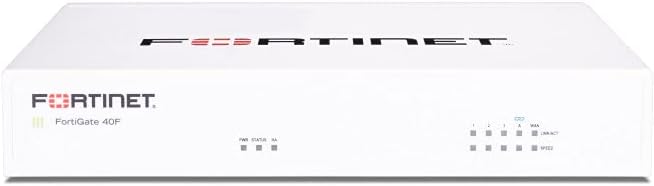
The FortiGate-40F is designed for small to mid-sized businesses with limited space. It features a compact fanless desktop form factor ensuring quiet operation. Its rating of 4.2 reflects solid performance for essential connectivity and flexibility.
We may earn a commission when you buy through this link, at no additional cost to you.
Equipped with 5 GE RJ45 ports, it supports 1 WAN and 4 internal ports. The system uses Fortinet's purpose-built security processor for industry-leading performance. SSL encrypted traffic protection is enhanced through integrated FortiGuard Labs technology.
This unit is sold without a subscription meaning advanced security services require separate purchase. While this reduces initial cost, ongoing protection depends on additional licenses. However, the Zero Touch Integration simplifies deployment significantly.
Small businesses needing reliable security without large infrastructure should find this appealing. Its user-friendly management console provides comprehensive automation. It balances space efficiency with robust threat mitigation for branch offices effectively.
A fanless desktop form factor ensures quiet operation and minimizes space usage.
Features Zero Touch Integration with Fortinet Security Fabric for easy deployment.
We may earn a commission when you buy through this link, at no additional cost to you.
Protectli Vault FW4B offers a compact fanless and silent firewall solution. With a 4.6 rating, it secures networks using an Intel Quad Core processor and AES-NI support. It is designed for users comfortable installing their own operating systems.
We may earn a commission when you buy through this link, at no additional cost to you.
This device includes 8GB DDR3L RAM and a 120GB mSATA SSD for efficient performance. It supports popular open-source software solutions like pfSense and OPNsense. The hardware is tested with these systems ensuring compatibility and reliability.
Note that no operating system is pre-installed so you must install the coreboot BIOS by user. This flexibility appeals to tech-savvy users but adds setup complexity. US-based support is available to assist with installation challenges.
Network enthusiasts seeking a customizable firewall mini PC will appreciate this model. Its 4 Gigabit Ethernet ports offer standard connectivity. It is best for those who want control over their firewall software stack.
All hardware tested with pfSense and OPNsense for flexible software choice.
Comes with US-based support to help with setup and configuration.
We may earn a commission when you buy through this link, at no additional cost to you.
The Ubiquiti Unifi Security Appliance delivers powerful firewall performance. It integrates seamlessly with the Unifi Controller for centralized management. With a 4.5 rating, it is a popular choice for smaller networks needing reliable security.
We may earn a commission when you buy through this link, at no additional cost to you.
It supports convenient VLAN and QoS for enterprise VoIP traffic. The device includes a VPN server for secure communications. Three Gigabit Ethernet ports provide sufficient connectivity for most home and office setups.
While functional, it has only three ports which may limit expansion. However, it offers essential security features without complex configuration. The wall mountable design allows for flexible placement options.
Users invested in the Unifi ecosystem should find this appliance useful. It provides a straightforward way to add security to existing networks. Its design and features balance cost and performance effectively.
Seamless integration with the Unifi Controller for unified network management.
Includes a VPN server for secure remote communications and access.
We may earn a commission when you buy through this link, at no additional cost to you.
The SonicWall TZ280 provides up to 2.5 Gbps firewall inspection and threat prevention. Rated 4.7, it uses SonicWall's patented Reassembly-Free Deep Packet Inspection engine. This model is built for small business and branch offices needing high security.
We may earn a commission when you buy through this link, at no additional cost to you.
It features 8x1GbE and 2x1G SFP ports for diverse connectivity options. SonicOS 8 delivers intrusion prevention and TLS/SSL decryption with an active service subscription. The device supports Zero-Trust Network Access through Cloud Secure Edge.
Note that security services and firmware updates are not included and must be purchased separately. This hardware-only approach offers flexibility but requires additional investment for full protection. The zero-touch deploy simplifies initial setup.
Organizations requiring secure SD-WAN and SSL VPN capabilities should consider this unit. It keeps distributed sites and remote workers protected. The combination of performance and features makes it a strong contender for business networks.
Patented RFDPI engine drives high performance firewall inspection rates.
Supports Zero-Trust Network Access for secure remote work environments.
We may earn a commission when you buy through this link, at no additional cost to you.
The Netgate 1100 is a business-ready pfSense+ Security Gateway. It comes pre-loaded with software to get you up and running fast. With a 4.1 rating, it offers a compact and silent form factor for desktop or wall placement.
We may earn a commission when you buy through this link, at no additional cost to you.
It uses a dual core ARM Cortex-A53 CPU to deliver near gigabit routing of common traffic. Three 1 GbE switched ports allow configuration of separate network segments. Free help with setup is available from the Technical Assistance Center.
Delivery requires an adult signature which ensures secure receipt of the hardware. The low power draw allows it to run unnoticed on your network. However, the ARM core may limit performance compared to x86 alternatives.
Businesses needing reliable edge networking with minimal setup effort will find this useful. It includes a one year hardware warranty and lifetime updates. It is ideal for securing network environments without complex configuration.
Pre-loaded with pfSense+ software to start quickly without complex setup.
Includes TAC Lite technical support for 24/7 assistance during setup.
We may earn a commission when you buy through this link, at no additional cost to you.
The FORTINET FG-100E provides network security against known exploits and malware. It detects unknown attacks and identifies thousands of applications with ease. With a 4.7 rating, it is designed to protect your network from malicious websites.
We may earn a commission when you buy through this link, at no additional cost to you.
This appliance focuses on broad threat mitigation across different layers. It uses advanced detection techniques to identify risks before they cause damage. The integration with FortiGuard Labs enhances its effectiveness against evolving threats.
Specific port and throughput details are not fully listed in the provided data. However, its security features align with Fortinet's reputation for comprehensive protection. A subscription is likely needed for full threat intelligence access.
Organizations prioritizing deep application control and unknown threat detection should consider this model. It secures network traffic effectively and helps identify malicious activity early. It is a strong choice for businesses needing robust defense.
Capable of identifying and mitigating attacks that are previously unknown.
Identifies thousands of applications for precise network control and security.
We may earn a commission when you buy through this link, at no additional cost to you.
This New Palo Alto PAN-PA-220 offers an 8-Port Next Generation Firewall security appliance. It is designed to provide advanced protection for modern network environments. The rating of 3.0 suggests potential variability in performance or support experience.
We may earn a commission when you buy through this link, at no additional cost to you.
It features Next Generation Technology which typically includes advanced threat prevention. The compact size allows for easy integration into existing network setups. As a new release it may benefit from recent firmware improvements.
Detailed specifications beyond the port count are not fully provided in the data. The lower rating might indicate compatibility issues or user satisfaction challenges. Potential buyers should verify support details before purchasing.
Small offices needing multiple ports and next-gen security might find this useful. However, reviewing recent user feedback is advised given the rating. It represents a standard compact solution for basic firewall needs.
Provides 8 ports for robust connectivity in small to medium setups.
Utilizes Next Generation Firewall technology for advanced threat prevention.
We may earn a commission when you buy through this link, at no additional cost to you.
Protectli Vault FW4C secures your network with a compact fanless and silent firewall. It features an Intel J3710 Pentium Quad Core CPU with AES-NI hardware support. With a 4.5 rating it supports popular open-source software solutions effectively.
We may earn a commission when you buy through this link, at no additional cost to you.
This unit includes 4 Intel 2.5 Gigabit Ethernet NIC ports for faster networking. It comes with 4GB DDR3 RAM and a 32GB SSD for efficient storage. All hardware is tested with pfSense and OPNsense ensuring compatibility.
No operating system is pre-installed requiring user installation of the coreboot BIOS. This allows flexibility but adds complexity for non-technical users. US-based support is available to assist with any setup challenges.
Enthusiasts needing faster 2.5G connectivity in a small footprint will appreciate this. It offers a balance of performance and size for home or office use. The hardware testing with open-source systems makes it a reliable choice.
Features 4 Intel 2.5 Gigabit Ethernet ports for high-speed network connections.
All hardware tested with pfSense and OPNsense for reliable software support.
We may earn a commission when you buy through this link, at no additional cost to you.
The FortiGate-60F Bundle includes the appliance plus 1 year of FortiGuard Unified Threat Protection. It is tailored for medium-sized businesses needing robust security without large enterprise infrastructure. With a 4.2 rating it ensures high-quality support and service continuity.
We may earn a commission when you buy through this link, at no additional cost to you.
This bundle secures against advanced online threats with comprehensive web filtering and anti-botnet technologies. FortiCare Premium provides effective protection through advanced filtering technologies. It simplifies the setup process by including essential services.
The cost is higher than the appliance alone but offers immediate protection. This avoids the need to purchase subscriptions separately after hardware acquisition. It is an all-in-one solution for streamlined security management.
Organizations wanting to ensure they have all necessary protections from day one should consider this. It is effective against sophisticated threats and reduces administrative overhead. The bundle delivers reliability for businesses seeking peace of mind.
Includes 1 year of FortiGuard Unified Threat Protection for immediate security.
FortiCare Premium ensures high-quality support and service continuity.
We may earn a commission when you buy through this link, at no additional cost to you.
Selecting the right firewall appliance requires careful consideration of your network needs and security requirements. This guide outlines key factors to help you evaluate options effectively.
Throughput capacity determines how much data your firewall can process without slowing down network performance. Look for specifications that match your bandwidth requirements to ensure smooth traffic flow during peak usage. Higher throughput is essential for environments with large data transfers or multiple connected devices.
Choose a device with enough throughput to handle your current load and future growth.
Port configuration refers to the number and type of network interfaces available on the device. Consider whether you need Gigabit Ethernet, SFP, or higher speed ports like 2.5G. The arrangement of WAN, LAN, and DMZ ports also affects how you segment your network.
Ensure the appliance has sufficient ports to connect all your network segments properly.
Security features include intrusion prevention, malware detection, and threat intelligence capabilities. Advanced appliances offer SSL decryption and sandboxing to identify hidden threats. Verify that the device supports protocols relevant to your industry compliance requirements.
Prioritize appliances with comprehensive threat protection and regular updates for effective defense.
The management interface should be intuitive and offer visibility into network traffic and threats. Some devices provide centralized cloud management while others rely on local consoles. Easy setup and troubleshooting capabilities save time for IT administrators.
Select a device with a user-friendly management console that fits your workflow.
Many appliances require subscriptions for advanced security services and firmware updates. Understand what is included with the hardware and what requires separate purchase. This affects the total cost of ownership over the device's lifespan.
Account for ongoing subscription costs when budgeting for your firewall solution.
Scalability ensures your firewall can grow with your business needs. Check if the device supports additional features or throughput upgrades later. Future-proofing your investment prevents the need for early hardware replacement.
Choose an appliance that can accommodate increased traffic and new security requirements.
Decide between a physical appliance and a virtual solution based on your environment. Physical appliances offer dedicated resources and simplified management for on-premise setups. Virtual options provide flexibility for cloud or hybrid environments.
Physical hardware is often preferred for standalone office networks needing dedicated security.
Reliable support ensures you can resolve issues quickly when they arise. Check the warranty period and availability of technical assistance from the vendor. Some manufacturers offer lifetime updates for specific software solutions.
Look for devices that include comprehensive support and warranty terms for peace of mind.
Begin by reading the manufacturer's manual to understand the specific configuration steps for your device. Connect the appliance to your network using the designated WAN and LAN ports to ensure proper traffic routing.
Update the firmware immediately after setup to patch any known vulnerabilities. Configure security rules and access policies based on your organizational requirements to protect sensitive data effectively.
Regularly monitor logs and performance metrics to detect unusual activity or potential threats. Keep the device in a well-ventilated area to prevent overheating and maintain consistent operation over time.
A firewall appliance is a dedicated hardware device that monitors and controls incoming and outgoing network traffic. It acts as a barrier between your internal network and external threats like hackers or malware. You need one to protect sensitive data and maintain network integrity.
Firewall appliances often include routing capabilities but are primarily designed for security. Some users combine them with a separate router for better performance. However many modern appliances can handle both functions efficiently for small to medium setups.
Hardware firewalls are physical devices that protect an entire network while software firewalls run on individual computers. Hardware solutions offer broader protection and better performance for multiple devices. Software firewalls provide additional layer security for specific endpoints.
Many advanced security features like threat intelligence and firmware updates require a subscription. Basic routing and access control might work without one. Always check the product details to understand which features are included versus optional.
Installation involves connecting the appliance to your modem and internal switches using Ethernet cables. You then access the management interface to configure network settings and security rules. Follow the manufacturer's guide to ensure proper setup.
Some appliances like Protectli and Netgate are designed to run open-source software such as pfSense. Others come with proprietary operating systems. Check compatibility lists to confirm if your preferred software works with the hardware.
Gigabit Ethernet refers to network ports that support speeds up to 1000 Mbps. This allows faster data transfer between devices and the internet. Ensure your network cabling supports this speed to achieve optimal performance.
You should check for firmware updates monthly or whenever the vendor releases security patches. Regular updates ensure you have the latest threat definitions and performance improvements. Automating updates can help maintain consistent security coverage.
We have reviewed ten distinct firewall appliances ranging from budget options to high-performance enterprise solutions. Each offers unique strengths such as port density, throughput speed, or ease of management. Your choice depends on your specific network size and security needs.
Prioritize devices that match your current bandwidth requirements while allowing room for future growth. Consider the total cost of ownership including any necessary subscriptions for full protection. A well-chosen firewall provides peace of mind and robust defense against cyber threats.
Remember that prices and availability can change frequently across retailers. Verify the latest details and current stock before making a purchase decision. Select the appliance that best aligns with your long-term security strategy.