
Acer Gadget Auto Face Tracking Tripod
4.6Editor score
360 degree AI face tracking
Detachable remote control included
Stable quadpod design
Finding the right AI gimbal with tripod can transform your mobile filmmaking experience by ensuring smooth footage and hands-free operation. These devices combine advanced stabilization with intelligent tracking to keep your subject in focus while you move freely.
We evaluated ten top-rated models based on stabilization quality, AI tracking capabilities, battery life, and build durability. Our comparison includes data from verified user feedback and technical specifications to help you choose the most reliable tool for your needs.
Each pick highlights unique strengths like active zoom or extended range. Keep in mind that prices and availability change frequently so check current listings before purchasing to ensure you get the best deal on your chosen stabilizer today.
4.6Editor score

4.3Editor score

4.4Editor score
As an Amazon Associate we earn from qualifying purchases.
This comparison table outlines the key specifications of each model so you can quickly identify which features align with your specific filming requirements and budget constraints.




The DJI Osmo Mobile 8 Gimbal Stabilizer stands out as a top choice for creators seeking a versatile AI gimbal with tripod. With a solid user rating and advanced features like native tracking with audio reception, it promises high-quality results for vloggers.
We may earn a commission when you buy through this link, at no additional cost to you.
Its seamless 360-degree pan rotation and direct phone connection make setup effortless while the built-in extension rod and tripod ensure flexibility for low-angle shots or group selfies without needing extra gear.
While the robust 3-axis stabilization delivers smooth footage, some users note that the DJI Mimo app is no longer on the Play Store and requires a manual download from the official website for the best experience.
This gimbal is ideal for mobile filmmakers who value integrated audio and lighting. Choose it if you want an all-in-one tool that balances portability with professional-grade tracking capabilities.
Combining tracking with audio reception and lighting allows you to stay sharply in focus and well-lit without additional accessories.
The built-in extension rod and tripod mean you can capture group selfies or wide travel shots without carrying extra gear.
We may earn a commission when you buy through this link, at no additional cost to you.
The AOCHUAN Smart V3 Gimbal Stabilizer offers impressive hands-free capabilities with its detachable remote and AI tracking module. Users praise its intelligent image stabilization 8.0 for keeping footage smooth during dynamic outdoor activities.
We may earn a commission when you buy through this link, at no additional cost to you.
Its extended rod reaching up to 70 inches and app-free AI tracking make it a great pick for vloggers who need flexible angles without constant manual adjustment or tethered phone connections.
Although it performs well, the learning curve for gesture controls and remote placement can be challenging initially. You may need to test different positions to find the optimal range for reliable tracking.
Choose this model if you want a budget-friendly option that supports gesture control and remote operation. It balances performance with affordability for those new to smartphone gimbals.
The detachable magnetic remote lets you control selfies and videos from up to 32 feet away for true hands-free filming.
App-free AI tracking and gesture controls let you start or stop tracking without touching your phone or relying on an app.
We may earn a commission when you buy through this link, at no additional cost to you.
The Insta360 Flow 2 Pro AI Tracker Bundle delivers top-tier performance with its Apple DockKit integration and active zoom tracking. It is designed for creators who need seamless compatibility across a wide range of iOS apps.
We may earn a commission when you buy through this link, at no additional cost to you.
Key strengths include its ability to track subjects at 15x zoom and support multi-person framing effortlessly. The built-in spotlight ensures cinematic-quality footage even in low-light conditions while the 360-degree pan keeps movement fluid.
The main trade-off is the higher price point and the fact that some advanced zoom features are limited to specific Pro models of iPhones. This can restrict usability for users with older devices.
If you want the most powerful gimbal for iPhone with pro-level tracking, this bundle is worth the investment. It offers unmatched versatility for content creators prioritizing app compatibility and tracking precision.
Being the first gimbal with Apple DockKit support means it works flawlessly with over 200 iOS apps for seamless tracking.
Active zoom tracking allows you to follow fast movements even at up to 15x zoom for dynamic sports or performance shots.
We may earn a commission when you buy through this link, at no additional cost to you.
The Insta360 Flow 2 Pro Gimbal Stabilizer in grey brings premium features to both Android and iPhone users. It supports 200+ apps and active zoom tracking making it a versatile tool for varied platforms.
We may earn a commission when you buy through this link, at no additional cost to you.
Its integrated fill light enhances low-light performance while multi-person tracking ensures no one is left out of group shots. The 360-degree pan and 3-axis stabilization keep your footage smooth and professional.
While powerful, the high cost and setup complexity may be barriers for beginners. You might need to review tutorials to fully utilize the active zoom and creative modes effectively.
This model suits creators who need cross-platform support without sacrificing advanced features. Choose it if you want a premium kit that works across different smartphones seamlessly.
Designed for both iPhone and Android users this gimbal ensures stable tracking for a wide range of devices.
The built-in fill light helps ensure your vlogs and livestreams look perfectly lit even in challenging low-light environments.
We may earn a commission when you buy through this link, at no additional cost to you.
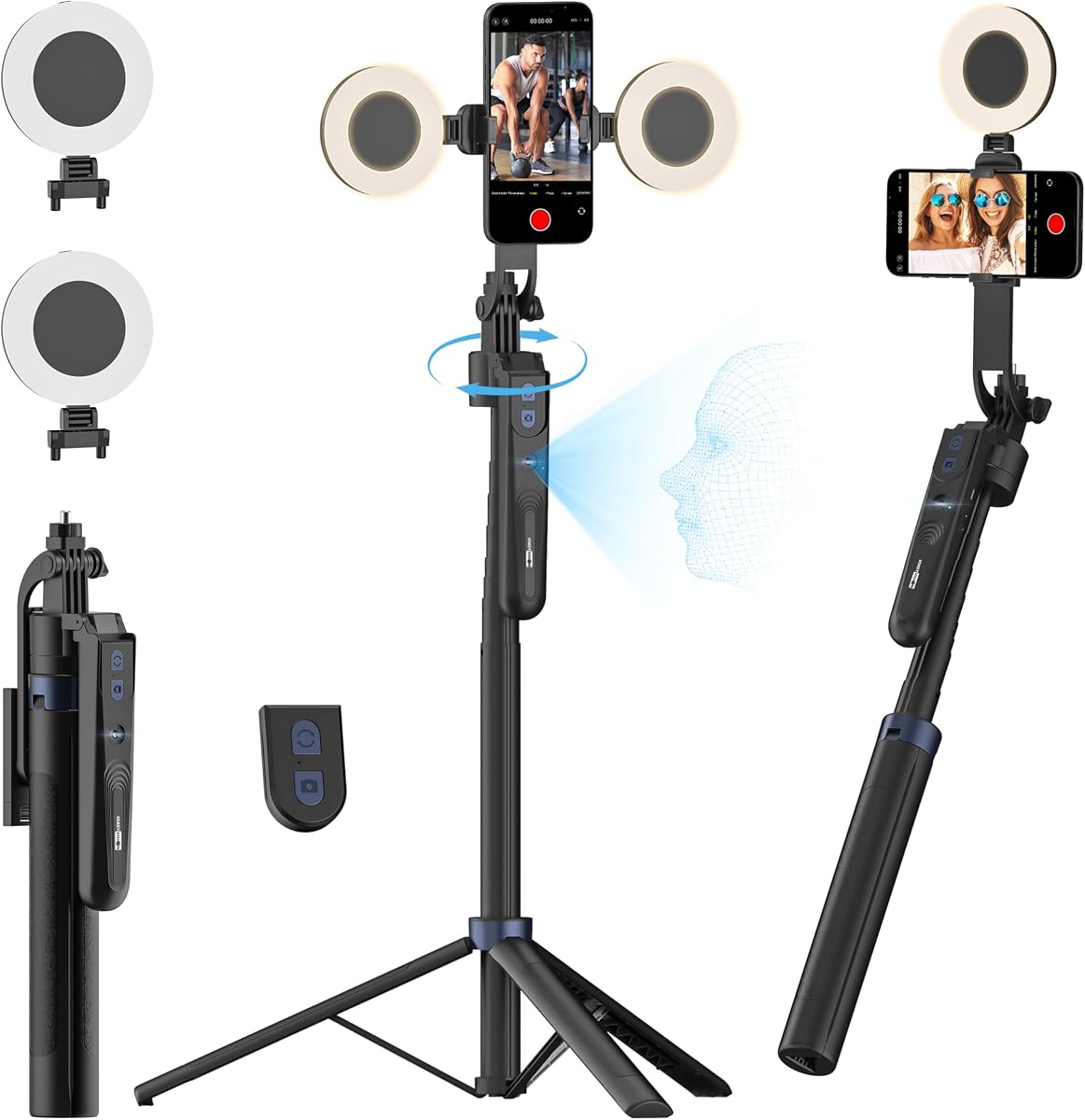
The Acer Gadget Auto Face Tracking Tripod delivers remarkable value with its 360-degree AI tracking and no-app requirement. It is an ideal entry point for beginners needing a reliable tripod with smart features.
We may earn a commission when you buy through this link, at no additional cost to you.
Its detachable remote and included ring light provide flexibility for hands-free shooting and consistent lighting. The stable quadpod design ensures rock-solid shots even when extended to maximum height.
While it lacks the advanced stabilization of premium models it still provides smooth footage and gesture control. Accuracy may be basic but sufficient for casual vlogging and social media updates.
Choose this option if you are on a budget but still want AI capabilities. It is perfect for those who need a simple and effective tool for everyday content creation.
The auto-tracking tripod recognizes and follows your face without requiring any app installation for instant setup.
Includes a detachable mini ring light with adjustable modes to enhance video quality in low-light settings.
We may earn a commission when you buy through this link, at no additional cost to you.
The DJI Osmo Mobile 7P Gimbal Stabilizer offers cinematic quality with its multifunctional module and dual-lens tracking. It ensures lossless stability and smart framing for professional mobile filmmaking.
We may earn a commission when you buy through this link, at no additional cost to you.
Features like shot guides and one-tap editing help you craft stunning masterpieces quickly. The built-in extension rod and tripod support flexible shooting while the 10-hour battery keeps you going all day.
Users note that the DJI Mimo app is no longer on the Play Store which may complicate setup. Also its size may be less portable than lighter alternatives for casual users.
Pick this if you want a reliable tool for creative storytelling with powerful stabilization. It suits filmmakers who need extra control and editing capabilities.
The multifunctional module packs intelligent tracking mic reception and lighting into one compact unit for ideal shots.
Includes ShotGuides and One-Tap Edit to save time and enhance your creative storytelling instantly during filming.
We may earn a commission when you buy through this link, at no additional cost to you.
The USKEYVISION Auto Face Tracking Tripod combines a tall reach with 360-degree rotation and AI tracking. It is built for streaming and recording videos with consistent lighting and stable framing.
We may earn a commission when you buy through this link, at no additional cost to you.
Its adjustable fill light and remote control make setup easy for family parties or outdoor shoots. The non-slip rubbers and aluminum alloy ensure stability even when fully extended.
However it is heavier than some options and supports limited phone widths. This may restrict compatibility with larger or foldable devices so check dimensions before buying.
Choose this if you need a sturdy tripod for live streaming or social media. It delivers reliable tracking and lighting for a reasonable price.
Equipped with dual detachable ring lights offering three brightness levels and color temperatures to adapt to different conditions.
The removable rechargeable remote allows you to take videos or photos within a range of 32 feet easily.
We may earn a commission when you buy through this link, at no additional cost to you.
The DJI Osmo Mobile 8 Bundle with Mic Mini Transmitter enhances audio quality while maintaining excellent stabilization. It is ideal for creators who need clear sound and reliable tracking in one package.
We may earn a commission when you buy through this link, at no additional cost to you.
Its seamless 360-degree pan and native tracking with audio reception ensure sharp focus and clear audio. The built-in extension rod and tripod add flexibility for various shooting angles.
The bundle is expensive and the app issue remains a hurdle. Still the extra power and mic receiver make it a valuable tool for professional recordings.
Choose this if you prioritize audio quality and advanced tracking. It suits creators needing a complete kit for high-end content.
The gimbal combines tracking with audio reception and lighting to stay sharply in focus and crystal clear.
Includes 10-hour battery life and phone charging to shoot for hours at events without power worries.
We may earn a commission when you buy through this link, at no additional cost to you.
The Insta360 Flow 2 Plus AI Tracker Bundle offers unique animal tracking features for pet owners. It ensures your pets stay in focus during playful moments with precise AI tracking.
We may earn a commission when you buy through this link, at no additional cost to you.
Multi-person tracking and 15x zoom capabilities make it versatile for group shots and sports. The 360-degree pan and 10-hour battery support full-day filming needs.
Complexity and price are trade-offs. Some advanced zoom features require specific iPhone models limiting its use for some users.
Choose this if you love capturing pets or animals. It brings creative tracking capabilities to mobile filmmaking.
Let the camera follow your pets wherever they go with AI tracking for dogs cats and even horses.
Turn any phone into your remote with second-screen control to preview and shoot with ease.
We may earn a commission when you buy through this link, at no additional cost to you.
The Insta360 Flow 2 Grey is a foldable AI gimbal that combines portability with powerful tracking features. It is great for travelers needing a lightweight tool for capturing pets or pets.
We may earn a commission when you buy through this link, at no additional cost to you.
Gesture control and AI-powered editing help you create videos quickly. The 10-hour battery and built-in tripod support long filming sessions.
Zoom limits may apply to non-pro models and accessories are minimal. Still it balances features and size well for casual creators.
Choose this if you value portability and smart editing tools. It suits those who want a compact yet capable gimbal.
No need to go back and forth to press the shutter button. Simply raise your hand to start tracking and recording.
Master your shots with AI-powered editing tools in the Insta360 app to tell a story with your clips on beat.
We may earn a commission when you buy through this link, at no additional cost to you.
Selecting the right AI gimbal with tripod requires understanding key factors like tracking accuracy, build quality, and compatibility with your smartphone.
Advanced AI tracking ensures your subject remains in frame without manual adjustments. Look for models that support active zoom and multi-person tracking for dynamic scenarios.
Prioritize gimbal that use advanced software to follow complex movements smoothly.
Robust 3-axis stabilization is essential for smooth video output. Check for motors that handle weight capacity well and minimize vibration during movement.
Opt for systems that balance power with portability for daily use.
Materials like aluminum alloy enhance stability and longevity. Ensure the tripod legs and joints are reinforced to prevent slipping or bending.
Choose rugged designs that can withstand travel conditions.
Long battery life is crucial for extended shoots. Aim for models offering at least 10 hours of operation to avoid interruptions.
Consider gimbals that also support charging your phone while filming.
Verify the gimbal works with your preferred apps. Some models integrate deeply with specific platforms for enhanced tracking.
Check if the DJI Mimo app or other software requires manual updates or downloads.
Look for extra features like fill lights or remote controls. These enhance your versatility and simplify setup for various content types.
Ensure the gimbal supports standard mounting screws for additional gear.
Start by calibrating your gimbal according to the manufacturer instructions. Ensure your phone is balanced correctly to prevent motor strain and achieve smooth footage.
Use the app or gestures to activate AI tracking. Move smoothly and avoid sudden jerks to help the gimbal keep your subject in focus effectively.
After use, store the gimbal in a dry cool place. Clean the tripod legs and motors regularly to remove dust and extend the lifespan of your device.
Most AI gimbals require an app for full functionality. However some models offer app-free gesture controls. Check the product details to confirm if a download is necessary for your model.
Loosen the clamp and adjust your phone until the arms sit evenly. Ensure it does not tilt to one side before tightening the screws securely.
Most models are designed for smartphones with specific width ranges. Check the specifications to see if your tablet falls within the supported range before purchasing.
Weight capacity varies by model but typically ranges from 200g to 300g. Always check the product specs to ensure your phone and case fit within this limit.
Yes many models feature foldable designs for easy portability. Look for compact gimbals that reduce to a small size for travel bags.
Use the provided USB cable to connect the gimbal to a power source. Monitor the LED indicators to know when it is fully charged.
The DJI Osmo Mobile 8 and Insta360 Flow 2 Pro stand out for advanced tracking and stabilization. They suit creators needing reliable performance for professional content.
For budget-conscious buyers the Acer Gadget tripod offers excellent value with basic AI features. It serves well for casual users wanting hands-free filming.
Always verify current prices and availability before buying. Features and stock can change quickly so review the latest listings to make the best choice.