
Zalman CUBIX M-ATX
4.5Editor score
Compact seventeen liter volume
Durable steel construction
Basic USB connectivity
This guide compares ten top-rated cube shaped PC case models to help you find the perfect compact computer chassis for your gaming or workstation build today.
Cube shaped PC cases offer a unique aesthetic and compact footprint for modern desktop setups. These cases prioritize visual impact and space efficiency while supporting powerful hardware configurations for gaming and creative work.
We compared ten leading models based on airflow design, motherboard compatibility, and build quality. Our analysis includes detailed specifications and user feedback to ensure you choose a case that meets your specific needs.
Each pick highlights key strengths and potential trade-offs for different user preferences. Please note that prices and availability change frequently so verify current details before making your final purchase decision.
4.5Editor score

4.7Editor score
4.4Editor score
The following table provides a side-by-side comparison of all ten reviewed models to highlight key differences in size, compatibility, and features at a quick glance.
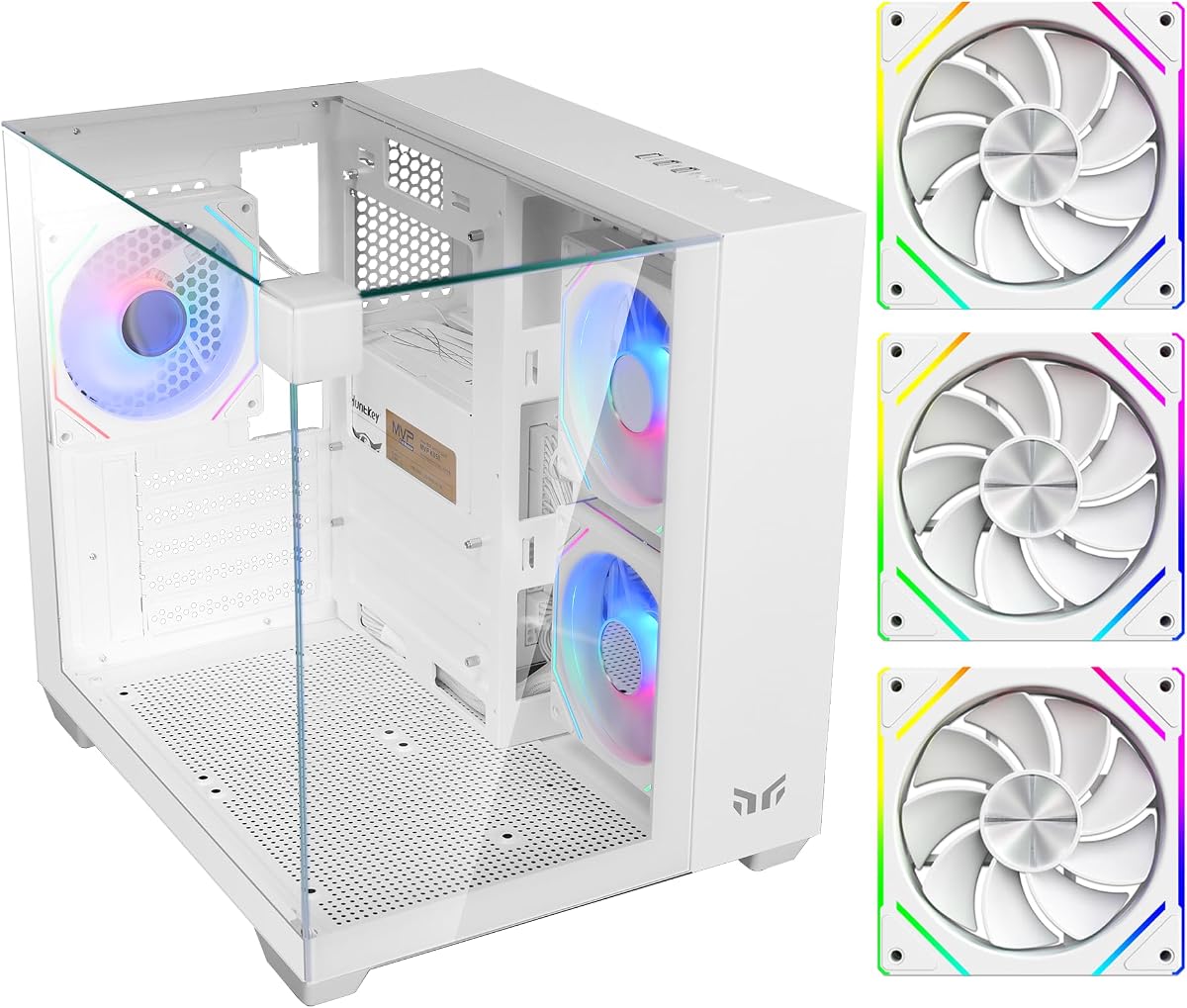



The Yeah Magic Cube is a visually striking case that transforms your desk into a showcase. With a 4.7 rating it delivers a panoramic view of your components through three tempered glass panels and pillar less design.
We may earn a commission when you buy through this link, at no additional cost to you.
Its compact layout supports Mini ITX and Micro ATX motherboards while fitting GPUs up to 325mm. The three pre installed 120mm fans ensure efficient airflow out of the box for stable gaming performance.
While the glass offers great visibility the compact size limits larger motherboard options. This trade off is acceptable for users prioritizing aesthetics and space efficiency over extreme expansion capabilities.
This case is ideal for builders wanting a clean modern look without sacrificing too much performance. We recommend it for compact gaming setups where visual appeal is a top priority.
The three glass panels create an immersive view of your internal hardware and lighting effects from almost any angle.
With a 28.5 liter volume this case fits easily on smaller desks while still supporting powerful hardware components.
We may earn a commission when you buy through this link, at no additional cost to you.
The Cooler Master QUBE 540 stands out for its flexible orientation allowing horizontal or vertical placement. This feature enhances accessibility and layout customization for diverse workspace configurations and user preferences.
We may earn a commission when you buy through this link, at no additional cost to you.
It supports ATX and E ATX motherboards with GPU clearance up to 415mm. The full front mesh panel maximizes ventilation for superior cooling under load during intensive gaming sessions.
The reversible I/O panel adds convenience but might require initial setup adjustment. This is a minor inconvenience given the overall robust build quality and expansion capabilities offered.
Choose this case if you need adaptability and support for larger components. It balances modern features with practical design elements for versatile desktop setups.
Engineered to work seamlessly in both horizontal and vertical positions this case adapts to your specific desk setup needs.
The full front mesh panel paired with pre installed fans ensures excellent airflow to keep components cool under load.
We may earn a commission when you buy through this link, at no additional cost to you.
The Apevia Prism-WH delivers exceptional lighting with five pre installed ARGB fans and 366 RGB modes. It offers a dual chamber design for effective cable management and component visibility on a budget.
We may earn a commission when you buy through this link, at no additional cost to you.
Supporting Micro ATX boards it fits GPUs up to 340mm and includes ventilated metal side panels for increased air circulation. The top panel provides essential connectivity for everyday peripherals.
The RGB sync depends on motherboard compatibility which can limit control options. However the included switch allows quick changes without needing software for basic customization needs.
This case is perfect for budget builders seeking high visual impact. It offers solid features and flexibility for those prioritizing RGB aesthetics in their build.
With 366 lighting modes via the top switch you can customize your setup easily without complex software integration.
The dual chamber design hides cables on the back side keeping your build organized and visually appealing.
We may earn a commission when you buy through this link, at no additional cost to you.
The Zalman CUBIX-G offers excellent value with a compact Micro ATX design ideal for budget gaming. It includes three FRGB fans and USB Type C for fast connectivity right out of the box.
We may earn a commission when you buy through this link, at no additional cost to you.
Supporting GPUs up to 280mm it fits most mid range cards while keeping the desktop footprint small. The sturdy construction ensures durability for everyday use in home or office environments.
Fixed lighting and limited GPU size are trade offs for the low price. These are acceptable for users needing a simple functional case without excessive features or costs.
Recommend this for entry level builds or secondary systems. It provides reliable performance and modern features without breaking the bank for casual gamers.
Ideal for budget gaming and clean desktop setups this case saves space without sacrificing essential hardware support.
Includes USB Type C and USB 3.0 ports ensuring fast data transfer and convenient access for your devices.
We may earn a commission when you buy through this link, at no additional cost to you.
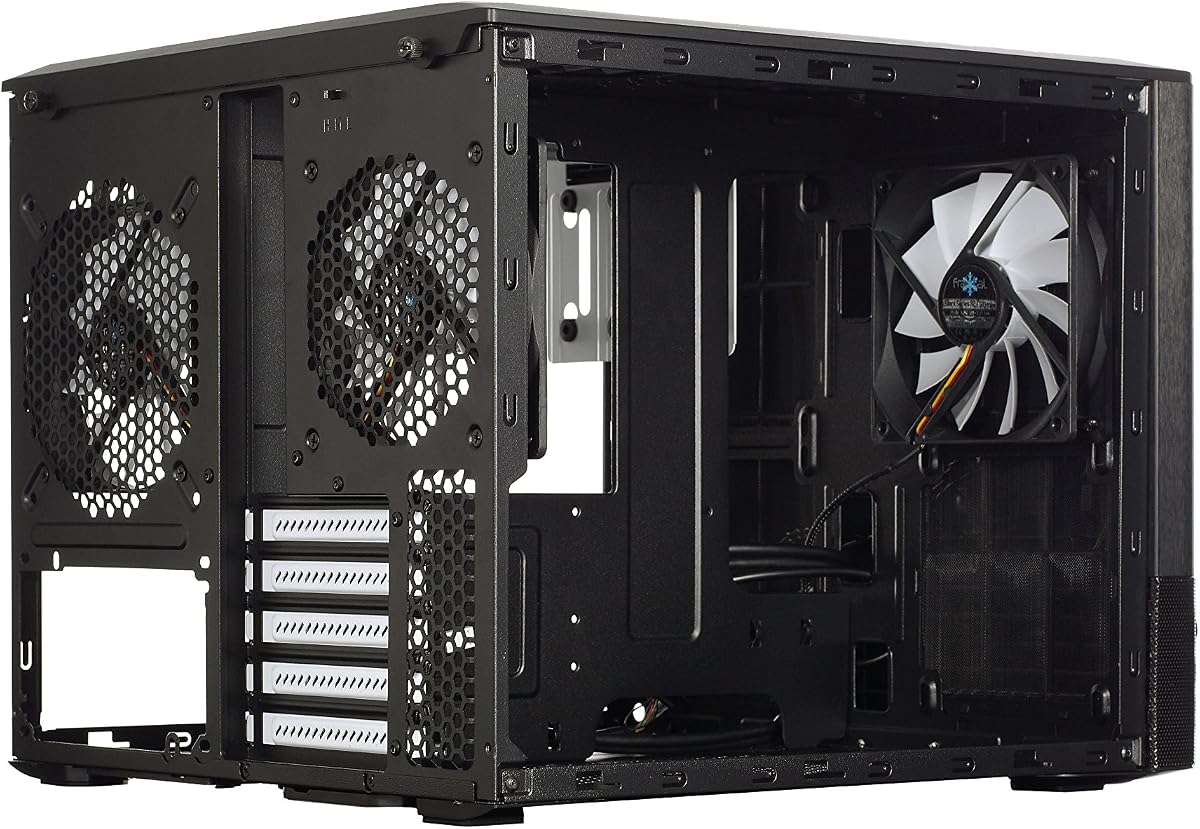
The Fractal Design Node 804 earns top marks for its dual chamber layout and modular interior. It supports up to eight 3.5 drives and includes high airflow mesh panels for excellent cooling.
We may earn a commission when you buy through this link, at no additional cost to you.
Its unique hard drive mounting system allows flexible storage configurations. The design supports water cooling with space for up to four radiators simultaneously ensuring thermal stability.
The larger footprint might be an issue for very small desks. However the storage capacity and airflow make it ideal for workstation builds needing extensive drives.
Choose this case for high capacity or cooling focused builds. It offers a balance of aesthetics functionality and thermal performance for demanding users.
The dual chamber layout separates power supply from components reducing heat buildup and improving overall system stability.
Flexible drive mounting supports up to eight drives allowing massive storage for media or server applications.
We may earn a commission when you buy through this link, at no additional cost to you.
The Apevia Prism-Elite-BK offers massive lighting with seven pre installed ARGB PWM fans. It supports GPUs up to 400mm and features dual glass panels for eye catching visibility.
We may earn a commission when you buy through this link, at no additional cost to you.
The PWM connectors allow motherboard speed adjustment for optimal gaming performance. A magnetic dust filter on top helps reduce accumulation and keeps the interior clean over time.
Seven fans might increase noise levels under heavy load. This is acceptable for RGB enthusiasts who prioritize visual impact and airflow over absolute silence.
Ideal for users wanting maximum RGB potential out of the box. The large support and lighting options make it a strong choice for flashy builds.
Seven fans provide extensive lighting coverage and modes for a vibrant setup that matches any aesthetic style.
Accommodates graphics cards up to 400mm ensuring compatibility with high end modern gaming hardware options.
We may earn a commission when you buy through this link, at no additional cost to you.
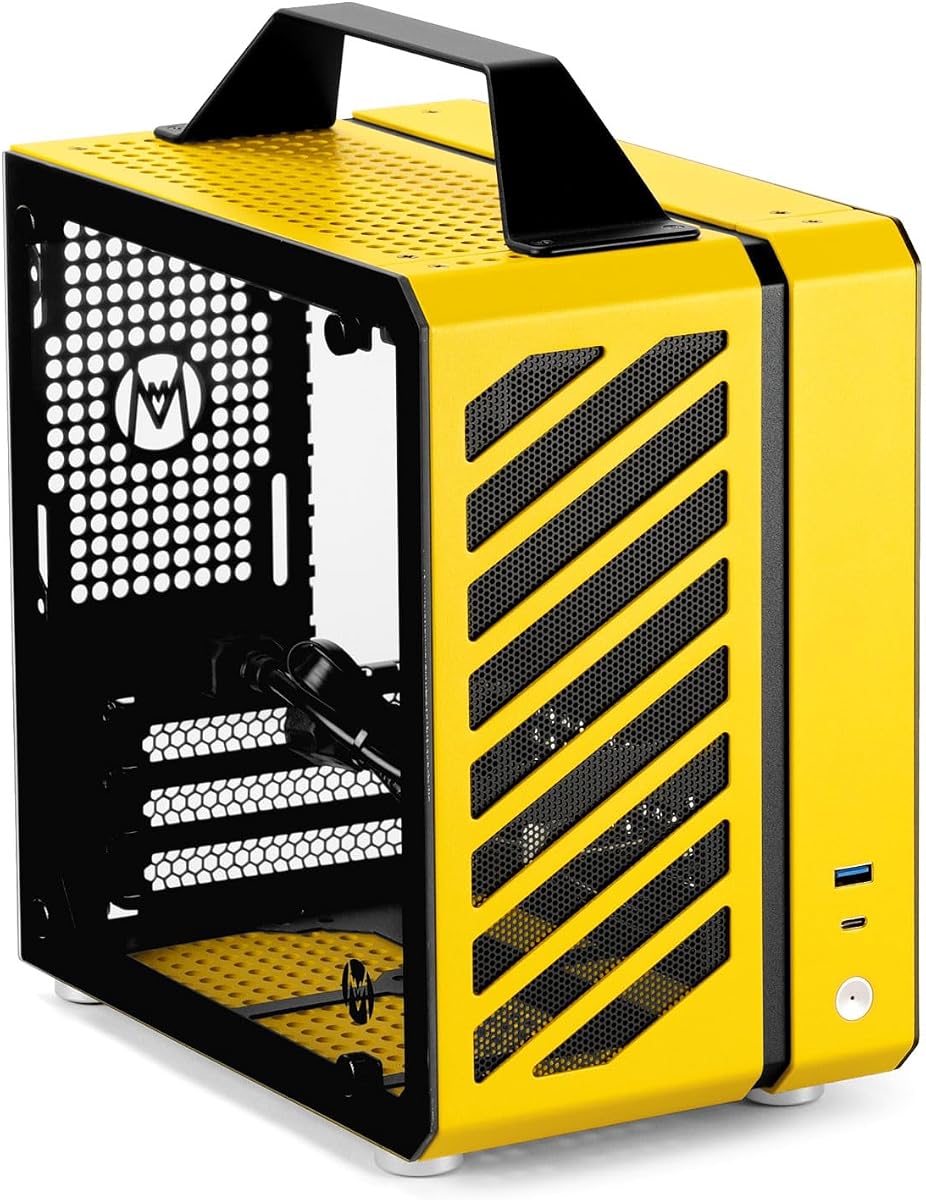
The Zalman CUBIX M-ATX is the most compact and affordable option with a 17.1 liter volume. Its sturdy 0.8T steel construction provides durability despite its charming and simple appearance.
We may earn a commission when you buy through this link, at no additional cost to you.
Supporting standard ATX PSUs and 260mm GPUs it fits essential components for entry level builds. The perforated front panel and 80mm fan ensure basic airflow for standard workloads.
Limited ports and single fan are constraints for advanced users. However for basic office or light gaming tasks this case offers solid value and reliability without cost.
Choose this for tight budgets or space constrained desks. It delivers essential protection and airflow for users needing a simple reliable system chassis.
With a 17.1 liter total volume this case fits in the smallest spaces without losing essential hardware support.
Built with durable 0.8T steel this case provides a robust and sturdy structure to protect internal components.
We may earn a commission when you buy through this link, at no additional cost to you.
The Mechanic Master C24 offers ultra small portability with a 9.9L form factor and aluminum handle. It supports ITX boards and SFX PSUs for high performance in a tiny footprint.
We may earn a commission when you buy through this link, at no additional cost to you.
Advanced cooling includes multi fan support with top rear and bottom options for optimized airflow. The aluminum steel hybrid frame ensures premium build quality for durability and aesthetics.
The high price and limited GPU size may deter budget buyers. These trade offs are justified for users needing a truly portable high performance machine.
Ideal for LAN party enthusiasts or space conscious users. This case combines premium materials and compact design for exceptional on the go computing.
The ultra small 9.9L volume with an aluminum handle makes this case ideal for transport and space saving.
Multi fan support across multiple panels ensures optimized airflow even within this ultra compact form factor.
We may earn a commission when you buy through this link, at no additional cost to you.
The Fractal Design Node 804 No Power Supply version offers flexible PSU options without the included unit. It maintains the same premium aluminum steel design and storage capacity as the full version.
We may earn a commission when you buy through this link, at no additional cost to you.
Supporting up to ten 3.5 drives it is ideal for storage focused builds. The Micro ATX form factor ensures compatibility with standard components and cooling systems.
Buying power supply separately increases total cost but allows customization. This is acceptable for users needing specific PSU wattage or features not included in standard bundles.
Choose this for storage builds needing specific PSU wattage. It retains the excellent design and cooling of the standard model with added flexibility.
Not including power supply allows you to choose the exact wattage and features needed for your specific build requirements.
Supports up to ten 3.5 drives providing massive storage space for media servers or extensive file libraries.
We may earn a commission when you buy through this link, at no additional cost to you.
The Cooler Master Qube 540 Moonstone offers a unique aesthetic finish for a compact ATX build. It provides standard I/O and maintains the flexible design of the series in a distinctive color.
We may earn a commission when you buy through this link, at no additional cost to you.
The Moonstone finish adds visual appeal for modern setups. Standard connectivity ensures convenience for everyday peripherals while keeping the form factor compact and accessible.
It shares standard features with other variants but lacks unique extras. The lower rating might reflect availability issues rather than hardware quality itself.
Ideal for color coordinated setups or specific design preferences. It brings the Qube 540 versatility to users seeking a distinctive visual style.
The Moonstone finish provides a distinctive look for color coordinated builds without sacrificing the standard case functionality.
Supports standard ATX motherboards in a compact form factor for versatile and space efficient desktop configurations.
We may earn a commission when you buy through this link, at no additional cost to you.
Selecting the right case involves balancing size, cooling, and compatibility with your hardware. This guide breaks down the key factors to consider for a successful build.
Ensure the case supports your motherboard size. Some cube cases support ATX while others limit to Micro ATX or Mini ITX which affects your hardware options.
Check specifications to confirm motherboard compatibility before purchasing to avoid fitting issues.
Airflow is critical for performance. Look for mesh panels or pre installed fans. Dual chamber designs improve cooling by separating heat sources.
Prioritize cases with good ventilation to prevent overheating during intensive gaming or workloads.
Measure your components. Cases vary in max GPU length and CPU cooler height. Compact cases often have stricter limits.
Verify dimensions match your planned build to ensure everything fits physically inside.
If you need multiple drives, check internal bays. Some designs like Node 804 offer massive storage while others limit to SSDs.
Choose a case based on your long term storage needs.
Steel thickness and material affect durability. Look for sturdy construction with minimal wobble. Panels should fit securely.
Investing in better materials ensures longevity and better protection.
Cable management impacts airflow and aesthetics. Look for dedicated routing channels and space behind the tray.
Good cable management keeps your build clean and improves airflow efficiency.
Front ports like USB 3.0 and Type C are essential for peripherals. Modern cases include these for convenience.
Ensure the I/O panel meets your daily access requirements for devices.
Choose a design matching your preferences. Glass panels offer visibility while mesh offers cooling. RGB lighting adds flair.
Balance visual appeal with functional needs like cooling and durability.
When assembling, lay the case on a clean soft surface. Use the modular panels to access the interior easily. Secure components tightly before adding cables.
Regularly clean dust filters to maintain airflow. Remove side panels periodically to check fan speeds and dust accumulation inside.
Handle with care during transport. If the case has a handle use it. Keep screws organized to avoid losing parts during future upgrades.
Many cube cases support ATX, but some are limited to Micro ATX or Mini ITX. Check the motherboard support list carefully. The Qube 540 supports ATX, while others may limit size for compactness.
Yes, if they have mesh panels or chamber designs. Dual chambers help airflow by separating hot and cool air zones. Look for models with multiple fans for best results.
Most support 240mm radiators. Some models offer 360mm options for high-end setups. Check radiator mounting options before buying to ensure compatibility.
Some models include handles for portability. Smaller 9L designs are very portable but may limit GPU choices. Check for aluminum frames if moving your PC often.
Yes, most allow upgrades. However, GPU length limits might block newer cards. Plan future upgrades carefully when choosing a compact case design.
Use microfiber cloths and glass cleaner. Avoid spraying directly on edges. Remove panels if possible for better access during cleaning.
The Node 804 and Qube 540 stand out for performance. The Yeah Magic Cube offers stunning visuals. Your choice depends on storage needs and aesthetics.
Prioritize cooling and motherboard size first. Visuals and RGB are secondary to thermal performance and fit. Balance features with your actual usage patterns carefully.
Prices change often so verify current deals before buying. Check availability for specific colors. A good case protects your hardware and enhances your setup.