
SCRIB3D P1 3D Printing Pen with Display
4.4Editor score
Stepless speed function
PLA filament included
Free stencil guide
This guide compares the top 3D printing pens for kids based on safety, ease of use, filament compatibility, and creative potential to help parents choose the
Finding the right 3D printing pen for kids can transform creativity into tangible art. These tools allow children to draw in three dimensions using heated plastic that hardens instantly. Safety and ease of use are paramount when selecting a device for young artists.
We evaluated ten leading models based on safety features, temperature control, and included accessories. Our analysis considers filament types, display screens, and ergonomic design to ensure a smooth user experience. Each product offers unique benefits for different skill levels and ages.
Every pick highlights key strengths and potential limitations to help you make an informed decision. Prices and availability may change frequently due to market demand and promotions. Always check the current listing before purchasing to ensure you get the best value available today.
4.4Editor score
4.4Editor score

4.4Editor score
This side-by-side comparison highlights the core specifications and unique selling points of each top-ranked 3D printing pen for kids. Use this table to quickly identify which model aligns best with your child's age, skill level, and creative interests.




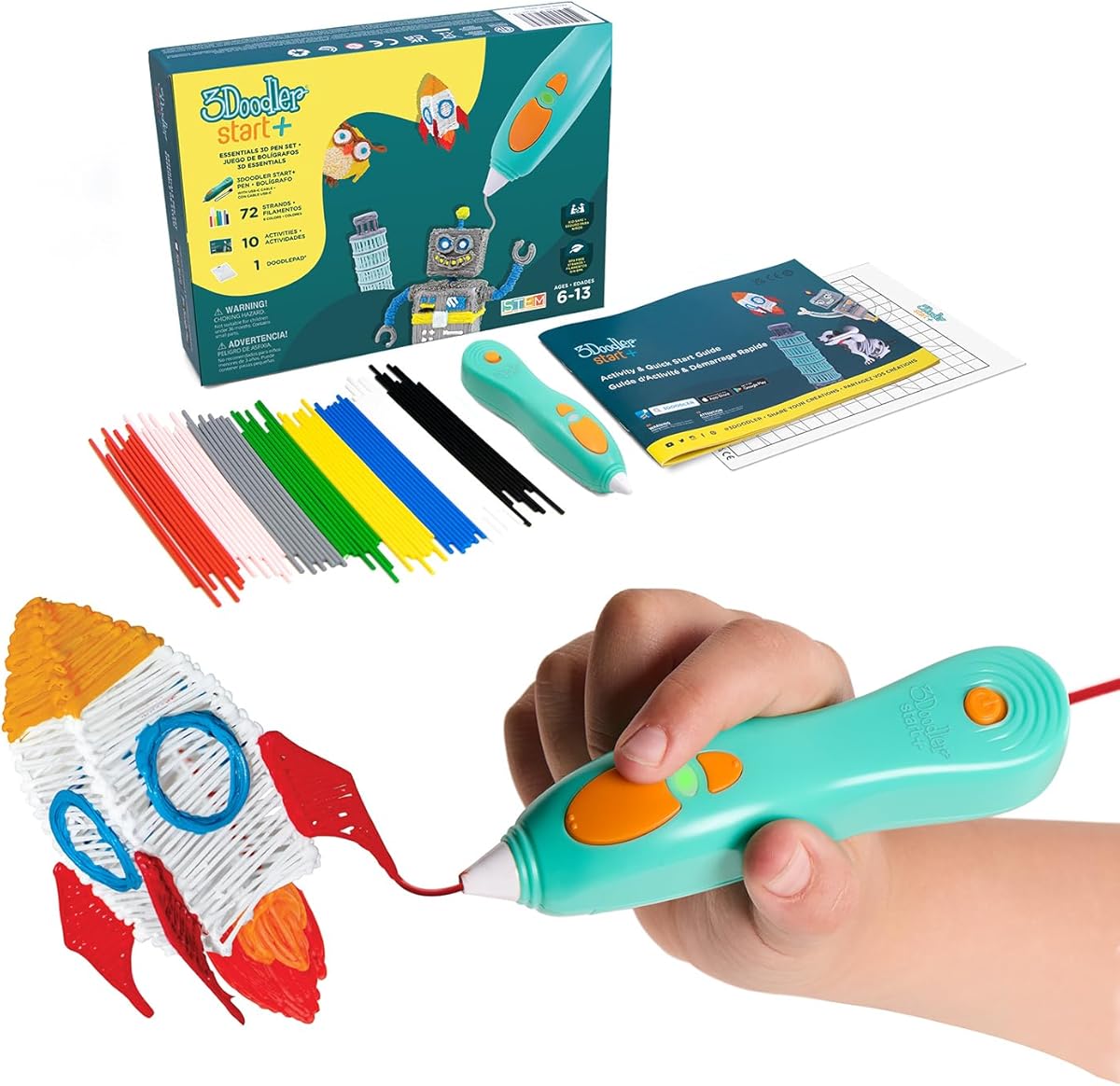
The 3Doodler Start+ Essentials set stands out as the top choice for families seeking safety and creativity. With a rating of 4.4 stars, it reassures parents that their children can explore 3D art without burn risks. The device is engineered specifically for young hands, ensuring a secure grip and intuitive operation during long creative sessions.
We may earn a commission when you buy through this link, at no additional cost to you.
Its standout quality is the completely child-safe design featuring no hot parts. The nozzle and plastic filament remain cool enough to touch, eliminating burn hazards entirely. This makes it ideal for children aged 6 and up. The bundle includes 72 strands of mixed-color Start+ plastics, providing ample material for immediate project creation and exploration.
While the price is higher than some alternatives, the safety features and included accessories justify the investment. The only trade-off is the limitation to specific 3Doodler Start filaments. However, this ensures consistent quality and safety standards. For parents prioritizing security over versatility, this pen delivers unmatched peace of mind.
This product is best suited for beginners and younger children who need a safe entry point into 3D drawing. The included DoodlePad and stencils help kids start creating right away. We recommend this kit for households looking for a reliable, educational toy that fosters spatial thinking and artistic expression.
The absence of hot components means kids can focus on creativity without adult supervision risks. This feature significantly lowers the barrier to entry for home learning activities.
This pen helps children understand geometry and spatial relationships through hands-on building. It serves as an effective tool for STEM learning in a playful, engaging environment.
We may earn a commission when you buy through this link, at no additional cost to you.
The SCRIB3D P1 offers excellent value for families seeking an affordable yet capable 3D printing pen. With a 4.4 rating, it balances cost and functionality effectively. The display screen provides essential feedback while the stepless speed function allows for precise control over extrusion.
We may earn a commission when you buy through this link, at no additional cost to you.
This pen includes 30 feet of PLA filament across three starter colors, giving kids immediate creative freedom. The stepless speed slider is a key feature, allowing users to adjust flow from intricate details to faster infill. This flexibility makes it suitable for both beginners and those progressing to complex structures.
The main trade-off is the warm-up time, which takes about 2 to 3 minutes before drawing begins. Additionally, the display is functional but not as advanced as premium OLED models. However, these limitations are minimal considering the price. It remains a practical choice for casual creative use.
Ideal for budget-conscious buyers, this pen is a great starting point for aspiring young artists. The included stencil book and project guide provide structured learning opportunities. We recommend it for families wanting a reliable tool without a heavy financial commitment.
The stepless speed slider allows for smooth transitions between detailed work and larger fills. This level of control is rare in budget models and enhances the user experience significantly.
Everything needed to start is included in the box. From the power adapter to the stencil book, users can begin creating immediately upon unboxing.
We may earn a commission when you buy through this link, at no additional cost to you.
The MYNT3D Professional pen stands out for its precise temperature control and OLED display. Rated 4.4 stars, it appeals to older kids and teens seeking professional-grade performance. The ability to adjust temperature in 1-degree increments allows for fine-tuning with different materials.
We may earn a commission when you buy through this link, at no additional cost to you.
The large OLED display lets users monitor temperature clearly, ensuring consistent results. The adjustable feed speed provides optimal control over material flow during drawing. This combination of features makes it a powerful tool for creating detailed 3D models and artistic projects.
While it carries a higher price tag, the build quality and features justify the cost. The trade-off is that it requires more careful handling than child-safe models. However, for responsible users, the enhanced control is invaluable. It bridges the gap between toys and professional tools.
This pen is best for older children and adults looking to expand their 3D printing skills. The ergonomic design ensures comfort during extended sessions. We recommend it for households invested in advanced creative hobbies and precise engineering projects.
Adjusting temperature in single-degree increments allows users to experiment with different effects. This precision is crucial for working with varied materials and achieving desired results.
The slim pen design fits comfortably in hand, reducing fatigue during long projects. This ergonomic focus enhances the overall usability for both kids and adults.
We may earn a commission when you buy through this link, at no additional cost to you.
The MYNT3D Super pen offers robust compatibility with both ABS and PLA filaments. With a 4.3 rating, it balances versatility and ease of use. The ultrasonic sealed nozzle ensures durability and reduces clogging risks during projects.
We may earn a commission when you buy through this link, at no additional cost to you.
Its stepless speed slider provides optimal flow control for various tasks. The ergonomic touch design ensures comfort during extended sessions. While it lacks a display screen, the manual controls are straightforward and reliable for consistent performance.
The lack of a visual display might be a drawback for users preferring quick temperature checks. However, the dual filament support expands creative options significantly. This trade-off is acceptable for users prioritizing material versatility over digital interfaces.
Ideal for hobbyists wanting to experiment with different plastics, this pen is a solid mid-range option. It suits older children and adults comfortable with manual adjustments. We recommend it for projects requiring specific material properties like strength or flexibility.
The ultrasonic sealed nozzle provides market-leading durability against clogs. This feature ensures reliable performance even after frequent use in demanding projects.
Support for both ABS and PLA expands the range of possible projects. Users can choose filaments based on their specific project requirements without buying multiple pens.
We may earn a commission when you buy through this link, at no additional cost to you.
The SCRIB3D Advanced pen is designed for making accurate and creative 3D models. Rated 4.3 stars, it focuses on precision and comfort. The LCD screen helps monitor heat levels to ensure correct settings for each project.
We may earn a commission when you buy through this link, at no additional cost to you.
It features 8 different speed options allowing users to regulate flow precisely. The soft touch surface ensures optimal comfort during long sessions. The kit includes 5 colors of PLA plastic totaling 50 feet, offering plenty of material for practice.
The warm-up time is a minor inconvenience but standard for this class of device. While the button interface is basic, it remains intuitive for users. These trade-offs are acceptable given the focus on accuracy and ease of use.
Best for users seeking a balance between advanced features and simplicity. It is suitable for teens and adults interested in engineering or detailed design. We recommend it for those wanting to create precise models without complex technical setups.
The soft touch surface and ergonomic curvature provide maximum comfort. This design choice reduces hand fatigue, making longer creative sessions more enjoyable.
With 8 speed options, users can adapt to different project needs. This flexibility allows for both rapid prototyping and detailed work within the same device.
We may earn a commission when you buy through this link, at no additional cost to you.
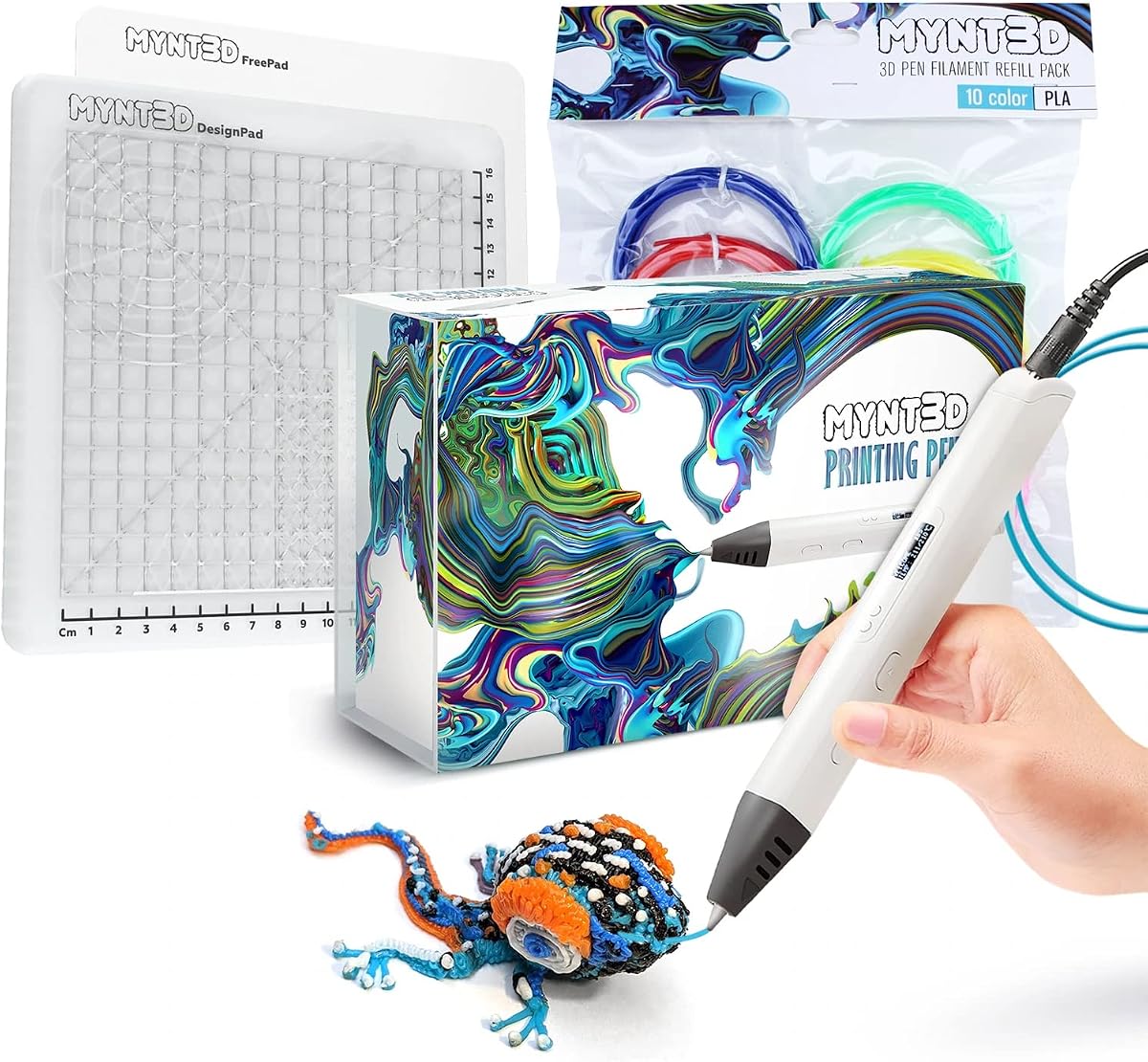
The MYNT3D Pro Kit delivers a comprehensive package for creators wanting professional results. Rated 4.5 stars, it excels in completeness and versatility. The bundle includes 10 colors of PLA filament, offering an extensive palette for diverse projects.
We may earn a commission when you buy through this link, at no additional cost to you.
A key feature is the DesignPad mat kit, which aids in creating geometric shapes. The replaceable sealed nozzle ensures long-lasting operation and clog-free performance. Stepless speed control allows for enhanced flow regulation during detailed work.
The price is higher than basic pens, but the included accessories justify the cost. The trade-off is the complexity of managing multiple components. However, for users seeking an all-in-one solution, this value is unmatched.
Ideal for serious hobbyists and educational settings needing varied materials. It suits older children and adults ready for advanced features. We recommend it for those wanting everything needed for professional-style creation in one purchase.
With 10 different colors, users can create more vibrant and varied projects. This wide range encourages experimentation with color theory and design mixing.
The DesignPad and FreePad surfaces provide structured support for designs. These tools help maintain consistency and accuracy during complex builds.
We may earn a commission when you buy through this link, at no additional cost to you.
The MYNT3D Super Kit offers a balanced blend of advanced features and comprehensive accessories. Rated 4.4 stars, it provides a robust solution for varied projects. The inclusion of 10 colors of PLA filament allows for significant creative flexibility.
We may earn a commission when you buy through this link, at no additional cost to you.
It features temperature adjustability for both ABS and PLA, expanding material options. The replaceable sealed nozzle design ensures durability and ease of maintenance. The DesignPad mat supports geometric designs with precision and ease.
While the cost is higher than basic models, the bundle value remains high. The trade-off is the learning curve for temperature settings. However, users gain versatility that basic kits cannot match.
Best for families or schools needing multiple material options and tools. It suits teens and adults interested in technical drawing. We recommend it for those seeking a durable, flexible solution for serious creative work.
Support for both ABS and PLA opens more project possibilities. Users can select the right material for specific strength or finish requirements.
The replaceable sealed nozzle ensures the pen lasts longer under heavy use. This feature reduces downtime caused by clogs or wear over time.
We may earn a commission when you buy through this link, at no additional cost to you.
The 3Doodler Flow pen is a versatile tool for teens and creators. Rated 4.1 stars, it balances portability with functionality. It supports multiple filament types including PLA, ABS, and wood for broad project range.
We may earn a commission when you buy through this link, at no additional cost to you.
Its integrated LCD provides real-time temperature monitoring for smooth operation. The pen is compact and lightweight, making it easy to carry on the go. Users receive 80 feet of plastic spools to begin creating immediately.
The rating reflects some user feedback on setup complexity. However, the convenience of multi-material support is a strong advantage. For portable needs, the benefits outweigh the minor learning curve.
Best for users needing a mobile creative solution with material flexibility. It suits teens and adults working on various design tasks. We recommend it for those prioritizing versatility and portability over advanced controls.
The lightweight and compact design allows for portability. Users can take this pen anywhere, enabling creativity outside the home studio.
Compatibility with wood and standard plastics expands design possibilities. This feature encourages experimentation with textures and structural elements.
We may earn a commission when you buy through this link, at no additional cost to you.
The SCRIB3D P1 Bundle adds essential accessories for a smoother creative experience. With a 4.0 rating, it provides a practical toolkit for beginners. The included silicone mat offers a durable surface for tracing and practice.
We may earn a commission when you buy through this link, at no additional cost to you.
It features built-in shapes and patterns to guide design consistency. The pen itself is beginner-friendly with a display screen for temperature monitoring. The bundle ensures users have everything needed to start projects immediately.
The mat requires occasional cleaning to maintain surface quality. This is a minor maintenance task for the benefits provided. The trade-off is a simple pen compared to advanced models, but it suits learning well.
Ideal for households wanting a complete starter kit. It suits children and new users needing support for consistency. We recommend it for those focusing on foundational skills and structured learning activities.
The silicone mat provides a non-slip surface for consistent work. This surface helps prevent shifting during drawing, ensuring better project outcomes.
Stencils and project guides help users learn techniques faster. These tools reduce frustration by offering clear starting points for beginners.
We may earn a commission when you buy through this link, at no additional cost to you.
The 3Doodler Start+ Bundle is designed for long-term creative play without refill worries. With a 4.0 rating, it offers immense value through filament volume. The bundle includes over 1250 feet of additional plastic for extended use.
We may earn a commission when you buy through this link, at no additional cost to you.
It maintains child-safe design with no hot parts, ensuring safety. The free app provides templates and step-by-step instructions for learning. This integration enhances the educational aspect significantly for young users.
The main limitation is the requirement for specific filaments. However, the sheer volume of included plastic outweighs this restriction. For long-term needs, the convenience of fewer refills is a major plus.
Best for households seeking a long-lasting supply for daily use. It suits parents wanting educational tools that minimize screen time. We recommend it for families prioritizing sustained creative engagement and safety.
With thousands of feet of filament, refills are rarely needed. This longevity ensures continuous creative practice without frequent interruptions.
The companion app adds structured guidance and templates. This feature bridges physical creativity with digital learning for a holistic experience.
We may earn a commission when you buy through this link, at no additional cost to you.
Selecting the right 3D printing pen requires considering safety, ease of use, and the materials available. This guide breaks down key factors to help you choose the best tool for your child's age and skill level.
Safety is the most critical factor when buying for children. Look for pens with no hot parts or automatic safety stand-by modes. Some models use specialized filaments that stay cool to the touch. These designs prevent burns and reduce parental supervision needs.
Prioritize devices specifically marketed as child-safe for younger users. Features like cool nozzles and protective covers ensure a secure creative environment.
Different pens support various filament types like PLA, ABS, or proprietary blends. Compatibility affects project durability and creative options. Some pens accept only one brand of plastic which limits choices but ensures safety.
Choose a pen matching your project goals. If versatility matters, pick a model supporting standard filaments. For safety, stick to proprietary options designed for young hands.
Temperature accuracy ensures consistent results across different materials. Pens with adjustable settings allow fine-tuning for different plastics. Visual displays like OLED or LCD provide clear feedback on heating status.
Consider whether your child needs precise control or just basic operation. Display screens add value for older users but may complicate things for beginners.
Flow control determines line thickness and detail level. Stepless speed sliders offer smooth transitions between slow and fast extrusion. This feature is essential for balancing speed and accuracy.
Look for pens with adjustable flow to match project complexity. Beginners benefit from simple buttons while advanced users need fine-tuned control.
Complete kits often include mats, stencils, and activity guides. These tools help children start projects immediately without extra purchases. Bundles provide better value and support structured learning.
Check what comes in the box. A good starter kit should offer enough materials and guidance to sustain early creativity.
Comfort is key for long creative sessions. Look for pens with soft-touch surfaces or ergonomic curvature. Lightweight designs reduce hand fatigue during detailed work.
Ensure the pen fits your child's hand properly. A comfortable grip encourages longer practice and more ambitious projects.
Some pens come with apps, tutorials, or project guides. These resources help children learn techniques and overcome challenges. Online communities provide extra inspiration and troubleshooting.
Prioritize products with strong support materials. Good resources turn a toy into an effective educational tool.
Build quality affects longevity. Pens with sealed nozzles resist clogs and wear better. A solid warranty ensures peace of mind against defects.
Check for warranty terms and customer service reputation. Reliable support helps resolve issues quickly so creativity isn't interrupted.
Begin by plugging in the pen and selecting the appropriate filament type. Allow the device to heat up fully before drawing. Use the display or LED indicators to confirm the pen is ready.
Start drawing on a flat surface like a mat or stencils to build confidence. Press the feed button to extrude plastic and move the pen smoothly. Practice varying speed to control line thickness.
After use, let the pen cool down before storing. Clean the nozzle if clogs occur using the provided cleaning tool. Store filaments in a dry place to prevent moisture damage.
Yes many models are designed specifically for children with no hot parts and cool-to-touch nozzles. These pens use safe filament that does not cause burns. Always check age recommendations before purchasing to ensure appropriate safety levels.
Most kids pens use PLA or proprietary plastic filaments. Standard pens may accept ABS or other materials. Always verify compatibility with your specific pen model to avoid jams or poor results.
Most pens take about 2 to 3 minutes to reach the required temperature. Some advanced models heat up faster. Check the product specs for exact times before starting your creative session.
Some pens are marketed for household repairs and DIY fixes. They can mend broken items or reinforce structures. However, they are primarily designed for artistic and educational purposes.
Yes most kits include stencils to help guide designs. You can use any thin plastic stencil safely. This feature makes it easier for beginners to create consistent shapes.
Use the cleaning tool provided with the pen to clear blockages. Some models allow you to retract the filament manually. Regular cleaning prevents jams and maintains consistent flow.
Yes these pens support STEM learning by teaching spatial reasoning and engineering. They also enhance fine motor skills and creativity. They are excellent tools for hands-on education at home.
Safety-focused models suit ages 6 and up. Advanced pens work best for teens and adults with experience. Always supervise younger children to ensure safe handling of the device.
We have highlighted ten top options ranging from safe beginners kits to advanced professional tools. The 3Doodler Start+ Essentials offers unmatched safety while the SCRIB3D P1 provides budget-friendly versatility. The MYNT3D Professional delivers precise control for older users.
Prioritize safety features and ease of use when selecting for children. Consider the filament types and included accessories that match your child's interests. A well-matched device will spark lasting creativity and learning.
Remember that prices and stock change frequently on online marketplaces. Always check current listings for the best deals and latest versions before purchasing.