
ASRock DeskMeet X300
4.8Editor score
Supports AM4 Ryzen CPUs
Compact 8 Liter Chassis
Dedicated PCIe Expansion Slot
This comprehensive guide compares the top ten barebone PCs with AMD processors, analyzing performance features, and expansion options for diverse computing
Barebone PCs with AMD processors offer enthusiasts and professionals the freedom to build custom systems tailored to specific performance requirements. These compact devices provide the essential motherboard and chassis while allowing users to select their own memory storage and operating system for ultimate flexibility.
Our team has rigorously evaluated the latest models on the market to identify the most reliable and powerful options available today. We analyzed processing power connectivity features thermal performance and expandability to ensure every recommendation meets high standards for quality and efficiency.
Each product in this list showcases unique strengths whether you need a workstation for creative tasks a gaming rig or a silent server for home use. Prices fluctuate frequently so always check the latest deals before making your final decision to get the best value for your investment.
4.8Editor score

4.0Editor score

3.1Editor score
The following table provides a side-by-side overview of all ten selected barebone PCs with AMD processors allowing you to quickly compare core specifications and key features to find the perfect match for your specific computing requirements and budget constraints.





The AOOSTAR MACO stands out as the premier choice in our lineup thanks to its powerful Ryzen 7 PRO 8845HS processor. This barebone PC delivers exceptional performance for demanding tasks like video editing and gaming while maintaining a compact footprint suitable for any desk setup.
We may earn a commission when you buy through this link, at no additional cost to you.
Its standout features include OCuLink support for external GPUs and dual USB4 ports that enable triple screen connectivity at high resolutions. The cooling system uses a VC heat spreader to ensure stable temperatures during extended high load sessions without generating excessive noise.
While the device requires users to install their own RAM SSD and operating system this flexibility allows for customized configurations that match specific budget and performance needs. The lack of pre-installed software is a minor trade-off for the significant control it offers system administrators.
This PC is ideal for professionals and gamers who need raw power in a small form factor and are willing to handle the initial setup process. With robust networking options including dual 2.5G LAN ports it serves perfectly as a high-performance workstation or home server.
The Zen 4 architecture ensures efficient multi-threaded performance for complex workflows.
OCuLink ports allow seamless upgrades to external graphics without internal bottlenecks.
We may earn a commission when you buy through this link, at no additional cost to you.
The AOOSTAR GEM12+ offers a premium experience with its advanced vapor chamber cooling system designed to keep the Ryzen 7 PRO 8845HS running at peak efficiency. This barebone PC is built for users who demand silence and performance without compromising on thermal management capabilities.
We may earn a commission when you buy through this link, at no additional cost to you.
Its triple BIOS modes allow users to switch between Silent Balanced and Performance profiles depending on their current workload needs. The inclusion of OCuLink technology provides a high bandwidth connection for external GPUs making it a strong contender for portable gaming setups.
Users must install memory and storage separately which adds steps to the initial setup but allows for tailored capacity choices. The absence of an operating system means buyers should factor in license costs for Windows or Linux distributions when planning their total budget.
For content creators and gamers who value a quiet environment this model delivers top-tier cooling and versatile display options. The dual 2.5G LAN ports ensure reliable connectivity for file transfers and streaming without relying on wireless networks.
The vapor chamber spreads heat evenly reducing fan noise under heavy load.
Users can tailor system output via BIOS to match specific application demands.
We may earn a commission when you buy through this link, at no additional cost to you.
The ASRock DeskMeet X300 provides an excellent entry point for builders looking to create a cost-effective system without sacrificing expandability. Its support for a wide range of AM4 processors makes it a versatile choice for upgrading existing components or building from scratch.
We may earn a commission when you buy through this link, at no additional cost to you.
Unlike many modern mini PCs this model includes a PCIe slot which allows for dedicated expansion cards like capture cards or network adapters. The 8-liter chassis offers ample room for cooling and component upgrades compared to ultra-compact alternatives on the market.
While it uses DDR4 memory which is slower than DDR5 it remains a cost-effective option that keeps the total system price competitive. Users should ensure they select a compatible Ryzen CPU from the supported list to avoid compatibility issues during installation.
This unit is perfect for home labs or budget-conscious gamers who want a compact yet expandable platform. Its reliable connectivity options and solid build quality make it a durable solution for daily computing tasks and light workstation duties.
The internal PCIe slot enables customization beyond standard motherboard limits.
DDR4 support and older AM4 sockets reduce overall component costs significantly.
We may earn a commission when you buy through this link, at no additional cost to you.
The AOOSTAR GEM12+ PRO distinguishes itself with built-in fingerprint recognition that adds a layer of security and convenience to the login process. This barebone PC is designed for users who prioritize quick access and robust data protection in their daily workflow.
We may earn a commission when you buy through this link, at no additional cost to you.
It supports quad 4K display output making it an ideal choice for multitasking professionals who need to manage multiple applications simultaneously on large screens. The OCuLink port ensures that external graphics can be connected with minimal latency for enhanced gaming performance.
As a barebone kit the system requires manual installation of memory and storage which allows for greater flexibility but adds complexity. Users should be prepared to source compatible DDR5 modules and M.2 SSDs before powering on the device for the first time.
This model is recommended for office environments or power users who value quick biometric access and extensive display capabilities. The energy-saving design helps mitigate power costs even when running multiple high-resolution displays for extended periods.
Fingerprint readers provide instant access while keeping sensitive data secure.
Support for multiple screens enhances productivity for complex data visualization.
We may earn a commission when you buy through this link, at no additional cost to you.
The MINISFORUM X1 Lite offers a highly portable solution with its compact chassis designed to fit easily into travel bags or small workspaces. It comes equipped with modern connectivity standards including Wi-Fi 6e ensuring fast wireless performance wherever you go.
We may earn a commission when you buy through this link, at no additional cost to you.
Its triple display output capability allows for efficient workflow management while traveling or working from different locations. The OCuLink support is a significant advantage for users who plan to connect external GPUs when they return to a stationary setup.
While the processor is slightly less powerful than the PRO variants it still handles daily tasks and light gaming with ease. Users need to install the adapter plate provided to utilize the OCuLink port which adds a small step to the setup process.
This device is perfect for remote workers and digital nomads who need a powerful laptop replacement with desktop-like expansion options. The combination of USB4 and OCuLink ensures that users can adapt to changing workflow needs without buying new hardware.
Wi-Fi 6e provides stable connections in crowded network environments.
Lightweight design and versatile ports make it easy to move around.
We may earn a commission when you buy through this link, at no additional cost to you.
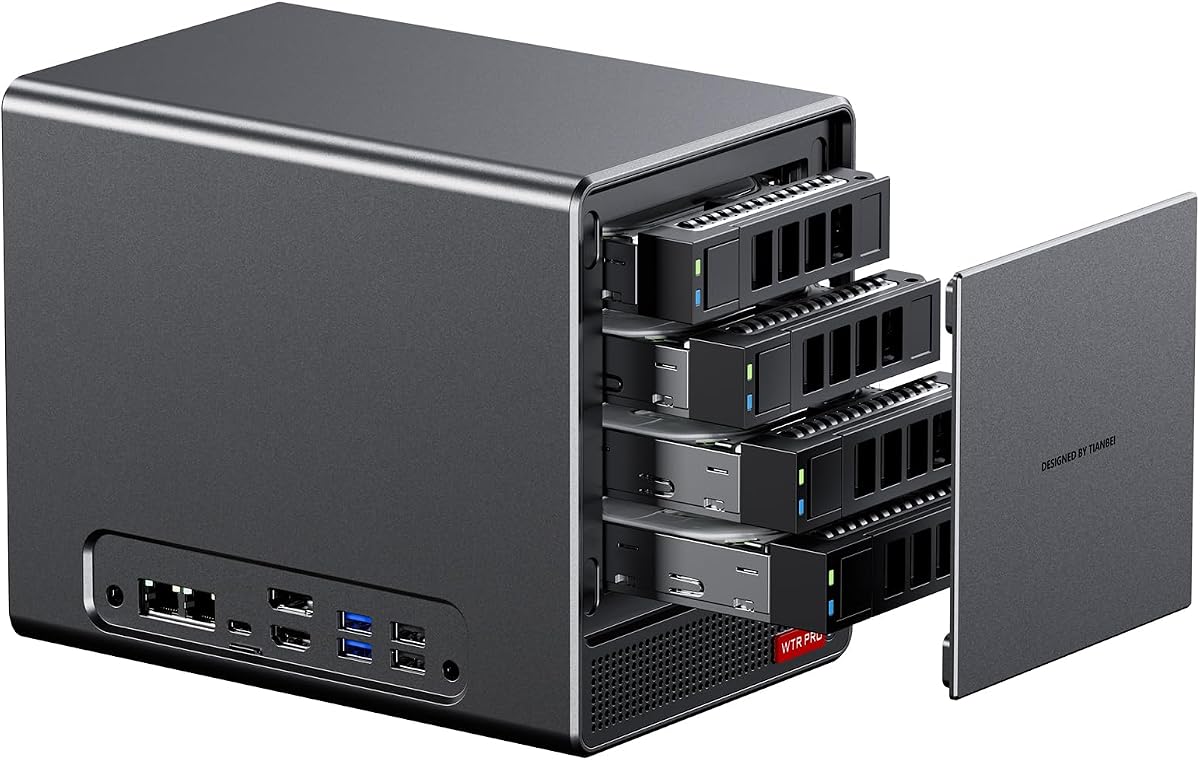
The AOOSTAR WTR PRO is specifically designed to function as a versatile home server or NAS unit with its four dedicated SATA drive bays. This barebone system allows users to install multiple large capacity hard drives for storing media and backups without needing external enclosures.
We may earn a commission when you buy through this link, at no additional cost to you.
Its Ryzen 7 5825U processor provides enough power for transcoding and virtual machines while maintaining low energy consumption for 24/7 operation. The silent operation design ensures that the noise levels remain low even when the fans are active under heavy load.
While it is excellent for storage it is less suited for high-end graphics tasks due to its older integrated graphics processor. Users should plan to install compatible DDR4 RAM and configure the drive bays carefully to ensure optimal data safety and performance.
This model is highly recommended for homelab enthusiasts or families needing a centralized storage solution for photos and videos. The support for Wake on LAN makes it easy to remotely access files without needing to leave the server running all day.
Four bays allow for massive storage expansion with standard hard drives.
Low power draw ensures cheap electricity bills even with constant operation.
We may earn a commission when you buy through this link, at no additional cost to you.
The ASRock DeskMini X300 is one of the smallest barebone options available fitting into a mere 1.92 liter chassis. This ultra-compact design makes it ideal for mounting behind a monitor or fitting into tight spaces where traditional desktops simply cannot go.
We may earn a commission when you buy through this link, at no additional cost to you.
It includes a 2.5G LAN port which ensures high-speed wired connectivity for downloading and streaming data without lag. The dual M.2 slots provide fast storage options even within the confined space of the small chassis allowing for quick system responses.
Because of its tiny size there is less room for expansion cards or heavy cooling modifications compared to larger kits. Users looking to install a dedicated GPU or complex networking gear might find this system too limited for their specific needs.
For those needing a discreet and powerful office workstation this unit delivers impressive value. Its reliable connectivity and support for triple displays allow for an efficient setup on even the smallest desks.
The tiny volume saves valuable desk space for other essential equipment.
VESA compatibility allows it to be hidden directly behind a display screen.
We may earn a commission when you buy through this link, at no additional cost to you.
The ASUS ExpertCenter PN54 integrates cutting-edge AI capabilities with its Ryzen AI 300 series processors and dedicated XDNA2 NPU. This barebone system is designed for enterprise environments where AI-driven tasks and heavy multitasking are daily requirements.
We may earn a commission when you buy through this link, at no additional cost to you.
It features Wi-Fi 7 connectivity which offers significantly faster wireless speeds and lower latency than previous standards. The toolless design allows administrators to upgrade components quickly without needing specialized tools or extensive technical expertise.
The high cost of the barebone kit and the complexity of configuring the AI features might be too advanced for casual users. Buyers should consider whether the specific AI performance gains justify the premium price point for their intended use case.
This device is best suited for business professionals who need a reliable and secure machine for demanding software and data processing. The durable eco-conscious chassis ensures it can handle 24/7 operation in professional office settings without issues.
Dedicated NPUs handle machine learning tasks efficiently without taxing the CPU.
Enterprise features and secure chassis design protect sensitive corporate data.
We may earn a commission when you buy through this link, at no additional cost to you.
The AOOSTAR WTR PRO 4+2 offers an exceptional storage configuration with four SATA bays and two M.2 slots for total flexibility. This barebone unit is built to serve as a robust home lab server with support for various operating systems including Ubuntu and OpenWrt.
We may earn a commission when you buy through this link, at no additional cost to you.
Its dual 2.5G LAN ports enable link aggregation or failover ensuring that network performance remains high even during heavy data transfers. The silent cooling system keeps the unit quiet while maintaining stable temperatures for the hard drives and CPU inside.
Users must be prepared to configure Linux udev rules to ensure full SATA performance as noted in the documentation. This requirement means it is better suited for advanced users who are comfortable with command line interfaces and system maintenance.
For power users building a custom home media center or file server this model provides unmatched expandability. The combination of fast networking and large storage capacity makes it a powerful addition to any smart home or office network.
The mixed bay design supports both SATA drives and fast NVMe caching.
Dual LAN ports allow for reliable network connections or load balancing.
We may earn a commission when you buy through this link, at no additional cost to you.
The ASUS ExpertCenter PN54-S1 pushes the limits of thinness with a chassis measuring just 34 millimeters in height. This barebone kit is perfect for users who need a discreet computer that can be mounted easily in tight spaces or portable workstations.
We may earn a commission when you buy through this link, at no additional cost to you.
Despite its slim profile it includes modern connectivity features like Wi-Fi 7 and dual 2.5G LAN ports for reliable networking. The tool-free design allows for quick access to internal components making it easier to upgrade storage or memory as needed.
The older Ryzen 200 series processor limits its performance for modern heavy computing tasks compared to newer models. Users should consider this model primarily for lightweight office work or digital signage rather than intensive creative or gaming workloads.
This unit is ideal for corporate kiosks or light office setups where aesthetics and low power consumption are key. Its durable construction ensures it can withstand daily use in professional environments without showing wear over time.
The slim profile saves desk space while maintaining essential connectivity options.
Even with older processors it supports the latest Wi-Fi and LAN standards.
We may earn a commission when you buy through this link, at no additional cost to you.
Selecting the right barebone PC requires understanding your specific needs and budget to ensure you get the best performance and value for your investment.
The processor is the heart of your system determining how well it handles multitasking and demanding applications like video editing or gaming. Look for Ryzen 7 or Ryzen 9 series chips if you need high performance for creative workflows or modern gaming.
Check the number of RAM slots and M.2 drive bays to ensure the system can grow with your needs. Models supporting DDR5 memory and multiple PCIe 4.0 SSDs will provide faster speeds and better longevity than older DDR4 options.
USB4 and Thunderbolt ports are essential for connecting high-speed external drives and docks while multiple HDMI or DisplayPort outputs allow for multi-monitor setups. Ensure the PC has enough USB ports to connect all your peripherals without needing extra hubs.
A good cooling system keeps the CPU running at optimal speeds without generating loud fan noise. Look for models with vapor chamber cooling or large fans that can dissipate heat efficiently even when the system is under heavy load.
Remember that barebone kits do not include an operating system so you must purchase a license for Windows or install a free Linux distribution. Factor this cost into your total budget and ensure you have the necessary media to install the software.
Lower power consumption models are better for 24/7 use like servers or media centers to save on electricity bills over time. Look for efficiency ratings and sleep modes if you plan to leave the system running in the background.
Wi-Fi 6E or Wi-Fi 7 support ensures you have fast wireless speeds for streaming and gaming without relying on a cable. Bluetooth 5.2 or higher is also important for connecting wireless peripherals like mice and keyboards with low latency.
Choosing a well-known brand often means better customer support and driver updates for your hardware. Look for models that come with a solid warranty and access to technical support in case you encounter setup or compatibility issues.
Keep the PC in a well-ventilated area to allow airflow around the intake and exhaust vents for optimal cooling. Regularly dust the exterior and vents with compressed air to prevent dust buildup that could lead to overheating over time.
A barebone PC is a system sold without essential components like RAM storage or an operating system. Choosing one allows you to customize the hardware to your exact needs and often saves money by avoiding paying for parts you already own.
Yes barebone units typically do not come with an OS installed so you must purchase a license and install it yourself. You can use a USB drive to install Windows or opt for a free Linux distribution to get started.
Many models support external GPUs via OCuLink or Thunderbolt making them capable of high-end gaming. The integrated Radeon graphics are sufficient for light gaming but a dedicated card is recommended for AAA titles.
DDR5 speeds of 5600MT/s or higher are recommended for Ryzen 7000 series processors to get the best performance. Using the correct speed ensures the memory subsystem works efficiently with the CPU architecture.
Modern barebone PCs often use advanced cooling solutions to operate quietly even under load. Look for models with vapor chambers or large fans if noise is a major concern for your workspace environment.
Most models feature multiple M.2 slots and some include SATA bays for additional hard drives. Check the motherboard manual to confirm available slots and ensure your case has enough space for extra drives.
Always check the latest prices and availability before buying since deals change frequently and inventory can run low quickly. Taking the time to research and compare features ensures you make a smart investment for your computing setup.