
Brother HL-L2405W
4.1Editor score
Compact wireless design
Manual feed slot for envelopes
30 pages per minute speed
This guide compares the top laser printers with envelope feeders for home and office use, highlighting speed, connectivity, and paper handling features.
Finding a laser printer with an envelope feeder simplifies mailing tasks for professionals and home users. These devices handle standard paper and thick envelopes reliably, ensuring crisp text and consistent feed rates without jams.
We evaluated ten models based on print quality, speed, connectivity options, and specific envelope handling capabilities. Our analysis focuses on real-world performance for small offices and households needing versatile document output solutions.
Each pick highlights unique strengths like duplex printing or mobile apps. Prices and availability change frequently, so verify current offers before purchasing to ensure you get the best value for your specific workflow needs.
4.1Editor score

4.3Editor score

4.4Editor score
The following table provides a side-by-side comparison of all ten selected laser printers. It highlights key specifications such as print speed, connectivity, and specific paper handling features to help you decide quickly.




The Brother HL-L2405W is a compact monochrome laser printer designed for home offices needing reliable envelope printing. It holds a solid rating for consistent performance and sharp black and white output quality.
We may earn a commission when you buy through this link, at no additional cost to you.
This model features a dedicated manual feed slot that supports envelopes and specialty paper without requiring complex adjustments. Its dual-band wireless connectivity ensures stable connections for multiple devices in a home environment.
While it lacks automatic duplex printing, the manual feed slot is straightforward for occasional envelope tasks. The only trade-off is the smaller paper tray which may need frequent refills during high volume days.
Ideal for individuals sending periodic mailers, this printer balances cost and functionality well. Its straightforward setup and Brother Mobile Connect app make it a practical choice for budget conscious buyers.
The manual feed slot accepts standard business envelopes and allows users to print addresses directly without jamming common in tray only models.
Dual-band Wi-Fi ensures reliable connections even in congested networks, allowing seamless printing from laptops and mobile devices across the home.
We may earn a commission when you buy through this link, at no additional cost to you.
The Brother MFC-L5915DW is a professional all-in-one printer built for busy offices requiring high speed and robust document handling. It delivers crisp monochrome prints at speeds reaching fifty pages per minute.
We may earn a commission when you buy through this link, at no additional cost to you.
Its automatic duplex printing and large auto document feeder streamline workflows for bulk mailing tasks. The manual feed slot supports envelopes and card stock ensuring versatility for various document types.
The price reflects its high speed and professional capabilities which may be overkill for small home users. However, the toner efficiency and speed justify the investment for businesses with heavy daily print volumes.
This printer is best for offices managing large batches of mail or reports. Its connectivity options and speed make it a powerhouse for teams needing to process documents quickly and efficiently.
With speeds up to 50 ppm and high yield toner options, this printer minimizes downtime and keeps workflow smooth during peak business hours.
Gigabit Ethernet and dual-band wireless provide secure and fast network sharing for multiple users within an office environment.
We may earn a commission when you buy through this link, at no additional cost to you.
The Brother HL-L2460DW offers a balance of speed and convenience with automatic duplex printing and a dedicated manual feed slot. It is engineered for home offices needing reliable black and white document output.
We may earn a commission when you buy through this link, at no additional cost to you.
Its dual-band wireless connectivity and Ethernet port provide flexible setup options. The manual feed slot is key for envelope printing ensuring users can handle mailing tasks without switching devices.
Lacking a scanner limits its utility compared to all-in-one models but improves its footprint. The duplex feature saves paper and time which is a significant benefit for regular office use.
For users focused on printing contracts and envelopes efficiently this model is a strong contender. Its speed and connectivity make it suitable for small teams prioritizing document production over scanning.
The compact form factor fits easily on desktops while still offering robust printing features like duplex and mobile connectivity.
Use the Brother Mobile Connect app to manage and print tasks from smartphones ensuring flexibility when working away from a desk.
We may earn a commission when you buy through this link, at no additional cost to you.
The HP LaserJet MFP M234sdw is designed for small teams needing reliable print scan and copy functions in a compact package. It offers fast speeds and strong security features out of the box.
We may earn a commission when you buy through this link, at no additional cost to you.
Its dual-band Wi-Fi with self-reset capabilities helps maintain stable connections. The manual feed slot allows for printing on envelopes and special paper types ensuring versatile document handling.
While not the fastest on the market it provides excellent value for small offices. The HP Smart app simplifies tasks like scanning to the cloud which enhances remote workflow capabilities.
This printer is ideal for teams with limited space who still require multifunction capabilities. Its ease of use and connectivity make it a friendly choice for non-technical staff.
The HP Smart app streamlines scanning and printing tasks allowing users to manage documents directly from their smartphones easily.
Built-in security and self-reset Wi-Fi features ensure the printer stays online and secure against potential network threats.
We may earn a commission when you buy through this link, at no additional cost to you.
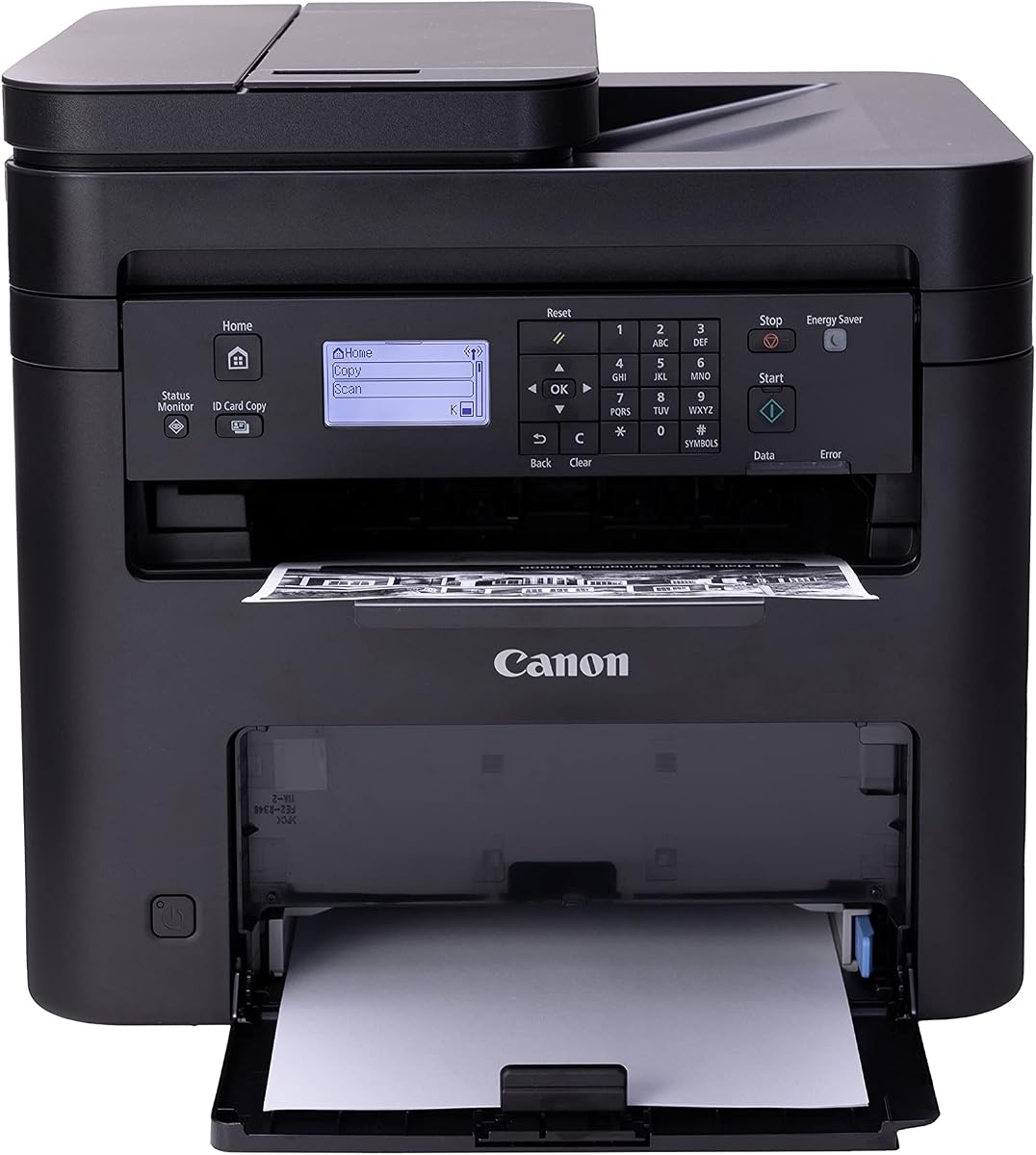
The Canon imageCLASS MF273dw is a wireless multifunction printer that delivers crisp black and white prints quickly. It features auto duplex printing which helps reduce paper usage for daily tasks.
We may earn a commission when you buy through this link, at no additional cost to you.
Its compact design fits well in smaller workspaces while still offering essential scanning and copying features. The wireless setup is straightforward allowing multiple users to connect without hassle.
While it lacks advanced envelope feeders the manual slot handles standard envelopes adequately. Users may need to adjust settings slightly for thicker envelopes to avoid minor jams during printing.
This printer is suited for home offices needing a reliable all-in-one solution. Its speed and ease of use make it a solid option for those prioritizing document efficiency over heavy duty features.
Automatic two-sided printing reduces paper waste and helps manage costs for frequent document printing tasks in the office.
Easy wireless setup means you can place the printer in a central location without worrying about complex cable management.
We may earn a commission when you buy through this link, at no additional cost to you.
The Brother MFC-L2820DW is a robust all-in-one printer offering fax, scan, copy, and print capabilities. It holds a high rating for its touchscreen interface and reliable performance in small offices.
We may earn a commission when you buy through this link, at no additional cost to you.
Its duplex printing and auto document feeder streamline high volume tasks. The manual feed slot supports envelopes ensuring you can handle mailing needs without needing a separate device.
While it uses a subscription service for toner this adds convenience for those who dislike tracking supplies. The touchscreen makes navigation intuitive which saves time on complex printing or scanning tasks.
Ideal for small businesses needing fax capabilities this model excels in versatility. Its balance of speed, connectivity, and features makes it a top recommendation for professional use.
The 2.7 inch touchscreen simplifies menu navigation and allows quick access to cloud apps for direct scanning to services.
Built-in fax functionality ensures you can send physical documents quickly without relying on digital-only communication methods.
We may earn a commission when you buy through this link, at no additional cost to you.
The Canon imageCLASS MF462dw II is a wireless printer designed for efficiency and ease of use. It features a large color touchscreen that simplifies navigation and printing tasks significantly.
We may earn a commission when you buy through this link, at no additional cost to you.
Its print speeds are impressive for its class ensuring minimal wait times. The expandable paper capacity allows for increased volume handling which is crucial for busy environments.
While it does not include an automatic envelope feeder the manual tray supports standard sizes well. The high capacity toner reduces the frequency of replacements helping manage operational costs.
This model is great for offices needing a modern interface and reliable output. Its wireless setup and speed make it a practical choice for teams prioritizing user experience.
The 5-inch color touchscreen provides a user-friendly interface that makes finding features and settings quick and easy.
Support for AirPrint and Canon PRINT app ensures you can print documents wirelessly from any mobile device effortlessly.
We may earn a commission when you buy through this link, at no additional cost to you.
The Brother MFC-L8930CDW is a high-end color laser printer offering professional quality prints and robust security features. It is designed for businesses needing reliable color output and advanced document management.
We may earn a commission when you buy through this link, at no additional cost to you.
Its multipurpose tray allows for flexible paper handling including envelopes and card stock. The advanced security features ensure sensitive documents remain protected during printing and network transmission.
The price is higher than monochrome models but justified for color requirements. The large touchscreen and customization options enhance productivity making it a top choice for business environments.
Ideal for teams needing both color and security this printer delivers professional results. Its connectivity and speed make it a valuable asset for demanding office workflows.
The dedicated multipurpose tray handles special media like envelopes and heavy stock without compromising print quality or causing jams.
Triple Layer Security protects data and network access ensuring your sensitive business documents remain secure from unauthorized users.
We may earn a commission when you buy through this link, at no additional cost to you.
The HP LaserJet Pro MFP 3101sdw is a wireless all-in-one printer designed for professional quality and reliability. It offers fast speeds and high performance for small teams needing efficient document handling.
We may earn a commission when you buy through this link, at no additional cost to you.
Its auto document feeder simplifies scanning and copying multi-page documents. The duplex feature helps save paper and improves workflow efficiency for daily business operations.
The high reliability rating ensures it stays online when needed. While it focuses on standard black and white output the print quality is sharp and consistent for professional documents.
This printer is suitable for businesses prioritizing uptime and ease of use. Its fast performance and connectivity make it a strong choice for teams with regular document processing needs.
Built with durable components to handle high demands ensuring consistent operation without frequent maintenance interruptions.
Dependable Wi-Fi technology maintains a strong connection for continuous printing tasks across multiple devices.
We may earn a commission when you buy through this link, at no additional cost to you.
The Brother Premium MFC-L2690DW is a compact monochrome all-in-one printer designed for durability and reliability. It offers a large paper tray and manual feed slot for envelope handling.
We may earn a commission when you buy through this link, at no additional cost to you.
Its sturdy construction ensures long term performance for busy schedules. While the speed is slightly lower than others the build quality provides peace of mind for office users.
The wireless network interface allows for easy sharing across the office. The manual feed slot handles envelopes efficiently making it versatile for occasional mailing tasks.
Ideal for users needing a durable machine for daily use this printer is a solid choice. Its reliability and design make it suitable for environments where uptime is critical.
The sturdy build ensures the printer withstands heavy daily use without degradation in print quality or mechanical issues.
A generous 250-sheet tray reduces the need for frequent refills allowing for smoother workflows and less interruptions.
We may earn a commission when you buy through this link, at no additional cost to you.
Selecting the right laser printer requires understanding your specific printing needs. This section outlines the key factors to consider to ensure you choose a device that handles envelopes and documents efficiently.
When looking for a printer that handles envelopes, check if it includes a manual feed slot or a dedicated envelope tray. Manual feed slots allow you to insert envelopes one by one to ensure precise positioning without jamming.
Ensure the slot supports the thickness of envelopes you typically use. Some printers require specific settings or adjustments for thicker card stock to prevent paper jams during the printing process.
Print speed is measured in pages per minute and affects how quickly you can process large batches of documents. For offices with high volume needs, look for models offering at least 30 ppm to save time.
Consider the monthly duty cycle which indicates how many pages the printer can handle reliably per month. Choosing a printer with a duty cycle matching your needs prevents wear and tear over time.
Modern printers offer various connectivity options including wireless, Ethernet, and USB. Wireless connections allow multiple users to print from different devices without cables, which is essential for modern offices.
Dual-band Wi-Fi support ensures stable connections even in environments with many devices. Ethernet ports provide a wired alternative for users who prioritize speed and security over convenience.
Automatic duplex printing allows the printer to print on both sides of a sheet automatically. This feature saves paper and helps with professional document presentation without manual intervention.
If you print mostly single-sided documents like invoices, duplex may be less critical. However, for general business use, automatic duplex can significantly reduce paper costs and waste.
The capacity of the paper tray determines how many sheets the printer can hold before needing a refill. Larger trays are convenient for offices with high print volumes to minimize downtime.
A standard tray holds about 250 sheets, but some models offer expandable options. Consider your daily volume when choosing a tray size to ensure efficient workflow interruptions.
While the initial printer price is important, the cost of replacement toner cartridges affects long term expenses. Look for printers that support high yield cartridges to lower the cost per page.
Some printers require subscription services for toner which can be convenient but might limit flexibility. Evaluate your preferred maintenance style to decide if subscriptions or traditional replacements suit you better.
For business environments, security features like user authentication and encrypted printing protect sensitive data. Advanced models offer features like secure print requiring a PIN at the device to release jobs.
Check if the printer includes built-in network security to prevent unauthorized access. Keeping your printer secure is vital to prevent data breaches in shared network environments.
All-in-one printers combine printing, scanning, copying, and sometimes faxing. This versatility is useful for small offices that want to save space and equipment costs by using one device for all tasks.
If you only need printing, a standalone printer may be cheaper and faster. However, if you frequently scan envelopes or letters, an all-in-one unit provides a convenient all-in-one solution.
To print envelopes, open the manual feed slot or tray and adjust the guides to match the envelope width. Select the envelope size and type in your printer settings before starting the job to ensure proper alignment.
Regularly clean the rollers and feed mechanisms with a dry cloth to prevent dust buildup. This simple maintenance step helps avoid paper jams and ensures smooth feeding of both paper and envelopes.
Keep the printer in a cool, dry environment away from direct sunlight. Extreme temperatures or humidity can damage internal components and affect print quality over time.
Not all laser printers handle envelopes efficiently. You should look for models with a manual feed slot or specific envelope support to ensure proper feeding and avoid jams. Always check the specifications for supported paper types and weights.
Most laser printers with feeders accept standard business envelopes ranging from #10 to larger sizes. Check the user manual for specific limits on envelope weight and dimensions to ensure compatibility with your mailing needs.
To prevent jams, ensure the envelope path is clear of paper and adjust the guides properly. Using high quality envelopes without wrinkles helps maintain smooth feeding through the printer mechanism.
Manual feed is generally safer for envelopes as it allows precise control over positioning. Automatic trays can sometimes misfeed thick paper, so manual feed is preferred for critical mailing tasks.
Use genuine toner cartridges recommended for your specific printer model. High quality toner ensures sharp text and prevents smudging on envelopes, especially if the paper is heavier than standard sheets.
Most laser printers are not designed for thermal paper as heat can damage the printer. Always use paper types rated for laser printing to avoid voiding warranties or causing mechanical issues.
Cleaning the rollers every few months or after a paper jam helps maintain performance. A dry cloth is usually sufficient to remove dust and debris from the rollers and feed paths.
Printing on both sides of an envelope is risky with most desktop printers. It is recommended to print only on the front side to avoid damage to the printer and ensure professional results.
Choosing a laser printer with an envelope feeder depends on your volume needs and office setup. Whether you need a budget option or a premium model, the top picks offer reliable performance and flexibility.
Prioritize connectivity options and paper handling features that align with your workflow. A printer with a manual feed slot and strong wireless capabilities will serve most small businesses and home offices well.
Remember to check current prices and availability before purchasing to ensure you get the best deal. These models offer significant value for those needing professional quality document output and mailing capabilities.