
Switch Cooling Fan with Bottom Cooling
4.0Editor score
Vertical stand design for better airflow
LED display for real-time monitoring
Compatible with Switch OLED and Steam Deck
This guide compares the top cooling fan Nintendo Switch dock accessories to help you prevent overheating and extend your console lifespan during long gaming
Keeping your Nintendo Switch cool during extended play sessions is essential for performance and longevity. A dedicated cooling fan for the dock helps dissipate heat efficiently, preventing thermal throttling or unexpected shutdowns that can ruin your gaming experience.
We evaluated ten real products based on fan speed, noise levels, compatibility, and additional features like LED displays or game card slots. Each option was assessed for how well it integrates with the original or OLED dock to provide reliable thermal management.
Each pick highlights specific strengths such as adjustable speeds, quiet operation, or extra connectivity. Prices and availability may change, so always verify the latest details before purchasing to ensure you get the right accessory for your setup.
4.0Editor score

4.6Editor score

4.4Editor score
The following table provides a side-by-side comparison of all ten cooling fan options to help you quickly identify the best match for your specific Nintendo Switch dock model and cooling needs.



This top-rated cooling fan offers a comprehensive solution for keeping your Switch dock cool. With a 4.6 rating, it stands out for its LED display that shows real-time temperature and RPM. The adjustable speed range lets you balance noise and cooling power effortlessly.
We may earn a commission when you buy through this link, at no additional cost to you.
The kit includes essential accessories like joystick caps and a fixed pad to secure the fan. The fan blows air directly onto the console base to improve heat exchange. Users can play for hours without worrying about thermal throttling or unexpected pauses during intense gaming.
While the fan is nearly silent below 2400RPM, higher speeds do produce audible spinning sounds. The Micro USB cable is functional but might require a specific adapter if your dock lacks a legacy port. However, the robust cooling performance makes this a minor trade-off for most users.
Ideal for gamers who want maximum control over their console's temperature, this unit provides reliable protection. The lifetime warranty and responsive customer service add peace of mind. We recommend this as the top choice for serious Switch users.
The LED display allows you to see exactly how hot the air exiting the console is. This helps you adjust the fan speed proactively before overheating becomes a critical issue.
Beyond just the fan, the package includes joystick caps and a stabilizing pad. These extras ensure your Switch remains secure and protected from scratches during extended docked sessions.
We may earn a commission when you buy through this link, at no additional cost to you.
This budget-friendly option delivers solid cooling performance without breaking the bank. Designed for both Switch OLED and Steam Deck, it uses a vertical stand to promote bottom cooling. The adjustable speed and LED display mirror features found in more expensive units.
We may earn a commission when you buy through this link, at no additional cost to you.
It includes a Micro USB cable and a fixed stabilizer pad to keep the unit steady. The fan effectively lowers operating temperatures to prevent lag or crashes during long sessions. It is a practical choice for casual gamers needing basic thermal protection.
The build is functional but lacks the premium materials of higher-end models. Noise levels are reasonable but may be noticeable in quiet rooms at high speeds. However, for the price, the performance is commendable and meets the core needs of most users.
If you want a simple, cost-effective solution to extend your console lifespan, this fan is a strong contender. It provides essential cooling features in a compact form factor. We suggest it for those prioritizing value over extra bells and whistles.
This fan is not limited to the Switch dock; it also works with the Steam Deck. This makes it a versatile option if you own multiple handheld gaming devices.
The included pad ensures the fan stays in place and prevents the console from scratching. This simple addition adds to the overall safety and stability of your gaming setup.
We may earn a commission when you buy through this link, at no additional cost to you.
The GLDRAM fan is crafted specifically for the 2021 OLED dock HEG-007. It features a sleek blue light design that enhances your console's aesthetic while providing efficient cooling. The ABS material keeps it lightweight yet durable for daily use.
We may earn a commission when you buy through this link, at no additional cost to you.
With 14 game card slots on top, you can organize your favorite games for quick access. The Type-C cable ensures a modern power connection that matches the OLED dock. Installation is simple, fitting perfectly to the base cover for stable operation.
The integrated blue light might be distracting in dark gaming environments, though it can be turned off. It is designed exclusively for OLED models so it will not fit older standard Switch docks. The storage slots add unique utility for collectors with large libraries.
If you own an OLED Switch and want a stylish accessory that offers extra storage, this fan is an excellent choice. It combines practical cooling with functional design elements. We recommend it for users who value form and function equally.
The 14 slots on the top of the fan allow you to store game cards securely. This prevents loss and lets you switch games quickly without searching through drawers.
Because it matches the dimensions of the HEG-007 OLED dock, it offers a cleaner look than universal fans. The Type-C cable also aligns with the power requirements of the OLED base.
We may earn a commission when you buy through this link, at no additional cost to you.
This cooling stand features dual fans to ensure powerful heat dissipation for the Switch 2 dock. It offers 3-stage cooling levels and 6 game card slots for convenience. The RGB lights provide a vibrant look that can match your gaming scenes.
We may earn a commission when you buy through this link, at no additional cost to you.
With 3 USB expansion ports, you can charge controllers and connect accessories directly. The system operates at full speed by default when connected but allows manual adjustment. This feature set extends the life of the console and reduces lag during extended play.
The RGB lights and multiple USB ports add bulk to the setup compared to simple fans. It is specific to the Switch 2 dock so it will not work with earlier models. However, the extra connectivity and storage are great benefits for modern gaming stations.
Gamers looking for an all-in-one dock solution with cooling and extra ports should consider this unit. The combination of dual fans and RGB lighting delivers strong performance. We recommend it for those who want expanded functionality alongside thermal management.
Two fans working together create stronger airflow than single units. This ensures the console stays cool even during demanding games that push the hardware to its limits.
The three USB ports allow you to connect and charge accessories without needing extra hubs. This keeps your setup cleaner and reduces the need for dongles or extra cables.
We may earn a commission when you buy through this link, at no additional cost to you.
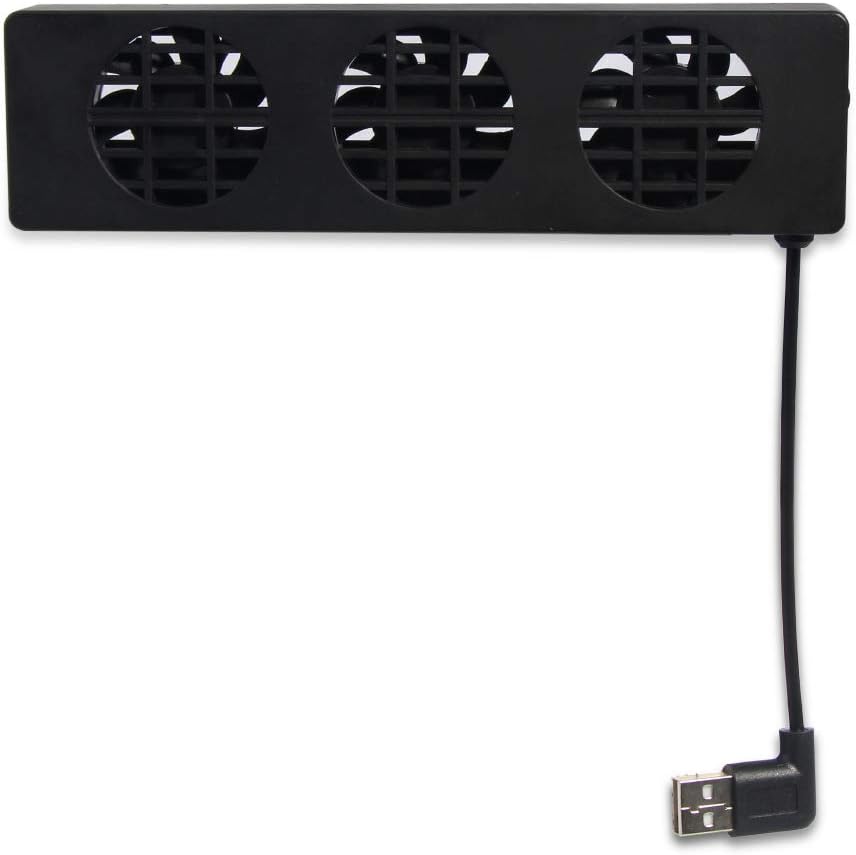
The TNP cooler features three fans to provide strong ventilation performance for the original dock. It includes a Turbo, Normal, and Off switch to adapt to different gaming needs. The compact design ensures it does not take up much space in your entertainment setup.
We may earn a commission when you buy through this link, at no additional cost to you.
Installation is straightforward since it plugs directly into the dock's USB port for power. The three fans lower the console temperature quickly and quietly during light to moderate sessions. This helps prevent overheating and prolongs the lifespan of your gaming system.
It lacks advanced features like LED displays or game slots found in other models. The build quality is adequate but not premium compared to higher-rated fans. However, it remains a reliable option for users seeking basic cooling without unnecessary complexity.
If you want a no-frills cooling solution with multiple fans, this TNP unit is a solid choice. It offers effective ventilation at a reasonable price point. We suggest it for owners of the original dock who need straightforward thermal protection.
Having three fans ensures better airflow across the dock surface compared to single-fan models. This design helps dissipate heat more evenly and efficiently during long gaming sessions.
The fan installs simply by inserting it into the back of the dock. No extra tools or complex wiring are required, making it accessible for anyone to set up quickly.
We may earn a commission when you buy through this link, at no additional cost to you.
This Dobe fan is designed specifically for the Switch OLED model with a clean white finish. It uses a Type-C power cable to connect directly to the base for power. The high-speed fan accelerates air circulation to achieve effective heat dissipation.
We may earn a commission when you buy through this link, at no additional cost to you.
The blue LED inside the fan turns on and off with the switch for a synchronized effect. It stays quiet during operation and helps avoid input delay during charging and gameplay. The design matches the OLED base visually for a cohesive setup.
It does not include extra features like game card slots or temperature displays. The functionality is limited to cooling and lighting without advanced controls. However, the quiet performance and matching design make it a good addition for pure aesthetics.
For users who want a discreet cooling option that matches their OLED console, this fan is suitable. It offers essential cooling in a small package. We recommend it for those who value simplicity and clean design over extra features.
The white design and blue LED are tailored to match the Nintendo Switch OLED dock. This ensures your cooling accessory does not clash visually with your main console hardware.
The high-speed fan is engineered to remain quiet even when pushing air. This helps you focus on your game without annoying background noise from the cooling unit.
We may earn a commission when you buy through this link, at no additional cost to you.
This efficient cooling fan uses a super turbo fan to accelerate airflow and cool the dock instantly. It features a clean white design that matches the OLED console with a blue LED accent. The unit plugs directly into the USB port for power supply.
We may earn a commission when you buy through this link, at no additional cost to you.
The 3000RPM fan ensures your console stays cool during intense gaming sessions. It is compact and does not clutter your TV stand or entertainment cabinet. The stylish design enhances the look of your setup while providing a smart solution for cooling.
It lacks adjustable speed settings or displays for monitoring temperature. The function is simple and focused purely on maintaining airflow. However, this simplicity makes it easy to use and reliable for basic thermal management needs.
If you need a straightforward way to keep your OLED Switch cool without extra features, this fan works well. It offers a balance of style and performance. We suggest it for casual gamers who want minimal setup and maximum cooling.
The super turbo fan is designed to cool the dock quickly upon activation. This ensures optimal performance right away even during demanding game sessions.
The compact design is optimized to save space on your entertainment stand. It keeps your setup tidy while providing necessary ventilation for the console base.
We may earn a commission when you buy through this link, at no additional cost to you.
This stand bracket features three internal cooling fans to effectively dissipate heat during gaming. It is made from durable materials to withstand regular use. A side switch allows you to adjust the cooling speed between Turbo and Normal modes or turn it off.
We may earn a commission when you buy through this link, at no additional cost to you.
The compact and small design makes it easy to set up and use with your game console. It fits neatly into your existing setup without taking up extra space. The external cooling approach helps maintain the console temperature for better performance.
It lacks advanced features like displays or extra connectivity options. The focus is purely on ventilation and simplicity. While the build is durable, it is a basic accessory that does not offer additional storage or USB ports.
Gamers looking for a sturdy external cooling option with speed control will find this useful. It provides reliable performance with a simple user interface. We recommend it for those who want robust cooling without complex controls.
The Turbo and Normal switches let you choose the right balance between noise and cooling. This flexibility ensures you can adapt the fan to your current gaming intensity.
Made from superior material, the stand is built to last. This ensures the cooling unit remains functional even after months of daily use.
We may earn a commission when you buy through this link, at no additional cost to you.
The OSTENT cooler uses three fans to increase airflow and speed up heat exchange for your console. It offers a Turbo and Normal switch to suit different gaming needs. The compact shape makes it easy to carry out and store when not in use.
We may earn a commission when you buy through this link, at no additional cost to you.
Power is drawn directly from the dock's USB port so no extra power is required. This design keeps the setup simple and avoids clutter. The unit helps reduce the console temperature quickly and effectively to prevent overheating.
It is a basic unit with lower ratings compared to more advanced options. The build quality is functional but may not feel as premium. However, it is an affordable choice for those needing simple ventilation for their dock.
If you want a portable cooling solution that is easy to set up, this unit serves its purpose. It provides adequate cooling without complex features. We suggest it for budget-conscious gamers looking for basic fan performance.
The design allows you to easily store the fan when not needed. Its small size ensures it does not take up much room in your storage space.
By plugging directly into the dock USB port, you avoid needing extra adapters. This makes the setup convenient and quick to install for anyone.
We may earn a commission when you buy through this link, at no additional cost to you.
This black cooling fan is designed specifically for the Switch OLED dock. It provides standard cooling to help manage the temperature of the console base. The plug and play setup ensures you can start using it right away without complex configuration.
We may earn a commission when you buy through this link, at no additional cost to you.
While specific features are not detailed, it serves the primary function of fan ventilation for your dock. The black finish is a good choice if you prefer a darker look for your console setup. It works by increasing airflow around the base to aid heat dissipation.
Details about speeds or displays are limited, so it is a purely functional accessory. It is suitable for basic cooling needs without advanced customization. The simple design fits well into most gaming stations.
Gamers who prefer a black aesthetic and basic cooling should consider this unit. It offers a straightforward solution to thermal management. We recommend it for those who want simplicity and color coordination with their console.
The black color helps this unit blend seamlessly with darker gaming setups. It provides a cohesive look without drawing attention to the accessory itself.
This unit focuses on the essential task of cooling the dock base. It is an ideal choice for users who do not need advanced features like displays.
We may earn a commission when you buy through this link, at no additional cost to you.
Choosing the right cooling fan for your Nintendo Switch dock involves considering compatibility, features, and build quality to ensure effective thermal management.
Always check if the fan is designed for your specific dock model. Some fans are made for the standard dock, while others fit the 2021 OLED dock or Switch 2 dock. Mismatched sizes can lead to poor fit or unstable connections.
Verify the product title and description to confirm it supports your console version before purchasing.
Look for adjustable speed settings like Turbo and Normal to balance cooling and noise. Fans with a wide RPM range allow you to optimize airflow based on your gaming intensity.
Adjustable speeds give you more control over how loud the fan runs during quiet moments.
High-speed fans can be noisy, especially at maximum RPM. Check reviews or descriptions to ensure the unit stays quiet at lower settings. This helps maintain a pleasant gaming environment.
Prioritize models that are marketed as low noise or quiet for better user experience.
Most dock fans draw power from a USB port on the dock itself. Some use Micro USB while others use Type-C cables. Ensure you have the right cable included or available.
Using the correct cable prevents connection issues and ensures stable power for the fan.
Fans made from durable ABS or superior materials last longer. Look for reinforced brackets or pads that protect your console from scratches. Quality construction ensures the unit remains sturdy over time.
Choose models that mention durable materials to avoid cheap plastic that might break easily.
Some fans include game card slots, RGB lights, or temperature displays. These add value but may increase the price. Decide if you need these extras or prefer a simple fan.
Features like LED displays help you monitor temperature real-time for better control.
A lifetime warranty or responsive customer service is a strong plus. It ensures you can get help if the fan has quality problems. Good support gives you peace of mind.
Check the seller's support terms before buying to know your protection options.
To install your cooling fan, align it with the back of your dock and plug the power cable into the USB port. Make sure the fan sits securely using any included pads or clips for stability.
Turn on the fan using the provided switch or buttons before starting your gaming session. Monitor the LED display if available to ensure the temperature is within a safe range.
Clean the fan blades regularly with a soft cloth to prevent dust buildup. Avoid placing the console in direct sunlight or enclosed spaces to maintain optimal cooling efficiency.
No, a quality cooling fan will not damage your dock if it fits correctly. Ensure you use the included pads and power cable to avoid loose connections. This accessory is designed to protect your console by preventing overheating.
Not all fans are compatible with the OLED dock. Some units are specifically designed for the standard dock or the 2021 HEG-007 model. Always verify compatibility in the product details before purchasing.
Most fans have adjustable speed settings. Use the Normal or low speed mode for quieter operation. Ensure the fan is stable to avoid vibration noise which can add to the overall sound.
Most cooling fans draw power directly from the dock's USB port. This means you do not need an extra outlet. Just plug the included cable into the USB port for power.
Some universal fans work with the Steam Deck. Always check the compatibility list in the product description. The Switch fans are optimized for the dock but may fit other devices with similar ports.
A well-made cooling fan can last several years with regular use. Dust buildup and poor ventilation can reduce lifespan. Regular cleaning and proper placement ensure it lasts longer.
Yes, by preventing overheating the fan helps avoid thermal throttling and lag. This ensures your console runs smoothly during long sessions. It protects your hardware and maintains consistent frame rates.
Many fans allow you to turn off the lights with a long press or button. Check the manual or buttons to find the light control feature. This is useful for dark gaming environments.
We have reviewed ten excellent options to help you find the perfect cooling fan for your dock. The top picks offer a range of features from LED displays to extra storage slots.
Prioritize compatibility and speed control to ensure the fan meets your specific needs. A good fan will protect your console and extend its lifespan significantly.
Remember that prices and availability can change quickly. Always check the current details on the product page before finalizing your purchase.