
Hercules DJControl Inpulse 200 MK3
4.6Editor score
Beginner friendly layout
Portable compact design
Stem separation ready
This guide compares the top Dj Controller for Serato options for every skill level, highlighting features like pad layouts, audio interfaces, and software
Finding the right Dj Controller for Serato can transform your mixing experience. Whether you are a beginner looking to learn the basics or a pro seeking advanced track separation, the right hardware matters.
We evaluated ten top-rated controllers based on build quality, software compatibility, and user feedback. Each pick offers unique strengths tailored to different budgets and performance needs in the current market.
Each review highlights key features, pros, and cons to help you decide. Prices and availability change frequently, so check the current links for the most up-to-date offers before purchasing your gear.
4.6Editor score

4.6Editor score

4.3Editor score
This side-by-side comparison covers all ten top-rated controllers. We analyze their key specifications, audio capabilities, and unique features to help you find the perfect match for your setup.




The Pioneer DJ DDJ-FLX4 stands out as a versatile choice for anyone starting their journey with Serato. With a rating of 4.6 stars, it earns high praise for its user-friendly design and Smart Fader technology that simplifies blending tracks seamlessly.
We may earn a commission when you buy through this link, at no additional cost to you.
Its standout feature is the Smart Fader, which automatically adjusts volume, bass, and BPM as you move a single fader. This removes the stress of manual beatmatching for beginners. Additionally, it supports streaming from services like Apple Music and Tidal directly, making it ideal for modern DJs.
While it offers a 2-channel layout with 16 performance pads, it lacks some advanced features found in higher-end models. The pads handle Hot Cues and FX well, but complex setups might require more detailed control options. However, these trade-offs are acceptable for its target audience of beginners.
This controller is perfect for new DJs or those who want a simple, portable setup for streaming or small gigs. Its ability to connect to phones and tablets via USB or Bluetooth adds significant convenience. We highly recommend it for anyone looking to grow their skills affordably.
The Smart Fader makes mixing genres effortless by automating the transition process. You just push the fader and let the software handle the complex blending logic for you.
Thanks to its compact size and versatile connectivity options, you can take this controller anywhere. It works seamlessly with your phone or tablet for mobile performance needs.
We may earn a commission when you buy through this link, at no additional cost to you.
The Hercules DJControl Inpulse 200 MK3 is an exceptional entry-level controller with a 4.6 rating. It is designed to get beginners mixing quickly with preloaded tutorials and Serato Lite software. Its unique selling point is stem separation, allowing you to isolate vocals and instrumentals live.
We may earn a commission when you buy through this link, at no additional cost to you.
Its Beatmatch Guide LEDs provide visual cues to help you align tracks perfectly. This eliminates the guesswork for new users. The controller is also incredibly compact, fitting easily into a backpack, which makes it ideal for mobile DJs or students living in dorms.
Despite its small size, it packs advanced features like streaming from multiple services. However, the jog wheels are smaller than pro models, which might feel limiting for scratching. Also, physical effects controls are somewhat basic compared to more expensive options.
This is the best choice for beginners on a tight budget who want modern features like stem separation. It balances affordability with powerful tools to help you learn. If you want to start spinning immediately without breaking the bank, this is the one to get.
Break any track into isolated vocals and instrumentals on the fly. This feature allows you to create unique mashups and fresh transitions without prep work.
The controller comes with DJ Academy tutorials that guide you step by step. You can go from unboxing to your first mix faster than ever before.
We may earn a commission when you buy through this link, at no additional cost to you.
The Hercules DJControl Inpulse 500 offers a robust mid-range experience with a 4.6 rating. It features large jog wheels with touch detection and a dedicated filter FX area for smooth transitions. The built-in audio interface ensures high-quality sound output without needing extra gear.
We may earn a commission when you buy through this link, at no additional cost to you.
Its 16 backlit RGB pads allow for precise cueing and looping. The retractable feet lift the controller to protect it from spills, a thoughtful design touch. It supports both Serato and DJUCED, giving you flexibility in software choice for your setups.
While it is heavier than the 200 MK3, the extra stability is appreciated during active mixing. The controls are responsive but may lack the deep customization of pro models. These limitations are minor considering the price point and the feature set it offers.
This controller suits those who have moved past the absolute basics and want more tactile control. The large jog wheels are great for scratching and beatmatching. If you need a reliable all-rounder for home studios or small venues, this is a strong contender.
The dedicated filter and FX area lets you craft smooth transitions easily. You can tweak effects on the fly without navigating complex menus on your computer.
The jog wheels feature touch detection for scratching and precise control. This adds a professional feel to the controller and enhances your performance experience.
We may earn a commission when you buy through this link, at no additional cost to you.
The Pioneer DJ DDJ-REV1 brings a classic battle layout to modern Serato users. With a 4.5 rating, it is praised for its open design that mirrors turntables. It is built for hip-hop DJs and those who want to master scratching techniques early on.
We may earn a commission when you buy through this link, at no additional cost to you.
Its tall pitch faders and quick effect controls put battle techniques within reach. The controller includes Serato DJ Lite, so you can start performing immediately. It is compact and affordable, making it a great investment for scratch-focused performers.
While it is excellent for battles, the 2-deck limitation means you cannot mix more tracks simultaneously. It is less suited for complex open-format sets compared to 4-channel models. However, for its intended purpose, the design is spot on and effective.
This controller is perfect for hip-hop DJs and scratch artists. If you value a layout that feels like real turntables, this is the one. We recommend it for anyone wanting to build scratch confidence without a massive investment.
The layout is designed for scratch techniques right out of the box. Tall pitch faders and dedicated controls make battle moves easy to execute.
Its open design mirrors classic turntables and battle mixers. This familiarity helps you develop real skills that transfer to pro club setups.
We may earn a commission when you buy through this link, at no additional cost to you.
The Numark Mixtrack Platinum FX stands out with its large 6-inch capacitive-touch jog wheels. Rated 4.6, it offers visual displays showing BPM and platter position. This visual feedback helps you mix more precisely and understand your track structure deeply.
We may earn a commission when you buy through this link, at no additional cost to you.
It includes four decks of control and dual paddle triggers for launching FX. The built-in 24-bit audio interface delivers high sound quality. You can also access streaming services like Apple Music and Tidal directly through Serato DJ Lite.
The screen is a major benefit but adds weight, making it less portable than smaller units. It also uses more desk space. These are acceptable trade-offs for the visual and control benefits. It suits home studios or gigs where portability is secondary.
This controller is great for visual learners who want detailed track info. The touch wheels feel authentic and provide a premium experience. If you want to see your mix data clearly while performing, this is the best choice for you.
The 6-inch displays show BPM and pitch adjustment details. You can visualize your mix structure and plan transitions with confidence.
It gives you control over four decks simultaneously. This expands your creativity and allows for complex live remixing on the go.
We may earn a commission when you buy through this link, at no additional cost to you.
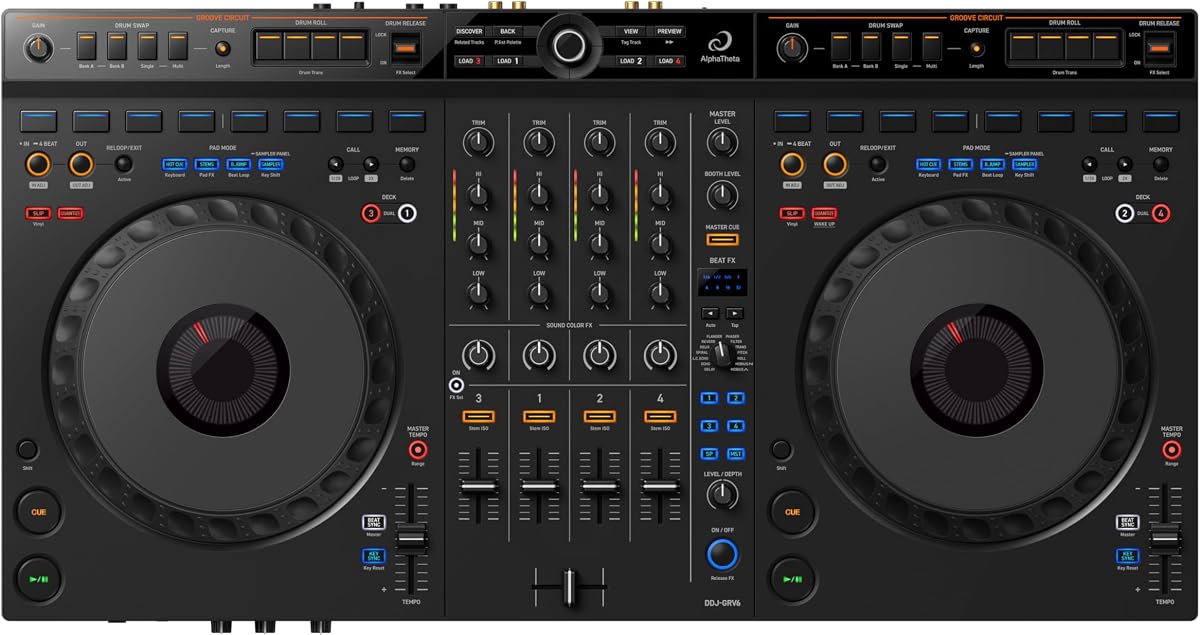
The AlphaTheta DDJ-GRV6 brings club standard layouts to home users. While its rating is 3.7, it is built to transfer muscle memory to CDJ-3000 setups. Its Groove Circuit feature allows live remixes by swapping drum parts instantly with a button press.
We may earn a commission when you buy through this link, at no additional cost to you.
The jog wheels are sized for real feel and include 8 pads above the jogs for expressive control. It works with both Rekordbox and Serato DJ Pro. This flexibility is great for DJs who may use different software depending on the venue.
Some users find the transition from Rekordbox to Serato complex, but the build quality is solid. The price is higher than entry-level models. However, for those aiming for professional club workflows, the investment is justified by the layout accuracy.
This controller is for DJs serious about transitioning to pro club gear. If you want to train with tools similar to those in nightclubs, choose this. It offers a professional workflow that grows with your career aspirations.
The layout is inspired by CDJ-3000 and DJM-A9 gear. This familiarity helps you build muscle memory that transfers directly to professional booths.
This tool lets you swap drum parts for loops on the fly. You can perform live remixes with a single button press during your set.
We may earn a commission when you buy through this link, at no additional cost to you.
The Pioneer DJ DDJ-FLX10 is a flagship performance controller rated 4.6. It includes Track Separation for live mashups and DMX output to run lights from the controller. Its large jog wheels with multicolor displays show waveforms and artwork clearly.
We may earn a commission when you buy through this link, at no additional cost to you.
Designed for serious hobbyists and pros, it offers a club-standard workflow. The 4-channel layout translates directly to CDJ and DJM setups. This makes it a future-proofed open-format tool for mobile DJs and touring professionals.
The high price point might be too much for casual users. However, the included features justify the cost for pros. The DMX lighting control is a unique bonus that saves money on separate lighting gear.
This controller is ideal for professionals needing advanced features. If you want to control lights and audio from one device, this is it. We recommend it for those who need a complete all-in-one performance system.
Splits any song into vocals, drums, and instruments live. This allows you to create mashups with no prep work needed before the set.
The built-in DMX output lets you run lights directly from the controller. This simplifies your setup and integrates visual effects seamlessly.
We may earn a commission when you buy through this link, at no additional cost to you.
The Numark Mixtrack Pro FX is a reliable 2-deck controller with a 4.6 rating. It features 6-inch touch jog wheels and dual paddle triggers for quick FX. Serato DJ Lite is included, making it a complete system out of the box.
We may earn a commission when you buy through this link, at no additional cost to you.
It allows access to streaming services and connects via USB to Mac or Windows. The 3-band EQ and filter knobs provide precise control over your sound. It is a solid mid-range option for DJs needing tactile control.
Compared to the Platinum model, it lacks the visual displays but remains powerful. Some users may find the feature set basic. However, these limitations are acceptable for the price and focus on core mixing essentials.
This controller suits those who want simplicity and reliability. If you prefer tactile control over visual data, this fits your needs. We recommend it for home use and small gigs where portability and sound matter.
The touch jog wheels emulate an authentic turntable feel. This enhances your ability to scratch and place cues precisely during mixing.
Six quick-launch FX with dual paddle triggers let you customize your set. You can launch effects instantly without breaking your flow.
We may earn a commission when you buy through this link, at no additional cost to you.
The Hercules Inpulse 300 MK2 is a high performance 2-deck controller with a 4.5 rating. It helps you beatmatch manually with built-in light guides. It supports both Serato and DJUCED software for flexible workflow options.
We may earn a commission when you buy through this link, at no additional cost to you.
You can mix tracks from your computer or streaming services like Beatport and SoundCloud. The layout is full featured and helps you master DJing techniques. It offers more capabilities than the 200 MK3 while remaining affordable.
The weight is slightly higher but offers stability during mixing. FX options remain basic compared to pro units. These trade-offs are acceptable for its intended audience of advancing beginners.
This controller is perfect for those growing beyond the basics. If you want a full featured layout with guidance tools, choose this. We recommend it for DJs ready to tackle more complex sets.
The built-in light guides help you align your tracks manually. This training feature helps you develop essential beatmatching skills for real performances.
You can stream tracks directly from services like TIDAL. This gives you an endless library without needing local files for every set.
We may earn a commission when you buy through this link, at no additional cost to you.
The Pioneer DJ DDJ-REV7 is a flagship battle controller rated 4.3. Its motorized platters give the authentic feel of vinyl for uncompromising scratch performance. The Magvel Fader Pro delivers the durability and cut feel that battle DJs demand.
We may earn a commission when you buy through this link, at no additional cost to you.
It ships with Serato DJ Pro and deep pad control. The on-jog color displays keep your routines tight by showing waveforms and BPM. It is designed for touring turntablists and serious scratch and open-format DJs.
The price and weight are high compared to other options. However, for pros needing authentic vinyl feel, this is unmatched. The durability and features justify the investment for serious performers.
This controller is for professionals and serious scratch DJs. If you want real motorized platters and top-tier build, this is it. We recommend it for those who demand the best in battle performance.
The motorized jog wheels give the authentic feel of vinyl. This uncompromising scratch performance is perfect for turntablists and pros.
The crossfader delivers precise cut feel and durability. It ensures your cuts are smooth and reliable during intense battles.
We may earn a commission when you buy through this link, at no additional cost to you.
Selecting the right hardware is crucial for your performance. We break down the key factors you should consider to find the perfect fit.
Consider how many decks you need to control simultaneously. Most entry models have two channels, while pros may need four.
Choose 2-channel for basic mixing and 4-channel for complex remixing.
Touch jog wheels mimic vinyl feel while capacitive ones offer visual data. Scratch DJs prefer motorized platters for authentic resistance.
Select jog wheels that match your preferred mixing style and tactile needs.
Ensure the controller works with Serato DJ Lite or Pro as needed. Some units lock you into specific versions or require drivers.
Check software versions before buying to avoid compatibility issues.
Lightweight designs are better for mobile DJs who travel often. Larger units may offer more features but are harder to move.
Prioritize portability if you gig frequently outside of home.
Performance pads handle cues, loops, and FX. Look for 8 to 16 pads depending on your workflow.
Ensure the pads respond quickly and offer enough customization.
Built-in interfaces save money and simplify setup. Check if they support 24-bit audio for professional sound.
Look for quality sound cards to ensure crisp playback.
Entry models cost less but have fewer features. Pro gear costs more but offers better durability and tools.
Set a budget that aligns with your skill level and goals.
Some controllers offer DMX output for lighting or USB hubs. This reduces the need for extra gear on stage.
Look for features that integrate well with your current setup.
Connect your controller to your computer or tablet via USB. Install the necessary drivers and open Serato software to begin.
Keep the controller clean and dust-free. Store it in a padded case when not in use to prevent physical damage.
Most controllers include Serato DJ Lite for free. To unlock DJ Pro features, you must purchase an upgrade key or buy a model that ships with it.
Some modern controllers support phone or tablet use without a PC. However, most still require a host device for full functionality.
Lite is free with basic features. Pro offers advanced controls like full waveform display, more tracks, and extended FX options.
Yes, most Serato controllers work with both macOS and Windows. Always check the specific system requirements on the product page.
Many units allow streaming from Apple Music or Tidal via Serato. You will need an active subscription to these services.
Download the update utility from the manufacturer's website. Follow the instructions to connect the device via USB and apply updates.
We have reviewed ten top controllers ranging from budget options to premium models. Each offers unique strengths tailored to different skill levels.
Consider your main use case: scratch, open format, or casual mixing. Prioritize features like pads and jog wheels accordingly.
Always check current pricing and stock before purchasing. Prices can change quickly, so staying updated helps you get the best deal.