
HP OmniBook 3 14 inch
4.4Editor score
Snapdragon X Processor
41 Hours Battery Life
2K OLED Display
AI laptops are transforming how we work and create by embedding powerful intelligence directly into the hardware. These devices feature specialized neural processing units that handle complex tasks like real-time translation and image generation without slowing you down.
We evaluated ten leading models based on performance, battery life, display quality, and AI-specific features. Our analysis focuses on real-world usability for professionals, students, and creators who need reliable tools for modern workflows.
Each pick highlights unique strengths from budget-friendly options to premium workstations. Remember that specifications and availability change frequently so verify current details before purchasing to ensure you get the right configuration for your needs.
4.4Editor score
4.8Editor score

5.0Editor score
As an Amazon Associate we earn from qualifying purchases.
Explore the side-by-side comparison of the top ten AI laptops available today. This table highlights key specifications to help you quickly identify which model fits your performance and portability requirements.


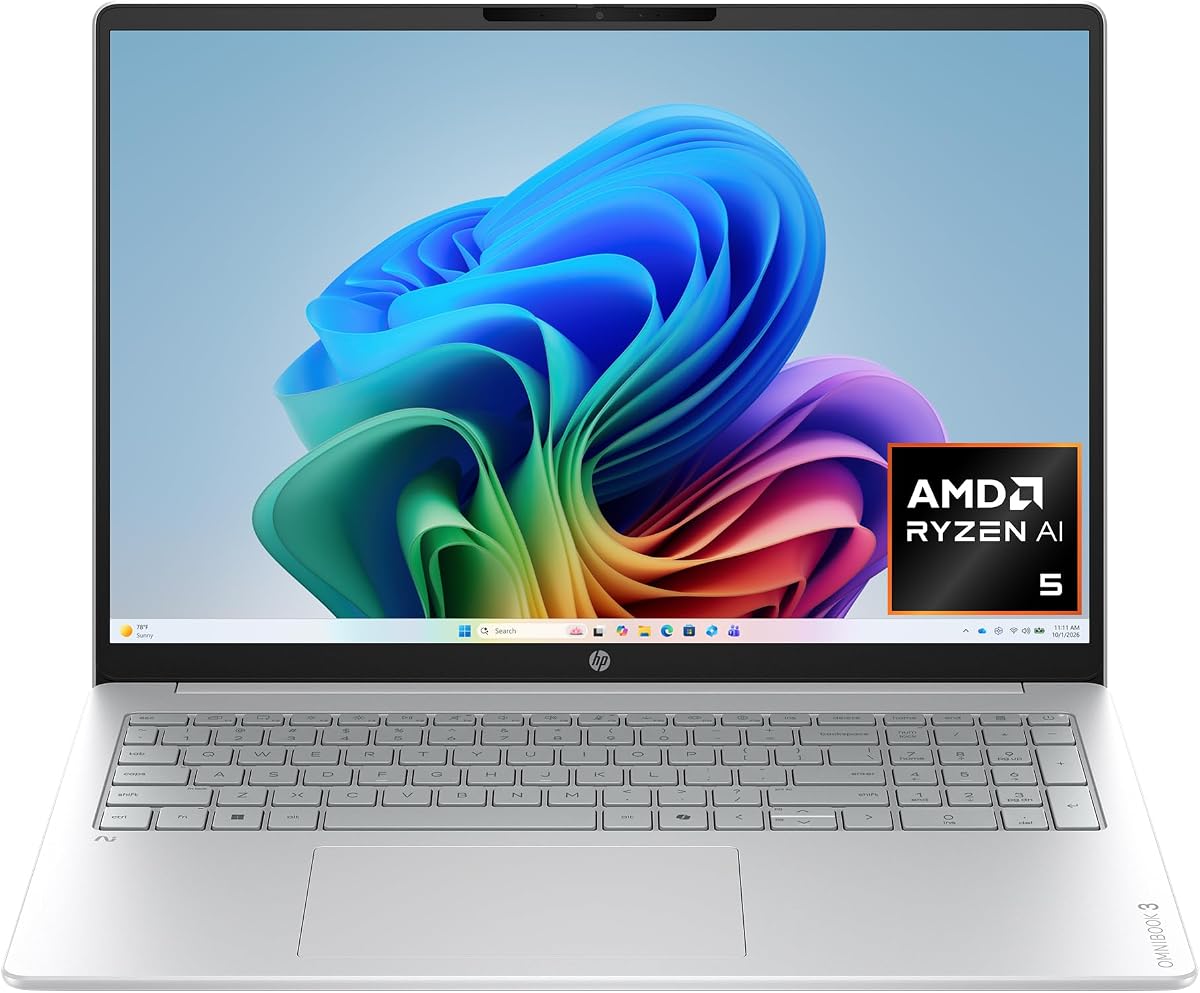
The HP OmniBook 3 16 inch stands out as the top choice for most users seeking a balanced AI laptop. With a high rating of 4.8 stars it delivers reliable performance driven by the AMD Ryzen AI 5 430 processor designed for modern workloads.
We may earn a commission when you buy through this link, at no additional cost to you.
Its standout quality lies in the integration of Copilot+ PC features which streamline daily tasks through intelligent assistance. The device supports hardware accelerated encoding and advanced noise reduction ensuring professional quality during virtual meetings without external tools.
While it lacks a dedicated graphics card the Radeon 840M GPU handles everyday creative tasks and light gaming adequately. The only trade-off is fewer physical ports which might require dongles for users needing multiple legacy connections simultaneously.
This laptop is ideal for students and professionals who prioritize portability and endurance. Its robust battery life and crisp display make it a strong recommendation for anyone needing a versatile daily driver for work and entertainment.
The system automatically filters background noise during calls keeping your voice clear and focused for better communication outcomes.
A dedicated Copilot key provides instant access to AI features allowing you to streamline workflows with a single press.
We may earn a commission when you buy through this link, at no additional cost to you.
The Lenovo ThinkBook 16 Gen 8 targets business users requiring robust performance and security. Its 4.6 rating reflects consistent reliability in handling complex spreadsheets and enterprise applications without lag or slowdown.
We may earn a commission when you buy through this link, at no additional cost to you.
Key strengths include 32GB of RAM which ensures smooth multitasking across numerous business applications. The inclusion of a fingerprint reader and Windows 11 Professional adds essential layers of security for protecting sensitive corporate data on the go.
The main trade-off is weight and the absence of a touchscreen which limits flexibility for touch-first workflows. These are acceptable for office environments where stability and security take precedence over mobility and interactive features.
IT departments and professionals managing heavy data sets will find this device particularly useful. The enterprise-grade features and connectivity options make it a solid investment for organizations needing reliable mobile workstations.
Fingerprint authentication and Windows 11 Professional protect your business data with advanced security protocols and access control.
WiFi 6E and Bluetooth 5.3 ensure stable connections for seamless video conferencing and file sharing across teams.
We may earn a commission when you buy through this link, at no additional cost to you.
The HP OmniBook X 14 inch impresses with its premium build and exceptional display technology. A rating of 4.3 highlights satisfaction with its balance of power and efficiency powered by Intel Core Ultra 7 processors.
We may earn a commission when you buy through this link, at no additional cost to you.
The 3K OLED touchscreen delivers deep blacks and vibrant colors ideal for media consumption and creative work. Coupled with up to 27 hours of battery life it offers unmatched endurance for travelers who need to stay productive without constant charging.
Its main drawback is the integrated graphics which limits use for intensive gaming or 3D rendering tasks. However for general productivity and content consumption these limitations are minimal compared to the visual benefits.
Users prioritizing screen quality and portability will appreciate this device. The Smart Sense feature adapts performance to your activity ensuring comfort and efficiency throughout the day without manual intervention.
Individual pixels light independently to produce richer contrast and deeper blacks for a truly immersive viewing experience.
Smart Sense optimizes thermal management and fan noise automatically to maintain comfort regardless of your activity level.
We may earn a commission when you buy through this link, at no additional cost to you.
This model offers a spacious 16-inch display tailored for creative professionals and multimedia users. With a 4.5 rating it is praised for its sleek design and responsive touch controls that enhance workflow efficiency.
We may earn a commission when you buy through this link, at no additional cost to you.
The integration of Copilot AI and ample storage makes it ideal for handling large files and complex projects. High-speed RAM ensures quick transitions between applications without lag even when editing high-resolution media.
While RAM capacity is standard it supports typical creative workflows adequately. The main limitation is the lack of a dedicated GPU which might slow down heavy rendering tasks compared to workstation-grade laptops.
Content creators and students needing a balance of power and aesthetics will find it appealing. The design supports daily work and creative tasks effectively without compromising on style or usability.
Built-in AI assistance helps optimize workflows and suggests intelligent actions to speed up productivity and creative tasks.
The large responsive touchscreen allows for natural navigation and precise editing directly on the display surface.
We may earn a commission when you buy through this link, at no additional cost to you.
The Snapdragon-based OmniBook 5 excels in mobile productivity with exceptional battery endurance. A 4.2 rating reflects user satisfaction with its ability to stay connected and productive throughout the day without interruption.
We may earn a commission when you buy through this link, at no additional cost to you.
Key strengths include built-in Otter.ai for automated meeting summaries and strong connectivity options like Wi-Fi 6E. The privacy camera shutter adds a layer of security for users concerned about surveillance during sensitive work.
Potential buyers should note that some desktop apps may have limited compatibility on ARM architecture. Storage is capped at 512GB which might require cloud management for users with large media libraries.
Remote workers and travelers will appreciate the balance of connectivity and endurance. The integrated cellular capability ensures you stay online wherever you go without relying solely on Wi-Fi networks.
Built-in AI notes capture and transcribe meeting audio automatically to help you stay organized without manual entry.
A physical privacy shutter allows you to disable the camera when not in use for added personal security.
We may earn a commission when you buy through this link, at no additional cost to you.
This compact model offers excellent value for students and casual users needing reliable performance. A rating of 4.4 highlights its ability to deliver premium features like OLED displays at a more accessible price point.
We may earn a commission when you buy through this link, at no additional cost to you.
Its standout feature is the massive battery life which supports extended use without needing a charger. The 2K OLED screen provides vibrant visuals for entertainment and media consumption making it a pleasure to use daily.
The main trade-off is limited storage which may require external drives or cloud solutions for larger files. However for typical document and media storage this capacity is often sufficient for general use.
Budget conscious buyers looking for portability will find this laptop compelling. Its lightweight design and long battery life make it perfect for campus use or coffee shop work sessions.
The slim lightweight design allows you to carry your device easily between classes or meetings without strain.
OLED technology ensures rich colors and deep blacks enhancing your viewing experience for movies and creative content.
We may earn a commission when you buy through this link, at no additional cost to you.
The Dell 16 Plus is built for professionals requiring the latest connectivity and processing power. A 4.5 rating indicates strong performance in business environments where reliability and speed are critical for success.
We may earn a commission when you buy through this link, at no additional cost to you.
Wi-Fi 7 support ensures you are ready for next-generation network speeds and reduced latency. Combined with a high-end processor and 32GB RAM this machine handles multitasking and complex data processing with ease.
The main drawback is the premium price and increased weight compared to ultrabooks. These trade-offs are acceptable for stationary or semi-stationary use where raw performance outweighs portability needs.
Professionals in tech or data intensive fields will appreciate this machine. Its advanced connectivity and robust hardware make it a solid choice for demanding business applications.
Support for Wi-Fi 7 provides faster wireless speeds and lower latency for seamless cloud collaboration and streaming.
AI-powered noise reduction ensures clear audio calls by filtering out background distractions during important meetings.
We may earn a commission when you buy through this link, at no additional cost to you.
The ASUS Vivobook S16 boasts a perfect 5.0 rating reflecting exceptional user satisfaction. It delivers top-tier AI performance via the AMD Ryzen AI 9 465 processor designed for demanding modern tasks.
We may earn a commission when you buy through this link, at no additional cost to you.
Its key strength is the combination of powerful hardware and beautiful visuals. The OLED display with 50 NPU TOPS ensures smooth operation for creative apps and AI workloads while maintaining a sleek portable design.
The high price point is the primary barrier for average consumers. However those seeking a high-end machine that balances power with aesthetics will find the cost justified by the premium experience.
Power users and creatives looking for a premium laptop will love this model. Its robust features and stunning display make it a standout choice for those who want the best available.
With up to 50 NPU TOPS it handles complex AI tasks like image generation and translation with exceptional speed.
The WUXGA OLED screen delivers deep blacks and vibrant colors for an engaging viewing experience across all content.
We may earn a commission when you buy through this link, at no additional cost to you.
The Acer Aspire 16 AI brings high refresh rate technology to the AI laptop market. A 4.2 rating shows appreciation for its smooth display and efficient Snapdragon processor that handles daily tasks well.
We may earn a commission when you buy through this link, at no additional cost to you.
Its standout feature is the 120Hz touchscreen which provides fluid scrolling and responsive touch input. Combined with Wi-Fi 7 it offers future-ready connectivity for users who demand speed and fluidity.
The trade-off includes standard storage which may require external solutions for large media collections. Users might also notice fan noise under heavy loads though it is generally acceptable for everyday use.
Gaming enthusiasts and media consumers will enjoy this display technology. Its balance of performance and visual fluidity makes it a compelling choice for interactive experiences.
A high refresh rate display ensures smoother scrolling and more responsive touch inputs for a fluid user experience.
Wi-Fi 7 support ensures you can take advantage of the fastest available wireless speeds and network efficiency.
We may earn a commission when you buy through this link, at no additional cost to you.
This model is designed for users needing maximum power in a mobile form factor. With a 4.6 rating it is highly rated for its robust memory and processing capabilities suited for heavy workloads.
We may earn a commission when you buy through this link, at no additional cost to you.
Its strengths include 32GB RAM and a 50 TOPS NPU that accelerate AI workflows significantly. Windows 11 Pro adds essential enterprise features for professionals requiring secure environments.
The device is heavier and bulkier than typical ultrabooks which limits portability. However for stationary office work or heavy content creation these physical characteristics are secondary to raw performance.
Power users and small business owners will find this laptop highly capable. Its specifications ensure you can handle demanding tasks without compromise while maintaining mobile connectivity.
A 50 TOPS NPU ensures seamless handling of AI workloads accelerating complex tasks like rendering and analysis.
Windows 11 Pro provides advanced security features essential for protecting business data and sensitive information.
We may earn a commission when you buy through this link, at no additional cost to you.
Selecting the right AI laptop requires understanding specific hardware and software features that define modern intelligent computing.
The core of an AI laptop is its processor and Neural Processing Unit (NPU). Look for models with Copilot+ PC certification to ensure seamless AI integration. Higher TOPS ratings generally indicate faster processing of AI tasks like image generation.
Prioritize devices with dedicated NPUs for future-proofing and efficient multitasking.
AI applications often require significant memory to operate smoothly. Aim for at least 16GB RAM though 32GB provides better longevity. Storage should be fast and sufficient with SSDs preferred for quick boot times.
Ensure your laptop has at least 512GB storage to accommodate growing software libraries.
High resolution displays like OLED or 4K enhance the AI experience by rendering images sharper. A 16-inch screen offers ample workspace for productivity while 14-inch models prioritize portability.
Select a display size that matches your mobility needs and visual fidelity preferences.
Mobile productivity depends heavily on battery endurance. Look for laptops promising 15 hours or more of active use. Fast charging technology adds convenience when you are away from a power source.
Choose models with efficient power management to support long work sessions.
Modern AI laptops should support the latest wireless standards like Wi-Fi 6E or Wi-Fi 7. Adequate ports including USB-C and HDMI reduce reliance on adapters. Bluetooth support is crucial for peripherals.
Verify that the laptop has the ports you need for your accessories and networks.
Windows 11 provides the best foundation for current AI features like Copilot. Ensure the device includes software enhancements like noise cancellation and smart search tools. These features add value beyond raw hardware.
Look for laptops that highlight Copilot+ integration in their specifications.
A sturdy chassis protects your investment from wear and tear. Materials like aluminum or magnesium alloy offer better resistance to damage. A comfortable keyboard is vital for extended typing sessions.
Invest in a device built to withstand daily commuting and regular use.
Ensure the laptop supports the applications you use daily. Some AI features work best within the Windows ecosystem. Check for compatibility with professional tools like Adobe Creative Cloud.
Verify software compatibility before purchasing to avoid workflow disruptions.
To maximize the performance of your AI laptop ensure it is updated with the latest drivers and security patches. These updates often optimize the Neural Processing Unit for better efficiency and stability.
Keep your device clean using a microfiber cloth to wipe the screen and keyboard. Avoid exposing it to extreme temperatures or moisture which can degrade internal components over time.
Utilize AI features like noise cancellation and smart search by enabling them in system settings. Regular restarts help maintain optimal speed and prevent software conflicts during heavy usage.
A Copilot+ PC is a Windows device equipped with a specific Neural Processing Unit capable of at least 40 TOPS. It enables advanced AI features like Recall and real-time translation directly on the device for better privacy and speed.
Not necessarily. Modern NPUs handle many AI workloads efficiently without a dedicated GPU. However professional rendering tasks may still benefit from discrete graphics cards for faster performance.
Battery life varies by usage but many modern AI laptops promise 15 to 20 hours on a single charge. Real-world performance depends on screen brightness and task complexity.
While they handle light gaming well most focus on productivity. Integrated GPUs are capable of casual titles but high-end gaming usually requires dedicated graphics cards found in gaming-specific laptops.
Many modern laptops have soldered RAM that cannot be upgraded. Always check the specifications before buying if you anticipate needing more memory in the future for growth.
Yes on-device AI processing keeps data local on your device ensuring greater privacy. This approach prevents your personal information from being sent to cloud servers for processing.
Most run Windows 11 Home or Pro tailored to support advanced AI features. Some may offer Linux compatibility but native support is optimized for Windows environments.
We highlighted ten top AI laptops each offering unique benefits from powerful processors to stunning displays. Whether you need endurance or performance these models provide excellent options for modern computing needs.
Prioritize features like NPU speed and RAM capacity to ensure longevity. Consider your daily tasks and mobility needs when deciding between a compact ultrabook or a powerful workstation.
Prices and availability fluctuate so checking current listings ensures you secure the best configuration. Use this guide to navigate the options confidently and find a device that elevates your productivity.