
Wireless Alarm System 16Pcs
4.6Editor score
Dual network WiFi and 4G
No monthly fees required
48 hour battery backup
This guide compares the top cellular alarm system options for home security, evaluating connectivity, features, and reliability to help you choose the right
Securing your home requires reliable communication methods that stay active even when traditional lines fail. A cellular alarm system uses mobile networks to send alerts, ensuring your property remains protected around the clock without relying on internet cables.
We analyzed ten leading models to find the most dependable options available today. Our comparison focuses on network compatibility, sensor integration, and ease of installation to help you understand which system fits your specific security needs best.
Each pick highlights unique strengths and potential drawbacks based on user feedback and technical specs. Keep in mind that pricing and availability can shift frequently, so always verify current details before making your final purchase decision for your home.
4.6Editor score

4.7Editor score

4.7Editor score
This side-by-side comparison highlights the core specifications and connectivity options for each of the ten selected cellular alarm systems to help you evaluate their capabilities quickly.




The Alula BAT-Connect-V stands out as a top-tier communicator for those seeking professional-grade security integration. With a strong rating, it offers robust performance for users needing dependable alert transmission.
We may earn a commission when you buy through this link, at no additional cost to you.
Its main strength lies in its universal compatibility, allowing it to work with various existing alarm panels. The inclusion of Ethernet and WiFi alongside cellular ensures that your system remains online even if one network path fails.
While it is designed for professional installations, the flexibility it offers is unmatched. The trade-off is that it is not a standalone consumer kit, which means you might need expert help to get it running correctly.
This unit is ideal for security professionals or homeowners with existing systems who need a reliable cellular backup. It ensures your security system communicates effectively with monitoring centers without interruption.
This communicator supports a wide range of alarm panels, making it a versatile choice for upgrading older systems without replacing everything.
By combining cellular with Ethernet and WiFi, it ensures that alerts reach the monitoring station even if your internet connection is cut.
We may earn a commission when you buy through this link, at no additional cost to you.
This module is designed for users who want to build a custom security system from scratch. It provides the core communication piece that connects sensors to a network without needing a full kit.
We may earn a commission when you buy through this link, at no additional cost to you.
Its flexibility is its biggest advantage, offering eight channels where each can send unique alert messages. This allows for detailed monitoring setups in warehouses or large properties where specific areas need distinct alerts.
The technical nature of the device means it requires some knowledge to configure properly. You will need to wire your own sensors and set up the port modes to match your specific needs.
Ideal for DIY enthusiasts or small business owners, this module delivers essential security functions at a reasonable cost. It is a great choice if you already have sensors and need a cellular backbone.
Equipped with 4G, 3G, and GSM modules, this device ensures connectivity wherever cellular coverage exists, making it suitable for travel or remote locations.
Each of the eight channels can be programmed with specific message content, allowing you to know exactly which part of your property triggered an alert.
We may earn a commission when you buy through this link, at no additional cost to you.
The Ring Alarm 8-Piece Kit is a top contender for homeowners seeking a balance of simplicity and functionality. It offers a comprehensive start to securing your space with reliable smart home integration.
We may earn a commission when you buy through this link, at no additional cost to you.
Its key strengths include the intuitive setup process and the ability to monitor your home directly through the Ring app. You can arm and disarm the system easily while receiving instant notifications on your phone.
While the system is excellent, relying on a subscription for full professional monitoring might not suit everyone. However, the flexibility to choose optional services keeps it accessible for different budgets.
This kit is perfect for small homes or apartments where you want reliable protection without complex wiring. It is a solid investment for those who value smart home connectivity and ease of use.
With Alexa compatibility, you can control your security system using voice commands, adding a layer of convenience to your daily routine.
You can easily add more sensors and accessories as your needs change, ensuring the system grows with your security requirements over time.
We may earn a commission when you buy through this link, at no additional cost to you.
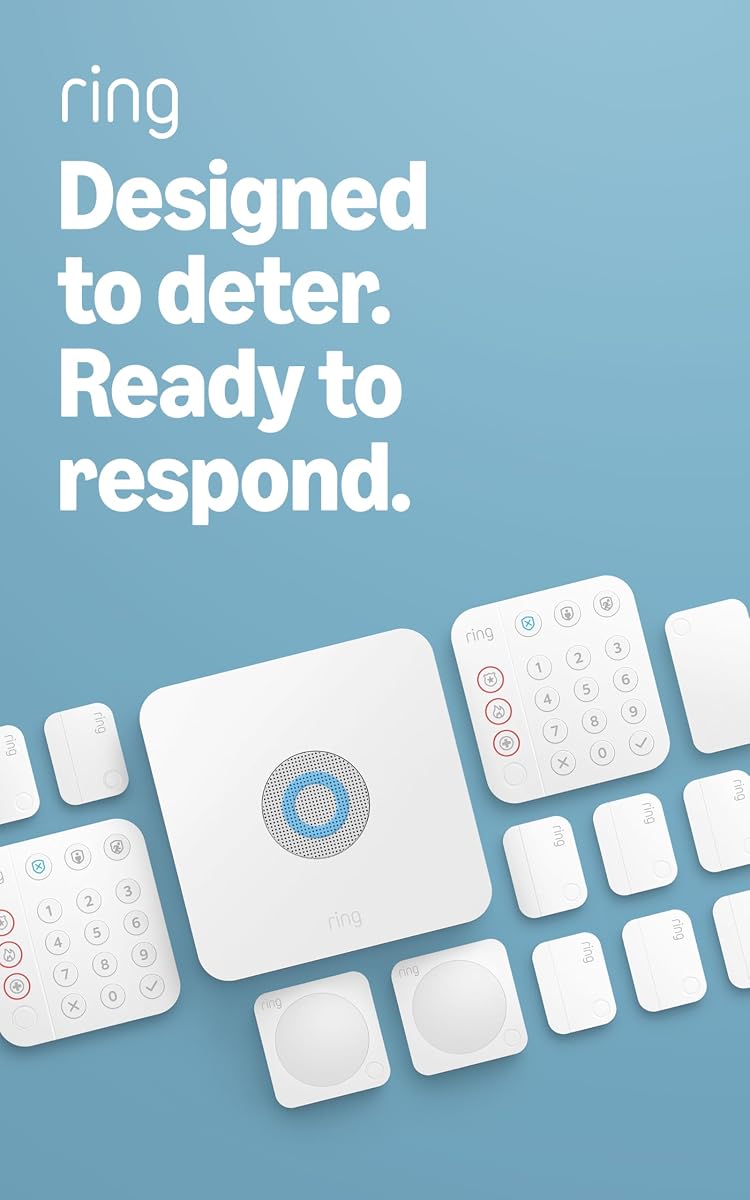
For larger properties, the Ring Alarm 14-Piece Kit provides the extra coverage needed to secure multiple entry points effectively. It builds on the standard kit with additional sensors for comprehensive protection.
We may earn a commission when you buy through this link, at no additional cost to you.
The inclusion of multiple keypads allows you to place controls in different zones, making it easier to manage access across a bigger home. This ensures you never have to walk too far to arm the system.
The added sensors mean more setup time compared to smaller kits, but the coverage benefit is significant. It is a practical choice if you need to secure a home with more windows and doors.
This system suits families or small offices needing expanded coverage without upgrading to a professional-grade complex setup. It maintains the simplicity of the Ring ecosystem while scaling up security.
Having two keypads allows for better access control in larger spaces, ensuring you can disarm or arm the system from a convenient location.
With eight contact sensors and two motion detectors, this kit covers more ground, reducing blind spots in your home security coverage.
We may earn a commission when you buy through this link, at no additional cost to you.
The TG7LA001 is a focused device designed to bring modern cellular technology to existing alarm systems. It serves as a dedicated communicator for those needing reliable remote alerting.
We may earn a commission when you buy through this link, at no additional cost to you.
Its primary advantage is utilizing LTE-A technology, which offers faster and more reliable data transmission than older standards. This ensures that your alarm signals reach the monitoring center quickly.
This unit does not include sensors, meaning it is strictly an upgrade component. Users should ensure their current panel is compatible before purchasing to avoid integration issues.
For those maintaining older setups, this communicator offers a practical path to modern connectivity without replacing the whole system. It is a smart choice for targeted updates.
Utilizing LTE-A standards ensures that your security signals are transmitted with high speed and reliability for consistent monitoring coverage.
As a dedicated module, it integrates cleanly into existing infrastructures, providing robust communication without adding unnecessary bulk to your setup.
We may earn a commission when you buy through this link, at no additional cost to you.
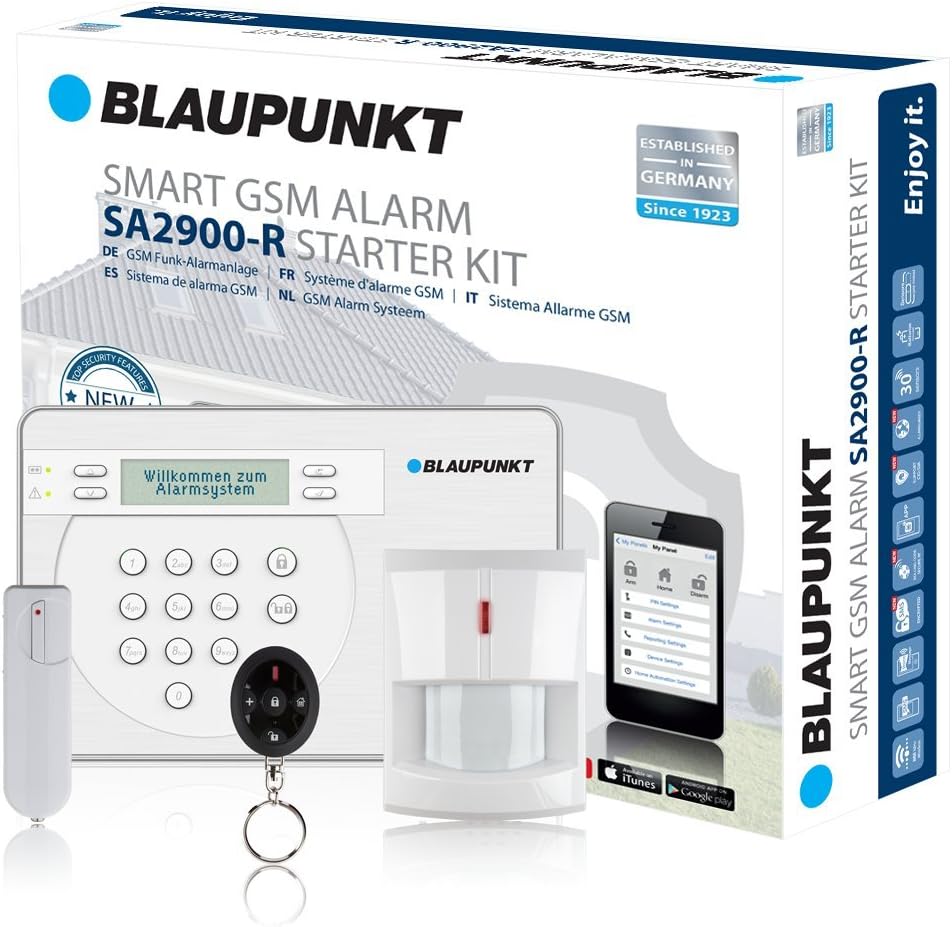
The Blaupunkt SA 2900 offers a robust wireless solution for homes and offices needing straightforward security without monthly fees. It combines sensors with a GSM module for direct communication.
We may earn a commission when you buy through this link, at no additional cost to you.
A standout feature is the loud integrated siren, which effectively deters intruders by creating a significant noise alert. The anti-sabotage design ensures that any damage to the unit triggers an immediate report.
Installation is designed to be self-managed, but you will need to provide your own SIM card to activate the cellular features. This adds a small step but keeps initial costs low.
Ideal for users who want a complete system without subscriptions, this model provides good security value. It is particularly useful for small offices or homes wanting basic wireless protection.
The system protects itself against tampering, automatically reporting any damage or removal attempts to ensure the security remains intact.
With an 18-hour emergency power supply, the system stays operational during outages, keeping your home secure even when the grid fails.
We may earn a commission when you buy through this link, at no additional cost to you.
This 24-piece kit offers an extensive package for those needing full coverage without a high price tag. It includes a wide array of sensors to protect every corner of your property.
We may earn a commission when you buy through this link, at no additional cost to you.
The color screen display and voice control integration make interacting with the system modern and accessible. You can check status and settings easily without needing to dive into an app every time.
While the number of sensors is impressive, pairing them all might take some time. Additionally, the lack of 5G WiFi support means you must ensure your home router uses the 2.4GHz band.
This system is perfect for large homes or small businesses needing budget-friendly comprehensive protection. It balances advanced features like voice control with affordable hardware.
The main unit features a color display that shows system status, date, and weather, offering a clear and intuitive interface for daily monitoring.
A compact SOS device is included, allowing immediate alerts for emergencies by simply pressing a button, ideal for vulnerable family members.
We may earn a commission when you buy through this link, at no additional cost to you.
Designed for condos and apartments, this 5-piece kit provides essential protection without overwhelming your small space with unnecessary hardware. It is an ideal entry point into smart security.
We may earn a commission when you buy through this link, at no additional cost to you.
Its main advantage is simplicity, allowing you to secure entry points with just a few sensors. The included range extender ensures that your base station stays connected even in compact layouts.
Because it is a basic kit, you may need to add more sensors if you move to a larger home later. However, the low initial cost makes it a low-risk way to start.
This system suits renters or small apartment dwellers who need basic security. It delivers the reliability of the Ring ecosystem in a cost-effective package.
The compact design avoids clutter in small living spaces while still providing essential protection for doors and windows.
An included range extender ensures stable connectivity throughout your unit, preventing signal dropouts in corner rooms.
We may earn a commission when you buy through this link, at no additional cost to you.
SimpliSafe offers a flexible approach to home security, allowing you to choose monitoring without binding contracts. This gives you control over costs and services based on current needs.
We may earn a commission when you buy through this link, at no additional cost to you.
Its motion sensors are pet-friendly, reducing false alarms from animals. The secret alerts feature lets you monitor private areas without triggering a full alarm, which is useful for specific privacy concerns.
The system is designed for easy self-installation, making it accessible for non-tech users. However, professional monitoring is a paid add-on, so basic security relies on your own response to alerts.
This kit is perfect for those who want freedom from long-term commitments. It offers a balanced mix of professional features and user control.
Motion sensors are designed to ignore pets under 60 lbs, ensuring you do not get false alerts from your furry friends.
You can configure sensors to send secret alerts, allowing you to know when a specific area is accessed without sounding a loud alarm.
We may earn a commission when you buy through this link, at no additional cost to you.
This system stands out for its dual network capability, ensuring you stay connected even if your internet fails. It offers a cost-effective solution with a substantial sensor set.
We may earn a commission when you buy through this link, at no additional cost to you.
The 48-hour battery backup is a significant advantage for areas prone to power outages. This ensures your security remains active during blackouts, providing peace of mind without extra hardware.
While the features are solid, the app interface is somewhat basic compared to premium brands. However, for those prioritizing budget and reliability over complex smart home features, it works well.
Ideal for homeowners seeking a reliable system without ongoing costs, this kit covers entry points and provides strong alerts. It is a practical choice for budget-conscious buyers.
By supporting both WiFi and 4G, this system ensures you remain connected even if your internet service is temporarily interrupted.
With a 48-hour backup battery, your system stays online during power failures, keeping your home protected when you need it most.
We may earn a commission when you buy through this link, at no additional cost to you.
Selecting the right cellular alarm system involves understanding your property needs, connectivity options, and budget constraints.
Ensure the system supports cellular bands available in your area. Some models may be locked to specific providers like Verizon, which could limit flexibility if you move or need a different carrier.
Always verify that the chosen model works with your local network infrastructure to maintain reliable alert delivery.
Consider how many sensors you need to cover your property effectively. Some kits include a comprehensive set while others are modular, allowing you to buy extras as your needs grow.
Choose a system that supports the types of sensors you require, such as motion, contact, or smoke detectors.
Some systems are designed for professional installation, while others are DIY-friendly. Evaluate your comfort level with wiring and technical setup before purchasing to avoid future headaches.
If you prefer a plug-and-play experience, look for wireless options with clear instructions and minimal hardware requirements.
Decide whether you need professional monitoring or prefer to handle alerts yourself. Professional services often come with monthly fees, while self-monitoring keeps costs lower but requires your active attention.
Check if the system offers both options so you can switch if your needs change in the future.
Look for built-in battery backups to ensure the system works during power outages. A reliable battery can keep your security online for hours or even days without electricity.
This feature is critical for maintaining security during emergencies when the main power source might be compromised.
Check if the system integrates with smart assistants like Alexa or Google Assistant. This allows for voice control and better automation within your existing smart home ecosystem.
Integration can enhance convenience, making it easier to arm or disarm your system without using a physical keypad.
Consider the total cost of ownership, including the upfront price and any ongoing subscription fees. Some systems have low hardware costs but high monthly fees, which can add up over time.
Calculate how long you plan to use the system to ensure the cost aligns with your long-term financial goals.
A good security app is essential for remote monitoring. It should be intuitive, reliable, and offer real-time notifications to keep you informed of any security events instantly.
Test the app if possible before committing to ensure it meets your usability expectations and provides the features you need.
To start using your system, insert the SIM card if required and pair all sensors with the base station following the provided instructions. Ensure you place sensors on entry points and high-traffic areas for maximum coverage.
Regularly check your battery levels and network status through the app to maintain optimal performance. If you notice signal issues, try moving the base station to a higher or more central location in your home.
Test your system periodically by triggering an alarm and verifying that you receive notifications. Keep your software updated to ensure you have the latest security patches and features available from the manufacturer.
Yes, cellular alarm systems use mobile networks to send alerts, so they function independently of your home internet. This means you stay protected even if your Wi-Fi is down or you are traveling without a data connection.
Most modern alarm systems are expandable. Check the compatibility of your base station to see which additional sensors you can add to increase your coverage without replacing the entire setup.
Professional monitoring ensures someone responds to alerts when you are unavailable, but it is not strictly necessary. Many users prefer self-monitoring to save on subscription fees while maintaining control over their security.
Battery life varies by model, but many systems offer 24 to 48 hours of backup power. Always check the specifications of your specific unit to know how long it will run during a power outage.
If the cellular network is unavailable, most systems will not be able to send remote alerts until service is restored. Some models also offer dual connectivity via WiFi or Ethernet to minimize this risk.
Many systems are designed for DIY installation with wireless components and clear instructions. However, some models may require professional setup if you need to integrate with an existing wired alarm panel.
Costs vary widely, ranging from free self-monitoring options to subscription plans for professional response. You should compare plans based on your budget and the level of service you require.
Most systems allow you to disable or silence alarms quickly through a keypad or mobile app. However, some models may still notify monitoring services of the event even if you cancel the alert.
Selecting the right cellular alarm system depends on your specific property needs and budget. The top picks cover a range of options, from professional-grade communicators to budget-friendly kits that offer reliable protection.
Prioritize features like dual network connectivity and battery backup to ensure your system stays online when you need it most. Also, consider whether you prefer a fully managed service or a self-setup solution.
Prices and availability change often, so be sure to verify the current details before purchasing. Investing in a quality system now can provide peace of mind and reliable security for your home or business.