
ORICO 5.25 Trayless Hot Swap Mobile Rack
4.1Editor score
Fits 3.5 inch SATA drives
Tool-free mounting process
On/off button for power control
Finding the right storage solution is crucial for modern computing setups. A Hot Swap SATA Mobile Rack allows you to easily add or remove drives without opening your case. This flexibility is essential for backups, data transfers, and system maintenance tasks.
We evaluated ten top-rated models based on build quality, compatibility, and ease of use. Our team analyzed user feedback and technical specifications to determine which racks offer the best value. Each product listed here meets strict criteria for reliability and performance standards.
Each pick highlights specific strengths like trayless design or fan cooling systems. We focus on how well each rack handles heat and drive security. Prices and availability can change, so verify details before purchasing your next storage upgrade solution today.
4.1Editor score

4.4Editor score

5.0Editor score
As an Amazon Associate we earn from qualifying purchases.
The following table provides a side-by-side comparison of all ten Hot Swap SATA Mobile Rack models evaluated in this guide. Each entry includes key specifications to help you quickly identify the model that fits your specific drive bay and interface requirements.




This StarTech mobile rack offers a reliable trayless solution for accessing 3.5 inch SATA drives. With a solid rating of 4.4 stars, users appreciate the ease of swapping drives without opening the chassis. The design prioritizes speed and durability for daily data access tasks.
We may earn a commission when you buy through this link, at no additional cost to you.
The trayless design allows you to install or remove drives quickly using an innovative mechanism. Internal rubber shock absorbers protect your hardware during insertion and removal. The lockable bay adds a layer of security for valuable data stored on these drives.
While it lacks active cooling fans, the aluminum construction helps dissipate heat passively. Some users might find the single bay limitation restrictive for larger storage needs. However, for occasional backup drives or system maintenance, this model stands out.
Buyers seeking a simple TAA compliant rack for 5.25 inch bays should consider this option. It is ideal for IT professionals who need to swap drives rapidly without tools. This model balances price and performance well for standard desktop or workstation use.
The trayless mechanism lets you slide drives in and out without mounting screws or trays. This saves significant time when moving data between systems or performing routine maintenance checks.
With a 50000 insertion rating and shock absorbers, this rack handles frequent use without wear. The solid aluminum build ensures the unit withstands physical stress in active office environments.
We may earn a commission when you buy through this link, at no additional cost to you.
ICY DOCK provides a dual bay option for users needing more capacity in a single 3.5 inch slot. Rated at 4.3 stars, this enclosure supports both 2.5 inch SSDs and HDDs easily. The tool-less design ensures quick access to your storage media.
We may earn a commission when you buy through this link, at no additional cost to you.
Each drive bay features an individual eject button and an activity indicator light for status monitoring. Active Power Technology ensures power is only supplied when a drive is present. This feature can help reduce energy consumption and heat generation slightly.
The lack of fans means passive cooling relies on case airflow which may be insufficient in hot environments. Some users prefer larger drives but this model is specific to 2.5 inch form factors. Still, it offers great versatility for server or desktop upgrades.
This unit is well suited for mobile computers or data center rackmount systems. It supports SATA 3.0 and SAS 3.0 speeds effectively. Technicians will appreciate the reliability and the included warranty for long term usage.
Holding two drives in a single 3.5 inch bay saves valuable rack space. This is ideal for expanding storage without modifying your existing chassis layout significantly.
APT powers up individual LEDs and power lines only when a drive is installed. This smart feature optimizes energy use and reduces unnecessary power draw in empty bays.
We may earn a commission when you buy through this link, at no additional cost to you.
This StarTech backplane converts a single 3.5 inch bay into a dual drive interface for 2.5 inch SATA SSDs or HDDs. With a 4.1 rating, it focuses on productivity and compatibility. The design allows for quick drive swaps without extra software or drivers.
We may earn a commission when you buy through this link, at no additional cost to you.
Dedicated front eject buttons make removing drives simple and safe. Individual LEDs show power status and activity for each slot separately. The open-top design helps vent heat naturally to prevent drive failure over time.
The price is higher than single bay options but you gain double capacity. Users who need reliable access to multiple small drives will find this useful. The included cables add value but the aluminum body can get warm under load.
Ideal for IT professionals managing backups or testing different systems. It supports SATA I, II, and III for broad compatibility. This model offers a sturdy solution for frequent drive changes in workstation environments.
Using one bay for two drives maximizes space efficiency in your computer case. This setup speeds up data transfer tasks and testing workflows significantly.
The vented slot divider and open top allow air to flow freely around drives. This passive cooling helps maintain optimal temperatures without needing additional fans.
We may earn a commission when you buy through this link, at no additional cost to you.
Kingwin offers a high rated dual 2.5 inch drive cage that supports both SATA and SAS interfaces. With 4.5 stars, users like the non-scratch connector and tray-less design. It delivers peak performance for enterprise systems needing rapid drive access.
We may earn a commission when you buy through this link, at no additional cost to you.
The key lock feature keeps your data safe from unauthorized access physically. ABS and metal materials help maintain ideal operating temperatures through good dissipation. The LED indicators allow you to see drive status clearly without opening the case.
Some users might miss an active fan for cooling in warm environments. The lack of tray support means you handle bare drives which requires care. However, the sturdy connection and mobility features compensate for these small issues.
This rack is perfect for server computers and cloud storage applications. It fits in open 3.5 inch floppy bays easily. IT professionals will appreciate the durable build and security features provided here.
A built-in key lock adds physical security to your hard drives. This prevents accidental removal or theft in shared office spaces.
The patented non-scratch SATA connector is rated for 50000 insertions. This ensures long term reliability even with frequent drive swapping operations.
We may earn a commission when you buy through this link, at no additional cost to you.
This ICY DOCK model stands out with a massive 6-bay capacity in a single 5.25 inch slot. Rated at a perfect 5.0, it offers top-tier performance and features. The ExpressTray system makes installing drives a quick and simple process.
We may earn a commission when you buy through this link, at no additional cost to you.
Dual user-upgradeable fans keep your drives cool even under heavy load. You can adjust the fan speed or turn them off as needed. Active Power Technology ensures power is only used when drives are present for efficiency.
The price is higher due to the advanced features and capacity. It requires a 5.25 inch bay which might not fit smaller cases. However, for media backup or server storage needs, this investment pays off well.
Ideal for data centers or high-performance desktops requiring lots of storage. The individual LEDs help monitor drive health easily. This model is the best premium choice for maximum drive density and cooling.
Fitting six drives in one bay saves significant internal space in your chassis. This allows for massive storage expansion without adding multiple enclosures.
The dual 40mm fans provide effective cooling with speed control options. This ensures optimal drive temperatures and longevity during continuous operation cycles.
We may earn a commission when you buy through this link, at no additional cost to you.
This 4-bay model from ICY DOCK offers solid performance with an ExpressTray system. Rated 4.6 stars, it focuses on stability and ease of use. The tool-less mounting design helps you swap drives without needing extra tools or time.
We may earn a commission when you buy through this link, at no additional cost to you.
Heavy-duty ABS trays and door latches keep drives secure during operation. A built-in fan with three-speed control manages heat effectively. Locking latches on connectors ensure secure connections without loose cables or power issues.
The requirement for a 5.25 inch bay limits use in smaller cases. But for desktops with optical drive bays available, this is a great fit. The durability and heat management make it a reliable choice for workstations.
Best for users who need multiple drives but not as many as the 6-bay model. It balances price and features well for medium storage needs. The individual LEDs make monitoring drive status straightforward and easy.
Removable trays allow you to install drives before inserting them into the cage. This provides better stability while making hot-swap operations very quick and safe.
Locking latches on the SATA connectors prevent accidental disconnects during moves. This ensures your data remains stable during vibration or transport tasks.
We may earn a commission when you buy through this link, at no additional cost to you.
ORICO delivers an affordable option for accessing 3.5 inch drives easily. With a 4.1 rating, users appreciate the tool-free process and low cost. The stainless steel construction ensures durability despite the budget-friendly price point.
We may earn a commission when you buy through this link, at no additional cost to you.
The on/off button lets you switch between connection and sleep mode conveniently. This helps save power when drives are not in active use. Detection is automatic under most Windows systems without extra driver installation.
It lacks advanced features like fans or locks found in premium models. However, for simple backups or secondary storage, this unit gets the job done well. The price makes it accessible for home users or small offices easily.
Choose this if you need a quick and cheap hot swap solution. It works well for standard desktop use without complexity. Users get a solid enclosure that meets basic storage expansion needs efficiently.
This model offers essential hot swap features without the high cost of branded units. It is perfect for users on a tight budget who still need drive access.
The physical button allows you to manually power down the drive interface. This reduces wear and power usage when the drive is idle.
We may earn a commission when you buy through this link, at no additional cost to you.
Rosewill offers a unique cage that turns three 5.25 inch spaces into four 3.5 inch drive bays. Rated at 4.3 stars, it is great for large storage needs. The cooling fan helps manage heat from multiple drives running together.
We may earn a commission when you buy through this link, at no additional cost to you.
This unit supports SAS 6Gbps which adds versatility for enterprise users. You can use up to four drives depending on your configuration needs. The rugged design ensures reliable use over years in active environments.
The main drawback is the space it consumes in your case. Not every PC case has three contiguous optical bays available. But if you have the room, the capacity increase is substantial and valuable.
Best for server builds or workstations needing high storage density. It integrates well with specific Rosewill models for seamless operation. Technicians will like the cooling and hot-swap support included here.
Turning three optical bays into four drive slots maximizes your chassis utility. This is a smart move for users needing more storage than usual.
The rear 120mm exhaust fan pulls hot air away from drives. This active cooling helps prevent overheating in multi-drive configurations.
We may earn a commission when you buy through this link, at no additional cost to you.
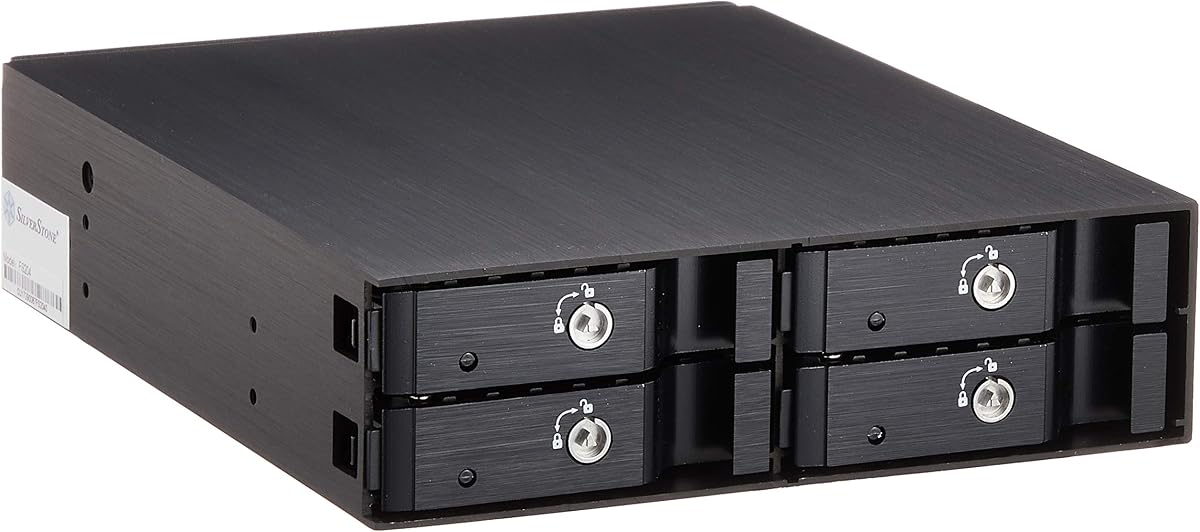
Silverstone brings a premium build quality with an all aluminum body and hairline finish. Rated 4.2 stars, it fits four 2.5 inch drives in a 5.25 inch bay. Each drive gets its own metal key lock for added security.
We may earn a commission when you buy through this link, at no additional cost to you.
The built-in fan helps dissipate heat effectively during operation. Individual status LEDs keep you informed on drive health. The trayless design makes swapping drives quick and easy without tools.
The price is high compared to plastic options but the finish and security are worth it. It requires a 5.25 bay which may not be in compact cases. Still, it is excellent for high-end desktop or server applications.
Choose this for a stylish and secure solution. It balances aesthetics with function well. Users wanting extra security on their drives will love the individual locks and robust build.
Each bay has its own key lock to prevent unauthorized access. This feature is rare in mobile racks and adds significant value for security.
The aluminum body is durable and helps with heat dissipation. The hairline finish looks professional in any workstation or server room.
We may earn a commission when you buy through this link, at no additional cost to you.
This LYNICESHOP model offers a 5-bay solution using three optical drive bays. Rated 5.0 stars, users praise its space-saving design and durability. It supports both SATA and SAS interfaces for flexible storage needs easily.
We may earn a commission when you buy through this link, at no additional cost to you.
Dual power supplies make operation safer and more stable under load. A fan ensures excellent heat dissipation to extend service life. The aluminum alloy construction provides resistance to corrosion and wear over time.
It requires three contiguous bays which is a significant space commitment. While brand support is limited, the quality assurance and service promise help buyers. It is a great option for those needing 5 drives in one unit.
Ideal for expanding storage in desktops with room for 3 bays. The heat dissipation capacity is strong enough for daily use. Buyers looking for a sturdy trayless solution will find this well built.
Using three optical bays to fit five hot-swap positions is efficient. This expands storage without needing a full server chassis.
Dual power supplies ensure stable voltage to prevent drive errors. This feature is crucial for reliable operation in data-intensive tasks.
We may earn a commission when you buy through this link, at no additional cost to you.
Selecting the right Hot Swap SATA Mobile Rack depends on several key factors that affect performance and convenience.
Ensure the rack supports your specific drive size and interface. Most options handle 3.5 or 2.5 inch drives but some differ. Check SATA vs SAS support based on your needs before buying.
Verify compatibility to avoid buying a unit that does not fit your drives.
Measure your computer case bays carefully before purchasing. Some units need a single 5.25 inch slot while others use 3.5 inch spaces. Knowing this prevents fit issues during installation.
Check your chassis specifications to match the rack slot size.
High capacity racks generate more heat and need fans. Look for units with built-in fans or good airflow design. Passive cooling works for single bays but may not suffice for 6 bays.
Prioritize active cooling for multi-drive enclosures to prevent overheating.
Trayless designs allow faster drive swaps without tools or screws. Others use trays for stability but take longer to install. Choose based on how often you need to remove drives.
Trayless is best for frequent access while trays offer more stability.
Physical locks on bays protect data from unauthorized removal. This is vital for shared workstations or public environments. Look for key locks if security is a priority for you.
Choose models with lockable bays if you work in shared spaces.
Aluminum or metal frames dissipate heat better than plastic. They also offer durability and resistance to physical damage. Steel and ABS blends are common in cost-effective models.
Select metal construction for better cooling and longer life.
LED status lights help you know if drives are active or powered. This is useful for troubleshooting without opening the case. Individual lights per bay add clarity when managing multiple drives.
Look for per-bay LEDs to monitor drive status easily.
Check if the rack needs external power or draws from the case. Some units include power connectors while others rely on internal lines. Ensure your PSU has the connectors needed.
Verify power requirements match your system connections before buying.
To install your rack, align it with the drive bay slots and secure the screws firmly. Ensure the SATA power and data cables are connected securely to the motherboard and PSU before first use.
When swapping drives, press the eject button gently and wait for the LED to stop flashing. This ensures the drive is fully unmounted by the OS and prevents data corruption during removal.
Regularly clean the fan vents and interior to prevent dust buildup. Keep the rack in a well-ventilated area to avoid overheating. Check cable connections periodically to ensure they remain tight.
Yes, most mobile racks fit into standard 5.25 or 3.5 inch bays found in desktop cases. Ensure your case has an available bay before buying to avoid fit issues.
No, most racks are plug and play and recognized automatically by modern operating systems. They use standard SATA interfaces so drivers are rarely needed.
3.5 inch racks hold standard hard drives while 2.5 inch racks hold smaller SSDs or laptop drives. Some units support both sizes via adapters but check specifications first.
Yes, they are designed for repeated insertions and removals safely. Look for high insertion ratings and quality connectors to ensure long-term reliability.
Some mobile racks support both SATA and SAS interfaces while others are SATA only. Check the product specs to confirm SAS compatibility before purchasing.
No, single bay units often rely on passive cooling while multi-bay units include fans. Consider your case airflow when choosing a unit without active cooling.
We reviewed ten models ranging from budget friendly single bays to premium 6-bay solutions. The StarTech trayless rack stands out as an editor choice for reliability. The ICY DOCK 6-bay model offers top features for large storage.
Focus on bay size and cooling needs when making your decision. If you swap drives daily prioritize a trayless design with high insertion rating. For static storage, a locked bay might be more important.
Always verify current stock and pricing before buying as these factors vary. Check your case dimensions and power connectors to ensure a smooth setup. We hope this guide helps you find the perfect storage upgrade solution today.