
SSK Portable SSD 1TB External Solid State Hard Drive
4.5Editor score
Affordable price point
Lightweight design
Steady transfer rates
Discover the top external SSD for Linux devices tested for speed compatibility and durability. Compare features to find the perfect drive for your workflow
Finding the right external storage for your Linux system requires careful consideration of file systems and speed. A good SSD ensures smooth performance and reliable data access across various distributions without compatibility issues.
We evaluated ten leading portable drives based on transfer speeds, build quality, and Linux support. Our analysis focuses on real-world usability and hardware encryption to help you make an informed decision for your setup.
Each pick highlights specific strengths like ruggedness or high capacity suitable for developers and creators. Please note that product availability and pricing may vary over time so verify details before purchasing.
4.5Editor score

4.7Editor score

4.6Editor score
This table provides a side-by-side overview of key specifications for all ten selected drives to help you quickly identify the model that best fits your technical requirements.





The Samsung T7 stands out as a top choice for Linux users seeking reliability and speed. Its high rating reflects consistent performance across various systems making it a safe bet for daily tasks.
We may earn a commission when you buy through this link, at no additional cost to you.
Powered by PCIe NVMe technology this drive delivers fast read and write speeds essential for large file transfers. The sturdy aluminum construction ensures it can withstand minor drops and everyday wear and tear.
While it lacks a dedicated password key the included software offers robust protection. Some users might find the included cable slightly short for certain desktop setups but this is a minor inconvenience.
This drive is ideal for developers and photographers who need quick access to data. Its balance of speed portability and durability makes it our top recommendation for most users today.
The dynamic thermal guard technology ensures the drive maintains peak performance even during heavy data transfers without throttling.
It works seamlessly with Linux macOS and Windows systems ensuring your data is always accessible regardless of your operating environment.
We may earn a commission when you buy through this link, at no additional cost to you.
The SSK Portable SSD offers impressive value for those needing high capacity without breaking the bank. It delivers solid speeds that compete well with more expensive models in its class.
We may earn a commission when you buy through this link, at no additional cost to you.
Features like SLC caching help maintain consistent performance during large file transfers which is crucial for Linux workflows involving code or media. The lightweight design makes it easy to carry in a laptop bag.
While it lacks advanced brand specific software it covers the basics effectively for storage and retrieval. Some users may prefer a more established brand for long term support but the hardware is reliable.
This drive is perfect for students or hobbyists looking for a cost effective backup solution. It provides the essential features needed for fast data access at a very competitive price point.
Smart caching mechanisms ensure that write speeds remain high even when transferring large datasets without significant slowdowns.
The inclusion of both USB-C and USB-A cables allows for easy connection to older and newer devices without extra adapters.
We may earn a commission when you buy through this link, at no additional cost to you.
For professionals who demand the fastest data transfer rates this drive delivers with exceptional speeds exceeding standard models. It is built to handle intensive workloads like 4K video editing without lag or interruption.
We may earn a commission when you buy through this link, at no additional cost to you.
The advanced thermal solution keeps the drive cool during prolonged use ensuring sustained performance. You can manage drive health and security settings easily with the included Magician software designed for reliability.
Premium features come at a higher cost and require a Gen 2×2 port to reach top speeds. For users with older USB standards the speed benefit might be limited compared to the investment.
This is the ultimate choice for creative professionals needing maximum throughput for their Linux systems. Its combination of speed durability and software support justifies the higher price tag for serious work.
With read speeds up to 2000MB/s you can move massive files in seconds significantly speeding up your workflow.
Regular software updates and health checks help you stay informed about the drive status and security settings at all times.
We may earn a commission when you buy through this link, at no additional cost to you.
This drive is engineered for tough environments offering robust protection against water and dust while maintaining high performance. It is an excellent choice for field work or travel where gear protection is a top priority.
We may earn a commission when you buy through this link, at no additional cost to you.
With a massive two terabyte capacity it can store extensive projects or archives without needing multiple drives. The included password protection keeps your sensitive data secure using strong hardware encryption methods.
While the rugged design adds some bulk it fits comfortably in most bags and the carabiner loop adds convenience. Some users may find the memory zone app necessary for full management a slight hurdle for minimalists.
Ideal for outdoor photographers or engineers working in harsh conditions this drive balances durability with speed. It ensures your data remains safe and accessible even when you are away from a stable desk environment.
Rated IP65 the drive resists water and dust ingress ensuring reliability in challenging outdoor environments.
With two terabytes of space you can store huge datasets or video files without worrying about running out of room soon.
We may earn a commission when you buy through this link, at no additional cost to you.
The Lexar ES3 focuses on a sleek design that fits easily into pockets or tight laptop sleeves. It offers reliable performance for daily file transfers and backups making it a practical option for students.
We may earn a commission when you buy through this link, at no additional cost to you.
Fast data transfer speeds allow you to access your files quickly whether you are using a laptop or a desktop setup. The included encryption software adds a layer of security to keep your personal information safe from prying eyes.
While it is not designed for extreme durability it holds up well for standard office use. The silver finish looks professional but may show fingerprints more than darker alternatives over time.
This drive is suitable for anyone prioritizing portability and a clean look. It delivers the core features needed for efficient data management without extra bulk or unnecessary complex features.
Measuring only a few millimeters thick it slips effortlessly into any pocket ensuring you never leave your data behind.
Built-in encryption tools help protect your sensitive files ensuring privacy without needing third party software.
We may earn a commission when you buy through this link, at no additional cost to you.
This variant of the popular T7 adds a rugged exterior specifically designed to protect against harsh conditions. It offers excellent durability for users who work in construction sites or travel frequently with their gear.
We may earn a commission when you buy through this link, at no additional cost to you.
With a rating for water and dust resistance you can use it confidently in various environments without fear of damage. The high capacity ensures you can store extensive backups or project files in one location.
The added protection does make it slightly heavier than standard models which might matter for ultra portable needs. However the trade off provides peace of mind when your data is critical and you are on the move.
Recommended for field engineers or outdoor photographers this drive combines speed with resilience. It ensures your valuable data stays safe and accessible regardless of the physical conditions you face daily.
The reinforced rubber exterior absorbs shocks and impacts allowing the drive to survive significant drops onto hard surfaces.
Water and dust resistance ensures the drive continues to function properly even in rainy or dusty environments.
We may earn a commission when you buy through this link, at no additional cost to you.
Western Digital provides a reliable storage solution with a focus on data security and speed. The hardware encryption ensures your files are protected without relying solely on software tools which is great for Linux users.
We may earn a commission when you buy through this link, at no additional cost to you.
NVMe technology allows for quick data access which is beneficial when working with large datasets or multimedia projects. The shock resistant design adds an extra layer of safety for your data during transport.
While the software is robust some users might prefer open source alternatives for security management. The price per terabyte is higher compared to some competitors but the build quality justifies the cost.
This drive is perfect for professionals handling sensitive corporate data or private files. Its combination of security and speed makes it a strong contender for any setup requiring high reliability.
Built-in encryption hardware protects your data even if the drive is connected to an untrusted computer.
Designed to withstand accidental drops this drive keeps your data safe from physical damage during everyday use.
We may earn a commission when you buy through this link, at no additional cost to you.
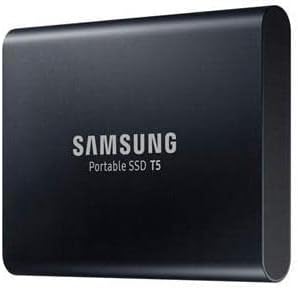
The Samsung T5 remains a trusted option known for its durable metal body and consistent performance. It offers a solid balance of speed and reliability that satisfies many users even with newer models available.
We may earn a commission when you buy through this link, at no additional cost to you.
Its high capacity allows for extensive storage of media or software projects in one compact device. The metal casing not only looks premium but also helps dissipate heat during data transfers effectively.
While slower than the latest Gen 2 models it still provides ample speed for most general tasks. The interface is older which might limit top speeds on modern high-end Linux machines compared to newer standards.
This drive is a great choice for users who prioritize reliability and build quality over the absolute fastest speeds. It continues to be a popular choice for those needing reliable portable storage.
The top to bottom metal design provides superior durability and heat dissipation compared to plastic alternatives.
Includes both USB-C and USB-A cables ensuring compatibility with a wide range of devices and adapters.
We may earn a commission when you buy through this link, at no additional cost to you.
This smaller version of the popular T7 is ideal for users who need speed without requiring massive storage. It serves well as a portable project drive or a quick backup solution for essential files.
We may earn a commission when you buy through this link, at no additional cost to you.
Fast transfer speeds ensure you spend less time waiting for files to copy and more time working. The thermal guard technology keeps the drive running cool even during extended use sessions.
The 500GB capacity may not be enough for large media libraries but is perfect for documents or code. The red color adds a unique style though some users might prefer more neutral tones for professionalism.
Recommended for students or casual users needing a fast and compact drive this model delivers on performance. It brings premium features to a lower entry price point without sacrificing reliability.
Automated thermal management slows transfers if needed to prevent overheating and extend the drive lifespan.
The small footprint makes it easy to carry everywhere ensuring your important files are always with you.
We may earn a commission when you buy through this link, at no additional cost to you.
The T5 in this smaller capacity offers an affordable entry point into quality portable storage. It delivers dependable performance suitable for everyday file transfers and backups across multiple operating systems.
We may earn a commission when you buy through this link, at no additional cost to you.
Its metal construction ensures durability and helps manage heat during operation keeping your data safe. The blue finish offers a distinct look for users who want their drive to stand out from standard black options.
While it lacks the fastest speeds of newer generations it remains highly capable for general use cases. The interface is widely supported ensuring compatibility with older and newer machines alike.
This drive is perfect for those who want a reliable brand without paying a premium for the latest tech. It balances cost performance and build quality effectively for the average user.
Backed by a limited warranty you can trust the drive to perform reliably for a significant period of use.
Support for multiple operating systems ensures you can use this drive with PCs Macs and Android devices easily.
We may earn a commission when you buy through this link, at no additional cost to you.
Selecting the right drive involves evaluating speed compatibility and build quality to ensure seamless integration with your Linux system.
Look for USB 3.2 Gen 2 or Gen 2×2 interfaces to maximize data transfer speeds on modern Linux hardware. Older ports may bottleneck performance even if the drive supports faster standards.
Choose a drive with a standard USB-C connector for best compatibility with modern laptops and adapters.
Ensure the drive supports Linux file systems like ext4 or NTFS for read and write access without additional formatting. Some drives ship formatted for Windows or Mac which may need reformatting.
Always back up data before reformatting to prevent accidental loss during the setup process.
Select a capacity that fits your project needs and backup requirements. Larger drives like 2TB are ideal for video editors while 500GB or 1TB suffices for documents and code.
Consider future growth to avoid purchasing another drive sooner than necessary.
If you travel often choose a drive with rugged features like water resistance and shock protection. Look for IP ratings and drop resistance specs to ensure longevity.
Standard models are fine for office use but rugged options offer peace of mind for field work.
Hardware encryption is preferred for sensitive data as it works independently of software. Ensure the encryption software is compatible with Linux or supports universal standards.
Check for password protection options to secure your drive against unauthorized physical access.
Fast drives can generate heat which may affect performance during long transfers. Look for models with thermal guards or aluminum bodies that dissipate heat effectively.
Proper cooling ensures sustained speeds without throttling during intensive tasks.
Some brands offer management tools that may not be supported on Linux. Prefer drives that rely on standard protocols rather than proprietary software for full functionality.
Check user reviews to confirm Linux compatibility before purchasing to avoid software issues.
A multi-year warranty indicates manufacturer confidence and provides security for your investment. Check support terms to ensure they cover accidental damage or standard failures.
Reliable support channels are essential if you encounter hardware issues or need technical assistance.
Connect your drive to a powered USB port and allow the system to mount it automatically. Use your file manager to access the drive or mount it manually via terminal commands if needed.
Avoid disconnecting the drive while data is being transferred to prevent corruption. Always use the safe eject option in your file manager or terminal before unplugging the device.
Store the drive in a cool dry place when not in use to prevent overheating or moisture damage. Use a protective case to shield it from scratches or impacts during transport.
Yes most external SSDs work natively with Linux as they use standard USB mass storage protocols. You may need to reformat the drive to a Linux compatible file system for full write access.
Transfer speeds depend on your USB port and the drive model. Modern SSDs can reach over 1000MB/s with USB 3.2 Gen 2 ports but older ports will limit these speeds significantly.
ext4 is the standard choice for Linux systems offering stability and performance. If you need cross compatibility with Windows NTFS is often used but read write support varies by distribution.
Yes but performance will be slower than internal storage. It is better suited for backup or portable apps rather than a primary system drive due to latency and port limitations.
This usually happens if the drive is formatted as NTFS or exFAT without write permissions. You can remount it with write access using the mount command or reformat to ext4.
Use the eject option in your file manager or run sync followed by umount in the terminal. This ensures all data is written and prevents file system corruption during removal.
Hardware encryption has minimal impact on speed as it is handled by the drive controller. Software encryption may slow transfers slightly but offers more flexibility across different systems.
Our top picks include the Samsung T7 for overall performance and the SSK for budget conscious buyers. The Samsung T9 remains the best premium option for those needing maximum speed.
Prioritize compatibility and durability when making your final decision to ensure long term reliability. Speed matters but a rugged build may be more important for your specific workflow.
Prices and availability change frequently so check current details before purchasing. Verify that your Linux distribution supports the drive features for a smooth experience.