
Apevia ITX-AP300W
3.9Editor score
Standard Mini-ITX compatible
Simple manual voltage switch
Affordable price point
Discover the best low power PSU options for compact builds. This guide compares efficiency, size, and reliability to help you choose the right unit.
Selecting the right power supply is crucial for any system build, especially when space is limited. A low power PSU ensures your components receive stable energy without wasting electricity or generating excess heat. Choosing wisely protects your investment and keeps your compact setup running smoothly for years.
We compared ten top-rated models based on efficiency ratings, physical dimensions, connector types, and safety features. Our analysis covers Small Form Factor units alongside standard ATX options that deliver efficient performance. Each product was evaluated to help you find the perfect match for your specific hardware needs.
Each entry in this list highlights key specifications, pros, cons, and real-world suitability. You will see detailed breakdowns to guide your decision-making process. Remember that product availability and pricing can fluctuate, so always verify current details before finalizing your purchase decision for your build.
3.9Editor score

4.7Editor score

5.0Editor score
This table provides a side-by-side overview of all ten selected units to help you quickly compare key specifications like wattage, efficiency rating, and form factor suitability.




The MSI MAG A650BE stands out as a top contender in the compact power supply market. With an impressive 4.7 rating, this unit balances performance and price exceptionally well. Its 80 Plus Bronze certification ensures energy efficiency without compromising on stability for daily computing tasks.
We may earn a commission when you buy through this link, at no additional cost to you.
This model features a semi-modular design that allows you to connect only the cables you need. This reduces clutter inside your case and improves airflow significantly. The 120mm low noise fan keeps operations quiet while the Active PFC design ensures stable power delivery even under varying loads.
While it lacks full modularity, the semi-modular approach keeps costs down while maintaining practical utility. Some users may find cable management slightly more complex than fully modular units. However, the trade-off is well worth the reliable performance and comprehensive safety features included.
This PSU is ideal for builders seeking reliable power without overspending. Whether you are assembling a home office PC or a lightweight gaming rig, this unit delivers consistent results. The five-year warranty adds peace of mind for long-term system reliability and user confidence.
The 80 Plus Bronze certification guarantees at least 80 percent efficiency under typical loads. This means less wasted energy and lower heat generation for your system components.
Industrial level protection including OVP, OCP, and OTP safeguards your hardware. These features prevent damage from electrical surges or overheating during operation.
We may earn a commission when you buy through this link, at no additional cost to you.
The Apevia ITX-AP300W is perfect for budget-conscious builders needing basic power for small systems. It delivers 300 watts reliably for office PCs or media centers. Its compact dimensions ensure it fits neatly into standard Mini-ITX or Flex-ATX chassis without issues.
We may earn a commission when you buy through this link, at no additional cost to you.
Connectivity is straightforward with essential SATA and Molex connectors for storage and fans. The manual voltage switch allows international use if toggled correctly to match local outlets. The included fan maintains adequate cooling for lower-power components inside your chassis.
Users must ensure the voltage switch is set correctly before plugging in to avoid damage. The limited wattage means it cannot support high-end graphics cards. However, for its price point, it offers functional reliability for entry-level builds effectively.
Choose this unit if you are building a HTPC or basic workstation. It provides essential power without unnecessary features that drive up cost. Just verify your system power needs match the 300W limit before purchasing for your setup.
Designed specifically for Small Form Factor cases this unit saves valuable space. Its dimensions align with standard Mini-ITX and Flex-ATX requirements perfectly.
Despite the low price it includes OVP OCP and SCP protections. These features help prevent electrical damage to your motherboard and storage drives.
We may earn a commission when you buy through this link, at no additional cost to you.
Thermaltake delivers a reliable standard ATX unit with the Smart 500W model. It meets Intel ATX 12V standards and offers continuous power output consistently. The 80 Plus White rating ensures decent efficiency for general computing tasks and everyday use cases.
We may earn a commission when you buy through this link, at no additional cost to you.
Its 120mm ultra quiet fan reduces noise during operation significantly. This makes it suitable for living room PCs or quiet workspaces where silence matters. The powerful 12V rail ensures stable performance for graphics cards and drives under load.
While efficiency is good it is not top-tier compared to newer bronze or gold units. Fixed cables mean less flexibility for cable management in some cases. However the five-year warranty provides strong support for long-term user confidence.
This PSU works well for mid-range builds needing consistent power. It balances cost and performance effectively for most consumers. Ensure your case accommodates standard ATX sizes before installation for best results.
This unit complies with Intel ATX 12V 2.31 and EPS 12V standards. This ensures compatibility with most modern motherboards and system components.
The included 120mm fan is designed for ultra-quiet cooling performance. This helps maintain low noise levels even during typical usage loads.
We may earn a commission when you buy through this link, at no additional cost to you.
NovaMist offers a straightforward power supply focused on essential performance. It carries 80 Plus Bronze certification for better efficiency than white models. The low noise fan helps keep your system quiet during normal daily operations.
We may earn a commission when you buy through this link, at no additional cost to you.
Its design is simple without advanced modularity or high-end specs. This makes it easy to install for users seeking uncomplicated setups. The five-year limited warranty adds value by protecting against early failures.
Build quality is standard for the price range without premium materials. It suits basic PCs where high wattage or modularity is not required. Users should verify connector availability matches their component needs before purchase.
Ideal for budget builds requiring certified efficiency. It provides reliable power for non-gaming systems effectively. Check current stock and prices to confirm availability for your build project.
Bronze certification ensures the unit meets strict efficiency standards. This reduces energy waste compared to non-certified alternatives.
A five-year limited warranty covers the unit against defects. This offers reassurance for long-term system operation reliability.
We may earn a commission when you buy through this link, at no additional cost to you.
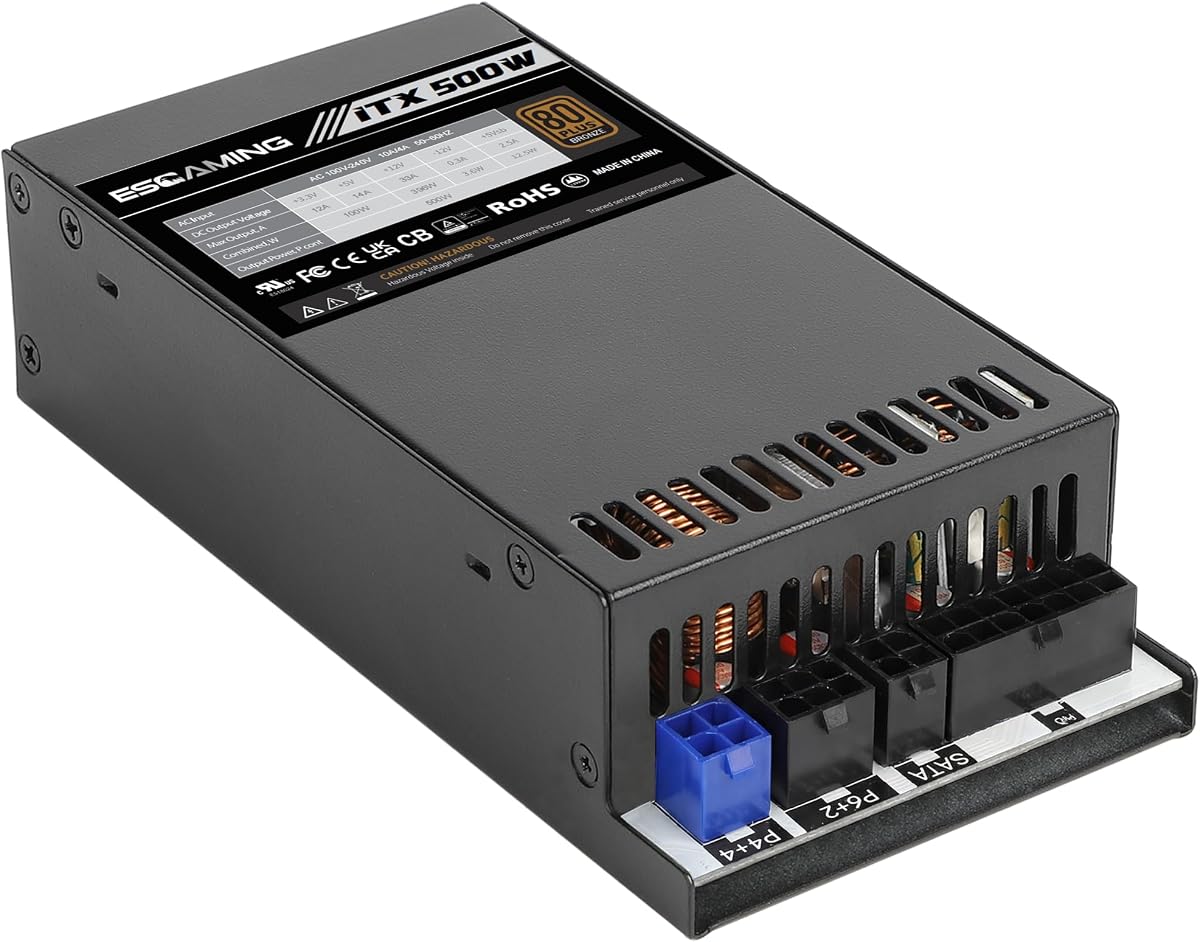
ESGAMING delivers a compact PSU with fully modular cables for cleaner installs. It targets 1U or ITX chassis with flexible cable routing options. The 80 Plus Gold rating ensures high efficiency and minimal energy waste during operation.
We may earn a commission when you buy through this link, at no additional cost to you.
Full modularity allows you to attach only necessary cables reducing clutter. The active PFC design supports a wide voltage range for international travel or use. This unit fits standard small form factor cases without major modifications needed.
Some users report variable stock availability which may delay purchases. Support quality depends on contacting the seller directly for help. However the performance and flexibility remain strong for the target niche market segment.
Perfect for small PC builds needing efficiency and clean layouts. Verify case dimensions match before ordering to ensure proper fit. Check seller ratings for reliable support during the purchase process.
Fully modular cables reduce clutter and improve airflow in small cases. This allows for cleaner builds and easier component installation.
Active PFC supports 90 to 264V input range automatically. This makes it versatile for travel or international use cases.
We may earn a commission when you buy through this link, at no additional cost to you.
This PSU is designed for TFX cases and SFF builds needing specific sizing. Its 500W output supports gaming and workstation components reliably. The auto-switching power feature adjusts voltage automatically without manual toggling.
We may earn a commission when you buy through this link, at no additional cost to you.
Silent start technology keeps the fan still during low loads. This ensures quiet operation when system stress is minimal. The high 12V amp delivery supports GPUs and drives effectively.
Fixed cables limit flexibility but simplify installation for standard TFX cases. Ensure your case supports the TFX shape and clearance before buying. Otherwise this unit delivers strong performance for its specialized niche form factors.
Choose this for SFF builds requiring TFX dimensions. It offers reliable power with smart safety features. Always verify case compatibility to avoid fitting issues during installation.
Designed specifically for TFX form factor cases to save space. This ensures perfect fit in compatible SFF chassis.
Silent start technology reduces noise during low load usage. This helps maintain quiet operation when system demand is low.
We may earn a commission when you buy through this link, at no additional cost to you.
The APEVIA VENUS500W provides standard ATX power for general systems. It features a 120mm fan with auto-thermal control for efficient cooling. Various protection mechanisms safeguard against electrical issues like surges or overheating.
We may earn a commission when you buy through this link, at no additional cost to you.
Voltage regulation stays within tolerance to ensure stable component performance. Multiple SATA and peripheral connectors support various storage setups. This model suits users seeking basic power without advanced efficiency certifications.
Build quality is standard and lacks premium materials. It may run slightly louder than higher-tier units under load. However it offers essential reliability for everyday computing tasks at a low cost.
Best for budget systems where efficiency ratings are not critical. Ensure your case fits standard ATX dimensions before installing. Check connector count to match your device needs.
Includes short-circuit over-current and over-voltage protections. These features protect hardware from electrical damage.
Auto-thermal control adjusts fan speed based on temperature. This balances cooling efficiency with noise levels effectively.
We may earn a commission when you buy through this link, at no additional cost to you.
This unit delivers premium performance for small builds with Flex ATX form factor. It achieves over 92 percent efficiency for reduced heat and noise. Fully modular cables simplify installation in tight spaces significantly.
We may earn a commission when you buy through this link, at no additional cost to you.
Japanese capacitors ensure long-term reliability and stable output. The included cables support modern GPU connectors for latest hardware. This makes it ideal for high-end compact gaming or workstation setups.
The price is higher than basic units reflecting the build quality. Limited availability might make sourcing harder for some buyers. However performance justifies cost for enthusiasts seeking top compact solutions.
Ideal for small form factor enthusiasts needing maximum efficiency. Verify case dimensions and connector needs before purchasing. Check seller reputation for support during the purchase process.
Japanese capacitors deliver stable output and long reliability. This ensures consistent performance over extended usage periods.
Over 92 percent efficiency reduces energy waste significantly. This minimizes heat generation and noise from cooling.
We may earn a commission when you buy through this link, at no additional cost to you.
Smart W3 series meets modern ATX v3.1 specifications for future readiness. It offers 600W capacity for powerful GPUs and components. The 80PLUS certification ensures efficient power usage during daily tasks.
We may earn a commission when you buy through this link, at no additional cost to you.
High amperage +12V rail design supports demanding workloads well. The 120mm FDB fan provides quiet cooling for low noise. Flat black cables make installation neat in standard cases.
It lacks full modularity which may limit cable management flexibility. Standard ATX size requires sufficient case clearance. However it delivers solid performance for the price effectively.
Great for users needing modern spec compatibility without premium cost. Ensure case supports standard ATX before installation. Check current stock for availability before your build.
Compatible with Intel ATX v3.1 specifications for next-gen hardware. This ensures readiness for upcoming system upgrades.
120mm FDB fan reduces noise during typical use. This keeps system operation quieter for better user experience.
We may earn a commission when you buy through this link, at no additional cost to you.
Apevia offers a specialized TFX unit for compact SFF builds reliably. 500W output supports gaming components in small cases efficiently. The auto-switching power removes the need for manual voltage toggling.
We may earn a commission when you buy through this link, at no additional cost to you.
Smart silent cooling technology keeps fan noise low at idle. High 12V amp ensures stable GPU performance under load. Industrial protections maintain system safety during operation.
Fixed cables are simple but less flexible than modular ones. Ensure case supports TFX shape to avoid fitting issues. Otherwise it offers great value for specific SFF chassis needs.
Best for builders targeting SFF with TFX constraints. Check case specs before purchasing to confirm compatibility. Ensure you need full 500W for your components.
Designed for TFX form factor cases to save space. This ensures compatibility with specific SFF chassis.
Includes OVP OCP and SCP for hardware safety. This helps prevent damage from electrical issues.
We may earn a commission when you buy through this link, at no additional cost to you.
Selecting the right low power PSU requires balancing wattage efficiency and form factor. This guide explains key factors to consider for your specific build needs.
Determine your total system power draw before selecting wattage. High-end GPUs or CPUs may need 500W or more while basic PCs run fine on 300W. Always add a safety margin for future upgrades.
Ensure your chosen PSU provides enough wattage for all components under load.
Check your case support for ATX SFX TFX or Flex ATX dimensions. A mismatched PSU will not fit or connect properly to the motherboard. Measure clearance for cables and mounting screws carefully.
Match the PSU form factor exactly to your case specifications.
Look for 80 Plus certification to ensure energy efficiency. Bronze or better ratings reduce wasted power and heat. Higher tiers like Gold offer even better performance for high loads.
Choose at least Bronze certification for reliable energy efficiency.
Verify that the PSU includes necessary connectors for your motherboard drives and GPU. Some units lack specific PCIe or CPU pins which can limit component options. Modular designs help organize cables but fixed ones are simpler.
Check connector count against your component needs before purchasing.
Ensure the unit includes protections like OVP OCP SCP and OTP. These features safeguard against voltage spikes or short circuits. Higher quality units have more robust protection circuits.
Prioritize PSU with complete protection suites for safety.
Low power PSUs often feature fans designed for quiet operation. Look for units with thermal control to minimize noise at low loads. Larger fans usually spin slower and produce less noise.
Select a unit with quiet fan technology for peaceful operation.
A longer warranty indicates confidence in product durability. Five years or more is ideal for long-term peace of mind. Check seller support reputation for quick assistance if issues arise.
Choose units with solid warranty terms for reliability.
Balance cost against features like modularity and efficiency ratings. Budget units save money but may lack advanced protections or noise control. Invest more for critical components like servers or gaming rigs.
Prioritize features that matter most for your usage scenario.
Before installation ensure your case supports the PSU form factor. Connect all necessary power cables to the motherboard GPU and drives securely.
Keep the interior of your case clean by dusting fans and vents regularly. This maintains airflow and prevents overheating during operation.
Avoid overloading the PSU by matching component power draws to rated wattage. Always shut down the system before connecting or disconnecting power cables for safety.
A low power PSU delivers sufficient energy for compact or low-demand systems while saving space and electricity. Use one for HTPCs mini PCs or small office setups where standard ATX units are unnecessary.
Higher efficiency means less wasted energy and heat rather than better raw performance. It translates to lower power bills and cooler operation which helps maintain system stability over time.
Not always because small cases may lack physical clearance for standard ATX dimensions. Check case compatibility charts before purchasing to ensure proper fit and cable routing.
Modular cables reduce clutter and improve airflow inside your case. They are worth the extra cost for tight builds where cable management matters for cooling and aesthetics.
Check your component list for required power connections like PCIe CPU or SATA pins. Compare this count against the PSU specs before buying to avoid missing necessary cables.
Higher wattage provides headroom for upgrades but may be overkill for low-power builds. Match wattage to your system needs to avoid unnecessary cost and size.
Not all units automatically support 230V. Some require manual switches or are region-specific. Always check input voltage specs to ensure compatibility with your local power outlet.
A quality PSU typically lasts five to ten years under normal conditions. Factors like heat and voltage stability affect lifespan so choose units with good build quality and warranty.
We explored ten excellent low power PSU options balancing efficiency and form factor. The MSI MAG A650BE stands out for reliability while budget units like Apevia offer essential features.
Prioritize wattage and size matching before considering extra features like modularity. Ensure your case and components align with the selected unit specifications for proper function.
Prices and availability change so verify current details before finalizing your purchase. Use this guide to find a PSU that fits your specific compact system needs perfectly.