
Digital Alarm Clock with Date and Day of Week for Dementia Seniors
4.7Editor score
Voice Announcement Time Function
Automatic Dimming at Night
Simple One-Click Setup
Compare the top digital clock with date and day of week for seniors and families. Find large display, voice, and alarm features to support daily routines
Finding a reliable digital clock with date and day of week is essential for maintaining daily routines. These devices offer clear visibility of time, date, and day to help users stay organized and informed throughout their day.
We evaluated ten leading models based on display clarity, alarm functionality, and ease of use. Our comparison highlights features like automatic dimming, voice announcements, and multi-language support to suit diverse household needs effectively.
Each selection includes detailed specifications and real user feedback to guide your decision. Prices and availability can change frequently, so please verify current details on the product pages before making your final purchase choice.
4.7Editor score

4.6Editor score

4.6Editor score
This side-by-side comparison breaks down the key specifications of each model. Review display size, alarm options, and special features to find the clock that best fits your specific environment and daily needs.


The SSYA Dementia Clock stands out with its massive 11.5-inch screen designed for maximum readability. Its 4.6 rating reflects user satisfaction with the clarity and simplicity of the interface which displays full words for time periods and dates.
We may earn a commission when you buy through this link, at no additional cost to you.
This model shines in accessibility with its non-abbreviated calendar format and 8-language support. Users can set up to 12 alarms for different daily tasks which makes it highly effective for managing medications or appointments without missing a beat.
While the screen size is a major advantage, it does require consistent wall power to maintain all features. Some users might find the large size takes up significant space but this is a small trade-off for the enhanced visibility it provides.
This clock is ideal for elderly users or those with memory challenges who need absolute clarity. It simplifies daily timekeeping tasks significantly and ensures that important dates and times remain visible at all times.
The ultra-large display ensures that even users with poor vision can read the time and date easily from across the room without straining their eyes.
With twelve customizable alarms, you can set specific reminders for medication, hydration, and appointments so that nothing is forgotten during the day.
We may earn a commission when you buy through this link, at no additional cost to you.
This affordable model delivers exceptional value with its 7-inch display and voice announcement feature which earns it a 4.7 rating. It provides a straightforward solution for users who need clear visibility and auditory confirmation of the current time.
We may earn a commission when you buy through this link, at no additional cost to you.
The voice timing function is a standout feature for those with vision impairment as it allows them to hear the time without looking at the screen. The automatic dimming ensures the screen is not too bright at night protecting your eyes during sleep.
While it lacks the extensive alarm customization of more expensive models, its simplicity is a benefit for users who prefer minimal setup. The single button setup ensures anyone can use it immediately without reading complex manuals.
It is an excellent choice for households on a budget that still require reliable timekeeping assistance. The clear fonts and voice capabilities make it accessible for elderly users needing support with daily routines.
The voice timing function speaks the current time aloud supporting nine languages and aiding those with vision issues.
Automatic dimming reduces screen brightness at night ensuring the light does not disturb sleep or cause eye strain.
We may earn a commission when you buy through this link, at no additional cost to you.
American Lifetime offers a premium option with a high-resolution display that maintains clarity in any lighting condition. Its robust build quality and 4.6 rating make it a reliable long-term choice for those prioritizing durability and consistent performance.
We may earn a commission when you buy through this link, at no additional cost to you.
The auto-dimming feature adjusts brightness based on room light ensuring visibility day and night. The backup power system keeps settings intact during outages which is critical for users who cannot reset complex settings frequently.
While the premium price is higher than average, the inclusion of U.S.-based customer support adds significant value. The simplified packaging and clear interface reduce confusion for elderly users and focus purely on usability.
This model is best for users who want a durable device with professional support behind it. Its clarity and ease of use provide peace of mind for families managing daily care schedules.
A backup power option ensures the clock resets automatically and displays the correct time after a power outage.
High contrast display makes numbers easy to read even in low light conditions for improved visibility.
We may earn a commission when you buy through this link, at no additional cost to you.
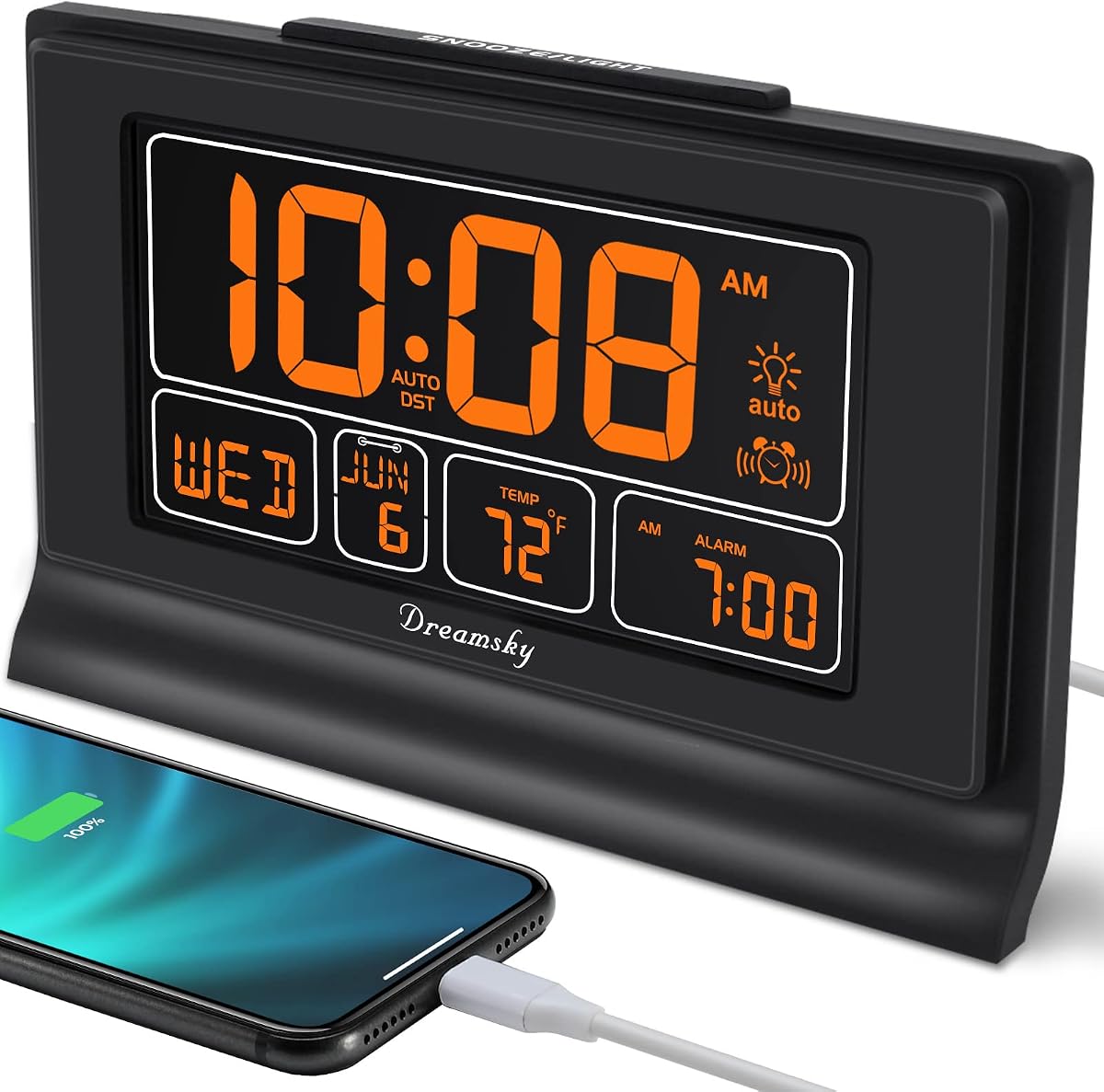
The DreamSky Large Digital Clock offers a practical 7.6-inch display with a useful USB charging port for devices. Users appreciate its 4.6 rating for its balance of functionality and ease of use for daily scheduling.
We may earn a commission when you buy through this link, at no additional cost to you.
Its four-level dimming option and auto-dimming feature provide flexibility for different lighting conditions. The indoor temperature display adds an extra layer of convenience for users who want to monitor room comfort levels.
The backup battery ensures settings are preserved during power cuts. While the alarm volume is adjustable, users needing auditory help might miss a voice announcement feature on this model.
This is a solid choice for those who want a simple clock with utility features like USB charging. It is well-suited for bedrooms or offices where keeping multiple devices charged is important.
The USB port allows you to charge phones without extra outlets.
The indoor temperature feature displays the room temperature.
We may earn a commission when you buy through this link, at no additional cost to you.
This model supports up to 20 alarms and 20 reminders which is ideal for detailed scheduling. Its 4.4 rating reflects users who value the flexibility to customize reminders for specific tasks without confusion.
We may earn a commission when you buy through this link, at no additional cost to you.
The photo playback function via SD card adds a personal touch making it a unique gift option. The time period icons like sun and moon help users visually understand the time of day easily.
Setup is more involved than other models and requires careful attention to instructions. Users need to plug it in constantly as it does not run on battery power alone.
Choose this if you need extensive alarm customization and visual aids. It is perfect for those who want to keep daily schedules precise without relying on external devices.
Insert an SD card to play photos on the clock screen.
Icons help visually represent morning evening and night times clearly.
We may earn a commission when you buy through this link, at no additional cost to you.
Offering a 7-inch display with voice announcement capabilities this model is built for clarity. Its high 4.7 rating highlights its effectiveness for users with vision issues who need auditory confirmation.
We may earn a commission when you buy through this link, at no additional cost to you.
The automatic dimming ensures comfort during night hours without manual adjustment. The setup is designed to be simple so users can start using it immediately.
While it lacks advanced themes it performs its core function reliably. Users report it is a dependable tool for daily reminders.
It is a strong value option for those prioritizing essential features over extra options.
The voice timing function allows you to hear the time clearly.
The interface is easy to use without complex menus or settings.
We may earn a commission when you buy through this link, at no additional cost to you.
This clock uses an IPS display to ensure clear viewing from multiple angles. Its 4.5 rating reflects the quality of the display which remains sharp even in varied lighting.
We may earn a commission when you buy through this link, at no additional cost to you.
The 12 alarms and 8 languages make it adaptable for various needs. The wall calendar layout helps users stay organized on dates and days.
The setup is straightforward and requires minimal technical knowledge. The auto dimming protects eyes at night and enhances comfort.
It is a good fit for users needing a wide viewing angle and multiple alarms.
The IPS screen ensures visibility from different directions.
The layout mimics a calendar to support better date awareness.
We may earn a commission when you buy through this link, at no additional cost to you.
The KOSUMOSU clock offers a modern aesthetic with a mirror finish. Its 4.1 rating indicates users appreciate the style but may find it lacks some specific senior-focused features.
We may earn a commission when you buy through this link, at no additional cost to you.
Dual alarms are useful for two people using the same bedside table. The temperature display adds practical information without cluttering the screen.
The manual dimming allows for total control over brightness levels. However the lack of voice announcements may limit accessibility for some users.
It is best for those who prioritize design and standard alarm features over accessibility options.
Set two separate alarms for different schedules or needs.
The mirror style clock blends well with modern bedroom decor.
We may earn a commission when you buy through this link, at no additional cost to you.
This model focuses on size and clarity to ensure users can see the time easily. Its 4.6 rating shows satisfaction with the straightforward and reliable design for daily use.
We may earn a commission when you buy through this link, at no additional cost to you.
The USB port on the back allows charging devices while sleeping. The five volume settings ensure the alarm is loud enough to wake heavy sleepers.
The design is simple with no complex settings to manage. This reduces confusion for users who need basic information without distractions.
It is a reliable option for bedrooms needing a large clear display.
The USB charger port allows charging phones.
The oversized screen ensures time is visible from a distance.
We may earn a commission when you buy through this link, at no additional cost to you.
This model simplifies setup by auto-setting the time and date automatically. Its 4.6 rating reflects its efficiency for users who want a plug-and-play experience.
We may earn a commission when you buy through this link, at no additional cost to you.
The ascending beeping alarm wakes users gently rather than jarring them awake. The battery backup ensures settings are safe during power outages.
The USB port is convenient for charging devices overnight. However the lack of a date display may limit its utility for those needing calendar info.
It is a great choice for those who value automated setup over advanced calendar features.
Plug it in and the clock sets itself immediately.
The beeping starts soft and gets louder to wake you naturally.
We may earn a commission when you buy through this link, at no additional cost to you.
Selecting the right digital clock requires evaluating key features to meet specific needs. Focus on display clarity, alarm flexibility, and usability factors to ensure the device supports your routine.
A clear display is crucial for reading time and date from a distance. Look for models with large screens and high contrast settings that ensure visibility even in low light.
Prioritize devices with large fonts and bold text to reduce eye strain.
Multiple alarms help manage various tasks throughout the day. Choose clocks that allow different alarm types and schedules for medication or appointments.
Check the number of customizable alarms to ensure it meets your daily needs.
Voice functions help those with vision impairment hear the time without looking. Models with this feature improve accessibility for users who prefer auditory cues.
Ensure the voice function supports your preferred language for clarity.
Automatic dimming adjusts brightness based on room light to protect eyes. This feature is essential for maintaining visibility at night without disrupting sleep.
Look for models with auto dimming to ensure consistent screen comfort.
Reliable power ensures the clock never stops working. Choose devices with backup batteries to retain settings during outages.
Check if the clock runs on standard batteries or mains power for reliability.
Simple interfaces are easier for elderly users to navigate. Avoid models with complex menus or confusing navigation steps.
Prioritize models with clear instructions and intuitive button layouts.
Multiple language options ensure the device is accessible to diverse users. Check how many languages are supported to avoid confusion.
Select a clock that supports your preferred language for clear display.
A durable housing ensures the clock withstands daily use. Look for warranties that protect against defects for peace of mind.
Choose brands with established customer support and warranty policies.
Start by connecting the clock to a reliable power source and following the setup instructions. Ensure the clock displays the correct time zone and daylight saving settings.
Clean the screen regularly with a soft cloth to prevent dust buildup. Avoid using harsh chemicals that may damage the display surface.
Test alarm sounds and dimming settings periodically to ensure they function correctly. Adjust brightness levels to match your environment and comfort needs.
Incorrect time may result from incorrect time zone settings or a battery backup failure. Ensure you select the correct time zone and check if the backup battery is functional.
Navigate to the alarm settings menu and select a new alarm slot. Set the desired time and ensure the alarm cycle matches your daily schedule.
Most models support multiple languages. Go to settings and select your preferred language from the menu to change the display language.
Many models include a snooze feature. Press the snooze button when the alarm rings to delay it by a few minutes.
Clocks with battery backup retain settings. Without a backup, the clock may reset. Check if the model includes a battery backup feature.
Yes, most models feature dimming or brightness adjustments. Ensure auto-dimming is enabled for comfortable viewing at night.
Check the settings for a voice feature option. Enable it and adjust the volume to hear the time spoken aloud.
Some models require manual adjustment. Look for a DST button or setting to adjust the time forward or backward as needed.
We reviewed ten top models with features like large displays and voice support. The SSYA Dementia Clock leads with its massive screen and multiple alarms for comprehensive daily organization.
Prioritize display clarity and simple alarm setup when choosing a model. Consider voice announcements and auto-dimming to enhance accessibility for all users.
Prices vary significantly and availability changes often. Check current listings to confirm details before making your final purchase.