
VIMIN 10G PCI-E Network Card
4.5Editor score
Intel X540-T2 Chipset
Dual RJ45 Ports
Heat Sink Included
This guide compares the top 10GB Ethernet Cards for speed and reliability helping you choose the right network adapter for your server NAS or gaming PC setup
Finding the right network upgrade is crucial for modern computing needs. A high quality 10GB Ethernet Card ensures your system keeps pace with fast internet and local file transfers without bottlenecks.
We evaluated ten leading models based on chipset performance compatibility and build quality. Our analysis covers PCIe and USB options to help you find the best fit for your specific hardware and use case.
Each pick below highlights key strengths and potential trade offs so you can decide confidently. Note that pricing and availability can change frequently so check current listings before making your final purchase decision.
4.5Editor score

4.2Editor score

4.6Editor score
This side by side comparison highlights the key specifications and features of each model to help you quickly identify the adapter that matches your performance requirements and budget constraints.




The TP-Link TX401 stands out as a top contender for general users seeking reliable 10G performance. It scores highly for its comprehensive package which includes the necessary CAT6A cable and multiple brackets for different case sizes.
We may earn a commission when you buy through this link, at no additional cost to you.
Its standout feature is the 10GBase-T technology that ensures smooth data transmission and automatic negotiation with slower networks. The QoS technology helps prioritize gaming traffic making it an excellent choice for home office and gaming setups alike.
While it performs well overall users should note that Linux support requires manual driver setup which might be a hurdle for some. Additionally the single port means it is less ideal for users needing dual connections for bonding or redundancy.
We recommend this card for anyone looking for a hassle-free upgrade to 10G Ethernet in a standard desktop. Its value proposition is strong given the included accessories and solid performance across major operating systems.
Includes everything needed for immediate installation without extra purchases.
QoS technology ensures critical tasks like gaming stay fast and lag free.
We may earn a commission when you buy through this link, at no additional cost to you.
For users needing dual 10G connections without spending a fortune the VIMIN card delivers impressive value. It utilizes the reliable Intel X540-T2 chipset which is known for consistent performance in high traffic environments.
We may earn a commission when you buy through this link, at no additional cost to you.
The dual RJ45 ports allow for network aggregation or failover setups which is great for small servers or workstations. The inclusion of both standard and slim brackets makes installation flexible across different server rack or desktop configurations.
One limitation is the lack of multi-gig support between 1G and 10G meaning it might not auto-negotiate efficiently on networks with intermediate switches. Users should ensure their network infrastructure supports full 10G speeds to avoid bottlenecks.
This card is an excellent budget choice for small businesses or enthusiasts needing dual links. The Intel chipset adds a layer of reliability that often costs more with other brands.
Dual ports allow for faster aggregated speeds or backup connections.
Intel X540-T2 ensures stable performance under heavy network loads.
We may earn a commission when you buy through this link, at no additional cost to you.
Synology users looking to expand network throughput will find this adapter perfectly tailored for their needs. It offers two 10GbE ports that seamlessly integrate with DSM ensuring high performance for storage applications and virtual machines.
We may earn a commission when you buy through this link, at no additional cost to you.
The seamless compatibility means users avoid driver headaches common with third-party cards. Synology validates this hardware rigorously so you can expect stable performance even with heavy file transfers and multiple simultaneous connections.
The main drawback is that it is not versatile outside the Synology ecosystem meaning it will not work as a standard PCIe card in general PCs. The price reflects this specialization but it is justified for NAS owners.
We recommend this adapter for any Synology owner needing faster speeds. The long warranty and optimized firmware support make it a reliable investment for home labs and small offices.
Fully validated for Synology DSM operating system without driver issues.
Dual ports handle high bandwidth storage workloads effectively.
We may earn a commission when you buy through this link, at no additional cost to you.
Asus brings a familiar brand name to the 10G Ethernet market with this reliable copper adapter. It delivers standard 10G performance with a focus on compatibility across various versions of Windows and Linux systems.
We may earn a commission when you buy through this link, at no additional cost to you.
The key advantage is its straightforward design which avoids complex requirements. The QoS technology helps manage bandwidth ensuring your gaming or video streaming remains smooth even during heavy network usage.
However the higher price tag relative to some competitors means it offers less value if you need multi-port solutions. It is a solid choice for simple upgrades but lacks the extra features found in budget options.
This adapter suits users who prefer sticking with a trusted brand for basic networking upgrades. It is easy to install and works reliably for home and small office environments.
Works with older Windows versions and modern Linux kernels.
Reliable connection using standard Category 6A cables.
We may earn a commission when you buy through this link, at no additional cost to you.
This 10Gtek adapter brings enterprise-grade reliability to home users at a competitive price. It mirrors the performance of the Intel X540-T2 making it suitable for servers and virtualization hosts needing dual high-speed links.
We may earn a commission when you buy through this link, at no additional cost to you.
The inclusion of a low profile bracket makes it versatile for smaller cases often found in compact servers. Support for Linux and ESX systems adds flexibility for advanced users running virtualized environments.
Users upgrading to Windows 11 should be aware that manual driver setup is required which can be a slight inconvenience. Also hot swapping is not supported so plan your network changes accordingly.
We suggest this card for server enthusiasts who want dual 10G links without breaking the bank. The Intel chipset ensures you get stable performance even under continuous heavy loads.
Supports ESX and Linux for virtualization and storage servers.
Two ports allow for aggregation or redundant network connections.
We may earn a commission when you buy through this link, at no additional cost to you.
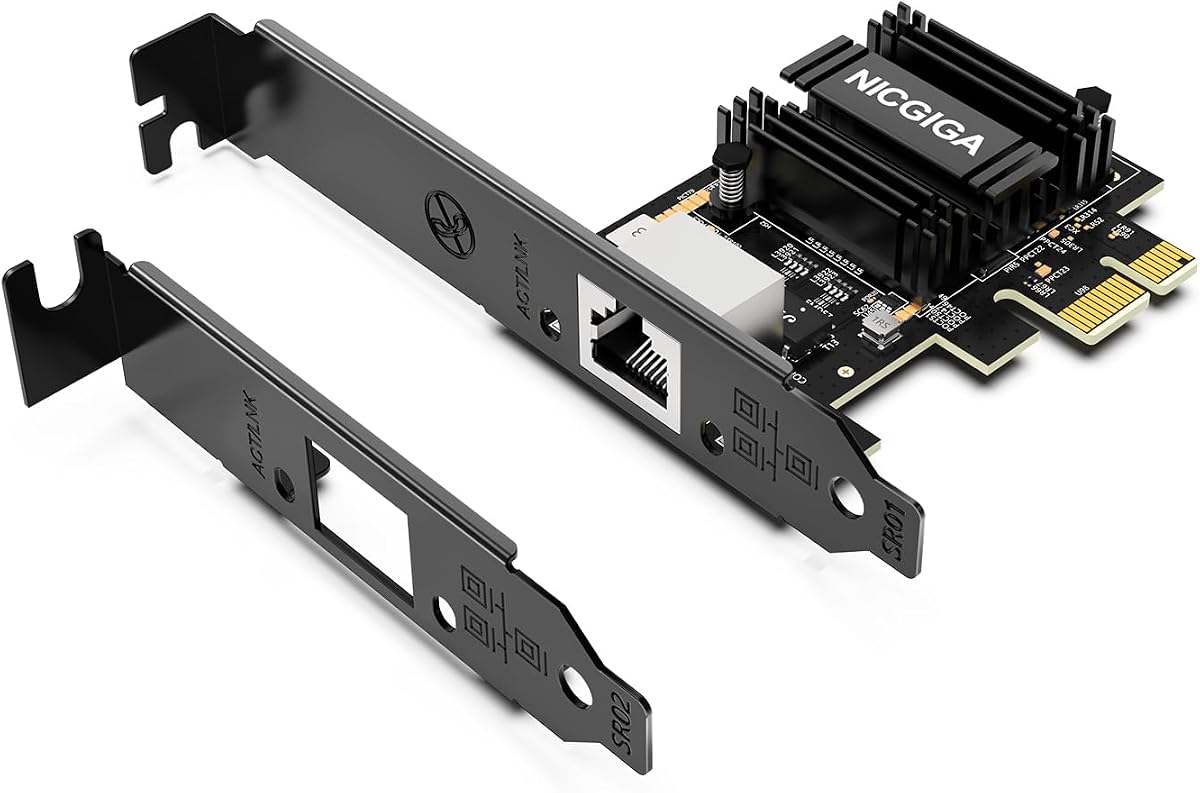
Designed for compact builds this NICGIGA adapter leverages PCIe 4.0 technology to deliver fast speeds without blocking other expansion slots. It is an excellent choice for Mini PCs or ITX builds where space is premium.
We may earn a commission when you buy through this link, at no additional cost to you.
The Realtek RTL8127 controller supports a wide range of speeds from 100Mbps up to 10Gbps ensuring you get the most out of your network switch. It also includes support for Wake-on-LAN which is useful for power management.
The main constraint is that it only fits x1 slots which limits use cases if you have older motherboards. Also while it is efficient single port users might miss out on redundancy options for critical setups.
This card is perfect for users upgrading small form factor PCs to 10G speeds. Its efficiency and compact size make it a great addition to modern compact workstations.
Uses a single lane slot leaving room for other components.
Multi-gig auto-negotiation handles various network standards.
We may earn a commission when you buy through this link, at no additional cost to you.
This VunLink adapter is built with energy efficiency in mind making it a great fit for always-on home labs and NAS systems. It uses the Realtek RTL8127AT controller which balances speed and power usage effectively.
We may earn a commission when you buy through this link, at no additional cost to you.
The auto-negotiation feature ensures you can connect to switches with different speed tiers without manual configuration. This flexibility simplifies network upgrades especially when moving from Gigabit to multi-gig environments.
Installation on Linux systems may require manual driver setup depending on your kernel version which could be a slight hurdle for some users. However once configured it offers reliable performance for file transfers and streaming.
We recommend this for NAS users needing a modern low-profile upgrade. Its efficiency and compatibility with common network standards make it a practical choice for home enthusiasts.
Optimized for reduced heat and energy consumption in 24-7 setups.
Auto-negotiation adapts to your network switch capabilities.
We may earn a commission when you buy through this link, at no additional cost to you.
This unique adapter allows you to upgrade to fiber optic networking which is ideal for reducing interference and increasing distance in data centers or large homes. It includes an SFP+ cage that accepts various transceiver modules.
We may earn a commission when you buy through this link, at no additional cost to you.
The aluminum heatsink keeps the card cool during high performance tasks which is crucial for long-term stability in server racks. Its QoS technology ensures your gaming or business critical data always gets priority.
Note that SFP+ transceivers are not included which adds to the initial cost. However the ability to switch between copper and fiber gives you significant flexibility for complex network environments.
This card is the top choice for users needing fiber connectivity. Its robust build and thermal management make it a solid investment for demanding networking scenarios.
SFP+ cage allows connection to fiber optic networks and switches.
Aluminum heatsink ensures stable temperatures during long sessions.
We may earn a commission when you buy through this link, at no additional cost to you.
TRENDnet offers a robust solution for users requiring compliant networking hardware. The NDAA and TAA compliance makes this adapter a viable option for government projects or organizations with strict procurement standards.
We may earn a commission when you buy through this link, at no additional cost to you.
It supports 2.5G BASE-T allowing you to use existing Cat5e cables for intermediate speeds without needing new cabling. This flexibility is great for incremental upgrades where full 10G infrastructure isn't yet ready.
While it lacks dual ports its single port reliability is backed by a three year warranty and strong technical support. This makes it a dependable choice for professional office environments.
We recommend this card for government or enterprise users needing compliant gear. Its balance of compliance and standard performance makes it a strong contender for regulated environments.
Meets NDAA and TAA standards for regulated procurement.
Supports 2.5G and 5G over existing Cat5e cabling.
We may earn a commission when you buy through this link, at no additional cost to you.
This adapter provides a quick way to add 10G Ethernet to devices without internal expansion slots. It works great with laptops and desktops that only have USB ports making it a versatile option for modern setups.
We may earn a commission when you buy through this link, at no additional cost to you.
The aluminum housing and thermal design help keep the device cool during use which is important for maintaining stable speeds. It supports multiple operating systems including macOS making it a universal tool for creatives.
While it supports 10G links real-world speeds often cap at around 7Gbps due to controller limits. If you need the absolute fastest speeds an internal card might be better but this offers maximum portability.
This adapter is best for mobile professionals needing fast network access on the go. Its ease of use and broad compatibility make it a practical solution for laptops and workstations.
External adapter works with any USB-C device without internal changes.
Aluminum housing helps manage heat during sustained data transfers.
We may earn a commission when you buy through this link, at no additional cost to you.
Selecting the right 10GB Ethernet Card involves considering your specific hardware needs and usage scenarios. This guide breaks down the essential factors to ensure you pick a card that delivers optimal performance.
Ensure your motherboard has a compatible PCIe slot. Most cards require x4 x8 or x16 slots but some newer models fit x1 slots which saves space in compact systems.
Check your motherboard manual to verify slot availability and speed compatibility before purchasing.
Decide between single and dual port cards. Dual ports allow for link aggregation or network redundancy which is vital for servers but may cost more.
Single port cards are usually sufficient for home users needing just one high-speed connection.
Intel chipsets like X540-T2 are known for stability while Realtek chips like RTL8127 offer lower cost and better power efficiency.
Choose based on whether you prioritize maximum stability or energy efficiency.
Verify driver support for your OS. Windows is generally easy but Linux may require manual driver installation which can be a hurdle for some users.
Check manufacturer documentation for confirmed Linux kernel compatibility.
Consider your computer case height. Many cards come with both standard and low-profile brackets to fit different case sizes.
Ensure you have the right bracket included to avoid installation issues.
10G speeds require high quality cables like Cat6a or Cat7. Some cards include these cables but others do not.
Invest in rated cables to prevent performance bottlenecks.
Compare prices relative to features. Dual port cards cost more but offer better value if you need redundancy or speed aggregation.
Budget cards may lack some enterprise features but work fine for home use.
Look for cards with solid warranties and technical support. A longer warranty indicates confidence in product quality.
Choose reputable brands that offer reliable customer assistance.
Install the card by shutting down your PC and opening the case. Insert it firmly into the correct PCIe slot and secure it with the bracket screws before closing the case.
Update drivers through the manufacturer's website or the included disc. Ensure your OS recognizes the network connection before testing speeds.
Keep the adapter and PC cool by maintaining good airflow. Regularly check cables for wear to ensure long-term stable performance.
Yes to achieve full 10Gbps speeds you need at least Cat6a or Cat7 cables. Old Cat5e or Cat6 cables may not support the full bandwidth needed for 10G connections over long distances.
Only if the card specifically states support for x1 slots. Most high-performance cards require x4 x8 or x16 slots to provide enough bandwidth for 10Gbps speeds.
Single port cards offer one high-speed connection while dual port cards offer two allowing for link aggregation or backup connections. Dual ports are better for servers or NAS setups.
Yes you need a switch or router that supports 10G speeds. Connecting to a Gigabit switch will limit your speed to 1Gbps regardless of the card you use.
Many cards support Linux but require manual driver installation. Check manufacturer documentation for compatibility with your specific Linux kernel version before buying.
PCIe 4.0 provides higher bandwidth than older versions making it better for 10G speeds. Ensure your motherboard supports PCIe 4.0 to use this feature fully.
Whether you need a budget option like the VIMIN card or a specialized adapter like the Synology E10G30-T2 there is a fit for every user. Our top picks highlight the best balance of performance and value.
Prioritize compatibility with your motherboard and network gear to ensure smooth operation. Don't overlook bracket size or cable quality as these factors directly impact stability.
Prices and stock vary so verify current listings before purchasing. Taking time to match your needs with the right card will ensure your network keeps up with your data demands.