
BENFEI USB 3.0 Switch, USB Switch 2 Computers Share 4 USB
4.1Editor score
Affordable four port USB switch
Plug and play driver free
LED indicator for active PC
This guide compares the top keyboard and mouse switch for 2 computers to help you choose the best USB sharing switch for your dual PC setup needs.
Finding the right keyboard and mouse switch for 2 computers is essential for anyone managing dual workstations. These devices allow seamless sharing of peripherals without constant cable swapping or complex network setups.
We analyzed ten leading USB switches based on data speed, port compatibility, build quality, and ease of use. Each product was evaluated for real-world performance in home and office environments.
Every pick highlights key features, pros, and cons to help you decide quickly. Remember that product availability and pricing can change over time, so check current listings before buying.
4.1Editor score

4.0Editor score

4.3Editor score
The following table provides a side-by-side comparison of all ten USB switches reviewed in this guide to help you identify the best fit for your dual computer workflow.


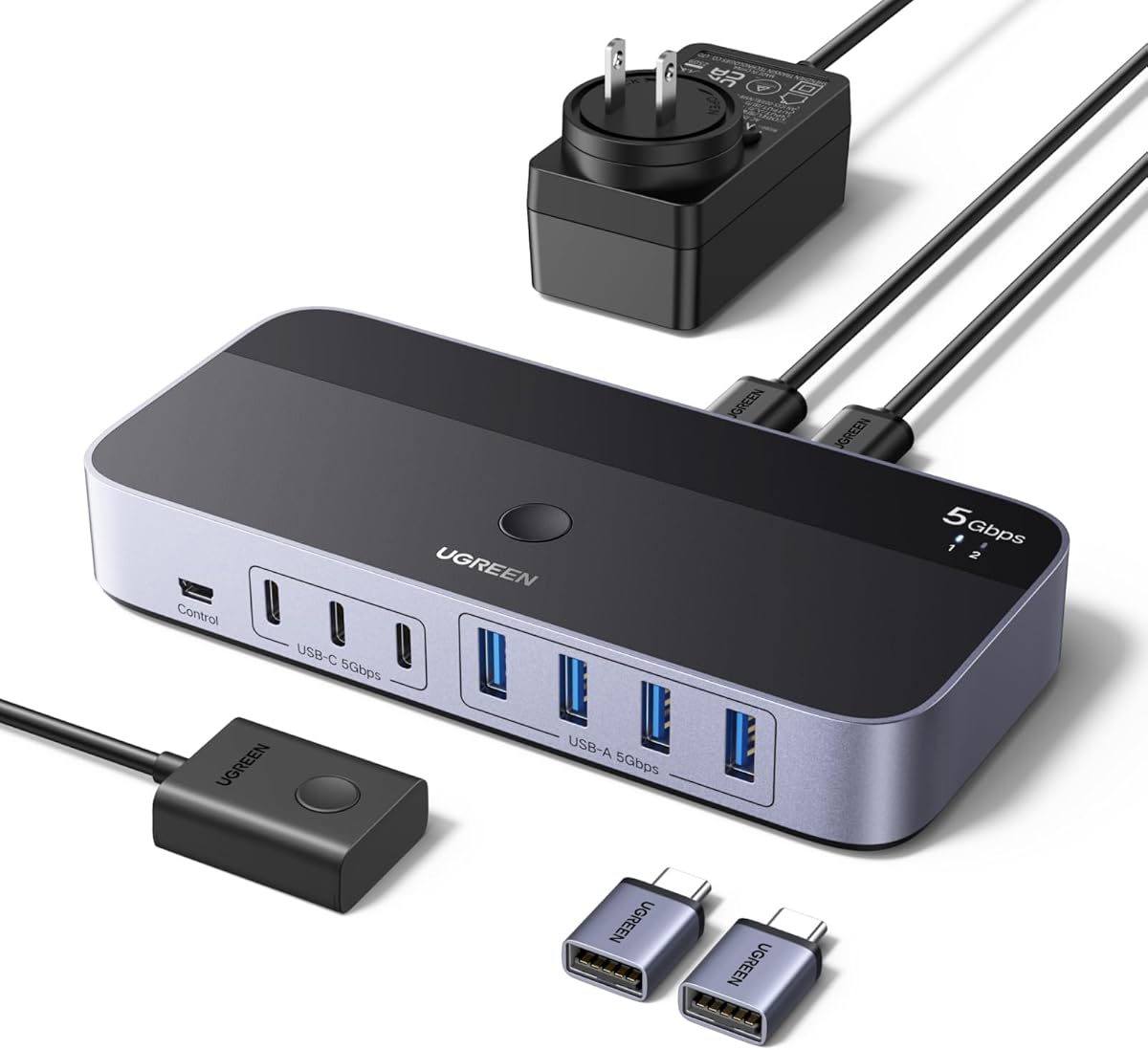

This UGREEN USB switch is designed for users who need to share devices between two computers seamlessly. It supports USB-C and USB-A devices making it versatile for modern and legacy hardware setups.
We may earn a commission when you buy through this link, at no additional cost to you.
The switch offers four ports allowing connection of keyboards mice printers and other USB peripherals. It supports data transfer speeds up to five gigabits per second ensuring fast file access across machines.
While it does not support video switching the USB sharing capabilities are robust. The included controller allows easy toggling between computers and the optional power supply ensures stable performance with power hungry devices.
If you need a reliable USB hub for dual PC setups this switch provides excellent flexibility. It is ideal for office users who want to keep devices connected without constant unplugging and replugging.
The mix of USB-C and USB-A ports means you can connect both new and old peripherals without needing extra adapters.
An optional power supply port ensures that high draw devices like external hard drives work reliably without disconnection.
We may earn a commission when you buy through this link, at no additional cost to you.
The BENFEI USB switch provides an affordable way to share four USB devices between two computers. It is perfect for users who need basic keyboard and mouse sharing without spending much.
We may earn a commission when you buy through this link, at no additional cost to you.
With USB 3.0 ports it offers fast data transfer rates ideal for moving files between work and personal machines. The LED indicator shows which computer is active for clear status monitoring.
Setup is plug and play with no drivers required. It works with Windows Mac and Linux systems making it accessible for most users. The compact design fits easily on any desk.
For those on a budget this switch delivers reliable performance. It handles common peripherals well and the included cable ensures you can start using it right out of the box.
Switching between computers is as easy as clicking a button with clear visual feedback via the LED indicator.
It works across multiple operating systems including Windows Mac and Linux for versatile office or home use.
We may earn a commission when you buy through this link, at no additional cost to you.
This switch is designed for users who only need to share two devices such as a keyboard and mouse between two computers. It offers a streamlined solution without unnecessary ports.
We may earn a commission when you buy through this link, at no additional cost to you.
The aluminum alloy shell provides durability and better heat dissipation than plastic models. It supports USB 3.0 speeds ensuring fast data transfer when needed for file sharing or printing.
One button switching makes it easy to toggle between systems. The LED indicator shows which computer is active. Since it comes with two cables you can start using it immediately.
This is an ideal choice for minimalists who want a compact and reliable switch. It avoids clutter and focuses on essential functions for a clean desk setup.
With only two ports it saves space on your desk while still providing reliable switching for essential peripherals.
The aluminum casing ensures the switch stays cool and lasts longer even with regular daily use.
We may earn a commission when you buy through this link, at no additional cost to you.
This UGREEN switch is great for sharing two devices like a keyboard mouse or printer between two computers. It simplifies workflows by reducing the need to swap cables manually.
We may earn a commission when you buy through this link, at no additional cost to you.
With USB 3.0 technology it ensures fast data transfer for files and print jobs. The one button switch makes toggling easy and the LED indicator shows which PC is active.
It is plug and play so no drivers are needed. The compact size fits on any desk and the included cables save you from buying extras. It works well with Windows and Mac.
If you need a simple reliable way to share a printer and keyboard this switch is an excellent choice. It keeps your workspace organized and efficient without complexity.
The single button press switches control instantly making it easy to switch between work and home computers.
Designed to handle printers effectively so both computers can access the same device without extra software.
We may earn a commission when you buy through this link, at no additional cost to you.
This KVM switch is for users who want to share a monitor along with keyboard and mouse between two computers. It supports 4K resolution at 60Hz for crisp visual quality.
We may earn a commission when you buy through this link, at no additional cost to you.
It includes four USB 3.0 ports to connect all your peripherals like printers and webcams. The wired remote lets you switch computers easily without reaching behind the device.
The switch is plug and play and supports multiple systems including Windows and Mac. It also works with gaming consoles like PS4 making it versatile for different uses.
If you need full video and peripheral sharing this switch is a powerful solution. It eliminates cable clutter by letting two computers use one screen and set of accessories.
It supports 4K video ensuring you get sharp and detailed images on your monitor from either computer.
The included wired remote allows you to switch control quickly without moving or reaching for the switch unit.
We may earn a commission when you buy through this link, at no additional cost to you.
This switch uses USB 2.0 technology which is ideal for devices that do not need high speed data transfer. It is perfect for basic keyboard mouse and printer sharing needs.
We may earn a commission when you buy through this link, at no additional cost to you.
It has four ports and allows you to swap between two computers with one button. The LED light shows which computer is active and it comes with two USB cables for easy setup.
The separate micro USB port allows for optional power which helps with stable operation. It works with Windows Mac and Linux systems making it accessible for most users.
For users with older peripherals this switch is reliable and affordable. It avoids the complexity of newer standards while delivering consistent performance for everyday tasks.
USB 2.0 ports provide stable connections for legacy devices that do not require high speed data transfer.
A dedicated power port ensures that even power hungry peripherals can be shared without issues.
We may earn a commission when you buy through this link, at no additional cost to you.
This switch offers four USB 3.0 ports which allow sharing multiple devices between two computers. It supports fast data transfer up to five gigabits per second for quick file access.
We may earn a commission when you buy through this link, at no additional cost to you.
The design includes a power port to ensure stable performance for devices like hard drives. It comes with two USB cables and is plug and play so no drivers are needed.
It works with Windows Mac and Linux making it versatile for different environments. The one button switch makes toggling between computers easy and the LED indicator shows the active PC.
For a balanced choice this switch provides speed and reliability. It is ideal for users who need to share more than just a keyboard and mouse between their computers.
USB 3.0 speed means you can move large files between computers quickly without waiting for slow transfers.
An extra power port ensures that high drain devices like external drives stay connected without interruption.
We may earn a commission when you buy through this link, at no additional cost to you.
This switch allows two computers to share up to seven devices which is ideal for users with many peripherals. It includes both USB-A and USB-C ports for versatile connectivity.
We may earn a commission when you buy through this link, at no additional cost to you.
A power adapter is included ensuring that all devices stay powered without disconnection. It also comes with a controller and USB-C adapter for easy setup and management.
The USB 3.0 ports support fast data transfer making file sharing efficient. It is plug and play and works with all major operating systems for convenience.
If you have multiple devices this switch reduces the need for extra hubs. It keeps your desk organized by letting one switch handle all your connection needs.
Seven ports mean you can connect all your peripherals without needing additional hubs or adapters.
The power adapter and USB-C adapter are included so you do not need to buy anything extra.
We may earn a commission when you buy through this link, at no additional cost to you.
This switch is designed for users who need to share two devices between two computers. It offers a simple and affordable solution for keyboard and mouse sharing without complexity.
We may earn a commission when you buy through this link, at no additional cost to you.
It includes two USB cables so you can start using it right away. The one button switch and LED indicator make it clear which computer is active at any time.
The compact design fits easily on any desk and it is plug and play so no drivers are needed. It works with Windows and Mac systems making it widely accessible.
If you want a basic switch without extra features this is a great choice. It keeps your workspace tidy and makes switching between computers effortless.
No drivers or complex setup are needed so you can connect and start switching immediately.
Two USB cables are included in the box so you have everything you need to get started.
We may earn a commission when you buy through this link, at no additional cost to you.
This switch delivers up to ten gigabits per second speed which is the fastest in this category. It allows two computers to share up to seven devices including both USB-A and USB-C.
We may earn a commission when you buy through this link, at no additional cost to you.
A power adapter and USB-C converter are included ensuring stable performance and connectivity for all devices. It is designed for users who need maximum speed and port availability.
The USB 3.2 ports support rapid file transfers ideal for large media files. It is plug and play and works with modern operating systems for seamless integration.
If you need top speed and many ports this switch is a premium choice. It offers the best performance for data intensive users who share multiple devices.
With ten gigabit speed you can transfer large files in seconds which improves productivity significantly.
This model includes a power adapter and converters to ensure reliable operation for high demand devices.
We may earn a commission when you buy through this link, at no additional cost to you.
Selecting the right USB switch requires considering port count data speed build quality and additional features to match your specific workflow needs.
Choose a switch with enough ports to connect all the devices you need such as keyboards mice printers and external drives. More ports provide flexibility for future expansion.
Select a port count that matches your current devices to avoid unnecessary costs while allowing room for growth.
USB 3.0 switches offer speeds up to five gigabits per second which is ideal for fast file transfers. USB 2.0 is slower but may suffice for basic keyboard and mouse use.
Prioritize USB 3.0 or higher if you transfer large files regularly between computers.
Some switches need an external power source to run high power devices like external hard drives reliably. Without it devices may disconnect unexpectedly.
Check if the switch includes or supports optional power to ensure stable operation for all your peripherals.
Most switches offer a physical button or an external controller to toggle between computers. Controllers are helpful if you want to keep the unit hidden away.
Choose a switching method that fits your desk layout and accessibility preferences.
Ensure the switch supports both USB-A and USB-C devices if you have modern laptops and legacy peripherals. Adapters may be needed for some connections.
Check product details to confirm support for your specific device types.
Aluminum or metal housings offer better durability and heat dissipation than plastic ones. This can extend the lifespan of the switch under daily use.
Look for sturdy materials if you plan to use the switch frequently in professional environments.
Some switches include LEDs to show which computer is active or come with cables and controllers. These features add convenience and reduce setup time.
Consider extra features that can simplify your workflow when comparing models.
Most USB switches are plug and play and work with Windows Mac and Linux. Confirm compatibility if you use niche or older systems.
Choose a switch that supports all your operating systems without requiring drivers.
Connect each computer to the switch using the included USB cables ensuring you use the correct ports for data and power. Make sure the switch is powered if required by your devices.
Plug your peripherals such as keyboard mouse and printer into the switch ports and test that they are recognized by the active computer. Use the switch button to toggle between PCs.
Keep the switch in a well ventilated area to avoid overheating and regularly check cable connections for wear to ensure long term stable performance.
A standard USB switch shares only USB devices like keyboards and mice not monitors. If you want to share a monitor you need a KVM switch that includes video support.
Yes you can connect multiple devices such as a keyboard and mouse together on the same switch ports. This allows sharing them between two computers easily.
Most modern USB switches are plug and play and do not require any driver installation. They work with Windows Mac and Linux operating systems automatically.
Disconnects often happen if the switch lacks sufficient power for devices like external hard drives. Using an external power adapter can resolve this issue.
Many switches support USB-C devices but you may need a USB-C to USB-A adapter if the switch has only USB-A ports. Always check port types before buying.
The number of devices depends on the switch port count which ranges from two to seven ports. Make sure the switch has enough ports for all your peripherals.
USB 3.0 switches offer faster data transfer speeds compared to USB 2.0. This is important if you need to transfer large files between computers quickly.
These switches are designed for keyboards and mice but not for game controllers that need low latency. For gaming a direct connection is usually better.
The right USB switch can simplify your dual computer setup by allowing seamless sharing of peripherals. The UGREEN USB 3.0 switch offers great versatility while the BENFEI model provides excellent value.
Consider your port needs and device power requirements when choosing. Premium switches like the 3.2 model offer speed but budget options work well for basic tasks.
Prices and availability may change so verify details before purchasing. Check current listings for the best deals and ensure compatibility with your devices.