
eufy Security 5-Piece Kit
4.3Editor score
Easy self setup in minutes
No monthly fees required
Instant alert notifications
Securing your home starts with a reliable system that you can control easily. A keypad control home security system offers a physical interface for arming and disarming, providing a straightforward method for families to manage safety without relying solely on apps or voice commands.
We have evaluated ten leading models based on their interface design, connectivity options, and overall system compatibility. Each product was chosen for its ability to integrate seamlessly with broader security ecosystems while maintaining a user-friendly keypad experience for daily use.
Each pick highlights specific strengths like touchscreen responsiveness or compact design. While prices fluctuate over time, these models represent consistent value and performance. Always check current listings for the most up-to-date pricing and availability before making your final decision.
4.3Editor score
4.6Editor score

4.6Editor score
As an Amazon Associate we earn from qualifying purchases.
The following table provides a side-by-side comparison of all ten selected systems, highlighting their core specifications and key capabilities to help you identify the right fit for your security requirements.



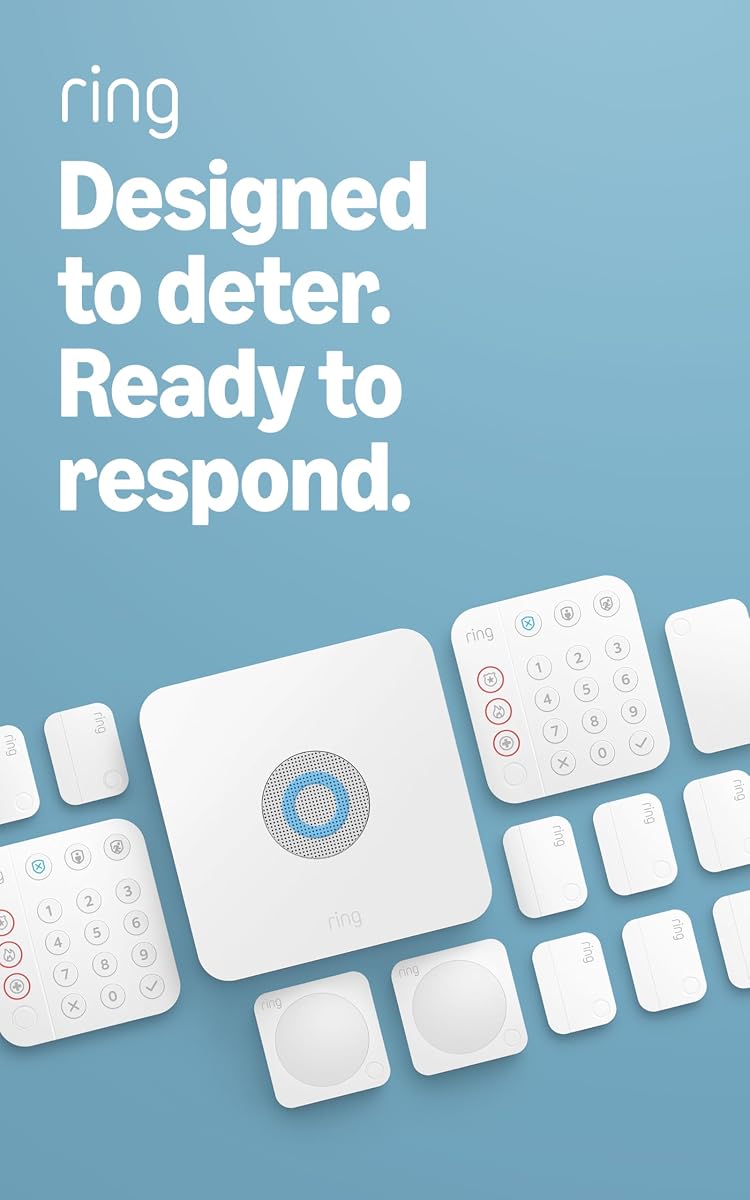
The Ring Alarm 14-Piece Kit stands out as a comprehensive solution for medium-sized homes seeking reliable security. With a high customer rating of 4.6 stars, it offers a balanced mix of hardware and smart features that cater to modern living needs.
We may earn a commission when you buy through this link, at no additional cost to you.
This kit includes two keypads which allows for easier access points throughout a larger home. The intuitive design lets users arm and disarm the system quickly. Additionally, the inclusion of motion detectors and contact sensors ensures broad coverage for doors and windows.
While the hardware is robust, users must subscribe to a separate Ring Protect Plan for full features like remote arming. This might be a consideration for those seeking a completely self-contained experience without ongoing costs.
Ideal for households wanting a blend of DIY setup and professional monitoring, this system delivers peace of mind. It is a strong choice for families who want an expandable security network without complex installation.
The inclusion of two keypads and eight contact sensors makes this kit suitable for homes with multiple entry points, ensuring no zone is left unmonitored.
Alexa compatibility allows for voice-controlled arming and disarming, adding a layer of convenience for users already invested in smart home ecosystems.
We may earn a commission when you buy through this link, at no additional cost to you.
The eufy Security 5-Piece Home Alarm Kit is an excellent entry point for those needing basic security without recurring subscription costs. It received a solid 4.3 star rating from users who appreciate its straightforward design and functionality.
We may earn a commission when you buy through this link, at no additional cost to you.
Installation is quick and can be done by the owner in minutes. The keypad and sensors attach easily to walls using included mounts. The HomeBase unit centralizes the system and sends instant alerts when motion or breaches are detected.
The trade-off for the low cost is a smaller initial sensor count. Users may need to purchase additional sensors later to cover more areas. However, the one-time purchase model saves money over the long term compared to subscription-based systems.
This kit is perfect for small homes or apartments where budget is a primary concern. It provides essential protection and immediate notifications, making it a reliable choice for cost-conscious security seekers.
Unlike many competitors, eufy products are designed as one-time purchases, eliminating the need for monthly service fees while still offering local storage and instant alerts.
The system is designed for DIY setup, allowing users to get their home secured quickly without needing professional assistance or tools.
We may earn a commission when you buy through this link, at no additional cost to you.
The Intrusion Honeywell 6290W Touch Center offers a premium experience with its large 7-inch color touchscreen. Rated 4.6 stars, it caters to users who want a sleek, high-tech look for their home security control panel.
We may earn a commission when you buy through this link, at no additional cost to you.
This keypad provides a vivid visual interface that makes navigating menus and settings simple. It supports wireless communication and voice commands, aligning with modern smart home trends. The build quality reflects professional-grade standards used in commercial settings.
It is important to note that this unit acts as a control interface and may require compatibility with an existing alarm panel. The price point is higher than basic keypads, reflecting its advanced display and feature set.
Ideal for homeowners upgrading a legacy system or designing a new smart home setup, this keypad brings a touch of elegance and utility. It is the top choice for those prioritizing display quality and modern interaction.
The color touchscreen provides clear, graphical feedback on system status, making it easy to identify which sensors are active or need attention.
Its wireless design allows for easy placement in optimal locations without the need for complex wiring during installation.
We may earn a commission when you buy through this link, at no additional cost to you.
The Honeywell Ademco 6150 Fixed Display Keypad is a straightforward solution for users who prefer a classic, reliable interface. With a 4.4 star rating, it serves as a dependable control point for Honeywell security systems without unnecessary bells and whistles.
We may earn a commission when you buy through this link, at no additional cost to you.
The fixed English display ensures that users can read status messages clearly. It is built for durability and typically connects via hardwiring, ensuring a stable connection to the main panel. This simplicity often translates to fewer points of failure.
Because it lacks a touchscreen, navigation is done via physical buttons. While efficient, it may feel dated to users accustomed to modern interfaces. The lower cost makes it an economical choice for replacements or secondary zones.
This keypad is suitable for those upgrading a control panel or maintaining an existing Honeywell setup. It prioritizes function over form and offers a no-frills approach to home security control.
The fixed display avoids complex graphics, focusing instead on clear text status updates that are easy to read at a glance.
For older systems, this unit offers an affordable way to replace aging keypads while maintaining compatibility with legacy panels.
We may earn a commission when you buy through this link, at no additional cost to you.
The Ring Alarm 8-Piece Kit is tailored for 1-2 bedroom homes and holds an impressive 4.7 star rating. It delivers essential security features in a compact package that does not overwhelm smaller living spaces.
We may earn a commission when you buy through this link, at no additional cost to you.
This kit includes a keypad and contact sensors that detect door and window openings. The included range extender ensures signals reach all areas, reducing dead zones. It works seamlessly with the Ring app for monitoring and alerts.
The main limitation is that it is designed for smaller footprints. Larger homes would need to buy multiple kits. However, the expandability of the Ring ecosystem means you can add more sensors as needs grow over time.
It is a top pick for apartments or small houses where simplicity is key. Users get a reliable system with the option for professional monitoring if they decide to subscribe to the Ring Protect Plan.
The component count is carefully selected to cover the essential entry points of a one or two-bedroom layout without excess hardware.
Inclusion of a range extender helps maintain strong wireless signals across the entire property, ensuring sensors remain connected.
We may earn a commission when you buy through this link, at no additional cost to you.
The eufy Keypad E10 distinguishes itself with advanced safety features like a one-touch SOS alert and a covert duress alarm. It maintains a 4.4 star rating by offering specialized tools that can be crucial during emergency situations.
We may earn a commission when you buy through this link, at no additional cost to you.
Users can set a duress code that silently triggers an emergency dispatch, allowing for help without escalating a situation. The SOS button on top provides immediate access to alerts. It connects wirelessly to HomeBase with a range up to 656 ft.
It is a standalone accessory that requires a compatible HomeBase to function. While it lacks the comprehensive sensor coverage of full kits, its focus on personal safety makes it a valuable addition to an existing eufy ecosystem.
This keypad is ideal for users who prioritize emergency access features. It complements a security system by adding a layer of personal protection that is simple to use in high-stress moments.
The inclusion of a physical SOS button and duress code allows users to signal for help discreetly or urgently without navigating complex menus.
With four distinct modes for arming and disarming, the keypad adapts to different scenarios such as staying home or leaving for work.
We may earn a commission when you buy through this link, at no additional cost to you.
The Ring Alarm Keypad 2nd Gen is a highly rated accessory at 4.7 stars designed to integrate with existing Ring Alarm systems. It offers a convenient way to arm and disarm without opening the app every time.
We may earn a commission when you buy through this link, at no additional cost to you.
Its new design includes an emergency response button, adding utility for quick access. The keypad is compact and fits well in entryways. It communicates with the Ring app to provide status updates and notifications.
To maximize its capabilities like remote control or monitoring, a Ring Home subscription is recommended. Without it, functionality is limited to local arming and disarming. However, for a low price, it serves as a solid control point.
This keypad is perfect for those adding a second entry point to their Ring setup. It enhances usability for family members who prefer a physical interface for daily security checks.
The ergonomic layout and clear buttons make it accessible for users of all ages, ensuring everyone can manage the system easily.
It works seamlessly with the Ring ecosystem, syncing status instantly to the mobile app for a cohesive security experience.
We may earn a commission when you buy through this link, at no additional cost to you.
The Honeywell Security 6160 Ademco Alpha Display Keypad is designed for users who need a functional interface for Honeywell Vista panels. With a 4.6 star rating, it is respected for its reliability and ability to handle programming tasks.
We may earn a commission when you buy through this link, at no additional cost to you.
The alpha display allows users to read system status and configuration options in text. It is a standard keypad that fits into existing setups without modification. Its simplicity ensures that it works consistently without software glitches.
It is not compatible with all modern smart home systems and relies on traditional panel connections. However, for those maintaining a Honeywell system, it provides the necessary tools to control and program the alarm effectively.
This keypad is best suited for professionals or DIYers managing a Vista alarm system. It delivers essential control functions and remains a staple in many residential security installations.
Designed specifically for Honeywell Vista panels, it ensures seamless integration with a wide range of security configurations.
The display supports programming tasks, allowing users to adjust settings and sensor configurations directly from the keypad.
We may earn a commission when you buy through this link, at no additional cost to you.
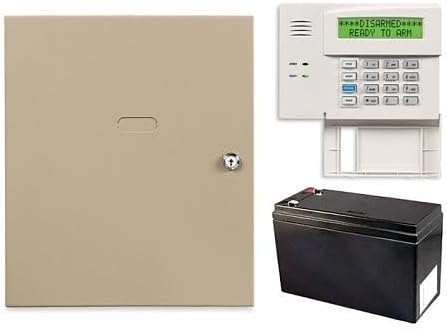
The Honeywell Home VISTA-20P 3-Piece Control Panel Kit is a top-rated solution with a perfect 5.0 star rating. It provides a complete control system including a panel and keypad, making it a powerful choice for comprehensive home security.
We may earn a commission when you buy through this link, at no additional cost to you.
This kit supports smart home devices like thermostats and lights via Z-wave technology. It includes a battery for backup power ensuring continuity during outages. The panel allows for push button control and cellular reporting capabilities.
It is a more complex system that may require professional installation due to wiring requirements. The learning curve for programming is steeper than DIY kits but offers professional-grade reliability and customization options.
Ideal for those planning a full security overhaul, this kit offers robust performance. It is a great option for users who want a wired system with modern smart home integration capabilities.
The inclusion of the panel, keypad, and battery simplifies the setup process by providing all necessary core components in one package.
Z-wave compatibility allows the panel to interact with various smart devices, creating a unified smart home security network.
We may earn a commission when you buy through this link, at no additional cost to you.
The TUXEDO 7 Touchscreen Security and Smart Controller offers a modern interface for security systems. Rated 4.3 stars, it provides a large 7-inch display that makes managing home security visually appealing and easy.
We may earn a commission when you buy through this link, at no additional cost to you.
This unit is hard wired and relies on the system's battery backup for power. It features no internal battery of its own which reduces failure points related to battery life. The touchscreen allows for intuitive navigation and control.
Because it draws power from the main system, it may stop functioning if the backup battery is depleted during a long outage. However, for most daily uses, it offers a robust and responsive control experience.
This controller is suitable for those who prefer a wired connection for stability. It works well with Honeywell systems and provides a premium feel to the security interface with its high-quality display.
Hardwired connectivity ensures a constant power supply reducing the risk of battery drain issues that can affect wireless units.
The high-resolution touchscreen displays clear graphics and icons, improving the user experience when adjusting settings or checking status.
We may earn a commission when you buy through this link, at no additional cost to you.
Choosing the right keypad control home security system requires evaluating several factors to ensure the system meets your specific needs and technical constraints.
Decide between wireless and hardwired systems based on your home's construction and wiring capabilities. Wireless systems are easier to install and ideal for rentals while hardwired systems offer stable connections for permanent setups.
Prioritize systems that support your preferred communication protocol like Wi-Fi or cellular for reliable alerts even if power goes out.
Look at the keypad interface to ensure it matches your comfort level. Touchscreens offer modern ease but fixed displays provide reliable text-based status that is often easier to read.
Choose a keypad with clear labeling and intuitive buttons so that family members can arm and disarm the system without confusion.
Check if the system integrates with your existing smart home ecosystem such as Alexa or Google Assistant. Compatibility allows you to control the keypad using voice commands which adds convenience.
Ensure the keypad supports the specific devices you want to automate like lights or locks to create a cohesive security environment.
Evaluate whether you require professional monitoring services or prefer self-monitoring via mobile apps. Some systems like Ring offer 24/7 professional monitoring with a subscription whereas others work without ongoing fees.
Consider the total cost of ownership including any monthly fees when comparing models to ensure they fit your budget.
If you prefer a DIY approach, choose systems designed for easy setup with included mounts and wireless components. This reduces the need for professional installation and saves money.
Ensure the keypad is easy to mount and wire if you are not comfortable with electrical work to avoid installation delays.
Select a keypad and system that can handle the number of sensors you need for your home size. Check the maximum number of devices the base station supports.
Choose a system that allows you to add extra sensors over time as your security needs change without replacing the entire setup.
Look for features like duress codes or one-touch SOS alerts that enhance personal safety during emergencies. These features can be vital for family safety.
Ensure the system encrypts data and uses secure authentication to protect your privacy and prevent unauthorized access to the keypad.
Consider the build quality and warranty coverage of the keypad and associated hardware. Durable materials ensure the device lasts longer in daily use.
Check the manufacturer's warranty policy to understand coverage for defects and support options should you encounter issues.
To set up your keypad control home security system, start by placing the base station in a central location and follow the manufacturer's instructions to mount the keypad at an accessible height near entry points.
Program the keypad by entering the master code provided with the system and set specific user codes for family members. Test the system regularly by arming and disarming it to ensure sensors are communicating correctly.
Maintain the keypad by keeping it clean of dust and avoiding direct sunlight which can affect the display. Check battery levels periodically if your keypad uses batteries and replace them to prevent system failures.
A touchscreen keypad uses a graphical interface for navigation offering a modern look and ease of use. A fixed display keypad uses text and buttons which is simpler and often more reliable for older systems.
Not all systems require professional installation. Wireless systems like Ring or eufy are designed for DIY setup. Wired systems like Honeywell VISTA may need professional help to run wires safely and correctly.
Most systems require a master reset code or access to the base station settings to reset user codes. Consult the user manual for the specific reset sequence for your model to avoid locking yourself out.
Yes many systems like Ring Alarm allow multiple keypads to be added for convenience. This helps larger homes where different zones need independent control access.
Hardwired keypads rely on the system's battery backup during power outages. Wireless keypads usually have internal batteries that allow them to function until power is restored.
Many modern systems allow remote control via mobile apps. However having a physical keypad is useful for quick arming and disarming when entering or leaving your home.
Yes many keypad systems support smart home integration with Z-wave or other protocols. This allows the keypad to communicate with smart locks for automatic locking when the system is armed.
Battery life varies but typically lasts between 12 to 24 months depending on usage. Regular checks and using high-quality batteries ensure the keypad remains operational when needed.
In summary the Ring Alarm 14-Piece Kit stands out as the top choice for families wanting a complete package with two keypads and expandability. For budget-conscious buyers the eufy Security 5-Piece Kit offers essential security without monthly fees.
For those seeking a premium interface the Intrusion Honeywell 6290W provides a large color touchscreen. Consider your home size and tech needs when choosing between wired and wireless options.
Always review current pricing and availability before purchasing since market rates can change. Selecting the right keypad system will provide reliable protection and peace of mind for your household.